CLK-150 - Stopwatch Steren - Free user manual and instructions
Find the device manual for free CLK-150 Steren in PDF.


| Product Type | Stopwatch |
| Brand | Steren |
| Model | CLK-150 |
| Power Supply | 1.5 V DC (1 x LR44 alkaline battery) |
| Display | Digital LCD |
| Buttons | MODE, START/STOP, SPLIT/RESET/SELECT |
| Time Format | 12-hour (AM/PM) or 24-hour |
| Alarm | Yes, with snooze (5 minutes) |
| Hourly Time Tone | Yes, can be activated or deactivated |
| Chronometer | Yes, elapsed time, split time, and two competitors |
| Split Time | Yes |
| Two Competitors Mode | Yes |
| Date Display | Yes, with day of week |
| Cleaning | Soft, slightly damp cloth; do not use detergents |
| Water Resistance | Not water-resistant; do not immerse |
| Safety Warnings | Keep away from children; not a toy; avoid dropping; do not open; avoid extreme temperatures |
| Battery Replacement | Contact authorized dealer |
Frequently Asked Questions - CLK-150 Steren
User questions about CLK-150 Steren
0 question about this device. Answer the ones you know or ask your own.
Ask a new question about this device
Download the instructions for your Stopwatch in PDF format for free! Find your manual CLK-150 - Steren and take your electronic device back in hand. On this page are published all the documents necessary for the use of your device. CLK-150 by Steren.
USER MANUAL CLK-150 Steren
natural_image
Black and white stopwatch with digital display showing 1:05:26, connected to a cable (no text or symbols on device body)IMPORTANTE
natural_image
Black and white stopwatch with digital display showing 1:05:26 (no text or symbols on device body)IMPORTANT
Read these manual to avoid any damage.
The instructions of these manual are for reference about the product.
There may be differences due to update.
Please check our web site www.steren.com to obtain the latest version of the instruction manual.
CAUTIONS

- Do not try to open the device, it may cause malfunction and void the warranty.
- Avoid dropping the product as it may be damaged.
- Do not expose the chronometer to extreme temperatures.
- Clean it with a soft and slightly damp cloth. Do not use detergents or soap.
- This device cannot be used by people with different habilities, at less they have preparation and supervision.
• This product is NOT a toy; keep it away from children. - Do not immerse the chronometer in water.
DESCRIPTION
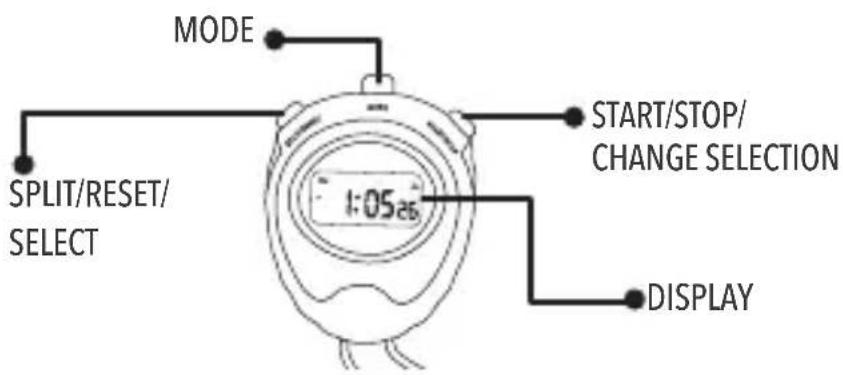
VIEWING FROM INITIAL MODE
In the initial mode will view on the display, the time, day of the week and, if the alarm is activated, will appears the 🧑 icon
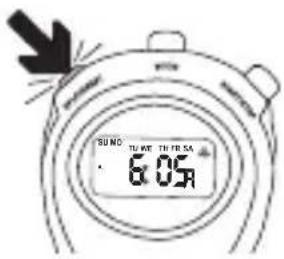
ALARM TIME
From the initial mode, press and hold the SPLIT/RESET button to view the alarm time.
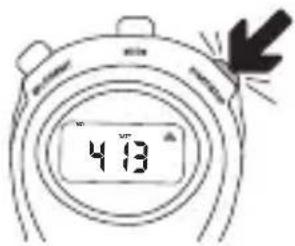
DATE
From the initial mode, press and hold the START / STOP button to view the date.
CONFIGURATION
DATE AND TIME
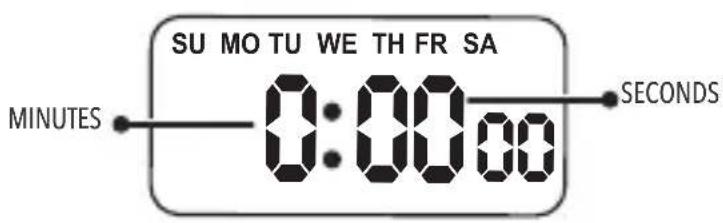
To configure the date and time, press the MODE button 3 times from the initial mode. The seconds will flash and the TU icon
The flashing digit is the one that is ready to be modified. Use the START/STOP button to change it, pressing the necessary times or if you want to adjust digits quickly, press and hold the START/STOP button. When the seconds are adjusted, press the SPLIT/RESET button and scroll through the programmable digits to adjust the minutes and hours.
You can choose how to display hours:
12 hours: will appear the A (AM) and P (PM) icon
24 Hours: will appear the H (HOURS) icon
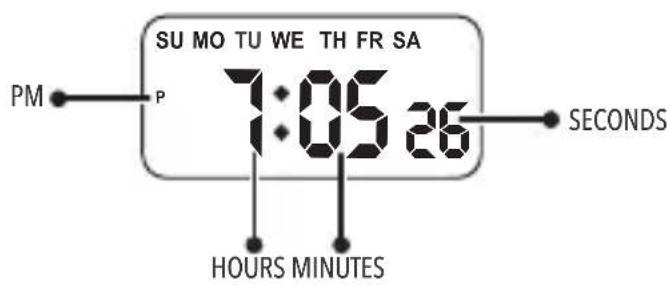
Once the time was adjusted, press again the SPLIT/RESET button to configure the date. The day of the month will appears flashing. Adjust with the START/STOP button and then scroll through the digital spaces with the SPLIT/RESET button for continue adjusting date.
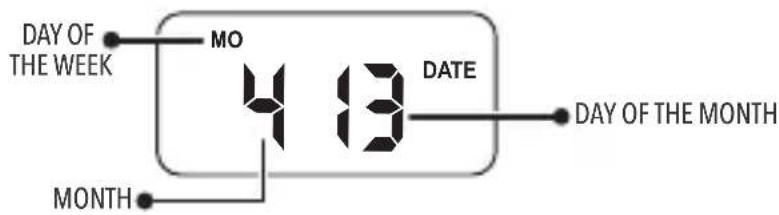
At finished, press the MODE button to return to the initial mode.
TIME TONE
You can activate or deactivate a tone that will sound every hour elapsed as mentioned below:
From the initial mode, press and hold the SPLIT/RESET button and without release, press the MODE button. The days of the week should appear, this will indicate that the tone is activated.
If you want to deactivate the tone, press again SPLIT / RESET and without release, press the MODE button. The days of the week will be disappear, which indicates that the tone will be deactivated.
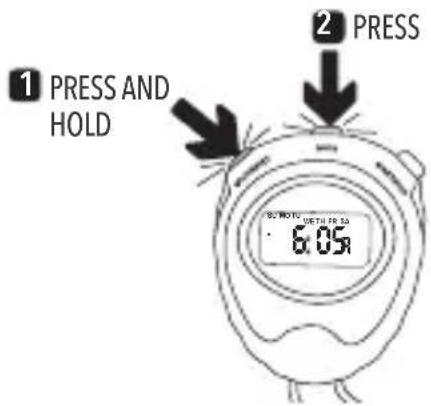
ALARM
To configure alarm, press the MODE button twice from the initial mode. The hours and the MO icon will appear flashing
The flashing digit is the one that is ready to be modified. Use the START/STOP button to change it, pressing the necessary times or if you want to adjust digits quickly, press and hold the START/STOP button. When the hours are adjusted, press SPLIT/RESET to scroll to the minutes and fix them.
In the moment that you start adjusting digits, the alarm icon appears, which indicates that it is activated
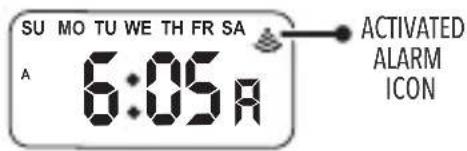
At the end, press the MODE button to return to the initial mode.
If you want to deactivate or activate alarm from the initial mode, perform the following:
Press and hold the SPLIT / RESET button and without release, press the START/STOP button. The alarm icon will disappear when it is deactivated and will appear when is activated
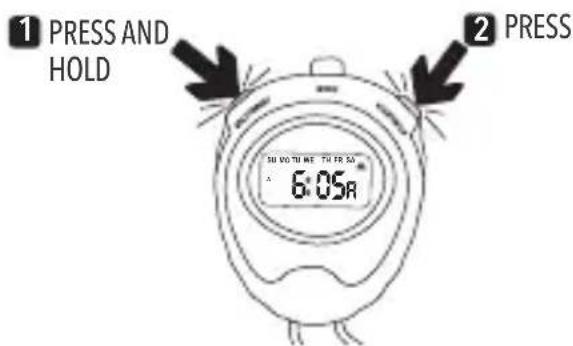
SNOOZE AND ALARM SILENCE
When the alarm sounds, press START / STOP. Will start a snooze time period of 5 minutes
To silence the alarm without snooze, press SPLIT / RESET after the alarm sounds.
CHRONOMETER
To activate the chronometer, press once the MODE button from the initial mode. The display will be appear in zeros and the SU, FR and SA icons will flashing
ELAPSED TIME CHRONOMETER
1 Press Start/Stop to start (the SU and SA icons will flashing).
2 Press Start/Stop to stop (the SU, FR and SA icons will flashing).
3 Press Start/Stop to restart or press Split/Reset to reset the display in zeros.
4 Press MODE to return to the initial mode.
SPLIT TIME
1 Press Start/Stop to restart (the SU and SA icons will flashing).
2 Press Split/Reset to measure split (the SU, TH and SA icons will flashing).
3 Press Split/Reset to exit split (the SU and SA icons will flashing).
4 Press Start/Stop to stop (the SU, FR and SA icons will flashing).
5 Press Split/Reset to reset the display in zeros.
6 Press MODE to return to the initial mode.
■ CHRONOMETER FOR TWO COMPETITORS
Press Start/Stop to start (the SU and SA icons will flashing).
2 Press Split/Reset to Split (the SU, TH and SA icons will flashing).
3 Press Start/Stop to Stop (los iconos SU, TH, FR and SA icons will flashing).
4 Press Split/Reset to deactivate Split (the SU, FR and SA icons will flashing).
5 Press Split/Reset to reset the display in zeros.
6 Press MODE to return to the initial mode.
REPLACING BATTERY
The chronometer uses an alkaline battery (LR44) located on the back of the chronometer. Contact an authorized dealer for replace it.
SPECIFICATIONS
Input: 1.5 V---(1 x LR44)

natural_image
Simple black curved shape on white background with no text or symbols
natural_image
Four black-and-white social media icons: YouTube, Facebook, Twitter, and Google+ (no text or symbols beyond logos)www.steren.com
Brand : Steren
Model : CLK-150
Category : Stopwatch