
Soundbar 550 - Soundbar MAC AUDIO - Free user manual and instructions
Find the device manual for free Soundbar 550 MAC AUDIO in PDF.


| Product Type | Soundbar |
| Brand | MAC AUDIO |
| Model | Soundbar 550 |
| Dimensions (W x H x D) | 550 x 60 x 80 mm |
| Weight | 1.2 kg |
| Power Supply | DC 18.0V 2.2A (AC/DC adapter included) |
| Output Power (RMS) | 2 x 20 W |
| Output Power (Max) | 2 x 40 W |
| Frequency Response | 50 - 18,000 Hz |
| Bluetooth Frequency | 2402 - 2480 MHz |
| Bluetooth Range | Approximately 10 m (30 ft) |
| Audio Inputs | USB (max 8 GB FAT32), Line In (3.5 mm), Optical In |
| Remote Control | Yes (with AAA battery) |
| Wall Mountable | Yes (screw distance 40 cm) |
| Auto Standby | After 15 minutes of inactivity |
| Equalizer Presets | Yes (via EQ button on remote) |
| Mute Function | Yes |
| Warranty | 2 years |
| Box Contents | Soundbar, Remote control (battery included), AC/DC adapter, Owner's manual |
| Ventilation Clearance | At least 20 cm from walls |
| Operating Temperature | 10°C to 35°C |
| Disposal | Separate collection per EU Directive 2012/19/EU |
Frequently Asked Questions - Soundbar 550 MAC AUDIO
User questions about Soundbar 550 MAC AUDIO
0 question about this device. Answer the ones you know or ask your own.
Ask a new question about this device
Download the instructions for your Soundbar in PDF format for free! Find your manual Soundbar 550 - MAC AUDIO and take your electronic device back in hand. On this page are published all the documents necessary for the use of your device. Soundbar 550 by MAC AUDIO.
USER MANUAL Soundbar 550 MAC AUDIO
The Bluetooth® word mark and logos are registered trademarks owned by Bluetooth SIG, Inc. and any use of such marks by MAC AUDIO is under license. Other trademarks and trade names are those of their respective owners.
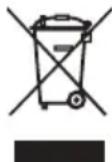
At the end of the product's useful life, please dispose of it at appropriate collection points provided in your country.
DYS40-180220W-2 (Hersteller: Dongguan Dongsong
Electronic Co., Ltd.)
Thank you for choosing the Mac Audio Soundbar 550.
Please read the following information carefully before starting to use the Soundbar 550.
IMPORTANT SAFETY PRECAUTIONS
Please read through the instruction manual carefully before starting to use the device. This manual contains important information concerning operation and safety aspects. It is imperative you observe all of the information. Keep the manual in a safe location.
WARNING NOTICES: All of the warning symbols on the device, accessories and in the instruction manual itself must be adhered to.
EXPOSURE TO HEAT: Only operate the device and accessories in a temperature range from 10^ C to 35^ C.
The device should not be positioned near heat sources (heaters, ovens, radiant heaters, naked flames, etc.). When setting up close to an amplifier a minimum distance of 10 cm must be maintained.
No naked flame sources, such as lighted candles, should be placed on the device.
Pay attention to a sufficient ventilation of the device. The device may not be covered, e.g. by drapes, curtains. Maintain a distance of 20 cm to walls.
EFFECT OF MOISTURE: The device should not be exposed to dripping or splash water. Neither should it be used to support vases or other containers filled with liquid. Do not expose the device to water or high levels of humidity. There is a danger of electric shock. In the event of contact with moisture or liquids the device should be disconnected from the mains immediately.
FOREIGN MATERIAL: Ensure that no foreign material enters through the device openings and into the interior. This could trigger short circuits and even result in electric shock and fire.
CLEANING: Please use a soft, dry cloth with no cleaning agents, sprays or chemical solvents, as these could damage the surfaces.
ELECTRICAL CONNECTION: Please note the voltage levels on the information signs. The device should only be operated with the voltage and frequency values specified on the signs.
LIGHTNING PROTECTION/PREVENTIVE
MEASURES: If the device is not going to be used for a prolonged period (e.g. when on holiday), it should be disconnected from the mains by removing the plug. The device should also be disconnected from the mains in the event of a thunderstorm. Doing this will prevent damage caused by lightning and overvoltage.
MAINS CABLE: The mains cable must always be suitable for operation and it should only ever be laid out in a manner that prevents it from being trodden on. It should not be pinched by objects either, as this can damage the cable. When using plugs and power strips it must be ensured that the cable is not kinked at the point where it emerges from the socket. Do not connect or remove the mains cable with damp hands.
The mains plug is used as the disconnecting device. Disconnecting devices shall remain readily operable.
OVERLOAD: Sockets, power strips and extension cables should not be overloaded. If an overload occurs, there is a risk of electric shock and fire.
SETTING UP: Please read the installation instructions.
The device should only be positioned or mounted on a solid surface and not on moving base frames, otherwise there is a risk of injury. Only use attachments/accessories specified by the manufacturer.
Only use the power supply adapter specified in this manual.
BATTERIES (battery pack or batteries installed) shall not be exposed to excessive heat, such as sunshine, fire and the like.
- CAUTION: Danger of explosion if battery is incorrectly replaced. Replace only with the same or equivalent type.
• RISK OF SWALLOWING BATTERIES!
- The product/remote control may contain a battery, which can be swallowed. Keep
the battery out of reach of children at all times! If swallowed, the battery can cause serious injury or death. Severe internal burns can occur within two hours of ingestion.
- If you suspect that a battery has been swallowed or placed inside any part of the body, seek immediate medical attention.
- When you change the batteries, always keep all new and used batteries out of reach of children. Ensure that the battery compartment is completely secure after you replace the battery.
- If the battery compartment cannot be completely secured, discontinue use of the product. Keep out of reach of children and contact the manufacturer.
DAMAGE THAT MUST BE RECTIFIED BY A SPECIALIST:
If any of the following damage occurs, disconnect the device from the mains immediately and contact a specialist to conduct the repair work:
- The device should not continue to be operated if there is visible damage to the mains cable. A damaged cable should not be repaired, but must be replaced.
- Damage to the mains socket at the device.
- If moisture or water has entered the device or foreign objects have fallen into the device.
- If the device has fallen and the housing is damaged.
- If the device does not work properly, even though all of the information in the instruction manual has been observed.
Only those subsequent alterations approved by the manufacturer may be conducted. Only original spare parts should be used for repair.
After conducting any repairs the safety of device should be checked to ensure it is functioning correctly and safely.
Repairs must always be conducted by qualified specialists, as you might otherwise be exposed to dangerous high voltage levels or other hazards.

This symbol warns the user that high voltage is used within the device which can result in electric shock.

This symbol makes the user aware that there are important notes in the enclosed instruction manual which must be observed.

WARNING:DO NOT OPEN! RISK OF ELECTRIC SHOCK!
CAUTION: In order to avoid electric shock do not open the speaker housing/mains adapters or remove the covers. The user is not to conduct any repairs him/herself. Repairs should only be conducted by qualified technicians! Do not use any sockets or extension cables that do not fully accommodate the plug of the device.
INSTRUCTIONS FOR DISPOSAL
In accordance with European Directive 2012/19/EU all electrical and electronic appliances must be disposed of separately via local collection points. Please observe the local regulations and do not dispose of your old appliances with normal household waste.
Battery disposal
Old batteries are hazardous waste and must be disposed of in accordance with current regulations.
DECLARATION OF CONFORMITY

Hereby, Magnat Audio-Produkte GmbH declares that the device Soundbar 550 is in compliance with the essential requirements and other relevant provisions of directive 2014/53/EU. The Declaration of Conformity can be found at www.mac-audio.de in the download area of the device.
USE AS DIRECTED
This device is designed for indoor use only.
YOUR SOUNDBAR

1 ON/STBY:
Switches the device on when it is in the standby mode. Conversely the device can be switched from power operation to the standby mode.
2 SOURCE:
Used for selecting the input source. The selected source is shown by the multi-color indicator LED (8):
USB: red/blue
BT: blue
Optical input: green/red
Line In: green
3 +/- (VOLUME):
Adjusts the volume (VOL MIN 00 - VOL MAX 45).
When the minimum or maximum volume is reached, the indicator LED is red.
REAR

4 USB INPUT:
For connecting USB storage media (MP3-music, max. 8GB/FAT32).
5 LINE IN
Connect to a TV or a MP3 player.
6 OPTICAL IN
Connect to an optical audio output on the TV or a digital device.
7 DC IN
Connect to the supplied power adapter.

8 LED:
Displays the settings you have made.
When the Soundbar is on standby, the standby indicator is red.
9 SENSOR FOR THE REMOTE CONTROL
REMOTE CONTROL

10 ¢(Standby-On)
Switches the Soundbar on or off.
11 Source buttons
LINE: Switches your audio source to the Line in (3.5mm jack) connection.
USB: Switches your audio source to the USB connection.
OPTICAL IN: Switches your audio source to the optical connection.
BT: Switches your audio source to the Bluetooth connection.
12 Play/Pause
USB/BT operation:
Starts or pauses the playback.
13 ◀◀, ▶▶
USB/BT operation:
Skips to the previous/next track.
14 EQ
Use EQ to choose between the equaliser presets.
15 VOL +/-
Increases or decreases volume.
16 MUTE
Mutes or restores volume.
Replace battery
- Open the battery compartment.
- Insert one AAA battery, with the polarity (+/-) as indicated.
- Close the battery compartment.
Warning
- Danger of explosion if battery is incorrectly replaced. Replace only with the same or equivalent type.
• The remote control contains a battery, which can be swallowed. Keep the battery out of reach of children at all times!
CONNECT AND SET UP
This section helps you connect your Soundbar to a TV and other devices, and then set it up.
Note
- For identification and supply ratings, see the type plate at the back or bottom of the product.
- Before you make or change any connections, make sure that all devices are disconnected from the power outlet.
Wall mount the Soundbar (optional)
Screw length/diameter
Depending on the type of wall for mounting your Soundbar, make sure that you use screws of a suitable length and diameter.
- Drill two holes on the wall (distance 40 cm).
- Secure the dowels and screws in the holes.
- Hang the Soundbar on the fastening screws.
Warning
- Improper wall mounting may result in accident, injury or damage. If you have any query, contact Consumer Care in your country.
- Before wall mounting, make sure the wall can support the weight of your Soundbar.
- Mac Audio is not liable for improper wall mounting that results in accident, injury or damage.
• Install the Soundbar on a sturdy vertical wall. - Do not install the Soundbar onto a ceiling or slanted wall. It may fall down and result in severe injury.
- Do not mount the Soundbar on a wall while the Soundbar is plugged in or turned on, it may result in an electrical shock injury.
CONNECTIONS
Connect to TV
Connect your Soundbar to a TV through a line in cable. You can listen to audio from TV programs through your Soundbar.
Note
During play, do not plug out the line in cable. On your TV, it is recommended to set the volume in the range of 60% maximum volume to avoid distortion of the audio output.
If your TV supports OPTICAL OUT feature, connect your Soundbar to the TV through a digital optical cable (not supplied).
Connect audio from other devices
Play audio from other devices through your Soundbar speakers.
Note
During play, do not plug out the audio cable.
USE YOUR SOUNDBAR
This section helps you use the Soundbar to play audio from connected devices.
Before you start
- Make the necessary connections described in the user manual.
- Switch the Soundbar to the correct source for other devices.
Adjust the volume
- Press +/- (Volume) to increase or decrease the volume level.
- To mute the sound, press MUTE on the remote control.
- When mute is on, the LED blinks red.
- To restore the sound, press MUTE again or press +/-.
Note
The volume might be influenced by MP3 or Bluetooth player.
Play audio through Bluetooth
Through Bluetooth, connect the Soundbar with your Bluetooth device (such as an iPad, iPhone, iPod touch, Android phone, or laptop), and then listen to the audio files on your device through your Soundbar speakers.
The operational range between the Soundbar and a Bluetooth device is approximately 10 meters (30 feet).
- On the Bluetooth device, switch on Bluetooth, search for and select Mac Audio Soundbar 550 (see the user manual of the Bluetooth device on how to enable Bluetooth).
- Select and play audio files or music on your Bluetooth device.
- During play, if a call is coming, music play is paused. Play resumes when the call ends.
- To exit Bluetooth, select other source.
- When you switch back to Bluetooth mode, the Bluetooth connection remains active.
- Press and hold the PLAY/PAUSE button to disconnect the current connection.
Note
The music streaming may be interrupted by obstacles between the device and the Soundbar, such as wall, metallic casing that covers the device, or other devices nearby that operate in the same frequency. If you want to connect your Soundbar with another Bluetooth device, press and hold the PLAY/PAUSE button to disconnect the current connection.
Auto Standby
When playing media from a connected device, the Soundbar automatically switches to standby after 15 minutes if no audio play is started from a connected device.
TROUBLESHOOTING
To keep the warranty valid, never try to repair the product yourself.
Malfunctions may occur with any electrical equipment. This must not always involve a defect of the device. Therefore, check the following table to see if you can correct the problem yourself.
| Malfunction Possible cause/Remedy | |
| The Soundbar does not work. Disconnect the Soundbar from the power supply for a few minutes, then reconnect. | |
| No sound from Soundbar speakers. Use the correct audio cable to connect your Soundbar to your TV or other devices.On your Soundbar remote control, press the Source buttons to select the correct audio input.Make sure that the Soundbar is not muted. Press VOL +/- to restore the sound (see 'Adjust the volume').Switch or set to other audio signal of your connected external device. | |
| A device cannot connect with the Soundbar via Bluetooth. | The device does not support the compatible profiles required for the Soundbar.You have not enabled the Bluetooth function of the device. See the user manual of the device on how to enable the function.The device is not connected correctly. Connect the device correctly.The Soundbar is already connected with another Bluetooth device. Disconnect the connected device, then try again. |
| Quality of audio play from a connected Bluetooth device is poor. | The Bluetooth reception is poor. Move the device closer to the Soundbar, or remove any obstacle between the device and the Soundbar. |
| The connected Bluetooth device connects and disconnects constantly. | The Bluetooth reception is poor. Move the device closer to the Soundbar, or remove any obstacle between the device and the Soundbar.For some Bluetooth devices, the Bluetooth connection can be deactivated automatically to save power. This does not indicate any malfunction of the Soundbar. |
| No reaction to the remote control The battery has been exhausted, please replace by a new one.Ensure the battery is placed correctly. | |
TECHNICAL SPECIFICATIONS
Configuration: Stereo soundbar
Output power RMS/Max.: 2 x 20/40 watts
Frequency range: 50 - 18 000 Hz
Operating frequency: 2402 - 2480 MHz
Maximum emitted power according to EN 62479: 9.86 dBm
Dimensions Subwoofer (wxhxd): 550 x 60 x 80 mm
Weight Soundbar: 1.2 kg
Power adapter: 100 - 240 V\~ / 50 - 60 Hz
DC 18.0V 2.2A
DYS40-180220W-2
(Manufacturer: Dongguan Dongsong
Electronic Co., Ltd.)
Contents: Soundbar
Remote control incl. battery (AAA)
AC/DC power adapter
Owner's manual
Subject to technical modifications.
GB Congratulations! You have made a wise selection in becoming the owner of a MAC-AUDIO product. We grant a 2-years warranty for this product.
The equipments are checked and tested continuously during the entire production process. In case you have problems with your equipment, kindly observe the following:
- The warranty period commences with the purchase of the component and is applicable only to the original owner.
- During the warranty period we will rectify any defects due to faulty material or workmanship by replacing or repairing the defective part at our discretion. Further claims, and in particular those for price reduction, cancellation of sale, compensation for damages or subsequential damages, are excluded.
- Unauthorized tampering with the equipment will invalidate this warranty.
- Consult your authorized dealer first, if warranty service is needed. Should it prove necessary to return the component to the factory, please insure that • the component is packed in original factory packing in good condition • your enclose your receipt as proof of purchase.
- Excluded from the warranty are: • Illuminates • Wear parts • Shipping damages, either readily apparent or concealed (claims for such damages must be lodged immediately with forwarding agent, the railway express office or post office). • Scratches in cases, metal components, front panels, etc. (You must notify your dealer directly of such defects within three days of purchase.) • Defects caused by incorrect installation or connection, by operation errors (see operating instructions), by overloading or by external force. • Equipments which have been repaired incorrectly or modified or where the case has been opened by persons other than us.
- Consequential damages to other equipments. • Reimbursement of cools, without our prior consent, when repairing damages by third parties • Batteries and battery packs.
MAC AUDIO
Lise-Meitner-Str. 9 • D-50259 Pulheim • Germany Tel. +49 (0) 2234/807 - 0 • Fax +49 (0) 2234/807 - 399
Internet: http://www.mac-audio.de


- IMPORTANT SAFETY PRECAUTIONS
- LIGHTNING PROTECTION/PREVENTIVE
- DAMAGE THAT MUST BE RECTIFIED BY A SPECIALIST:
- INSTRUCTIONS FOR DISPOSAL
- Battery disposal
- DECLARATION OF CONFORMITY
- USE AS DIRECTED
- YOUR SOUNDBAR
- ON/STBY:
- SOURCE:
- +/- (VOLUME):
- USB INPUT:
- LINE IN
- OPTICAL IN
- DC IN
- LED:
- SENSOR FOR THE REMOTE CONTROL
- REMOTE CONTROL
- ¢(Standby-On)
- Source buttons
- Play/Pause
- EQ
- VOL +/-
- MUTE
- Replace battery
- Warning
- CONNECT AND SET UP
- Note
- Wall mount the Soundbar (optional)
- Screw length/diameter
- CONNECTIONS
- Connect to TV
- Connect audio from other devices
- USE YOUR SOUNDBAR
- Before you start
- Adjust the volume
- Play audio through Bluetooth
- Auto Standby
- TROUBLESHOOTING
- TECHNICAL SPECIFICATIONS
- MAC AUDIO
Brand : MAC AUDIO
Model : Soundbar 550
Category : Soundbar