
PCTAC 3040 NE - Cooker PRIVILEG - Free user manual and instructions
Find the device manual for free PCTAC 3040 NE PRIVILEG in PDF.


| Product Type | Built-in electric hob (cooktop) |
| Brand | Privileg |
| Model | PCTAC 3040 NE |
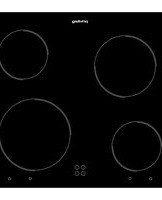
| Number of Cooking Zones | 2 (1 double-circuit radiant + 1 single radiant) |
| Double Radiant Zone Size | 180 mm / 120 mm |
| Single Radiant Zone Size | 145 mm |
| Control Type | Touch capacitive sensors with acoustic signal |
| Power Supply | 230 V ~, 50/60 Hz |
| Connection Cable | H05RR-F 3x1.5 mm² |
| Cut-out Dimensions (W x D) | 490 mm x 270 mm |
| Overall Dimensions (W x D) | 511 mm x 285 mm |
| Height (flush mount) | 4.7 mm below worktop surface |
| Booster Function | Yes (maximum power level "P") |
| Timer Function | Yes, 0-99 minutes with automatic shut-off |
| Residual Heat Indicator | "H" displayed until safe temperature (~60°C) |
| Safety Shutdown | Automatic if left on too long |
| Key Lock | Yes, 3-second press to lock/unlock |
| Cleaning Instructions | Use soft cloth, specific hob cleaner; avoid abrasives and steam |
| Installation Requirements | Worktop depth 20-50 mm, minimum distance 150 mm from side column, not near dishwasher/washing machine |
| Warranty | See warranty booklet or contact After-sales Service |
Frequently Asked Questions - PCTAC 3040 NE PRIVILEG
User questions about PCTAC 3040 NE PRIVILEG
0 question about this device. Answer the ones you know or ask your own.
Ask a new question about this device
Download the instructions for your Cooker in PDF format for free! Find your manual PCTAC 3040 NE - PRIVILEG and take your electronic device back in hand. On this page are published all the documents necessary for the use of your device. PCTAC 3040 NE by PRIVILEG.
USER MANUAL PCTAC 3040 NE PRIVILEG
natural_image
Simple diagram with two circles inside a rectangle, no text or symbols presentnatural_image
Illustration of a person using a kitchen appliance to lift a stove (no text or symbols)

DANKE, DASS SIE SICH FÜR EIN PRIVILEG PRODUKT ENTSCHIEDEN HABEN
natural_image
Three diagrams showing a U-shaped object with cross marks, no text or symbols presentBefore using the appliance, read these safety instructions. Keep them nearby for future reference.
These instructions and the appliance itself provide important safety warnings, to be observed at all times. The manufacturer declines any liability for failure to observe these safety instructions, for inappropriate use of the appliance or incorrect setting of controls.
⚠ WARNING: The appliance and its accessible parts become hot during use. Care should be taken to avoid touching heating elements. Children less than 8 years of age must be kept away unless continuously supervised.
⚠ WARNING: If the hob surface is cracked, do not use the appliance – risk of electric shock.
⚠ WARNING: Danger of fire : Do not store items on the cooking surfaces.
⚠️ CAUTION: The cooking process has to be supervised. A short cooking process has to be supervised continuously.
⚠ WARNING: Leaving the hob unattended when cooking with fat or oil can be dangerous – risk of fire. NEVER try to extinguish a fire with water, but switch off the appliance and then cover the flames e.g. with a lid or a fire blanket.
⚠ Do not use the hob as a work surface or support.
Keep clothes or other flammable materials away from the appliance, unit all the components have cooled down completely - risk of fire.
⚠️ Very young children (0-3 years) should be kept away from the appliance. Young children (3-8 years) should be kept away from the appliance unless continuously supervised. Children from 8 years old and above and persons with reduced physical, sensory or mental capabilities or lack of experience and knowledge can use this appliance only if they are supervised or have been given instructions on safe use and understand the hazards involved. Children must not play with the appliance. Cleaning and user maintenance must not be carried out by children without supervision.
PERMITTED USE
⚠️ CAUTION: The appliance is not intended to be operated by means of an external switching device, such as a timer, or separate remote controlled system.
This appliance is intended to be used in household and similar applications such as: staff kitchen areas in shops, offices and other working environments; farm houses; by clients in hotels, motels, bed & breakfast and other residential environments.
⚠️ No other use is permitted (e.g. heating rooms).
⚠ This appliance is not for professional use. Do not use the appliance outdoors.
INSTALLATION
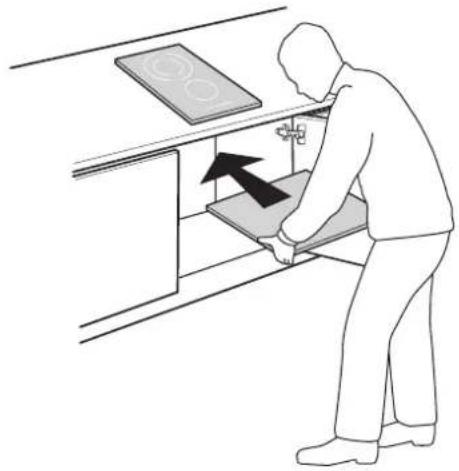
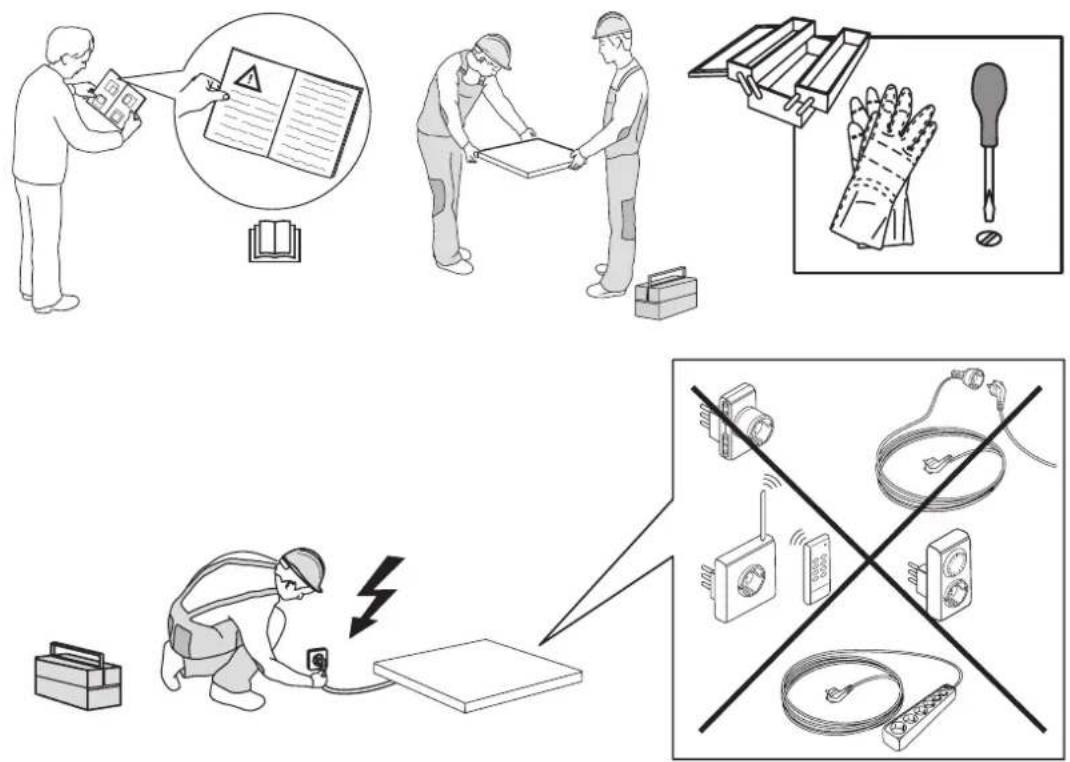
⚠ The appliance must be handled and installed by two or more persons - risk of injury. Use protective gloves to unpack and install - risk of cuts.
⚠️ Installation, including water supply (if any), electrical connections and repairs must be carried out by a qualified technician. Do not repair or replace any part of the appliance unless specifically stated in the user manual. Keep children away from the installation site. After unpacking the appliance, make sure that it has not been damaged during transport. In the event of problems, contact the dealer or your nearest Aftersales Service. Once installed, packaging waste (plastic, styrofoam parts etc.) must be stored out of reach of children - risk of suffocation. The appliance must be disconnected from the power supply before any installation operation - risk of electric shock.
During installation, make sure the appliance does not damage the power cable - risk of fire or electric shock. Only activate the appliance when the installation has been completed.
⚠️ Carry out all cabinet cutting works before fitting the appliance in place and remove all wood chips and sawdust.
⚠️ If the appliance is not installed above an oven, a separator panel (not included) must be installed in the compartment under the appliance.
ELECTRICAL WARNINGS
⚠ It must be possible to disconnect the appliance from the power supply by unplugging it if plug is accessible, or by a multi-pole switch installed upstream of the socket in accordance with the wiring rules and the appliance must be earthed in conformity with national electrical safety standards.
⚠ Do not use extension leads, multiple sockets or adapters. The electrical components must not be accessible to the user after installation. Do not use the appliance when you are wet or barefoot. Do not operate this appliance if it has a damaged power cable or plug, if it is not working properly, or if it has been damaged or dropped.
⚠️ If the supply cord is damaged, it must be replaced with an identical one by the
manufacturer, its service agent or similarly qualified persons in order to avoid a hazard - risk of electric shock.
CLEANING AND MAINTENANCE
⚠ WARNING: Ensure that the appliance is switched off and disconnected from the power supply before performing any maintenance operation; never use steam cleaning equipment - risk of electric shock.
⚠ Do not use abrasive or corrosive products, chlorine-based cleaners or pan scourers.
DISPOSAL OF PACKAGING MATERIALS
The packaging material is 100% recyclable and is marked with the recycle symbol. The various parts of the packaging must therefore be disposed of responsibly and in full compliance with local authority regulations governing waste disposal.
DISPOSAL OF HOUSEHOLD APPLIANCES
This appliance is manufactured with recyclable or reusable materials. Dispose of it in accordance with local waste disposal regulations. For further information on the treatment, recovery and recycling of household electrical appliances, contact your local authority, the collection service for household waste or the store where you purchased the appliance. This appliance is marked in compliance with European Directive 2012/19/EU, Waste Electrical and Electronic Equipment (WEEE). By ensuring this product is disposed of correctly, you will help prevent negative consequences for the environment and human health. The symbol ☒ on the product or on the accompanying documentation indicates that it should not be treated as domestic waste but must be taken to an appropriate collection centre for the recycling of electrical and electronic equipment.
DECLARATION OF CONFORMITY
This appliance meets Ecodesign requirements of European Regulation 66/2014 in compliance with the European standard EN 60350-2.
INSTALLATION
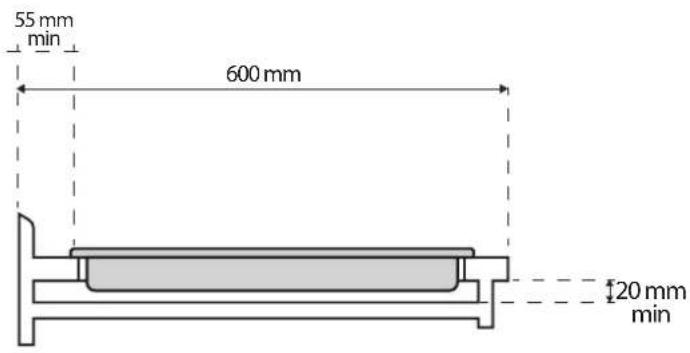
The cooktop must be set into a worktop between 20 mm and 50 mm deep.
- There must be nothing between the cooktop and the oven (cross rails, brackets, etc.).
- The distance between the lower face of the glass ceramic hob and the cupboard or separating panel must be at least 20 mm.
- If the cooktop is to be installed next to a column unit, leave a distance of at least 150mm from the edge of the cooktop to the side of the column unit.
- For built-in dimensions and installation see the pictures in this paragraph.
- A minimum distance must be maintained between the hob and the hood above it. Please refer to the user manual of the hood for more informations.
- Apply the supplied gasket to the cooktop (unless it has already been fitted), after having cleaned its surface.
- Do not install the cooktop near a dishwasher or washing machine, so that the electronic circuits do not come into contact with steam or moisture, which could damage them.
- If an oven (from our range of ovens) is installed beneath the cooktop, make sure that it is equipped with a cooling system. If the temperature of the electronic circuits exceeds the maximum permitted temperature, the cooktop will switch off automatically; in this case, wait for a few minutes until the internal temperature of the electronic circuits reaches a tolerable level, at which point it will be possible to switch the hob on again.
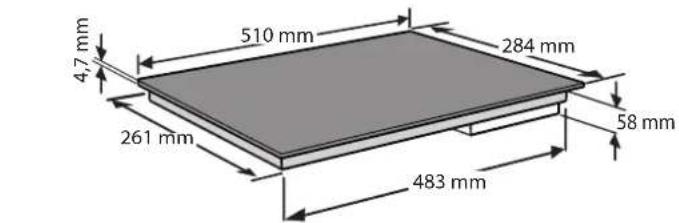
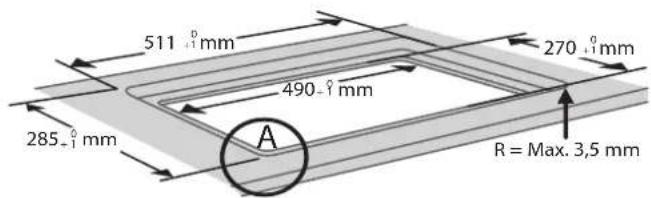


Please note: Do not glue or silicone the glass when lowering it by 4,7 mm.
For the semi-flush mount version the 4,7 mm milling is not necessary.
natural_image
Illustration of a person using a kitchen appliance to adjust or install a tray with a stove (no text or symbols)PLACING THE HOB
After the electrical connection (see the chapter "Electrical connection"). P ingi clips each fix on the dedicated slots on the lateral sides of the hob as shown in the picture. Then push the hob inside the cut out and check that the glass is flat and parallel to the worktop. The fixing clips are designed for every type of worktop material (wood, marble, etc).


natural_image
Diagram showing a device with two circular holes above a rectangular base, with a downward arrow indicating motion or force (no text or symbols)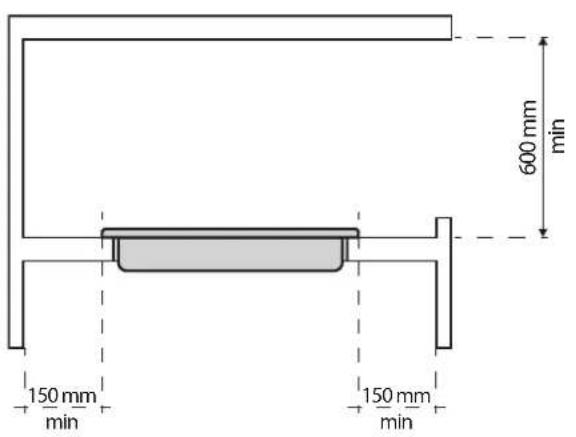
ELECTRICAL CONNECTION
Electrical connection must be made before connecting the appliance to the electricity supply. Installation must be carried out by qualified personnel who know the current safety and installation regulations. Specifically, installation must be carried out in compliance with the regulations of the local electricity supply company.
Make sure the voltage specified on the dataplate located on the bottom of the appliance is the same as that of the home.
Regulations require that the appliance be earthed: use conductors (including the earth conductor) of the appropriate size only.
The manufacturer declines all liability for injury to persons or animals and for damage to property resulting from failure to observe the regulations provided in this chapter.
CONNECTION TO THE TERMINAL BLOCK
For the electrical connection, use an H05RR-F cable as specified in the table below.
The appliance must be connected to the electricity supply by means of an all-pole disconnect switch with minimum contact gap of 3 mm.

H05RR-F3x1.5
H05RN-F3x1.5
Attention: the power supply cable must be long enough to allow the cooktop to be removed from the worktop and must be positioned so as to avoid damage or overheating caused by contact with the base.
DAILY REFERENCE GUIDE

THANK YOU FOR BUYING A PRIVILEG PRODUCT
In order to receive a more complete assistance, please register your product on www.whirlpool.eu/register

Before using the appliance carefully read the Safety instructions.
PRODUCT DESCRIPTION

- DOUBLE RADIANT COOKING ZONE
Double circuit (180 - 120 mm)
- RADIANT COOKING ZONE
(145 mm)
- CONTROL PANEL
All operations can be performed using the touch keys (capacitive sensors). Each activity is confirmed by an acoustic signal.
CONTROL PANEL DESCRIPTION

-
Double cooking zone selection
-
ON / OFF button
to switch on or off the appliance
-
Cooking zone selection
-
Key lock
keep pressed 3" long to lock the control panel
- Heat setting increase and
decrease repeated press to reach the desired level
- Timer selection
to set the cooking time by pressing + and - (8)
DAILY USE
SWITCHING ON THE DEVICE
Press the key to activate the control: the adjustment level indicators show "0" and a power-on LED appears above the first key.
Perform the next operation within 10 seconds, otherwise the device will switch off automatically.
SET POWER AND TIMER
Use the "+" and "-" keys to adjust the setting of the plates and the required time on timer/minute counter.
The “+” and “-” controls are common to both functions. Accordingly, to regulate the power of the hob, first select the zone with key (4, 6), then adjust the relative power level using the “+” and “-” keys; once done, select the timer function and proceed to set the duration, likewise using the “+” or “-” keys.
SWITCHING ON THE COOKING AREA
Once the device has been activated, switch on the cooking area (within 10 seconds) as follows:
- Press one of the keys to select the cooking area required. The related display gets brighter.
- Use the "+" and "-" keys to adjust the heating level (from 1 to 9-P).
Pressing button "+" when level 9 is reached, the "Booster" function is activated and the letter "P" appears on the display.
- Press and hold down these keys to increase or decrease the setting.
SWITCHING OFF THE COOKING AREA
The requested cooking zone must be activated and will, therefore, be brighter.
Return the setting to "0", by means of the key "-".
RAPID SHUTDOWN OF THE COOKING AREA
- Select the cooking zone to turn off.
- Press and hold “-” and “+” at the same time.
DOUBLE RADIANT COOKING ZONE
On a double cooking zone, one zone or both (central crown/extended-crown) can be switched on.
» TURNING ON A DOUBLE ZONE
After selecting the power level, greater or equal to 1, the double circuit areas are enabled by pressing the cooking zone key again.
Only for this type of heating plate, horizontal dashes light up to indicate how many circuits are turned on.
Two horizontal dashes indicate that all the two resistors are turned on in the selected heating element.
» TURNING OFF A DOUBLE ZONE
The requested cooking zone must be activated and will, therefore, be brighter.
When you touch again the selection key, one circuit at a time is turned off.
If you continue to press the selection key intermittently, the plates are turned on and off.
RESIDUAL HEAT INDICATOR ("H")
If the temperature of the cooking area is still high (and a burn risk is still present) after it has been switched off, the display related to the zone will indicate the letter "H" (residual heat).
The letter H will only disappear when the burn risk is no longer present (approximately 60°C).
SWITCHING OFF THE HOB
The hob can be switched off at any time by pressing the ON / OFF icon ( ⏻ ).
The hob can be locked with a combination of keys. Turn on the cooking surface and then press key “-”, holding it down, press the select key on the left: L's appears.
The purpose of this lock is to prevent unintended operations. While the lock is engaged, all operations of the keys are unable, with the exception of the OFF key.
To unlock the hob, perform the same operation: turn on the surface, press the minus key and press the selection key to the left. The L's disappears.
TIMER FUNCTION
This function simplifies cooking operations: once the set time on the timer has elapsed, the cooking area is automatically switched off.
» TURNING THE TIMER ON
- The cooking zone must be activated.
- Select a power level between 1 and 9.
- Touch the timer key (9): the timer display shows "00" and the cooking zone decimal point is highlighted.
- Select the cooking time (between 0 to 99 minutes) by means of the "+" and "-" keys (8). The timer function will automatically start within a few seconds and a flashing "t" will appear on the zone with the shortest timer setting.
The decimal point of the cooking zone with timer setting remains highlighted with the shortest timer setting. The timer will start up automatically in a few seconds. Press and hold down the "+" or "-" key to scroll the time setting.
The timer function can be applied to all the cooking zones by selecting them.
» TURNING THE TIMER OFF
When the set time has elapsed, an acoustic signal is emitted for two minutes.
To silence the signal, press any key.
To interrupt the timer, proceed as follows:
- Press the timer key (5).
- Press the "-" key to reset the time.
SAFETY SHUTDOWN
In the event that one or more cooking areas is inadvertently left on, the safety system will shut the zones down automatically after a certain time has elapsed. The letter "H" will be displayed below.
IMPORTANT
To avoid a permanent damage the hob: do not use pots with bottoms that are not flat; do not use metal pots with enamelled bottom; do not place hot pots/ pans over the control panel.

natural_image
Three diagrams showing a U-shaped object with cross marks below, no text or symbols presentCLEANING AND MAINTENANCE
- Disconnect the appliance from the power supply.
- Do not use steam cleaning equipment.
- Do not use abrasive sponges or scouring pads as they may damage the glass.
• After each use, clean the hob (when it is cool) to remove any deposits and stains from food residue. - Use a scraper only if residues are stuck to the hob. Follow the scraper manufacturer's instructions to avoid scratching the glass.
• Sugar or foods with a high sugar content can
damage the hob and must be immediately removed.
- Salt, sugar and sand could scratch the glass surface.
- Use a soft cloth, absorbent kitchen paper or a specific hob cleaner (follow the Manufacturer's instructions).
• Spills of liquid in the cooking zones can cause the pots to move or vibrate.
• After cleaning the hob, dry thoroughly.
TROUBLESHOOTING
| PROBLEM POSSIBLE CAUSE SOLUTION | ||
| F0 Electronic error Disconnect and reconnect the power supply. If the error persists, call after-sales support. | ||
| Fc Electronic control overheated, the cooking zones are switched off. | Wait until the temperature is lowered. The cooking hob will start working again when the temperature returns to normal. | |
| Ft / FE Electronic temperature sensor may be damaged. | Wait until temperature is lowered. If the message persists even after the value returns to room temperature, call the after-sales support. | |
| Fb Excessive key sensitivity. Check that the glass-ceramic work top has been installed properly. Call after-sales support to make sure that keys touch the glass surface correctly. | ||
| FU / FJ / FA / FC / Fd Touchpad error, this error is an automatic keypad check. It will disappear when the automatic check is reset to the correct value. | If the error persists, contact the after-sales support. | |
| Fr Relay error, there may be a problem with one of the relays. | Disconnect the power supply, wait one minute and switch on again. If the error persists, call after-sales support. | |
You can download the safety Instructions, User Manual, Product Fiche and Energy data by:

- Visiting our website - docs.whirlpool.eu
- Using QR code
• Alternatively, contact our After-sales Service (see phone number in the warranty booklet). When contacting our After-sales Service, please state the codes provided on your product's identification plate.

400011392013
Printed in Italy


- DANKE, DASS SIE SICH FÜR EIN PRIVILEG PRODUKT ENTSCHIEDEN HABEN
- PERMITTED USE
- INSTALLATION
- ELECTRICAL WARNINGS
- CLEANING AND MAINTENANCE
- DISPOSAL OF PACKAGING MATERIALS
- DISPOSAL OF HOUSEHOLD APPLIANCES
- DECLARATION OF CONFORMITY
- PLACING THE HOB
- ELECTRICAL CONNECTION
- CONNECTION TO THE TERMINAL BLOCK
- DAILY REFERENCE GUIDE
- THANK YOU FOR BUYING A PRIVILEG PRODUCT
- PRODUCT DESCRIPTION
- CONTROL PANEL DESCRIPTION
- DAILY USE
- SWITCHING ON THE DEVICE
- SET POWER AND TIMER
- SWITCHING ON THE COOKING AREA
- SWITCHING OFF THE COOKING AREA
- RAPID SHUTDOWN OF THE COOKING AREA
- DOUBLE RADIANT COOKING ZONE
- » TURNING ON A DOUBLE ZONE
- » TURNING OFF A DOUBLE ZONE
- RESIDUAL HEAT INDICATOR ("H")
- SWITCHING OFF THE HOB
- TIMER FUNCTION
- » TURNING THE TIMER ON
- » TURNING THE TIMER OFF
- SAFETY SHUTDOWN
- IMPORTANT
- TROUBLESHOOTING
Brand : PRIVILEG
Model : PCTAC 3040 NE
Category : Cooker