
MDABW13E - Radio MATSUI - Free user manual and instructions
Find the device manual for free MDABW13E MATSUI in PDF.


| Product Type | Portable DAB/FM Radio |
| Brand | Matsui |
| Model | MDABW13E |
| Dimensions (W x D x H) | 181 x 45 x 105 mm |
| Net Weight | 0.4 kg |
| Power Source | Mains adapter (DC 6V 0.8A) or 4 x AA batteries (not included) |
| Battery Life (approx.) | 10 hours (alkaline, both DAB and FM) |
| Power Consumption | 4.5W |
| Speaker Output Power | 1.0W RMS |
| Radio Bands | DAB Band III (174–240 MHz), FM (87.5–108 MHz) |
| Preset Stations | Up to 10 per band (DAB and FM) |
| Display | LCD showing station info, time/date, signal strength, etc. |
| Display Modes | Time/Date, Frequency, Audio Bit Rate, Signal Strength, DLS, Programme Type, Ensemble/Multiplex (DAB); Radio Text, Frequency, Station Name, Programme Type, Time/Date (FM) |
| Aerial | Built-in telescopic aerial |
| Earphone Socket | 3.5mm stereo jack |
| Audio Features | Auto/Mono mode selection (FM) |
| Tuning Methods | Auto scan, manual tuning, preset recall |
| Controls | Power on/off switch, Volume +/-, Menu, Info, Preset, Select, Mode, Navigation ▲▼ |
| Maintenance | Wipe with slightly moist, lint-free cloth; no alcohol or abrasive cleaners |
| Safety Features | Overheating protection via ventilation slots; automatic shutdown on battery exhaustion |
| Spare Parts / Repair | No user-serviceable parts; contact qualified personnel for service |
Frequently Asked Questions - MDABW13E MATSUI
User questions about MDABW13E MATSUI
0 question about this device. Answer the ones you know or ask your own.
Ask a new question about this device
Download the instructions for your Radio in PDF format for free! Find your manual MDABW13E - MATSUI and take your electronic device back in hand. On this page are published all the documents necessary for the use of your device. MDABW13E by MATSUI.
USER MANUAL MDABW13E MATSUI
natural_image
Illustration of a black and white electronic device with a speaker, antenna, and wave patterns inside a circular frame (no text or symbols)MDABB13E
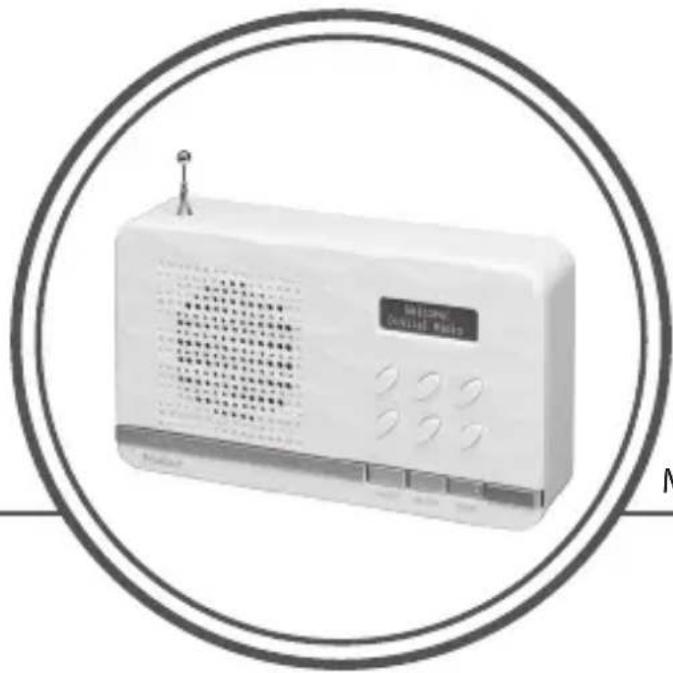
natural_image
White portable radio device with digital display and control buttons, enclosed in a circular frame (no visible text or symbols)MDABW13E
Contents
GB
Innhold
NO
Safety Warnings......4
Unpacking......8
Product Overview......9
Front View 9
Rear View....10
Power Source 11
Battery Power 11
Battery Life (Approx. hours)......11
Knowing When to Replace the Batteries....11
Mains Power....12
Connections 13
Using Earphones 13
Basic Operation 13
Powering ON/OFF 13
Selecting Modes....14
Adjusting the Volume......14
Factory Reset 14
Software Version....14
DAB Operation....15
Full Scan....15
Secondary Services ....15
Manual Tuning 16
Presetting Stations 16
Recalling a Preset Station....16
Display Modes....16
FM Operation 18
Switching from DAB to FM Mode.....18
Auto Scan....18
Manual Scan....18
Audio Setting......18
Presetting Stations 18
Recalling a Preset Station....19
Display Modes....19
Maintenance 20
Cleaning the Unit....20
Hints and Tips...... 20
Specifications......21
Softwareversion......56
DAB betjening....57
Fuld søgning 57
- Read all the instructions carefully before using the unit and keep them for future reference.
- Retain the manual. If you pass the unit onto a third party make sure to include this manual.
- Check that the voltage marked on the rating label matches your mains voltage.
Damage
- Please inspect the unit for damage after unpacking.
- Do not continue to operate the unit if you are in any doubt about it working normally, or if it is damaged in any way - switch off, unplug from the mains socket and consult your dealer.
Location of Unit
- The unit must be placed on a flat stable surface and not subjected to vibrations.
- Do not place the unit on sloped or unstable surfaces as the unit may fall off or tip over.
- The mains socket must be located near the unit and should be easily accessible.
Temperature
- Avoid extreme degrees of temperature, either hot or cold. Place the unit well away from heat sources such as radiators or gas / electric fires.
- Avoid exposure to direct sunlight and other sources of heat.
Naked Flames
- Never place any type of candle or naked flame on the top of or near the unit.
Moisture
• To reduce the risk of fire, electric shock or product damage, do not expose this unit to rain, moisture, dripping or splashing. No objects filled with liquids, such as vases, should be placed on the unit.
- If you spill any liquid into the unit, it can cause serious damage. Switch it off at the mains immediately. Withdraw the mains plug and consult your dealer.
Ventilation
• To prevent the risk of electric shock or fire hazard due to overheating, ensure that curtains and other materials do not obstruct the ventilation vents.
• A minimum distance of 5cm around the unit should be maintained to allow for sufficient ventilation.
- Do not install or place this unit in a bookcase, built-in cabinet or in another confined space. Ensure the unit is well ventilated.
Safety
• Always disconnect the unit from the mains supply before connecting / disconnecting other devices or moving the unit.
- Unplug the unit from the mains socket during a lightning storm.
- In the interests of safety and to avoid unnecessary energy consumption, never leave the unit switched on while unattended for long periods of time, e.g. overnight, while on holiday or while out of the house. Switch it off and disconnect the mains plug from the mains socket.
Mains Adapter Cable
- Make sure the unit or unit stand is not resting on top of the mains adapter cable, as the weight of the unit may damage the cable and create a safety hazard.
Mains Adapter
- The mains adapter will continue to draw electricity from the mains supply when plugged in the mains socket. In the interests of safety and to avoid unnecessary energy consumption, never leave the adapter plugged in the mains socket while unattended for long periods of time. Disconnect the adapter from the power supply.
Interference
- Do not place the unit on or near appliances which may cause electromagnetic interference. If you do, it may adversely affect the working performance of the unit, and cause a distorted sound.
Earphones
- Listening to loud sounds for prolonged periods of time may permanently damage your hearing.
- Before putting on earphones, turn the volume down then put the earphones on and slowly increase the volume until you reach a comfortable listening level.

Batteries
- Batteries used in the unit are easily swallowed by young children and this is dangerous.
- Keep loose batteries away from young children and make sure that the battery holder tray is secure in the unit. Seek medical advice if you believe a cell has been swallowed.
- Please dispose of batteries correctly by following the guidance in this manual.
- Do not expose the battery to direct sunlight or sources of excessive heat.
Supervision
• Children should be supervised to ensure that they do not play with the unit.
- Never let anyone especially children push anything into the holes, slots or any other openings in the case - this could result in a fatal electric shock.


The lightning flash with arrowhead symbol, within an equilateral triangle, is intended to alert the user to the presence of uninsulated "dangerous voltage" within the unit's enclosure that may be of sufficient magnitude to constitute a risk of electric shock.
The exclamation point within an equilateral triangle is intended to alert the user to the presence of important operating and maintenance (servicing) instructions in the manual accompanying the unit.
Service
• To reduce the risk of electric shock, do not remove screws. The unit does not contain any user-serviceable parts. Please leave all maintenance work to qualified personnel.
- Do not open any fixed covers as this may expose dangerous voltages.
Maintenance
Thank you for purchasing your new Matsui Radio.
We recommend that you spend some time reading this instruction manual in order that you fully understand all the operational features it offers. You will also find some hints and tips to help you resolve any issues.
Read all the safety instructions carefully before use and keep this instruction manual for future reference.
Unpacking
Remove all items from the packaging. Retain the packaging. If you dispose of it please do so according to local regulations.
The following items are included:

natural_image
Illustration of a portable electronic device with buttons and a hanging knob (no text or symbols)
natural_image
Illustration of a coiled cable with a plug and power plug (no text or symbols)Mains AdapterThe Main Unit

Instruction Manual
Product Overview
Front View

GB
-
INFO Button
-
Aerial
- Speaker
- Display
Displays radio station information.
- +/- Buttons
Adjusts the volume.
- ▲▼ Buttons
Navigate the left and right area of the menu screen.
- MENU Button
Displays menu screen.
- PRESET Button
• Presets a radio station.
• Recalls a preset radio station.
- SELECT Button
Confirms the selection on the menu screen.
- MODE Button
Switches between DAB and FM modes.
Rear View
GB
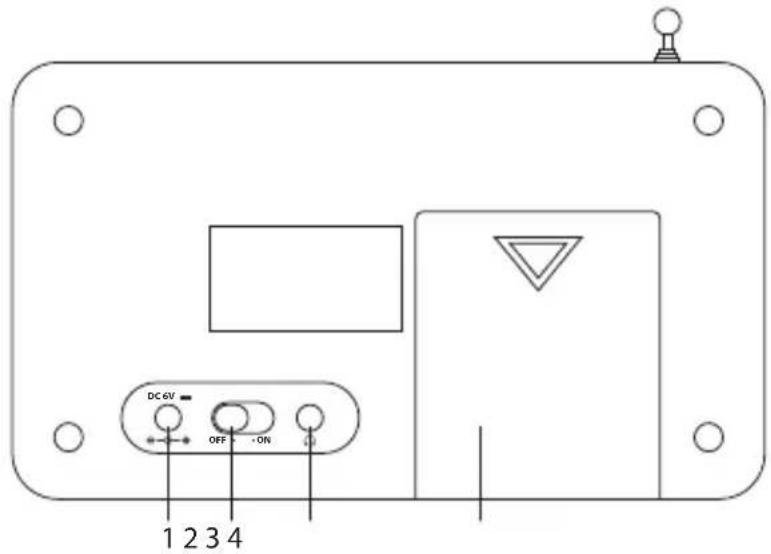
-
DC 6V Socket
-
Earphones Socket
-
ON/OFF Switch
-
Battery Compartment
Switches the unit on or off.
Power Source
Battery Power
Insert 4 x 1.5V AA batteries (not included) correctly by following the polarity (+ or -) indications in the battery compartment.


Battery Life (Approx. hours)
| When Using | DAB FM | |
| Alkaline (Size AA) | 10 10 |
Knowing When to Replace the Batteries
- When the batteries become weak, the sound becomes weak and distorted. The display backlight becomes unstable when a button is pressed.
- When the batteries are completely exhausted, the power is turned off.
GB

Handling the Batteries
- Improper or incorrect use of batteries may cause corrosion or battery leakage, which could cause personal injury or damage to property.
- Install the batteries correctly by following the polarity (+ and -) indications in the battery compartment.
• Use only the types of batteries which are indicated in this manual. - Do not install new batteries with used ones and do not mix different types of batteries.
- Do not dispose of the used batteries as domestic waste. Dispose of them in accordance with local regulations.
- If you are not going to use the unit for a long time, remove the batteries to avoid damage from battery leakage and corrosion.
- Due to the short battery life span of some alkaline batteries, it is recommended to use rechargeable batteries. You will need to purchase a charger to charge the rechargeable batteries. This saves cost and is more environmental-friendly.
Mains Power
Before using, connect the supplied mains adapter to the DC socket at the rear of the unit and to the mains socket.

natural_image
Line drawing of an electronic device with cable, ports, and a connector (no text or symbols)Connections
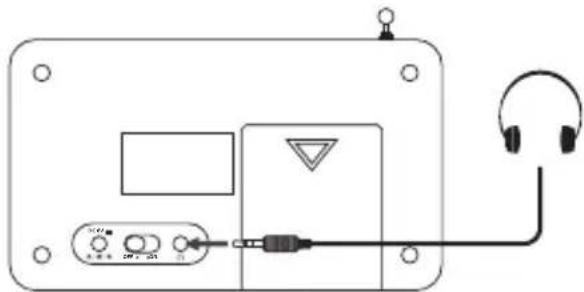
Using Earphones
Turn down the volume before connecting earphones. Slowly raise the volume with the earphones on until you reach your desired level.
GB
natural_image
Diagram of an electronic device with headphones, ports, and a connector (no text or symbols)Long-term exposure to loud music may cause hearing damage. It is best to avoid extreme volume when using earphones, especially for extended periods of time.
Basic Operation
Powering ON/OFF
After connecting the mains adapter to the unit and the mains socket, switch the ON/OFF switch at the back of the unit to the "ON" position to switch the unit on.
- Switch the ON/OFF switch to the "OFF" position to turn the unit off.
- Disconnect the power cable of the mains adapter from the mains socket if you want to switch the unit off completely.
Selecting Modes
Press MODE repeatedly to switch between modes (DAB or FM).
Adjusting the Volume
Adjust the volume to the desired level by pressing + / - .
Factory Reset
There may be times when you need to reset your unit back to the factory settings especially when you have moved house. If you experience reception problems you may want to reset and try again. If you move to another part of the country and pick up the local and national DAB stations in that area, your previously tuned channels may no longer be available.
- Press and hold MENU until the "Press SELECT to confirm reset" shows on the display.
- Press SELECT to start the system reset, "Restarting..." will show on the display. After the reset is complete, the unit will then start scanning for DAB channels immediately.
After the factory reset, all the tuned stations, DAB & FM preset stations will be erased.
Software Version
- Press and hold INFO for 2 seconds and then release it to view the software version of this unit.
- The software version will automatically disappear after 3 seconds.
DAB Operation
If the unit is connected to the mains power and then switched on for the first time, the unit will automatically enter into the DAB mode and perform auto scan. During the scan the display will show "Scanning..." together with a slide bar that indicates the progress of the scan and the number of stations that have been found so far.
Once the scan has finished, the unit will select the first alphanumerically found station. To explore the found stations, press▲▼ and then SELECT to confirm selection.
Full Scan
The full scan will search for the entire DAB Band III channels. After the scan has finished, the first alphanumerically found station will be automatically selected.
Full scan will not replace the DAB stations in memory. If you want to remove all the previously scanned stations, factory reset is required.
- To activate full scan, press MENU then ▲▼ to select
, finally press SELECT to confirm. The display will show "Scanning..." and a progressing slide bar. - All the stations that have been found will be stored automatically. To explore and listen to the found stations, press ▲▼ and then SELECT to confirm selection.
Secondary Services
You may see a “>” symbol after the name of the station, this indicates that there are secondary services available to that station. These secondary services contain extra services that are related to the primary station. e.g. a sports station may want to add extra commentaries. The secondary services are inserted directly after the primary station in the station list.
To select the secondary station, press SELECT when the "<" appears in the display before the station name. When the secondary service ends, the unit will automatically switch back to the primary station.
Manual Tuning
Manual tuning can help add stations that were missed by full scan.
- Press MENU and then ▲▼ to select
. Press SELECT to confirm. - Press ▲▼ to scroll through the DAB channels, which are numbered from 5A to 13F.
- Press SELECT to select the station that you would like to listen to.
Presetting Stations
You can store up to 10 of your favourite DAB stations to the memory. This will enable you to access your favourite stations quickly and easily.
- To store a preset, you must first be listening to the station that you would like to save. Press and hold PRESET. The display will show "Empty preset #", and the preset number will flash.
- Press ▲▼ to select the desired preset station number and then press SELECT to confirm.
- The station will be stored and the screen will show "Preset # saved".
Recalling a Preset Station
- Once you have saved a station, you can recall it by pressing PRESET.
- Press ▲▼ to select the desired preset station number.
- Press SELECT to confirm.
- If you choose a preset station number that has not been allocated a station, "Empty preset #" will be displayed.
Display Modes
Every time you press INFO, the display will show the following display modes.
Time / Date
This displays the current time / date provided automatically by the broadcaster.
Frequency
This displays the frequency of the present station, such as "11C 220.352 MHz".
Audio Bit Rate
This displays the digital audio bit rate being received.
Signal Strength
This shows a slide bar to indicate the signal strength, the stronger the signal, the longer the bar will be from left to right.
DLS (Dynamic Label Segment)
This is a scrolling message that the broadcaster may include with their transmissions. The message usually includes information, such as programme details etc.
Programme Type
This describes the "style" or "genre" of the programme that is being broadcast.
Ensemble / Multiplex
A multiplex is a collection of radio stations that are bundled and transmitted on one frequency. There are national and local multiplexes. Local ones contain stations that are specific to that area.
DAB – unlike normal radio, groups together several radio stations and transmits them on one frequency.

flowchart
graph TD
    A["Time / Date"] --> B["Frequency"]
    B --> C["Audio Bit Rate"]
    C --> D["Signal Strength"]
    D --> E["DLS"]
    E --> F["Programme Type"]
    F --> G["Ensemble/Multiplex"]
    G --> H["GB"]
FM Operation
Switching from DAB to FM Mode
To switch the unit from DAB to FM mode, press MODE once.
Auto Scan
To search for an FM station, press and hold ▲ to start the auto scan.
"Scanning..." will show on the display. Once a station has been found, the scanning will stop automatically.
Manual Scan
To search for FM stations manually, press ▲repeatedly until your desired frequency is reached.

With FM radio, it may be necessary to fine tune each station by pressing ▲repeatedly. Each press will adjust the frequency by 0.05 MHz. If reception is still poor, adjust the position of the aerial or try moving the radio to another location.
Audio Setting
Press SELECT to toggle between the Auto or Mono audio mode.
- The unit will automatically switch between stereo and mono mode, when auto mode is selected but you can override this and switch this function manually by changing it to mono mode. This is helpful when receiving poor signal reception.
- During stereo reception, the received L/R stereo sound will be automatically combined into one single channel to suit the single speaker design of this radio.
Presetting Stations
You can store up to 10 of your favourite FM stations to the memory. This will enable you to access your favourite stations quickly and easily.
- To store a preset, you must first be listening to the station that you would like to save. Press and hold PRESET. The display will show "Empty preset #", and the preset number will flash.
- Press ▲▼ to select the desired preset station number and then press SELECT to confirm.
- The station will be stored and the screen will show "Preset # saved".
GB
Recalling a Preset Station
- Once you have saved a station, you can recall it by pressing PRESET.
- Press ▲▼ to select the desired preset station number.
- Press SELECT to confirm.
- If you choose a preset station number that has not been allocated a station, "Empty preset #" will be displayed.
Display Modes
Every time you press INFO, the display will show the following display modes.
Radio Text
This is a scrolling message information about the current programme.
Frequency
This displays the frequency of the present station, such as "87.50 MHz".
Station Name
This displays the station name.
Programme Type
This describes the "style" or "genre" of programme that is being broadcast.
Time / Date
This displays the current time provided automatically by the broadcaster.

flowchart
graph TD
    A["Radio Text"] --> B["Frequency (Station Name)"]
    B --> C["Programme Type"]
    C --> D["Time / Date"]
    D --> A
Maintenance
Cleaning the Unit
GB
Ensure the unit is fully unplugged from the mains socket before cleaning.
• To clean the unit, wipe the case with a slightly moist, lint-free cloth.
- Do not use any cleaning fluids containing alcohol, ammonia or abrasives.
• Do not spray aerosol at or near the unit.
Hints and Tips
| Problem Solution | |
| No Sound Adjust the volume. | |
| Static Sound Signal reception is too low. Adjust the aerial or move the unit to a stronger signal location. | |
| Sound is distorted Volume is too high. Adjust the volume. | |
| Desired station not found | Weak signal. Search manually. |
| No DAB coverage in your area or poor reception. | Adjust the position of the aerial. |
| The display is blank This may occur if the broadcaster changes the label of a service or removes a label while tuned. The unit will try to re-tune or perform a scan. | |
If the unit is not working properly, disconnect the power source and then reconnect it.
Specifications
| Model MDABB13E / MDA | BW13E |
| Mains Adapter Input AC | 100 – 240V ~50/60HzOutput DC 6V 0.8A |
| Battery DC 1.5V (UM3) x 4, AA size | |
| Power Consumption 4.5W | |
| Speaker Output Power 1.0W RMS | |
| Radio Frequency FM 87.5 | – 108 MHzDAB Band III 174 – 240 MHz |
| Dimensions 181 (W) x 45 | (D) x 105 (H) mm |
| Net weight 0.4 kg | |
Features and specifications are subject to change without prior notice.
GB
NO
Takk for at du kjøpte ny Matsui radio.
natural_image
Illustration of a portable electronic device with buttons and a top-mounted antenna (no text or symbols)
natural_image
Illustration of a cable with a plug and probe inserted, no text or symbols presentNO
Batterilevetid (cirka timer)
natural_image
Line drawing of an electronic device with cable, ports, and a switch (no text or symbols)Tilkoblinger
Bruke øretelefoner
Skru volumet ned før du kobler til øretelefoner. Sett øretelefonene på og skru volumet langsomt opp til du oppnår ønsket lydstyrke. Høyttalerne dempes automatisk når øretelefoner tilkobles.

natural_image
Diagram of an electronic device with headphones, ports, and a connector (no text or symbols)NO
natural_image
Illustration of a portable electronic device with buttons and a lamp (no text or symbols)
natural_image
Coiled cable and plug with a probe, no text or symbols visibleInstruktionsbok
Produktöversikt
Vy framifrån

SE
natural_image
Line drawing of an electronic device with cable, ports, and a warning symbol (no text or labels)Anslutningar
Använda hörlurar
natural_image
Diagram of an electronic device with headphones, ports, and a connector (no text or symbols)SE
natural_image
Illustration of a portable electronic device with buttons and a screen (no text or symbols)
natural_image
Illustration of a cable with a plug and connector, no text or symbols presentDK
Batteriets levetid (ca. i timer)
| Under brug | DAB FM | |
| Alkaline (str. AA) | 10 10 |
natural_image
Line drawing of an electronic device with cable, ports, and a connector (no text or symbols)Tilslutninger
natural_image
Pure electrical circuit lines without any symbolsDK
DLS (Dynamic Label Segment)
Ensemble / Multiplex
This symbol on the product or in the instructions means that your electrical and electronic equipment should be disposed at the end of its life separately from your household waste. There are separate collection systems for recycling in the EU.
For more information, please contact the local authority or your retailer where you purchased the product.
Notes for battery disposal
The batteries used with this product contain chemicals that are harmful to the environment.
To preserve our environment, dispose of used batteries according to your local laws or regulations. Do not dispose of batteries with normal household waste.
For more information, please contact the local authority or your retailer where you purchased the product.
All trademarks are the property of their respective owners and all rights are acknowledged.
NO

Maylands Avenue, Hemel Hempstead, Herts., HP2 7TG, UK.
227-6206MC-013-V1
- Contents
- Innhold
- Safety Warnings......4
- Unpacking......8
- Product Overview......9
- Power Source 11
- Connections 13
- Basic Operation 13
- DAB Operation....15
- FM Operation 18
- Maintenance 20
- Hints and Tips...... 20
- Specifications......21
- Damage
- Location of Unit
- Temperature
- Naked Flames
- Moisture
- Ventilation
- Safety
- Mains Adapter Cable
- Mains Adapter
- Interference
- Earphones
- Batteries
- Supervision
- Service
- Maintenance
- Thank you for purchasing your new Matsui Radio.
- Unpacking
- Product Overview
- Rear View
- Power Source
- Battery Power
- Battery Life (Approx. hours)
- Knowing When to Replace the Batteries
- GB
- Handling the Batteries
- Mains Power
- Connections
- Using Earphones
- Basic Operation
- Powering ON/OFF
- Selecting Modes
- Adjusting the Volume
- Factory Reset
- Software Version
- DAB Operation
- Full Scan
- Secondary Services
- Manual Tuning
- Presetting Stations
- Recalling a Preset Station
- Display Modes
- Time / Date
- Frequency
- Audio Bit Rate
- Signal Strength
- DLS (Dynamic Label Segment)
- Programme Type
- Ensemble / Multiplex
- FM Operation
- Switching from DAB to FM Mode
- Auto Scan
- Manual Scan
- Audio Setting
- Radio Text
- Station Name
- Cleaning the Unit
- Hints and Tips
- Specifications
- Takk for at du kjøpte ny Matsui radio.
- Batterilevetid (cirka timer)
- Tilkoblinger
- Bruke øretelefoner
- Produktöversikt
- Anslutningar
- Använda hörlurar
- Batteriets levetid (ca. i timer)
- Tilslutninger
- Notes for battery disposal
- NO
Brand : MATSUI
Model : MDABW13E
Category : Radio