
XMR401AHD - Dictaphone Epcom - Free user manual and instructions
Find the device manual for free XMR401AHD Epcom in PDF.


| Product Type | Mobile Digital Video Recorder (MDVR) |
| Brand | Epcom |
| Model | XMR401AHD |
| Video Input | 4 channels WD1 + 1 channel 720P IPC |
| Video Output | 1 channel |
| Audio Input | 5 channels (4 analog + 1 IPC) |
| Audio Output | 1 channel |
| Video Compression | H.264 |
| Audio Compression | ADPCM, G.711A, G.711U |
| Recording Resolution | Up to 720P (1280x720) digital |
| Display Split | 1/4/9 |
| Storage | 2 x SD card slots |
| GPS | Yes, location tracking and speed detection |
| Interface | USB 2.0, RS232, Ethernet IPC (100M) |
| Alarm | 8 inputs, 2 outputs |
| Speed Input | 1 channel pulse |
| Power Input | DC 8-36V with ignition signal |
| Power Output | 5V @ 500mA |
| Max Power Consumption | 29W |
| Standby Power | ~0W |
| Operating Temperature | -40°C to +70°C |
| Operating Humidity | 8% - 90% (non-condensing) |
| Dimensions (LxWxH) | 167.3 x 146.3 x 54.1 mm |
| Weight | 0.83 kg |
| Control Modes | Easy Check, CP4, mouse |
Frequently Asked Questions - XMR401AHD Epcom
User questions about XMR401AHD Epcom
0 question about this device. Answer the ones you know or ask your own.
Ask a new question about this device
Download the instructions for your Dictaphone in PDF format for free! Find your manual XMR401AHD - Epcom and take your electronic device back in hand. On this page are published all the documents necessary for the use of your device. XMR401AHD by Epcom.
USER MANUAL XMR401AHD Epcom
natural_image
Interior view of a multi-lane bus with passengers and interior compartments (no visible text or symbols)
natural_image
Composite photo showing a taxi driver at night, a row of white cars on a city street, and a bus with passengers (no visible text or signage)User Manual For
□□□□; 0 5 □□□+ '
Mobile Digital Video Recorder
Notice
The information in this manual was current when published. The manufacturer reserves the right to revise and improve its products. All specifications are therefore subject to change without any notice.
The purpose of this manual is to kindly aid the user for the operation for our MDVR. The user should have a basic understanding of computer operation and basic knowledge of how to connect peripherals and make some settings.
Copyright
Under copyright laws, the content of this manual may not be copied, photocopied, reproduced, translated or reduced to any electronic medium or machine-readable form, in whole or in part, without prior written consent of Streamax Technology Co., Ltd. Copyright (2013-2015)
Guarantee & Warnings
1) Electrical Apparatus Safety
All installation and operation should comply with local electrical safety norms.
2) Transportation
In the process of transportation, storage and installation, please avoid heavy stress, violent vibration, impact and water splashing.
3) Installation
Install the equipment in accordance with the requirements, handle carefully. Do not heavily press the equipment before the MDVR installation is finished.
4) Requirements on Engineers & Technicians
All the work of checking and maintenance should be done by qualified technicians and engineers. We do not undertake any responsibility caused by unauthorized modifications.
5) Requirements on Environment
The equipment should be installed and stored in a cool and dry place, away from direct sunlight, flammable or explosive substances, etc. Keep gaps not less than 3cm around the device to facilitate ventilation for cooling.
6) Accessories
Make sure to use accessories from the manufacturer recommended in the attachment.
Insulate circuit ground and metal shell for all the peripherals.
Before installation, please open the package and ensure that all parts are included.
If there are any problems, please contact us as soon as possible.
1. PRODUCT CHARACTERISTICS
1.1. OVERVIEW
XMR401HD is a functional Mobile Digital Video Recorder specially designed for vehicle video surveillance. It has a high-speed processor and embedded operating system, combining with the most advanced H.264 video compression / decompression technology, GPS positioning technology. It supports video recording in 720P, WD1, WHD1, WCIF, D1, HD1 and CIF formats. It is easy to use wi simple design, multi-functions, superior anti-vibration, flexible installation and high reliability.
1.2. SPECIFICATIONS
| Function Overview | Preview, Recording, Playback, Locating | |
| System | OS | Linux 3.0.8 |
| Control Mode | Easy Check, CP4, mouse | |
| Video | Input | 4 channels WD1+1 channel 720P |
| Output | 1 channel | |
| Total Resource | (4x25)FPS WD1 @ PAL / (4x30)FPS WD1 @ I +30FPS 720P | |
| Video Signal Standard | Electrical level: 1Vpp Impedance: 75Ω NTSC/PAL Optional | |
| Audio | Input | 5channels (1 channel IPC audio input) |
| Output | 1channel | |
| Audio Signal Standard | Electrical level: 2Vpp Input impedance: 4.7kΩ | |
| Display | Display Split | 1/4/9 |
| OSD | GPS information, alarm, vehicle No., speed, date/time | |
| Operation Interface | Semi-transparent GUI | |
| Recording | Video/Audio Compression | Video: H.264 |
| Audio: ADPCM, G.711A G.711U | ||
| Image Resolution | Analog:PAL:WD1(928X576),WHD1(928X288),WCIF(464X288),D1(704X576),HD1(704x288), CIF(352x288);NTSC:WD1(928X480),WHD1(928X240),WCIF(464X240),D1(704x480),HD1(704x240), CIF(352x240);Digital:720P(1280X720); | |
| Image Quality | 1-8 levels adjustable (1 is the best) | |
| Recording Mode | Boot up/Manual/Schedule/Alarm | |
| Pre-recording | 0-60minutes | |
| Post-recording | 0-30 minutes | |
| Mirror/Dual Recording | Support | |
| Playback | Playback Channel | 1 channel by local playback |
| Search Mode | Date/time, channel, event | |
| IPC Ethernet | 6-pin DJ M12(100M x 1, PON power supply) | |
| Locating | GPS | Location tracking, speed detection and time sync |
| Storage | SD | SD card x 2 |
| Interface | USB | USB2.0 x 1 |
| RS232 | RS232 x 1 | |
| Sensor | 8 inputs, 2 outputs | |
| Speed | 1 channel pulse speed detection | |
| Intercommunication | I MIC interface | |
| Power | Input | DC8-36V, Ignition signal |
| Output | 5V@500mA | |
| Max Power Consumption | 29W | |
| Standby Power Consumption | ≈0W | |
| Physical Characteristic | Dimension (L × W × H)(mr) | 167.3 x 146.3 x 54.1 |
| Weight | 0.83Kg | |
| Environment | Operating Temperature | -40°C- +70°C |
| Operating Relative Humidity | 8%-90% (No Condense) | |
1.3. SYSTEM DIAGRAM
1.4. EXTERNAL INTERFACE
DIMENSION (Unit: mm)

natural_image
Technical line drawing of a rectangular electronic device with multiple circular ports and connectors, shown with dimension lines (no text or symbols)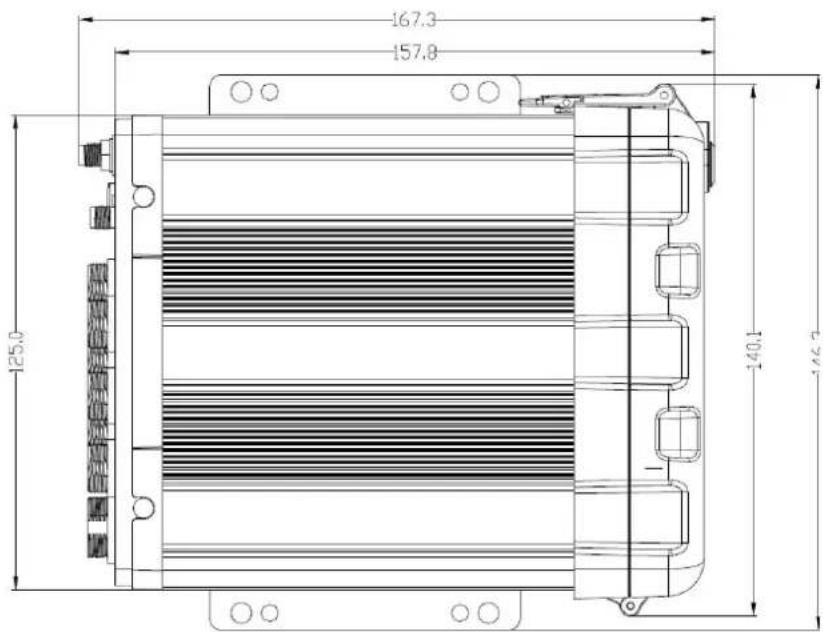
FRONT PANEL

REAR PANEL
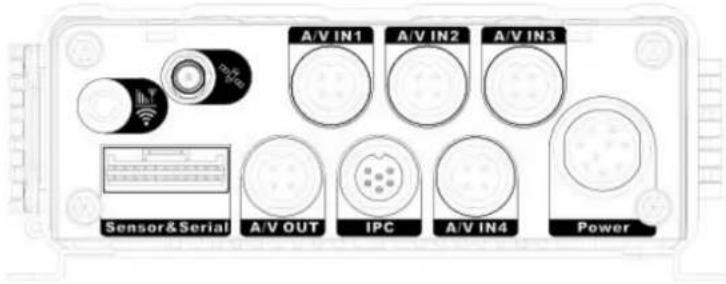
| Serial No. | Description | |
| 1 | Power | DC 8-36 V Power Input |
| 2 | Sensor&Serial | The Interfaces of Serial Port and Switch |
| 3 | A/V IN1~4 | Audio & Video Input 1-4 |
| 4 | A/V OUT | Audio & Video Output |
| 5 | IPC | The Interface of PON Power Supply |
| 6 | GPS Antenna Interface |
1.5. DEFINITION AND PICTURES OF EXTERNAL CABLES
ALARM CABLE DEFINITION


natural_image
Coiled electrical cable with wires and connectors, no visible text or symbols
natural_image
Close-up of a black and yellow cable with connector ends (no text or symbols visible)Alarm and Serial Cables A/V OUT Cable
2. FREQUENTLY ASKED QUESTIONS
1) The system can't start?
Usually this problem results from the incorrect power connection. Please follow below steps to check the power connection:
-
Check the input power, whether the power wire is connected correctly, whether the ground wire is connected back to the battery, and whether the fuse on the power wire is in good condition.
-
Check whether the ACC signal wire input to the power is with voltage higher than 7 V.
-
Check whether the device key is closed.
2) The MDVR restarts uninterruptedly?
Please follow below steps to check it:
-
Check whether the voltage of MDVR is insufficient. If the voltage is less than the start-up voltage of the device, the device would always restart.
-
The problem in hard disk/SD card may cause the failure to start. Take off the storage part and check
whether it is broken down.
3) The device can't record?
Usually this problem results from the storage disk or camera. Please follow below steps to check if
-
Check whether the storage disk is installed, whether it is in good contact, and whether the disk car be read normally in computer.
-
Check whether the storage disk is formatted. The storage disk should be formatted before normally storing record files.
-
Check whether there is video signal input into the device from camera, and whether there is video/image on the screen.
4) There is no voice in record file?
Please follow below steps to check it:
-
Check whether there is an external pickup, or whether the camera features with the function of audio collection.
-
Access to Video Channel Settings, check if Audio is set on.
-
There must be video input into the channel for recording and it must record normally.
5) The GPS works abnormally?
Please follow below steps to check it:
-
Check whether the GPS antenna is installed correctly. There is a silk print logo on the GPS antenna holder behind the host device.
-
Check whether the antenna receiver is sheltered. It should not be covered by any stuff, which may cause it not to receive signals.
-
Environmental influence such as tree shades, being inside tunnel, driving near tall building or elevated roads, thunderstorms or other weather influence, etc. can also cause signal loss or receiving wrong signals.
6) The device can't shutdown in ignition switch mode?
Please follow below steps to check it:
-
Check if the ACC line connection mode is correct; and check whether there is voltage on ACC yellow line when the key is turned off.
-
If the device has been set with schedule recording, it can't shutdown if it is still during recording tir of the task table.
- User Manual For
- Notice
- Copyright
- Guarantee & Warnings
- 1) Electrical Apparatus Safety
- 2) Transportation
- 3) Installation
- 4) Requirements on Engineers & Technicians
- 5) Requirements on Environment
- 6) Accessories
- PRODUCT CHARACTERISTICS
- OVERVIEW
- SPECIFICATIONS
- SYSTEM DIAGRAM
- EXTERNAL INTERFACE
- DEFINITION AND PICTURES OF EXTERNAL CABLES
- FREQUENTLY ASKED QUESTIONS
- 1) The system can't start?
- 2) The MDVR restarts uninterruptedly?
- 3) The device can't record?
- 4) There is no voice in record file?
- 5) The GPS works abnormally?
- 6) The device can't shutdown in ignition switch mode?
Brand : Epcom
Model : XMR401AHD
Category : Dictaphone