P 1212-8 - USB Hub Pentagram - Free user manual and instructions
Find the device manual for free P 1212-8 Pentagram in PDF.


| Product Type | USB 3.0 PCI Express Host Controller |
| Model | P 1212-8 |
| Brand | Pentagram |
| Interface | PCI Express |
| USB Standard | SuperSpeed USB 3.0 |
| Number of Ports | 4 |
| Transfer Rate | Up to 5 Gb/s |
| Power Input | 4-pin Molex Mini power connector |
| Power Output per Port | +5V / 900mA |
| Operating Temperature | 0°C to 57°C |
| Storage Temperature | -20°C to 85°C |
| Operating Humidity | 5% to 95% (non-condensing) |
| System Requirements | Windows XP/Vista/7, available PCI slot, CD-ROM drive |
| Package Contents | Host controller, drivers CD, quick installation guide, warranty card |
| Dimensions (Approx.) | 120 x 60 x 20 mm |
| Weight (Approx.) | 50 g |
| Compliance | CE |
Frequently Asked Questions - P 1212-8 Pentagram
User questions about P 1212-8 Pentagram
0 question about this device. Answer the ones you know or ask your own.
Ask a new question about this device
Download the instructions for your USB Hub in PDF format for free! Find your manual P 1212-8 - Pentagram and take your electronic device back in hand. On this page are published all the documents necessary for the use of your device. P 1212-8 by Pentagram.
USER MANUAL P 1212-8 Pentagram
natural_image
Simple line drawing of a trash bin with crossed lines indicating no waste or restriction, and a solid black rectangle below (no text or symbols)natural_image
Close-up of a computer motherboard with numbered components (1, 2, 3), no visible text or symbols beyond labelsInstalacja
Instalacja karty
IMPORTANT INFORMATION....3
SAFETY PRECAUTIONS....3
INFORMATION CONCERNING WASTE ELECTRONIC EQUIPMENT..3
PACKAGE CONTENTS....4
SYSTEM REQUIREMENTS....4
DEVICE OVERVIEW....4
INSTALLATION....5
ADAPTER INSTALLATION....5
DRIVER INSTALLATION....5
SPECIFICATION....6
Important information
Safety precautions
- Do not use or store the device in dusty places, where the humidity is high or in extreme temperatures.
- Before removing adapter from protective foil and installing it inside the computer, it's recommended to discharge electrostatic charge from your body. To do this simply touch grounded metal part of the computer case.
- Do not touch PCI connector contacts or any other electronic components. It's recommended to handle adapter by its edges or bracket.
- Before installing adapter inside of the computer, make sure that it's turned off and unplugged from power outlet.
- Do not modify or fix the device yourself in any way, it might void the guarantee.
- Do not drop or shake the device.
Information concerning waste electronic equipment
The markings on the device and in the attached documentation indicate that it cannot be disposed of along with unsegregated general black bag waste when withdrawn from use. The device must be recycled or processed in another way to recover reusable materials and neutralize hazardous components.

natural_image
Simple line drawing of a trash bin with two crossed lines indicating no waste or restriction (no text or symbols)The users should contact recycling/recovery authorities to determine how the device is to be disposed of in an environment-friendly manner.
NOTE: All information and technical data is subject to change without previous notice and/or indication in this manual.
Copyright ©2011 PENTAGRAM
All rights reserved; copying and reproduction is strictly forbidden.
Package Contents
- USB 3.0 Super-Speed PCI Express Host Controller 4xUSB 3.0 P1212-8
- Drivers on CD
- Quick Installation Guide
- Warranty card
If any of the above items are missing, please contact your reseller.
System Requirements
You must have at least the following:
• A computer PC with an available PCI slot
- Windows XP, Vista, 7
- CD-ROM Drive
Device overview
- USB 3.0 4 ports
- Connector PCI
- 4-Pin Internal Power Connector (type Molex Mini)
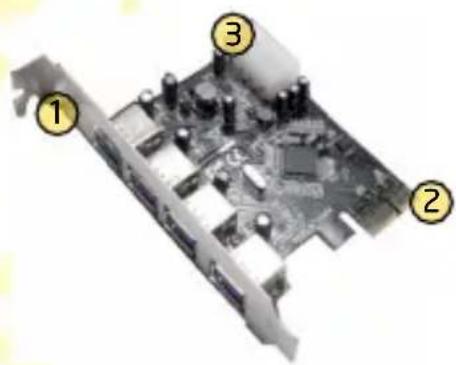
natural_image
Close-up of a computer motherboard with numbered components (1, 2, 3), no visible text or symbols beyond labelsInstallation
Adapter installation
- Shut down the operating system, then turn the computer off and disconnect it from mains.
- Open the computer case and locate an available PCI slot on the motherboard.
- Insert the adapter into the PCI slot. Ensure that the card's connector is placed securely in the slot. It may be necessary to apply force to the card to ensure it is firmly seated. Attach the adapter to the computer chassis with a screw. Connect the auxiliary power connector with 4-pin molex mini. Close the case.
- Turn the computer on and wait for the operating system to launch. Log on, if necessary.
- If the Add New Hardware Wizard appears, click Cancel and follow steps on the next page to install adapters drivers.
Driver installation
- Insert the supplied CD into the CD-ROM drive. The startup menu should open automatically. Under Windows Vista and Windows 7, you may need to click Run: PentaSetup.EXE in the AutoPlay dialog. If the menu does not open automatically, select Start > Run (under Windows Vista and 7: Start > All Programs > Accessories > Run). In the Open field in the Run dialog, type X:\PentaSetup.exe (where "X" is the letter corresponding to your optical drive), then press Enter.
- During CD menu start, you may need to click Allow (Windows Vista) or Yes (Windows 7) in the User Account Control dialog, and provide an administrative user name and password if the current user does not have administrative privileges.
- Click the Install button, to begin configuration wizard.
- If it is necessary to reboot the computer, select Yes, I want to restart my computer now, to restart the computer after the installation, or No, I will restart my computer later, to restart the computer later.
- Click Finish to complete the installer operation.
To verify the drivers are installed, go to “Control Panel->System->Device Manager”, in the Universal Serial Bus controllers, hardware should be detected under the name “Electronics Remesas USB 3.0 Host Controller” and “Electronics Renesas USB 3.0 Root Hub”.
Specification\*
PC Interface: PCI Express
Type: Universal Serial Bus 3.0
Transfer rate: up to 5Gb/s
Power input: 4-pin power connector (type molex mini)
Power output: +5V/900mA(each port)
Temperature:
operation: 0°C-57°C
storage: -20°C-85°C
Humidity:
operation: 5%-95%, without condensation
CE ^11
DEKLARACJA ZGODNOŚCI
Importer: PENTAGRAM Europe Sp. z o.o.
Brand : Pentagram
Model : P 1212-8
Category : USB Hub