
IN3146 - Projector INFOCUS - Free user manual and instructions
Find the device manual for free IN3146 INFOCUS in PDF.


| Product Type | Video Projector |
| Model | IN3146 |
| Brand | Infocus |
| Display Technology | DLP |
| Resolution | XGA (1024 x 768) |
| Brightness | 3600 Lumens |
| Contrast Ratio | 15000:1 |
| Lamp Life | 3000 hours (Normal), 5000 hours (Eco) |
| Lamp Power | 280 W |
| Zoom | Manual, 1.3x |
| Lens Shift | Vertical: ±15% |
| Keystone Correction | Vertical: ±30° |
| Projection Size | 40" to 300" |
| Throw Ratio | 1.5 to 1.9:1 |
| Inputs | HDMI x2, VGA x2, S-Video, Composite, USB, RS-232 |
| Audio Output | 3.5mm jack, 10W speaker (mono) |
| Noise Level | 32 dB (Normal), 28 dB (Eco) |
| Power Consumption | 350 W (Normal), 260 W (Eco), 0.5 W (Standby) |
| Dimensions (W x D x H) | 315 x 230 x 110 mm |
| Weight | 3.2 kg |
| Operating Temperature | 5°C to 40°C |
| Cleaning Instructions | Use a soft, dry cloth for exterior. Clean air filter every 100 hours. |
| Replaceable Parts | Lamp module, air filter |
| Safety Features | Auto power-off, overheat protection, Kensington lock |
Frequently Asked Questions - IN3146 INFOCUS
User questions about IN3146 INFOCUS
0 question about this device. Answer the ones you know or ask your own.
Ask a new question about this device
Download the instructions for your Projector in PDF format for free! Find your manual IN3146 - INFOCUS and take your electronic device back in hand. On this page are published all the documents necessary for the use of your device. IN3146 by INFOCUS.
USER MANUAL IN3146 INFOCUS
IN3144/IN3146/IN3148HD
User's Guide
Mode d'emploi
Benutzeranleitung
natural_image
Exterior view of a black projector with blue lens and control buttons (no visible text or symbols)Copyright
This publication, including all photographs, illustrations and software, is protected under international copyright laws, with all rights reserved. Neither this manual, nor any of the material contained herein, may be reproduced without written consent of the author.
© Copyright 2017
Disclaimer
The information in this document is subject to change without notice. The manufacturer makes no representations or warranties with respect to the contents hereof and specifically disclaims any implied warranties of merchantability or fitness for any particular purpose. The manufacturer reserves the right to revise this publication and to make changes from time to time in the content hereof without obligation of the manufacturer to notify any person of such revision or changes.
Trademark Recognition

Kensington is a U.S. registered trademark of ACCO Brand Corporation with issued registrations and pending applications in other countries throughout the world.

HIGH-DEFINITION MULTIMEDIA INTERFACE
HDMI, the HDMI Logo, and High-Definition Multimedia Interface are trademarks or registered trademarks of HDMI Licensing LLC in the United States and other countries.

MHL, the MHL logo, and Mobile High-Definition Link are trademarks or registered trademarks of MHL licensing, LLC.
Apple, Macintosh, and PowerBook are trademarks or registered trademarks of Apple Computer, Inc. IBM is a trademark or registered trademark of International Business Machines, Inc. Microsoft, PowerPoint, and Windows are trademarks or registered trademarks of Microsoft Corporation. Adobe and Acrobat are trademarks or registered trademarks of Adobe Systems Incorporated. DLP®, DLP Link and the DLP logo are registered trademarks of Texas Instruments and BrilliantColor™ is a trademark of Texas Instruments. InFocus, In Focus, and INFOCUS (stylized) are either registered trademarks or trademarks of InFocus Corporation in the United States and other countries.
All other product names used in this manual are the properties of their respective owners and are acknowledged.
Important Safety Information

Important:
It is strongly recommended that you read this section carefully before using the projector. These safety and usage instructions will ensure that you enjoy many years of safe use of the projector. Keep this manual for future reference.
Symbols Used
Warning symbols are used on the unit and in this manual to alert you of hazardous situations.
The following styles are used in this manual to alert you to important information.
Note:
Provides additional information on the topic at hand.

Important:
Provides additional information that should not be overlooked.

Caution:
Alerts you to situations that may damage the unit.

Warning:
Alerts you to situations that may damage the unit, create a hazardous environment, or cause personal injury.
Throughout this manual, component parts and items in the OSD menus are denoted in bold font as in this example:
"Push the Menu button on the remote control to open the Main menu."
General Safety Information
Do not open the unit case. Aside from the projection lamp, there are no user-serviceable parts in the unit. For servicing, contact qualified service personnel.
➢ Follow all warnings and cautions in this manual and on the unit case.
The projection lamp is extremely bright by design. To avoid damage to eyes, do not look into the lens when the lamp is on.
Do not place the unit on an unstable surface, cart, or stand.
- Avoid using the system near water, in direct sunlight, or near a heating device.
Do not place heavy objects such as books or bags on the unit.
Note:
As with any bright light source, do not stare into the beam, RG2 IEC 62471-5:2015
Projector Installation Notice
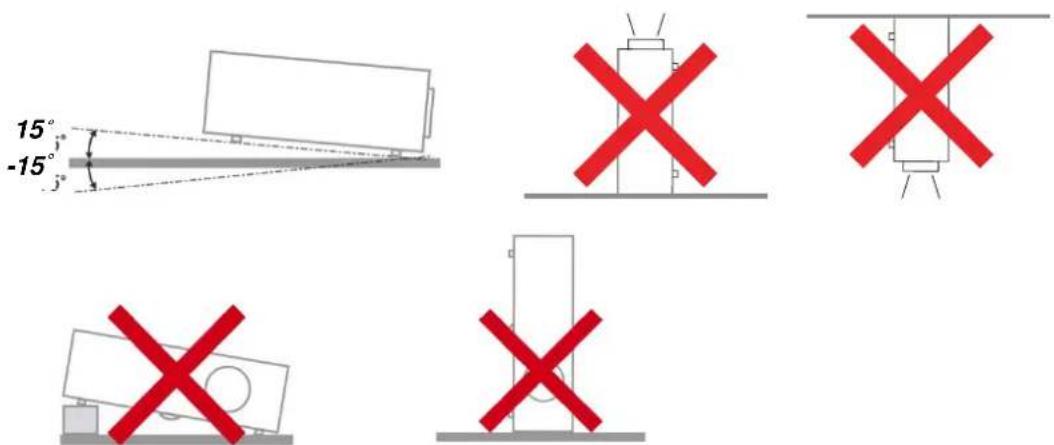
Place the projector in a horizontal position
The tilt angle of the projector should not exceed 15 degrees. In addition, the projector should not be installed in any other way except desktop and ceiling mount positions. Otherwise lamp life could decrease dramatically, and may lead to other unpredictable damage.
Allow at least 50 cm (19.69 inch) clearance around the exhaust vent.
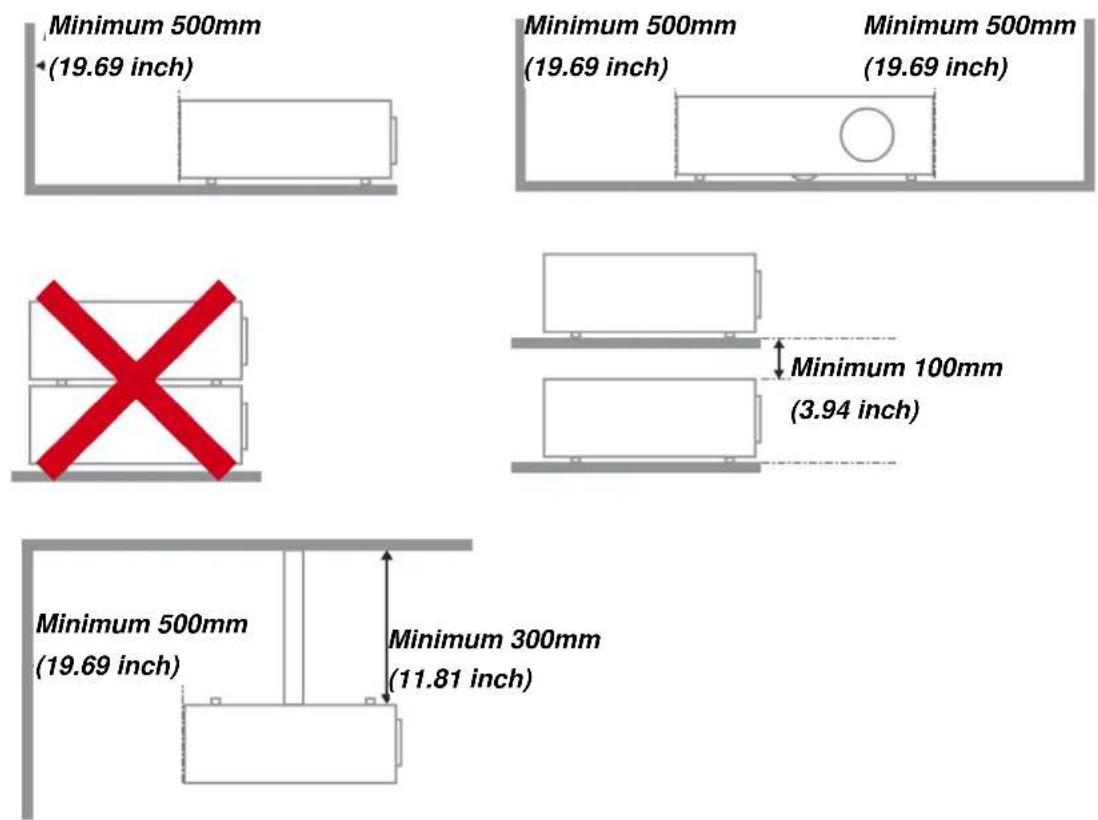
➢ Ensure that the intake vents do not recycle hot air from the exhaust vent.
When operating the projector in an enclosed space, ensure that the surrounding air temperature within the enclosure does not exceed operation temperature while the projector is running, and the air intake and exhaust vents are unobstructed.
All enclosures should pass a certified thermal evaluation to ensure that the projector does not recycle exhaust air, as this may cause the device to shutdown even if the enclosure temperature is with the acceptable operation temperature range.
Power Safety
▶ Only use the supplied power cord.
Do not place anything on the power cord. Place the power cord where it will not be in the way of foot traffic.
Remove the batteries from the remote control when storing or not in use for a prolonged period.
Replacing the Lamp
Replacing the lamp can be hazardous if done incorrectly. See Replacing the Projection Lamp on page 46 for clear and safe instructions for this procedure. Before replacing the lamp:
▶ Unplug the power cord.
- Allow the lamp to cool for about one hour.
Cleaning the Projector
➢ Unplug the power cord before cleaning. See Cleaning the Projector page 50.
- Allow the lamp to cool for about one hour.
Regulatory Warnings
Before installing and using the projector, read the regulatory notices in the Regulatory Compliance on page 64.
Important Recycle Instructions:

Lamp(s) inside this product contain mercury. This product may contain other electronic waste that can be hazardous if not disposed of properly. Recycle or dispose in accordance with local, state, or federal Laws. For more information, contact the Electronic Industries Alliance at WWW.EIAE.ORG. For lamp specific disposal information check WWW.LAMPRECYCLE.ORG.
Symbol Explanations

DISPOSAL: Do not use household or municipal waste collection services for disposal of electrical and electronic equipment. EU countries require the use of separate recycling collection services.
About this Manual
This manual is intended for end users and describes how to install and operate the DLP projector. Wherever possible, relevant information—such as an illustration and its description—has been kept on one page. This printer-friendly format is both for your convenience and to help save paper, thereby protecting the environment. It is suggested that you only print sections that are relevant to your needs.
Table of Contents
GETTING STARTED....1
PACKING CHECKLIST .... 1
VIEWS OF PROJECTOR PARTS....2
Front-right View 2
Top view—On-screen Display (OSD) buttons and LEDs....3
Rear view....4
Bottom view....6
REMOTE CONTROL PARTS 7
REMOTE CONTROL OPERATING RANGE....9
PROJECTOR AND REMOTE CONTROL BUTTONS....9
SETUP AND OPERATION....10
INSERTING THE REMOTE CONTROL BATTERIES 10
TURNING THE PROJECTOR ON AND OFF 11
SETTING AN ACCESS PASSWORD (SECURITY LOCK) 13
ADJUSTING THE PROJECTOR LEVEL 15
ADJUSTING THE ZOOM, FOCUS AND KEYSTONE 16
ADJUSTING THE VOLUME 16
ON-SCREEN DISPLAY (OSD) MENU SETTINGS....17
OSD MENU CONTROLS 17
Navigating the OSD....17
SETTING THE OSD LANGUAGE 18
OSD MENU OVERVIEW 19
IMAGE MENU 22
Computer Menu 23
Advanced Features 24
White Balance....25
Color Manager....26
SETTINGS 1 MENU 27
Audio 28
Advanced 1 Features....29
Advanced 2 Features....31
SETTINGS 2 MENU 32
Status 33
Advanced 1 Features....34
Advanced 2 Features....44
MAINTENANCE AND SECURITY 46
REPLACING THE PROJECTION LAMP....46
Resetting the Lamp Timer....49
CLEANING THE PROJECTOR....50
Cleaning the Lens 50
Cleaning the Case....50
USING THE CABLE LOCK SYSTEM AND SECURITY BAR 51
Using the Cable Lock....51
Using the Security Bar....51
TROUBLESHOOTING....52
COMMON PROBLEMS AND SOLUTIONS 52
TIPS FOR TROUBLESHOOTING 52
LED ERROR MESSAGES....53
IMAGE PROBLEMS....54
LAMP PROBLEMS 54
REMOTE CONTROL PROBLEMS 55
AUDIO PROBLEMS 55
HAVING THE PROJECTOR SERVICED 55
HDMI Q & A 56
SPECIFICATIONS....57
SPECIFICATIONS....57
PROJECTION DISTANCE VS. PROJECTION SIZE (XGA)....58
Projection Distance and Size Table.... 58
PROJECTION DISTANCE VS. PROJECTION SIZE (WXGA) 59
Projection Distance and Size Table....59
PROJECTION DISTANCE VS. PROJECTION SIZE (1080P)....60
Projection Distance and Size Table....60
TIMING MODE TABLE 61
PROJECTOR DIMENSIONS 63
REGULATORY COMPLIANCE....64
FCC WARNING 64
CANADA 64
SAFETY CERTIFICATIONS....64
APPENDIX I....65
SERIAL COMMUNICATION....65
GETTING STARTED
Packing Checklist
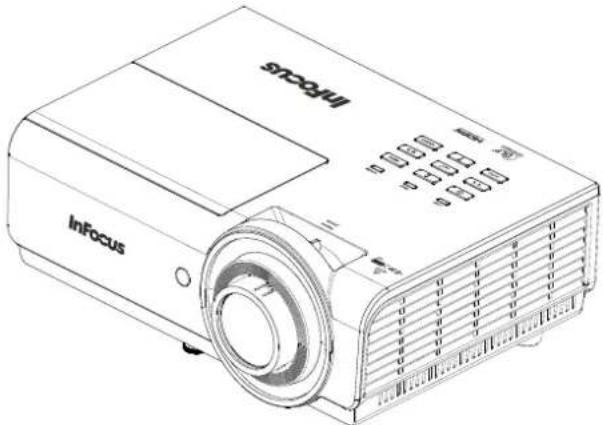
Carefully unpack the projector and check that the following items are included:
natural_image
Line drawing of a InFocus projector with no visible text or symbols on the device bodyDLP PROJECTOR
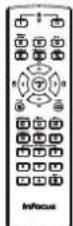
REMOTE CONTROL
(BATTERIES NOT INCLUDED)
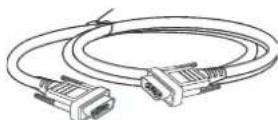
VGA CABLE
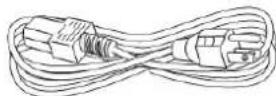
POWER CORD

CD-ROM
(THIS USER'S MANUAL)
QUICK START GUIDE

SAFETY & WARRANTY BOOKLET
Contact your dealer immediately if any items are missing, appear damaged, or if the unit does not work. It is recommended that you keep the original packing material in case you ever need to return the equipment for warranty service.

Caution:
Do not place the project in direct sunlight, humid, greasy or dusty places or in places where the projector may come into contact with smoke or steam.
Views of Projector Parts
Front-right View
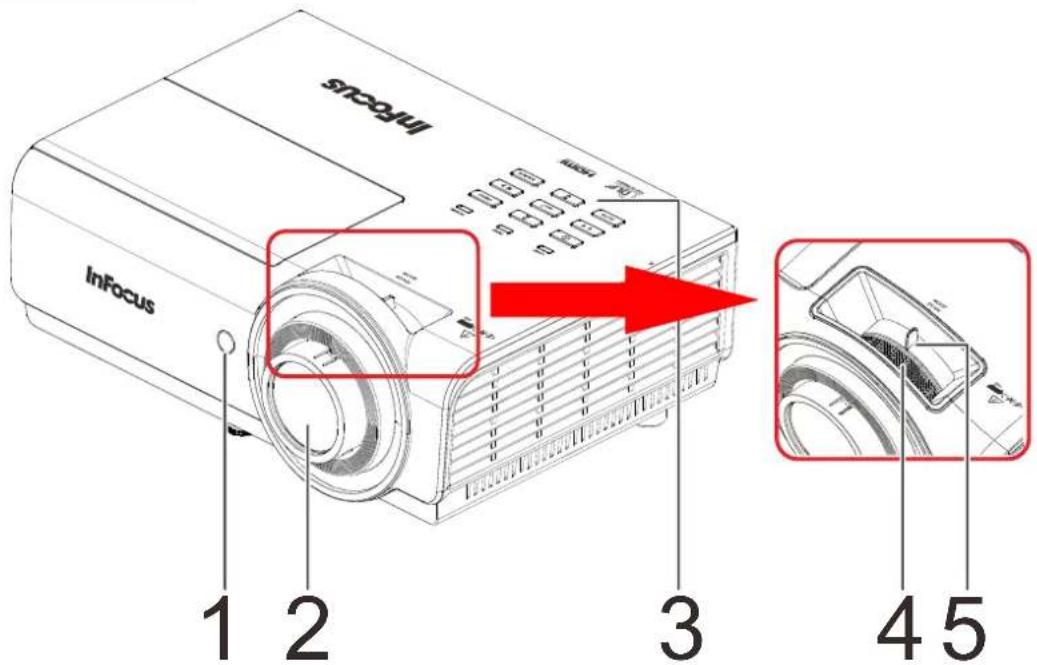
| ITEM | LABEL | DESCRIPTION | SEE PAGE |
| 1. | IR receiver Receive | R signal from remote control. | |
| 2. | Lens | Projection Lens. | |
| 3. | Keypad See Top view—Keypad and LEDs. | 3 | |
| 4. | Focus ring Focuses the projected image. | 16 | |
| 5. | Zoom ring Enlarges the projected image. | ||

Important:
Do not block ventilation openings. Locate the projector in a well-ventilated area without obstructions to intake or exhaust vents. Do not place the projector on a tablecloth or other soft covering that may block the vents. Ventilation openings on the projector allow for good air circulation.
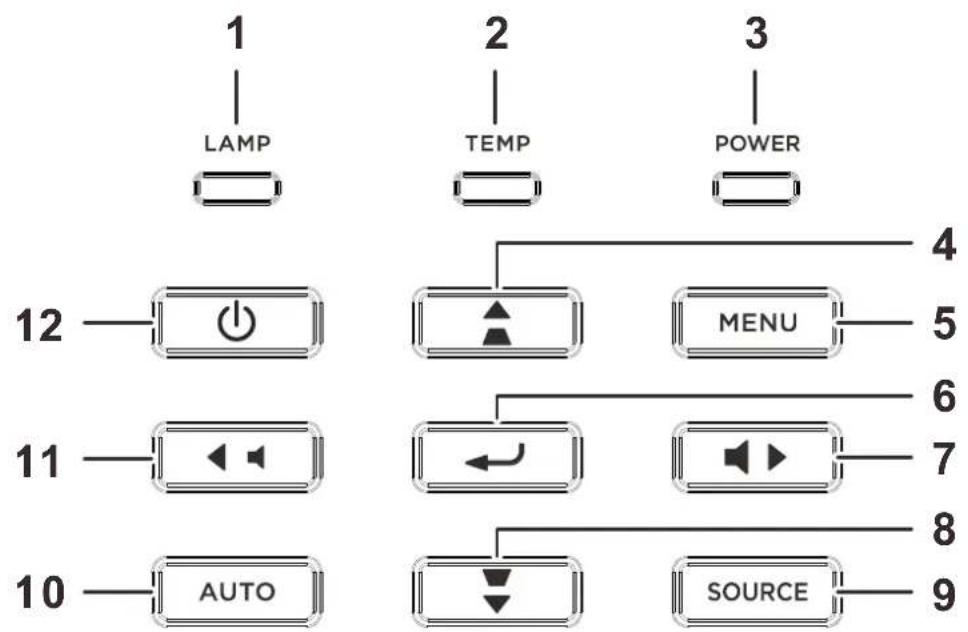
Top view—Keypad and LEDs
flowchart
graph TD
    A["1 LAMP"] --> B["12"]
    C["2 TEMP"] --> D["MENU"]
    E["3 POWER"] --> F["11"]
    G["10 AUTO"] --> H["10"]
    B --> I["4"]
    D --> J["5"]
    F --> K["6"]
    H --> L["7"]
    I --> M["8"]
    J --> N["9"]
    K --> O["8"]
    L --> P["SOURCE"]
| ITEM | LABEL | DESCRIPTION | SEE PAGE | |
| 1. | LAMP LED Blinking | Red Error code | 53 | |
| 2. | TEMP LED Red Over Temperature | T1 | 53 | |
| 3. | POWER LED | Green Lamp | Ready | 53 |
| Blinking Green | Start, Cooling or error code. | |||
| 4. |  | Navigates the OSD. Quick Menu – For Keystone | 17 | |
| 5. | Menu Open and exit | OSD menus. | 17 | |
| 6. |  | Enter or confirm highlighted OSD menu item. | 17 | |
| 7. |  | Navigate and change settings in the OSD. Quick Menu – For Volume | 17 | |
| 8. |  | Navigates the OSD. Quick Menu – For Keystone | 17 | |
| 9. | SOURCE Enter the Source menu. | 17 | ||
| 10. | AUTO Optimizes image size, position, and resolution. | |||
| 11. |  | Navigate and change settings in the OSD. Quick Menu – For Volume | 17 | |
| 12. |  | Turns the projector On or Off. | 17 | |
Rear view
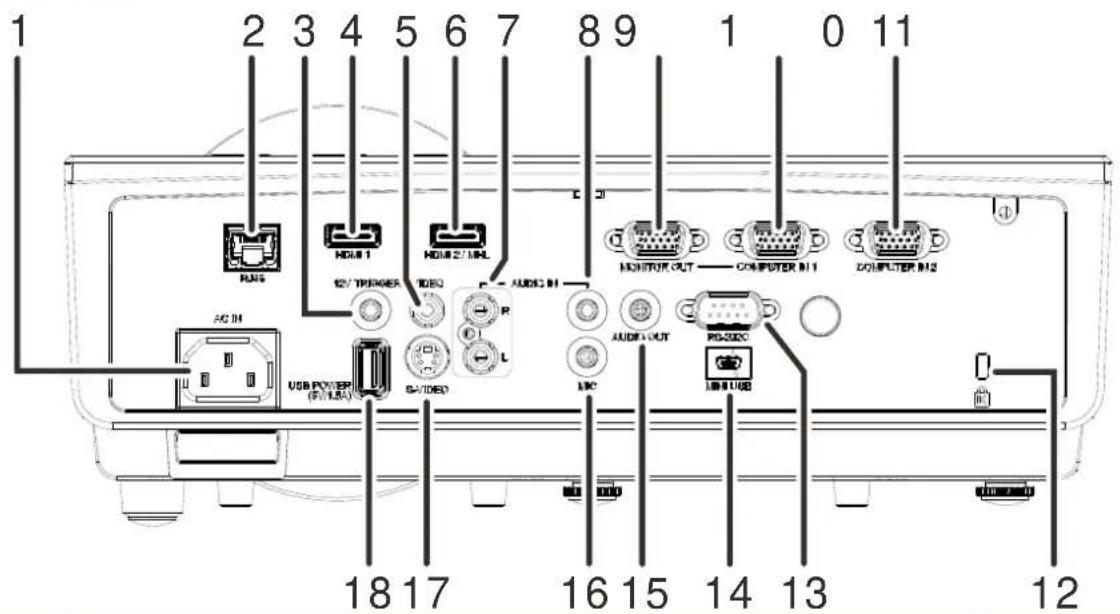
| ITEM | LABEL | DESCRIPTION | SEE PAGE |
| 1. | AC IN Connect a POWER cable. | 11 | |
| 2. | RJ45 Connect a LAN cable from Ethernet. | ||
| 3. | 12V TRIGGER | When connected to the screen through a commercially available cable, the screen deploys automatically on start up of the projector. The screen retracts when the projector is powered off (see notes below). | |
| 4. | HDMI1 Connect an HDMI cable from a HDMI device. | ||
| 5. | VIDEO Connect a COMPOSITE cable from a video device. | ||
| 6. | HDMI2/MHL | Connect the HDMI cable from a HDMI device. Connect the MHL cable from a MHL-compatible device. Note: For some MHL compatible devices, whose output is not thru micro-USB, an extra cable adaptor may be required. | |
| 7. | AUDIO IN (L and R) Connect an AUDIO cable from an audio device. | ||
| 8. | AUDIO IN Connect an AUDIO cable from an audio device. | ||
| 9. | MONITOR OUT (COMPUTER IN 1) | Connect a RGB cable to an external monitor/display. | |
| 10. | COMPUTER IN 1 Connect a RGB cable from a computer. | ||
| 11. | COMPUTER IN 2 Connect a RGB cable from a computer. | ||
| 12. | Kensington Lock | Secure to a permanent object with a Kensington® Lock system. | 51 |
| 13. | RS-232C Connect a PS-232 serial port cable for remote control. | ||
| 14. | MINI USB | Service use only. | |
| 15. | AUDIO OUT Connect an AUDIO cable to an audio amplifier. | ||
| 16. | MIC | Connect a Microphone for use.Note: All other audio sources are muted when MIC is On. | 28 |
| 17. | S-VIDEO Connect an | S-VIDEO cable from a video device. | |
| 18. | USB POWER (5V/1.5A) | Connect an USB cable for power supply. | |
DC12V Trigger Note:
- To use this feature, you must plug in the connector before turning on/off the projector.
- Screen controllers are supplied and supported by screen manufacturers.
- Do not use this jack for anything other than intended use.
Connectivity Note:
If your video equipment has multiple connection options, please note that HDMI provides the highest quality image, followed by Component and then S-video. Composite provides the least quality image.

Warning:
As a safety precaution, disconnect all power to the projector and connecting devices before making connections.
Bottom view
![82mm [3.2"] 144mm [5.7"] 54mm [2.1"] 125mm [4.9"] 1 155mm [6.1"] 46mm [1.8"] 31mm [1.2"] 2 1 2 1 M4 M4 D0](/content/2026/05/865665/images/09c90054177040765b6318d113964a69c8cd2277e68e650954539381d439a7ff.jpg)
| ITEM | LABEL | DESCRIPTION | SEE PAGE |
| 1. | Ceiling support holes | Contact your dealer for information on mounting the projector on a ceiling. | |
| 2. | Tilt adjustor Rotate adjuster lever to adjust angle position. | 15 | |
Note:
It is recommended to use InFocus ceiling mount p/n PRJ-MNT-UNIV. Refer to the installation guide that comes with the mount for more information. The warranty does not cover any damage caused by use of non-approved ceiling mount kits or by installing in an improper location.
Remote Control Parts
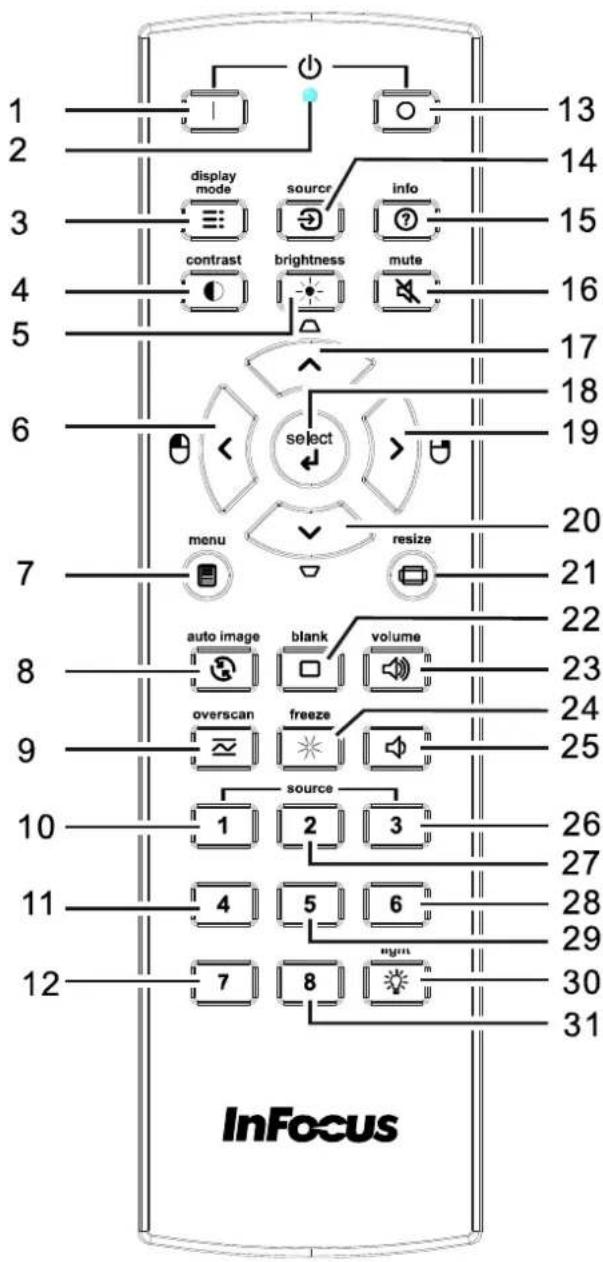

Important:
- Avoid using the projector with bright fluorescent lighting turned on. Certain high-frequency fluorescent lights can disrupt remote control operation.
- Be sure nothing obstructs the path between the remote control and the projector. If the path between the remote control and the projector is obstructed, you can bounce the signal off certain reflective surfaces such as projector screens.
- The buttons and keys on the projector have the same functions as the corresponding buttons on the remote control. This user's manual describes the functions based on the remote control.
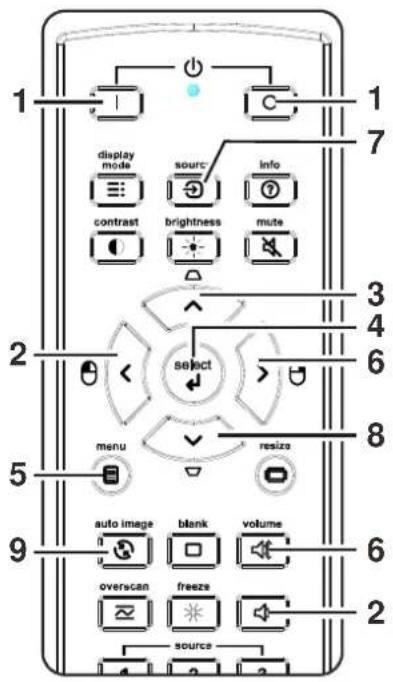
| ITEM | LABEL | DESCRIPTION | SEE PAGE |
| 1. | Power ON Turn the projector on. | 11 | |
| 2. | LED indicator Only lights when the remote keys are pressed. | ||
| 3. | Display Mode Choose a suitable preset mode for usage environment. | ||
| 4. | Contrast Display the Contrast setting bar and use the right and left keys to adjust. | ||
| 5. | Brightness | Display the Brightness setting bar and use the right and left keys to adjust. | |
| 6. | Left cursor | When the OSD is displayed, this button navigates to the left. | 17 |
| 7. | Menu Display the OSD menu. | ||
| 8. | Auto image Re-synchronize the PC image. | ||
| 9. | Overscan Display digital Zoom adjust bar. | ||
| 10. | Source-1 | Computer In 1 | |
| 11. | Source-4 | HDMI 2 | |
| 12. | Source-7 | N/A | |
| 13. | Power OFF Turn the projector off. | 11 | |
| 14. | Source Display the source menu. | 17 | |
| 15. | Info Display projector information. | ||
| 16. | Mute Mute the audio. | ||
| 17. | Up cursor / Keystone+ | When the OSD is displayed, this button navigates up the menu. Otherwise it adjusts keystone. | 17 |
| 18. | Select | Enter and confirm settings in the OSD. | |
| 19. | Right cursor | When the OSD is displayed, this button navigates to the right. | |
| 20. | Down cursor / Keystone - | When the OSD is displayed, this button navigates down the menu. Otherwise it adjusts keystone. | |
| 21. | Resize | Change the image aspect ratio. | |
| 22. | Blank Blank the screen. | ||
| 23. | Volume+ | Increase the volume. | 16 |
| 24. | Freeze | Freeze video. | |
| 25. | Volume- | Decrease the volume. | 16 |
| 26. | Source-3 | HDMI 1 | |
| 27. | Source-2 | Computer In 2 | |
| 28. | Source-6 | S-Video | |
| 29. | Source-5 | Composite Video | |
| 30. | Light | Turns the remote control backlight on or off. | |
| 31. | Source-8 | N/A | |
Note: Mouse control function is not available in IN3144, IN3146 and IN3148HD.
Remote Control Operating Range
The remote control uses infrared transmission to control the projector. It is not necessary to point the remote directly at the projector. Provided you are not holding the remote perpendicular to the sides or the rear of the projector, the remote will function well within a radius of about 7 meters (23 feet) and 15 degrees above or below the projector level. If the projector does not respond to the remote control, move a little closer.
Projector and Remote Control Buttons
The projector can be operated using the remote control. All operations can be carried out with the remote control.
SETUP AND OPERATION
Inserting the Remote Control Batteries
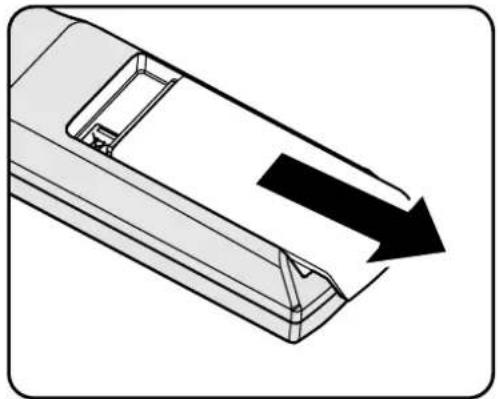
- Remove the battery compartment cover by sliding the cover in the direction of the arrow.
natural_image
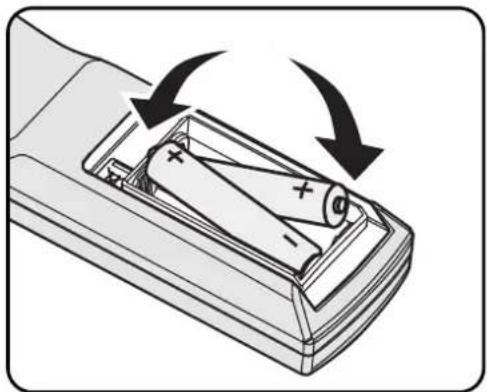
Diagram of a mechanical component with an arrow indicating direction (no text or symbols present)- Insert batteries (not included) as shown in the illustration.
natural_image
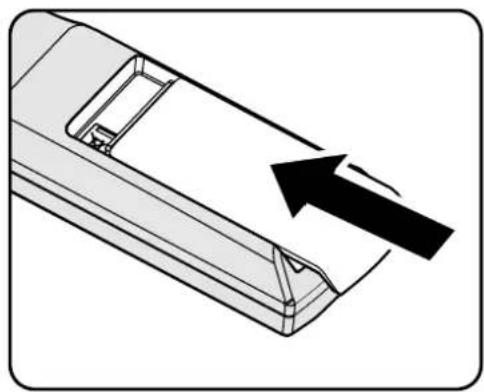
Diagram of a remote control panel with battery and power connections (no text or symbols)- Replace the cover.
natural_image
Diagram of a vehicle's side panel with an arrow indicating direction (no text or symbols present)
Caution:
- Only use AA batteries (Alkaline batteries are recommended).
- Dispose of used batteries according to local ordinance regulations.
- Remove the batteries when not using the projector for prolonged periods.
- Do not mix old and new batteries, or mix battery types.
Note:
Batteries are not normally included with InFocus projectors.
Turning the projector on and off
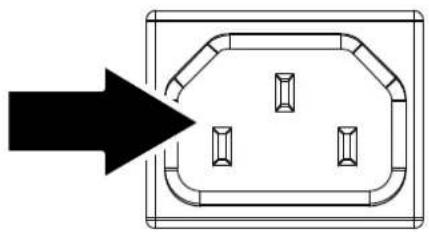
- Connect the power cord to the projector. Connect the other end to a wall outlet.
The ⏻ POWER LED on the projector light.
- Turn on the connected devices.
- Ensure the POWER LED is not flashing. Then press the POWER button to turn on the projector.
The projector splash screen displays and connected devices are detected.
See Setting an Access Password (Security Lock) on page 13 if the security lock is enabled.
- If more than one input device is connected, press the SOURCE button and use ▲▼ to scroll among the devices.
(Component is supported using a RGB to COMPONENT ADAPTER.)
natural_image
Pure diagram of a rectangular electrical socket with four internal compartments and an arrow pointing to one (no text or symbols)InFocus
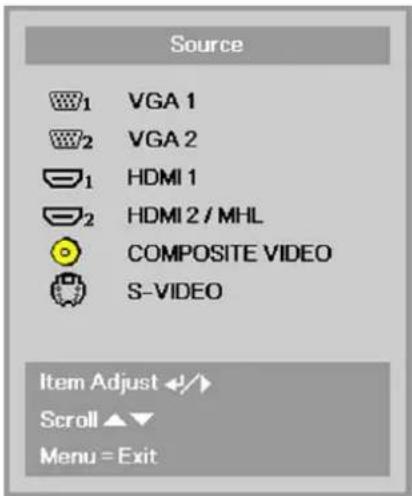
• VGA1 / VGA2: Analog RGB1 / RGB2
• HDMI1: High-Definition Multimedia Interface
- HDMI2 /MHL: High-Definition Multimedia Interface/ Mobile High-Definition Link
• Composite Video: Traditional composite video
• S-Video: Super video (Y/C separated)
- To turn the projector off, press the POWER OFF button. When the "Power Off? Press Power again" message appears, press the POWER OFF button. The projector turns off.

Power Off?
Press Power again

Caution:
Do not unplug the power cord until the POWER LED stops flashing—indicating the projector has cooled down.
Setting an Access Password (Security Lock)
You can use the four arrow buttons on the remote to set a password and prevent unauthorized use of the projector. When enabled, the password must be entered after you power on the projector. (See Navigating the OSD on page 17 and Setting the OSD Language on page 18 for help on using OSD menus.)

Important:
Keep the password in a safe place. Without the password, you will not be able to use the projector. If you lose the password, contact InFocus Support for information on clearing the password.
- Press the MENU button to open the OSD menu.
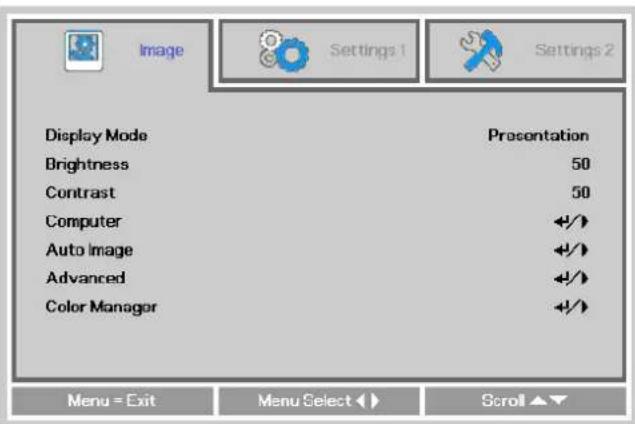
- Press the ◀▶ buttons to move to the Settings 1 menu. Press the ▲▼ buttons to select Advanced 1.
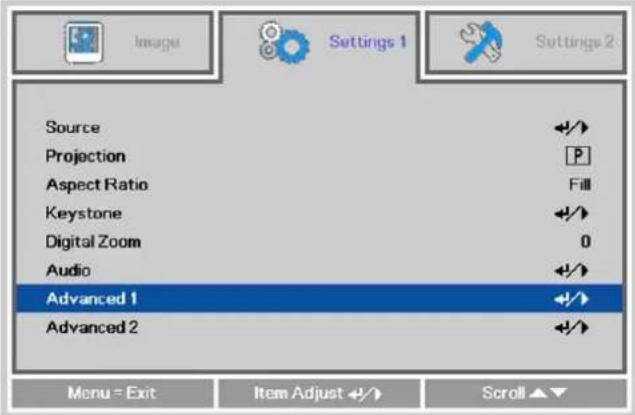
- Press ←(Enter) or ▶ to enter the Advanced 1 sub menu. Press the ▲▼ buttons to select Security Lock.
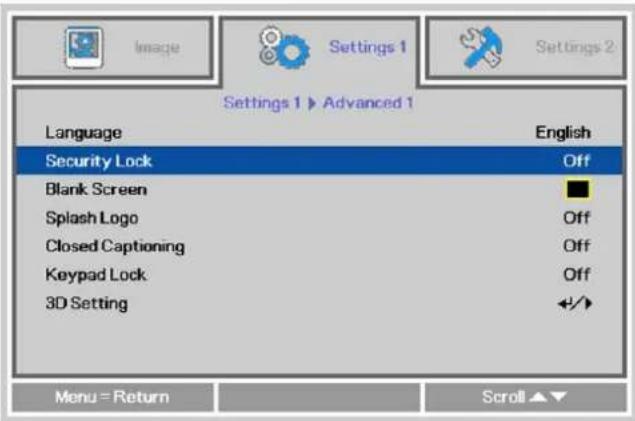
- Press the ◀▶ buttons to enter and enable or disable security lock function.
A password dialog box automatically appears.
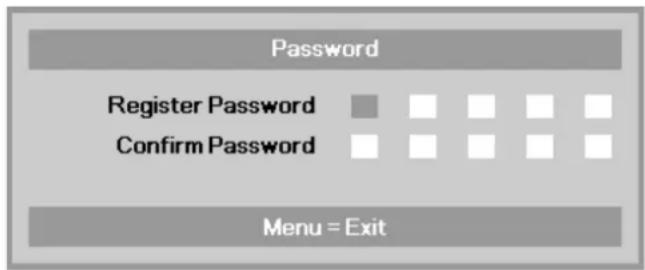
5. You can use the arrow buttons

either on keypad or IR remote control for password entry. You can use any combination including the same arrow five times, but five characters must be used.
Press the arrow buttons in any order to set the password. Push the MENU button to exit the dialog box.
flowchart
graph TD
    A["Password"] --> B["Register Password"]
    A --> C["Confirm Password"]
    D["Menu = Exit"] --> E["End"]
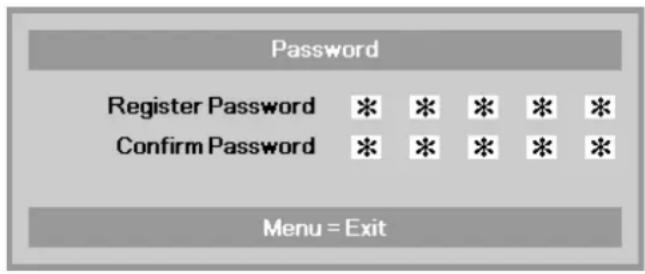
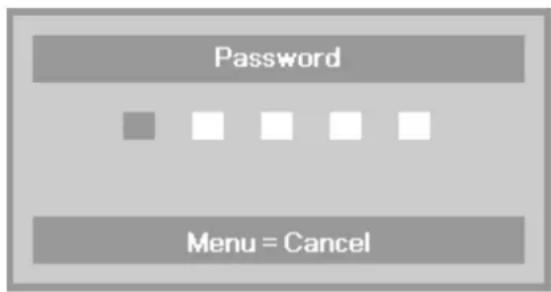
6. If the Security Lock is enabled, the user will be prompted to enter a password when the projector's power button is pressed.
Enter the password in the order you set it on step 5. If you forget the password, please contact InFocus.
Visit our website at www.infocus.com/support or call us.
flowchart
graph TD
    A["Password"] --> B["■"]
    A --> C["□"]
    A --> D["□"]
    A --> E["□"]
    A --> F["□"]
    G["Menu = Cancel"] --> H["■"]
Adjusting the Projector Level
Take note of the following when setting up the projector:
• The projector table or stand should be level and sturdy.
• Position the projector so that it is perpendicular to the screen.
- Ensure the cables are in a safe location. You could trip over them.
natural_image
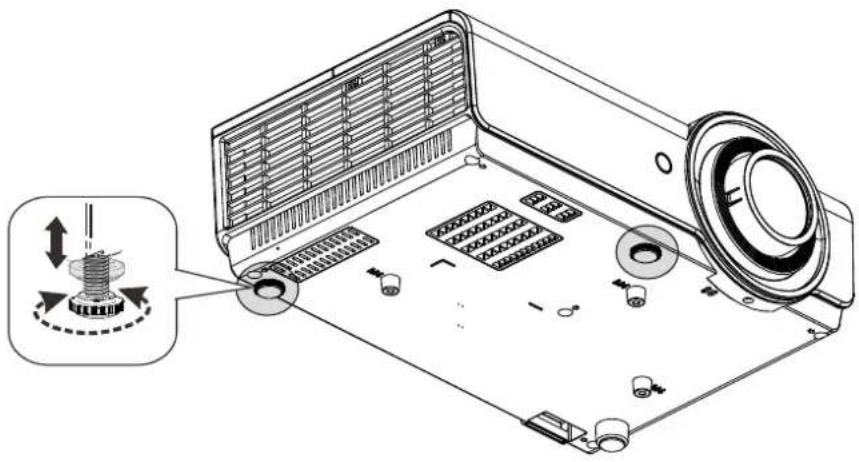
Technical diagram of an air conditioner unit with labeled components and a magnified inset showing the internal structure (no text or symbols present)To adjust the angle of the picture, turn the tilt-adjuster right or left until the desired angle has been achieved.
Adjusting the Zoom, Focus and Keystone
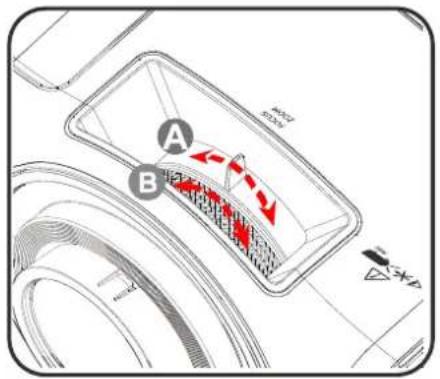
- Use the Image-zoom control (on the projector only) to resize the projected image and screen size Ⓐ
- Use the Image-focus control (on the projector only) to sharpen the projected image Ⓔ
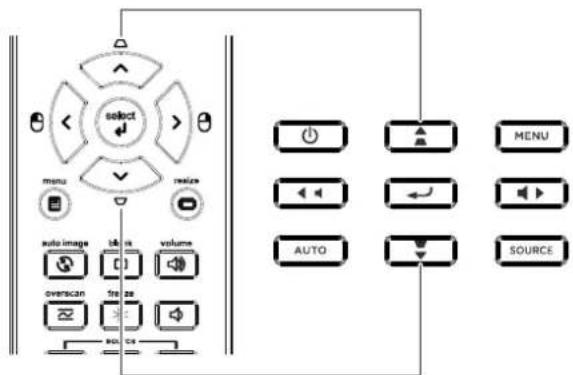
- Use the KEYSTONE buttons on the remote control to correct trapezoid image issues (wider top or bottom).
- The keystone control appears on the display.
Adjusting the Volume
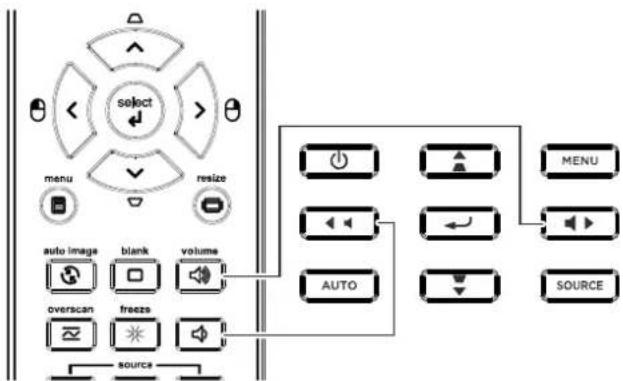
- Press the Volume +/- buttons on the remote control.
- The volume control appears on the display.
- Press the MUTE button on the remote control to turn off the volume.

flowchart
graph TD
    A["select"] --> B["menu"]
    A --> C["resize"]
    A --> D["auto image"]
    A --> E["blank"]
    A --> F["volume"]
    A --> G["overscan"]
    A --> H["freeze"]
    A --> I["sOURCE"]
    J["AUTO"] --> K["MENU"]
    J --> L["SOURCE"]


ON-SCREEN DISPLAY (OSD) MENU SETTINGS
OSD Menu Controls
The projector has an OSD that lets you make image adjustments and change various settings.
Navigating the OSD
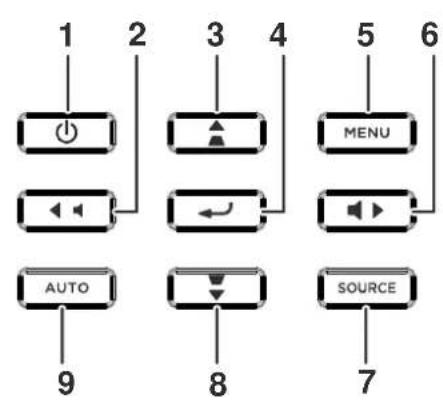
You can use the remote control arrow buttons to navigate and make changes to the OSD.
flowchart
graph TD
    A["1"] --> B["Power Icon"]
    C["2"] --> D["Audio Block"]
    E["3"] --> F["Amplifier"]
    G["4"] --> H["Audio Block"]
    I["5"] --> J["MENU"]
    K["6"] --> L["Audio Block"]
    M["7"] --> N["SOURCE"]
    O["8"] --> P["Down Arrow"]
    Q["9"] --> R["AUTO"]
- To enter the OSD, press the MENU button.
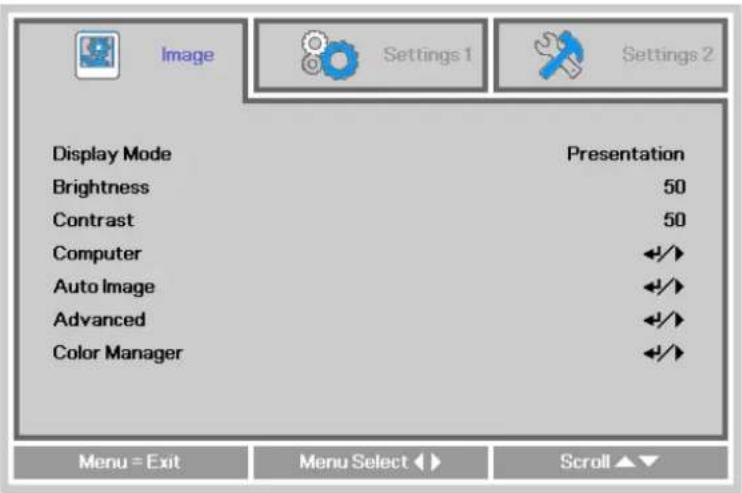
- There are three menus. Press the ◀▶ buttons to move through the menus.
- Press the ▲▼ buttons to move up and down in a menu.
- Press the ◀▶ buttons to change setting values.
- Press the MENU button to close the OSD or leave a submenu.
Note:
Depending on the video source, not all items in the OSD are available. For example, the Horizontal/Vertical Position items in the Computer menu can only be modified when connected to a PC. Items that are not available cannot be accessed and are grayed out.
Setting the OSD Language
Set the OSD language to your preference before continuing.
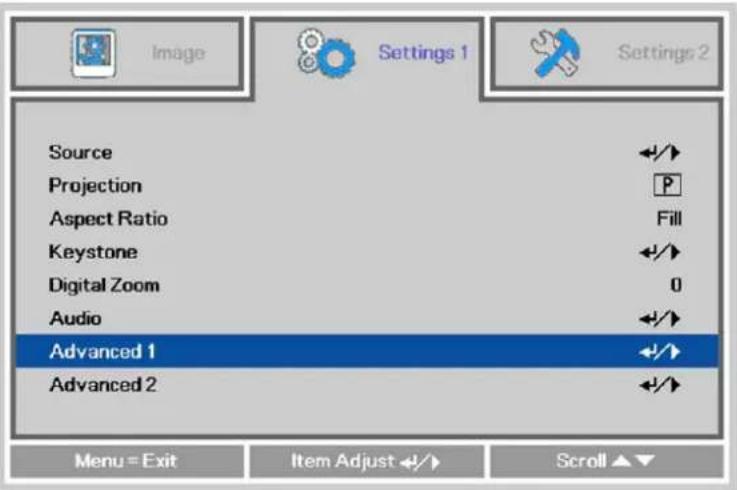
- Press the MENU button. Press the ◀▶ buttons to navigate to Settings 1. Press the ▲▼ buttons to move to the Advanced 1 menu.
- Press ← (Enter) or ▶ to enter the Advanced 1 sub menu. Press the ▲▼ buttons until Language is highlighted.
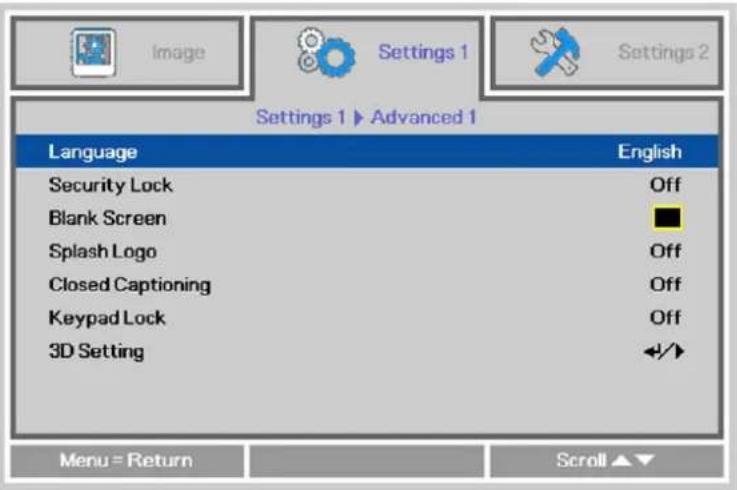
- Press the arrow buttons until the language you want is highlighted.
- Press the MENU button four times to close the OSD.
OSD Menu Overview
Use the following illustration to quickly find a setting or determine the range for a setting.
| MAIN MENU | SUB MENU | SETTINGS | ||
| Image | Display Mode | Presentation, Bright, Game, Movie, TV, sRGB, Blackboard, User | ||
| Brightness | 0~100 | |||
| Contrast | 0~100 | |||
| Computer | Horizontal Position | -5~5 (depend on Autolock) | ||
| Vertical Position | -5~5 (depend on Autolock) | |||
| Frequency | 0~31 | |||
| Tracking | -5~5 | |||
| Auto Image | ||||
| Advanced | Brilliant Color | 0~10 | ||
| Sharpness | 0~31 | |||
| Gamma | 1.8, 2.0, 2.2, 2.4, B&W, Linear | |||
| Color Temperature | Warm, Normal, Cold | |||
| Video AGC | Off, On | |||
| Video Saturation | 0~100 | |||
| Video Tint | 0~100 | |||
| White Balance | RGain | 0~200 | ||
| GGain | 0~200 | |||
| BGain | 0~200 | |||
| ROffset | -256~255 | |||
| GOffset | -256~255 | |||
| BOffset | -256~255 | |||
| Color Manager | Red | Hue, Saturation, Gain | 0~100 | |
| Green | Hue, Saturation, Gain | 0~100 | ||
| Blue | Hue, Saturation, Gain | 0~100 | ||
| Cyan | Hue, Saturation, Gain | 0~100 | ||
| Magenta | Hue, Saturation, Gain | 0~100 | ||
| Yellow | Hue, Saturation, Gain | 0~100 | ||
| White | Red, Green, Blue | 0~100 | ||
| MAIN MENU | SUB MENU | SETTINGS | |
| Settings 1 | Source | Source | reference Input Source Select (IR/Keypad) |
| Projection | Normal, Rear, Ceiling, Rear+Ceiling | ||
| Aspect Ratio | Fill, 4:3, 16:9, Letter Box, Native, 2.35:1 | ||
| Keystone | -40~40 | ||
| Digital Zoom | -10~10 | ||
| Audio | Volume | Off, On | |
| Mute | Off, On | ||
| MIC | Off, On | ||
| Advanced 1 | Language | English, Français, Deutsch, Español, Português, 簡体中文, 繁體中文, Italiano, Norsk, Svenska, Nederlands, Русский, Polski, Suomi, Dansk, 한국어, Magyar, Čeština, العربية, Türkçe, Việt, Indonesian, Română | |
| Security Lock | Off, On | ||
| Blank Screen | Black, Red, Green, Blue, White | ||
| Splash Logo | Off, On | ||
| Closed Captioning | Off, On | ||
| Keypad Lock | Off, On | ||
| 3D Setting | 3D Off, DLP-Link, IR | ||
| 3D Sync Invert | Off, On | ||
| 3D Format Frame Sequential, Top/Bottom, Side-By-Side, Frame Packing (3D Frame Packing HDMI source only) | |||
| Advanced 2 | Test Pattern | None, Grid, White, Red, Green, Blue, Black | |
| H Image Shift | -50~50 | ||
| V Image Shift | -50~50 | ||
| MAIN MENU | SUB MENU | SETTINGS | |
| Settings 2 | Auto Source | Off, On | |
| No Signal | 0~180 | ||
| Power Off | |||
| Auto Power | Off, On | ||
| On | |||
| Lamp Mode | ECO, Normal, Smart ECO | ||
| Reset All | |||
| Status | Active Source | ||
| Video Information | |||
| Hours(ECO, Normal) | |||
| Smart ECO) | |||
| Software Version | |||
| Advanced 1 | Menu Position | Center, Down, Up, Left, Right | |
| Translucent Menu | 0%, 25%, 50%, 75%, 100% | ||
| Off, Low Power, Network | |||
| Low Power Mode | |||
| Fan Speed | Normal, High | ||
| Lamp Hour Reset | |||
| Projector ID | 0-98 | ||
| Network State | Connect, Disconnect | ||
| DHCP | On, Off | ||
| IP Address | 0~255, 0~255, 0~255. 0~255 | ||
| Subnet Mask | 0~255, 0~255, 0~255. 0~255 | ||
| Gateway | 0~255, 0~255, 0~255. 0~255 | ||
| DNS | 0~255, 0~255, 0~255. 0~255 | ||
| Apply | Ok / Cancel | ||
| Advanced 2 | Sleep Timer | 0~600 | |
| Source Filter | VGA1 Disable, Enable | ||
| VGA2 Disable, Enable | |||
| HDMI1 Disable, Enable | |||
| HDMI2/MHL Disable, Enable | |||
| VIDEO Disable, Enable | |||
| S-VIDEO Disable, Enable | |||
| COMPOSITE | Wall Color | Off, Light Yellow, Pink, Light Green, Blue, Blackboard | |
| Auto, RGB, YUV | |||
| Quantization Range | Auto, Full, Limited | ||
Image Menu

Attention!
When image options are changed, the Display Mode changes to User.
Press the MENU button to open the OSD menu. Press the ◀▶ buttons to move to the Image Menu. Press the ▲▼ buttons to move up and down in the Image menu. Press the ◀▶ buttons to enter and change setting values.
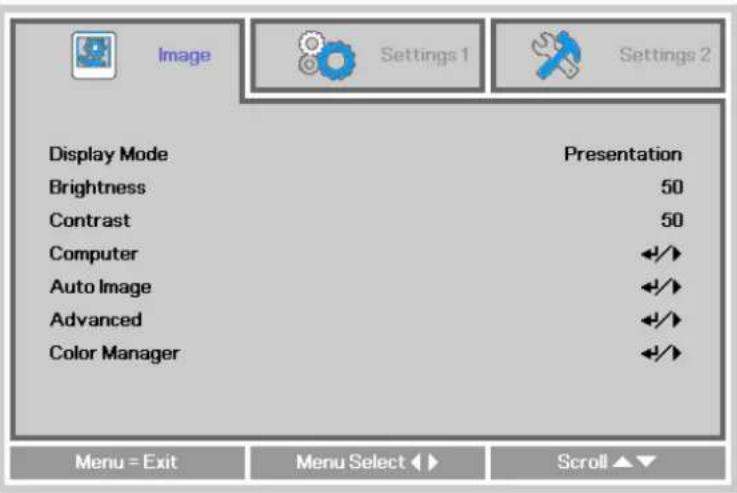
| ITEM DESCRIPTION | |
| Display Mode | Press the ◀▶ buttons to enter and set the Display Mode.Note: Display Mode must be set to User in order to access the other Image menu items. |
| Brightness | Press the ◀▶ buttons to adjust the display brightness. |
| Contrast | Press the ◀▶ buttons to adjust the display contrast. |
| Computer | Press ← (Enter) or ▶ to enter the Computer menu. SeeComputer Menuon page 23. |
| Auto Image | Press ← (Enter) or ▶ to automatically adjustment for phase, tracking, size and position. |
| Advanced | Press ← (Enter) or ▶ to enter the Advanced menu. SeeAdvanced Featureon page 24. |
| Color Manager | Press ← (Enter) or ▶ to enter the color manager menu. See page 26 for more information onColor Manager. |
Computer Menu
Press the MENU button to open the OSD menu. Press the ◀▶ buttons to move to the Image menu. Press the ▲▼ buttons to move to the Computer menu and then press ← (Enter) or ▶. Press the ▲▼ buttons to move up and down in the Computer menu.
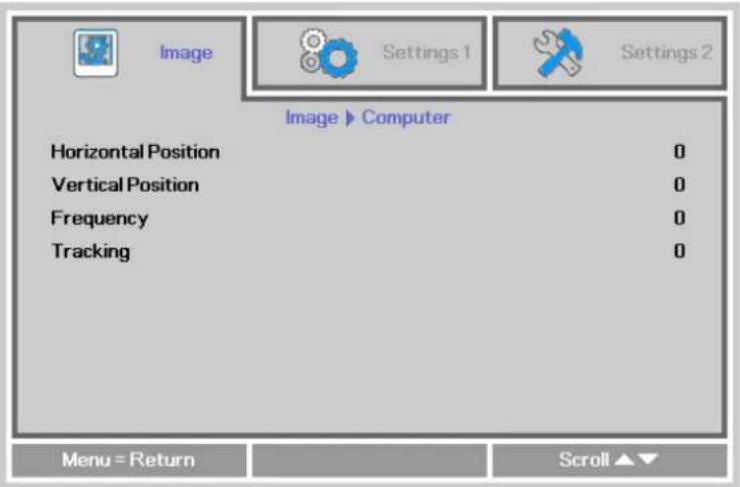
| ITEM DESCRIPTION | |
| Horizontal Position | Press the ◀▶ buttons to adjust the display position to left or right. |
| Vertical Position | Press the ◀▶ buttons to adjust the display position to up or down. |
| Frequency | Press the ◀▶ buttons to adjust the A/D sampling clock. |
| Tracking | Press the ◀▶ buttons to adjust the A/D sampling phase. |
Advanced Features
Press the Menu button to open the OSD menu. Press the ◀▶ buttons to move to the Image menu. Press the ▼▲ buttons to move to the Advanced menu and then press ← (Enter) or ▶. Press the ▼▲ buttons to move up and down in the Advanced menu.
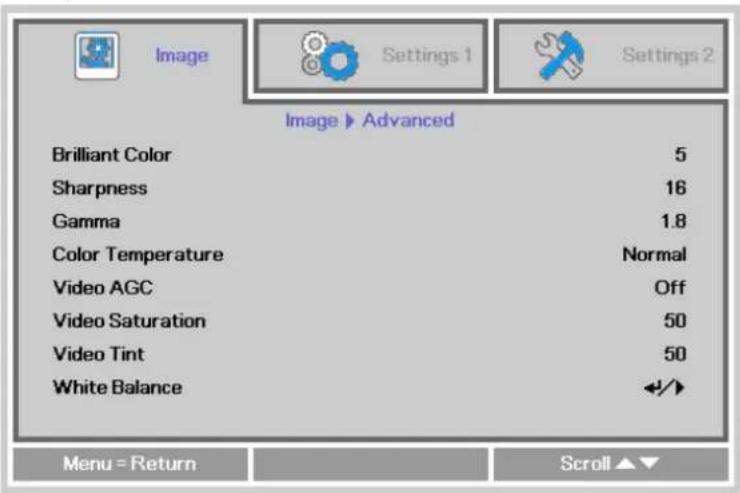
| ITEM DESCRIPTION | |
| Brilliant Color | Press the ◀▶ buttons to adjust the Brilliant Color value. |
| Sharpness | Press the ◀▶ buttons to adjust the display sharpness. |
| Gamma | Press the ◀▶ buttons to adjust the gamma correction of the display. |
| Color Temperature Press the ◀▶ buttons to adjust the color temperature. | |
| Video AGC | Press the ◀▶ buttons to enter and enable or disable the Automatic Gain Control for video source. |
| Video Saturation | Press the ◀▶ buttons to adjust the video saturation. |
| Video Tint | Press the ◀▶ buttons to adjust the video tint/hue. |
| White Balance | Press the ENTER/ ▶ button to enter the White Balance sub menu.See White Balance on page 25 |
White Balance
Press the ENTER button to enter the White Balance sub menu.
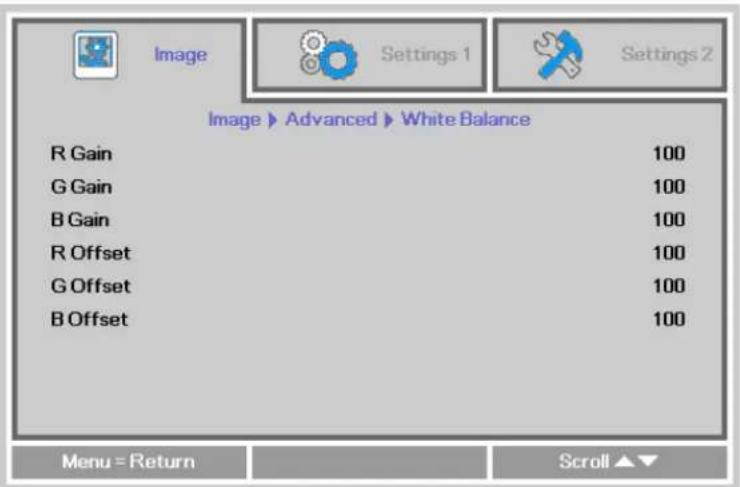
| ITEM DESCRIPTION | |
| R Gain | Press the ◀▶ buttons to adjust the Red Gain. |
| G Gain | Press the ◀▶ buttons to adjust the Green Gain. |
| B Gain | Press the ◀▶ buttons to adjust the Blue Gain. |
| R Offset | Press the ◀▶ buttons to adjust the Red Offset. |
| G Offset | Press the ◀▶ buttons to adjust the Green Offset. |
| B Offset | Press the ◀▶ buttons to adjust the Blue Offset. |
Color Manager
Press the Menu button to open the OSD menu. Press the ◀▶ buttons to move to the Image menu. Press the ▼▲ buttons to move to the Color Manager menu and then press ← (Enter) or ▶. Press the ▼▲ buttons to move up and down in the Color Manager menu.
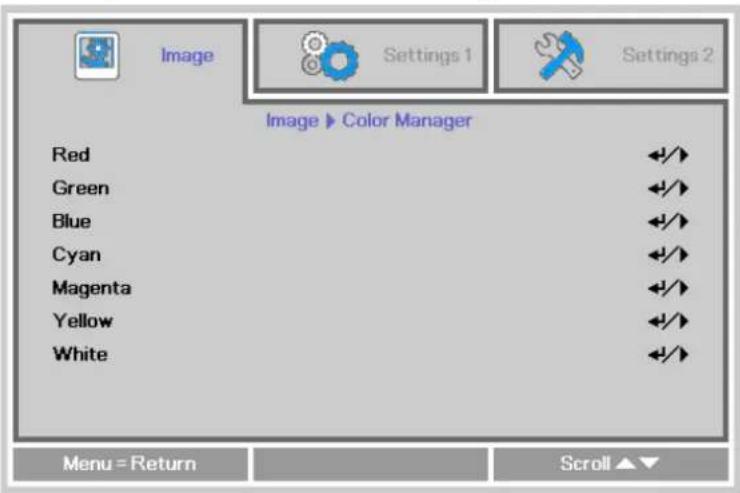
| ITEM DESCRIPTION | |
| Red | Select to enter the Red Color Manager.Press the ◀▶ buttons to adjust the Hue, Saturation, and Gain. |
| Green | Select to enter the Green Color Manager.Press the ◀▶ buttons to adjust the Hue, Saturation, and Gain. |
| Blue | Select to enter the Blue Color Manager.Press the ◀▶ buttons to adjust the Hue, Saturation, and Gain. |
| Cyan | Select to enter the Cyan Color Manager.Press the ◀▶ buttons to adjust the Hue, Saturation, and Gain. |
| Magenta | Select to enter the Magenta Color Manager.Press the ◀▶ buttons to adjust the Hue, Saturation, and Gain. |
| Yellow | Select to enter the Yellow Color Manager.Press the ◀▶ buttons to adjust the Hue, Saturation, and Gain. |
| White | Select to enter the White Color Manager.Press the ◀▶ buttons to adjust the Red, Green, and Blue. |
Settings 1 Menu
Press the MENU button to open the OSD menu. Press the ◀▶ buttons to move to the Settings 1 menu. Press the ▲▼ buttons to move up and down in the Settings 1 menu. Press the ◀▶ buttons to enter and change setting values.
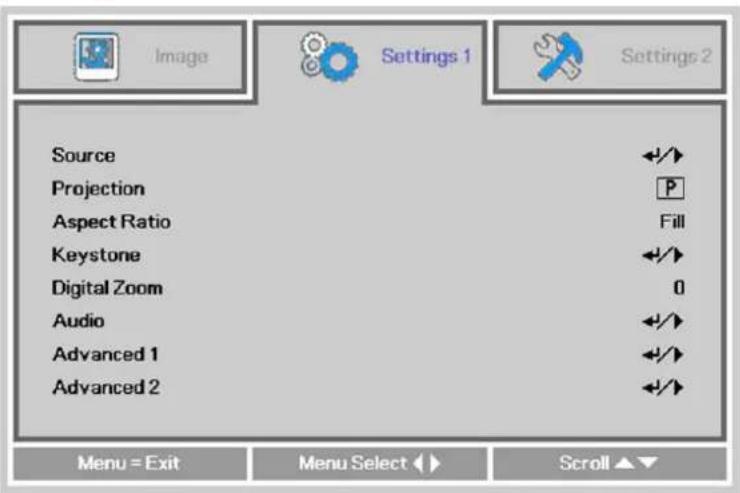
| ITEM | DESCRIPTION |
| Source | Press the ◀▶ buttons to open source menu. |
| Projection | Press the ◀▶ buttons to enter and choose from four projection orientations. |
| Aspect Ratio | Press the ◀▶ buttons to adjust the video aspect ratio. |
| Keystone | Press the ◀▶ buttons to adjust the display keystone. |
| Digital Zoom | Press the ◀▶ buttons to adjust the Digital Zoom menu. |
| Audio | Press ← (Enter) or ▶ to enter the Audio menu. See Audio on page 28. |
| Advanced 1 | Press ← (Enter) or ▶ to enter the Advanced 1 menu. See Advanced 1 Features on page 29. |
| Advanced 2 | Press ← (Enter) or ▶ to enter the Advanced 2 menu. See Advanced 2 Features on page 31. |
Audio
Press the Menu button to open the OSD menu. Press the ◀▶ buttons to move to the Settings 1 menu. Press the ▼▲ buttons to move to the Audio menu and then press ← (Enter) or ▶. Press the ▼▲ buttons to move up and down in the Audio menu.
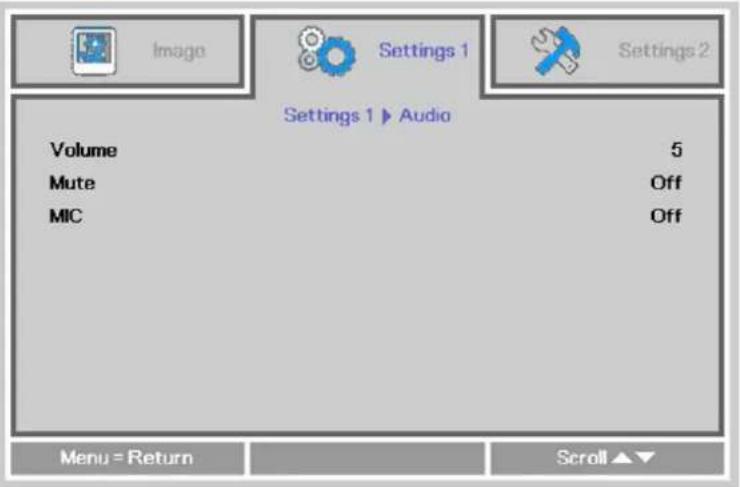
| ITEM | DESCRIPTION | ||
| Volume | Press the ◀▶ buttons to enter and adjust the audio volume. | ||
| Mute | Press the ◀▶ buttons to enter and turn on or off the speaker. | ||
| MIC | Press the ◀▶ buttons to enter and turn MIC Mode Off or On.Note: MIC can only be turned on when a MIC is plugged in. Please connect a 3.5∅ mini jack cable microphone to the projector and condenser microphone is recommended to use as below. | ||
| Microphone | Transducer principle | condenser | |
| Impedance | 600ohm~2.2Kohm | ||
| Frequency | 100Hz~16KHz | ||
| Output | stereo | ||
Advanced 1 Features
Press the Menu button to open the OSD menu. Press the ◀▶ buttons to move to the Settings 1 menu. Press the ▲▼ buttons to move to the Advanced 1 menu and then press ◀◀ (Enter) or ▶. Press the ▲▼ buttons to move up and down in the Advanced 1 menu. Press the ◀▶ buttons to enter and change setting values.
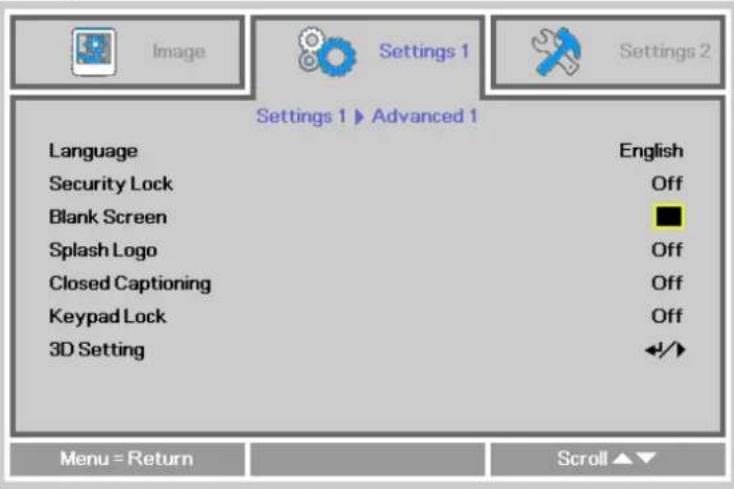
| ITEM DESCRIPTION | |
| Language | Press the ◀▶ buttons to enter and select a different localization Menu. |
| Security Lock | Press the ◀▶ buttons to enter and enable or disable the security lock function. |
| Blank Screen | Press the ◀▶ buttons to enter and select a different blank screen color. |
| Splash Logo | Press the cursor ◀▶ button to enter and select splash logo. |
| Closed Captioning | Press the ◀▶ buttons to enter and enable or disable Closed Captioning |
| Keypad Lock | Press ◀▶ to enter and enable or disable the keypad keys. |
| 3D Setting | Press ← (Enter) or ▶ to enter the 3D menu. See page 30 for more information on the 3D Setting. |
Note:
To enjoy the 3D function, first enable the Play Movie in 3D setting found in your Blu-Ray device under the 3D Disc Menu.
3D Setting
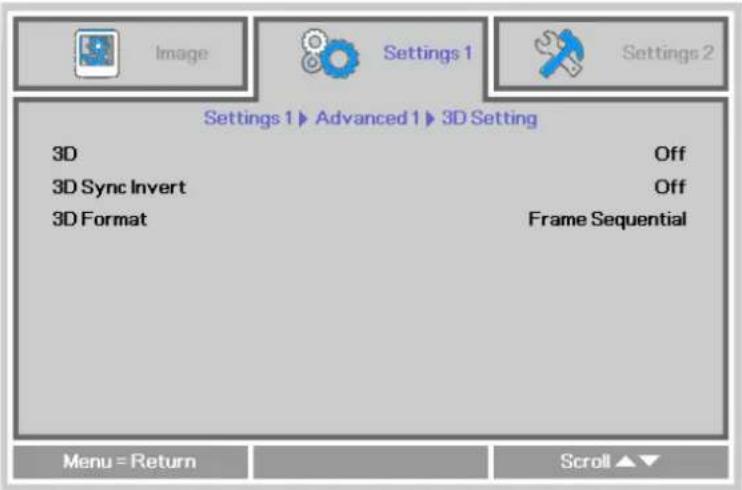
| ITEM DESCRIPTION | |
| 3D | Press the ◀▶ buttons to enter and select different 3D modes. |
| 3D Sync Invert | Press the ◀▶ buttons to enter and enable or disable 3D Sync Invert. |
| 3D Format | Press the ◀▶ buttons to enter and enable or disable different 3D formats. |
Note:
- By default, if no 3D source is detected, the 3D OSD menu items will not be available.
- When the projector is connected to an appropriate 3D source, the 3D OSD menu items are available for selection.
- Use 3D glasses to view a 3D image.
- You need 3D content from a 3D Blu-Ray or 3D media file.
- You need to enable the 3D source (some 3D Blu-Ray content may have a 3D on-off selection feature).
- You need DLP link 3D glasses.
- The OSD 3D mode needs to match the type of glasses (DLP link or IR).
- Power on the glasses. Glasses normally have a power on -off switch. Each type of glasses has their own configuration instructions. Please follow the configuration instructions that come with your glasses to finish the setup process.
Advanced 2 Features
Press the Menu button to open the OSD menu. Press the ◀▶ buttons to move to the Settings 1 menu. Press the ▲▼ buttons to move to the Advanced 2 menu and then press ◀◀ (Enter) or ▶. Press the ▲▼ buttons to move up and down in the Advanced 2 menu. Press the ◀▶ buttons to enter and change setting values.
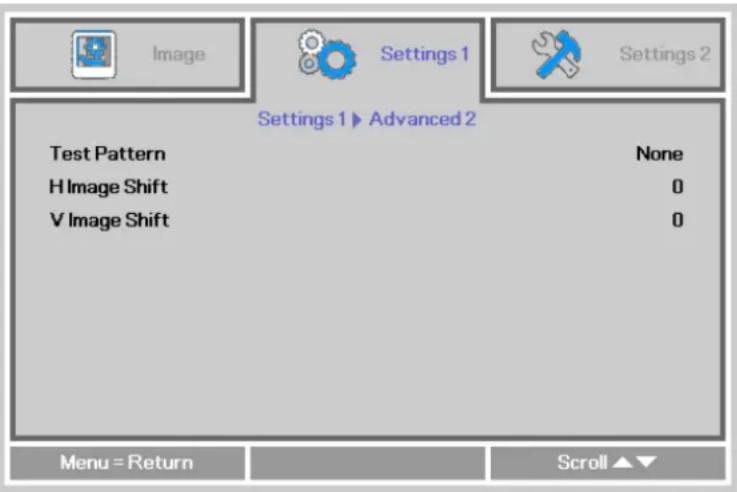
| ITEM DESCRIPTION | |
| Test Pattern | Press the ◀▶ buttons to enter and select internal test pattern. |
| H Image Shift | Press the ◀▶ buttons to enter and select H Image Shift. |
| V Image Shift | Press the ◀▶ buttons to enter and select V Image Shift. |
Settings 2 Menu
Press the MENU button to open the OSD menu. Press the ◀▶ buttons to move to the Settings 2 menu. Press the ▲▼ buttons to move up and down in the Settings 2 menu.
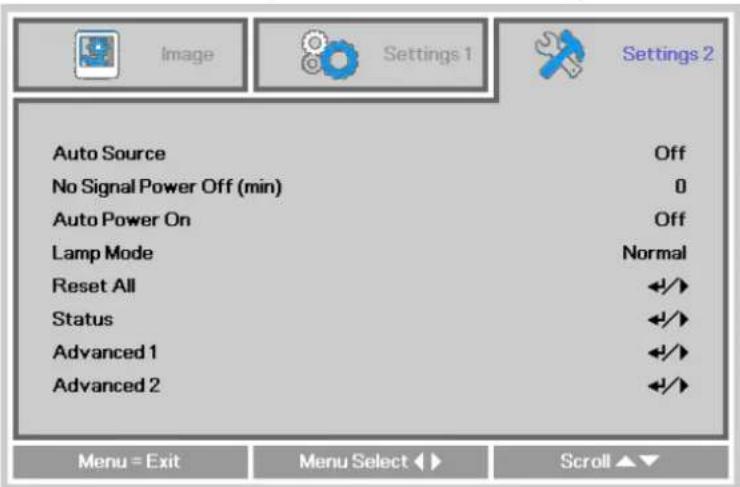
| ITEM DESCRIPTION | |
| Auto Source | Press the ◀▶ buttons to enter and enable or disable automatic source detection. |
| No Signal Power Off (min.) | Press the ◀▶ buttons to enter and enable or disable automatic shutdown of lamp when no signal is detected. |
| Auto Power On | Press the ◀▶ buttons to enter and enable or disable automatic power On when AC power is supplied. |
| Lamp Mode | Press the ◀▶ buttons to enter and select the lamp mode for higher brightness, or lower brightness if you wish to save lamp life. |
| Reset All | Press ← (Enter) or ▶ to reset all settings to default values. |
| Status | Press ← (Enter) or ▶ to enter the Status menu. See page 33 for more information on Status. |
| Advanced 1 | Press ← (Enter) or ▶ to enter the Advanced 1 menu. See Advanced 1 Features on page 34. |
| Advanced 2 | Press ← (Enter) or ▶ to enter the Advanced 2 menu. See Advanced 2 Features on page 44. |
Note:
"Smart ECO": Press the Blank button to activate the Smart ECO feature, which will dim the lamp 30% when the image is black.
Status
Press the ▲▼ buttons to move up and down in the Settings 2 menu. Select the Status menu and press ◀(Enter) or ▶ to enter.
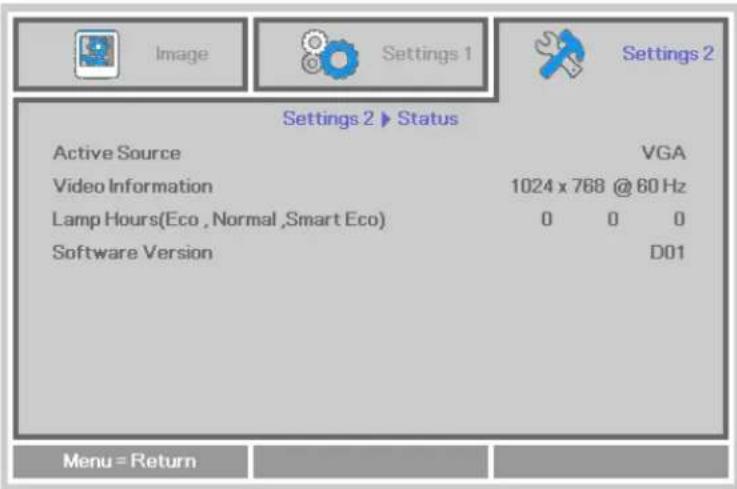
| ITEM DESCRIPTION | |
| Active Source | Displays the current active source type. |
| Video Information | Displays resolution/video information for RGB sources and color standard for Video sources. |
| Lamp Hours | Lamp hour usage information is displayed. (Eco, Normal and Smart Eco) |
| Software version | Displays system software version. |
Advanced 1 Features
Press the Menu button to open the OSD menu. Press the ◀▶ buttons to move to the Settings 2 menu. Press the ▲▼ buttons to move to the Advanced 1 menu and then press ◀◀ (Enter) or ▶. Press the ▲▼ buttons to move up and down in the Advanced 1 menu. Press the ◀▶ buttons to enter and change setting values.
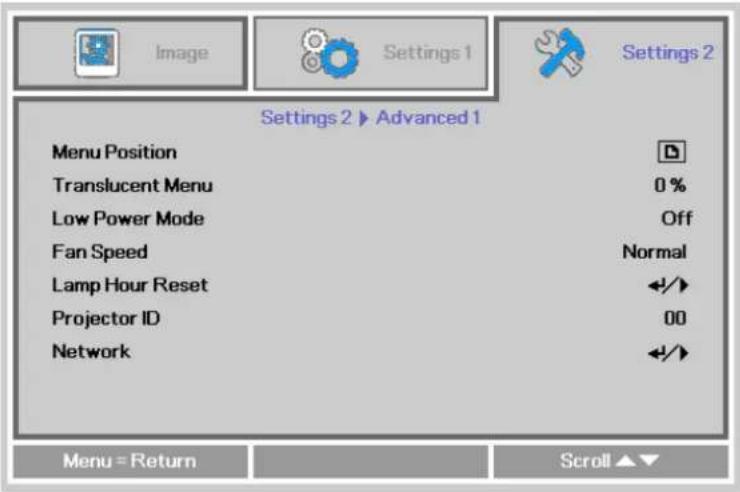
| ITEM DESCRIPTION | |
| Menu Position | Press the ◀▶ buttons to enter and select different OSD location. |
| Translucent Menu | Press the ◀▶ buttons to enter and select OSD background translucent level. |
| Low Power Mode | Press the ◀▶ buttons to enter and turn Low Power Mode Off, Low Power, Network. |
| Fan Speed | Press the ◀▶ buttons to enter and toggle between Normal and High fan speeds.Note: We recommend selecting high speed in high temperatures, high humidity, or high altitude (higher than 1500m/4921ft) areas. |
| Lamp Hour Reset | After replacing the lamp, the lamp should be reset. See page 35 for more information on Lamp Hour Reset. |
| Projector ID | Press the ◀▶ buttons to enter and adjust the two digit projector ID from 00 through 98. |
| Network | Press ←(Enter) or ▶ to enter the Network menu. See page 35 for more information on Network. |
| Note:When "Network" is enabled, VGA Out is inactive when the projector is in standby mode.Both VGA OUT and Network control are active in standby when Low Power Mode is set to Off. | |
Lamp Hour Reset
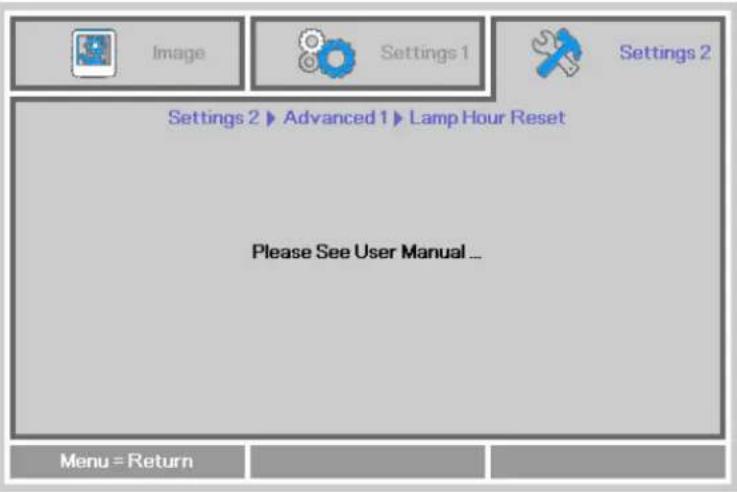
Please refer to Resetting the Lamp Timer on page 49 to reset the lamp hour counter.
Network
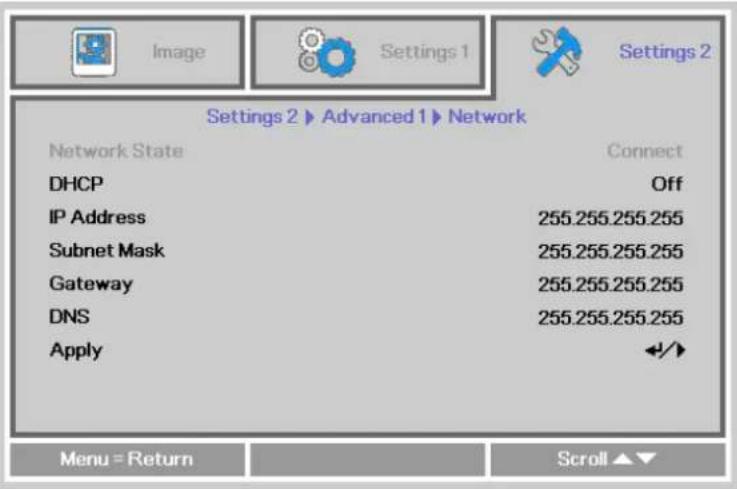
| ITEM DESCRIPTION | |
| Network State | Displays the network connection status. |
| DHCP | Press ◀▶ to turn DHCP On or Off.Note: If DHCP is turned Off, complete the IP Address, Subnet Mask, Gateway, and DNS fields. |
| IP Address | Enter a valid IP address when DHCP is turned off. |
| Subnet Mask | Enter a valid Subnet Mask when DHCP is turned off. |
| Gateway | Enter a valid Gateway address when DHCP is turned off. |
| DNS | Enter a valid DNS name when DHCP is turned off. |
| Apply | Press ← (Enter) or ▶ to confirm settings. |
LAN\_RJ45
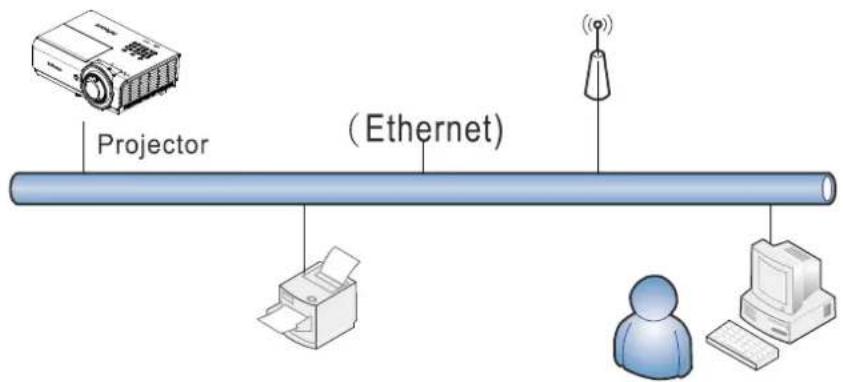
Remote control and monitoring of a projector from a PC (or laptop) via wired LAN is also possible. Compatibility with Crestron / AMX (Device Discovery) / Extron control boxes enables not only collective projector management on a network but also management from a control panel on a PC (or laptop) browser screen.
★ Crestron is a registered trademark of Crestron Electronics, Inc. of the United States.
★ Extron is a registered trademark of Extron Electronics, Inc. of the United States.
★ AMX is a registered trademark of AMX LLC of the United States.
★ PJLink applied for trademark and logo registration in Japan, the United States of America, and other countries by JBMIA.
Supported External Devices
This projector supports specified Crestron Electronics controller commands and related software (ex, RoomView ®). http://www.crestron.com/
This projector supports AMX (Device Discovery). http://www.amx.com/
This projector supports Extron device(s). http://www.extron.com/
This projector supports all commands of PJLink Class1 (Version 1.00). http://pjlink.jbmia.or.jp/english/
For detailed information about the diverse types of external devices which can be connected to the LAN/RJ45 port to control the projector, as well as related control commands, go to www.infocus.com/support.
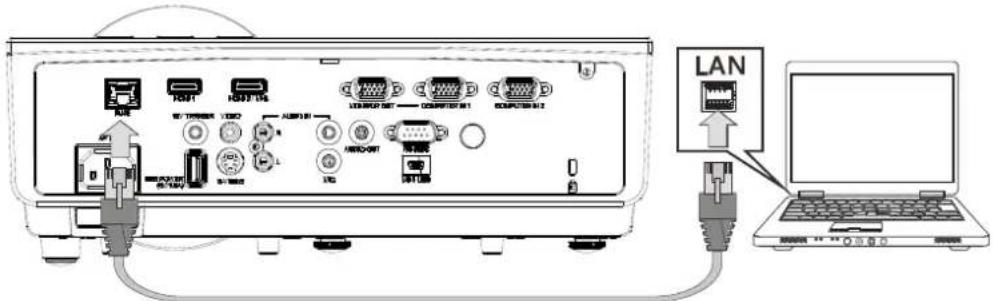
LAN RJ45
- Connect an RJ45 cable to RJ45 ports on the projector and the PC (laptop).
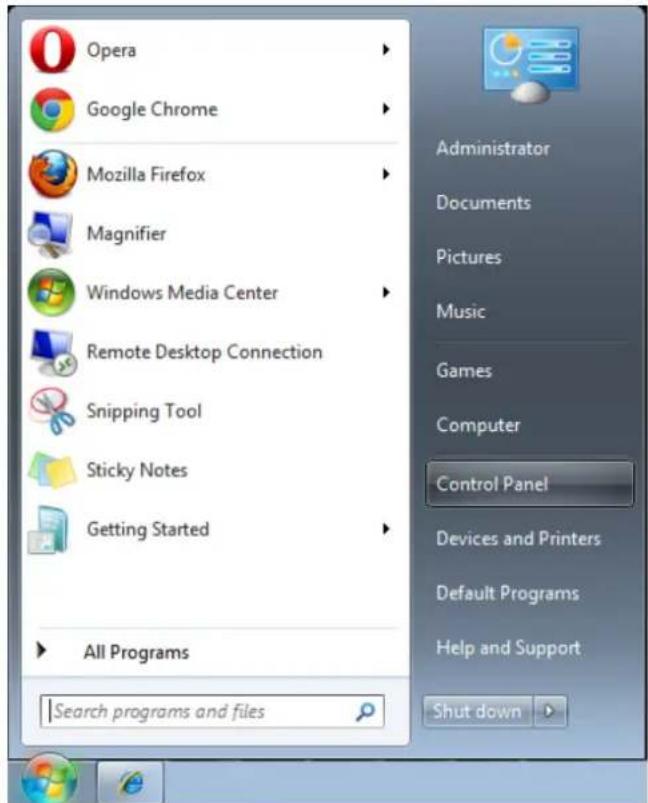
- On the PC (laptop), select Start → Control Panel → Network and Internet.
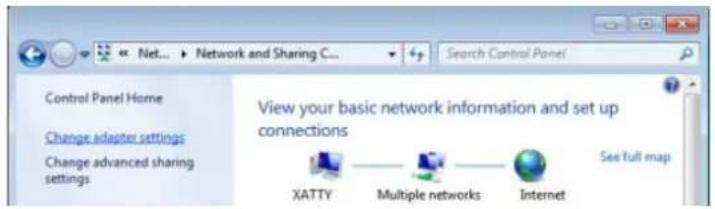
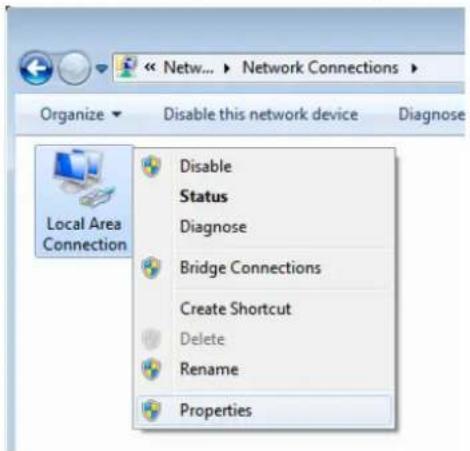
- Right-click on Local Area Connection, and select Properties.
-
In the Properties window, select the Networking tab, and select Internet Protocol (TCP/IP).
-
Click Properties.
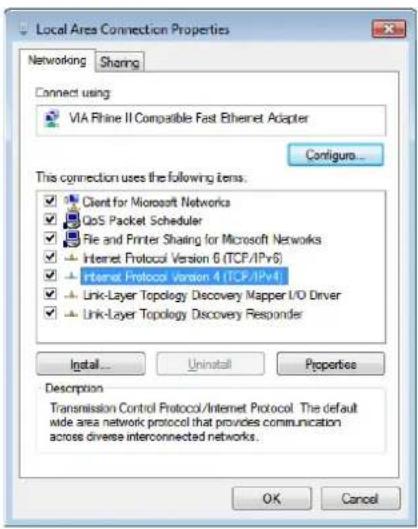
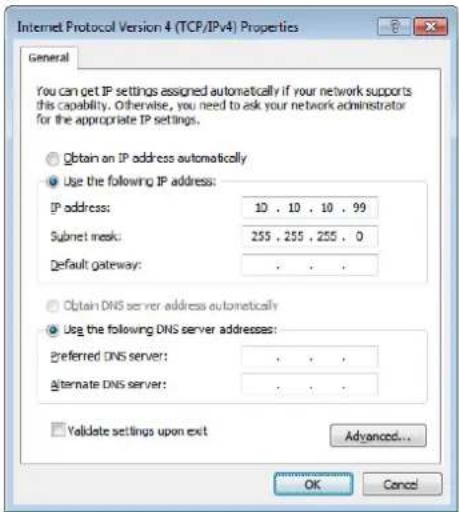
- Click Use the following IP address and fill in the IP address and Subnet mask, then click OK.
- Press the Menu button on the projector.
- Select Settings2→ Advanced1 → Network
- After getting into Network, input the following:
▶ DHCP: Off
▶ IP Address: 10.10.10.10
▶ Subnet Mask: 255.255.255.0
▶ Gateway: 0.0.0.0
▶ DNS Server: 0.0.0.0
- Press ← (Enter) / ▶ to confirm settings.
Open a web browser
(for example, Microsoft Internet Explorer with Adobe Flash Player 9.0 or higher).
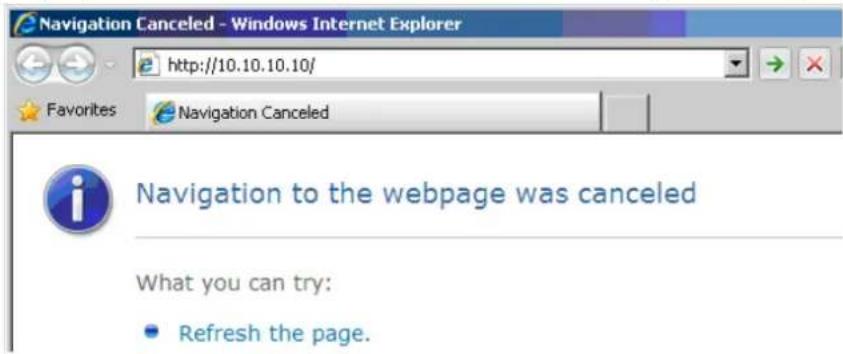
- In the Address bar, input the IP address: 10.10.10.10.
- Press ←Enter) / ▶.
The projector is setup for remote management. The LAN/RJ45 function displays as follows.
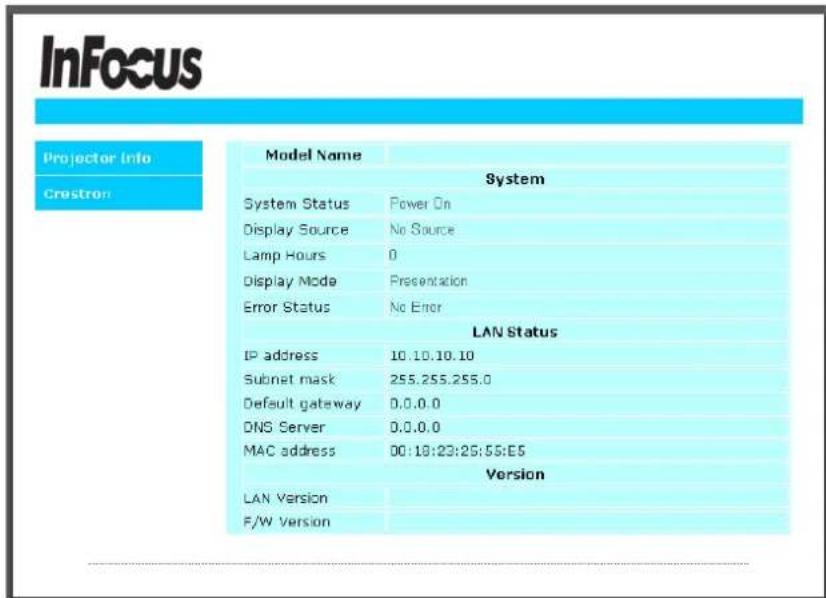
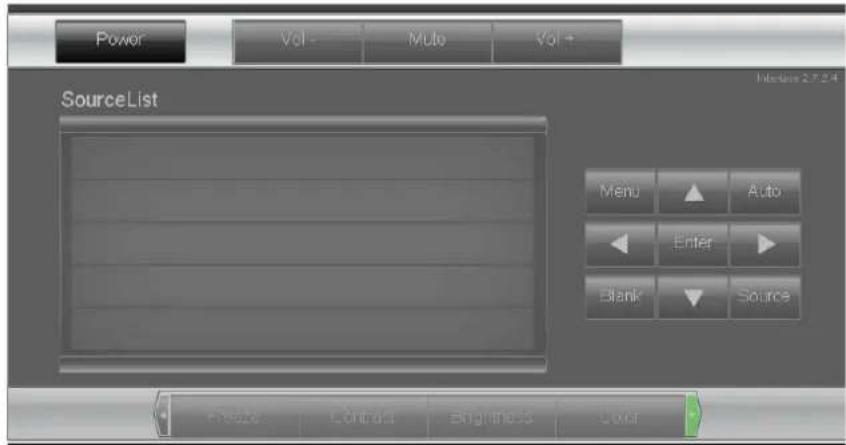

Expansion Options
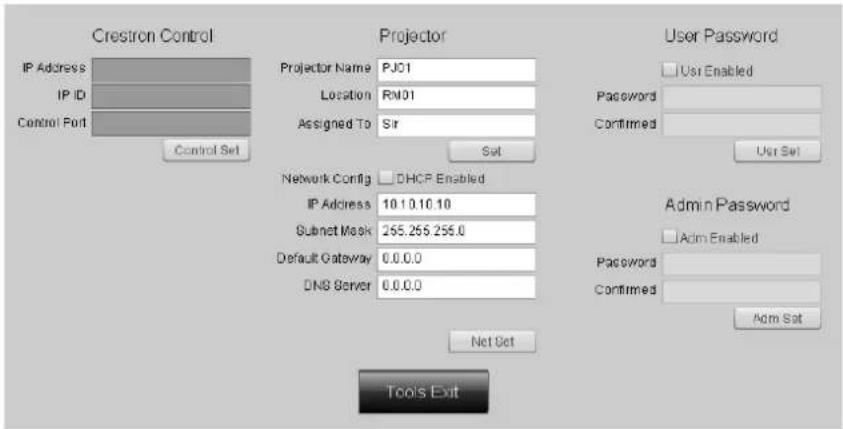
| CATEGORY | ITEM | INPUT-LENGTH |
| Crestron Control | IP Address 15 | |
| IP ID 3 | ||
| Port 5 | ||
| Projector | Projector Name 10 | |
| Location 10 | ||
| Assigned To 10 | ||
| Network Configuration | DHCP (Enabled) (N/A) | |
| IP Address 15 | ||
| Subnet Mask 15 | ||
| Default Gateway 15 | ||
| DNS Server 15 | ||
| User Password | Enabled (N/A) | |
| New Password 10 | ||
| Confirm 10 | ||
| Admin Password | Enabled (N/A) | |
| New Password 10 | ||
| Confirm 10 |
For more information, please visit http://www.crestron.com.
RS232 by Telnet Function
Besides using Hyper-Terminal for projector control, you can also use RS232 by Telnet with the LAN/RJ45 interface.
Quick Start-Guide for "RS232 by TELNET"
- Locate the IP address from the projector's OSD.
- Make sure that the laptop/PC can access the projector's web page.
- Make sure that the Windows firewall settings are disabled to prevent the laptop/PC from ignoring the Telnet commands.
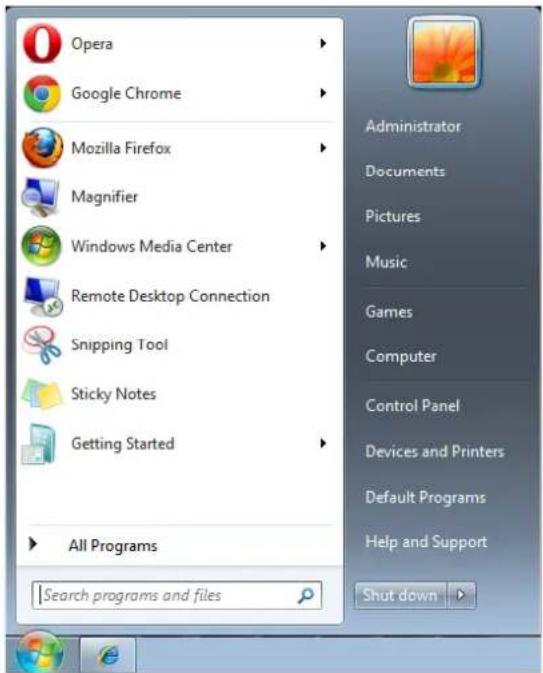
- Go to Start => All Programs => Accessories => Command Prompt
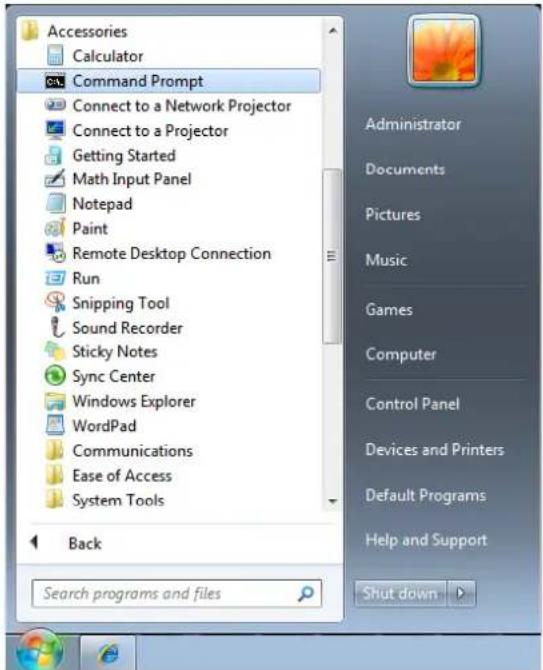
- Type the Telnet command in the following format:
telnet ttt.xxx.yyy.zzz 23 ("Enter" key pressed)
(ttt.xxx.yyy.zzz: IP-Address of the projector)
- When the Telnet connection is ready and you have input an RS232 command, press Enter.
Enabling Telnet in Windows 7/8/10
- Telnet is not included by default in Windows 7, 8 or 10.
- Open the Control Panel.
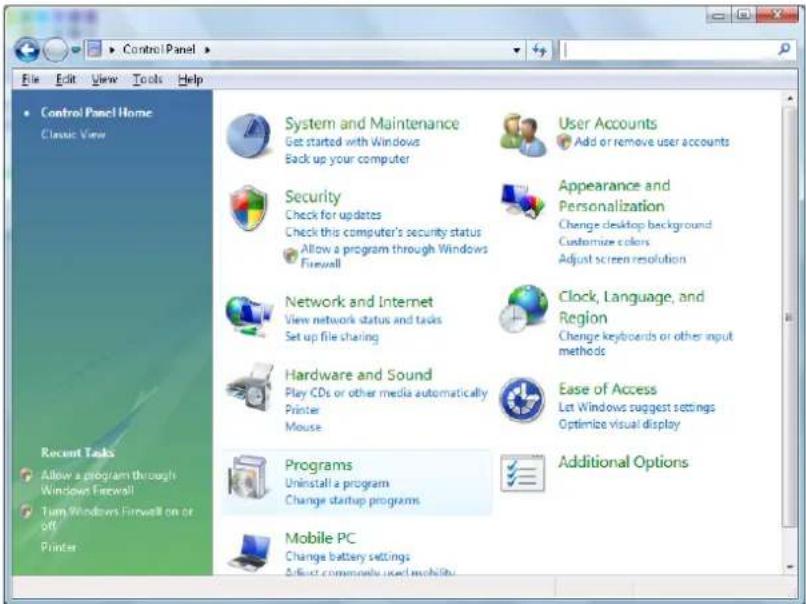
- Open Programs.
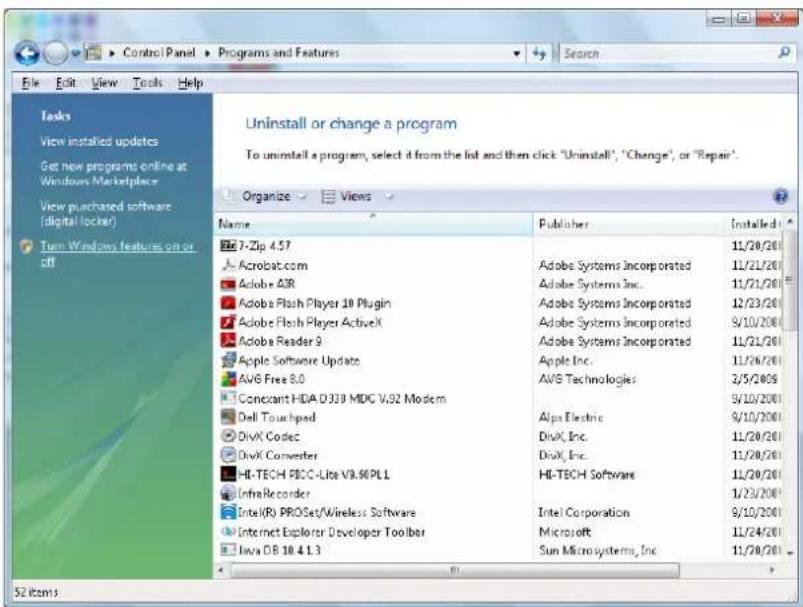
4. Select Turn Windows features on or off.
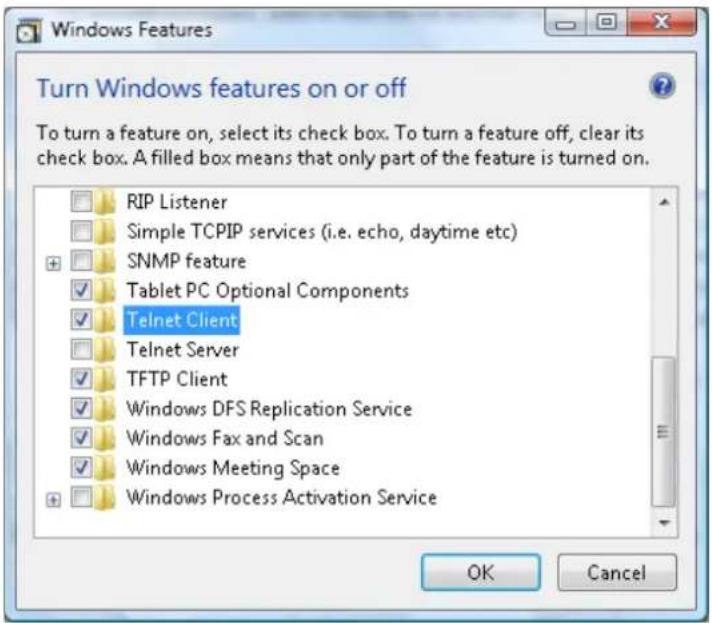
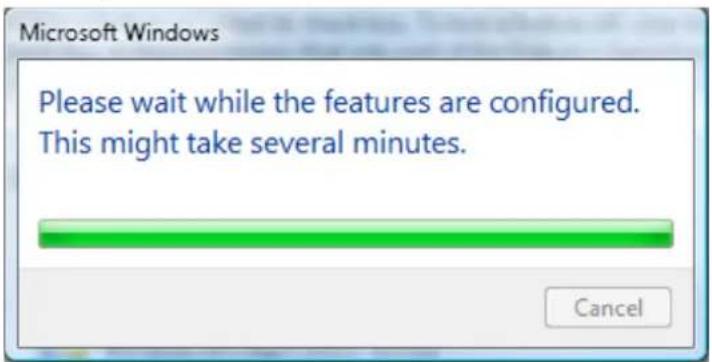
5. Select Telnet Client, and click OK.
Telnet specifications
Telnet: TCP
Telnet port: 23
Telnet utility: Windows Telnet.exe (console mode)
Disconnecting Telnet when Telnet is active: Close Windows Telnet utility.
Telnet Limitations:
- Less than 50 bytes are used for the successive network payload for the Telnet Control application.
- Less than 26 bytes are used for one complete RS232 command for Telnet control.
- There must be at least 200ms between RS232 commands.
Other: When using the Windows built-in Telnet utility, the Enter key causes a carriage return and starts a new line of code.
Advanced 2 Features
Press the Menu button to open the OSD menu. Press the ◀▶ buttons to move to the Settings 2 menu. Press the ▲▼ buttons to move to the Advanced 2 menu and then press ◀◀ (Enter) or ▶. Press the ▲▼ buttons to move up and down in the Advanced 2 menu. Press the ◀▶ buttons to enter and change setting values.
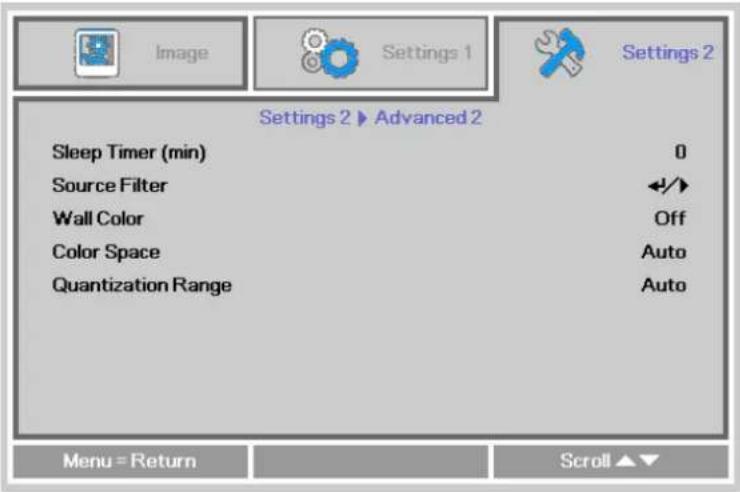
| ITEM DESCRIPTION | |
| Sleep Timer | Press the ◀▶ buttons to enter and set the Sleep timer. The projector automatically turns off after the preset period of time. |
| Source Filter | Press ← (Enter) or ▶ to enter the Source Filter menu. See page 45 for more information on Source Filter. |
| Wall Color | Press the cursor ◀▶ button to enable or disable the wall color function. |
| Color Space | Press the cursor ◀▶ button to enter and adjust the Color Space. |
| Quantization Range | Press the cursor ◀▶ button to enter and adjust the Quantization Range |
Source Filter
Press the ENTER button to enter the Source Filter sub menu. This sub menu allows you to enable and disable source inputs.
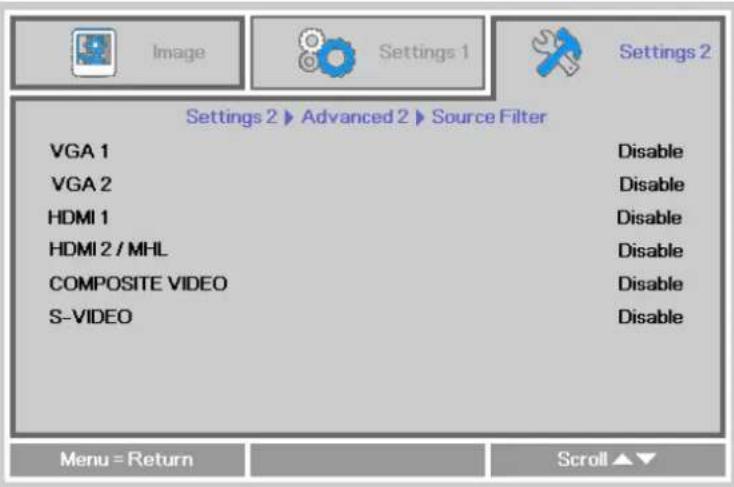
| ITEM DESCRIPTION | |
| VGA 1 | Press the ◀▶ buttons to enter and enable or disable the VGA1 source. |
| VGA 2 | Press the ◀▶ buttons to enter and enable or disable the VGA2 source. |
| HDMI 1 | Press the ◀▶ buttons to enter and enable or disable the HDMI 1 source. |
| HDMI 2 / MHL | Press the ◀▶ buttons to enter and enable or disable the HDMI 2 / MHL-compatible source. |
| Composite Video | Press the ◀▶ buttons to enter and enable or disable the Composite Video source. |
| S-Video | Press the ◀▶ buttons to enter and enable or disable the S-Video source. |
MAINTENANCE AND SECURITY
Replacing the Projection Lamp
The projection lamp should be replaced when the lamp fails or reaches recommended lamp life hours. It should only be replaced with a certified replacement part, which you can order from your local dealer.

Important:
a. The projection lamp used in this product contains a small amount of mercury.
b. Do not dispose this product with general household waste.
c. Disposal of this product must be carried out in accordance with the regulations of your local authority.
www.lamprecycle.org

Warning:
Be sure to turn off and unplug the projector at least 60 minutes before replacing the lamp. Failure to do so could result in a severe burn.

Caution:
In rare cases the lamp bulb may burn out during normal operation and cause glass dust or shards to be discharged outward from the rear exhaust vent.
Do not inhale or touch glass dust or shards. Doing so could result in injury.
Always keep your face away from the exhaust vent so that you do not suffer from the gas and broken shards of the lamp.
When removing the lamp from a ceiling-mounted projector, make sure that no one is under the projector. Glass fragments could fall if the lamp has burned out.

IF A LAMP RUPTURES
If a lamp ruptures, the gas and broken shards may scatter inside the projector and may come out of the exhaust vent. The gas contains toxic mercury.
Open windows and doors for ventilation.
If you inhale the gas or the shards of the broken lamp enter your eyes or mouth, consult a doctor immediately.
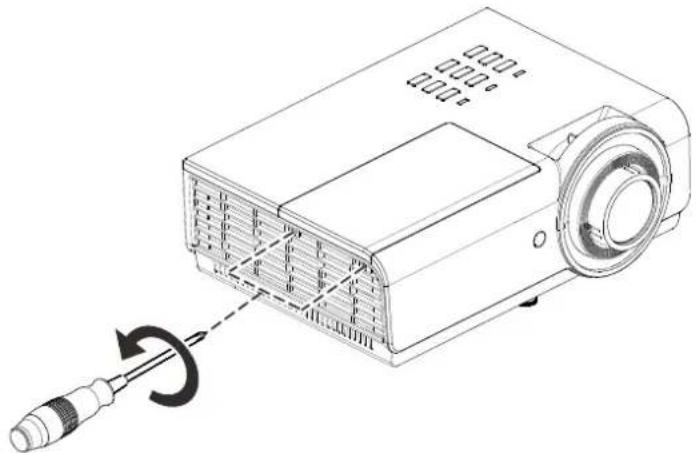
- Remove two screws on the lamp compartment cover.
natural_image
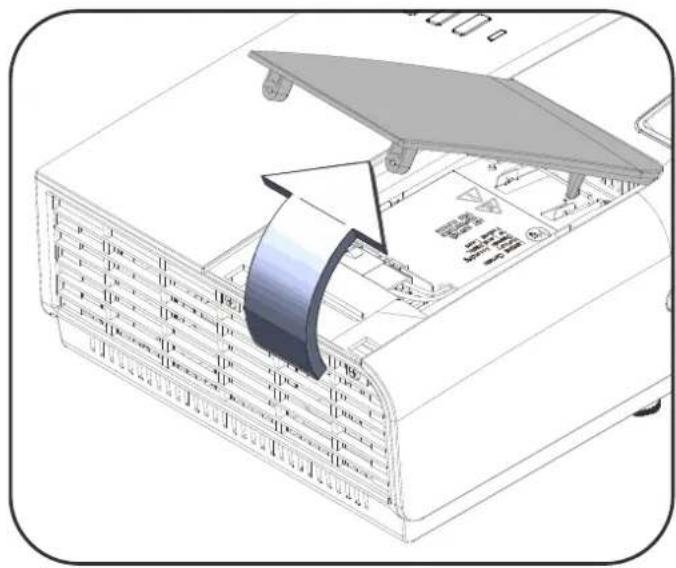
Line drawing of a projector with a screwdriver inserted, showing internal structure and motion direction (no text or symbols)- Remove the lamp compartment cover.
natural_image
Diagram of a server rack with an open lid and a curved arrow indicating rotation or movement (no text or symbols present)- Disconnect the lamp connector
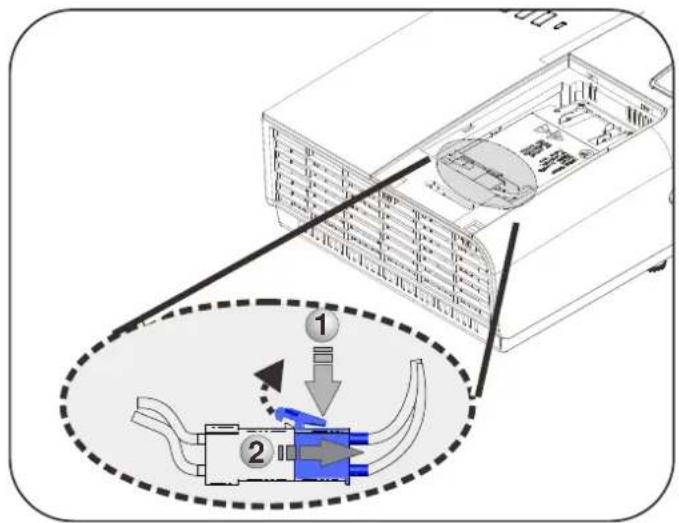
- Remove the two screws from the lamp module.
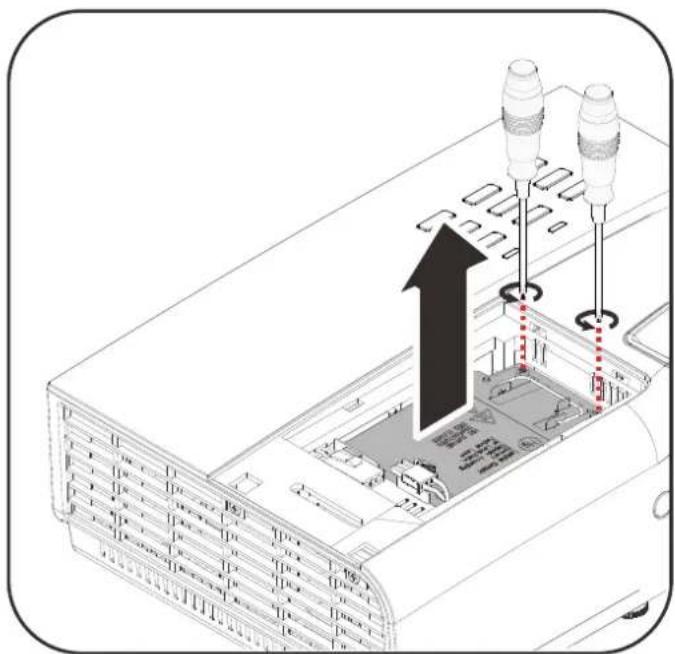
natural_image
Diagram of an electronic device showing internal components and a black upward arrow indicating motion (no text or symbols present)-
Lift the module handle up.
-
Pull firmly on the module handle to remove the lamp module.
-
Reverse steps 1 to 6 to install the new lamp module.
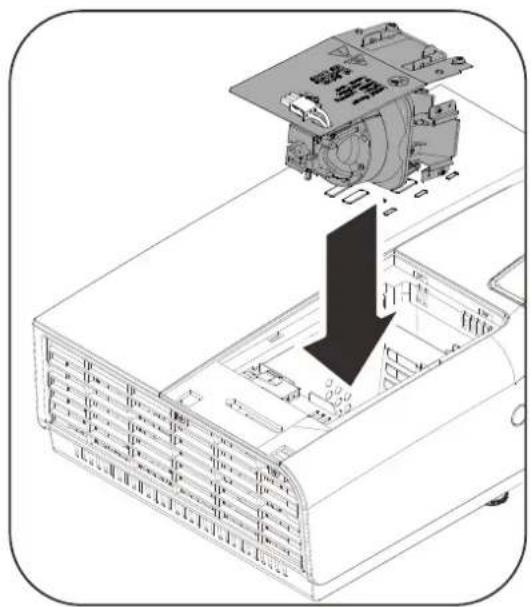
natural_image
Technical diagram of an electronic device showing internal components and a downward arrow indicating a process (no text or symbols present)Note:
The lamp module must sit securely in place and the lamp connector must be connected properly before tightening the screws.
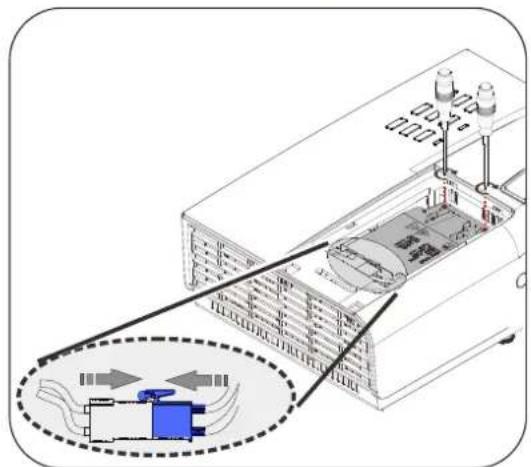
natural_image
Diagram of an electronic device showing internal components and a highlighted circuit or component (no text or symbols present)
Warning:
Lamp Connector must be installed flush with the connector base as shown in the image below. A gap between the Lamp Connector and the connector base will cause damage to the projector. The following images illustrate correct and incorrect Lamp Connector installations.
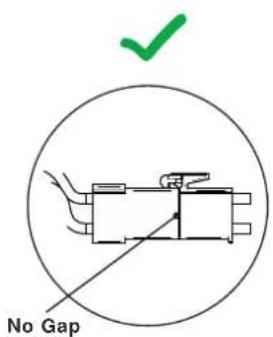
Correct
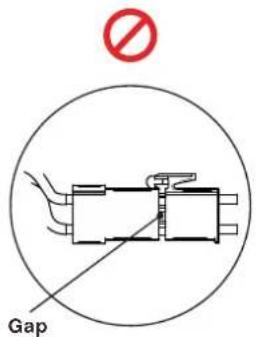
Incorrect
Resetting the Lamp Timer
After replacing the lamp, you should reset the lamp hour timer to zero. Refer to the following:
- Press the MENU button to open the OSD menu.
- Press the ◀▶ buttons to move to the Settings 2 menu. Press the ▼ button to move down to Advanced 1 and press enter.
- Press the ▼▲ buttons to move down to Lamp Hour Reset.
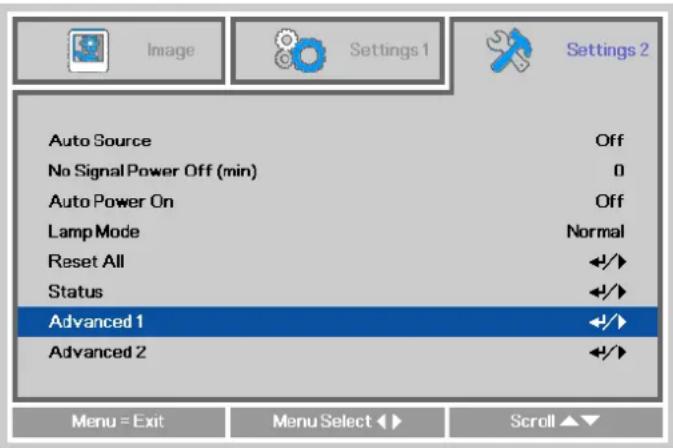
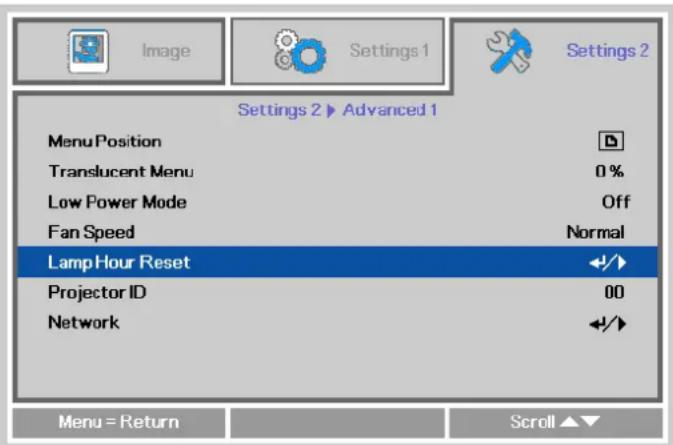
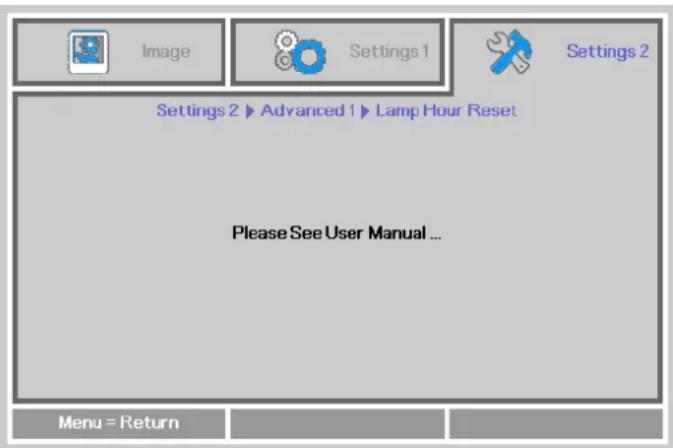
- Press the ◀(Enter) or ▶ button. A message screen appears.
- Press ←◀◀◀▶ buttons in sequence to reset the lamp timer.
- Press the MENU button to return to Settings 2.
Cleaning the Projector
Cleaning the projector to remove dust and grime will help ensure trouble-free operation.

Warning:
- Be sure to turn off and unplug the projector at least 30 minutes before cleaning. Failure to do so could result in a severe burn.
- Only use a dampened cloth when cleaning. Do not allow water to enter the ventilation openings on the projector.
- If a little water gets into the projector interior while cleaning, leave the projector unplugged in a well-ventilated room for several hours before using.
- If a lot of water gets into the projector interior when cleaning, have the projector serviced.
Cleaning the Lens
You can purchase optic lens cleaner from most camera stores. Refer to the following to clean the projector lens.
- Apply a little optic lens cleaner to a clean soft cloth. (Do not apply the cleaner directly to the lens.)
- Lightly wipe the lens in a circular motion.

Caution:
- Do not use abrasive cleaners or solvents.
- To prevent discoloration or fading, avoid getting cleaner on the projector case.
Cleaning the Case
Refer to the following to clean the projector case.
- Wipe off dust with a clean dampened cloth.
- Moisten the cloth with warm water and mild detergent (such as used to wash dishes), and then wipe the case.
- Rinse all detergent from the cloth and wipe the projector again.

Caution:
To prevent discoloration or fading of the case, do not use abrasive alcohol-based cleaners.
Using the Cable Lock System and Security Bar
Using the Cable Lock
If you are concerned about security, attach the projector to a permanent object with the Kensington slot and a security cable.
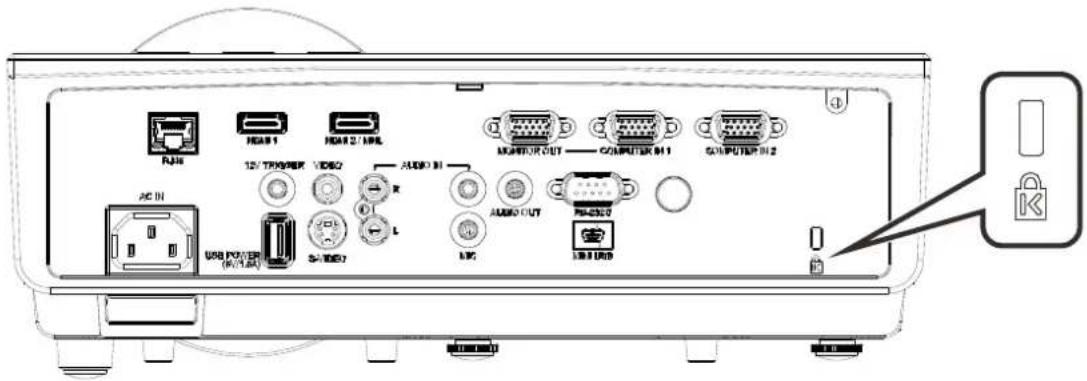
Note:
A Cable Lock System can be purchased from InFocus or your dealer. Refer to the information that comes with the lock for instructions on how to use it.
The security lock slot corresponds to Kensington's MicroSaver Security System. If you have any questions or concerns, contact: Kensington, 2853 Campus Drive, San Mateo, CA 94403, U.S.A.
Tel: 800-535-4242, http://www.Kensington.com.
Using the Security Bar
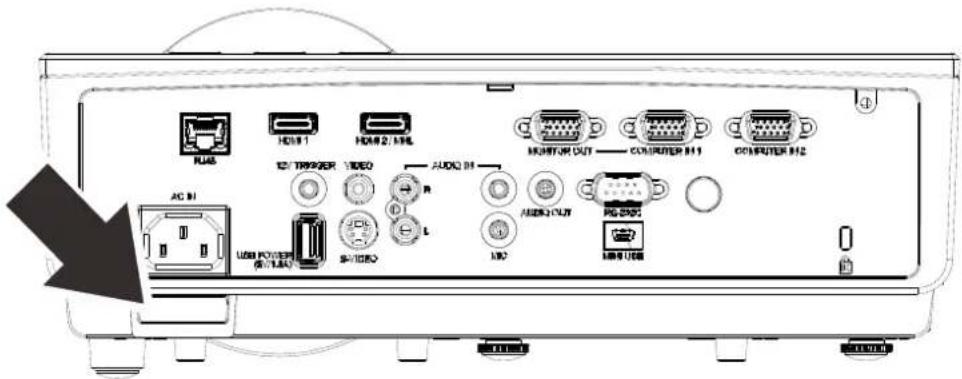
In addition to the password protection function and the Kensington lock, the Security Bar helps protect the projector from unauthorized removal. See the following picture.
TROUBLESHOOTING
Common problems and solutions
These guidelines provide tips to deal with problems you may encounter while using the projector. If the problem remains unsolved, contact your dealer for assistance.
After spending time troubleshooting, the problem can often be traced to something as simple as a loose connection. Check the following before proceeding to the problem-specific solutions.
- Use some other electrical device to confirm that the electrical outlet is working.
- Ensure the projector is turned on.
- Ensure all connections are securely attached.
- Ensure the attached device is turned on.
- Ensure a connected PC is not in a suspended mode.
- Ensure a connected notebook computer is configured for an external display. (This is usually done by pressing an Fn-key combination on the notebook.)
Tips for Troubleshooting
In each problem-specific section, try the steps in the order suggested. This may help you to solve the problem more quickly.
Try to pin point the problem and thus avoid replacing non-defective parts.
For example, if you replace batteries and the problem remains, put the original batteries back and go to the next step.
Keep a record of the steps you take when troubleshooting. The information may be useful when calling for technical support or for passing on to service personnel.
LED Error Messages
| ERROR CODE MESSAGES | POWER LED GREEN | LAMP LED RED | TEMP LED RED |
| Lamp Ready ON OFF OFF | |||
| Start Flashing OFF OFF | |||
| Cooling Flashing OFF OFF | |||
| Over Temperature T1 | OFF | 1 blinks | ON |
| Thermal Break Sensor error 4 blinks OFF OFF | |||
| G794 error | 4 blinks | 1 blinks | OFF |
| Lamp Re-Strike 6 times Failed | 5 blinks | OFF | OFF |
| Lamp Temperature shut down(Ballast Temp) | 5 blinks | 1 blinks | OFF |
| Lamp Short circuit in output detected(Ballast circuit short) | 5 blinks 2 blinks OFF | ||
| Lamp End of lamp life detected | 5 blinks | 3 blinks | OFF |
| Lamp did not ignite | 5 blinks | 4 blinks | OFF |
| Lamp extinguished during normal operation | 5 blinks | 5 blinks | OFF |
| Lamp extinguished during run-up phase | 5 blinks | 6 blinks | OFF |
| Lamp voltage too low | 5 blinks | 7 blinks | OFF |
| Lamp Ballast Fail | 5 blinks | 8 blinks | OFF |
| Lamp Ballast COMM Fail | 5 blinks | 10 blinks | OFF |
| Lamp Ballast Over Temp | 5 blinks | 11 blinks | OFF |
| Lamp voltage too low | 5 blinks | 12 blinks | OFF |
| FAN1 error | 6 blinks | 1 blinks | OFF |
| FAN2 error | 6 blinks | 2 blinks | OFF |
| FAN3 error | 6 blinks | 3 blinks | OFF |
| FAN4 error | 6 blinks | 4 blinks | OFF |
| 1W MCU detects scaler stops working | 2 blinks | OFF | OFF |
| Case Open | 7 blinks OFF | OFF | |
| DMD error | 8 blinks OFF | OFF | |
| Color wheel error | 9 blinks | OFF | OFF |
In the event of an error, please disconnect the AC power cord and wait for one (1) minute before restarting the projector. If the Power or Lamp LEDs are still blinking or any other situation that isn't listed in the chart above, please contact InFocus Support.
Image Problems
Problem: No image appears on the screen
- Verify the settings on your notebook or desktop PC.
- Turn off all the equipment and power everything up again. The projector should be turned on last.
Problem: The image is blurred
- Adjust the Focus on the projector.
- Press the Auto button on the remote control.
- Ensure the projector-to-screen distance is within the specified range.
- Check that the projector lens is clean.
Problem: The image is wider at the top or bottom (trapezoid effect)
- Position the projector so it is as perpendicular to the screen as possible.
- Use the Keystone button on the remote control to correct the problem.
Problem: The image is reversed
Check the Projection setting on the Settings 1 menu of the OSD.
Problem: The image is streaked
- Set the Frequency and Tracking settings on the Image->Computer menu of the OSD to the default settings.
- To ensure the problem is not caused by a connected PC's video card, connect to another computer.
Problem: The image is flat with no contrast
Adjust the Contrast setting on the Image menu of the OSD.
Problem: The color of the projected image does not match the source image.
Adjust the Color Temperature and Gamma settings on the Image->Advanced menu of the OSD.
Lamp Problems
Problem: There is no light from the projector
- Check that the power cable is securely connected.
- Ensure the power source is good by testing with another electrical device.
- Restart the projector in the correct order and check that the Power LED is on.
- If you have replaced the lamp recently, try resetting the lamp connections.
- Replace the lamp module.
- Put the old lamp back in the projector and have the projector serviced.
Problem: The lamp goes off
- Power surges can cause the lamp to turn off. Re-plug power cord. When the Power LED is on, press the power button.
- Replace the lamp module.
- Put the old lamp back in the projector and have the projector serviced.
Remote Control Problems
Problem: The projector does not respond to the remote control
- Direct the remote control towards remote sensor on the front of the projector.
- Ensure the path between remote and sensor is not obstructed.
- Turn off any fluorescent lights in the room.
- Check the battery polarity.
- Replace the battery.
- Turn off other infrared-enabled devices in the vicinity.
- Replace the remote control.
Audio Problems
Problem: There is no sound
- Adjust the volume on the remote control.
- Adjust the volume of the audio source.
- Check the audio cable connection.
- Test the source audio output with other speakers.
- Have the projector serviced.
Problem: The sound is distorted
- Check the audio cable connection.
- Test the source audio output with other speakers.
- Have the projector serviced.
Having the Projector Serviced
If you are unable to solve the problem, you should have the projector serviced. Pack the projector in the original carton and contact InFocus Support at www.infocus.com/support or call us.
HDMI Q & A
Q. What is the difference between a "Standard" HDMI cable and a "High-Speed" HDMI cable?
Recently, HDMI Licensing, LLC announced that cables would be tested as Standard or High-Speed cables.
Standard (or "category 1") HDMI cables have been tested to perform at speeds of 75Mhz or up to 2.25Gbps, which is the equivalent of a 720p/1080i signal.
*High Speed (or “category 2”) HDMI cables have been tested to perform at speeds of 340Mhz or up to 10.2Gbps, which is the highest bandwidth currently available over an HDMI cable and can successfully handle 1080p signals including those at increased color depths and/or increased refresh rates from the Source. High-Speed cables are also able to accommodate higher resolution displays, such as WQXGA cinema monitors (resolution of 2560 x 1600).
Q. How do I run HDMI cables longer than 10 meters(32.81ft)?
There are many HDMI Adopters working on HDMI solutions that extend a cable's effective distance from the typical 10 meter(32.81ft) range to much longer lengths. These companies manufacture a variety of solutions that include active cables (active electronics built into cables that boost and extend the cable's signal), repeaters, amplifiers as well as CAT5/6 and fiber solutions.
Q. How can I tell if a cable is an HDMI certified cable?
All HDMI products are required to be certified by the manufacturer as part of the HDMI Compliance Test Specification. However, there may be instances where cables bearing the HDMI logo are available but have not been properly tested. HDMI Licensing, LLC actively investigates these instances to ensure that the HDMI trademark is properly used in the market. We recommend that consumers buy their cables from a reputable source and a company that is trusted.
For more details, go to the HDMI website at: http://www.hdmi.org/learningcenter/faq.aspx#49
SPECIFICATIONS
Specifications
| Model | IN3144 | IN3146 | IN3148HD |
| Display type | DLP 0.55 S450 DLP | 0.65" S450 DLP 0.65" S600 | |
| Resolution | XGA 1024 X 768 WXGA 1280 X 800 1080p 1920x1080 | ||
| Projection distance | 1.2 ~ 10 m (3.94ft ~ 32.8ft) | ||
| Projection screen size | 21.5"~270"(54.6cm ~ 685.8cm) | 25.3"~318"(64.3cm ~ 807.7cm) | 25.3"~318"(64.3cm ~ 807.7cm) |
| Projection lens | Manual Focus/Manual Zoom | ||
| Zoom ratio | 1.5x | ||
| Vertical keystone correction | +/- 40 degrees | ||
| Projection methods | Front, Rear, Desktop/Ceiling (Rear, Front) | ||
| Data compatibility | VGA, SVGA, XGA, SXGA, SXGA+, UXGA, WUXGA@60hz, Mac | ||
| SDTV/EDTV/ HDTV | 480i, 576i, 480p, 576p, 720p, 1080i, 1080p | ||
| Video compatibility | NTSC (M, 3.58/4.43MHz), PAL (B,D,G,H,I,M,N), SECAM (B,D,G,K,K1,L) | ||
| H-Sync | 15, 31 ~ 91.4kHz | ||
| V-Sync | 24~30Hz, 47~120Hz | ||
| Safety certification | FCC-B, cUL, UL, CE, C-tick, CB, CCC, CECP, CEL, PSB, TUV-Safety, KC, NOM, CU | ||
| Operation temperature | 5° ~ 40°C (41° ~ 104°F) | ||
| Environmental Storage Condition | -10° ~ 60°C, 5% to 85% (No condensation) | ||
| Dimensions | 315 mm (W) x 218 mm (D) x 126 mm (H) (12.4" x 8.6" x 5") | ||
| AC Input | AC Universal 100-240V | ||
| Power consumption | Normal:410W, ECO:320W, Standby:<0.5W, Lan<2W | ||
| Lamp | 310W (Normal) / 245W (ECO) | ||
| Audio speaker | 10W mono speaker | ||
| Input Terminals | VGA x 2 | ||
| Composite x 1 | |||
| S-Video x 1 | |||
| HDMI x 1, HDMI (with MHL) x 1 | |||
| PC Audio jack (3.5mm), Condenser x 1 | |||
| RCA Stereo Audio LR x 1 | |||
| Output Terminals | VGA x 1 | ||
| PC Audio jack(3.5mm) x 1 | |||
| Microphone (Mini Jack) x1 | |||
| USB Type A Power 1.5A Only x1 | |||
| Control Terminals | RS-232C | ||
| RJ45 | |||
| Screen trigger: DC Jack x 1 (DC12V 200mA output function) | |||
| USB (Type mini B) - service only | |||
| Security | Kensington lock / Security Bar | ||
Note:
InFocus reserves the right to alter product offerings and specifications at any time without notice.
Projection Distance vs. Projection Size (XGA)
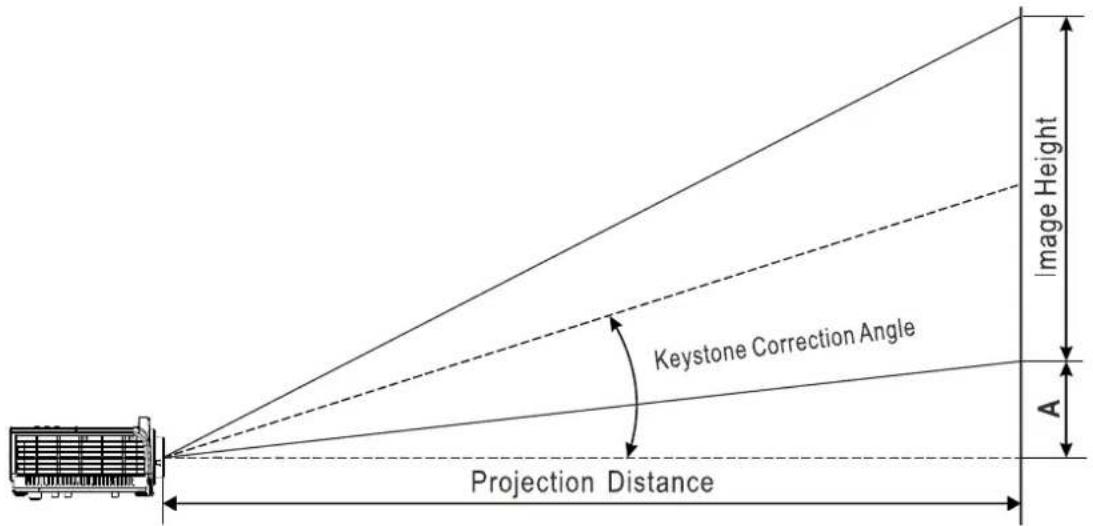
Projection Distance and Size Table
| IN3144 | ||||||||||||
| IMAGE DIAGONAL | IMAGE WIDTH | IMAGE HEIGHT | PROJECTION DISTANCE FROM | PROJECTION DISTANCE TO | OFFSET-A | |||||||
| MM | INCH | MM | INCH | MM | INCH | MM | INCH | MM | INCH | MM | INCH | |
| 1,524 | 60 | 1,219.2 | 48.0 | 914 | 4 36.0 | 223 | 1.1 87.8 | 335 | 2.8 13 | 2.0 | 109.7 | 4.3 |
| 1,778 | 70 | 1,422.4 | 56.0 | 1,066.8 | 42.0 | 2603.0 | 102.5 | 3911.6 | 154.0 | 128.0 | 5.0 | |
| 1,829 | 72 | 1,463.0 | 57.6 | 1,097.3 | 43.2 | 2677.4 | 105.4 | 4023.4 | 158.4 | 131.7 | 5.2 | |
| 2,032 | 80 | 1,625.6 | 64.0 | 1,219.2 | 48.0 | 2974.8 | 117.1 | 4470.4 | 176.0 | 146.3 | 5.8 | |
| 2,134 | 84 | 1,706.9 | 67.2 | 1,280.2 | 50.4 | 3123.6 | 123.0 | 4693.9 | 184.8 | 153.6 | 6.0 | |
| 2,286 | 90 | 1,828.8 | 72.0 | 1,371.6 | 54.0 | 3346.7 | 131.8 | 5029.2 | 198.0 | 164.6 | 6.5 | |
| 2,438 | 96 | 1,950.7 | 76.8 | 1,463.0 | 57.6 | 3569.8 | 140.5 | 5364.5 | 211.2 | 175.6 | 6.9 | |
| 2,540 | 100 | 2,032.0 | 80.0 | 1,524.0 | 60.0 | 3718.6 | 146.4 | 5588.0 | 220.0 | 182.9 | 7.2 | |
| 3,048 | 120 | 2,438.4 | 96.0 | 1,828.8 | 72.0 | 4462.3 | 175.7 | 6705.6 | 264.0 | 219.5 | 8.6 | |
| 3,429 | 135 | 2,743.2 | 108.0 | 2,057.4 | 81.0 | 5020.1 | 197.6 | 7543.8 | 297.0 | 246.9 | 9.7 | |
| 3,810 | 150 | 3,048.0 | 120.0 | 2,286.0 | 90.0 | 5577.8 | 219.6 | 8382.0 | 330.0 | 274.3 | 10.8 | |
| 5,080 | 200 | 4,064.0 | 160.0 | 3,048.0 | 120.0 | 7437.1 | 292.8 | 11176.0 | 440.0 | 365.8 | 14.4 | |
Projection Distance vs. Projection Size (WXGA)
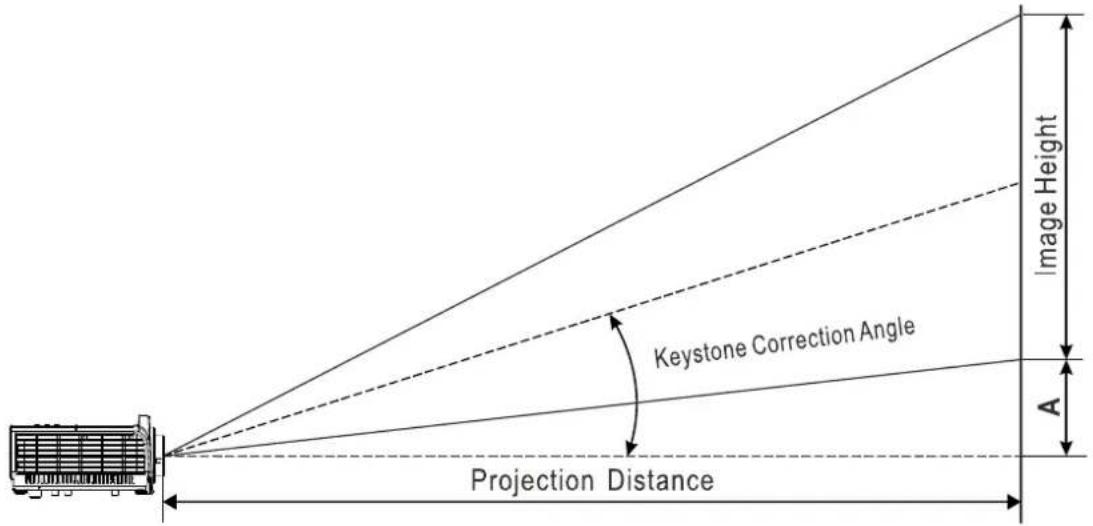
Projection Distance and Size Table
| IN3146 | |||||||||||
| IMAGE DIAGONAL | IMAGE WIDTH | IMAGE HEIGHT | PROJECTION DISTANCE FROM | PROJECTION DISTANCE TO | OFFSET-A | ||||||
| MM | INCH | MM | INCH | MM | INCH | MM | INCH | MM | INCH | MM | INCH |
| 1524 | 60 | 1292.3 | 50.9 | 807.7 | 31.8 | 1 | 886.8 | 74.3 | 2843.2 | 111.9 | 113.1 |
| 1778 | 70 | 1507.7 | 59.4 | 942.3 | 37.1 | 2 | 201.3 | 86.7 | 3317.0 | 130.6 | 131.9 |
| 1829 | 72 | 1550.8 | 61.1 | 969.3 | 38.2 | 2 | 264.2 | 89.1 | 3411.8 | 134.3 | 135.7 |
| 2032 | 80 | 1723.1 | 67.8 | 1077.0 | 42.4 | 2 | 2515.8 | 99.0 | 3790.9 | 149.2 | 150.8 |
| 2134 | 84 | 1809.3 | 71.2 | 1130.8 | 44.5 | 2641.6 | 104.0 | 3980.4 | 156.7 | 158.3 | 6.2 |
| 2286 | 90 | 1938.5 | 76.3 | 1211.6 | 47.7 | 2830.2 | 111.4 | 4264.8 | 167.9 | 169.6 | 6.7 |
| 2438 | 96 | 2067.8 | 81.4 | 1292.3 | 50.9 | 3018.9 | 118.9 | 4549.1 | 179.1 | 180.9 | 7.1 |
| 2540 | 100 | 2153.9 | 84.8 | 1346.2 | 53.0 | 3144.7 | 123.8 | 4738.6 | 186.6 | 188.5 | 7.4 |
| 3048 | 120 | 2584.7 | 101.8 | 1615.4 | 63.6 | 3773.7 | 148.6 | 5686.3 | 223.9 | 226.2 | 8.9 |
| 3429 | 135 | 2907.8 | 114.5 | 1817.4 | 71.5 | 4245.4 | 167.1 | 6397.1 | 251.9 | 254.4 | 10.0 |
| 3810 | 150 | 3230.9 | 127.2 | 2019.3 | 79.5 | 4717.1 | 185.7 | 7107.9 | 279.8 | 282.7 | 11.1 |
| 5080 | 200 | 4307.8 | 169.6 | 2692.4 | 106.0 | 6289.4 | 247.6 | 9477.2 | 373.1 | 376.9 | 14.8 |
Projection Distance vs. Projection Size (1080p)
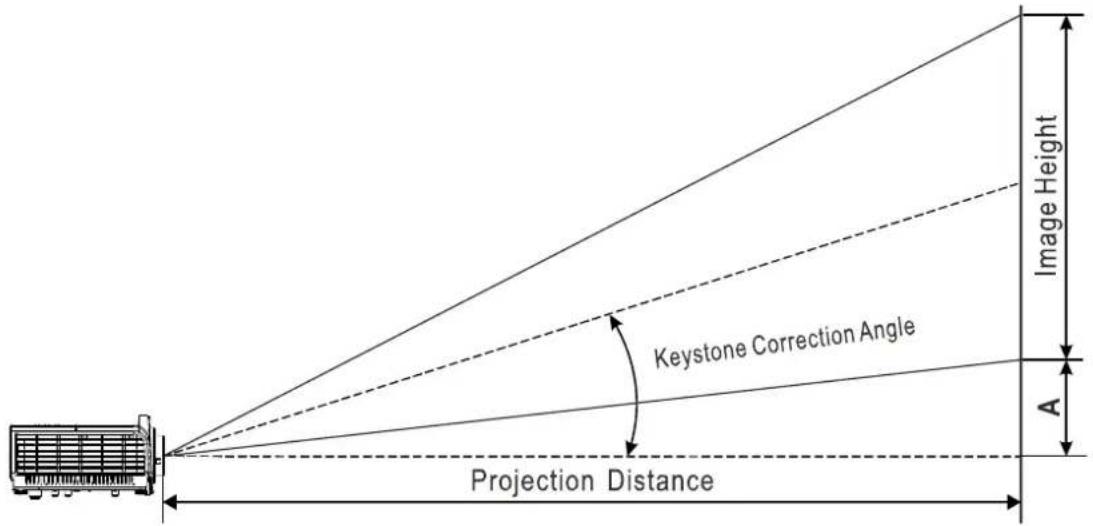
Projection Distance and Size Table
| IN3148HD | ||||||||||||
| IMAGE DIAGONAL | IMAGE WIDTH | IMAGE HEIGHT | PROJECTION DISTANCE FROM | PROJECTION DISTANCE To | OFFSET-A | |||||||
| MM | INCH | MM | INCH | MM | INCH | MM | INCH | MM | INCH | MM | INCH | |
| 1524 | 60 | 1328.3 | 52.3 | 747.2 | 29.4 | 1,846 | 3 72.7 | 2,776.1 | 109.3 | 112.1 | 4.4 | |
| 1778 | 70 | 1549.7 | 61.0 | 871.7 | 34.3 | 2,154 | 0 84.8 | 3,238.8 | 127.5 | 130.8 | 5.1 | |
| 1829 | 72 | 1593.9 | 62.8 | 896.6 | 35.3 | 2,215 | 6 87.2 | 3,331.3 | 131.2 | 134.5 | 5.3 | |
| 2032 | 80 | 1771.0 | 69.7 | 996.2 | 39.2 | 2,461 | 7 96.9 | 3,701.5 | 145.7 | 149.4 | 5.9 | |
| 2134 | 84 | 1859.6 | 73.2 | 1046.0 | 41.2 | 2,584.8 | 101.8 | 3,886.6 | 153.0 | 156.9 | ||
| 2286 | 90 | 1992.4 | 78.4 | 1120.7 | 44.1 | 2,769.5 | 109.0 | 4,164.2 | 163.9 | 168.1 | ||
| 2438 | 96 | 2125.2 | 83.7 | 1195.5 | 47.1 | 2,954.1 | 116.3 | 4,441.8 | 174.9 | 179.3 | ||
| 2540 | 100 | 2213.8 | 87.2 | 1245.3 | 49.0 | 3,077.2 | 121.1 | 4,626.8 | 182.2 | 186.8 | 7.4 | |
| 3048 | 120 | 2656.6 | 104.6 | 1494.3 | 58.8 | 3,692.6 | 145.4 | 5,552.2 | 218.6 | 224.1 | 8.8 | |
| 3429 | 135 | 2988.6 | 117.7 | 1681.1 | 66.2 | 4,154.2 | 163.6 | 6,246.2 | 245.9 | 252.2 | 9.9 | |
| 3810 | 150 | 3320.7 | 130.7 | 1867.9 | 73.5 | 4,615.8 | 181.7 | 6,940.3 | 273.2 | 280.2 | 11.0 | |
| 5080 | 200 | 4427.6 | 174.3 | 2490.5 | 98.1 | 6154.4 | 242.3 | 9,253.7 | 364.3 | 373.6 | 14.7 | |
Timing Mode Table
O : Frequency supported
— : Frequency not supported
Projector Dimensions
![315mm [12.4"] InFocus HDMI DLP 218mm [8.6"] 13mm [0.5"]](/content/2026/05/865665/images/8b2025a5f69749b45d87966c0ca2c99f4b8e05851b64c24e9bf3a9f703bddf4c.jpg)
![InFocus 51mm [2"] 97mm [3.8"] 112mm [4.4"] 126mm [5"]](/content/2026/05/865665/images/37456689c2fc79b5a0237b41ac3d2ea03779694928a8b1a13847e549020b2c3a.jpg)
REGULATORY COMPLIANCE
FCC Warning
This equipment has been tested and found to comply with the limits for a Class B digital device pursuant to Part 15 of the FCC Rules. These limits are designed to provide reasonable protection against harmful interference when the equipment is operated in a commercial environment.
This equipment generates, uses, and can radiate radio frequency energy and, if not installed and used in accordance with the instruction manual, may cause harmful interference to radio communications. Operation of this equipment in a residential area is likely to cause harmful interference in which case the user will be required to correct the interference at his/her own expense.
Changes or modifications not expressly approved by the parties responsible for compliance could void the user's authority to operate the equipment.
Canada
This class B digital apparatus complies with Canadian ICES-003.
Safety Certifications
FCC-B, cUL, UL, CE, C-tick, CB, CCC, CECP, CEL, PSB, TUV-Safety, KC, NOM, CU
APPENDIX I
Serial Communication
The following table describes the serial communication configuration that should be used when interfacing to CLI via the serial port.
Windows HyperTerminal or ProComm are two tools that can be used to send CLI commands across the serial port.
| Setting Value | |
| Bits per second 19200 | |
| Data bits 8 | |
| Parity None | |
| Stop bits 1 | |
| Flow control None | |
| Emulation VT100 | |
Control Command Structure
| Header code | Command code | Data code | End code | |
| HEX | 28 | Command | Data | 29 |
| ASCII | ( | Command | Data | ) |
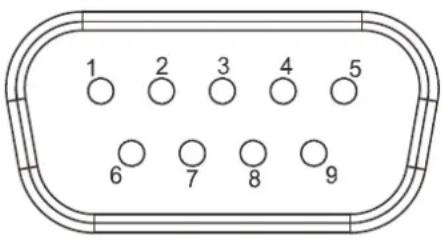
RS232 pin assignment
| Pin | Description | Pin | Description |
| 1 | NC | 6 | NC |
| 2 | RXD | 7 | RTS |
| 3 | TXD | 8 | CTS |
| 4 | NC | 9 | NC |
| 5 | GND |
| Item | Function | Command | Min | Max | Return | Note |
| 1 | Get projector power status | (PWR?) | 0 | 1 | (0-1,1) | 0: Off1: On |
| 2 | Set projector off / on | (PWR0) 0 | 1 | |||
| 3 | Get which source connect | (SRC?) | -- | -- | (0-12,1) | 0: VGA11: VGA24: HDMI-15: HDMI-211: Composite Video12: S-Video |
| 4 | Set source | (SRCn) | 0 | 12 | ||
| 5 | Get Auto power on value | (APO?) | -- | -- | (0-1,1) | 0: Off1: On |
| 6 | Set Auto power on | (APO0) | 0 1 | |||
| 7 | Get Aspect ratio value | (ARZ?) | -- | -- | (0-5,1) | 0: Fill1: 4:32: 16:93: Letter Box4: Native5: 2.35:1 |
| 8 | Set Aspect ratio | (ARZn) | 0 5 | |||
| 9 | Do auto image (AIM1) -- -- | |||||
| 10 | Get no signal power off timer | (AOT?) | -- | -- | (0-36,1) | |
| 11 | Set no signal power off timer | (AOTn) | 0 | 36 | Timer = n x 5 minutes | |
| 12 | Get Auto source value | (ASC?) | -- | -- | (0-1,1) | 0: Off1: On |
| 13 | Set auto source off / on | (ASCO) | 0 1 | |||
| 14 | Get blank status | (BLK?) | -- | -- | (0-1,1) | 0: Off1: On |
| 15 | Set blank off | (BLK0) 0 | 1 | |||
| 16 | Get brightness value | (BRT?) | -- | -- | (0-100,50) | |
| 17 | Set brightness value | (BRTn) | 0 | 100 | ||
| 18 | Get ceiling value | (CEL?) | -- | -- | (0-3,1) | 0: Desktop Front1: Desktop Rear2: Ceiling Front3: Ceiling Rear |
| 19 | Set ceiling value | (CELn) | 0 | 3 | ||
| 20 | Get close caption value | (CLC?) | -- | -- | (0-1,1) | 0: Off1: On |
| 21 | Set close caption value | (CLCn) | 0 | 1 | ||
| 22 | Get color saturation value | (CLR?) | -- | -- | (0-100,50) | |
| 23 | Set color saturation value | (CLRn) | 0 | 100 | ||
| 24 | Get color temperature value | (TMP?) | -- | -- | (0-2,1) | 0: Warm1: Normal2: Cold |
| 25 | Set color temperature value | (TMPn) | 0 | 2 | ||
| 26 | Get contrast value | (CON?) | -- | -- | (0-100,50) | |
| 27 | Set contrast value | (CONn) | 0 | 100 | ||
| 28 | Get digital zoom value | (DZM?) | -- | -- | (-10-10,1) | |
| 29 | Set digital zoom value | (DZMn) | -10 | 10 | ||
| 30 | Get error item | (ERR?) | -- | -- | (0-9,1) | 0: No error1: Lamp3: Ballast4: Fan5: Temp7: case open8: DMD9: Color wheel |
| 31 | Factory reset (user) | (RST1) | -- | -- | ||
| 32 | Get Freeze status | (FRZ?) | -- | -- | (0-1,1) | 0: Off1: On |
| 33 | Set Freeze off | (FRZ0) | -- | -- | ||
| 34 | Set Freeze on | (FRZ1) | -- | -- | ||
| 35 | Get Gamma value | (GTB?) | -- | -- | (0-5,1) | 0: 1.81: 2.02: 2.23: 2.44: B&W5: Linear |
| 36 | Set Gamma value | (GTBn) | 0 | 6 | ||
| 37 | Get H position value | (HPS?) | -- | -- | (-5-5,1) | |
| 38 | Set H position value | (HPSn) | 0 | 5 | ||
| 39 | Get Lamp Normal mode hours | (LMO?) | -- | -- | (0-9999,0) | |
| 40 | Get Lamp Smart Eco mode hours | (LML?) | -- | -- | (0-9999,0) | |
| 41 | Get Lamp Eco mode hours | (LME?) | -- | -- | (0-9999,0) | |
| 42 | Reset lamp hours (User) | (LRT1) | -- | -- | ||
| 43 | Get current Lamp hours | (LMP?) | -- | -- | (0-9999,0) | |
| 44 | Get lamp reset times | (LMR?) | -- | -- | (0-9999,0) | |
| 45 | Get lamp total hours | (LMT?) | -- | -- | (0-9999,0) | |
| 46 | Get lamp life (LIF?) -- -- (0-2500,0) | |||||
| 47 | Get lamp mode (IPM?) -- -- (0-2,1) | 0: Eco1: Normal2: Smart Eco | ||||
| 48 | Set lamp mode | (IPMn) | 0 | 2 | 0: Eco1: Normal2: Smart Eco | |
| 49 | Get OSD language | (LAN?) | -- | -- | (0-23,0) | 0: English1: French2: German3: Spanish4: Portuguese5: Simplified Chinese6: Traditional Chinese7: Italian8: Norwegian9: Swedish10: Dutch11: Russian12: Polish13: Finnish14: Danish15: Korean16: Hungarian17: Czech18: Arabic19: Turkish20: Vietnamese21: Hebrew22: Bahasa Indonesia23: Romamian |
| 50 | Set OSD language | (LANn) | 0 | 23 | ||
| 51 | Get OSD Menu on / off | (MNU?) | -- -- | (0-1,0) | 0: Off1: On | |
| 52 | Set Menu on/off | (MNUn) | 0 | 1 | ||
| 53 | Remote key - Menu | (NAV0) | -- | -- | ||
| 54 | Remote key - Up | (NAV1) | -- | -- | ||
| 55 | Remote key - Down | (NAV2) | -- | -- | ||
| 56 | Remote key - Enter | (NAV3) | -- | -- | ||
| 57 | Remote key - Left | (NAV4) | -- | -- | ||
| 58 | Remote key - Right | (NAV5) | -- | -- | ||
| 59 | Get OSD transparency | (TOE?) | -- | -- | (0-4,0) | 0: 0%1: 25%2: 50%3: 75%4: 100% |
| 60 | Set OSD transparency | (TOEn) | 0 | 4 | ||
| 61 | Get mute status | (MTE?) | -- -- | (0-1,0) | 0: Off1: On | |
| 62 | Set Mute off | (MTE0) | -- | -- | ||
| 63 | Set Mute on | (MTE1) | -- | -- | ||
| 64 | Get phase value | (MSS?) | -- | -- | (0-31,0) | |
| 65 | Set phase | (MSSn) | 0 | xx | ||
| 66 | Get display mode (PST?) --- (0-7,0) | 0: Presentaion1: Bright2: Game3: Movie4: TV5: sRGB6: BlackBoard7: User | ||||
| 67 | Set next display mode (PST+) --- | |||||
| 68 | Set upper display mode (PST-) --- | |||||
| 69 | Set display mode (PSTn) 0 7 | 0: Presentaion1: Bright2: Game3: Movie4: TV5: sRGB6: BlackBoard7: User | ||||
| 70 | Get FW version | (FVS?) | -- | -- | ("IN3148HD P01") | |
| 71 | Get projector info | (PRI1) | -- | -- | ||
| 72 | Get Model name | (MDL?) | -- | -- | ("IN3144") | |
| 73 | Get input resolution | (NRS?) | -- | -- | ("1920x1080") | |
| 74 | Get blank screen | (DSU?) | -- | -- | (0-4,0) | 0: Black1: Red2: Green3: Blue4: White |
| 75 | Set blank screen | (DSUn) | 0 | 4 | ||
| 76 | Get sharpness value | (SHP?) | -- | -- | (0-31,0) | |
| 77 | Set sharpness value | (SHPn) | 0 | 31 | ||
| 78 | Get color tint value | (TNT?) | -- | -- | (0-100,50) | |
| 79 | Set color tint value | (TNTn) | 0 | 100 | ||
| 80 | Get tracking value | (MTS?) | -- | -- | (-5-5,0) | |
| 81 | Set tracking +1 | (MTS+) | -- | -- | ||
| 82 | Set tracking -1 | (MTS-) | -- | -- | ||
| 83 | Set tracking value | (MTSn) | -5 | 5 | ||
| 84 | Get keystone value | (DKV?) | -- | -- | (-40-40,0) | |
| 85 | Set keystone | (DKVn) | -40 | 40 | ||
| 86 | Get V position value | (VPS?) | -- | -- | (-5-5,0) | |
| 87 | Set V positon +1 | (VPS+) | -- | -- | ||
| 88 | Set V position -1 | (VPS-) | -- | -- | ||
| 89 | Set V position value | (VPSn) | -5 | 5 | ||
| 90 | Get volume value | (VOL?) | -- | -- | (0-10,0) | |
| 91 | Set volume | (VOLn) | 0 | 10 | ||
| 92 | Get Brilliant color value | (BCL?) | -- | -- | (0-10,0) | |
| 93 | Set Brilliant color | (BCLn) | 0 | 10 |
- IN3144/IN3146/IN3148HD
- Copyright
- Disclaimer
- Trademark Recognition
- Important Safety Information
- Important:
- Symbols Used
- Note:
- Caution:
- Warning:
- General Safety Information
- Projector Installation Notice
- Power Safety
- Replacing the Lamp
- Cleaning the Projector
- Regulatory Warnings
- Important Recycle Instructions:
- Symbol Explanations
- About this Manual
- Table of Contents
- GETTING STARTED....1
- SETUP AND OPERATION....10
- ON-SCREEN DISPLAY (OSD) MENU SETTINGS....17
- MAINTENANCE AND SECURITY 46
- TROUBLESHOOTING....52
- SPECIFICATIONS....57
- REGULATORY COMPLIANCE....64
- APPENDIX I....65
- GETTING STARTED
- Packing Checklist
- Views of Projector Parts
- DC12V Trigger Note:
- Connectivity Note:
- Remote Control Parts
- Remote Control Operating Range
- Projector and Remote Control Buttons
- SETUP AND OPERATION
- Inserting the Remote Control Batteries
- Turning the projector on and off
- Setting an Access Password (Security Lock)
- You can use the arrow buttons
- If the Security Lock is enabled, the user will be prompted to enter a password when the projector's power button is pressed.
- Adjusting the Projector Level
- Adjusting the Zoom, Focus and Keystone
- Adjusting the Volume
- ON-SCREEN DISPLAY (OSD) MENU SETTINGS
- OSD Menu Controls
- Navigating the OSD
- Setting the OSD Language
- OSD Menu Overview
- Image Menu
- Attention!
- Computer Menu
- Advanced Features
- White Balance
- Color Manager
- Settings 1 Menu
- Audio
- Advanced 1 Features
- Advanced 2 Features
- Settings 2 Menu
- Status
- LAN\_RJ45
- Supported External Devices
- LAN RJ45
- RS232 by Telnet Function
- Quick Start-Guide for "RS232 by TELNET"
- Enabling Telnet in Windows 7/8/10
- Select Turn Windows features on or off.
- Select Telnet Client, and click OK.
- Telnet specifications
- Source Filter
- MAINTENANCE AND SECURITY
- Replacing the Projection Lamp
- IF A LAMP RUPTURES
- Resetting the Lamp Timer
- Cleaning the Lens
- Cleaning the Case
- Using the Cable Lock System and Security Bar
- Using the Cable Lock
- Using the Security Bar
- TROUBLESHOOTING
- Common problems and solutions
- Tips for Troubleshooting
- Image Problems
- Problem: No image appears on the screen
- Problem: The image is blurred
- Problem: The image is wider at the top or bottom (trapezoid effect)
- Problem: The image is reversed
- Problem: The image is streaked
- Problem: The image is flat with no contrast
- Problem: The color of the projected image does not match the source image.
- Lamp Problems
- Problem: There is no light from the projector
- Problem: The lamp goes off
- Remote Control Problems
- Problem: The projector does not respond to the remote control
- Audio Problems
- Problem: There is no sound
- Problem: The sound is distorted
- Having the Projector Serviced
- HDMI Q & A
- What is the difference between a "Standard" HDMI cable and a "High-Speed" HDMI cable?
- How do I run HDMI cables longer than 10 meters(32.81ft)?
- How can I tell if a cable is an HDMI certified cable?
- SPECIFICATIONS
- REGULATORY COMPLIANCE
- FCC Warning
- Canada
- Safety Certifications
- APPENDIX I
- Serial Communication
Brand : INFOCUS
Model : IN3146
Category : Projector