
S14 - Coffee maker Caffitaly - Free user manual and instructions
Find the device manual for free S14 Caffitaly in PDF.


| Product Type | Coffee Maker |
| Brand | Caffitaly |
| Model | S14 |
| Dimensions (W x D x H) | 170 mm x 280 mm x 350 mm |
| Weight | Approx. 4 kg |
| Water Tank Capacity | 1.2 litres |
| Pump Pressure | Max 15 bar |
| Noise Level | < 70 dB(A) |
| Power Supply | See rating plate on base (typical household voltage) |
| Compatible Capsules | Only Caffitaly System capsules |
| Beverage Buttons | Single Espresso (30 ml, white), Double Espresso (60 ml, white), Tea/Hot Water (120 ml, blue) |
| Cup Height Adjustment | Adjustable drip tray grid and removable drip tray for tall cups |
| Used Capsule Drawer | Integrated, holds used capsules |
| Auto Power Off | After 1 hour of inactivity |
| Descaling Indicator | Orange blinking light and 3 beeps |
| Water Empty Indicator | Red blinking light and 3 beeps |
| Cleaning | Daily: rinse drip tray, capsule drawer, water tank; not dishwasher safe |
| Safety Features | Lever safety switch, overheat protection, child supervision required |
| Intended Use | Domestic use only |
| Warranty | Void if non-Caffitaly capsules used or improper use |
Frequently Asked Questions - S14 Caffitaly
User questions about S14 Caffitaly
0 question about this device. Answer the ones you know or ask your own.
Ask a new question about this device
Download the instructions for your Coffee maker in PDF format for free! Find your manual S14 - Caffitaly and take your electronic device back in hand. On this page are published all the documents necessary for the use of your device. S14 by Caffitaly.
USER MANUAL S14 Caffitaly
MODEL S14

natural_image
Black and white photo of a modern coffee maker with a coffee cup, no visible text or symbolsINSTRUCTION MANUAL
Imported by Maranatha Import Export Pty Limited
13 Hoyle Avenue, Castle Hill, NSW 2154
Phone: 02 9846 0307
E-Mail: info@maranathaimport.com.au
www.caffitalysystem.com.au
CE
INDEX
Introduction:
- Welcome 2
- Safety Warnings 3
- Symbols Guide 4
Instructions:
• Machine Components 5
- First Time Use 6
• Correct Use Of The Buttons 7
• Dispensing Beverages - Using Factory Settings 8
• Turning On The Appliance 9
• Adjusting The Cup/Mug Height 9
- Programming The Quantity Of Beverage In A Cup 10
• General Operating Indications 11
Cleaning and Maintenance:
• Daily Maintenance 12
- Descaling 13
- Saving Energy 15
Miscellaneous:
- Restore Original Settings (RESET) 16
- Troubleshooting 17
• Technical Data 18 - Instructions for Use and Disposal 18
• Caffitaly System Care Contact 18
CONGRATULATIONS
on the purchase of your New Caffitaly System S14 Machine. Thank you for having chosen our product and for your confidence in our company. You can savour your favourite hot beverages at any time of the day with our appliance by choosing one of the capsules that Caffitaly System offers you. For example: an espresso, hot chocolate or a tea will be ready in just a few seconds.

natural_image
Black and white photo of a black electric shaver on a table with a coffee cup and matching saucer, set against a minimalist indoor setting with potted plants in the background (no text or symbols visible).SAFETY WARNINGS
Carefully read the following instructions. In this way you will avoid the risk of personal injury and damage to the appliance.

- This appliance is intended to be used in domestic environments. Not suitable for Professional use.

- Use ONLY Caffitaly System compatible capsules. Damage caused by using incorrect capsules will void the guarantee.

- Use the TEA button (Blue) for Tea and Hot Water ONLY! Incorrect use of this button will cause damage to the machine and void the guarantee.
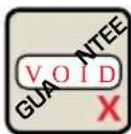
- Use of the appliance in any manner other than as directed herein could cause harm to persons and void the guarantee. The manufacturer will not be responsible for injury or damage resulting from improper use of the appliance.

- After removing the packaging, check that the appliance is not damaged. If damage is detected, or upon the first sign of a defect (unusual noise or odours), or if any other problem is detected inside the appliance, do not use it and contact the Maranatha Customer Service Line on 02 9846 0307.

- The packaging elements (plastic bags, etc.) must not be left within reach of children as they are potential sources of danger.

- Only use the appliance if the power cord is intact, if the cord is damaged it must be replaced by the manufacturer or qualified person, due to potential electrical safety risks. Contact the Maranatha Customer Service Line on 02 9846 0307.

- Use and store the appliance indoors. Make sure the electrical elements, plug and cord are dry. Never submerge the appliance in water. Protect the appliance from sprays and drips. Water and electricity together constitute a risk of electrocution.

- Do not leave the power cord near hot surfaces, sharp edges or other sharp objects.
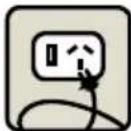
- Only connect the appliance to power outlets complying with the requirements of the law. Make sure that the power supply voltage matches the rating shown on the data plate on the bottom of the appliance.

- Do not pull on the power cord to disconnect it. Remove the plug carefully to avoid damage to the outlet.
SAFETY WARNINGS - Continued

- This appliance is not intended for use by persons (including children) with reduced physical, sensory or mental capabilities, or lack of experience and knowledge, unless they have been given supervision or instruction concerning use of the appliance by a person responsible for their safety. Children should be supervised to ensure that they do not play with the appliance
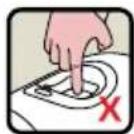
- Never place your hands inside the capsule compartment. There is a risk of injury.
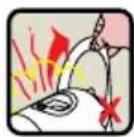
- Do not open the lever while the appliance is operating. If the lever is raised during the delivery of a product, the machine can emit jets of hot water. Risk of Burns!

- Do not remove parts of the appliance, OR insert objects into the openings. This could cause electric shocks! Any operation that is not described in this instruction manual should only be performed by an Authorised Support Centre. Please contact the Maranatha Customer Service Line on 02 9846 0307.

• Install the appliance on a solid, stable, heat resistant surface with an incline no greater than 2 degrees.

- When the Indicator Light blinks ORANGE and the machine emits 3 beeps, it is advisable to perform the descaling cycle, as illustrated Page 13. If you do not, the appliance may be damaged.

- Clean the appliance carefully and regularly with a soft cloth and a mild detergent, do not use alkaline cleaning agents. If it is not cleaned, the build-up that forms may be hazardous to your health. Unplug the appliance and allow it to cool before cleaning.

- Unplug the machine if you do not expect to use the appliance for a long period of time (leaving on vacation, etc.).
SYMBOLS GUIDE

CAUTION: This is the safety warning symbol. It is used to call your attention to possible risks of personal injury. Abide by the safety messages provided in order to avoid possible injury or death.

This is the symbol used to highlight some actions that will optimise the use of this appliance.
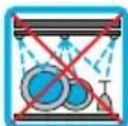
Not Dishwasher Safe

Maintenance Tips
MACHINE COMPONENTS


5.
FIRST TIME USE

We would also recommend following these steps after not having used the machine for a long period of time.


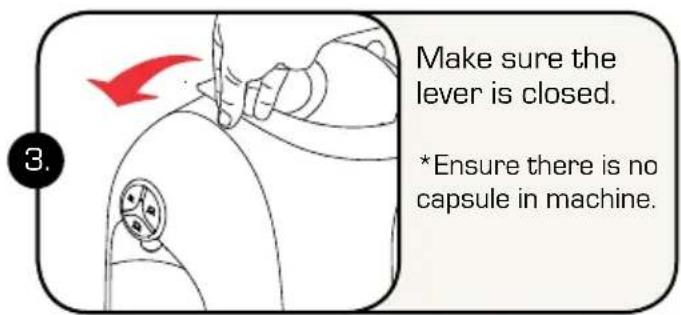


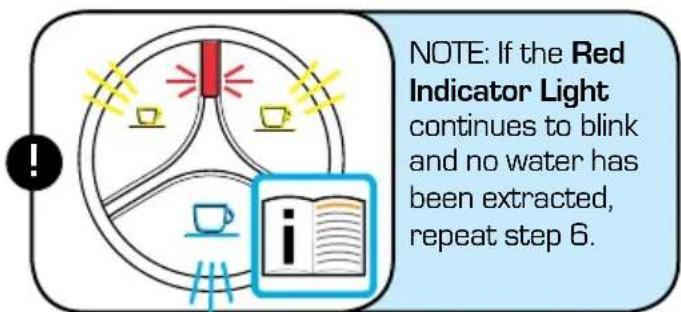
![Press any of the buttons. The machine will draw water through the system. [This will take about 30 sec]. When done the the Red Indicator Light will switch off.](/content/2026/05/864040/images/2e4b46886dd794eab748423fe6f4864491c4bf718916b067498f5095b0d01184.jpg)
Continued on next page... >>
BEFORE FIRST USE - Continued


CORRECT USE OF THE BUTTONS

natural_image
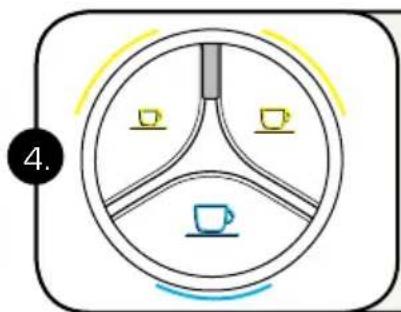
Close-up of a car wheel with three switches and red alignment markers (no text or symbols)Single Espresso Button - 30ml (Lit in WHITE). Use for dispensing a single espresso shot.
Double Espresso Button - 60ml (Lit in WHITE). Use for dispensing a double espresso coffee for a stronger beverage. Also suitable for Hot Chocolate, Chai Latte and similar beverages (NOT TEA).
Tea or Hot Water Button - 120mL (Lit in BLUE) should only be used for tea capsules or to add hot water.
Do not use the Tea Button for espresso coffee or any other beverages except tea (capsules appropriate for the Tea Button will be indicated on the packaging). Inappropriate use of this button may damage the machine and void your warranty.
Diagram 3:
When in doubt follow the directions on the capsule box regarding required button use.
DISPENSING BEVERAGES - Using Factory Settings


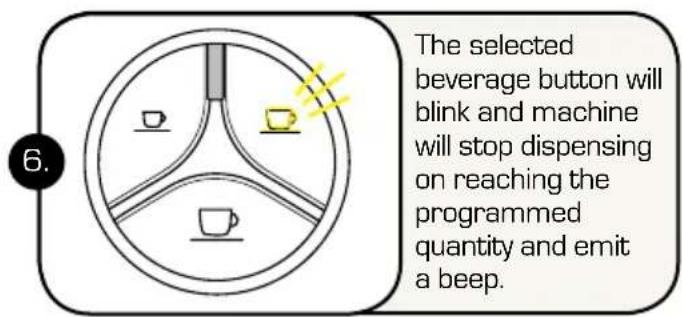


MAINTENANCE TIP: Between uses, to ensure optimum product delivery, remove used capsule from machine and rinse by pressing any button.

NOTE: The quantity of beverage dispensed can be programmed according to personal taste and the size of the cups or mugs used. Please refer to chapter "Programming the quantity of beverage in a cup" on Page 10.
TURNING ON THE APPLIANCE - DAILY USE


ADJUSTING THE CUP/MUG HEIGHT
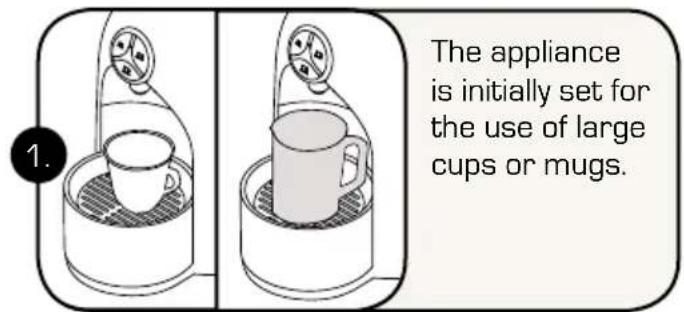
The appliance can be adjusted for the use of mugs or espresso cups.


PROGRAMMING THE QUANTITY OF BEVERAGE IN A CUP

Switch the machine on using the On/Off Switch. Wait about 1 min for machine to warm up.

natural_image
Line drawing of a hand holding a device with a red arrow indicating motion (no text or symbols)Raise the lever to open the capsule compartment.
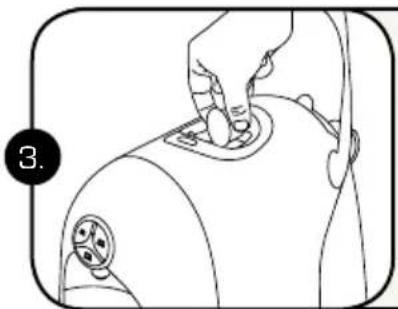
natural_image
Line drawing of a person applying pressure on a medical device (no text or symbols)Insert the capsule, pressing it gently into place.

Close the lever fully.

natural_image
Line drawing of a coffee maker with a cup and lid, no text or symbols presentPlace a cup or mug under the coffee dispensing spout.
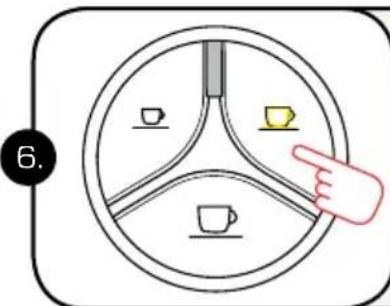
Press and release the button corresponding to the type of beverage you want as per Diagram 3 on Page 7.

On reaching the desired amount of beverage, release the button.
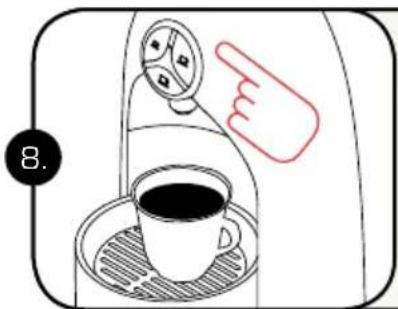
Now the button is programmed to your desired amount.

NOTE: The quantity of coffee dispensed may be programmed, from a minimum of 30ml to a maximum of 250ml.

NOTE: Recommended Programming/Factory Programming:
- 30ml: Single Espresso Shot
- 60ml: Double Espresso Shot
- 120ml: Tea (& Hot Water Button)
* Quantities are approximate and may vary slightly between capsules.
GENERAL OPERATING INDICATIONS
DESCALING SIGNAL:

When the Indicator Light blinks ORANGE and the machine emits 3 beeps (after which it will remain lit), it is advisable to perform the descaling cycle.
See section: Descaling on Page 13
HEATING:

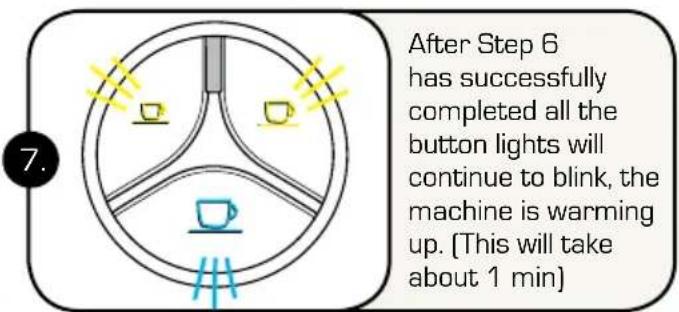
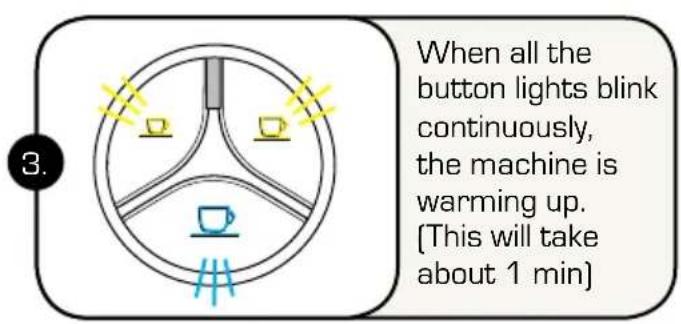
When all the button lights continuously blink, the machine is warming up. (This will take about 1 min)
WHEN THE WATER RUNS OUT DURING OPERATION:

The water tank is empty when the Indicator Light blinks RED and the appliance emits 3 beeps, followed by a single repeated beep.

natural_image
Line drawing of a bottle being inserted into a cup (no text or symbols)Fill the tank with fresh, still water.

Press any one of the buttons. Wait for the machine to complete the priming cycle as it fills with water.
flowchart
graph TD
    A[" "] --> B[" "]
    B --> C[" "]
    C --> D[" "]
    D --> E[" "]
    style A fill:#fff,stroke:#000
    style B fill:#fff,stroke:#000
    style C fill:#fff,stroke:#000
    style D fill:#fff,stroke:#000
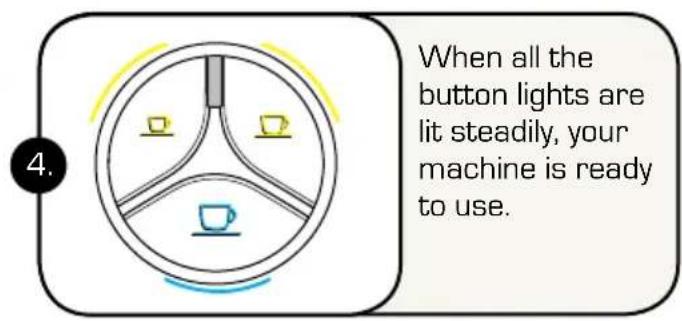
When the Button Lights turn on and remain steadily lit, the appliance is ready for use.
GENERAL OPERATING INDICATIONS - Continued
IF THE LEVER IS RAISED:


DAILY MAINTENANCE
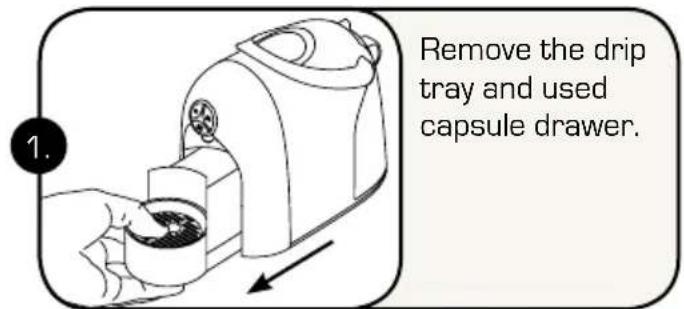
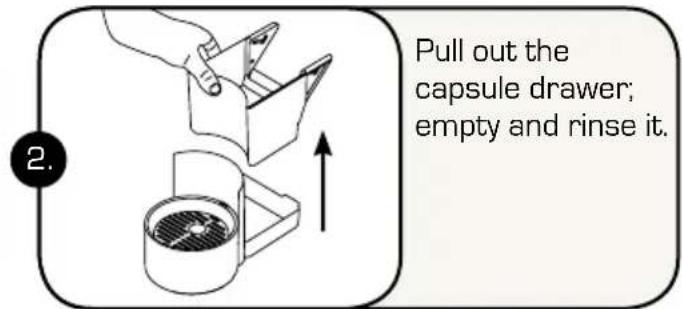


Use a soft damp cloth and a mild detergent to clean the surfaces of the appliance.

The plastic parts of the appliance are NOT dishwasher safe.

DANGER: Never submerge the appliance in water. Protect appliance from sprays and drips. Water and electricity together constitute a risk of electrocution.
DESCALING INSTRUCTIONS
DESCALING SIGNAL: When the Indicator Light blinks ORANGE and the machine emits 3 beeps, it is advisable to perform the descaling cycle, as illustrated below.
PLEASE DO NOT LEAVE THE MACHINE DURUNG THE DESCALING PROCESS

NOTE: Descaling refers to the removal of the natural mineral build up within the pipes of the machine. If not removed this may result in a poor quality beverage and eventually block the pipes.
The machine features an advanced program that monitors how much water is used to dispense beverages. This measurement provides the user with indications as to when the machine needs to be descaled.

CAREFULLY read the directions for use on the package of the descaling agent. Avoid contact with eyes, skin and machine surfaces. Switch the appliance off during descaling, and do not lift the lever. A person must be present during the operation. Do not use vinegar: it could damage your appliance


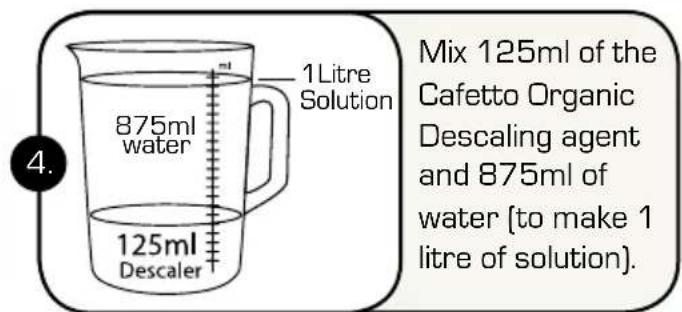
Continued on next page... >>
DESCALING INSTRUCTIONS - Continued
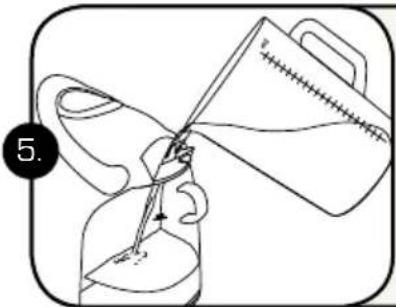
natural_image
Illustration of a hand holding a tool with a magnifying glass pouring liquid into it (no text or symbols)Replace water tank and pour 1 litre descaling solution into it.
natural_image
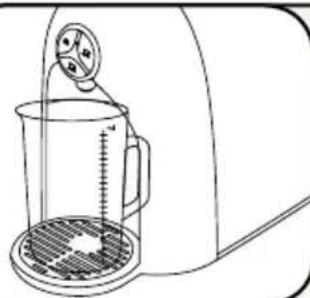
Line drawing of a kitchen blender with a measuring cup and stand (no text or symbols)Place a container [at least 1L] under the coffee dispensing spout. NB: Do not leave machine as you may have to empty the container as it cycles through the Descaling process.

Press and hold the Single & Double Espresso buttons and at the same time turn on the machine.

Double Espresso Button will be lit and Indicator light will blink. Press the Double Espresso button to start the descaling cycle.

The appliance will dispense the descaling solution at intervals: 5 doses with a 4 min pause between each. Total time about 25 min.

Do not press any buttons during this time. The Indicator Light blinks. NB: At the end of final cycle 5, the watertank will be empty. Do not refill.

The Double Espresso button will blink & beep twice, after about 5-7 mins it will light up steadily then descaling is complete.

natural_image
Line drawing of a hand using a kitchen mixer (no text or symbols)Rinse the water tank and fill it with fresh still water to max line.

natural_image
Illustration of a hand holding a box with an upward arrow, next to a container with a gridded lid (no text or symbols)Remove and empty used capsule drawer, reassemble with drip tray and replace.

Press the Double Espresso button to start the rinse cycle. Fresh water will be run through the appliance to rinse (about 500ml).
Continued on next page... >>
DESCALING INSTRUCTIONS - Continued

When the rinse cycle is complete, the machine beeps and all the buttons will blink at the same time (machine is warming up).

natural_image
Line drawing of a hand inserting a small object into a container (no text or symbols)Rinse water tank and fill it with fresh still water.
natural_image
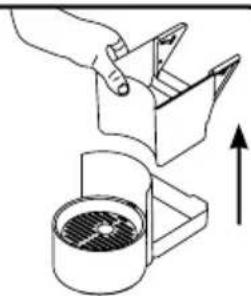
Diagram showing a hand placing a component into a container with an upward arrow indicating motion (no text or symbols)Remove, empty, rinse and then replace drip tray and used capsule drawer.
natural_image
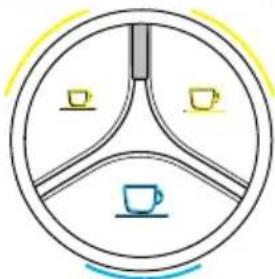
Simple circular diagram with three segments, each containing a small icon (a cup and a coffee cup), no text or symbols present.When the buttons turn on and remain steadily lit, the appliance is ready for use.
SAVING ENERGY

The machine will automatically reduce consumption one hour after the last use.

natural_image
Simple line drawing of a circular object with three arms and icons, no text or symbols present.All the buttons will slowly and sequentially blink.

natural_image
Line drawing of a hand holding a device with a red arrow indicating motion (no text or symbols)To restore normal operating conditions, press any button or raise the lever. The appliance will start warming up.

natural_image
Simple circular diagram with three segments, one containing a cup and another a slice of coffee, surrounded by a yellow arc (no text or symbols)When all the buttons turn on and remain steadily lit, the appliance is ready for use.
RESTORE ORIGINAL SETTINGS (RESET)
These instructions, allow you to reset the machine back to its factory settings – helpful if you experience an issue with the machine, or you have changed the pour levels for example and cannot change them back to their original levels.


NOTE: Now that the machine has been RESET it is in First Use Mode. We recommend following the First Use steps again on Page 6.

NOTE: If you have RESET the machine and the problem still continues, you should Contact the Maranatha Customer Service Line on 02 9846 0307.
TROUBLESHOOTING
PROBLEM CAUSE SOLUTION
| No beverage is brewed.The Indicator lightblinks RED. | - The water tank is empty.and/or- Incorrect use of theTea button. | - Fill the tank with fresh water.Press Single Espresso button.When the buttons remain steadily lit, the appliance is ready for use.- The Tea Button is Only to be used for Tea Capsules and hot water. |
| The coffee is nothot enough. | - Cold milk, cups or mugs. | - Preheat milk and preheat cups ormugs by running under hot water. |
| The lever cannot belowered. | - The used capsule draweris full or a Capsule stuckinside the machine. | - Empty out the used capsuledrawer.- Gently push down on jammedcapsule with a new capsule. |
| The Indicator lightis on and steadily lit inRED and water is cold. | - Heating problems. | - RESET the machine as perinstructions on Page 16.- If problem persists please contactthe Maranatha Customer ServiceLine on 02 9846 0307. |
| When a coffee dispensingbutton is pressed, themachine seems to startrunning, but stops withoutdispensing coffee or afterdispensing only a smallamount. | - Incorrect quantityprogramming. | - Reprogram the quantitycorresponding to that button.See chapter. “Programming thequantity of coffee in a cup” onPage 10.- If that doesn’t work follow theRESET instructions as illustratedon Page 16. |
| Indicator Light is Orange | - Machine requiresDescaling. | - Refer to sections - Descaling andperform the steps to descalemachine found on Page 13. |
| Coffee grinds appearingin cup. | - Incorrect coffee capsulebeing used. | - Capsules suitable for the Caffitalysystems are only suitable for thismachine (there will be a Caffitalylogo on the packaging). |
If any of the above solutions are not correcting your problem or you have any further questions/enquiries, please contact the Maranatha Customer Service line on:
02 9846 0307
TECHNICAL DATA

See the data plate on the base of the machine.

Max. 15 bar

< 70dB A

Approx. 4 kg

1,2 litres

ambient temperature: 10^ C ÷ 40^ C


170 mm 280 mm 350 mm


The appliance has been manufactured using high quality materials that can be reused or recycled. Dispose of the appliance in a suitable waste collection centre.
All materials and objects in contact with food products comply with the requirements of European Regulation 1935/2004.
CAFFITALY SYSTEM CARE CONTACT
Phone: 02 9846 0307
E-Mail: info@maranathaimport.com.au
For more information on the machine operation, available capsules and other useful hints and tips go to the Caffitaly website:
www.caffitalysystem.com.au

natural_image
Close-up of a white ceramic cup filled with cream and a dark dessert, placed on a saucer (no text or symbols visible)
For more information on the machine operation, available capsules and other useful hints and tips go to the Caffitaly website:
www.caffitalysystem.com.au
CE


- INSTRUCTION MANUAL
- INDEX
- Introduction:
- Instructions:
- Cleaning and Maintenance:
- Miscellaneous:
- CONGRATULATIONS
- SAFETY WARNINGS
- SAFETY WARNINGS - Continued
- SYMBOLS GUIDE
- MACHINE COMPONENTS
- FIRST TIME USE
- BEFORE FIRST USE - Continued
- CORRECT USE OF THE BUTTONS
- DISPENSING BEVERAGES - Using Factory Settings
- TURNING ON THE APPLIANCE - DAILY USE
- ADJUSTING THE CUP/MUG HEIGHT
- PROGRAMMING THE QUANTITY OF BEVERAGE IN A CUP
- GENERAL OPERATING INDICATIONS
- DESCALING SIGNAL:
- HEATING:
- WHEN THE WATER RUNS OUT DURING OPERATION:
- GENERAL OPERATING INDICATIONS - Continued
- IF THE LEVER IS RAISED:
- DAILY MAINTENANCE
- DESCALING INSTRUCTIONS
- PLEASE DO NOT LEAVE THE MACHINE DURUNG THE DESCALING PROCESS
- DESCALING INSTRUCTIONS - Continued
- SAVING ENERGY
- RESTORE ORIGINAL SETTINGS (RESET)
- TROUBLESHOOTING
- TECHNICAL DATA
- CAFFITALY SYSTEM CARE CONTACT
Brand : Caffitaly
Model : S14
Category : Coffee maker