
Formula 500i TS - Iron OBH NORDICA - Free user manual and instructions
Find the device manual for free Formula 500i TS OBH NORDICA in PDF.


| Product Type | Steam Iron |
| Brand | OBH Nordica |
| Model | Formula 500i TS |
| Product Code | 2119 |
| Power Supply | 220-240 V ~ 50 Hz |
| Power Consumption | 2016-2400 W |
| Soleplate Material | Profiled Ceramic with Button Groove |
| Water Tank Capacity | 400 ml |
| Cord Length | 3 m with cord clip |
| Steam Settings | Adjustable (0-3) |
| Burst of Steam | Yes |
| Spray Function | Yes |
| Vertical Steaming | Yes |
| Dry Ironing | Yes |
| Anti-Drip System | Yes |
| Auto Shut-Off | Yes (10 min vertical, 30 sec horizontal) |
| Temperature Control | Electronic with LCD Display |
| Self-Cleaning Function | Yes |
| Anti-Scale Filter | Built-in (non-replaceable) |
| Safety Features | Overheating Fuse, Auto Shut-Off |
| Included Accessories | Filling Beaker |
| Warranty | According to current law |
| Intended Use | Domestic only |
Frequently Asked Questions - Formula 500i TS OBH NORDICA
User questions about Formula 500i TS OBH NORDICA
0 question about this device. Answer the ones you know or ask your own.
Ask a new question about this device
Download the instructions for your Iron in PDF format for free! Find your manual Formula 500i TS - OBH NORDICA and take your electronic device back in hand. On this page are published all the documents necessary for the use of your device. Formula 500i TS by OBH NORDICA.
USER MANUAL Formula 500i TS OBH NORDICA




Formula 500i TS
steam iron
Bruksanvisning – svenska......sida 3 – 16
Brugsanvisning – dansk ......side 17 – 30
Bruksanvisning – norsk......side 31 – 44
Käyttöohjeet – suomi......sivu 45 – 58
Instruction manual – english...... page 59 – 72
OBH Nordica Ångstrykjärn Formula 500i TS
Apparatens delar
OBH Nordica Denmark A/S
Ole Lippmanns Vej 1
2630 Taastrup
Tlf.: 43 350 350
www.obhnordica.dk
Tekniske data
OBH Nordica 2119
Apparatets deler
OBH Nordica Norway AS
Postboks 5334, Majorstuen
0304 Oslo
Tlf: 22 96 39 30
www.obhnordica.no
Tekniske data
OBH Nordica 2119
Laitteen osat
OBH Nordica Steam Iron Formula 500i TS
Safety instructions
Never pour vinegar, descaling or softening agents in the water tank. Never use demineralised water or distilled water. Such liquids combined with the metallic part of the iron may damage the iron. Possible damage to the iron or garments due to incorrect use is not covered by the warranty.
- Read the instruction manual carefully before use and save it for future use.
- Plug the appliance to a household outlet of 220-240V only, and use the appliance only for the intended use.
- Always unplug the appliance from the mains supply, if the appliance does not function properly, when not in use and before cleaning and maintenance..
- Never immerse the appliance in water or any other liquid.
- This appliance can be used by persons (including children from the age of 8) with reduced physical, sensory or mental capabilities or lack of experience/knowledge, if they have been given supervision or instructions concerning the use of the appliance by a person responsible for their safety.
- Children should be supervised to ensure that they do not play with the appliance. Children are not always able to understand potential risks. Teach children a responsible handling of electrical appliances.
- Always position the appliance and the cord out of the reach of children under the age of eight, when it is on or still hot.
- Cleaning and maintenance should not be carried out by children under the age of 8 and always under supervision.
-
Check that the cord is not hanging free from the ironing board.
-
Never leave the iron unattended, when plugged to a wall outlet.
- Never use or store the iron outdoor or in a bathroom.
- Do not place the appliance on or near hotplates, open fire or the like.
- The iron should be used and stored on a stable and even surface.
- When the iron is in a vertical position, make sure that it is standing on a stable and even surface.
- Never iron across buttons, zips etc. This may damage the soleplate.
- Always unplug the appliance from the mains supply when filling up or pouring out water, before cleaning and maintenance and when not in use.
- Do not open the filling inlet of the water tank during use.
- Never wrap the core around the iron until it has cooled completely.
- During use the iron reaches high temperatures. Consequently, never touch the hot parts of the iron.
- Do not use the iron if it has been dropped, in case of visible damages or if it leaks water.
- Always check the appliance, the core and the plug before use. If the core is damaged, it must be replaced by the manufacturer or his service agent or a similarly qualified person in order to avoid a hazard.
- The electrical installation must comply with the current edition of the Danish declaration of high voltage current concerning additional protection in the form of a residual current device (RCD with a rated residual operating current not exceeding 30 mA.) Check with your installer.
-
The appliance is for domestic use only.
-
If the appliance is used for other purposes than intended, or is it not handled in accordance with the instruction manual, the full responsibility for any consequences will rest with the user. Any damages to the product or other things are not covered by the warranty.
Before use
Before you use the steam iron for the first time, please read the instruction manual carefully and save it for future use.

Parts of the appliance
- Steam button for setting the amount of steam
- Self-cleaning button
- Spray button
- Burst of steam button
- Extra long cord 3 m with cord clip
- Flexible cord clip
- LCD display
- Temperature control
-
Water filling inlet
-
Spray mouthpiece
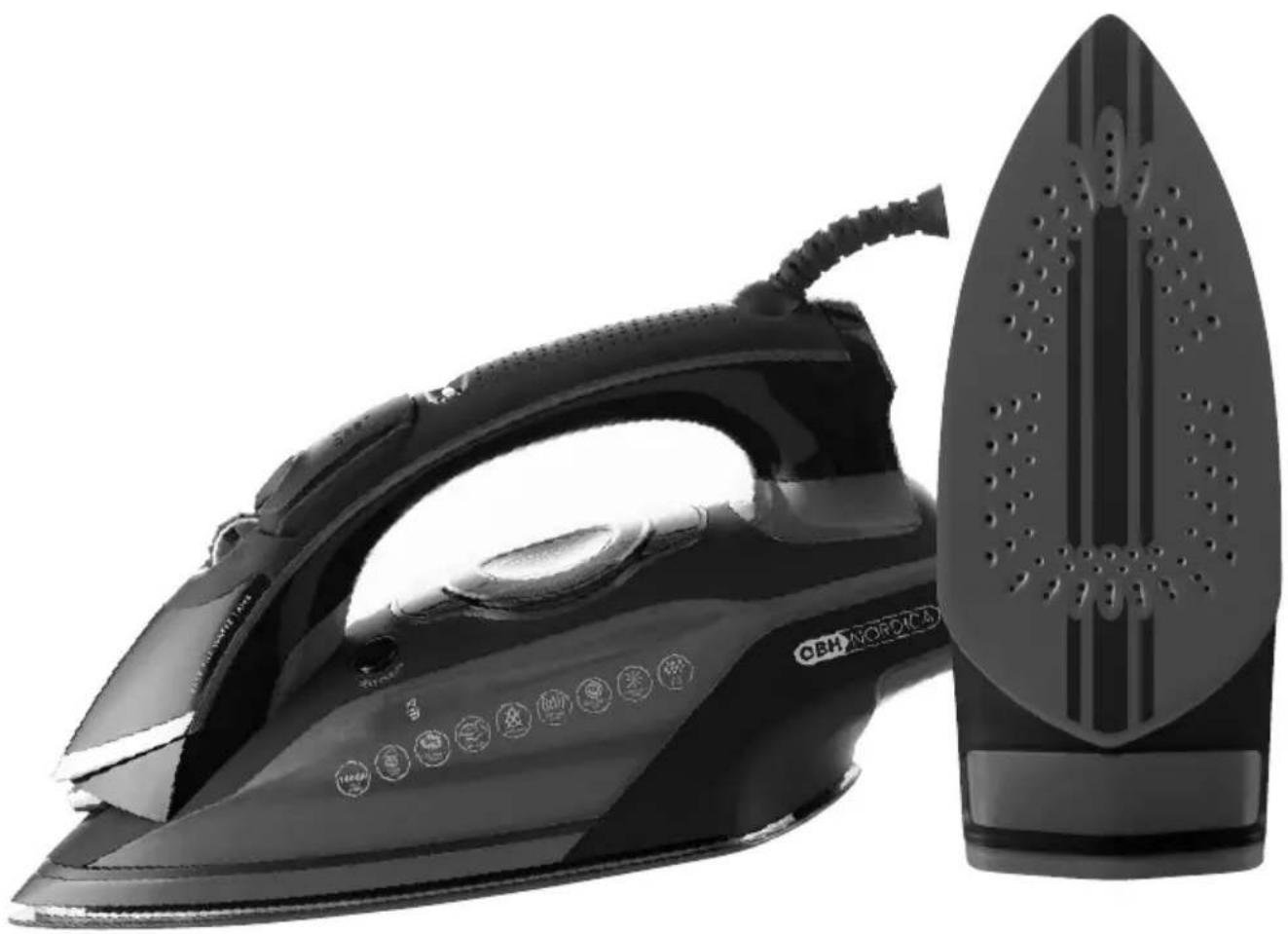
- Profiled cheramic soleplate with button groove
- Max level indicator water tank
- Incorporated anti-scale filter
- Extra big water tank, 400 ml
- Heel (resting)
- Signal lamp
- Beaker
Remove possible protective film from the soleplate and wipe the soleplate with a damp cloth to remove any residue from the production. Fill water in the tank and empty it again to be sure that there are no impurities left in the water tank. Empty the water tank by opening the lid and turn the iron upside down over e.g. the kitchen sink to let the water run out.
Use
Setting of temperature
Plug the switch to a wall outlet. The water tank will light to indicate that the iron is connected. All segments of the display will be on for 3 seconds and next the “VELVET” marking will be on. The temperature indicator starts flashing and the signal lamp turns blue until the lowest temperature has been reached. When the iron is ready for use, the temperature indicator on the display will be on permanently and the colour of the signal lamp at the edge of the iron changes to red.
In order to change the temperature, press the temperature setting button until the wanted temperature symbol ( ·/··/··· ) is displayed.
Note that each temperature setting can be specified by selection of fabric according to the table below.
Do not start ironing until you hear a beep and the temperature indicator of the display stops flashing and the signal lamp at the edge of the iron has turned red. The iron has now obtained the temperature set.
If you want to lower the temperature, press the temperature control button downwards until the wanted setting is displayed. Wait until you hear a beep and the temperature indicator of the display stops flashing and the signal lamp at the edge of the iron has turned red.
The following table can be used as a guideline in case of doubt as to the temperature.
• = VELVET, SYNTH. Ironing at low temperature. Forsynthetic fabrics such as e.g. acrylic, nylon, polyester, velvet etc. Steam ironing is not possible at low temperatures. Set the steam button at "0".
• • = SILK, WOOL. Ironing at medium temperature. For e.g. wool, silk etc. Steam ironing is possible to a certain degree by setting the steam selector at optional amount of steam (1-3).
••• = COTTON, LINEN, DENIM. Ironing at high temperature. For e.g. cotton, linen, jeans etc. Steam ironing is possible to a certain degree by setting the steam selector at optional amount of steam (1-3).
Always follow the label and ironing instructions of the garment.
If the iron symbol on the label is crossed, the garment cannot be ironed.
If there is no indication of the temperature to be used for the garment, start at the lowest temperature and carefully make a test.
Always start at a part that will not be visible. In case of mixed kinds of fabrics, such as polyester/cotton, always iron at a temperature corresponding to polyester - i.e. the lowest temperature.
If the garment has prints, sequins etc. special care is required as such materials may melt. Consequently, the above instructions are not valid for such materials. We recommend that fabrics that have a tendency of becoming shiny are ironed on the reverse side. If ironed on the upper side, do it carefully and always keep the iron moving.
Filling with water
Position the iron upright and make sure that the appliance has been unplugged before filling of water. Set the steam selector at "0" (no steam) and open the lid of the inlet. Pour water slowly by means of the delivered beaker until the water reaches the MAX marking on the water tank (never exceed the MAX marking). Close the lid.
Distilled and demineralised water as well as softening agents must not be poured in the water tank, as such liquids may damage the metallic parts of the iron and discolour the fabric.
Any damage to the iron or the garment that indicate that water other than tap water has been used, is not covered by the warranty. Possible use of other liquids can be ascertained by our repair shop.
If you live in an area with very hard water (above 17 pH), you should clean the steam chamber regularly in order to avoid lime deposits. Follow the cleaning procedure described later in this instruction manual. The iron is furthermore equipped with a built-in anti-lime filter (not changeable), which has been designed to reduce the building up of limestone in the steam chamber and thus prolong the lifetime of the iron. The anti-lime filter will, however, not entirely prevent the natural building up of limestone in the steam chamber and it is therefore important to follow the self-cleaning procedure at regular intervals.
The iron comprises an alarm that indicates when it is time to add water. The symbol of the beaker flashes in the display, when the water tank needs filling (you will also hear a beep).
Steam ironing
Stem ironing is only possible at high temperatures •• and ••• (as per the indications: WOOL, COTTON, LINEN or DENIM) on the display. See the above table.
- Make sure that the appliance is unplugged.
- Add water through the filling inlet; the water tank should be filled at least up to 1/4. Remember first to set the steam selector at "0" to prevent water from running out.
-
Plug the appliance to a wall outlet and set the wanted temperature and wait until the temperature indicator in the display is permanently on and the colour of the signal lamp at the edge of the iron changes to red. You will hear a beep as an indication that the iron is ready for use.
-
Finally, set the steam selector at optional amount of steam (1-3) and start ironing.
- Make a test on an old cloth or fabric to make sure that all possible impurities in the water tank have been removed. Some parts of the iron have been slightly lubricated/greased, which may create some smoke when you use the iron for the first time. After about 10 minutes the completely harmless smoke will disappear.
When steam ironing at low temperatures some dripping may be seen from the soleplate, as the water in the tank will not evaporate sufficiently. Consequently, make sure to set the steam selector corresponding to the temperature setting.
Before you start ironing, press the spray and steam selector 3-4 times to activate these functions.
Burst of steam
Check that the water tank is full. Set the temperature button at the wanted position on the scale ••• (WOOL, COTTON, LINEN or DENIM) and wait until the temperature indicator is constantly on and you hear a beep (the colour of the signal lamp at the edge of the iron changes to red).
Lift the iron a few centimetres from the garment and press hard on the burst of steam button. The soleplate will now release a powerful burst of steam onto the garment. It may be necessary to activate the burst of steam button a couple of times in order to ensure the optimum power of the pump in the iron. Wait a few seconds before reactivating the burst of steam button.
Note that the burst of steam can only be activated at high temperatures (WOOL, COTTON, LINEN or DENIM) and when the steam selector is set at 3. If you want to have a more powerful burst of steam, set the steam button at position "0".
IMPORTANT!
If you use the steam function it is important to keep children away due to the risk of burns. Keep your fingers off the jet of steam when this function is on.
Vertical ironing
The iron can also be used for vertical ironing, which is perfect for removing creases on hanging clothes, curtains etc. The process is the same as for burst of steam (see above section), but the iron is to be held in a vertical position about 15-30 cm away from the garment to be ironed.
Dry ironing
Set the steam selector at "0" (closed). Press the temperature setting until the wanted temperature setting is displayed. Wait until the temperature indicator on the display goes out; you will hear a beep and the colour of the signal lamp changes to red. The iron is now ready for use.
Spray
Spray is used to dampen dry garments and difficult creases. Press the spray button all the way down several times and water particles will be sprayed on the garment for easier ironing and a better result.
It will also be an advantage to use the spray function for delicate fabrics (synthetic fabrics) that are ironed at low temperatures and where you cannot use the burst of steam function.
Anti-drip system
The iron comprises an anti-drip system to prevent water from dripping on the clothes during steam ironing, should the temperature of the iron be too low.
The anti-drip system may emit a “click”, particularly when the iron is heating up or cooling down. This is quite normal and does not mean that the iron is defective. If this “click” is heard during ironing, it indicates that the amount of steam is too important for the chosen temperature. Either reduce the amount of steam or increase the temperature.
If, contrary to expectation, some water drops should occur, this does not mean that the iron is defective, but it can indicate that the water tank is about to being empty or that the iron needs to be descaled.
The anti-drip system will automatically switch off the steam if the temperature is too low.
Safety Stop function
The iron comprises a safety stop function that automatically switches off the iron if you e.g. forget to switch it off after use. This function switches off the iron if it is placed in a vertical position and has not been moved for about 10 minutes. If the iron is placed horizontally on the soleplate, it will be switched off after 30 seconds if it has not been moved within that period of time.
If the safety stop function is activated, the AUTO OFF in the display and the signal lamps at the sides of the iron start to flash. Short beep signals will be emitted at the same time to indicate that the power supply to the iron has been cut.
In order to reactivate the iron, move the iron forwards and backwards in horizontal position.
AUTO OFF and the signal lamp stop flashing, the temperature indicator flashes to indicate that the iron is heating up. When the iron is warm and the temperature indicator has been switched off, you can start ironing again.
If the safety stop function of the iron has been on for more than 1 hour, the iron will be cold. In that case, press the temperature setting in order to select the wanted temperature again.
After use
When the ironing is done, set the steam selector in position "0". Disconnect from the mains supply and empty the water tank by opening the filling inlet and turn the iron upside down over e.g. the kitchen sink to let the water run out. Reconnect the appliance and set the temperature at ••• 1-2 minutes to let any remaining water evaporate. Now disconnect from the mains supply and position the iron on its heel to let the soleplate cool off.
NOTE! Always position the iron on its heel when not in use!
When the iron has cooled down, the cord can easily be wrapped around the heel of the iron and kept in place by the clip on the cord.
Self-cleaning - cleaning of the steam chamber of the iron
You will get the best result and the iron will last longer if the self-cleaning process is followed at regular intervals, i.e. once or twice a month. By doing this possible limestone and fluff in the steam chamber and in the steam holes will be removed.
- Unplug from the wall outlet.
- Set the steam selector at position "0" (closed).
- Fill the water tank to the MAX marking.
- Position the iron vertically on its heel.
- Plug the switch to a wall outlet. Press the temperature setting button until DENIM is displayed.
- Let the iron warm up and wait until the temperature indicator in the display is constantly on and you hear a beep signal.
- Unplug from the wall outlet and hold the iron horizontally over a sink.
- Press the "SELF-CLEAN" button and keep it pressed during the entire process. The button may be a little slow, but this does not mean that the iron is defective.
- Steam and boiling water will now evaporate from the holes of the soleplate. Impurities and limestone will be flushed out.
- Move the iron forwards and backwards until the water tank is empty.
- After descaling, release the self-cleaning button. Let the soleplate cool off and wipe it with a cloth.
Repeat the self-cleaning procedure until there are no further impurities.
IMPORTANT! Never use the self-cleaning button during ironing.
Cleaning and maintenance
In case fabric finish residues should melt on the soleplate, these can be removed by using a cloth soaked in a vinegar/water solution. Dry with a soft cloth. There are various products available that can be used as cleansing agents for the soleplate. We have not tested all these products and a possible use of such products is therefore the user's responsibility. Damage to the soleplate or the iron due to the use of a cleansing agent is not covered by the warranty.
Do not use sharp objects or scratching detergents for the cleaning of the soleplate, as such products may damage the soleplate and thereby shorten the lifetime of the iron considerably.
Always remember to empty the iron completely after use in order to avoid unnecessary scaling.
Disposal of the appliance
Legislation requires that all electrical and electronic equipment shall be collected for reuse and recycling. Electrical and electronic equipment marked with the symbol indicating separate collection of such equipment must be returned to a municipal waste collection point.
Warranty
Warranty according to current law. Any claim shall be accompanied by the cash receipt with purchase date. When raising a claim the appliance must be returned to the store of purchase.
OBH Nordica AB
Box 7086
Tel +46 08-629 25 00
www.obhnordica.se
Technical data
OBH Nordica 2119
220-240 volt AC
2016-2400 watt 50 Hz
Incorporated anti-lime filter (not changeable)
Anti-drip system
Safety Stop function
Electronic temperature regulation Overheating fuse Incl. filling beaker
CE
These instructions are subject to alterations or improvements.
OBH NORDICA

- FORMULA 500I TS
- OBH NORDICA ÅNGSTRYKJÄRN FORMULA 500I TS
- APPARATENS DELAR
- OBH NORDICA DENMARK A/S
- TEKNISKE DATA
- APPARATETS DELER
- OBH NORDICA NORWAY AS
- LAITTEEN OSAT
- OBH NORDICA STEAM IRON FORMULA 500I TS
- SAFETY INSTRUCTIONS
- BEFORE USE
- PARTS OF THE APPLIANCE
- USE
- SETTING OF TEMPERATURE
- FILLING WITH WATER
- STEAM IRONING
- BURST OF STEAM
- IMPORTANT
- VERTICAL IRONING
- DRY IRONING
- SPRAY
- ANTI-DRIP SYSTEM
- SAFETY STOP FUNCTION
- AFTER USE
- NOTE! ALWAYS POSITION THE IRON ON ITS HEEL WHEN NOT IN USE
- SELF-CLEANING - CLEANING OF THE STEAM CHAMBER OF THE IRON
- IMPORTANT! NEVER USE THE SELF-CLEANING BUTTON DURING IRONING
- CLEANING AND MAINTENANCE
- DISPOSAL OF THE APPLIANCE
- WARRANTY
- OBH NORDICA AB
- TECHNICAL DATA
- OBH NORDICA
Brand : OBH NORDICA
Model : Formula 500i TS
Category : Iron