USER MANUAL CI 397 R VESTFROST
Old and out-of-order fridges
Installing and Operating your Fridge
Before Using your Fridge
Operating your Cooler
MODE Button
SET Button
Cooler Department Temperature Adjustment and Activating
SUPER COOLING Mode
Super Cooling Mode
Economy mode
Warnings about Temperature Adjustments
CLEANING AND MAINTENANCE
Defrosting
SHIPMENT AND REPOSITIONING
Repositioning the Door....10
BEFORE CALLING SERVICE....11
Tips for saving energy 13
THE PARTS OF THE APPLIANCE AND THE COMPARTMENTS ...... 14
BEFORE USING YOUR FRIDGE
General warnings
WARNING: Keep ventilation openings, in the appliance enclosure or in the built-in structure, clear of obstruction.
WARNING: Do not use mechanical devices or other means to accelerate the defrosting process, other than those recommended by the manufacturer.
WARNING: Do not use electrical appliances inside the food storage compartments of the
appliance, unless they are of the type recommended by the manufacturer.
WARNING: Do not damage the refrigerant circuit.
WARNING: To avoid a hazard due to the instability of the appliance, it must be fixed in accordance with the instructions.
- If your appliance uses R600a as a refrigerant – you can learn this information from the label on the cooler- you should be careful during shipment and installation to prevent your appliance's cooler elements from being damaged. Although R600a is an environmentally friendly and natural gas. As it is explosive, in the event of a leak due to damage to the cooler elements, move your fridge from open flame or heat sources and ventilate the room where the appliance is located for a few minutes.
- While carrying and positioning the fridge, do not damage the cooler gas circuit.
- Do not store explosive substances such as aerosol cans with a flammable propellant in this appliance.
- This appliance is intended to be used in household and similar applications such as:
- staff kitchen areas in shops, offices and other working environments;
- farm houses and by clients in hotels, motels and other residential type environments;
- bed and breakfast type environments;
catering and similar non-retail applications.
- This appliance is not intended for use by persons (including children) with reduced physical, sensory or mental capabilities, or lack of experience and knowledge, unless they have been given supervision or instruction concerning use of the appliance by a person responsible for their safety. Children should be supervised to ensure that they do not play with the appliance.
- The appliance is supplied with a plug approved in the EU, which must not be used in a Danish installation, as the unit thereby is not earthed according to local regulations. Replacing the plug with a Danish plug must be performed by a qualified electrician. Alternatively, use an adapter to transition between Schuko plug and Danish earth system.
- This appliance can be used by children aged from 8 years and above and persons with reduced physical, sensory or mental capabilities or lack of experience and knowledge if they have been given supervision or instruction concerning use of the appliance in a safe way and understand the hazards involved. Children shall not play with the appliance. Cleaning and user maintenance shall not be made by children without supervision.
- If the supply cord is damaged, it must be replaced by the manufacturer, its service agent or similar qualified persons in order to avoid a hazard.
Old and out-of-order fridges
- If your old fridge has a lock, break or remove the lock before discarding it, because children may get trapped inside it and may cause an accident.
- Old fridges and freezers contain isolation material and refrigerant with CFC. Therefore, take care not to harm the environment when you are discarding your old fridges.

Please ask your municipal authority about the disposal of the WEEE for the reuse, recycle and recovery purposes.
Notes:
- Please read the instruction manual carefully before installing and using your appliance. We are not responsible for the damage occurred due to misuse.
- Follow all instructions on your appliance and instruction manual, and keep this manual in a safe place to resolve the problems that may occur in the future.
- This appliance is produced to be used in homes and it can only be used in domestic environments and for the specified purposes. It is not suitable for commercial or common use. Such use will cause the guarantee of the appliance to be cancelled and our company will not be responsible for the losses to be occurred.
- This appliance is produced to be used in houses and it is only suitable for cooling / storing foods. It is not suitable for commercial or common use and/or for storing substances except for food. Our company is not responsible for the losses to be occurred in the contrary case.
Safety warnings
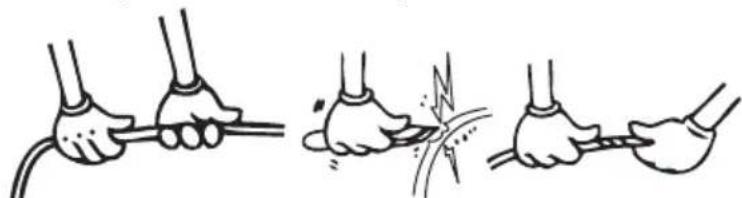
- Do not use multiple receptacles or extension cord.
- Do not plug in damaged, torn or old plugs.
- Do not pull, bend or damage the cord.

- This appliance is designed for use by adults, do not allow children to play with the appliance or let them hang off the door.
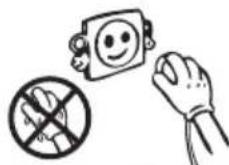
- Do not plug-in or out the plug from the receptacle with wet hands to prevent electrocution!
- Do not place explosive or flammable material in your fridge for your safety. Place drinks with higher alcohol amount vertically and by closing their necks tightly in the fridge.
- Do not cover the body or top of fridge with lace. This affects the performance of your fridge.
- Fix the accessories in the fridge during transportation to prevent damage to accessories.


Installing and Operating your Fridge
Before starting to use your fridge, you should pay attention to the following points:
- Operating voltage for your fridge is 220-240 V at 50Hz. • We do not take the responsibility of the damages that occur due to ungrounded usage.
- Place your fridge in a place where it will not be exposed to direct sunlight.
Your appliance should be at least 50 cm away from stoves, ovens, and heater cores, and at least 5 cm away from electrical ovens.
It should never be used outdoors or left under the rain.
When your fridge is placed next to a deep freezer, there should be at least 2 cm between them to prevent humidity on the outer surface.
Do not place anything on your fridge, and install your fridge in a suitable place so that at least 15 cm is available on the upper side.
If you will place your fridge next to your kitchen cabinets, leave a space of 2 cm between them.
Fit the plastic wall spacers to the condenser at the back of the refrigerator in order to prevent leaning to the wall for good performance.
Install the distance adjustment plastic (the part with black vanes at the rear) by turning it 90° to prevent the condenser from touching the wall.
The refrigerator should be placed against a wall with a free distance not exceeding 75 mm.


The adjustable front legs should stabilize at an appropriate height to allow your fridge to operate in a stable and proper way. You can adjust the legs by turning them clockwise (or in the opposite direction). This should be done before placing food in the fridge.
Before using your fridge, wipe all parts with warm water added with a teaspoonful of sodium bicarbonate, then rinse with clean water and dry. Place all parts after cleaning.
Before Using Your Fridge
When it is operated for the first time or after transportation, keep your fridge in the upright position for 3 hours and plug it in to allow efficient operation. Otherwise, you may damage the compressor.

Your fridge may have a smell when it is operated for the first time; the smell will fade away when your fridge starts to cool.
Operating your Cooler
![graph TD A["Cooler compartment temperature indicator"] --> B["5"] C["SET Button"] --> D["○"] E["MODE Button"] --> F["○"] G["Economy mode lamp"] --> H["○"] I["Power lamp"] --> J["○"] K["Super Cool mode lamp"] --> L["○"]](/content/2026/05/863483/images/be9ae2206379d12e90eedaa3bb85dccedfd70a53ae4598d75b5b2374bd981a4d.jpg)
- The Mode button allows switching between Cooler Department Indicator, Super Cooling Mode Lamp, and Economy Mode Lamp.
- When you press once, the Cooler Department Indicator starts to flash.
- The set value is ready to be changed.
- When you press twice, the Super Cooling Mode Lamp starts to flash.
- When you press three times, the Economy Mode Lamp starts to flash.

Allows the temperature adjustment of the related department when the Cooler Department Indicator is selected with the Mode button.

Cooler Department Temperature Adjustment and Activating SUPER COOLING Mode
- The initial temperature value for the Cooler Department Indicator is 5°C.
- Press the Mode button once.
- The set value for the Cooler Department indicator starts to flash when you press this button.
- The value for the Cooler Department indicator changes to a lower temperature each time you press this button when the indicator is flashing. (8°C, 7°C, 6°C, 5°C, 4°C, 3°C, 2°C)

- When you wait for 5 seconds without pressing any button after reaching the desired set value, the set value is activated and your fridge operates with that set value.
- When you press the set button until the value for the Cooler Department Indicator reaches 2°C (maximum cold position), if you press the button again, the display values start again from 8°C.
Recommended Temperature Values for Cooler
| When would it be adjusted? Inner Temperature |
| For minimum cooling capacity 7 | °C, 8°C |
| In normal usage 4 | °C, 5°C, 6°C |
| For maximum cooling capacity. 2 | °C, 3°C |
Super Cooling Mode
• To cool plenty of food • To cool foods rapidly
How to use:
- Press the mode button until Super Cooling mode.
- While the Super Cooling Mode Lamp is flashing, if no button is clicked for 5 seconds, then a beep sound will be heard and the mode will be enabled.

- While the Super Cooling mode is active, the letters "SC" will be seen at the Indicator of the Cooler.
While SC mode is selected:
- To cancel SC Mode and continue with the previous set value:
- Please press the Mode Button 1 time and wait for 5 seconds. SC mode will be cancelled and the appliance will start to work according to the previous set value.
To cancel SC Mode and continue with a new set value:
- Please press the Mode Button 1 time and within 5 seconds, push the set button until you see the set value you want and wait for 5 seconds. SC mode will be cancelled and the appliance will start to work according to the new set value.
To cancel SC Mode and activate Economy Mode:
- Please press the Mode Button 3 times and wait for 5 seconds. SC mode will be cancelled and the appliance will start to work according to Economy Mode.
Note: Super Cooling mode will be cancelled automatically after 5 hours or when the freezer sensor temperature falls below 2°C.
If Super Cooling mode is finished automatically, the SC LED will continue to light. It is enough to press the mode button to turn off the SC LED.
Economy mode
Your fridge will consume minimum energy at 5°C set value, which is the most optimum storage condition.
When to use:
- When you want your refrigerator to operate economically.

How to use:
- Press the mode button until the Economy Mode LED lights up (3 times).
- While the Economy Mode LED is flashing, if no button is clicked, then a beep sound will be heard and the mode will be enabled.
- During this mode, the cooler compartment operates at the special temperature value set on the control circuit.
- While the Economy mode is active, the letters "Ec" will be seen at the Indicator of the Cooler Compartment.
While Economy mode is selected:
To cancel Economy Mode and continue with previous set value:
Please press Mode Button 1 time and wait for 5 secs. Economy mode will be cancelled and the appliance will start to work according to the previous set value.
To cancel Economy Mode and continue with new set value:
Please press Mode Button 1 time and within 5 seconds, push the set button until you see the set value you want, then wait for 5 seconds. Economy mode will be cancelled and the appliance will start to work according to the new set value.
To cancel Economy Mode and activate SC Mode:
Please press Mode Button 2 times and wait for 5 seconds. Economy mode will be cancelled and the appliance will start to work according to SF Mode.
Warnings about Temperature Adjustments
- Your temperature adjustments will not be deleted when an energy breakdown occurs.
- Do not pass to another adjustment before completing an adjustment.
- Temperature adjustments should be made according to the frequency of door openings, the quantity of food kept inside the fridge, and the ambient temperature of the place where your fridge is located.
- Your fridge should be operated up to 24 hours according to the ambient temperature without interruption after being plugged in to be completely cooled.
- Do not open the doors of your fridge frequently and do not place much food inside it in this period.
- A 5-minute delaying function is applied to prevent damage to the compressor of your fridge when you take the plug off and then plug it on again to operate it, or when an energy breakdown occurs. Your fridge will start to operate normally after 5 minutes.
CLEANING AND MAINTENANCE
- Disconnect the unit from the power supply before cleaning.
- Do not clean the appliance by pouring water.

- The refrigerator should be cleaned periodically using a solution of bicarbonate of soda and lukewarm water.

- Clean the accessories separately with soap and water. Do not clean them in the washing machine.
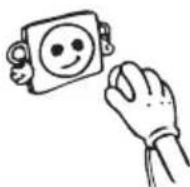
- Do not use abrasive products, detergents or soaps. After washing, rinse with clean water and dry carefully. When the cleaning operations have been completed, reconnect the plug of the unit with dry hands.
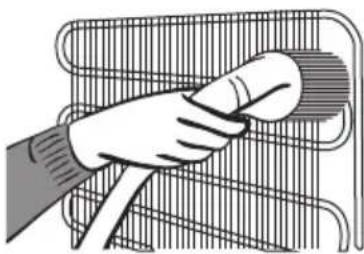
- You should clean the condenser (back of the appliance) with a broom once a year in order to provide energy saving and increase the productivity.

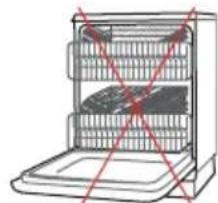


THE POWER SUPPLY MUST BE DISCONNECTED.
Defrosting

- Defrosting occurs automatically in the refrigerator compartment during operation; the defrost water is collected by the evaporating tray and evaporates automatically.
- The evaporating tray and the defrost water drain hole should be cleaned periodically with the defrost drain plug to prevent the water from collecting on the bottom of the refrigerator instead of flowing out.
- You can also pour 1/2 glass of water into the drain hole to clean inside.
SHIPMENT AND REPOSITIONING
- Original package and foam may be kept for re-transportation (optionally).
- You should fasten your fridge with thick packaging, bands, or strong cords and follow the instructions for transportation on the package for re-transportation.
- Remove movable parts (shelves, accessories, vegetable bins, etc.) or fix them into the fridge against shocks using bands during re-positioning and transportation.
Carry your fridge in the upright position.

Repositioning the Door
- It is not possible to change the opening direction of your fridge door if the door handles on your fridge are installed from the front surface of the door.
- It is possible to change the opening direction of the door on models without any handles.
BEFORE CALLING SERVICE
If your fridge is not operating:
• Is there any electrical fault? - Is the plug placed properly in the receptacle? - Is the fuse of the receptacle that the plug is plugged into or the main fuse blown? - Is there any fault in the socket? Examine this by plugging your fridge into a receptacle which you are sure is working.
| WARNING TYPE | MEANING REASON REMEDY | | |
| Sr Failure warnings | Appears when one or more of the refrigerator parts fail or there is a problem in the cooling system. | Call service immediately. |
| LC | Cooler compartment is not cold enough | This warning appears if there has been a power failure for a long period and when the refrigerator is operated for the first time. | Tem porarily increase the cooler temperature setting to the desired level or switch the appliance to Super Cooling mode. |
| LP Low voltage | Refrigerators witches to the standby mode when the voltage supply falls below 170 Volts. | This feature prevents the compress or from getting damaged due to low voltage. Refrigerator will start operating automatically when the voltage restores to the required level. |
Temperature Warning:
The temperature display flashes "LC" and an audible warning sounds when the temperature in the cooler compartment is too warm.
A rise in the temperature may be caused by:
- Frequent door opening for long periods of time
- Loading with large quantities of warm foods • High ambient temperature
- An error with the appliance.
Check Warnings:
Your fridge warns you if the temperatures for cooler departments are at improper levels or when a problem occurs in the appliance. Warning codes are displayed in the cooler department indicators. Warning codes appear in the cooler compartment setting displays.
Also, a warning sound is heard.
The code display and buzzer will continue until you press SET or MODE button. When you press one of these buttons, the buzzer will stop. The "LC" warning will disappear in 15 minutes. You don't have to call your service; this condition may appear due to the reasons above. You can keep storing your foods in your fridge. If the "LC" warning does not disappear within an hour after pressing the button, you can call your service.
If your fridge is operating too loudly:
Compressor noise
Normal motor noise. This noise means that the compressor operates normally. The compressor may cause more noise for a short time when it is activated.
Bubbling noise and splash:
This noise is caused by the flow of the refrigerant in the tubes of the system.
Air blow noise:
Normal fan noise. This noise can be heard in the fridge during normal operation of the system due to the circulation of air.
If humidity builds up inside the cooler:
- Are all food packed properly? Are the containers dried before placing them in the fridge?
- Is the fridge door opened frequently? Humidity of the room gets in the fridge when the doors are opened. Humidity build up will be faster when you open the doors more frequently, especially if the humidity of the room is high.
- Building up of water drops on the rear wall after automatic defrosting is normal (in static models).
If the door is not opened and closed properly:
- Do the food packages prevent closing of the door?
- Are the door compartments, shelves and drawers placed properly?
- Are door joints broken or torn? Is your fridge on a level surface?
If your fridge is not cooling enough:
Your fridge is designed to operate in the ambient temperature intervals stated in the standards, according to the climate class stated in the information label. We do not recommend operating your fridge out of the stated temperature value limits in terms of cooling effectiveness.
| Climate Class Ambient Temperature (°C) |
| T Between 16 | and 43 (°C) |
| ST Between 16 | and 38 (°C) |
| N Between 16 | and 32 (°C) |
| SN Between 10 | and 32 (°C) |
IMPORTANT NOTES:
- Compressor protection function will be activated after sudden power breakdowns or after unplugging the appliance, because the gas in the cooling system is not stabilized yet. Your appliance will start after 5 minutes, there is nothing to worry about.
- If you will not use your fridge for a long time (e.g. in summer holidays) unplug it. Clean your fridge according to chapter “CLEANING AND MAINTENANCE” and leave the door open to prevent humidity and smell.
- If the problem persists after you have followed all the instructions above, please consult to the nearest Authorized service.
- This appliance is designed for use at an ambient temperature within the 16°C - 43°C range.
- The appliance is designed in compliance with the IEC60335-1 / IEC60335-2-24, 2004/108/EC standards.
Tips for saving energy
- Install the appliance in a cool, well ventilated room, but not in direct sunlight and not near heat source (radiator, cooker.. etc). Otherwise use an insulating plate.
- Allow ward food and drinks to cool down outside the appliance.
- When thawing frozen food, place it in the refrigerator compartment. The low temperature of the frozen food will help to cool the refrigerator compartment when it is thawing. So it causes energy saving. If the frozen food is put out, it causes wastage of energy.
- When placing, drinks and slops they must be covered. Otherwise humidity increases at the appliance. Therefore the working time gets longer. Also covering drinks and slops helps to save smell and taste.
- When placing food and drinks, open the appliance door as briefly as possible.
- Keep close the covers of any different temperature compartment in the appliance (crisper, chiller ...etc).
- Door gasket must be clean and pliable.
THE PARTS OF THE APPLIANCE AND THE COMPARTMENTS

This presentation is only for information about the parts of the appliance.
Parts may vary according to the appliance model.
- Head panel
- Light bulb
- Turbo fan (Glass shelves models)
- Glass shelves (optional with wire shelves)
- Top crisper cover (Safety glass* - Optional)
- Top crisper (Optional)
- Bottom crisper cover (Safety glass*)
- Bottom crisper
- Levelling feet
- Bottle shelf
- Door shelves
- Egg holder
- Top shelf
- Top shelf cover (In some models)
Contents
BEFORE USING THE REFRIGERATOR 16
General warnings 16
PARTS AND COMPARTMENTS OF THE APPLIANCE 28
BEFORE USING THE REFRIGERATOR
General warnings


Information on use
Setting button


Defrosting

BEFORE CONTACTING THE SERVICE CENTER
PARTS AND COMPARTMENTS OF THE APPLIANCE