
Kilo Solar PS-10BS - Scale WILFA - Free user manual and instructions
Find the device manual for free Kilo Solar PS-10BS WILFA in PDF.


| Product Type | Kitchen Scale |
| Brand | Wilfa |
| Model | Kilo Solar PS-10BS |
| Power Source | Solar cell (built-in) with rechargeable battery |
| Dimensions (approx.) | 20 x 15 x 2 cm |
| Weight (approx.) | 200 g |
| Max Capacity | 5 kg (typical for kitchen scale) |
| Graduation | 1 g |
| Units | g, kg, oz, lb (selectable) |
| Functions | Tare, auto-off, overload indication, low battery indication |
| Display Type | LCD |
| Platform Material | Tempered glass |
| Maintenance | Wipe with a damp cloth; do not immerse in water |
| Safety | Not for commercial use; keep away from heat and moisture |
| Spare Parts | Not user-serviceable; contact Wilfa support for repairs |
| Reparability | No user-serviceable parts inside; professional repair only |
| General Information | Solar-powered scale, environmentally friendly, automatic calibration |
Frequently Asked Questions - Kilo Solar PS-10BS WILFA
User questions about Kilo Solar PS-10BS WILFA
0 question about this device. Answer the ones you know or ask your own.
Ask a new question about this device
Download the instructions for your Scale in PDF format for free! Find your manual Kilo Solar PS-10BS - WILFA and take your electronic device back in hand. On this page are published all the documents necessary for the use of your device. Kilo Solar PS-10BS by WILFA.
USER MANUAL Kilo Solar PS-10BS WILFA
Kilo Solar
Scale
Bruksanvisning
Bruksanvisning
Brugsanvisning
Käyttöohje
Instruction manual
Funksjonsindikator
natural_image
Empty rectangular frame with dashed border (no text or symbols)natural_image
Empty rectangular frame with dashed border (no text or symbols)natural_image
Simple diagram with five horizontal black lines inside a dashed rectangular border (no text or symbols)Merk:
Funktionsindikator
natural_image
Empty rectangular frame with dashed border (no text or symbols)natural_image
Empty rectangular frame with dashed border (no text or symbols)natural_image
Simple horizontal line with three parallel dashed segments inside a dashed rectangle (no text or symbols)Påminnelse
Funktionsindikator
natural_image
Empty rectangular frame with dashed border (no text or symbols)natural_image
Empty rectangular frame with dashed border (no text or symbols)natural_image
Simple horizontal line with four evenly spaced black segments inside a dashed rectangular border (no text or symbols)Husk!
Toimintoilmaisin
natural_image
Empty rectangular frame with dashed border (no text or symbols)natural_image
Empty rectangular frame with dashed border (no text or symbols)natural_image
Simple horizontal line with four evenly spaced black segments inside a dashed rectangular border (no text or symbols)Muistutus
Operation instruction ....4
Indication message 5
Features
■ Capacity: 150 kg / 23st: 8lb / 330lb
■ Division: 0.1 kg / 0.2lb
■ Weight unit: kg / st: lb / lb
■ Minimal weight: 5 kg
■ Function key: UNIT
■ Display: positive LCD
■ Battery: solar panel with 100 lux light source at least
■ Auto on or press UNIT to switch on
■ Auto off function
LCD display
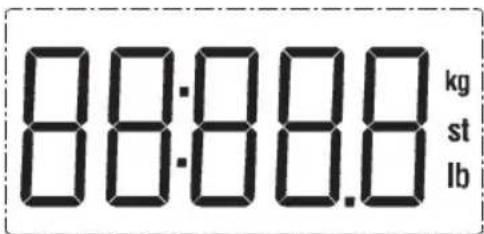
Function indication
■ UNIT: Press "UNIT" to select desired unit in weighing mode.
Operation instruction
1. Select unit before use
■ Put the scale under the light with the strength. of 100lux at least.
■ Wait until the solar symbol flashes on the LCD.
natural_image
Empty rectangular frame with dashed border (no text or symbols)■ Press "UNIT" to select the desired unit.
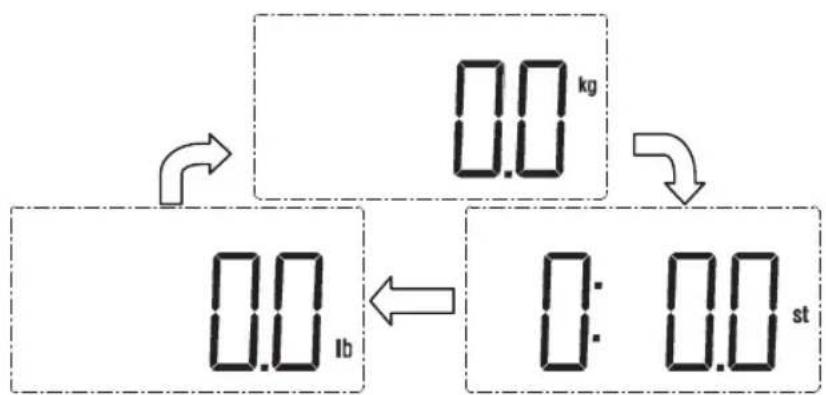
Note: Please put the scale on flat hard ground when finishing selecting unit. Wait for a few seconds, then you may start measuring according to the measuring procedure below. If there is not any operation in weighing mode, the scale will turn off automatically after about 10s.
2. Measuring (Unit kg selected)
■ Please put the scale on flat hard ground and under the light with the strength. of 100lux at least.
■ Please stand on the platform directly when the solar symbol flashes on the LCD.
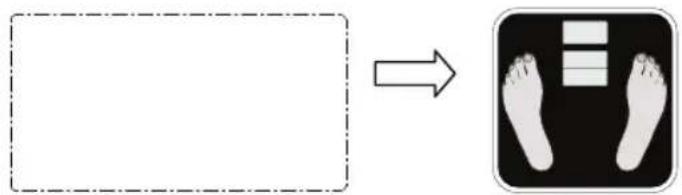
■ Stand still and the weight data will be locked automatically with showing the unit when stable. Then the scale will turn off after about 5 s.
60.0 kg
Note: If you want to measure once again, please step off, then step on the platform again.
Indication message
■ Ready for use.
natural_image
Empty rectangular frame with dashed border (no text or symbols)■ Overload indication. Please remove the weight on the scale to protect the loadcells.
natural_image
Simple horizontal line with three parallel dashed segments inside a dashed rectangular border (no text or symbols)Reminder
■ Please do not put the scale on carpet.
■ Please do not expose the scale under sunlight for a long time.
■ Please use the scale under the 100lux light source at least.
■ Please do not cover the solar panel when use.
■ Clean the scale with a slightly damp cloth, DO NOT immerse the scale in water or use chemical/abrasive cleaning agents.
Under the Waste Electrical and Electronic Equipment Directive (WEEE), such waste must be collected separately and processed. If in future you need to discard this product, please do not throw it out with your normal rubbish. Please send this product to a collection point where one is available.

AS WILFA
Industriveien 25
Postboks 146
1483 Skytta, Norway
Tel: 67 06 33 00
Fax: 67 06 33 91
wilfa.com

Brand : WILFA
Model : Kilo Solar PS-10BS
Category : Scale