
MD 10940 - Microwave MEDION - Free user manual and instructions
Find the device manual for free MD 10940 MEDION in PDF.


| Product Type | Microwave Oven |
| Brand | MEDION |
| Model | MD 10940 |
| Capacity | 20 litres |
| Power Output | 800 W |
| Control Type | Digital touch |
| Defrost Function | Yes, by weight |
| Auto Cook Programs | 8 presets |
| Timer | Up to 99 minutes |
| Door Type | Side-opening, drop-down handle |
| Interior Light | Yes |
| Turntable | Glass, 245 mm diameter |
| Dimensions (W x D x H) | 440 x 340 x 258 mm |
| Net Weight | 10.5 kg |
| Power Supply | 230 V ~ 50 Hz |
| Power Consumption | 1200 W (microwave), 1000 W (grill) |
| Cleaning | Wipe with damp cloth; avoid abrasives |
| Safety Features | Child lock, auto shut-off |
| Spare Parts Availability | Contact MEDION support |
| Repairability Index | 7.5 / 10 |
| Warranty | 2 years |
Frequently Asked Questions - MD 10940 MEDION
User questions about MD 10940 MEDION
0 question about this device. Answer the ones you know or ask your own.
Ask a new question about this device
Download the instructions for your Microwave in PDF format for free! Find your manual MD 10940 - MEDION and take your electronic device back in hand. On this page are published all the documents necessary for the use of your device. MD 10940 by MEDION.
USER MANUAL MD 10940 MEDION
Safety instructions 2
Initial operation and use 4
Important information 4
Faults 6
About microwaves 7
Cooking and heating up in the microwave 8
General notes 8
Microwave-suitable materials 9
Size and shape of microwave-suitable containers 11
Before first use 12
Setting up the unit 12
Heat appliance while empty 13
Using accessories 13
Operation 14
Set the time 14
Child protection 14
Cooking and heating up with microwave energy 15
Quick start 17
Automatic defrost 18
Grill mode 18
Combi mode 19
Automatic cooking 20
Cleaning and care 25
Shutdown 26
Error recovery 27
Disposal 28
Technical data 28
Safety instructions
Please read these operating instructions thoroughly and follow the safety notes in particular before using the appliance for the first time!
Anything done to or with this appliance should only be undertaken as described in the operating instructions.
Keep these instructions in a safe place for further use. If you pass on this microwave to a third party, please include these instructions.
Areas of use / Proper use
- This appliance is intended solely for household use. It may only be used for warming up appropriate foodstuffs in suitable containers and dishes (see "Size and shape of microwave-suitable containers" on page 11).
- When warming up meals in plastic or paper containers it is necessary to monitor the appliance constantly because of the danger of fire.
- The microwave is not intended for the preparation of foods which require frying. The appliance is also not intended for drying out objects. Caution! This could cause a fire!
- Children may only use this appliance without adult supervision if they have been sufficiently instructed in the safe use of the appliance and are aware of the dangers of misuse.

WARNING!
If you operate the appliance in combi or grill mode, then children may only use the appliance under adult supervision due to the occurring temperatures.
Setting up and electrical connection
- Connect the microwave only with an appropriate 230 V\~50 Hz safety plug which has at least a 16 Amp fuse. Do not use an extension cable.
- Ensure that the power cable is undamaged and does not run underneath the appliance or over any hot surfaces.
natural_image
Three geometric crosshair symbols: a target, a circular target with radial lines, and a target with crosshairs (no text or labels)2


natural_image
Pure geometric diagram with crosshair and circular target-like pattern (no text or symbols)Safety instructions
- The microwave should be set up on a level, stable surface that is able to carry the weight of the appliance as well as the food which is to be prepared within it. Only set up the microwave in a safe, dry environment.

WARNING!
Please observe the minimum safe distances and never cover the ventilation slots.
- Do not place any objects on the microwave as these may become hot during use. To ensure adequate ventilation, a minimum safe clearance distance of 20 cm and 10cm on both sides and the back must be observed. The openings in the appliance may not be covered or blocked.

- Protect the appliance from water droplets or spray. If the appliance does become wet then pull out the plug immediately.

Note!
Hot surface!

WARNING!
During use the touchable surfaces of the appliance may become very hot!
Initial operation and use
Important information
- Never operate the microwave while empty, meaning without food in the cooking chamber.
- Only use the included accessories, or accessories that have been described as suitable in the instructions.
- Never use dishes with metal trimmings, metal utensils or the grill stand in microwave mode as this could damage the appliance.
- After cooking with the grill the rotating dish will become very hot! Therefore, make sure you use pot holders or heat-resistant gloves when you remove it from the microwave.
- Use only microwave-suitable dishes. Look for markings such as "Microwave-suitable" or "For the microwave" (see "Size and shape of microwave-suitable containers" on page 11).
- Do not remove any of the microwave's panels from the inside or the inner coating of the viewing window as this could lead to microwave radiation leakage.
- Never leave the appliance unattended during operation.

WARNING! Delayed boiling!
When heating liquids in the microwave so-called "delayed boiling" can occur, i. e. the liquid has reached boiling temperature without beginning to bubble as boiling liquids normally do.
Agitation, for instance when removing the liquid from the appliance, can lead to a sudden boiling up of the liquid. That is why you should use caution when handling the liquid container.
There is a danger of scalding!
Therefore, always place a glass or ceramic rod in liquids that are to be heated up. This will prevent sudden, belated boiling of the liquid.
- Never heat up food in closed containers as they could easily explode. For bottles and closeable containers, such as baby bottles, always remove the closure beforehand.
4


natural_image
Pure geometric diagram with intersecting lines and a central circular pattern (no text or symbols)Initial operation and use
- With foods that have a firm skin, e. g. sausages or tomatoes, make small slits in the skin so that they do not burst during cooking.
- Do not try to warm up eggs in their shells or hard-boiled eggs unless in specially designed microwave-suitable containers.

WARNING
Eggs that are already boiled can explode, even after being removed from the cooking chamber.
• After heating, stir the food if possible to ensure even temperatures, otherwise let the food stand for a short time.
- Check the temperature before eating food cooked in the microwave. Special care must be taken with baby food and baby bottles. Always stir or shake the baby food before checking the temperature to avoid burns.




5


Initial operation and use

Faults
- Avoid damaging the appliance or the power cable.
• Always check the cable and the appliance before each use. - If you detect any damage do not use the appliance under any circumstances. In this case, immediately remove the mains plug from the socket.
- Ensure that defective devices or damaged mains cables are repaired immediately by a specialist workshop, or contact your Medion Service Centre to reduce risks.

WARNING!
It is dangerous for untrained persons to carry out repair or maintenance work which requires the removal of the plates which are in place to prevent the escape of microwave radiation.
- If you see smoke, keep the door closed to prevent fire from breaking out, or to smother flames which have already broken out, and immediately turn off the appliance using the Start/Quick Start button.
- Then pull the plug out of the mains socket straight away.

WARNING!
If the housing, panels, door or the door catch is damaged then do not use the appliance under any circumstances. Have the appliance repaired immediately by a specialist workshop or contact your Medion Service Centre.
- Ensure that the microwave is not placed near any heat source or in an area where it could come into contact with water.


6



About microwaves
Microwaves are high-frequency electromagnetic waves that have a warming effect on the food in the cooking space. Microwaves heat all non-metallic objects. Therefore, do not use any metallic objects during microwave operation. This heating effect works better if the foodstuff has a higher water content.
To ensure optimal distribution of heat let food stand in the microwave for a minute or two after cooking.
The effect of microwaves on foodstuffs
- Microwaves penetrate foodstuffs to a depth of up to 3cm.
• They heat up water, fat and sugar molecules (foodstuffs with high water content are heated more intensively). - This heat then works its way – slowly – throughout the food and has a defrosting, heating and cooking effect on the food.
- The cooking chamber and the air within are not heated (the food container is heated mainly by the hot food).
- Each foodstuff requires a certain amount of energy to cook or defrost. As a rule of thumb we can say high power = short time or low power = long time.
The Microwave Oven
- A microwave generator, the so-called magnetron, generates the microwaves and directs them into the cooking chamber.
- The inner walls reflect the microwaves inwards so that they cannot escape from the interior.
- The microwave power and the cooking time can be set in several stages.
• After the cooking time has elapsed, or when the door is opened, the magnetron turns off immediately.

natural_image
Three geometric diagrams with crosshairs and central dots, no text or symbols present
natural_image
Pure geometric diagram with crosshair and circular pattern (no text or symbols)Cooking and heating up in the microwave
General notes
- To arrange food so that it cooks properly, place the food with the largest pieces towards the outer edge.
- Note the exact cooking or heating times.
- Choose the shortest available cooking or heating time and extend it as necessary.
WARNING!
Overcooked food can start to smoke or even catch fire.
- Cover the food during cooking or heating with a microwave-suitable cover. Covering the food helps avoid splashes; furthermore the food is cooked more evenly.
- Foods such as chicken pieces or hamburgers should be turned once during cooking to speed up cooking. Larger pieces such as roasts or roast chicken must be turned at least once.
- It is also important to reposition food, e.g. with meatballs. After half of the cooking time the food should be repositioned from top to bottom and from the middle to the outside.
Microwave-suitable materials
You can buy special dishes and accessories for your microwave. Look for markings such as "Microwave-suitable" or "For the microwave". You can also use your existing dishes – if the material is suitable.
Suitable materials
- Porcelain, glass ceramic and heat-proof glass
- Plastics which are heat-proof and microwave-suitable (Caution: plastics may become discoloured by foods or become warped by the heat)
- Baking paper.

Warning
Do not use porcelain, ceramic or plastic containers in grill or grill combi mode. Do not use cling film either. Due to the very high temperatures the materials could break, warp or even melt.
Conditionally suitable materials
- Stoneware and ceramics. Use clay containers only for defrosting and for short cooking times because the air and water content of the material could cause the clay to crack or break.
- Dishes with gold or silver décor should only be used if the manufacture has labelled it "microwave-suitable".
- Aluminium foil. Do not use aluminium foil in large quantities. However, you can use small pieces, e.g. to cover delicate parts. Cover the corners of containers to prevent boiling over, as the microwave energy is concentrated primarily on the corners. Keep a distance of 2.5 cm between the foil and the inner wall.
- Aluminium containers (e.g. those for ready-to-serve meals) are suitable, but they must be at least 3cm high to be used in the microwave.

natural_image
Pure geometric crosshair symbols without any text or labels

natural_image
Pure geometric diagram with crosshair and circular target symbol (no text or labels)Cooking and heating up in the microwave
Non-suitable materials
• Metal, i.e. metal pots, pans and lids.

Warning
Metal in the cooking space can lead to sparks! These can destroy the appliance or the viewing window! Therefore use the supplied grill only in the grill or combi mode.
- Dishes with metal parts (handles, decoration or bottoms) or with gold or silver décor can also lead to sparks in microwave operation.
• Crystal or lead crystal can shatter, coloured glass may become discoloured. - Any materials that are not heat-proof can lose their shape or even burn.

Note:
To test whether a dish is suitable for use in the microwave, put some water in the container and place it in the microwave. Start the microwave with the Time/Weight button for 1 minute at the highest power setting. If you find that the container is hotter than the food, then it is not suitable for the microwave. Microwave-suitable dishes are only warmed by the heat of the food.

WARNING!
As soon as you notice sparks, flashes or even fire, turn off the microwave immediately using the Stop/Cancel button!
Cooking and heating up in the microwave
Overview of suitable materials for the microwave and grill
The following list is a general guide to help you choose the correct cooking dishes:
| Cooking dishes Microwave | Combi mode (microwave + grill) | Grill |
| Heatproof glass Yes Yes Yes | ||
| Non-heatproof glass No No No | ||
| Heatproof ceramic Yes Yes Yes | ||
| Microwave-suitable plastic dishes | YesNoNo | |
| Kitchen paper Yes No No | ||
| Metal No No Yes | ||
| Metal grill No No Yes | ||
| Aluminium foil and foil containers | No No Yes |

Size and shape of microwave-suitable containers
Flat, broad containers are better than narrow, tall ones. "Flat" foods can be cooked more evenly.
Round or oval containers are better than angular ones. There is a danger of local overheating in the corners.


11


Before first use
Setting up the unit
- Make sure that all packaging materials were removed from the appliance and from the inside of the door.

Warning
The screwed on cover in the cooking space is not part of the packaging and must not be removed!

Note:
Check the microwave for any damage – e.g. if the door is crooked or bent, door seals and other seals are damaged, hinges and the closing mechanism are defective or loose, or if the interior of the appliance or the door is dented or damaged. If you discover any damage, do not use the microwave. In this case please contact our customer service.
- Do not place the microwave near any heat sources, in a location prone to wetness or high humidity, or in the immediate vicinity of inflammable materials.
• The feet must not be removed.

Warning
The microwave is intended for household use and may not be used out of doors!
- Connect the microwave to a 230V\~50Hz safety plug.
Heat appliance while empty
Before using the microwave the appliance must be heated up while empty first so that production residues can evaporate. Turn on the appliance in the grill mode without any food and accessories as follows.
- Open the door and remove any packaging or accessory parts from the cooking chamber. Then close the door again.
- Press the "Grill/Comb." button once. You have selected the grill mode. The Symbol will appear in the display.
- Use the turning knob Time/Weight to set a cooking time of 10 minutes.
- Press the Start/Quick Start button to start the heating process.

Note:
During this initial heating period you may notice faint odours. These vapours are not dangerous and will disappear after a short time. Make sure you have adequate ventilation, e. g. by opening a window.
• After 10 minutes the appliance turns itself off automatically. Wait until it has completely cooled down.
- Remove the plug from the socket and then clean the appliance once more inside and out with a damp cloth and then thoroughly dry it off.
Using accessories
After the microwave has been heated up in an empty state as described above, it may never again be put into operation without properly placed roller ring and rotating dish.
- Put the roller ring in the cooking chamber over the drive axis.
- Place the rotating dish on the roller ring in such a way that the notches in the rotating dish lock onto the drive axis.
Operation
Every time a button is pressed you will hear a signal tone as confirmation.
Set the time
When the microwave is operated for the first time, or if the power supply was interrupted, the display will show "1:01". Set the clock as described in the following example:
Let us assume you would like to set the time to 13:56 hours.
- Press the Clock button once for the 12-hour display, and twice for the 24-hour display. The clock symbol in the display will blink.
- Turn the Time/Weight control to 13 hours in the 24-hour display, or to 1 o'clock in the 12-hour display.
- Press the Clock button..
- Turn the Time/Weight control to 56 minutes.
- Press the Clock button as confirmation; the clock is now set to 13:56 hours and the clock symbol in the display now lights up permanently.
To read the current time of day while the microwave is in operation, press the Clock button; the time will be shown for 5 seconds in the display.
Child protection
- Press the Stop/Cancel button and keep it pressed for 3 seconds. You will hear a beep and the indicator lamp of the child protection will light up. The buttons and the control of the microwave are now without function.

- To deactivate the child protection, press the Stop/Cancel button and again keep it pressed for 3 seconds until you hear a beep and the child protection display extinguishes.
natural_image
Pure geometric crosshair symbols without any text or labels14


natural_image
Pure geometric crosshair symbol with concentric circles and lines, no text or labels presentCooking and heating up with microwave energy
To cook just with microwave energy, proceed as follows:
- Press the Power button once or several times to select a power setting according to the following table:
| Press the "Power" button | Readout in the display | Power (Watt) |
| 1 x 800 W |  | |
| 2 x 640 W |  | |
| 3 x 480 W |  | |
| 4 x 320 W |  | |
| 5 x 160 W |  | |
| 6 x | 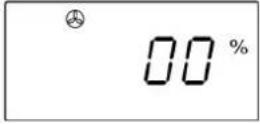 | No power; Timer, e. g. to let the food stand after cooking |
Operation
- Then turn the Time/Weight control to set the desired cooking time in the following time intervals.
| From 10 seconds to 5 minutes: | in 10-second intervals |
| From 5:30 to 10 minutes: | in 30-second intervals |
| From 11 to 30 minutes: | in 60-second intervals |
| From 35 to 95 minutes: | in 5-minute intervals |
The longest cooking time is 95 minutes.
The symbol "Operational Readiness" flashes at the same time.

- Press the Start/Quick Start button. The cooking process starts.
End of cooking process
After every cooking process is over, you will hear a beep. End will be shown in the display in order to show that the cooking process is ended.
- Open the door or press the Stop/Cancel button. You will hear three signal tones every two minutes until you open the door or press the Stop/Cancel button.

WARNING!
Since the food or the containers can be very hot, use pot holders or heat-proof gloves by all means when removing the food from the cooking chamber.
Interrupt or prematurely cancel the programme
To turn over the food or to stir it, e.g. after half of the elapsed cooking time, it is often necessary to interrupt the programme.
- Press the Stop/Cancel button once (or open the door) to interrupt the programme. The symbol "Operational Readiness" flashes in the display.
- After closing the door again, press Start/Quick Start to continue the cooking process.
- Press the Stop/Cancel button twice to definitely cancel the programme prematurely.
Timer (let food stand)
Your microwave has a timer which emits a signal tome after the preset time has elapsed. When the power setting 00 is set, the timer runs without the switched on microwave. This is helpful, for example, when you would like to leave the heated food in the microwave to stand while using the rotating dish.
Let us assume you would like to set the time to 3 minutes.
- Press the Power button six times until 00 appears in the display.
- Turn the Time/Weight control to 3:00.
- Press the Start/Quick Start button.
Quick start
If you press the Start/Quick Start button without selecting a power setting beforehand, the cooking programme will begin at the highest power setting (800 Watt).
- To increase the cooking time, press the Start/Quick Start button quickly several times:
press once: 0:30 minutes; press twice: 01:00 minutes; press 3 times: 01:30 minutes; press 4 times: 02:00 minutes; press 5 times: 02:30 minutes; press 6 times: 03:30 minutes; press 7 times: 04:30 minutes; etc. in 60 second intervals until a maximum of 12 minutes.

natural_image
Pure geometric crosshair symbols without any text or labels17


natural_image
Pure geometric diagram with intersecting lines and a central circular pattern (no text or symbols)Operation
Automatic defrost
You can also use your microwave to defrost, e. g. meat, poultry and fish. The defrost time and power setting are set automatically as soon as you enter the weight of the food to be defrosted. The scale for the weight of the frozen goods ranges from 100 to 2,700 grams.
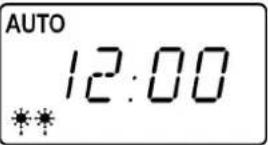
Let us assume you would like to defrost 600 grams of prawns.
- Turn the Time/Weight control to 600 g.
- Press the Start/Quick Start button. The defrost symbol ⚙️ and the AUTO display will appear.
Grill mode
The longest grill time is 95 minutes.
The grill function is especially useful for thin slices of meat, steaks, minced meat, kebabs, sausages or pieces of chicken. It is also suitable for baked sandwiches and gratin dishes.

WARNING!
Observe the minimum safe distances of the appliance to a wall and never cover the ventilation slots.
Let us assume you would like to grill for 8 minutes.
-
Press the Grill/Comb. button once (if you press the button several times you will active the combi mode, see below).
-
Turn the Time/Weight control to 08:00.
-
Press the Start/Quick Startbutton to start the grilling process.

natural_image
Pure geometric crosshair symbols without any text or labels18

natural_image
Pure geometric diagram with crosshair and circular target symbol (no text or labels)Combi mode
The combi mode combines the microwave and grill modes. Two combi programmes are available. Both have a maximum cooking time of 95 minutes.
Combination 1
With this setting, 30% of the time is used for cooking/heating with the microwave, and 70% for grilling.
Use this setting for fish, potatoes or gratin dishes.
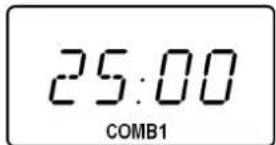
Let us assume you would like to set the cooking function Combination 1 for 25 minutes.
- Press the Grill/Comb button twice.
- Set the Time/Weight control to 25:00.
- Press the Start/Quick Start button. COMB1 will appear in the display.
Combination 2
With this setting, 55 % of the time is used for cooking/heating with the microwave, and 45 % for grilling.
Use this setting for puddings, omelettes, backed potatoes and poultry.
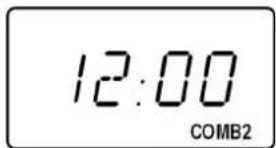
Let us assume you would like to set the cooking function Combination 2 for 12 minutes.
- Press the Grill/Comb button 3 times.
- Set the Time/Weight control to 12:00.
- Press the Start/Quick Start button. COMB2 will appear in the display.

natural_image
Three geometric diagrams with crosshairs and central dots, no text or symbols present19


natural_image
Pure geometric diagram with intersecting lines and a central circular pattern (no text or symbols)Operation
Automatic cooking
For automatic cooking and heating it is not necessary to enter the cooking/heating time and power setting. The microwave automatically determines the cooking time and the corresponding power setting for an entered weight, and/or for a number of portions.
Depending on the programme, a microwave power setting (M) can be combined with the grill function (G). In the following table you will find an overview of the setting options.
| Prog. | AUTO-Programme | Microw.Grill | Weight intervals(Settings with the "Time/Weight" control) | ||||||||
| 1 | Drinks M 1 port. 2 port. 3 port. | ||||||||||
| 2 | Rice M 100 g | 200 g 400 g | 600 g 800 g | 1,000 g | |||||||
| 3 | Spaghetti M 100 g | 200 g 300 g | |||||||||
| 4 | Potatoes M 150 g | 300 g 450 g | 600 g | ||||||||
| 5 | Auto Reheat M | 100 g 200 g | 300 g | 400 g 500 g | 600 g | 700 g | 800 g | 1,000 g | |||
| 6 | Fish M 100 g | 200 g 400 g | 600 g | 800 g | 1,000 g | ||||||
| 7 | Chicken | M+G | 800 g | 1,000 g | 1,200 g | 1,300 g | 1,400 g | ||||
| 8 | Beef/Mutton | M+G | 300 g | 500 g | 800 g | 1,000 g | 1,200 g | 1,300 g | |||
| 9 | Skewered Meat | M+G | 100 g | 200 g 300 g | 400 g | 500 g | 600 g | 700 g | |||
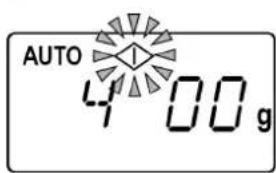
Example: Set the automatic cooking programme for 400 g fish.
- Press the Auto Cook button six times for the "Fish" programme. The AUTO will appear in the display.

-
Turn the Time/Weight control to 400 g. The symbol for operational readiness will blink.
-
Press the Start/Quick Start button to start the cooking process.
natural_image
Pure geometric crosshair symbols without any text or labels20


natural_image
Pure geometric crosshair symbol with concentric circles and lines, no text or labels presentOperation
If the dish is not properly cooked, let it stand for a few minutes with the quick start programme. For programmes that use the the grill function you can let the food stand with the grill function as well. When letting the food stand after cooking with the grill function, the browning degree of the food will increase. To achieve even cooking the food should be turned over after half of the cooking time.

WARNING
Never use covers or non heat-resistant dishes for programmes with switched on grill function, as these could melt or break out into flames!

After cooking with the grill, the rotating dish will be very hot! Therefore, make sure you use pot holders or heat-proof gloves when you remove it from the microwave.

Note:
Please note that the size, shape and type of food will determine the cooking results.
Programme 1: Drinks
This programme runs only with the use of the microwave power. Depending on the set number of portions, the program runs between 1:20 and 3:00 minutes.
- Place the drink you would like to heat up on the rotating dish in the cooking chamber. If you put several glasses or cups in the microwave, make sure the glasses do not touch each other. Put a glass or ceramic rod in the container (see "WARNING! Delayed boiling!" on page 4).
- Select the settings 1, 2 or 3 depending on the number of drinks and start the cooking program for drinks.
If the drink(s) is/are not hot enough after cooking, start another cooking process with microwave power (see page 15).
Operation
Programme 2: Rice
This programme runs only with the use of the microwave power. Depending on the set weight, the programme runs between approx. 18 and 34 minutes.
- When cooking rice use a high container as there is a risk of boiling over. Use 500 ml water for e. g. 250 g rice.
- Put the rice in the container, pour in the required liquid and let the rice soak for approx. 3 minutes.
- Cover the container and start the cooking programme for rice.
If the rice is not done after cooking, start another cooking process with microwave power (see page 15).
Programme 3: Spaghetti
This programme runs only with the use of the microwave power. Depending on the set weight, the programme runs between approx. 18 and 27 minutes.
- When cooking noodles use a high container as there is a risk of boiling over. Use as much water as for conventional cooking.
- Boil the water in a covered container first. Add the noodles and start the cooking programme for noodles.
- Then let the noodles stand for about 3 minutes.
If the noodles are not done after cooking, start another cooking process with microwave power (see page 15).
Programme 4: Potatoes
This programme runs only with the use of the microwave power. Depending on the set weight, the programme runs between approx. 3:50 and 10 minutes.
We recommend you use unpeeled potatoes for a cooking process. Prick the skin in several places.
- Put the unpeeled potatoes on a microwave-suitable plate or in a container. Use the same sized potatoes, if possible. The potatoes should not touch each other if possible. Start the programme for potatoes.
If the potatoes are not done after cooking, start another cooking process with microwave power (see page 15).
Programme 5: Auto Reheat
This programme runs only with the use of the microwave power. Depending on the set weight, the programme runs between approx. 1:20 and 7:20 minutes.
- Put the plate with the dish you would like to warm up on the rotating dish in the cooking chamber and start the cooking programme for warming up. If the dish to be warmed up is not hot enough after cooking, start another cooking process with microwave power (see page 15).
Programme 6: Fish
This programme runs only with the use of the microwave power. Depending on the set weight, the programme runs between approx. 3:30 and 16 minutes.
- Put the pieces of fish on a microwave-suitable plate, add a little fat or butter, season according to taste and start the cooking programme for fish.
If the fish is not done enough after cooking, start another cooking process with microwave power (see page 15).
Programme 7: Chicken
This programme runs in several cooking stages under utilisation of microwave power and grill. Depending on the set weight, the programme runs between approx. 33 and 45 minutes.

WARNING
Do not use any covers as this programme runs with switched on grill.
- Place the entire chicken on a microwave-suitable plate, cover the thin parts with pieces of aluminium foil, season according to taste and start the cooking programme for chicken.
- A whole chicken must be turned otherwise the side pointing upwards might dry out. The programme interrupts automatically for this purpose after approximately 2/3 of the time and you will hear a beep. Press the Start/Quick Start button to continue the programme.
If the chicken is not done or brown enough after cooking, start another cooking process with grill (see page 18) or microwave power (see page 15).
Operation
Programme 8: Beef/Mutton
This programme runs in several cooking stages under utilisation of microwave power and grill. Depending on the set weight, the programme runs between approx. 16 and 60 minutes.

WARNING
Do not use any covers as this programme runs with switched on grill.
- Place the roast on a microwave-suitable plate. If the roast is not too big you may place it on the grill. In this case, place a microwave-suitable container underneath the grill to catch the fat. Season the meat according to taste and start the cooking programme for roast.
- A whole roast must be turned otherwise the side pointing upwards might dry out. The programme interrupts automatically for this purpose after approximately 2/3 of the time and you will hear a beep. Press the Start/Quick Start button to continue the programme.
If the roast is not done or brown enough after cooking, start another cooking process with grill (see page 18) or microwave power (see page 15).
Programme 9: Skewered Meat
This programme runs in several cooking stages under utilisation of microwave power and grill. Depending on the set weight, the programme runs between approx. 10 and 30 minutes.

WARNING
Do not use any covers as this programme runs with switched on grill.
- Use the supplied grill for the meat skewers. Place a microwave-suitable container underneath the grill to catch the fat. Season the meat according to taste, place it on the grill and start the cooking programme for meat skewers.
- Skewers must be turned to be cooked evenly. The programme interrupts automatically for this purpose after approximately 2/3 of the time and you will hear a beep. Press the Start/Quick Start button to continue the programme.
If the meat skewers are not done or brown enough after cooking, start another cooking process with grill (see page 18) or microwave power (see page 15).
Cleaning and care
Poor appliance hygiene can lead to the destruction of the appliance surfaces, which in turn can reduce the lifespan and even lead to dangerous situations. Therefore, regularly clean the microwave and remove all food residues.
- Turn off the microwave and pull the plug from the mains socket before cleaning.
- Keep the inside of the oven clean. Wipe off splashes or spilled liquids that stick to the oven walls with a damp cloth. You may use a mild detergent for stronger soiling. Do not use sprays or other aggressive detergents as they could damage, scratch, or dull the door surface.
- Clean the outside surfaces with a damp cloth. To prevent damage to operating parts on the inside of the oven, keep water from penetrating the ventilation openings.
- Parts of the door, the viewing window, and especially the seal and the closing mechanism should be cleaned carefully with a mild detergent solution. Take great care to avoid damaging these parts.
- The operating field must not get wet. Clean with a soft, damp cloth. If you clean the operating field let the oven door stay open to prevent the oven from inadvertently switching on.
- If steam should accumulate on the inside or on the outside surface, wipe off with a soft cloth.
- Steam can occur when the microwave oven is operated in areas with high humidity; this is normal.
- The glass rotating dish must be removed occasionally in order to be cleaned. Rinse the plate in warm water with a mild soap solution, or place in a dishwasher.
- Thoroughly dry the rotating dish with a soft cloth. After you have removed the rotating dish from the floor opening to clean it, make sure that it is replaced properly.
- The roller ring and the bottom of the oven should be cleaned regularly to prevent strong noise development.
- Simply wipe the bottom surface of the oven with a mild detergent. The roller ring can be rinsed in mild foamy water or in the dishwasher.
Shutdown
- Remove any residual odours in the oven by placing a cup of water with some lemon juice and lemon peel in a deep microwave-suitable container and heat for 5 minutes in the microwave. Wipe out thoroughly and dry with a soft cloth.
- If it is necessary to replace the light in the oven, consult a qualified specialist workshop or the Medion Service.

Shutdown
When the cooking process is ended and End appears in the display, open the door and remove the cooked food. After closing the door, the microwave is switched off.
If the appliance is not used for a longer period of time, pull the plug and store the appliance in a dry location.


26



Error recovery
| Problem Possible cause Solution | ||
| The appliance will not start. | The mains plug is not plugged in properly. | Pull out the plug, wait 10 seconds and then plug it back in again. |
| The fuse is blown or the power interrupter has tripped. | Replace the fuse or reset the power interrupter (contact our service centre to do this). | |
| The mains socket is defective. | Check the mains socket by plugging in another appliance. | |
| The appliance does not warm up. | The door is not closed. Close the door. | |
| The rotating dish makes a loud noise while revolving. | The roller ring or the floor of the oven is dirty. | Clean the appliance.Read the section "Cleaning the appliance". |




Disposal
Appliance

At the end of its life ensure that the appliance is disposed of in an environmentally appropriate manner. This could, e. g. occur through a local collecting point for used equipment. Enquire of your local administrative office about the disposal possibilities on site.
Packaging

Your microwave is wrapped in packaging to protect it against transportation damage. Packaging is raw material and can be reused or returned to the recycling system.

Technical data
Nominal voltage: 230V \~ 50Hz
Nominal output (microwave): 1200 W
Nominal output power (microwave): 800 W
Nominal output grill: 1,000 W
Cooking chamber volume: 21 litres
Microwave frequency: 2450 MHz
Subject to technical changes.


28


- Safety instructions
- Areas of use / Proper use
- WARNING!
- Setting up and electrical connection
- Initial operation and use
- Important information
- WARNING! Delayed boiling!
- WARNING
- 5
- Faults
- About microwaves
- The effect of microwaves on foodstuffs
- The Microwave Oven
- Cooking and heating up in the microwave
- General notes
- Microwave-suitable materials
- Suitable materials
- Conditionally suitable materials
- Non-suitable materials
- Note:
- Size and shape of microwave-suitable containers
- Before first use
- Setting up the unit
- Heat appliance while empty
- Using accessories
- Operation
- Set the time
- Child protection
- Cooking and heating up with microwave energy
- End of cooking process
- Interrupt or prematurely cancel the programme
- Timer (let food stand)
- Quick start
- Automatic defrost
- Grill mode
- Combi mode
- Combination 1
- Combination 2
- Automatic cooking
- Programme 1: Drinks
- Programme 2: Rice
- Programme 3: Spaghetti
- Programme 4: Potatoes
- Programme 5: Auto Reheat
- Programme 6: Fish
- Programme 7: Chicken
- Programme 8: Beef/Mutton
- Programme 9: Skewered Meat
- Cleaning and care
- Shutdown
- Error recovery
- Disposal
- Appliance
- Packaging
- Technical data
Brand : MEDION
Model : MD 10940
Category : Microwave