
MD 14768 - Microwave MEDION - Free user manual and instructions
Find the device manual for free MD 14768 MEDION in PDF.


| Product Type | Countertop Microwave Oven |
| Brand | Medion |
| Model | MD 14768 |
| Capacity | 20 Liters |
| Microwave Power | 800 Watts |
| Power Consumption | 1200 Watts |
| Voltage | 230 V / 50 Hz |
| Dimensions (W x D x H) | 45 x 35 x 25 cm |
| Weight | 10.5 kg |
| Control Type | Push Button with LED Display |
| Display | LED Digital Display |
| Timer | Up to 95 Minutes |
| Defrost Function | By Time or Weight |
| Clock Function | 12/24 Hour |
| Child Lock | Yes |
| Turntable | Yes, Glass Turntable |
| Interior Light | Yes |
| Door Release | Push Button |
| Material | Stainless Steel / ABS Plastic |
| Cleaning | Wipe with Damp Cloth; Avoid Abrasives |
| Energy Efficiency Class | B |
| Accessories Included | Glass Turntable, Rotating Ring, User Manual |
| Repairability Index | 6.5/10 (Estimated) |
| Spare Parts Availability | Available via Medion Service |
Frequently Asked Questions - MD 14768 MEDION
User questions about MD 14768 MEDION
0 question about this device. Answer the ones you know or ask your own.
Ask a new question about this device
Download the instructions for your Microwave in PDF format for free! Find your manual MD 14768 - MEDION and take your electronic device back in hand. On this page are published all the documents necessary for the use of your device. MD 14768 by MEDION.
USER MANUAL MD 14768 MEDION
natural_image
Two electric microwave units, one with a digital display and control panel, the other with a black control panel (no visible text or symbols on the devices themselves)Contents
Overview .... 4
Use....5
Appliance parts 6
About these operating instructions 9
Safety information 10
Package contents ......19
About microwaves 20
Cooking and heating up in the microwave oven....20
Before using the appliance for the first time 24
Operation....26
Cleaning and maintenance 33
End of operation 34
Troubleshooting....35
Disposal....35
Technical specifications 36
Declaration of Conformity 36
Service information 37
Legal Notice ....38
A

B

C
D

Appliance parts
1 Magnetron cover (DO NOT REMOVE!)
2 Display: Display cooking time, power level, operating state and time
3 Controls: Potatoes
4 Door release button Pizza
5 Glass rotary plate Vegetables
6 Roller ring Drinks
7 Drive axis Heating food
8 Cooking area
9 Door lock
10 Viewing window
11 Function buttons
Enter the cooking time

Time defrost

Weight defrost

Set power output level

Set the time

Set the timer
12 Automatic programme buttons

Popcorn


13
Keypad
14
Start appliance, confi rm entry, quick start
15
Input number 0/memory button
16
Interrupt operation/clear entry/activate button lock
Contents
Overview 4
Use 5
Appliance parts 6
About these operating instructions 9
Key to symbols 9
Safety information ....10
Proper use....10
Safety of children and persons 11
General safety 12
Hot surfaces ....15
Safety instructions relating specifically to the use of microwave ovens ... 16
Safety instructions on the heating of liquids 18
Cleaning and maintaining the appliance 18
Package contents ....19
About microwaves 20
The effect of microwaves on foodstuffs ....20
Microwave oven 20
Cooking and heating up in the microwave oven 20
Microwave-suitable materials 21
Materials that are partially suitable 22
Unsuitable materials 23
Before using the appliance for the first time 24
Setting up the appliance 25
Opening/closing the door 25
Cleaning the appliance for the first time 25
Using accessories 25
Operation....26
Setting the clock time 26
Child lock 26
Display prompt ....26
Setting the cooking timer 27
Heating using microwave energy 27
Quick start....28
Contents
Interrupting a programme 29
Weight defrost ....29
Time defrost ....30
Using multiple programmes ....31
Memory function ....31
Automatic cooking ....31
End of the cooking process ....33
Cleaning and maintenance ....33
End of operation 34
Troubleshooting....35
Disposal 35
Technical specifications.... 36
Declaration of Conformity 36
Service information ....37
Legal Notice 38
About these operating instructions

Thank you for choosing our product. We hope you enjoy using this appliance.
Read the safety instructions carefully before using the appliance for the first time. Note the warnings on the appliance and in the operating instructions.
Always keep the operating instructions close to hand. If you sell the appliance or give it away, please ensure that you also pass on these operating instructions. They are an essential component of the product.
Key to symbols
If a block of text is marked with one of the warning symbols listed below, the hazard described in that text must be avoided to prevent the potential consequences described there from occurring.

DANGER!
This keyword denotes a high-risk hazard situation which results in death or serious injury if it is not avoided.

WARNING!
This keyword denotes a medium-risk hazard situation which can result in death or a serious injury if it is not avoided.

CAUTION!
This keyword denotes a low-risk hazard situation which can result in moderate or minor injuries if it is not avoided.
NOTICE!
This keyword serves as a warning for possible damage to property.

This symbol provides useful additional information for assembling or operating the appliance.

CE labelling
Products that feature this symbol meet the requirements of the EU directives (see chapter entitled “Declaration of conformity”).

Protective earthing symbol (For protection class I)
Electrical appliances in protection class I are electrical appliances that have at least basic insulation throughout and have either a plug with earth contact or a fixed power cord with protective earth. Electrical appliances in protection class I can have parts with double or reinforced insulation, or parts which are operated with safety extra-low voltage.
Indoor use
Appliances with this symbol are intended solely for indoor use.
Safety information
IMPORTANT SAFETY INSTRUCTIONS – READ CAREFULLY AND KEEP FOR FUTURE REFERENCE!
Proper use
The microwave may only be used for heating up appropriate foodstuffs in microwave-suitable containers and dishes. It may not be used outside!
This appliance is designed for use in private households and similar household applications, such as
- In kitchens, for staff in retail outlets, offices and other commercial areas
- On agricultural estates
- By customers in hotels, motels and other accommodation facilities
-In bed-and-breakfast establishments
The appliance is not designed for use in commercial, industrial areas or in laboratory environments.
- Please note that we shall not be liable in cases of improper use.
- Comply with all the information in these operating instructions, especially the safety information. Any other use is considered improper and can cause personal injury or property damage.
Safety of children and persons

WARNING!
Risk of injury!
Risk of injury to children and persons with limited physical, sensory or mental abilities (for example, partially disabled people or older people with limited physical and mental abilities) or to those without experience and knowledge (such as older children).
- Keep the appliance and its accessories out of the reach of children.
- This appliance may be used by children over the age of 8 and by persons with reduced physical, sensory or mental abilities or by those with limited experience and/or knowledge if they are supervised or have been instructed in the safe use of the appliance and have understood the associated risks.
- Children must not be allowed to play with the appliance.
- Do not allow children to clean the appliance or perform maintenance tasks on it unless they are aged 8 years or older and properly supervised.
- Do not allow children younger than 8 years old near the appliance and its power cord.

DANGER!
Risk of injury!
Risk of choking and suffocation through swallowing or inhaling small parts or plastic wrap.
- Do not store any of the packaging material used (bags, polystyrene, etc.) within the reach of children.
- Do not let children play with the packaging material.
General safety

WARNING!
Warning: risk of electric shock!
There is a risk of electric shock due to live parts.
- Before using for the first time and after each use, check the microwave oven and the mains cable for damage.
- Do not operate the microwave if there appears to be any damage to the microwave oven or to the mains cable.
- Make sure that the mains cable is not damaged and does not run underneath the microwave or over hot surfaces or sharp edges.
- Completely unwind the mains cable.
- Do not kink or crush the mains cable.
- Contact the Service Centre without delay if the appliance has been damaged during transport.
- Only connect the microwave to a properly installed, earthed and fused socket. The mains voltage must match the technical data for the appliance.
- The socket must be freely accessible so that you can unplug the microwave from the mains quickly if necessary.

WARNING!
Risk of injury!
There is a risk of injury as a result of microwave radiation.
- Microwave radiation may leak outside if the appliance is damaged. Damage to the mains cable may cause an electric shock.
- If the housing, covers, door, door seals or the door catch are damaged then do not use the microwave oven under any circumstances. Immediately remove the plug from the earthed mains socket in this case. Do not use the microwave again until it has been repaired by a person trained for this purpose.
- WARNING! It is dangerous for untrained persons to carry out repair or maintenance work which requires the removal of a cover which is in place to prevent the escape of microwave radiation.
- Do not, under any circumstances, make any unauthorised modifi cations to the microwave or try to open a component and/or repair it yourself. Only allow the microwave oven and mains cable to be repaired by a professional workshop or contact the Service Centre in order to avoid risks.
- Do not remove any of the microwave oven's internal covers or the inner coating of the viewing window as this could lead to microwave radiation leakage.
- Only use replacement parts or accessories that we have supplied or approved.
The microwave must not be submerged in water or other liquids, nor exposed to running water or used in damp rooms, as this may result in an electric shock.
- Disconnect the mains plug of the microwave from the mains socket, if
-you are cleaning the appliance,
–the appliance is unattended,
-you are no longer using the appliance.
- Protect the microwave oven from water in droplet and spray form. Do not let the appliance come into contact with water or other liquids. Keep the appliance, the mains cable and the mains plug away from wash basins, sinks or similar. Should
liquid ever penetrate into the appliance, disconnect the plug from the earthed mains socket immediately. Have the appliance checked by a qualified specialist workshop.
- Never touch the appliance or the mains cable with wet hands.

DANGER!
Risk of explosion!
Risk of explosion if you operate the appliance in potentially explosive atmospheres!
- Do not use the appliance in potentially explosive atmospheres. This includes petrol stations, fuel storage areas and areas where solvents are processed, for example. This appliance must also not be used in areas with particle-laden air (for example fl our or wood dust).
NOTICE!
Risk of damage!
Risk of damage to the appliance if installed incorrectly.
- Place the microwave oven on a level, stable surface which is able to carry the weight of the appliance as well as the maximum weight of the food which will be cooked in it.
- Operate the appliance indoors only.
- Do not expose the appliance to extreme conditions. Avoid:
–High humidity or wet conditions
-Extremely high or low temperatures
-Direct sunlight
-Open fl ames
- Do not place the microwave oven near heat sources.
Chemical additives in furniture coatings may corrode the material of the appliance feet and cause residue on the furniture surface.
- Place the appliance on a heatproof mat if necessary.
Hot surfaces

DANGER!
Risk of explosion!
Mixtures of water and oil can ignite or even explode.
- Do not heat water mixed with oil or fat in the microwave oven.
- Do not defrost frozen fat or oil in the microwave.
WARNING!
Risk of fi re!
There is a risk of fire due to improper use with extremely high temperatures/hot appliance surfaces.
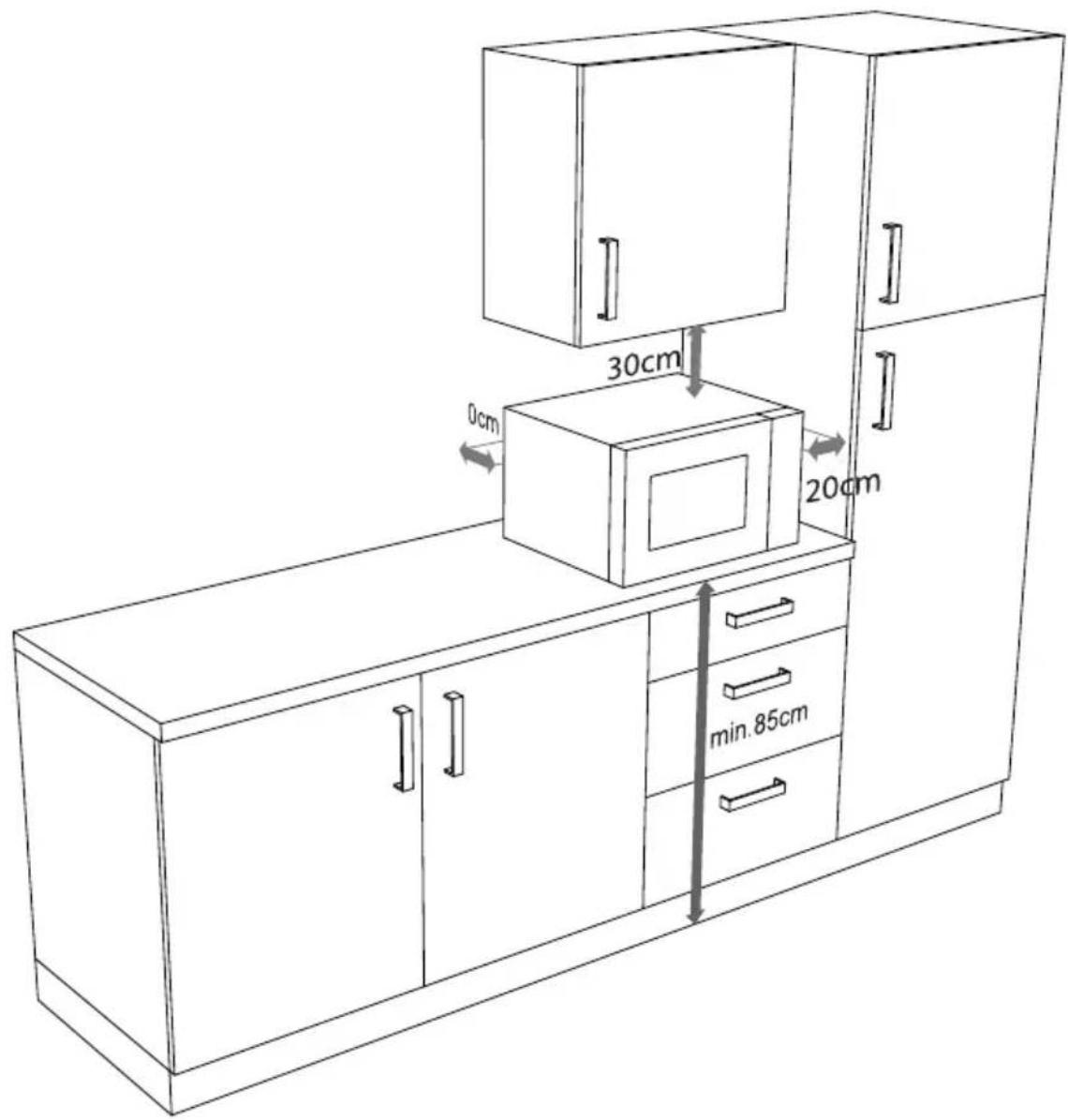
- Do not place objects on top of the microwave oven. To ensure adequate ventilation, a minimum safe clearance distance of 30 cm to the top and 20 cm on both sides must be observed (see Fig. C). The footprint of the appliance is to have a height of at least 85 cm. The appliance must be positioned with the rear panel against a wall.
- Do not cover or obstruct the vents on the appliance.
- The microwave oven is designed as a free-standing appliance. Do not operate in fitted cabinets or a cupboard.
- Never leave the appliance unattended during operation.
- The microwave oven is not designed to be operated with an external timer or a separate remote control system.
- If heating or cooking food in flammable materials such as plastic or paper containers, check the microwave frequently on account of the risk of ignition.
-
The appliance may only be used for heating up appropriate food in suitable containers and dishes.
-
The microwave is intended for heating food and drink. Drying food or clothes and warming heat pads, slippers, sponges, wet clothes, etc. may lead to injuries, ignition or fire.
- Do not prepare food containing alcohol. Do not use the appliance to deep-fry or to heat oil!
- To avoid sparks, load the rotary plate evenly ensuring that it does not touch the metal internal wall of the appliance when the appliance is in use.
- If smoke starts to emerge, keep the door closed in order to prevent fire from breaking out or to smother any flames. Immediately switch off the appliance by disconnecting the mains plug.
- Never exceed the cooking times specified by the manufacturer.
- Do not store any food or other objects in the microwave oven.
Safety instructions relating specifi cally to the use of microwave ovens
WARNING!
Risk of injury!
There is a risk of injury from exploding containers.
- Do not heat up food or liquids in sealed or tightly closed containers! These can explode in the appliance and cause injuries on opening. Remove the lids from containers which close, such as feeding bottles for babies.

CAUTION!
Risk of injury!
There is a risk of burns.
- Food prepared in the microwave oven may heat up unevenly. Check the temperature of food before eating. When preparing
baby food and bottles, always stir the food or shake the bottle before checking the temperature in order to avoid burns.
- Do not heat eggs in their shells or prepare whole hard-boiled eggs in the microwave oven as they can explode while cooking and even after removal from the oven. Eggs may only be cooked in microwave dishes designed specifically for this purpose.
- Prick or score food which has a tough skin, e.g. tomatoes, sausages, aubergines, etc. before cooking in order to prevent it from bursting.
- Hot steam will escape when you open cooking containers. Always hold the opening away from the body on opening.
- Hot steam will escape when you open the door. Do not stand too close.
- The surfaces of the microwave, the accessory parts, as well as the dishes will become very hot during the cooking process. Use oven gloves. Allow parts to cool down before cleaning.
NOTICE!
Possible material damage!
Risk of damage to the appliance due to improper use of the appliance.
- Never operate the appliance without the rotary plate and never operate it without food in the cooking area.
- Only use the accessories supplied or accessories which are described as suitable in these instructions.
- Never use dishes with metal trimmings or metal dishes in microwave mode as this may lead to sparks that could damage the appliance and/or the dishes.
- Use microwave-safe dishes. Look for markings such as “Microwave-safe” or “For the microwave” when purchasing dishes.
- Do not move the appliance during operation.
Safety instructions on the heating of liquids

CAUTION!
Risk of injury!
There is a risk of burns.
- When warming up liquids in the microwave, so-called “delayed boiling” can occur, i.e. the liquid has reached boiling temperature without beginning to bubble as boiling liquids normally do. Movements, such as those generated when removing the liquid from the microwave oven, can then cause a sudden reaction, causing boiling liquid to spurt out.
- Do not use tall, narrow containers.
- Place a glass rod or ceramic rod in the container when heating liquids in order to prevent delayed boiling. Wait a few moments after heating the liquid then take hold of the container carefully and stir the liquid before you take it out of the oven.
Cleaning and maintaining the appliance
NOTICE!
Possible material damage!
Risk of damage to the appliance due to improper use of the appliance.
- The improper use of cleaning agents on the appliance may damage the surfaces. Do not use any aggressive chemical agents, scouring agents or hard sponges for cleaning.
- The appliance must not be cleaned using a steam cleaner. Steam may penetrate into the appliance and damage the electronics and the surfaces.
-
Failure to clean the microwave properly can damage the surface which can in turn reduce the service life of the appliance and may lead to dangerous situations.
-
Clean the appliance regularly and remove food residues.
- Observe the instructions for cleaning when cleaning the inside of the microwave oven as well as the adjacent parts, see “Cleaning and maintenance” on page 33.
Package contents
DANGER!
Risk of choking and suffocation!
Risk of choking and suffocation through swallowing or inhaling small parts or plastic wrap.
- Keep the plastic packaging out of the reach of children.
- Remove the product from the packaging and remove all packaging material.
- Please check your purchase to ensure that all items are included. If anything is missing, please contact us within 14 days of purchase.
The following items are supplied with your product:
- Microwave MD 14768
- Glass rotary plate
- Roller ring
- Operating instructions, warranty card
About microwaves
Microwaves are high-frequency electromagnetic waves that have a warming effect on the food in the internal cooking area. Microwaves heat all non-metallic objects. Therefore, do not use any metallic objects in microwave mode. This heating effect works better the higher the water content of the foodstuff.
To ensure optimal distribution of heat, let heated dishes stand for a minute or two in the microwave oven after cooking.
The effect of microwaves on foodstuffs
- Microwaves penetrate foodstuffs to a depth of around 3 cm.
- They heat up water, fat and sugar molecules (foodstuffs with a high water content are heated the most intensively).
- This heat then works its way – slowly – throughout the food and has a defrosting, heating and cooking effect on the food.
- The cooking area and the air in the oven are not heated (the food container is mainly heated by the hot food).
- Each foodstuff requires a certain amount of energy to cook or defrost. As a rule of thumb we can say: High output – short time or low output – long time.
Microwave oven
- A microwave generator, known as the magnetron, generates the microwaves and directs them into the cooking area.
- The inner walls and the viewing window grid reflect the microwaves inwards so that they cannot escape from the cooking area.
- The microwave output and the cooking time can be set in several steps.
- After the cooking time has elapsed, or when the door is opened, the magnetron turns off automatically.
Cooking and heating up in the microwave oven
- Arrange the food in the oven correctly and place the thickest pieces on the outside so that it cooks properly.
- Note the exact cooking or heating times.
- Choose the shortest available cooking or heating time and extend it if necessary.
WARNING!
Risk of fi re due to very high temperatures!
Overcooked food can start to smoke or even catch fire.
- Supervise the cooking process at all times.
- Cover food during cooking or heating with a cover that is suitable for the microwave oven. Covering the food helps avoid splashes; furthermore, the food is more evenly cooked.
- Foods such as chicken pieces or hamburgers should be turned once when cooking in the microwave oven in order to speed up cooking. Larger pieces such as joints or roasting chickens must be turned at least once.
- It is also important to reposition food, e.g. if cooking meatballs: After half of the cooking time has expired, the food should be repositioned from top to bottom and from the inside to the outside.
- After heating, mix the food thoroughly if possible to ensure even temperatures, otherwise let the food stand for a short time.
Microwave-suitable materials
You can buy special dishes and accessories for your microwave oven. Look for markings such as “Microwave-safe” or “For the microwave”. You can also use your existing dishes – if the material is suitable.
Suitable materials
- Porcelain, glass ceramic and heatproof glass
- Plastics which are heatproof and microwave-suitable (note: plastics may become discoloured by foods or become warped by the heat)
- Baking paper.
Overview of suitable materials
The following list is a general guide to help you choose the correct cooking dishes:
| Cooking dishes Microwave | |
| Heatproof glass Yes | |
| Non-heatproof glass No | |
| Heatproof ceramic Yes | |
| Microwave-suitable plastic dishes Yes | |
| Baking paper Yes | |
| Metal No | |
| Aluminium foil/containers Limited suitability |
Materials that are partially suitable
- Stoneware and ceramics. Use clay containers only for defrosting and for short cooking times because the air and water content of the material could cause the clay to crack or break.
- Dishes with gold or silver trim should only be used if they have been labelled “microwave-safe” by the manufacturer.
- Never use aluminium foil in large quantities. It can however be used e.g. in small pieces to cover sensitive parts. You can also cover the corners of containers to prevent overcooking as the microwave energy is primarily concentrated on the corners. Maintain a distance of 2.5 cm between the foil and the internal wall.
- Aluminium containers (e.g. those for ready-to-serve meals) are partially suitable, but they must be at least 3 cm high to be used in the microwave oven.
Unsuitable materials
• Metals, metal pots, pans and lids.
NOTICE!
Possible material damage!
Risk of damage to the appliance due to improper use of the appliance.
- Never use dishes with metal trimmings, metal dishes or cooking grates in microwave mode as this may cause sparks that could damage the appliance and/or the dishes.
- Do not use crystal or lead crystal in microwave mode. It can shatter, and coloured glass may become discoloured.
- Do not use materials which are not heatproof. They may warp or may even catch fi re.

In order to test whether a dish is suitable for use in the microwave oven, put some water in it and place it in the microwave oven.
Press the 30sec. 14 button twice. The appliance will now operate in microwave mode at maximum power for 1 minute. If you ascertain that the container is hotter than the food, then it is not suitable for the microwave oven. Microwave-suitable dishes are only warmed by the heat of the food.

WARNING!
Risk of fi re!
There is a risk of fire due to improper use of the appliance.
- As soon as you notice sparks, fl ashes or even fi re, immediately press the 16 button and pull out the mains plug.
- Remove the food and check the cooking dishes for metal parts. It is possible that it is not suitable for use in a microwave.
Before using the appliance for the first time

DANGER!
Risk of injury!
There is a risk of injury from electric shock or microwave radiation. Microwave radiation may leak outside if the appliance is damaged. Damage to the mains cable may cause an electric shock.
- If the housing, covers, door or the door catch are damaged then do not use the microwave oven under any circumstances. Immediately remove the plug from the earthed mains socket in this case.
- If you discover any damage, do not use the microwave. Instead, please contact the Service Centre.
NOTICE!
Possible material damage!
Risk of damage to the appliance due to improper use of the appliance.
- The cover 1 in the internal cooking area is not part of the packaging and must not be removed!
- The microwave has been designed for household use and may not be used outside.
- Never operate the appliance without the rotary plate and never operate it without food in the cooking area.
Setting up the appliance
Ensure that all packaging materials have been removed from inside the appliance and the interior of the door.
- Do not place the microwave near to any heat sources, in a location prone to wetness or high humidity, or in the immediate vicinity of infl ammable materials.
- The feet must not be removed.
- Connect the microwave to a convenient and easily accessible mains socket.
Opening/closing the door
- Press the door release button 4 to open the appliance door.
- To close the door, press the door shut until you hear the door lock 9 lock into place.
Cleaning the appliance for the first time
- In order to remove the dust residue from the packaging and any other possible residues from the manufacturing process, wipe out the interior and the inner side of the viewing window 10 with a slightly damp, soft cloth before using the appliance for the first time.
- Ensure that no liquids penetrate the appliance and dry the surfaces completely afterwards.
- Clean the glass rotary plate 5 and the roller ring 6 in warm water with a little washing up liquid before drying off these parts completely.
Using accessories
- Do not use the microwave without properly installing the rotary plate 5.
- Place the roller ring 6 in the recess in the cooking area and then place the rotary plate centrally on the drive shaft 7 (see Fig. D).
Operation
Every time a button is pressed you will hear an acoustic signal to confirm.
NOTICE!
Possible material damage!
Risk of damage to the appliance due to improper use of the microwave.
- Never operate the appliance without the rotary plate and never operate it without food in the cooking area.
Setting the clock time
When the microwave is used for the first time or the power supply is interrupted, the display will show "☐☐:☐☐" and the time (12-hour display) needs to be set.
- Press the 11 button once.
The hour display fl ashes.
- Use the number buttons to enter the time 13.
- Press again.
The time is now set.
Child lock
- In order to activate the child lock, press and hold the 16 button for approximately 3 seconds. An acoustic signal sounds and the symbol is shown in the display. The microwave buttons will now have no function.
- In order to deactivate the child lock, press and hold the Ⓥ button for approximately 3 seconds again, until an acoustic signal sounds and the symbol goes out. All functions are available again.
Display prompt
- When the appliance is in use, press the microwave mode in the display for app
11 button to show the current ox. 3 seconds. - When the appliance is in use, press the time for three seconds in the display.
11 button to show the current
Setting the cooking timer
The appliance can emit an acoustic signal after a defined duration has elapsed. You can use this function as an egg timer, for example.
- Press 11.
- Use the number buttons to enter the time 13. The maximum cooking time that can be set is 99 minutes and 99 seconds.
- Confirm your selection with the 14 button.
Five acoustic signals are emitted once the set duration has elapsed.

The timer function is not available while a cooking programme is in progress.
Heating using microwave energy

Risk of injury!
As the food or containers may be very hot, there is a risk of scalding.
Always use a protective cloth or heatproof oven gloves when removing food from the oven.
- Press the Ⓤ ≈ 11 button.
- Use the number buttons to enter the cooking time 13. The maximum cooking time that can be set is 99 minutes and 99 seconds.
- Press the button and use the number buttons to select one of the power output levels shown in the following table (e.g. 10 for PL10):
| Readout on the display | Output in watts |
| PL10 | 800 |
| PL9 | 720 |
| PL8 | 640 |
| PL7 | 560 |
| PL6 | 480 |
| PL5 | 400 |
| PL4 | 320 |
| PL3 | 240 |
| PL2 | 160 |
| PL1 | 80 |
| PLO | 0 |
- Press the

14 button to confirm the selection.
The cooking process starts in the selected power output level. The remaining cooking time is shown on the display.
Five acoustic signals sound once the cooking process has finished.
- Open the door and remove the cooked food.
Quick start
Selecting the cooking time in 30 second intervals
If you press the 30sec. 14 button without previously setting the power output level, the cooking programme will start at the maximum level (800 watts).
- The maximum cooking time that can be set is 99 minutes and 99 seconds.
- Press the button several times until the desired cooking time is shown (the cooking time is increased by 30 seconds each time the button is pressed).
The cooking process at full power output level starts immediately. The remaining cooking time is shown on the display.

If the appliance is in use, the cooking time can be increased by 30 seconds each time the button is pressed.
This function is, however, not available for the automatic programmes and defrosting mode.
Selecting a cooking time of 1 to 6 minutes
- Enter a cooking time of 1 to 6 minutes using the number buttons 1 to 6.
The cooking process at full power output level starts immediately. The remaining cooking time is shown on the display.
Interrupting a programme
If you want to turn or stir the food, for instance midway through the cooking process, it is often necessary to interrupt the cooking programme.
- Open the door or press the 16 button to interrupt the programme. The remaining cooking time is still shown on the display.
- Once you have closed the door again, press the 30sec. 14 button to resume the cooking process.
- Press the 16 button twice in order to prematurely stop the programme completely.
Weightdefrost
You can set the defrosting programme based on the weight of the food. Weights from 100 g to 2000 g can be set.
- Place the frozen food in a suitable container in the cooking area and close the door.
- Then press the 11 button to select the desired defrosting mode by weight.
dEF1 appears on the display.
- Use the number buttons to enter the weight of the food to be defrosted.
- Press the 108sec. 14 button. The programme starts.
The remaining defrosting time is shown on the display.

If necessary, open the door after approximately half the time has elapsed and turn the food over or stir the food to guarantee even defrosting.
- If the frozen food has still not been defrosted once the time has elapsed, start the appliance again at level PL3 for several minutes to defrost the frozen food completely.
Timedefrost
You can set the duration of the defrosting programme. The longest defrosting time is 00:01 to 99:59 minutes.
- Place the frozen food in a suitable container in the cooking area and close the door.
- Then press the ⏱* 11 button to select the desired defrosting mode by time.
dEF2 appears on the display.
- Use the number buttons to enter the defrosting time.
As standard, the programme runs at power output level L3.
For your guidance, you will find the thawing times for foodstuffs in the following table which lists the approximate defrosting times required for various weight classes:
| Weight Time setting |
| 200 g Approx. 5 minutes |
| 400 g Approx. 9 minutes |
| 600 g Approx. 14 minutes |
| 800 g Approx. 18 minutes |
| 1000 g Approx. 23 minutes |
If you would like to set a higher power output level, press the button and use the number buttons to enter a different power output level.
- Press the 14 button. The programme starts.
The remaining defrosting time is shown on the display.
If necessary, open the door after approximately half the time has elapsed and turn the food over or stir the food to guarantee even defrosting.
- If the frozen food has still not been defrosted once the time has elapsed, start the appliance again at level PL3 for several minutes to defrost the frozen food completely.
Using multiple programmes
The appliance can carry out two cooking programmes consecutively.
Set each cooking programme as described but only press the 14 button when the last cooking programme has been set.
Example:
You wish to defrost food at power output level PL3 for 5 minutes and then operate the PL9 programme for 10 minutes.
- Set the PL3 programme for 5 minutes as described in “Heating using microwave energy” on page 27 without pressing the ◆14 button afterwards.
- Set the PL9 programme for 10 minutes.
- Press the 1/20Sec. 14 button to start the programme.
Both programmes run one after another.
Memory function
You can save frequently used programme sequences. You can also save the performance of two successive programmes (see “Using multiple programmes” on page 31).
Three memory spaces are available.
In standby mode, press the button from one to three times until memory space 1, 2 or 3 is shown on the display.
- Set a programme as described in "Heating using microwave energy" on page 27.
- Press the 30Sec. 14 button. The programme is saved to the selected memory space and an acoustic signal is output.
- To perform the saved programme, in standby mode press the Memory button and then the button.
The cooking process starts. The remaining cooking time is shown on the display.
Automatic cooking
In automatic cooking, it is not necessary to enter the cooking time or power output level. The microwave automatically determines the values depending on the foodstuff and weight input.
Setting an automatic programme
- Press an automatic programme 12 button once to select an automatic programme.
- Press the button again to change the portion size.
The amount can be set according to the table:
| Programme Weight | Display | |
Popcorn 50 g 50 | ||
| 100 g 100 | ||
Potatoes 230 g 1 | ||
| 460 g 2 | ||
| 690 g 3 | ||
Pizza 100 g 100 | ||
| 200 g 200 | ||
| 400 g 400 | ||
Frozen vegetables 150 g 150 | 350 g | 350 |
| 500 g 500 | ||
Drinks | 1 cup | 1 |
| 2 cups | 2 | |
| 3 cups | 3 | |
Heating | 250 g | 250 |
| 350 g | 350 | |
| 500 g 500 |
- Press the

14 button to start the programme.
- The cooking process ends automatically and five acoustic signals are output. If the food is not fully cooked through, cook it for a few minutes more with the microwave programme.

Making popcorn
Always use standard popcorn packaging that is designed for making popcorn in a microwave.
If the rotary plate no longer rotates once the popcorn packaging expands, press the

16 button. Then place the packaging on the rotary plate in such a way that the plate is able to rotate unhindered to prevent the popcorn from burning.
End of the cooking process

CAUTION!
Risk of injury!
As the food or containers may be very hot, there is a risk of scalding.
- Always use a protective cloth or heatproof oven gloves when removing food from the oven.
Once the cooking process has fi nished, 5 acoustic signals are output.
- Open the door and remove the cooked food.
Cleaning and maintenance

WARNING!
Risk of electric shock!
There is a risk of electric shock due to live parts.
- Switch the microwave oven off and disconnect the plug from the mains socket before cleaning.
Failure to clean the appliance properly can damage the surfaces which can in turn reduce the service life of the appliance and may lead to dangerous situations.
Therefore, clean the microwave regularly and remove all food residues.
- Switch the microwave oven off and disconnect the plug from the earthed mains socket before cleaning.
-
Keep the interior of the microwave clean. Wipe away splashes or spilled liquids that stick to the inner walls of the cooking area 8 with a damp cloth. A mild cleaning solution can be used for serious dirt. Do not use cleaning sprays or other caustic detergents as these could corrode, scratch or dull the door surface.
-
The external surfaces should be cleaned with a damp cloth. In order to prevent damage to the microwave's internal operating parts, avoid allowing water to penetrate into the ventilation openings.
- Clean the door, the viewing window as well as the closing mechanism carefully with a mild soap solution. Take great care not to damage these parts.
- Water may condense on the external surfaces if used in high humidity. If water condenses on the internal or external surfaces, wipe it off with a soft cloth.
- The glass rotary plate 5 must be removed occasionally for cleaning. Wash the glass rotary plate in warm water with a mild soap solution or in the dishwasher. Then dry the glass rotary plate thoroughly with a soft cloth.
- Wipe the drive shaft 7 and the roller ring 6 with a damp cloth.
- Wipe out the cooking area with a damp cloth and a mild cleaning solution.
- Lingering odours in the microwave can be removed by placing a glass of water with the juice and rind of a lemon into a deep container that is suitable for microwave use and heating for 5 minutes. Wipe out thoroughly and dry with a soft cloth.
- If you have to replace the light in the microwave, please contact a qualified specialist workshop or the Service Centre.
End of operation
Once the cooking process has ended, open the door and remove the cooked food. The appliance switches to standby mode once the cooking process has finished.
- If you do not plan to use the microwave for a long period of time, disconnect the mains plug and store the microwave in a dry, clean and dust-free place.
Troubleshooting
| Problem Possible | cause Solution | |
| The appliance cannot be started. | The mains plug is not inserted. | Insert the mains plug into the socket. |
| The mains socket is faulty. | Check the mains socket by connecting another appliance. | |
| The appliance does not heat up. | The door is not closed. Close | the door. |
Disposal
PACKAGING

Your appliance has been packaged to protect it from damage in transit. The packaging is made of materials that can be recycled in an environmentally friendly manner.

APPLIANCE
All old appliances marked with the symbol illustrated must not be disposed of in normal household waste.
In accordance with Directive 2012/19/EU, the appliance must be properly disposed of at the end of its service life.
This involves separating the materials in the appliances for the purpose of recycling and minimising the environmental impact.
Take old appliances to a collection point for electrical scrap or a recycling centre.
Contact your local waste disposal company or your local authority for more information on this subject.
Technical specifications
Rated voltage 230-240 V \~ 50 Hz
Rated power
Microwave:
1200-1270
W
Rated power output (microwave): 750-800 W
Microwave frequency: 2450 MHz
Protection class: I
Rotary plate: 25.5 cm
Net weight: 11.1 kg

Cooking area and glass rotary plate are food-safe.
Declaration of Conformity

Medion AG hereby declares that the product conforms to the following European requirements:
• EMC Directive 2014/30/EU
• Low Voltage Directive 2014/35/EU
• Ecodesign Directive 2009/125/EC
• RoHS Directive 2011/65/EU.
This product meets the requirements of European standard EN55011. The product is classed as standard-compliant as a group 2, class B appliance. Group 2 means that the appliance intentionally generates high-frequency energy in the form of electromagnetic rays for the heat-treatment of foodstuffs. Class B means that the appliance is suitable for domestic use.
Service information
Please contact our Customer Service team if your device ever stops working the way you want or expect it to. There are several ways for you to contact us:
- In our Service Community, you can meet other users, as well as our staff, and you can exchange your experiences and pass on your knowledge there. You will find our Service Community at http://community.medion.com.
• Alternatively, use our contact form at www.medion.com/contact. - You can also contact our Service team via our hotline or by post.
| Opening times Hotline number UK | |
| Mon – Fri: 08.00 – 20.00Sat – Sun: 10.00 – 16.00 | 1 0333 3213106 |
| Hotline number Ireland | |
| 1 1800 992508 | |
| Service address | |
| MEDION Electronics Ltd.120 Faraday Park, Faraday Road, DorcanSwindon SN3 5JF, WiltshireUnited Kingdom | |

You can download this and many other sets of operating instructions from our service portal at www.medion.com/gb/service/start/.
You will also find drivers and other software for a wide range of devices there.
You can also scan the QR code on the side of the screen, to download the operating instructions onto your mobile device from the service portal.
Legal Notice
Copyright © 2019
Date: 21.03.2019
All rights reserved.
These operating instructions are protected by copyright.
Mechanical, electronic and any other forms of reproduction are prohibited without the written permission of the manufacturer.
Copyright is owned by the company:
MEDION AG
Am Zehnthof 77
45307 Essen
Germany
Please note that you cannot use the address above for returns. Please always contact our Customer Service team fi rst.

Great care has gone into the manufacture of this product and it should therefore provide you with years of good service when used properly. In the event of product failure within its intended use over the course of the first 3 years after date of purchase, we will remedy the problem as quickly as possible once it has been brought to our attention. In the unlikely event of such an occurrence, or if you require any information about the product, please contact us via our helpline support services, details of which are to be found both in this manual and on the product itself.

PRODUCED IN CHINA FOR:



- Contents
- Appliance parts
- Overview 4
- Use 5
- Appliance parts 6
- About these operating instructions 9
- Safety information ....10
- Package contents ....19
- About microwaves 20
- Cooking and heating up in the microwave oven 20
- Before using the appliance for the first time 24
- Operation....26
- About these operating instructions
- Key to symbols
- DANGER!
- WARNING!
- CAUTION!
- NOTICE!
- CE labelling
- Protective earthing symbol (For protection class I)
- Indoor use
- Safety information
- Proper use
- Safety of children and persons
- Risk of injury!
- General safety
- Warning: risk of electric shock!
- Risk of explosion!
- Risk of damage!
- Hot surfaces
- Risk of fi re!
- Safety instructions relating specifi cally to the use of microwave ovens
- Possible material damage!
- Safety instructions on the heating of liquids
- Cleaning and maintaining the appliance
- Package contents
- Risk of choking and suffocation!
- About microwaves
- The effect of microwaves on foodstuffs
- Microwave oven
- Cooking and heating up in the microwave oven
- Risk of fi re due to very high temperatures!
- Microwave-suitable materials
- Suitable materials
- Overview of suitable materials
- Materials that are partially suitable
- Unsuitable materials
- Before using the appliance for the first time
- Setting up the appliance
- Opening/closing the door
- Cleaning the appliance for the first time
- Using accessories
- Operation
- Setting the clock time
- Child lock
- Display prompt
- Setting the cooking timer
- Heating using microwave energy
- Quick start
- Selecting the cooking time in 30 second intervals
- Selecting a cooking time of 1 to 6 minutes
- Interrupting a programme
- Weightdefrost
- Timedefrost
- Using multiple programmes
- Example:
- Memory function
- Automatic cooking
- Setting an automatic programme
- Making popcorn
- End of the cooking process
- Cleaning and maintenance
- Risk of electric shock!
- End of operation
- Troubleshooting
- Disposal
- PACKAGING
- APPLIANCE
- Technical specifications
- Declaration of Conformity
- Service information
- Legal Notice
- PRODUCED IN CHINA FOR:
Brand : MEDION
Model : MD 14768
Category : Microwave