
DSB 182 LH - Air-conditioner DAEWOO - Free user manual and instructions
Find the device manual for free DSB 182 LH DAEWOO in PDF.


| Product Type | Split Air Conditioner |
| Model | DSB 182 LH / DSB 182 LH-R |
| Function | Cooling & Heating |
| Power Supply | AC 220-240V, 50Hz |
| Cooling Capacity | 18,000 BTU/h |
| Heating Capacity | 18,000 BTU/h |
| Operating Current (Cooling) | 9.2 A |
| Power Consumption (Cooling) | 2,000 W |
| Indoor Unit Dimensions (W x H x D) | 1035 x 322 x 205 mm |
| Outdoor Unit Dimensions (W x H x D) | 800 x 615 x 320 mm |
| Indoor Unit Net Weight | 12.1 kg |
| Outdoor Unit Net Weight | 63.5 kg |
| Refrigerant Connection Type | Flare |
| Gas Pipe Size | 1/2" (12.7 mm) |
| Liquid Pipe Size | 1/4" (6.35 mm) |
| Air Filters | Anti-bacteria, Electrostatic, Deodorizing |
| Operating Modes | Auto, Quick, Cool, Fan, Dehumidifier, Heat |
| Fan Speeds | Low, Medium, High, Natural |
| Timer Range | 0.5 to 24 hours (On/Off) |
| Sleep Mode | Yes |
| Emergency Operation | Via manual switch on indoor unit |
| Remote Control | LCD display, full function |
| Safety Features | 3-minute compressor delay, grounding required |
| Operating Temperature (Indoor Heating) | 15°C to 27°C |
| Operating Temperature (Outdoor Heating) | -5°C to 24°C |
Frequently Asked Questions - DSB 182 LH DAEWOO
User questions about DSB 182 LH DAEWOO
0 question about this device. Answer the ones you know or ask your own.
Ask a new question about this device
Download the instructions for your Air-conditioner in PDF format for free! Find your manual DSB 182 LH - DAEWOO and take your electronic device back in hand. On this page are published all the documents necessary for the use of your device. DSB 182 LH by DAEWOO.
USER MANUAL DSB 182 LH DAEWOO
This air conditioner meets strict safety and operating standards. The installer of this unit must install or service this unit so it operates safely and efficiently.
IMPORTANT NOTES
- Adhere to all safety instructions and warnings throughout this manual.
- Read this manual carefully before installing or operating this unit to become familiar with its features and obtain the performance that will bring you continued enjoyment for many years.
- Follow each installation or repair step exactly as shown in the manual.
- Observe all local, state and national electric codes. Contact your local government for more information on electrical codes.
The lightning flash with arrowhead symbol, within an equilateral triangle is intended to alert the user to the presence of uninsulated dangerous voltage within the product's enclosure that may be of sufficient magnitude to constitute a risk of electric shock to persons.

The exclamation point within an equilateral triangle is intended to alert the user to the presence of important operating and maintenance (servicing) instructions in the literature accompanying the appliance.
Contact Installer if Necessary:
The installation instructions are for a experienced installer. If you are not an experienced installer, contact a local installer for help. If you require help with service, contact your certified dealer or Daewoo Electronics for additional instructions.
If Unit is Installed Improperly:
The manufacturer shall in no way be responsible for improper installation or maintenance service, including failure to follow the instructions in this manual.
WARNING:
- ELECTRICAL SHOCK CAN CAUSE SEVERE PERSONAL INJURY OR DEATH. ONLY A QUALIFIED, EXPERIENCED ELECTRICIAN/INSTALLER SHOULD ATTEMPT TO WIRE THIS SYSTEM.
• THE APPLIANCE IS NOT INTENDED FOR USE BY CHILDRENOR INFIRM PERSONS WITHOUT SUPERVISION. - YOUNG CHILDREN SHOULD BE SUPERVISED TO ENSURE THAT DO NOT PLAY WITH THE APPLIANCE
Precautions When Wiring:
- Do not plug in the unit until all connections (tubing, drain hose, mounting, etc.) have been made and double-checked.
- High voltages are present in this unit and are very dangerous. Please refer to these instructions and diagrams when wiring. Improper connections or inadequate grounding can cause accidental injury.
- This unit must be grounded in accordance with local electrical codes.
- Connect wires and pipes securely and tightly as loose connections/wiring may cause overheating at connections and a possible fire hazard.
Precautions When Transporting:
- When transporting the unit, be very careful and get help as the units are very heavy. Be careful of sharp edges on the units also.
Precautions When Installing:
- When installing in a ceiling or wall, make sure the ceiling/wall is strong enough to hold the unit's weight. A frame may be necessary for added support.
- When installing in a room, make sure the tubes are well insulated to protect the walls and furniture from sweating of the tubes.
- When installing in moist or uneven locations, make sure to use a raised level concrete pad or concrete blocks to provide a level, solid foundation for the outdoor unit; this prevents water damage and vibration.
- When installing in an area of high winds, make sure to securely anchor the outdoor unit down with bolts and a metal frame.
When Connecting Refrigerant Tubing:
- Keep all tubing as short as possible.
- Use the flare method for connecting tubing.
- Apply refrigerant lubricant to the matching surfaces of the flare and union tubes before connecting them, then tighten, making sure not to overtighten.
- Check the tubes carefully for leaks before starting the test run.
When Servicing:
- Make sure the power is off and the unit is unplugged before opening the unit to troubleshoot or repair electrical parts and wiring.
- Keep your fingers and clothing away from any moving parts.
- Clean up the sight after you finish, making sure no metal scraps and wiring are left in the unit.
- The Air conditioner shall be installed in accordance with the nationed wiring regulation.
ROOM AIR CONDITIONER INSTRUCTION
Remark per EMC Directive 89/336/EEC
To prevent flicker impressions during the start of the compressor (technical process) following installation conditions do apply.
- The power connection for the air conditioner has to be done at the main power distribution. This distribution has to be of an low impedance. Normally the required impedance is reached at a 32A fusing point. Air conditioner fuse has to be 16A max!
- No other equipment has to be connected to this power line.
- For detailed installation acceptance please refer to your contract with the power supplier. If restrictions do apply for products like washing machines, air conditioners or electrical ovens.
- For power details of the air conditioner refer to the rating plate of the product.
CONSIGINES D'INSTALLATION RACCORDEMENT ELECTRIQUE
It is recommended that you read Operating instructions fully before operating this unit.
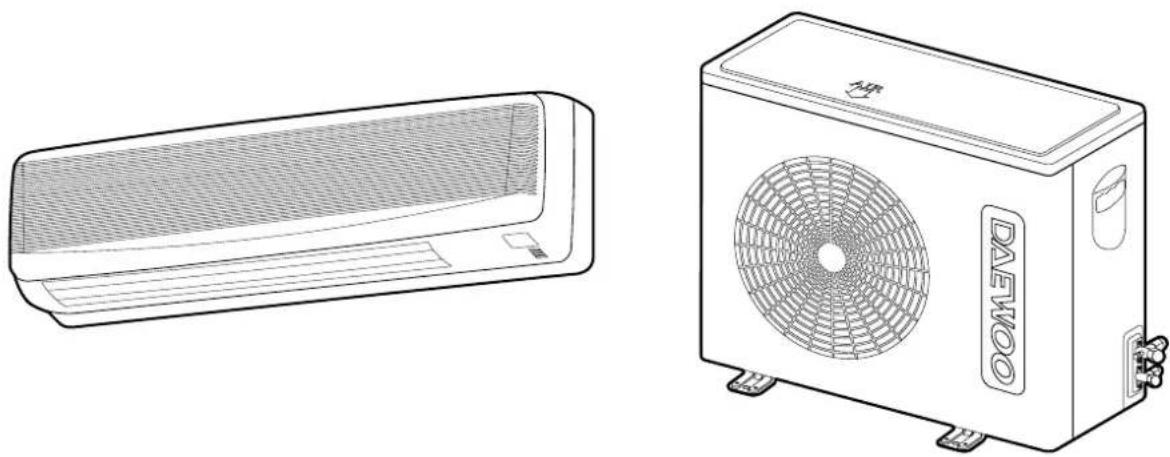
natural_image
Line drawings of two different air conditioning units, one with a mesh grille and the other a fan-shaped unit labeled 'DAEKOO' (no text or symbols on the devices themselves)Safety Instructions....1
Contents 3
OPERATING SECTION
Location of Controls....4
Indoor Unit 4
Outdoor Unit 4
Indoor unit Display....5
Remote Controller 6
Remote Display 6
Operation....8
Connecting the AC Cord 8
How to Install Batteries ....8
Setting the Unit for Remote Operation....8
Celsius to Fahrenheit Conversion Chart....9
To Set the Unit to Auto Mode....9
To Operate Only Fan 10
To Set Unit to Cool Mode....10
To Set Unit to Dehumidifier Mode....11
To Select Fan Direction....11
To Set Unit to Quick Mode....12
To Set the On Timer Mode ....12
To Set the Off Timer Mode ....13
To Set Unit to Sleep Mode....13
To Set Unit to Heat mode (Only LH/LH-R) 14
Emergency Operation....14
Changing/Cleaning the Air Filters 15
Care and Maintenance....16
Troubleshooting Guide....17
Specifications 18
OPERATING SECTION
LOCATION OF CONTROLS
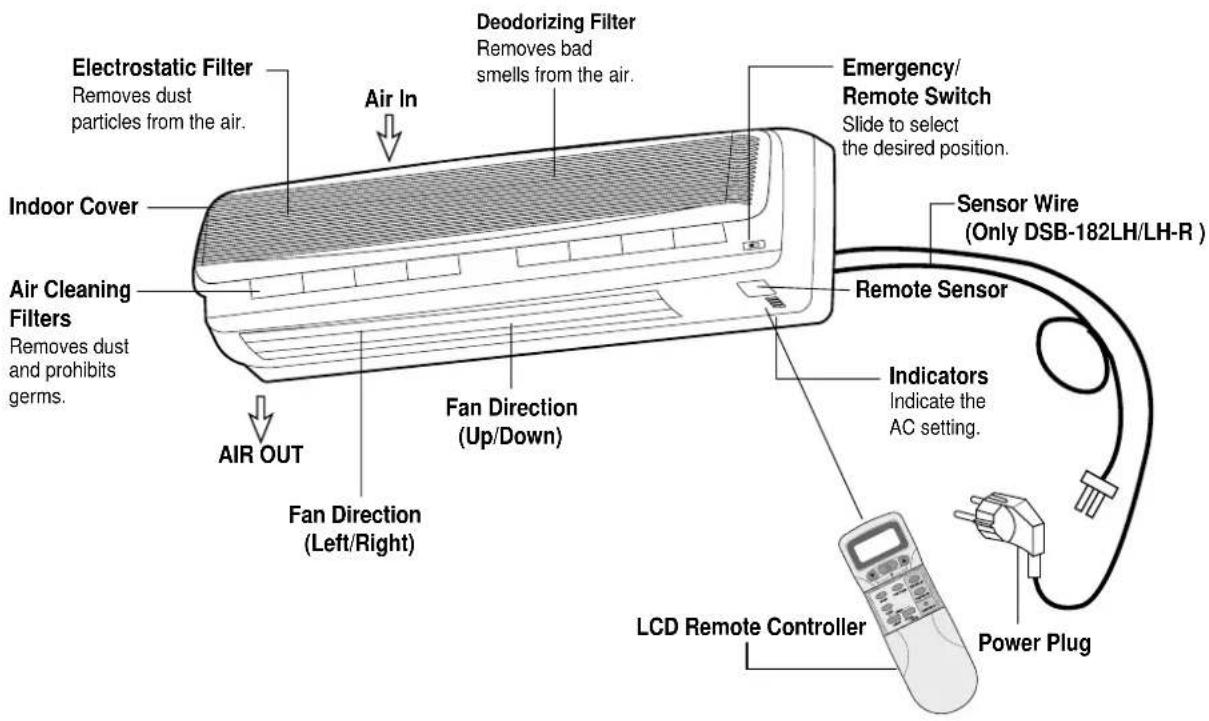
INDOOR UNIT
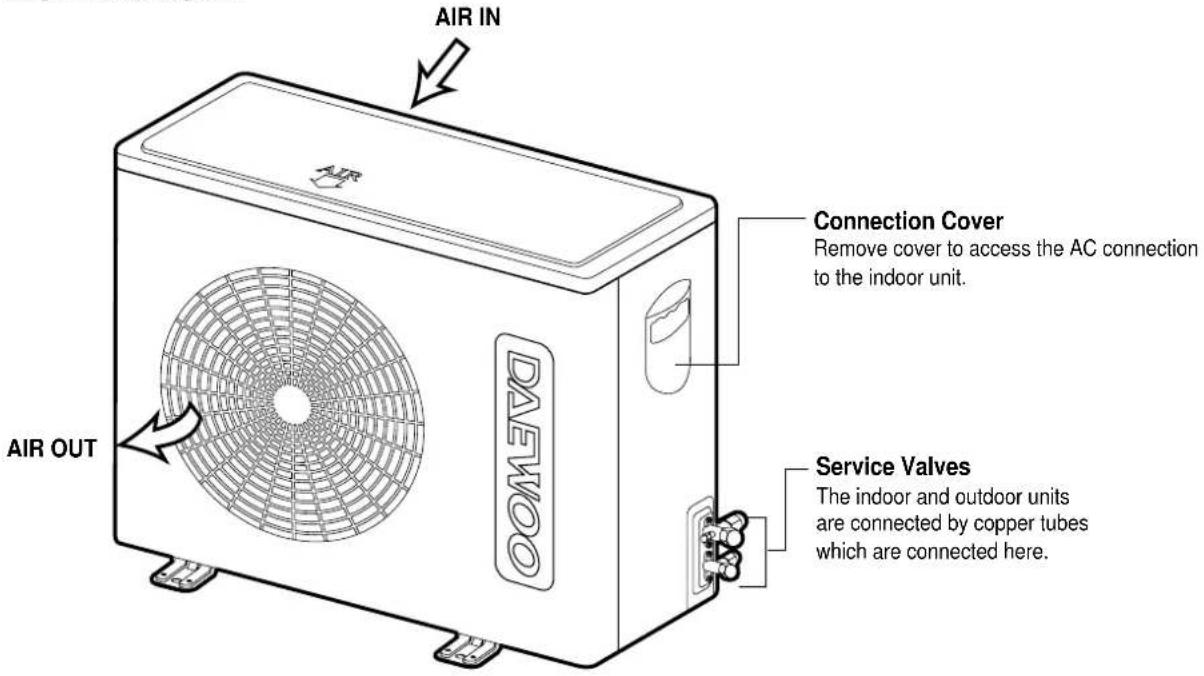
OUTDOOR UNIT
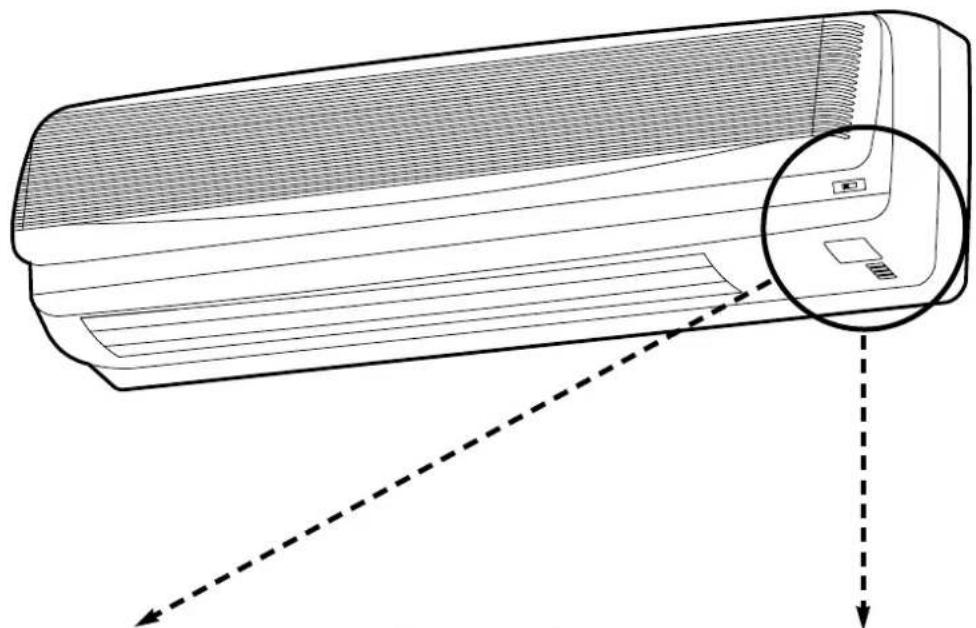
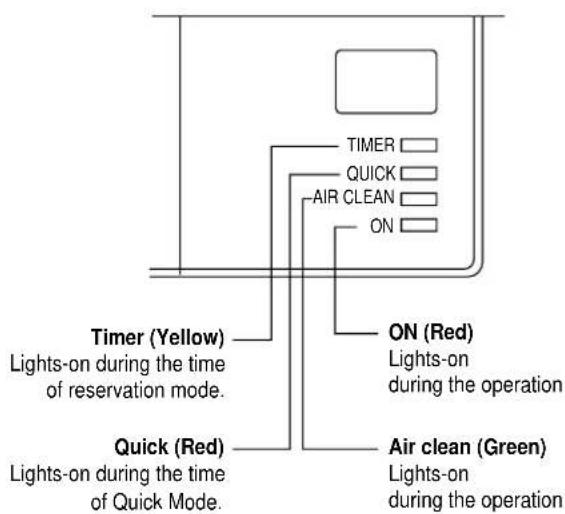
INDOOR UNIT DISPLAY
natural_image
Line drawing of a wall-mounted air conditioner unit with a magnified inset showing internal components (no text or symbols)Indoor Unit Display Sw...Panel
■ Remote Control Signal Receiver
This place is the part to receive the signal if it receives the signal, you can hear the signal "beep. beep".
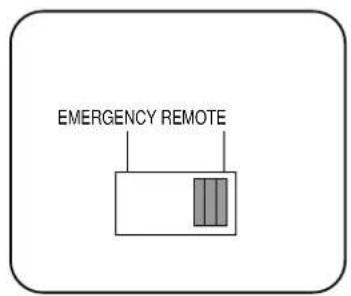
■ When the remote controller is lost or out-of-order, push the emergency button (EMERGENCY) to operate by hand.
Open the front panel on emergency operating.
Remocon switch is usually used with remote controller.
REMOTE CONTROLLER
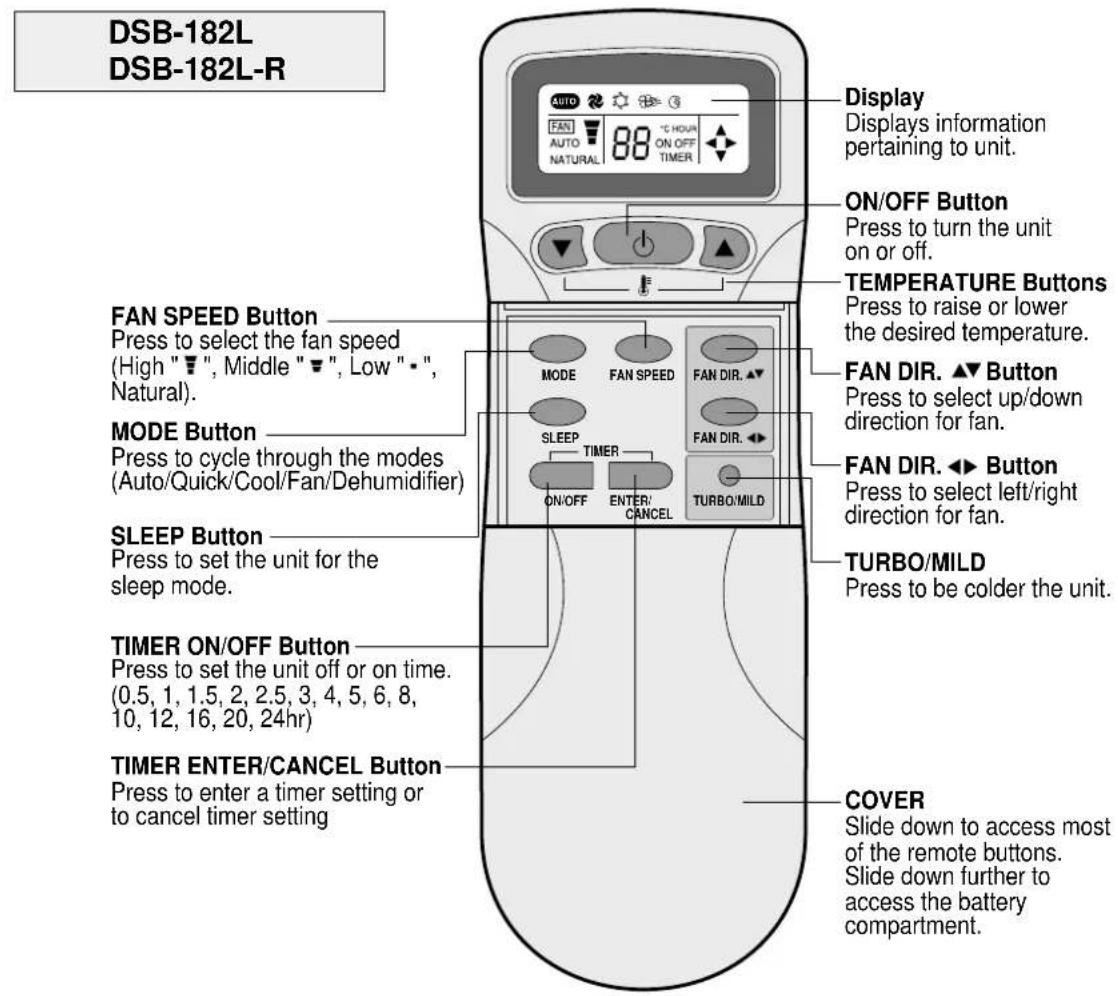
REMOTE CONTROLLER
DSB-182LH
DSB-182LH-R
FAN SPEED Button
Press to select the fan speed (High "▼", Middle "▼", Low "-", Natural).
MODE Button
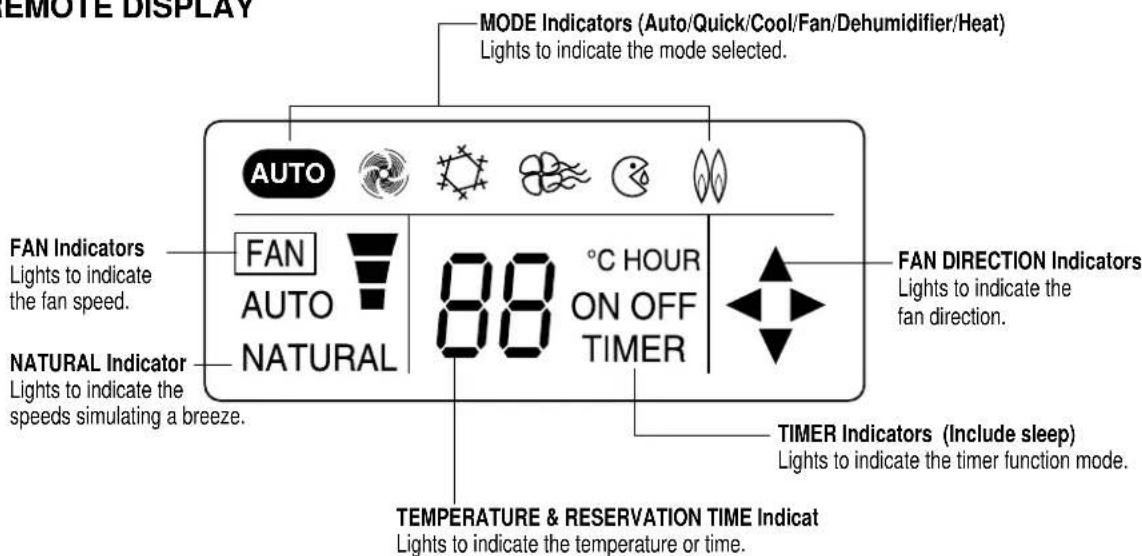
Press to cycle through the modes (Auto/Quick/Cool/Fan/Dehumidifier/Heat)
SLEEP Button
Press to set the unit for the sleep mode.
TIMER ON/OFF Button
Press to set the unit off or on time. (0.5, 1, 1.5, 2, 2.5, 3, 4, 5, 6, 8, 10, 12, 16, 20, 24hr)
TIMER ENTER/CANCEL Button
Press to enter a timer setting or to cancel timer setting
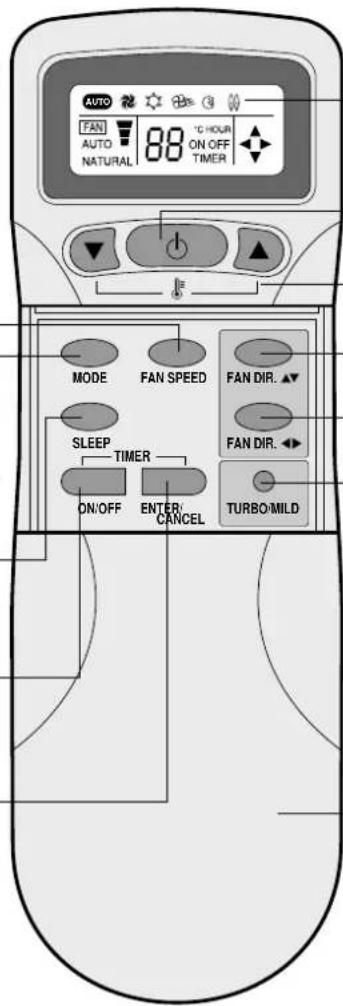
Display
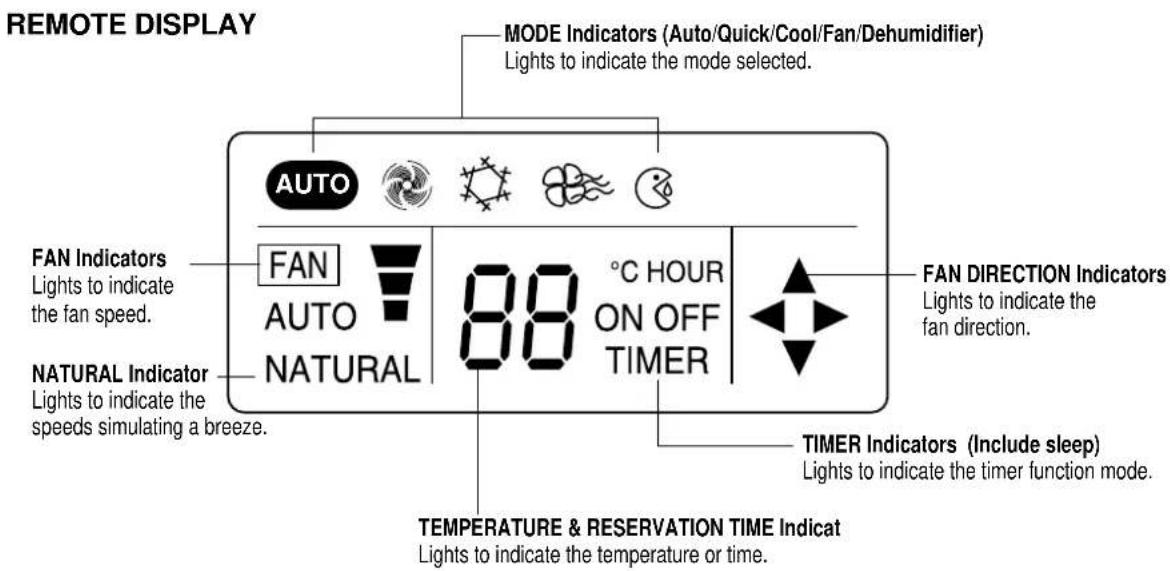
Displays information pertaining to unit.
ON/OFF Button
Press to turn the unit on or off.
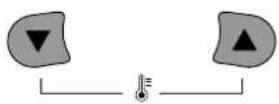
TEMPERATURE Buttons
Press to raise or lower the desired temperature.
FAN DIR. ▲▼ Button
Press to select up/down direction for fan.
FAN DIR. ◀▶ Button
Press to select left/right direction for fan.
TURBO/MILD
Press to be colder the unit.
COVER
Slide down to access most of the remote buttons.
Slide down further to access the battery compartment.
REMOTE DISPLAY
OPERATION
CONNECTING THE AC CORD
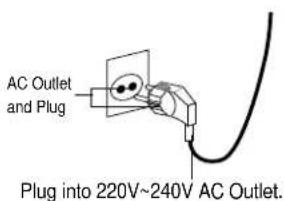
The outdoor unit is connected to the indoor unit through the AC connecting wire or connection cord. To connect the indoor unit to AC, follow the procedures below:
- Insert the attached AC plug into a 2-pronged 220V\~240V AC outlet.
NOTES:
- Never connect the AC line cord plug to other than the specified voltage (220V\~240V).
- Use the attached power cord only.
- If the outlet is a 3-pronged type or other, have an electrician install a new outlet.
- The new air conditioner system should be on it's own 220V circuit. Contact your local electrical installer for installation.
HOW TO INSTALL BATTERIES
To install the batteries, follow the procedures below:
- Slide down the cover to access most of the remote buttons. Slide down further to access the battery compartment.
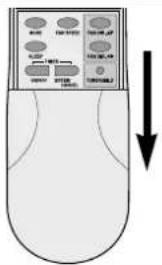
- Insert two "AAA" size Alkaline batteries following the polarity diagram below.
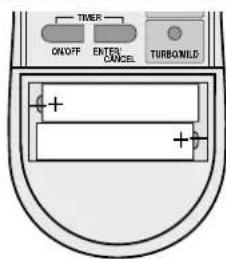
BATTERY PRECAUTIONS
The precautions below should be followed when using batteries in this device:
- Use only the size and type of batteries specified.
- Be sure to follow the correct polarity when installing the batteries as indicated in the battery compartment. Reversed batteries may cause damage to the device.
- Do not mix different types of batteries together (e.g. Alkaline and Carbon-zinc) or old batteries with fresh ones.
- If the device is not to be used for a long period of time, remove the batteries to prevent damage or injury from possible battery leakage.
- Do not try to recharge batteries not intended to be recharged; they can overheat and rupture. (Follow battery manufacturer's directions).
After the unit is fully connected and plugged in, it can be turned on. To turn the unit on and set it for remote operation, follow the procedures below:
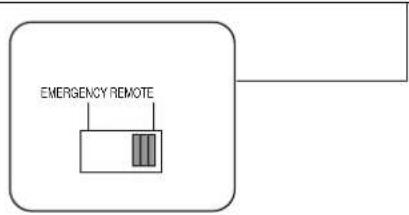
- Open the indoor unit's cover and make sure the EMER-
GENCY/REMOTE switch is set to the REMOTE position; this will allow the unit to operate with the remote controller.
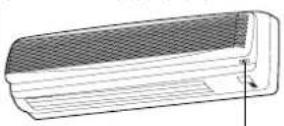
EMERGENCY/REMOTE Switch
- Press the ON/OFF button on the remote controller to turn on the unit. The On LED will light on the indoor unit and
"ON" will light in the remote display. To select the various modes and settings, read the following pages.
THREE MINUTE COMPRESSOR DELAY
- After turning the indoor unit on and setting it for air conditioner operation, the compressor (outdoor unit) will not come on for three minutes. This is a feature that will protect the compressor from damage due to quick start and stops.
CELSIUS TO FAHRENHEIT CONVERSION CHART
| CELSIUS FAHRENHEIT | CELSIUS FAHRENHEIT |
| 18 64.4 | 26 78.8 |
| 19 66.2 | 27 80.6 |
| 20 68 | 28 82.4 |
| 21 69.8 | 29 84.2 |
| 22 71.6 | 30 86 |
| 23 73.4 | 31 87.8 |
| 24 75.2 | 32 89.6 |
| 25 77 |
NOTES:
- When operating the remote controller, make sure there are no obstructions between the remote controller and the remote sensor.
- After a while the display goes blank to conserve battery power. To check the settings, press the ON/OFF button once.
TO SET THE UNIT TO AUTO MODE
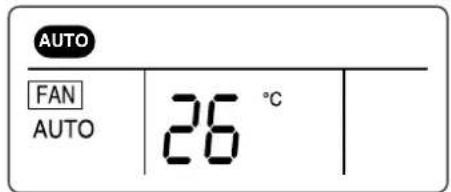
This unit will automatically operate the unit according to its surroundings while in the Auto mode. All you have to set is the desired temperature and it will control the fan, coolness and dehumidifier. Follow procedures below:
- Press the ON/OFF button on the remote control to turn the unit on; the On LED will light on the indoor unit and "ON" will light in the remote display.
- Make sure the Auto cator appears in the remote display. Using the TEMP. ▼ or ▲ buttons, set the desired temperature. The desired temperature can be changed up or down 1 degree from the actual room temperature. For temperature setting: 24\~28°C
- Then the unit will automatically operate.
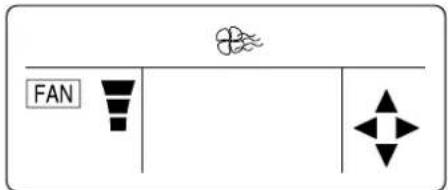
TO OPERATE ONLY FAN
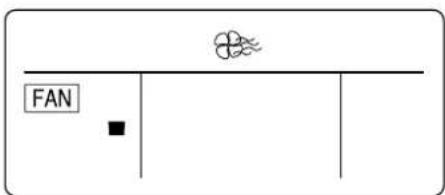
To operate only the fan so the unit will circulate the air, proceed as follows:
- Press the ON/OFF button on the remote control to turn the unit on; the On LED will light on the indoor unit and "ON" will light in the remote display.
-
To select a fan speed, press the FAN SPEED button until the desired speed appears in the display (see below).
-
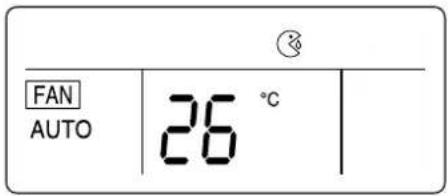
Press the MODE button until the Fan indicator appears in the display. No allowance setting temperature

FAN SPEEDS
“”
The fan will operate on low speed.
“ ”
The fan will operate on medium speed.
“”
The fan will operate on high speed.
“NATURAL” The fan will randomly cycle through the speeds simulating a breeze.
NOTE:
- If "NATURAL" is selected, the NATURAL" indicator on the indoor unit will light.
TO SET UNIT TO COOL MODE
To set the unit to cool the room to a desired temperature, follow the procedures below:
- Press the ON/OFF button on the remote control to turn the unit on; the On LED will light on the indoor unit and "ON" will light in the remote display.
- Press the MODE button until the Cool indicator appears in the display.

- Using the TEMP. ▼ or ▲ buttons, set the desired temperature. The desired temperature can be changed up to 32°C and down to 18°C.
- To select the fan speed, press the FAN SPEED button until the desired speed appears in the display (see below).
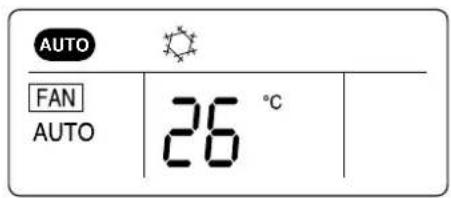
FAN SPEEDS
"AUTO"
The fan will automatically select the fan speed.

The fan will operate on low speed.

The fan will operate on medium speed.

The fan will operate on high speed.
“NATURAL” The fan will randomly cycle through the speeds simulating a cool breeze.
TO SET UNIT TO DEHUMIDIFIER MODE
Select this mode when there is high humidity. To select, follow the procedures below.
- Press the ON/OFF button on the remote control to turn the unit on; the On LED will light on the indoor unit and "ON" will light in the remote display.
- Press the MODE button until the Dehumidifier indicator appears in the display.

- Using the TEMP. ▼ or ▲ buttons, set the desired temperature. The desired temperature can be changed up to 32°C and down to 18°C.
TO SELECT THE FAN DIRECTION
Regardless of the mode the unit is set for, the fan direction can be changed so it moves up and down, left and right or both. Follow procedures below to set fan direction.
- Press the ON/OFF button on the remote control to turn the unit on; the On LED will light on the indoor unit and "ON" will light in the remote display.
- Press the MODE button to select the desired mode.
- Press the FAN DIR. button to select the fan direction. See chart below for detailed information on each of the three settings.
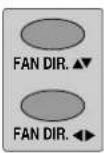
| FAN DIR. ▲▼First Press |  | The air will flow up and down. | FAN DIR. ◀▶ First Press | The air will flow left and right. | |
| Second Press | Normal air direction. | Second Normal Press | air direction. |
TO SET UNIT TO QUICK MODE
To set this unit to cool at the highest power, follow the procedures below:
- Press the ON/OFF button on the remote control to turn the unit on; the On LED will light on the indoor unit and "ON" will light in the remote display.
-
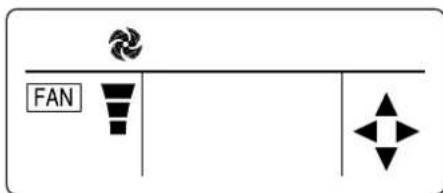
Press the MODE button until the Quick ("") indicator appears in the display. MODE
-
The unit will then start cooling the room at the highest power.
TO SET THE ON TIMER MODE
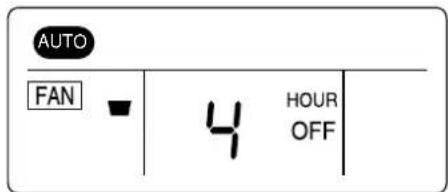
This unit can be set to automatically turn on after a predetermined amount of hours (up to 24) in the order of 0.5, 1, 1.5, 2, 2.5, 3, 3.5, 4, 5, 6, 8, 10, 12, 16, 20, 24.
-
Press the ON/OFF button of timer on the remote control to set the on timer mode, "HOUR" and "ON" on the remote display will be displayed and "TIMER" will be flicked. When you increase to press "ON/OFF" you will get desired time. Then, if pressing "ENTER/CANCEL" button, ON TIMER Mode will be started. If you want to stop ON TIMER Mode, please press "ENTER/CANCEL" again.
-
While the unit is off, press the TIMER ON button; the display will light waiting input for the timer, but the actual unit will not turn on.
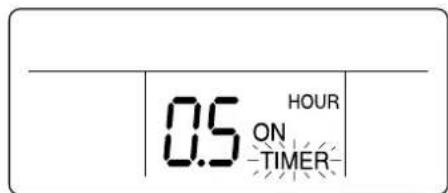
- Repeatedly press the TIMER ON button until the desired hour that you want the unit to turn on appears on the display. For example, if it is 1:00 P.M. and you want the unit to turn on at 4:00 P.M., select 3 hours.
- Press the ENTER button to input the setting into memory; the unit will beep, the TIMER indicator will light on the unit and the TIMER indicator on the remote will light to indicate the unit is in the timer mode.
- When the desired hour is reached, the unit will turn on to the selected mode.
NOTE : Press the ENTER button within 5 seconds of selecting the desired time. If note than 5 seconds elapse, steps 3 and 4 must be repeated.
TO SET OFF TIMER MODE
This unit can be set to automatically turn off after a predetermined amount of hours (up to 12) in the order of 0.5, 1, 1.5, 2, 2.5, 3, 3.5, 4, 4.5, 5, 5.5, 6, 6.5, 7, 7.5, 8, 8.5, 9, 9.5, 10, 11, 12.
-
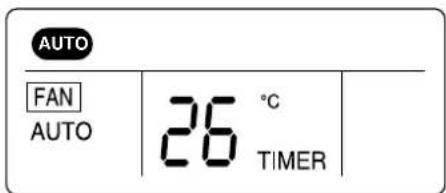
Press the ON/OFF button of timer on the remote control to set the off timer mode, "HOUR" and "OFF" on the remote display will be displayed and "TIMER" will be flicked. When you increase to press "ON/OFF" you will get desired time. Then, if pressing "ENTER/CANCEL" button, OFF TIMER Mode will be started. If you want to stop OFF TIMER Mode, please press "ENTER/CANCEL" again.
-
Press the TIMER OFF button once to enter the Timer screen. ——TIMER——
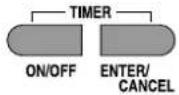
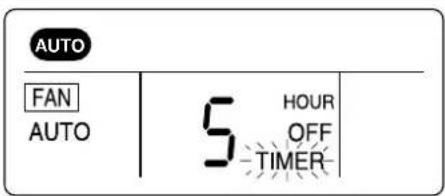
- Repeatedly press the TIMER OFF button until the desired hour that you want the unit to shut off appears on the display. For example, if it is 8:00 P.M. and you want the unit to turn off at 10:00 P.M., select 2 hours.
-
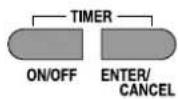
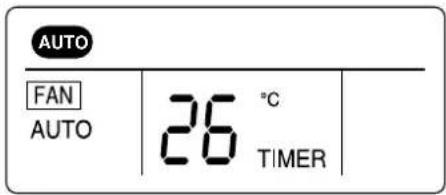
Press the ENTER button to input the setting into memory; the unit will beep, the TIMER indicator will light on the unit and the TIMER indicator on the remote will light to indicate the unit is in the timer mode.
-
When the desired hour is reached, the unit will turn off.
NOTE: Press the ENTER button within 5 seconds of selecting the desired time. If note than 5 seconds elapse, steps 3 and 4 must be repeated.
TO SET UNIT TO SLEEP MODE
When you are going to sleep, select this feature and the unit will cool off the room to the desired temperature and then increase that temperature throughout the night.
- Press the ON/OFF button on the remote control to turn the unit on; the On LED will light on the indoor unit and "ON" will light in the remote display.
- Press the MODE button to select the desired mode. Then, set the desired temperature using the TEMP. ▲ or ▼ buttons.
- Press the SLEEP button on the remote controller. The unit will then be in the sleep mode and will cool the room to the desired temperature. After a while the unit will increase the temperature again.
This process will then repeat.
- Press the "TURBO/MILD" button to select powerful cooling if this button is selected one more time, it is become normal power.
TO CANCEL SLEEP MODE:
To cancel sleep mode, press the SLEEP button again; the SLEEP indicator will disappear in the display.
TO SET UNIT TO HEAT MODE (ONLY DSB-182LH/182LH-R)
To set the unit to heat the room to a desired temperature, follow the procedures below:
- Press the ON/OFF button on the remote control to turn the unit on; the On LED will light on the indoor
unit and "ON" will light in the remote display.
- Press the MODE button until the Heat indicator appears in the display.
In the heat mode, the fan direction (UP, DOWN) is further downward than that in the cool mode for the good circulation.
MODE
- Using the TEMP. ▼ or ▲ buttons, set the desired temperature. The desired temperature can be changed up to 32°C and down to 18°C.
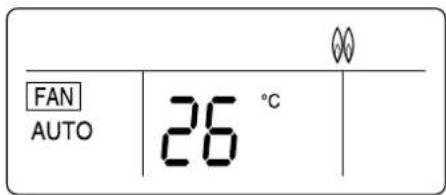
- To select the fan speed, press the FAN SPEED button until the desired speed appears in the display (see below).
FAN SPEED
NOTE:
When the heating operation is started, hot air delivery might be delayed due to warm up period.
FAN SPEEDS
"AUTO" The fan will automatically select the fan speed.

The fan will operate on low speed.

The fan will operate on medium speed.

The fan will operate on high speed.
"NATURAL" The fan will randomly cycle through the speeds simulating a cool breeze.
EMERGENCY OPERATION
If the remote control is lost, broken or has no batteries, follow the procedures below:
- Open the indoor unit's cover and make sure the EMERGENCY/REMOTE switch is set to the EMERGENCY position.
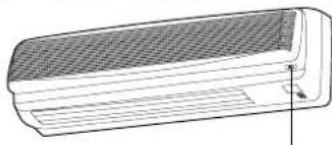
natural_image
Technical line drawing of a rectangular air conditioner unit with ventilation grille and ventilation duct (no text or symbols)EMERGENCY/REMOTE Switch
-
The unit will then turn on and depending on the room temperature, it will select the cool or dehumidifier mode, fan speed and fan direction automatically.
-
To turn the unit off, slide the EMERGENCY/REMOTE switch to the REMOTE position.
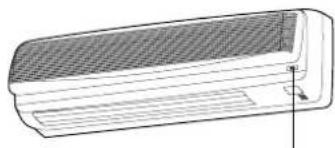
natural_image
Technical line drawing of a rectangular air conditioner unit with ventilation grille and side panel (no text or symbols)EMERGENCY/REMOTE Switch
CHANGING/CLEANING THE AIR FILTERS
To change or clean the two black air filters, follow the procedures below:
- Open the indoor unit's cover and remove both black air filters by bending them slightly backward and the lifting out.
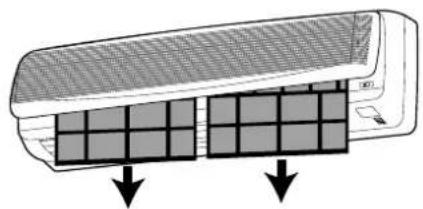
natural_image
Diagram of a car air conditioner unit with two side panels showing internal grid patterns (no text or symbols)- Remove the two small filters (Deodorizing and Electrostatic) from the indoor unit.
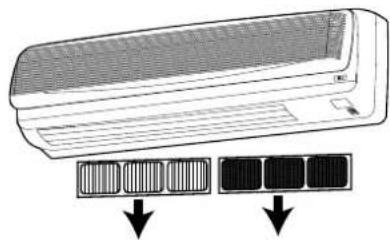
natural_image
Illustration of a wall-mounted air conditioner unit with two solar panel arrays below (no text or symbols)- Examine the filters and determine if they need to be cleaned or replaced. To clean filters, use a vacuum and clean off dust. Use water and mild soap also if necessary.
NOTE: The filters should be changed every 6 months. If in a climate with cold winters, once a year is adequate.
- Insert cleaned or new small filters (Deodorizing and Electrostatic) back into the unit.
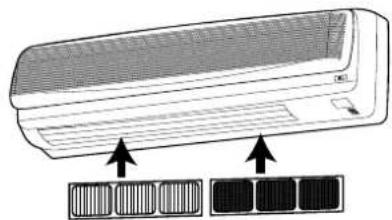
natural_image
Illustration of a wall-mounted air conditioner unit with two side panels below (no text or symbols)- Insert cleaned or new black filters back into the unit.
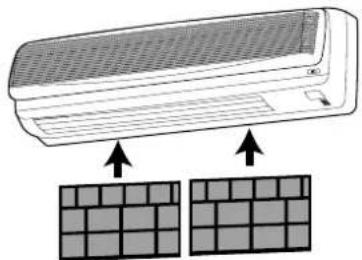
natural_image
Illustration of a wall-mounted air conditioner unit with two grid-patterned panels below (no text or symbols)CARE AND MAINTENANCE

warning
- Make sure the AC cord is unplugged and the unit is off before cleaning.
- Do not use water on the unit to clean it. This is a shock hazard and the unit can be damaged.
- Make sure the indoor unit's AC cord is not connected to AC power when performing these procedures.
Clean the casing and front of the indoor unit with a vacuum brush or wipe with a clean damp cloth.
- NEVER USE Solvents, harsh chemicals or hot water to clean the unit.
- Some metal edges on the unit are sharp. Be careful when cleaning or handling.
- Internal parts in the outdoor unit may need cleaning or routine maintenance from time to time. Consult your local service center for more details.
AFTER THE SEASON:
- Operate the fan, then dry the indoor unit.
- Shut off the indoor unit and then unplug it from the wall.
- Clean the air filters.
- Cover the outdoor unit with the supplied cover; this is very important to protect this unit.
BEFORE THE SEASON:
• Make sure the air filters are clean.
- Make sure the inlet and outlet on the indoor and outdoor units are not blocked by obstructions.
- Make sure the unit is grounded. Consult a serviceman for help.
PRECAUTIONS:
- Do not use this unit for animal or plant storage.
- In a lightning or thunder storm, immediately unplug it from the wall.
TROUBLESHOOTING GUIDE
Before requesting service, please refer to the chart below for possible solutions:
| SYSPTOMS POSSIBLE CAUSE POSSIBLE SOLUTIONS | |||
| No power. Power failure. Restore the power | |||
| Line voltage too low. Contact electrician to install new outlet. | |||
| Unit is unplugged or not completely Insert plug all the way. | |||
| Unit is off. Turn unit on. | |||
| Batteries in remote are weak or dead. Replace remote's batteries. | |||
| EMERGENCY/REMOTE Slide EMERGENCY/REMOTE switch is not set to REMOTE. to REMOTE. | |||
| The compressor does When not turn on. and turned on, the compressor (no cool air at cooling) will delay turn on for 3 minutes. | the unit to operate. | ||
| If the unit is turned off and then Wait 3 minutes for the unit to operate. immediately back on, the compressor will delay for 3 minutes. | |||
| The air filter(s) is dirty or clogged. Clean or replace filter(s). | |||
| A door or window is open. Shut door or window. | |||
| There is an obstacle in front of intake or indoor unit. | Remove obstacle. | ||
| The temperature has been set improperly. | Check and reset if necessary. | ||
| Strange sounds occur. | During operation, especially after turning it on or off, refrigerant flows inside the unit. | This is normal. | |
| Strange smells occur. | The fan is bringing out the smells of the carpet, walls, etc. | The smell should go away shortly. | |
| No remote operation. | Batteries are weak, dead or inserted improperly. | Replace batteries. | |
| Remote is out of range. | Move closer to unit. | ||
| Remote not aimed at sensor. | Aim remote at sensor. | ||
| There is an obstruction between unit and remote. | Remove obstruction. | ||
SPECIFICATIONS
| MODEL DSB-182L DSB-182L | -R DSB-182LH | DSB-182LH-R | |||
| Function Cooling Cooling / Heating | |||||
| Power Supply AC 220-240V, 50Hz | |||||
| Cooling Capacity (Heating Mode) | 17,500 BTU 18,000 BTU/h | 17,500 BTU/h(18,500 BTU/h) | 18,000 BTU/h(18,000 BTU/h) | ||
| Operating Current (Heating Mode) 9.6A | 9.2 A 9.65 A | (10.0 A) | 9.2 A (9.5 A) | ||
| Power Consumption (Heating Mode) | 2,134 W 2,000 W | 2,150 W(2,235 W) | 2,000 W(2,100 W) | ||
| Indoor Unit Dimensions W 1035 x H 322 x D 205 mm | |||||
| Outdoor Unit Dimensions W 800 x H 615 x D 320 mm | |||||
| Net Weight | Indoor | 11.7 kg | 12.1 kg | ||
| Outdoor | 52.5 Kg 62 Kg | 54 Kg | 63.5 Kg | ||
| Connection the piping | Type | Flare | |||
| Gas | 1/2" (12.7 mm) | ||||
| Liquid | 1/4" (6.35 mm) | ||||
| Air Cleaning | Anti-bacteria Filter, Electrostatic Filter, Deodorizing Filter | ||||
| Operating Condition | Indoor side (Heating Mode) | min 21°C ~ max 32°C | min 21°C~max 32°C (min 15°C~max 27°C) | ||
| Outdoor side (Heating Mode) | min 21°C ~ max 52°C | min 21°C~max 43°C (min -5°C~max 24°C) | |||
Design and specification are subject to change without notice for product improvement.
DAEWOO
OWNER'S MANUAL
MODEL #: