
SHX50 - Headphones PHILIPS - Free user manual and instructions
Find the device manual for free SHX50 PHILIPS in PDF.
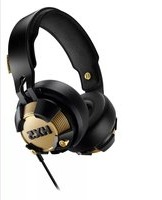


User questions about SHX50 PHILIPS
0 question about this device. Answer the ones you know or ask your own.
Ask a new question about this device
Download the instructions for your Headphones in PDF format for free! Find your manual SHX50 - PHILIPS and take your electronic device back in hand. On this page are published all the documents necessary for the use of your device. SHX50 by PHILIPS.
USER MANUAL SHX50 PHILIPS
Always there to help you
Register your product and get support at www.philips.com/support

SHX50

User manual
PHILIPS
Important safety instructions
Hearing Safety

4
Danger
- To avoid hearing damage, limit the time you use headphones at high volume and set the volume to a safe level. The louder the volume, the shorter the safe listening time is.
Be sure to observe the following guidelines when using your headset.
- Listen at reasonable volumes for reasonable periods of time.
- Be careful not to adjust the volume continuously upwards as your hearing adapts.
- Do not turn up the volume so high that you can't hear what's around you.
- You should use caution or temporarily discontinue use in potentially hazardous situations.
- Excessive sound pressure from earphones and headphones can cause hearing loss.
- Using headphones with both ears covered while driving is not recommended and may be illegal in some areas while driving.
- For your safety, avoid distractions from music or phone calls while in traffic or other potentially dangerous environments.
General information
To avoid damage or malfunction:

Caution
- Do not expose headphones to excessive heat.
- Do not drop your headphones.
• Headphones shall not be exposed to dripping or splashing. - Do not allow your headphones to be submerged in water.
- Do not use any cleaning agents containing alcohol, ammonia, benzene, or abrasives.
- If cleaning is required use a soft cloth, if necessary dampened with a minimum amount of water or diluted mild soap, to clean the product.
- The battery shall not be exposed to excessive heat such as sunshine, fire or the like.
- Danger of explosion if battery is incorrectly replaced. Replace only with the same or equivalent type.
- Use only the Philips airline adapter to connect the headphones to airplane seat jacks. Do not use other airline adapters as they might not result in correct response or even result in personal injury such as burns or property damage due to overheating. Remove the adapter and disconnect immediately if you experience warming or loss of audio.
- Do not insert any plug into the power jack of the airplane seat because it may damage the headphones and result in personal injury.
- Never use your headphones when you are operating a motor vehicle, riding a bicycle, running or walking in traffic areas. It is dangerous and illegal in many places.
About operating and storage temperatures and humidity
- Operate or store in a place where temperature is between -15°C (5°F) and 55°C (131°F) (up to 90% relative humidity.
- Battery life may be shorter in high or low temperature conditions.
Charge the battery with a USB cable
Chargez la batterie à l'aide d'un câble USB / Carga la batería con un cable USB / Carregue a bateria com um cabo USB / Carregue a bateria com um cabo USB / Carga la batería con un cable USB / Laden Sie den akku auf mit einem USB-Kabel / Caricare la batteria con un cavo USB / Laad de batterij op met behulp van een USB-kabel
Activating the LED
Activation de la LED / Activación de la luz LED / Ativação do LED / Ativando o LED / Activación de LED / LED-Aktivierung / Attivazione del sistema LED / LED-lamp activeren

1. Make sure your headphones are fully charged
Assurez-vous que votre casque est complètement chargé / Asegúrate de que los auriculares están totalmente cargados / Verifique se os fones de ouvido estão totalmente carregados / Se certifique que seu fone de ouvido está totalmente carregado / Asegúrate de que el audifono esté completamente cargado / Stellen Sie sicher, dass Ihre Kopfhörer vollständig aufgeladen sind / Assicurati che le tue cuffie siano completamente cariche / Zorg ervoor dat de hoofdtelefoon volledig is opgeladen

2. Connect your headphones to your phone or music source
Branchez votre casque sur votre téléphone ou une autre source musicale / Conecta los auriculares al teléfono o fuente de música / Conecte seus fones de ouvido ao telefone ou à fonte de música / Conecte seu fone de ouvido ao smartphone ou à fonte de música / Conecta los audífonos a tu teléfono o fuente de música / Schließen Sie Ihre Kopfhörer an Ihr Telefon oder eine Musikquelle an / Collega le cuffie al telefono o alla sorgente musicale / Sluit uw hoofdtelefoon aan op uw telefoon of de muziekbron

3. On/off (press and hold for 2 seconds).
Marche/arrêt (Maintenez le bouton enfoncé pendant 2 secondes). / Encendido/apagado (Manténgalo pulsado durante 2 segundos). / Ligar/desligar (Pressione e segure por 2 segundos). / Ligar/desligar (Manter premido durante 2 segundos). / Encendido/apagado (Manténgalo pulsado durante 2 segundos). / Ein-/Ausschalten (Halten Sie die Taste 2 Sekunden lang gedrückt). / On/off (Tenere premuto per 2 secondi). / Aan/uit (2 seconden ingedrukt houden).
Notice
Disposal of your old product and battery

Your product is designed and manufactured with high quality materials and components, which can be recycled and reused.
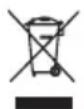
This symbol on a product means that the product is covered by European Directive 2012/19/EU.

This symbol means that the product contains batteries covered by European Directive 2013/56/EU which cannot be disposed of with normal household waste. Inform yourself about the local separate collection system for electrical and electronic products and batteries. Follow local rules and never dispose of the product and batteries with normal household waste. Correct disposal of old products and batteries helps prevent negative consequences for the environment and human health.
Removing the disposable batteries
To remove the disposable batteries, see section 'Replace the battery'.
Environmental information
All unnecessary packaging has been omitted. We have tried to make the packaging easy to separate into three materials: cardboard (box), polystyrene foam (buffer) and polyethylene (bags, protective foam sheet.)
Your system consists of materials which can be recycled and reused if disassembled by
a specialized company. Please observe the local regulations regarding the disposal of packaging materials, exhausted batteries and old equipment.

2015 © Gibson Innovations Limited.
All rights reserved.
This product has been manufactured by, and is sold under the responsibility of Gibson Innovations Ltd., and Gibson Innovations Ltd. is the warrantor in relation to this product. Philips and the Philips Shield Emblem are registered trademarks of Koninklijke Philips N.V. and are used under license from Koninklijke Philips N.V.
- ALWAYS THERE TO HELP YOU
- IMPORTANT SAFETY INSTRUCTIONS
- HEARING SAFETY
- DANGER
- BE SURE TO OBSERVE THE FOLLOWING GUIDELINES WHEN USING YOUR HEADSET
- GENERAL INFORMATION
- CAUTION
- ABOUT OPERATING AND STORAGE TEMPERATURES AND HUMIDITY
- CHARGE THE BATTERY WITH A USB CABLE
- ACTIVATING THE LED
- MAKE SURE YOUR HEADPHONES ARE FULLY CHARGED
- CONNECT YOUR HEADPHONES TO YOUR PHONE OR MUSIC SOURCE
- ON/OFF (PRESS AND HOLD FOR 2 SECONDS)
- NOTICE
- DISPOSAL OF YOUR OLD PRODUCT AND BATTERY
- REMOVING THE DISPOSABLE BATTERIES
- ENVIRONMENTAL INFORMATION
Brand : PHILIPS
Model : SHX50
Category : Headphones