
AC1056A-4 - Séparateur Black Box - Free user manual and instructions
Find the device manual for free AC1056A-4 Black Box in PDF.


| Product Type | Video Splitter / VGA Splitter |
| Brand | Black Box |
| Model | AC1056A-4 |
| Number of Outputs | 4 |
| Signal Type | VGA, SVGA, Multi-sync |
| Bandwidth | 350 MHz |
| Input Connector | 1x HD15 (VGA) Female |
| Output Connectors | 4x HD15 (VGA) Female |
| Included Input Cable Length | 5 ft (1.5 m) |
| Included Output Cables Length | 3x 10 ft (3 m) each |
| Maximum User-Supplied Output Cable Length | 210 ft (64 m) |
| Power Supply Input | 100-240 VAC, 50/60 Hz |
| Power Supply Output | 5 VDC, 2 A (10 W max) |
| Dimensions (H x W x D) | 1.6 x 3.3 x 2.7 in (4.1 x 8.4 x 6.9 cm) |
| Weight | 0.6 lb (0.3 kg) |
| LED Indicators | Power (green) and Active (green) |
| Included Accessories | Power supply, power cord, rubber feet, input cable, 3 output cables, user manual |
| Compliance | FCC Class A, Industry Canada Class A |
| Operating Temperature | 0°C to 50°C (32°F to 122°F) |
| Storage Temperature | -20°C to 60°C (-4°F to 140°F) |
| Housing Material | Metal |
| Mounting | Desktop (rubber feet included) |
| Special Features | Automatic power saving when input lost, DDC support on Port 1 |
| Technical Support | Free 24/7, 724-746-5500 or blackbox.com |
Frequently Asked Questions - AC1056A-4 Black Box
User questions about AC1056A-4 Black Box
0 question about this device. Answer the ones you know or ask your own.
Ask a new question about this device
Download the instructions for your Séparateur in PDF format for free! Find your manual AC1056A-4 - Black Box and take your electronic device back in hand. On this page are published all the documents necessary for the use of your device. AC1056A-4 by Black Box.
USER MANUAL AC1056A-4 Black Box
Compact Video Splitters
Broadcast a crisp, clear VGA signal from one PC to two, four, or eight VGA monitors.
Use for trade shows, training, even public information systems.
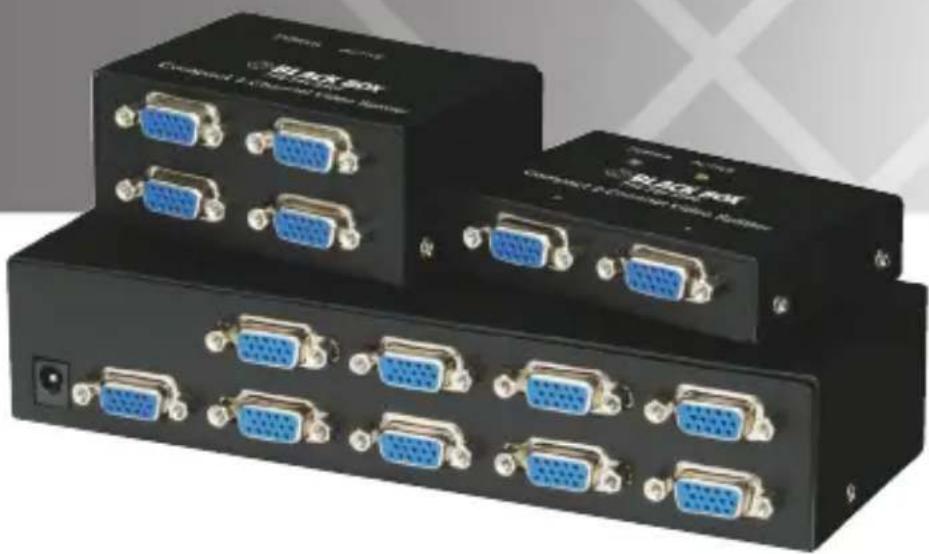
natural_image
Exterior view of two black industrial electrical switch modules with blue and gold connectors (no visible text or symbols)Customer Support Information
Order toll-free in the U.S.: Call 877-877-BBOX (outside U.S. call 724-746-5500) FREE technical support 24 hours a day, 7 days a week: Call 724-746-5500 or fax 724-746-0746 Mailing address: Black Box Corporation, 1000 Park Drive, Lawrence, PA 15055-1018
Web site: www.blackbox.com • E-mail: info@blackbox.com
FEDERAL COMMUNICATIONS COMMISSION AND INDUSTRY CANADA RADIO FREQUENCY INTERFERENCE STATEMENTS
This equipment generates, uses, and can radiate radio-frequency energy, and if not installed and used properly, that is, in strict accordance with the manufacturer's instructions, may cause interference to radio communication. It has been tested and found to comply with the limits for a Class A computing device in accordance with the specifications in Subpart B of Part 15 of FCC rules, which are designed to provide reasonable protection against such interference when the equipment is operated in a commercial environment. Operation of this equipment in a residential area is likely to cause interference, in which case the user at his own expense will be required to take whatever measures may be necessary to correct the interference.
Changes or modifications not expressly approved by the party responsible for compliance could void the user's authority to operate the equipment.
This digital apparatus does not exceed the Class A limits for radio noise emission from digital apparatus set out in the Radio Interference Regulation of Industry Canada.
Trademarks Used in this Manual
Black Box and the Double Diamond logo are registered trademarks of BB Technologies, Inc.
Any other trademarks mentioned in this manual are acknowledged to be the property of the trademark owners.
Table of Contents
- Specifications....7
- Overview....8
2.1 Introduction 8
2.2 What's Included....8
2.3 Hardware Description 9
2.3.1 AC1056A-2 9
2.3.2 AC1056A-4 10
2.3.3 AC1056A-8 11
- Installation 13
- Operation 14
Appendix: Troubleshooting....15
A.1 Contacting Black Box....15
A.2 Shipping and Packaging....15
1. Specifications
Number of VGA Outputs — AC1056A-2: (2);
AC1056A-4: (4);
AC1056A-8: (8)
Signal Bandwidth — AC1056A-2, AC1056A-4: 350 MHz;
AC1056A-8: 300 MHz
Signal Type — VGA, SVGA, Multi-sync
Cable Length — AC1056A-2: (1) 5-ft. (1.5-m) input cable, (1) 10-ft. (3-m) output cable;
AC1056A-4: (1) 5-ft. (1.5-m) input cable, (3) 10-ft. (3-m) output cables;
AC1056A-8: (1) 5-ft. (1.5-m) input cable, (7) 10-ft. (3-m) output cables;
NOTE: Or, you can use up to 210 feet (64 m) maximum cable length of user-supplied output cable.
Connectors — AC1056A-2: Input: (1) HD15 female,
Output: (2) HD15 female;
AC1056A-4: Input: (1) HD15 female,
Output: (4) HD15 female;
AC1056A-8: Input: (1) HD15 female,
Output: (8) HD15 female
Indicators — (2) LEDs: (1) Power, (1) Active
Power — Input: 100–240 VAC, 50/60 Hz autosensing inline power supply;
Output: 5 VDC, 2A
Size — AC1056A-2: 0.9"H x 3.3"W x 2.7"D (2.3 x 8.4 x 6.9 cm);
AC1056A-4: 1.6"H x 3.3"W x 2.7"D (4.1 x 8.4 x 6.9 cm);
AC1056A-8: 1.7"H x 7.8"W x 3"D (10.7 x 19.8 x 7.6 cm)
Weight — AC1056A-2: 0.4 lb. (0.2 kg);
AC1056A-4: 0.6 lb. (0.3 kg);
AC1056A-8: 1.3 lb. (0.6 kg)
2. Overview
2.1 Introduction
The Compact Video Splitter (2-, 4-, or 8-port) broadcasts and boosts one VGA signal source to 2, 4, or 8 VGA monitors. Use it for presentations, exhibits, demonstrations, trade shows, monitor testing, or business meetings.
There's no software or interface card to install. Simply connect the cables, power on the splitter, and you're ready to transmit one VGA image to multiple monitors with excellent quality. A high-bandwidth circuit enables a high-resolution, 350-MHz VGA signal to display on 2 or 4 monitors, or a 300-MHz signal to display on 8 monitors.
The maximum distance between the VGA input source and the output can be up to 210 feet (64 m). (For distances longer than 10 feet [3 m], you must supply the output cables.) The splitter works with VGA, SVGA, and multisync monitors to provide crisp, clear VGA images. Cascade splitters for more VGA outputs. (Call Tech Support for details.) If the VGA input is lost, the splitter automatically saves power.
2.2 What's Included
Your package should contain the following items. If anything is missing or damaged, contact Black Box at 724-746-5500 or info@blackbox.com.
Your package should include the following items:
• (1) AC1056A-2*, AC1056A-4**, or AC1056A-8*** unit
• (1) power supply (special P/N VMVA314792)
• (1) power cord
• (4) rubber feet
• (1) 5-ft. (1.5-m) input cable (HD15 male to HD15 male, part number EVNPS06-0005-MM)
• (1) user manual
*AC1056A-2 also includes (1) HD15 male to HD15 female 10-ft. (3-m) cable (EVNPS06-0010-MF)
**AC1056A-4 also includes (3) HD15 male to HD15 female 10-ft. (3-m) cables (EVNPS06-0010-MF)
***AC1056A-8 also includes (7) HD15 male to HD15 female 10-ft. (3-m) cables (EVNPS06-0010-MF)
2.3 Hardware Description
2.3.1 AC1056A-2
Figures 2-1 and 2-2 show the front and back panels of the AC1056A-2. Table 2-1 describes its components.
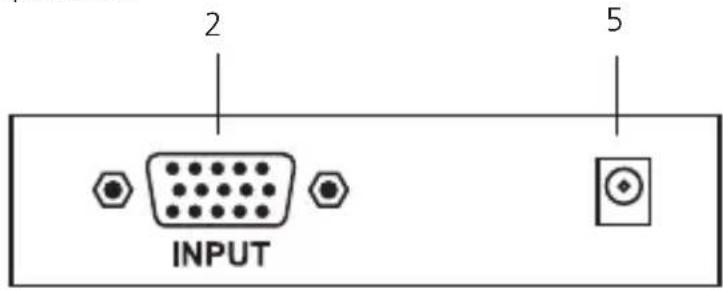
Figure 2-1. AC1056A-2 front panel.
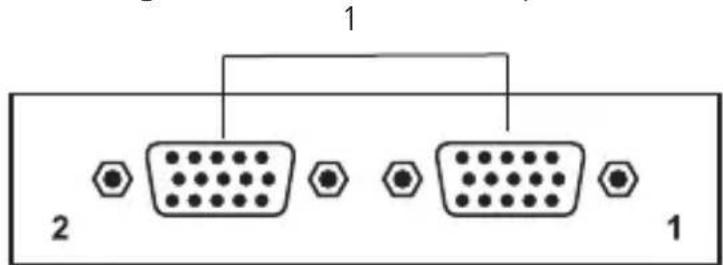
Figure 2-2. AC1056A-2 back panel.
Table 2-1. AC1056A-2 components.
| Component Description | ||
| 1 (2) HD15 connectors Outputs | ||
| 2 (1) HD15 connector Input | ||
| 3 | Power LED (not shown, on top of unit) | Lights when the splitter is powered by the 5-VDC power adapter |
| 4 | Active LED (not shown, on top of unit) | Lights when there is a VGA signal at the input port |
| 5 5-VDC power connector Links to a 5-VDC power adapter | ||
2.3.2 AC1056A-4
Figures 2-3 and 2-4 show the front and back panels of the AC1056A-4. Table 2-2 describes its components.
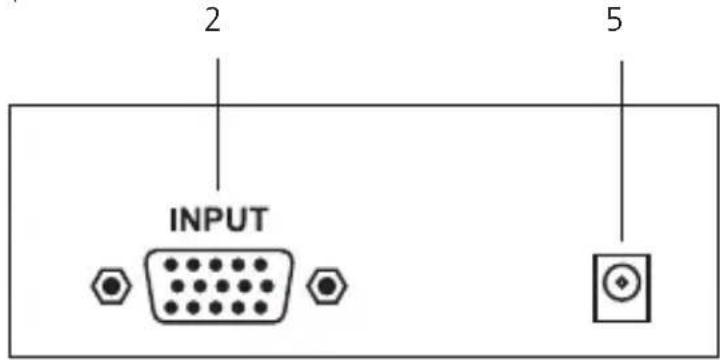
Figure 2-3. AC1056A-4 front panel.
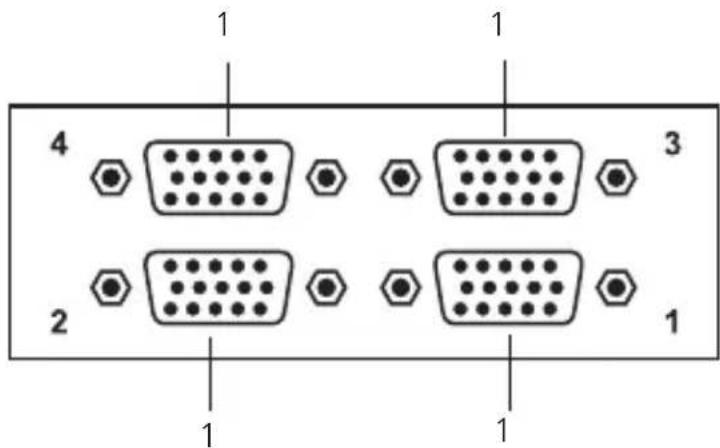
Figure 2-4. AC1056A-4 back panel.
Table 2-2. AC1056A-4 components.
| Component Description | ||
| 1 (4) HD15 connectors Outputs | ||
| 2 (1) HD15 connector Input | ||
| 3 | Power LED (not shown, on top of unit) | Lights when the splitter is powered by the 5-VDC power adapter |
| 4 | Active LED (not shown, on top of unit) | Lights when there is a VGA signal at the input port |
| 5 5-VDC power connector Links to a 5-VDC power adapter | ||
2.3.3 AC1056A-8
Figures 2-5 and 2-6 show the front and back panels of the AC1056A-8. Table 2-3 describes its components.
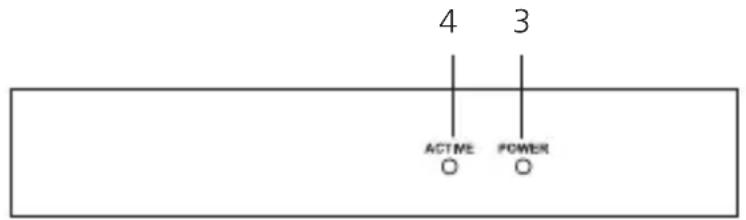
Figure 2-5. AC1056A-8 front panel.
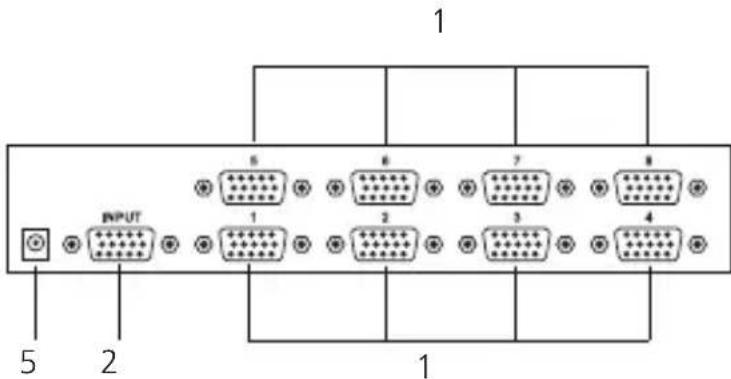
Figure 2-6 AC1056A-8 back panel.
Table 2-3. AC1056A-8 components.
| Component Description | ||
| 1 | (8) HD15 connectors (on back of unit) | Outputs |
| 2 | (1) HD15 connector (on back of unit) | Input |
| 3 | Power LED (on front of unit) | Lights when the splitter is powered by the 5-VDC power adapter. |
| 4 | Active LED (on front of unit) | Lights when there is a VGA signal at the input port |
| 5 | 5-VDC power connector (on back of unit) | Links to a 5-VDC power adapter |
3. Installation
- For the 2-port model (AC1056A-2), you'll need two HD15 male-to-male output cables (one of these cables is included). You'll also need one input cable (included).
For the 4-port model (AC1056A-4), you'll need four output cables (three of these cables are included) and one input cable (included).
For the 8-port model (AC1056A-8), you'll need eight output cables (seven of these cables are included) and one input cable (included).
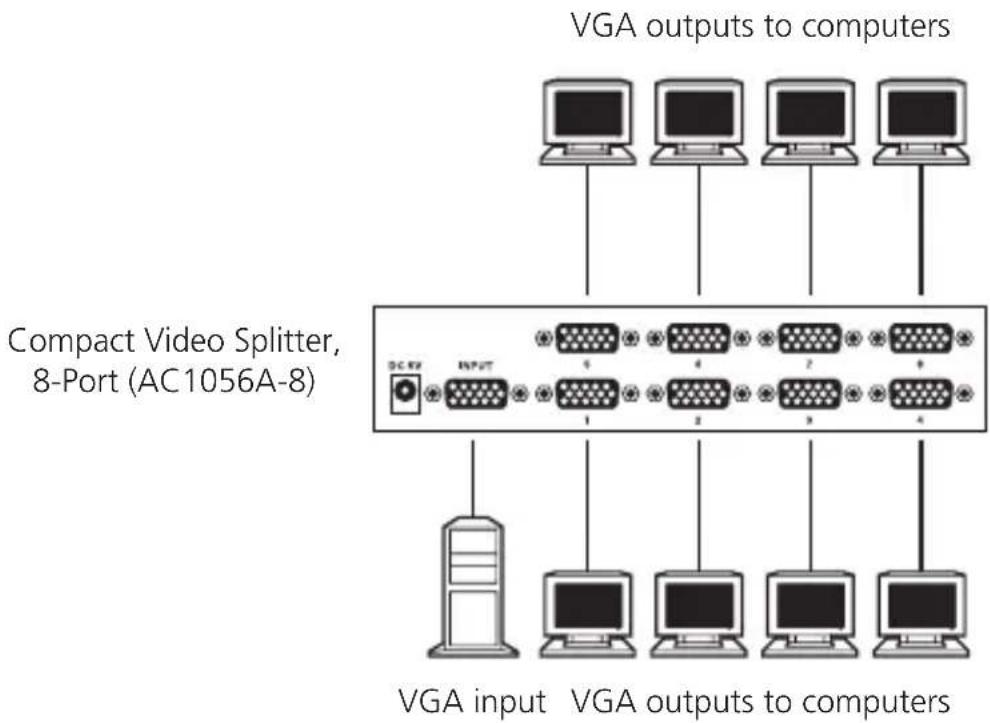
Connect multiple monitors to the video splitter's output connectors as shown in Figure 3-1.
NOTE: If you want to use the Compact Video Splitter's Display Data Channel (DDC) feature, you must have a monitor on Port 1. If you have additional monitors on other ports with higher resolutions, they will only support the resolution of the monitor on Port 1.
flowchart
graph TD
    A["Input"] --> B["Compact Video Splitter, 8-Port (AC1056A-8)"]
    C["VGA inputs"] --> D["Computer 1"]
    E["VGA outputs"] --> F["Computer 2"]
    G["VGA outputs to computers"] --> H["Computer 3"]
    I["VGA outputs to computers"] --> J["Computer 4"]
Figure 3-1. Compact Video Splitter, 8-Port (AC1056A-8) connection.
- You'll also need to connect the Compact Video Splitter's input connector to the VGA source. Use an HD15 male-to-male cable (included) for this connection.
- Connect the included power supply cord's barrel connector to the barrel connector receptacle on the Compact Video Splitter. Then plug the other end of the power cord into an AC outlet.
4. Operation
Once the Compact Video Splitter is installed, it operates unattended. The splitter has two front-panel LEDs that indicate its status at a glance.
- The Active LED lights when there is a VGA signal at the input port.
- The Power LED lights when the Compact Video Splitter is powered by the 5-VDC power adapter.
Appendix. Troubleshooting
A.1 Contacting Black Box
If you determine that your Compact Video Splitter is malfunctioning, do not attempt to alter or repair the unit. It contains no user-serviceable parts. Contact Black Box at 724-746-5500 or info@blackbox.com.
Before you do, make a record of the history of the problem. We will be able to provide more efficient and accurate assistance if you have a complete description, including:
- the nature and duration of the problem.
- when the problem occurs.
- the components involved in the problem.
- any particular application that, when used, appears to create the problem or make it worse.
A.2 Shipping and Packaging
If you need to transport or ship your Compact Video Splitter:
- Package it carefully. We recommend that you use the original container.
- If you are shipping the Compact Video Splitter for repair, make sure you include everything that came in the original package. Before you ship, contact Black Box to get a Return Authorization (RA) number.
Black Box Tech Support: FREE! Live. 24/7.
Tech support the way it should be.

natural_image
Black-and-white portrait of a smiling woman wearing a headset (no visible text or symbols)Great tech support is just 30 seconds away at 724-746-5500 or blackbox.com.

BLACK BOX®
NETWORK SERVICES
About Black Box
Black Box provides an extensive range of networking and infrastructure products. You'll find everything from cabinets and racks and power and surge protection products to media converters and Ethernet switches all supported by free, live 24/7 Tech support available in 30 seconds or less.
© Copyright 2011. Black Box Corporation. All rights reserved.
AC1056A-2, version 2
- Compact Video Splitters
- FEDERAL COMMUNICATIONS COMMISSION AND INDUSTRY CANADA RADIO FREQUENCY INTERFERENCE STATEMENTS
- Trademarks Used in this Manual
- Table of Contents
- Specifications
- Overview
- Introduction
- What's Included
- Hardware Description
- AC1056A-2
- AC1056A-4
- AC1056A-8
- Installation
- Operation
- Appendix. Troubleshooting
- A.1 Contacting Black Box
- A.2 Shipping and Packaging
- Black Box Tech Support: FREE! Live. 24/7.
- BLACK BOX®
- NETWORK SERVICES
- About Black Box
Brand : Black Box
Model : AC1056A-4
Category : Séparateur