
Traveller 150 Premium Duo - Camera tripod HAMA - Free user manual and instructions
Find the device manual for free Traveller 150 Premium Duo HAMA in PDF.


| Product Type | Camera Tripod |
| Brand | Hama |
| Model | Traveller 150 Premium Duo |
| Max Height | 150 cm |
| Min Height | 35 cm |
| Folded Length | 44 cm |
| Weight | 1.6 kg |
| Material | Aluminum |
| Load Capacity | 5 kg |
| Number of Leg Sections | 4 |
| Leg Lock Type | Twist locks |
| Head Type | Ball head with quick release plate |
| Pan/Tilt Function | Yes (pan and tilt) |
| Spirit Level | Yes, built-in |
| Feet | Rubber with retractable spikes |
| Carrying Bag | Included |
| Power Source | None (manual operation) |
| Maintenance | Wipe with dry cloth; avoid water and solvents |
| Safety | Ensure all locks are tight; do not exceed load capacity |
| Spare Parts | Replacement feet and quick release plates available |
Frequently Asked Questions - Traveller 150 Premium Duo HAMA
User questions about Traveller 150 Premium Duo HAMA
0 question about this device. Answer the ones you know or ask your own.
Ask a new question about this device
Download the instructions for your Camera tripod in PDF format for free! Find your manual Traveller 150 Premium Duo - HAMA and take your electronic device back in hand. On this page are published all the documents necessary for the use of your device. Traveller 150 Premium Duo by HAMA.
USER MANUAL Traveller 150 Premium Duo HAMA
Traveller 150 Premium Duo
Dreibeinstativ
natural_image
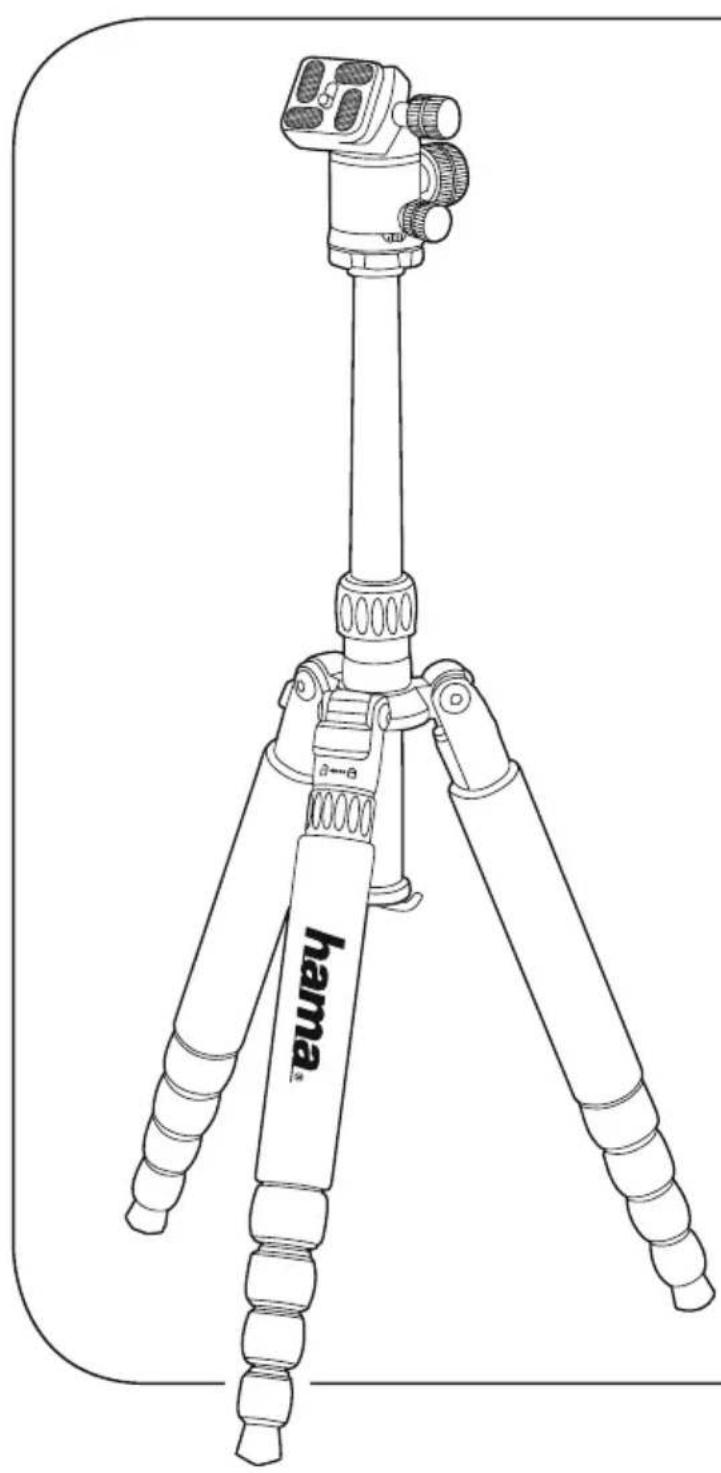
Line drawing of a tripod-mounted camera with a hama branding label (no text or symbols on the device itself)Operating Instructions
Bedienungsanleitung
GB
D

Thank you for choosing a Hama product.
Take your time and read the following instructions and information completely. Please keep these instructions in a safe place for future reference.
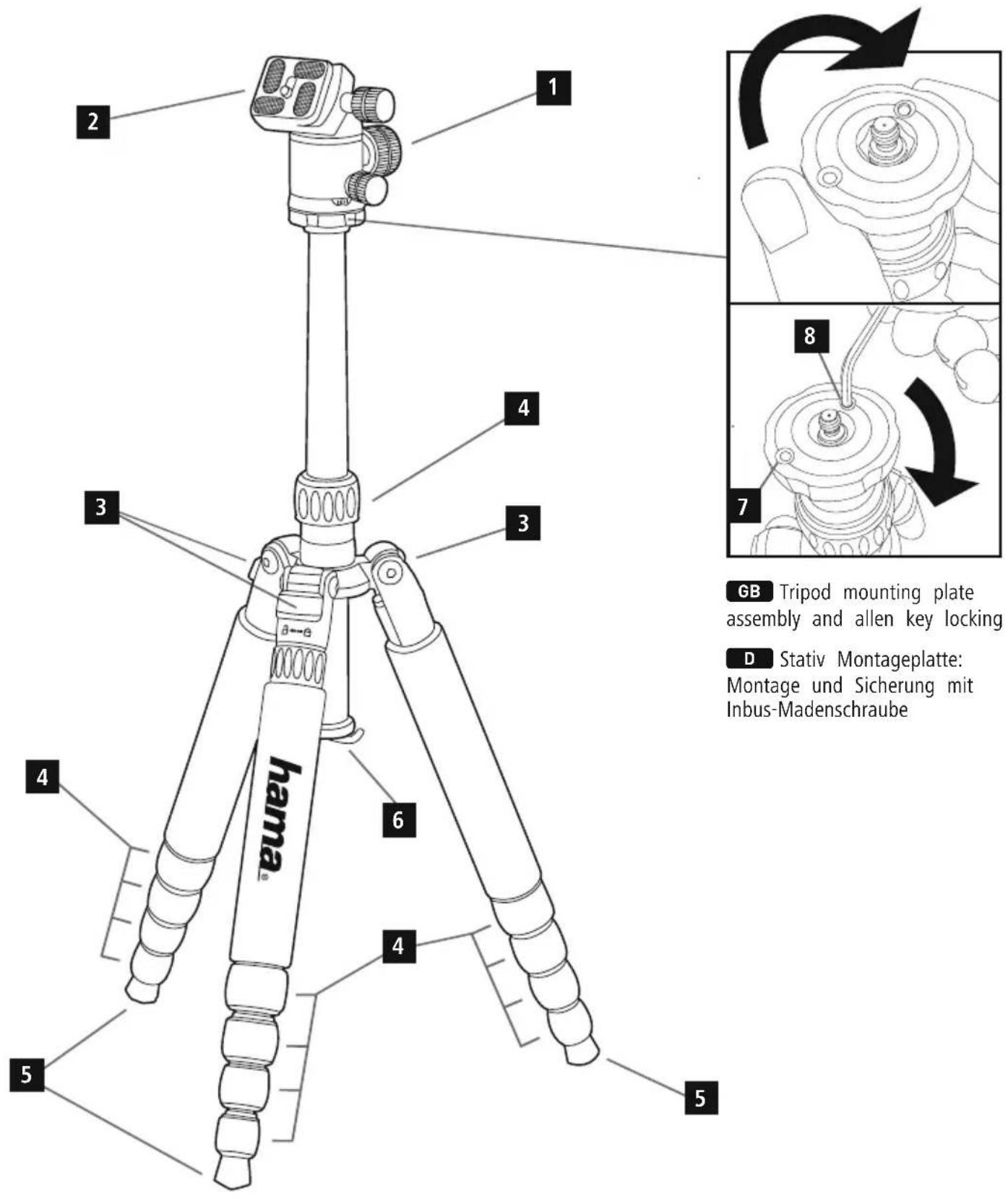
Controls
- 3D ball head
- Quick-release plate
- Tripod leg adjustment release
- Screw clamps
- Rubber feet
- Weight hook (detachable)
1. Explanation of Warning Symbols and Notes

Warning
This symbol is used to indicate safety instructions or to draw your attention to specific hazards and risks.

Note
This symbol is used to indicate additional information or important notes.
2. Package Contents
• 1 „Traveller 150 Premium Duo“ tripod
• 1 Allen key, metric, 3mm
• 2 Allen key, metric, 4mm
- Storage bag
• 3 Spikes
• This operating instruction
3. Safety Notes
- The product is intended for private, non-commercial use only.
- Protect the product from dirt, moisture and overheating and use it in dry rooms only.
- Do not drop the product and do not expose it to any major shocks.
- Do not operate the product outside the power limits given in the specifications.
- Keep the packaging material out of the reach of children due to the risk of suffocation.
- Dispose of packaging material immediately according to locally applicable regulations.
- Do not modify the product in any way. Doing so voids warranty.
4. Startup and Operation

Hinweis - Twist-on connecting devices
Do not completely loosen the twist-on connecting devices. You only need to loosen them 1 to 1.5 rotations to make adjustments. If you loosen them more, components of the tripod could fall out.
4.1 Setting up the tripod
- Open the tripod legs until they reach the first position.
- If you want to set the tripod to one of the other 3 possible angles, pull the releases (3) and adjust the tripod legs to the desired angle.
- You can adjust the length of the tripod legs in order to achieve the desired height for taking photos.
- To do this, loosen the screw clamps (4) by turning them approximately a half a turn clockwise (when viewed from above) until you no longer feel any resistance. The tripod leg segment being adjusted then automatically extends to its full length.
- If desired, adjust it to the length you want and then lock it by turning the screw clamp (4) counter-clockwise until it is secure.
- Repeat this step for the other two legs.

Note - Tripod legs
The legs of the Traveller 146 Premium Duo can be vertically swivelled by up to 180^ in three stages, which makes it especially compact and easy to pack or store. Extend the middle column completely - this ensures that the tripod will be as compact as possible after the legs have been folded up. Pull the release on the hinge of one of the tripod leg Move the tripod leg up fully onto the middle column. The rubber feet (5) of the tripod legs can be removed and replaced with spikes. The spikes are located in the inner pocket of the storage bag.
4.2 Adjusting the height of the middle column
The height of the middle column can be infinitely adjusted using a screw clamp (4).
- To do this, loosen the screw clamp (4) by turning it approximately a half a turn counter-clockwise (when viewed from above) until you no longer feel any
- Pull the middle column out to the desired length and hold it in place.
- Lock the middle column in place by turning the screw clamp (4) clockwise (when viewed from above) until secure.
4.3 Weight hook and removable middle column
A weight hook (6) is located on the bottom end of the middle column. You can hang weight (for example: your camera bag) on this hook to further stabilize the tripod. The weight hook (6) can be unscrewed and removed and the middle column can be removed, flipped by 180° and re-inserted in order to take photos close to the ground.
- Remove the weight hook (6) by unscrewing it.
- Open the lower screw clamp (4) by turning it counterclockwise and pull the middle column upwards out of the tripod base.
- Flip the middle column by 180^ and insert it into the tripod basis from the bottom, set the desired length and lock the middle column using the screw clamp (4).

Warning - Don't forget the weight hook!
- Screw the weight hook (6) back on. It prevents the middle column from slipping out and damaging your valuable camera equipment when the screw clamps (4) are opened.
4.4 Integrated monopod
A stable monopod can be created from the middle column and one of the tripod legs (labelled with the Hama logo on the rubber coating).
- Remove the middle column as described in point 4.3. Do not reattach the weight hook (6).
- Unscrew the tripod leg with the Hama logo and remove it from the tripod base.
- Screw the middle column and the threaded tripod leg together until it is hand tight.
- Adjust the monopod you have just created to the desired length.
4.5 Ball head
The ball head (1) is equipped with a large fixing screw for the ball head function and a small fixing screw for the panorama function.
- Unscrew the large fixing screw so it is loose enough that the camera can move and the ball head (1) can be adjusted.
- Next, tighten the fixing screw again and ensure that the ball head (1) is also secured.

Warning - Ensure that your camera is secure!
- Hold your camera securely with one hand when you adjust the ball head (1).
- Unscrew the small fixing screw in order to be able to take panorama shots. The slight resistance allows you to turn the camera smoothly and evenly.
4.6 Quick-release plate

Note
A safety thread essentially prevents the quick-release plate (2) from falling out; however you should always hold on to your camera to be safe.
- Ensure that the ball head (1) pivot is secured.
- Unscrew the fixing screw until it is loose enough that the quick-release plate (2) can be removed from its fixture by tilting it slightly upwards.
- Attach the quick-release plate (2) to your camera.
- Place your camera with the quick-release plate (2) attached into the fixture slightly tiled upwards and turn the fixing screw until the camera is securely in place.
4.7 Head mounting plate
- This tripod is also equipped with a universal mounting plate (2) so that supporting heads can be used other than the one that came attached to the tripod. The mounting plate (2) can be used with both 1/4" and 3/8" threads.

Note - Allen grub securing screw
The mounting plate is equipped with two Allen grub screws. Tighten them carefully!
- The screw (7) that can be accessed from the bottom is used to prevent the ball head from accidentally becoming unscrewed from the tripod.
- The screw (8) that can be accessed from the top of the mounting plate after the ball head is removed is used to secure the ball head to the middle column.
-
The 3 mm Allen key for these screws is included with the product.
-
Lock the panorama function of the ball head (1) with the small fixing screw.
- Screw the knurled mounting plate (2) below the degree display of the ball head (1). It's possible that the Allen screw (8) on the bottom of the mounting plate (2) will have to be loosened a bit.
- If necessary, loosen the Allen screw (8) on the top of the mounting plate (2) if the mounting plate (2) can not be removed from the middle column.
- Turn the screw if you want to attach a different ball head (1) with a 1/4" thread.
- Screw the mounting plate (2) onto the ball head (1) again until it is securely in place.
- Always screw in the Allen screw carefully in order to prevent damage to the ball head (1) and the mounting plate (2).
5. Care and Maintenance
- Only clean this product with a slightly damp, lint-free cloth and do not use aggressive cleaning agents.
- The included Allen key can be used for the ball head and mounting plate (3 mm Allen key) as well as to adjust the mobility of the tripod legs on the tripod base (4 mm Allen key).
6. Warranty Disclaimer
Hama GmbH & Co. KG assumes no liability and provides no warranty for damage resulting from improper installation/mounting, improper use of the product or from failure to observe the operating instructions and/or safety notes.
Please contact Hama Product Consulting if you have any questions about this product. Hotline: +49 9091 502-115 (German/English) Further support information can be found here: www.hama.com
86652 Monheim/ Germany
www.hama.com
- Traveller 150 Premium Duo
- Dreibeinstativ
- Controls
- Explanation of Warning Symbols and Notes
- Warning
- Note
- Package Contents
- Safety Notes
- Startup and Operation
- Hinweis - Twist-on connecting devices
- Setting up the tripod
- Note - Tripod legs
- Adjusting the height of the middle column
- Weight hook and removable middle column
- Warning - Don't forget the weight hook!
- Integrated monopod
- Ball head
- Warning - Ensure that your camera is secure!
- Quick-release plate
- Head mounting plate
- Note - Allen grub securing screw
- Care and Maintenance
- Warranty Disclaimer
Brand : HAMA
Model : Traveller 150 Premium Duo
Category : Camera tripod