
SHJ026 - Headphones PHILIPS - Free user manual and instructions
Find the device manual for free SHJ026 PHILIPS in PDF.


| Product Type | Over-ear headphones |
| Brand | Philips |
| Model | SHJ026 |
| Driver Size | 40 mm |
| Frequency Response | 20 - 20,000 Hz |
| Impedance | 32 Ω |
| Sensitivity | 100 dB |
| Cable Length | 1.2 m |
| Connector | 3.5 mm gold-plated plug |
| Weight | 200 g |
| Material | Plastic, metal headband |
| Foldable | Yes |
| Noise Isolation | Passive |
| WEEE Compliance | Yes, per European Directive 2002/96/EC |
| RoHS Compliance | Yes |
| CE Marking | Yes |
| Operating Temperature | 0°C to 40°C |
| Storage Temperature | -20°C to 60°C |
| Cleaning | Use a dry cloth; avoid solvents |
| Safety | Do not expose to rain or moisture |
Frequently Asked Questions - SHJ026 PHILIPS
User questions about SHJ026 PHILIPS
0 question about this device. Answer the ones you know or ask your own.
Ask a new question about this device
Download the instructions for your Headphones in PDF format for free! Find your manual SHJ026 - PHILIPS and take your electronic device back in hand. On this page are published all the documents necessary for the use of your device. SHJ026 by PHILIPS.
USER MANUAL SHJ026 PHILIPS
www.philips.com/welcome
NO User Manual 1
Waste Electrical and Electronic Equipment - WEEE

This marking on the product or on its packaging illustrates that, under European Directive 2002/96/EC governing used electrical and electronic appliances, this product may not be disposed of with normal household waste. You are responsible for disposal of this equipment through a designated waste electrical and electronic equipment collection. To determine the locations for dropping off such waste electrical and electronic, contact your local government office, the waste disposal organization that serves your household or the store at which you purchased the product.
Your new monitor contains materials that can be recycled and reused. Specialized companies can recycle your product to increase the amount of reusable materials and to minimize the amount to be disposed of.
All redundant packing material has been omitted. We have done our utmost to make the packaging easily separable into mono materials.
Please find out about the local regulations on how to dispose of your old monitor and packing from your sales representative.
Recycling Information for Customers
There is currently a system of recycling up and running in the European countries, such as The Netherlands, Belgium, Norway, Sweden and Denmark.
In Asia Pacific, Taiwan, the products can be taken back by Environment Protection Administration (EPA) to follow the IT product recycling management process, detail can be found in web site www.epa.gov.tw
The monitor contains parts that could cause damage to the nature environment. Therefore, it is vital that the monitor is recycled at the end of its life cycle.
For help and service, please contact Consumers Information Center or F1rst Choice Contact Information Center in each country.
Use only the AC/DC adapter model ADPC1236/FSP036-DGAA1/LCAP07F-2
2 Install the stand
191E2/191EL2
- Place the monitor with the screen side down on a soft surface, being careful not to scratch or damage the screen.

2 Start with the Standard route:
Adjustment menu:


Color menu:
- In the Color Menu you can adjust RGB, Black Level, White Point, Color Calibration, and SmartImage Lite (see the section on SmartImage Lite).
- You can follow the instructions and perform the adjustment.
- Refer to the table below for the collection of submenu items in the input signals.
- Example for Color Calibration


Options > Preferences - Only active when you select Preferences from the Options drop-down menu. On a monitor that is not supported, but is DDC/CD-compatible, only the Help and Options categories are available.

Help > User Manual
- Only active when you select User Manual from the Help drop-down menu. On a monitor that is not supported, but is DDC/CD-compatible, only the Help and Options categories are available.
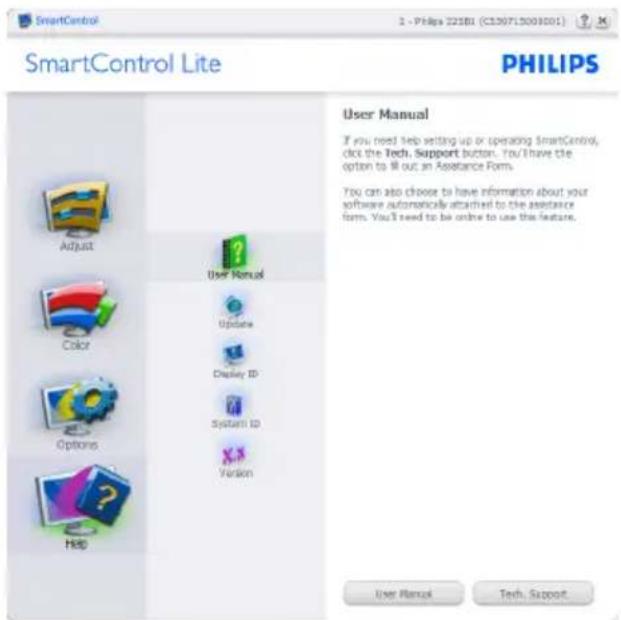
Context Sensitive menu The Context Sensitive menu is enabled by default. If Enable Context Menu is unchecked in the Options > Preferences box, the menu will be shown.

The Context menu has four entries:

Lead free display promotes environmentally sound recovery and disposal of waste from electrical and electronic equipment. Toxic substances like Lead have been eliminated and compliance with the European community's stringent RoHS directive mandating restrictions on hazardous substances in electrical and electronic equipment have been adhered to in order to make Philips monitors safe to use throughout their life cycle.
EPEAT
(www.epeat.net)
"The EPEAT (Electronic Product Environmental

Assessment Tool) program evaluates computer desktops, laptops, and monitors based on 51 environmental criteria developed through an extensive stakeholder consensus process supported by US EPA.
EPEAT system helps purchasers in the public and private sectors evaluate, compare and select desktop computers, notebooks and monitors based on their environmental attributes. EPEAT also provides a clear and consistent set of performance criteria for the design of products, and provides an opportunity for manufacturers to secure market recognition for efforts to reduce the environmental impact of its products."
Benefits of EPEAT
Reduce use of primary materials Reduce use of toxic materials
Avoid the disposal of hazardous waste EPEAT'S requirement that all registered products meet ENERGY STAR's energy efficiency specifications, means that these products will consume less energy throughout their life.
CE Declaration of Conformity
This product is in conformity with the following standards
• EN60950-1:2006 (Safety requirement of Information Technology Equipment) • EN55022:2006 (Radio Disturbance requirement of Information Technology Equipment) • EN55024:1998+A1:2001+A2:2003 (Immunity requirement of Information Technology Equipment) • EN61000-3-2:2006 (Limits for Harmonic Current Emission) • EN61000-3-3:1995+A1:2001+A2:2005 (Limitation of Voltage Fluctuation and Flicker) following provisions of directives applicable • 2006/95/EC (Low Voltage Directive) • 2004/108/EC (EMC Directive) - 2005/32/EC (EuP Directive, EC No. 1275/2008 implementing Directive for Standby and Off mode power consumption) and is produced by a manufacturing organization on ISO9000 level. • The product also comply with the following standards • ISO9241-307:2008 (Ergonomic requirement, Analysis and compliance test methods for electronic visual displays) • GS EK1-2000:2009 (GS mark requirement) • prEN50279:1998 (Low Frequency Electric and Magnetic fields for Visual Display) - MPR-II (MPR:1990:8/1990:10 Low Frequency Electric and Magnetic fields)
This monitor is equipped with a function for saving energy which supports the VESA Display Power Management (DPM) standard. This means that the monitor must be connected to a computer which supports VESA DPM. Time settings are adjusted from the system unit by software.
| VESA State LED Indicator Power | Consumption | ||
| Normal operation | ON (Active) | White 191E2< 16.5 W | (W(typ.)191EL2< 11 W(typ.) |
| Power Saving Alternative 2One step | Sleep Switch Off | White(blink)Off | < 0.5 W (typ.)< 0.5 W (typ.) |

As an ENERGY STAR® Partner, we have determined that this product meets the ENERGY STAR® guidelines for energy efficiency.

Note
We recommend you switch off the monitor when it is not in use for a long time.
Federal Communications Commission (FCC) Notice (U.S. Only)

This equipment has been tested and found to comply with the limits for a Class B digital device, pursuant to Part 15 of the FCC Rules. These limits are designed to provide reasonable protection against harmful interference in a residential installation. This equipment generates, uses and can radiate radio frequency energy and, if not installed and used in accordance with the instructions, may cause harmful interference to radio communications. However, there is no guarantee that interference will not occur in a particular installation. If this equipment does cause harmful interference to radio or television reception, which can be determined by turning the equipment off and on, the user is encouraged to try to correct the interference by one or more of the following measures:
• Reorient or relocate the receiving antenna. - Increase the separation between the equipment and receiver. - Connect the equipment into an outlet on a circuit different from that to which the receiver is connected. - Consult the dealer or an experienced radio/TV technician for help.

Changes or modifications not expressly approved by the party responsible for compliance could void the user's authority to operate the equipment.
Use only RF shielded cable that was supplied with the monitor when connecting this monitor to a computer device.
To prevent damage which may result in fire or shock hazard, do not expose this appliance to rain or excessive moisture.
THIS CLASS B DIGITAL APPARATUS MEETS ALL REQUIREMENTS OF THE CANADIAN INTERFERENCE-CAUSING EQUIPMENT REGULATIONS.
FCC Declaration of Conformity
Declaration of Conformity for Products Marked with FCC Logo,
United States Only

This device complies with Part 15 of the FCC Rules. Operation is subject to the following two conditions: (1) this device may not cause harmful interference, and (2) this device must accept any interference received, including interference that may cause undesired operation.
Federal Communications Commission (FCC Declaration)

EN 55022 Compliance (Czech Republic Only)
This device belongs to category B devices as described in EN 55022, unless it is specifically stated that it is a Class A device on the specification label. The following applies to devices in Class A of EN 55022 (radius of protection up to 30 meters). The user of the device is obliged to take all steps necessary to remove sources of interference to telecommunication or other devices.
Polish Center for Testing and Certification Notice
The equipment should draw power from a socket with an attached protection circuit (a three-prong socket). All equipment that works together (computer, monitor, printer, and so on) should have the same power supply source.
The phasing conductor of the room's electrical installation should have a reserve short-circuit protection device in the form of a fuse with a nominal value no larger than 16 amperes (A).
To completely switch off the equipment, the power supply cable must be removed from the power supply socket, which should be located near the equipment and easily accessible.
A protection mark "B" confirms that the equipment is in compliance with the protection usage requirements of standards PN-93/T-42107 and PN-89/E-06251.
North Europe (Nordic Countries) Information
| Placering/VentilationVARNING:FÖRSÄKRA DIG OM ATT HUVUDBRYTAREOCH UTTAG ÄR LÄTÅTKOMLIGA, NÄR DUSTÄLLER DIN UTRUSTNING PÅPLATS. |
| Placering/VentilationADVARSEL:S∅RG VED PLACERINGEN FORNETLEDNINGENS STIK OG STIKKONTAKT ERNEMT TILGÆNGELIGE. |
| Paikka/llmankiertoVAROITUS:SIJOITA LAITE SITEN, ETTÄ VERKKOJOHTOVOI DA AN TARVITTAESSA HELP O STIIRROTTAA PISTORASIASTA. |
| Plassering/VentilasjonADVARSEL:NÅR DETTE UTSTYRET PLASSERES, MÅDU PAS SE PÅ AT KO NTAKTENE FORST∅MTILF∅RSEL ER LETTE Å NÅ. |
BSMI Notice (Taiwan Only)
Complies with the standards for Class B information products
The People's Republic of China released a regulation called "Management Methods for Controlling Pollution by Electronic Information Products" or commonly referred to as China RoHS. All products including CRT and LCD monitor which are produced and sold for China market have to meet China RoHS request.
China RoHS
Australia / New Zealand
ASIA
China / Hong Kong / India / Indonesia / Korea / Malaysia / Pakistan / Philippines / Singapore / Taiwan / Thailand / Vietnam
AFRICA
South Africa
MIDDLE EAST
United Arab Emirates
Philips F1rst Choice warranty
Address: 28 Walls Rd Penrose Auckland
Tel: 0800 657447
Fax: 09 5809607
Email: vai.ravindran@visualgroup.co.nz
Service hours: Mon.-Fri. 8.30-17.30
Asia
HONG KONG/MACAO
Company name: PHK Service Limited
Address: Flat A, 10/F., Pak Sun Building, 103 - 107
Wo Yi Hop Road, Kwai Chung, New Territories, Hong Kong
Tel: (852) 2610-6908 / (852) 2610-6929 for Hong
Company: REDINGTON INDIA LTD
Address: SPL Guindy House, 95 Mount Road,
Chennai 600032, India
Tel: +9144-42243352/353
Email: aftersales@in.aocmonitor.com
Service hours: Mon.-Fri. 9:00-17:30; Sat. 9:00-13:00
INDONESIA
Company name: PT. Gadingsari elektronika Prima
Address: Komplek Pinang 8, Jl. Ciputat raya No. 8F,
Company: After Market Solutions (CE) Sdn Bhd
Address: Lot 6. Jalan 225/51A, 46100 Petaling Jaya,
Selangor DE, Malaysia.
Tel: 603 7953 3370
Philips information line: 1-800-880-180
Fax: 603 7953 3338
Email: pceinfo.my@philips.com
Service hours: Mon.-Fri. 8:15-17:15; Sat. 9:00-13:00
PAKISTAN
Philips Consumer Service
Address: Mubarak Manzil, 39, Garden Road, Saddar,
Karachi-74400
Tel: (9221) 2737411-16
Fax: (9221) 2721167
Email: care@philips.com
Website: www.philips.com.p
SINGAPORE
Company: Philips Electronics Singapore Pte Ltd
(Philips Consumer Care Center)
Address: 620A Lorong 1 Toa Payoh, TP4 Building
Level 1, Singapore 319762
Tel: (65) 6882 3999
Fax: (65) 62508037
Email: consumer.care.sg@philips.com
Service hours: Mon.-Fri. 9:00-18:00; Sat. 9:00-13:00
TAIWAN
Company: FETEC.CO
Address: 3F, No.6, Lane 205, Sec. 1, Chang Hsing
Rd, Lu Chu Hs, Taoyuan, Taiwan R.O.C 33800
Town Soi 3 Road, Wangthonglang, Bangkok 10310
Thailand
Tel: (662) 934-5498
Glee Electronics Inc
Contact no. (632) 636-3636 / 7064028 to 29
4th Level Cyberzone, Building B,
SM Megamall, Mandaluyong City
NEO CARE - SM North EDSA
4th Level Cyberzone, Annex Bldg.
SM City North EDSA, Quezon City
441-1610
MDR Microwave Sales Inc.
Cebu Branch
N. Escario corner Clavano St., Cebu City Phils.
# 255-4415/255-3242/253-9361/4124864 to 67
Søn # 0922-8210045 to 46
Davao Office:
C. Arellano St., Davao City 8000
082-225-3021/225-3022
Søn # 0922-8210015
CDO Office:
1445 Corrales Ext., CDO City
088-856-8540/856-8541
Søn # 0922-8210080
Iloilo Office:
C. Lim Comp., Gomez St., Iloilo City
# 033 338-4159/033 508-3741
Son # 0922-8808850
Africa
SOUTH AFRICA
Company name: Sylvara Technologies Pty Ltd
Address: Ho Address Palm Springs Centre
Christoffel Road Van Riebeeck Park Kempton Park,
South Africa
Tel: +27878084456
E-mail: customercare@philipssupport.co.za
Service hours: Mon.-Fri. 8.00-17.00
Middle East
MIDDLE EAST + NORTH AFRICA
Company: AL SHAHD COMPUTER L.L.C
Address: P.O.BOX: 29024, DUBAI, UNITED ARAB
EMIRATES
Tel: 00971 4 2276525
Fax: 00971 4 2276242
E-mail: shahd52@eim.ae
Service hours: Sat.-Thu. 9:00-13:00 and 16:00-20:00
ISRAEL
Company: Eastronics LTD
Address: 13 Rozanis St. P.O.B. 39300, Tel Aviv 61392 Israel
E-mail: eastronics@eastronics.co.il
Service hours: Sun.~Thu. 9:00-18:00
Your Philips F1rst Choice warranty (USA)
Always activate a moving screen saver program when you leave your monitor unattended.

- WASTE ELECTRICAL AND ELECTRONIC EQUIPMENT - WEEE
- RECYCLING INFORMATION FOR CUSTOMERS
- START WITH THE STANDARD ROUTE
- ADJUSTMENT MENU
- COLOR MENU
- HELP > USER MANUAL
- EPEAT
- CE DECLARATION OF CONFORMITY
- NOTE
- FEDERAL COMMUNICATIONS COMMISSION (FCC) NOTICE (U.S. ONLY)
- FCC DECLARATION OF CONFORMITY
- FEDERAL COMMUNICATIONS COMMISSION (FCC DECLARATION)
- EN 55022 COMPLIANCE (CZECH REPUBLIC ONLY)
- POLISH CENTER FOR TESTING AND CERTIFICATION NOTICE
- NORTH EUROPE (NORDIC COUNTRIES) INFORMATION
- BSMI NOTICE (TAIWAN ONLY)
- ASIA
- AFRICA
- MIDDLE EAST
- PHILIPS F1RST CHOICE WARRANTY
- HONG KONG/MACAO
- INDONESIA
- PAKISTAN
- SINGAPORE
- TAIWAN
- GLEE ELECTRONICS INC
- NEO CARE - SM NORTH EDSA
- MDR MICROWAVE SALES INC
- DAVAO OFFICE
- CDO OFFICE
- ILOILO OFFICE
- SOUTH AFRICA
- MIDDLE EAST + NORTH AFRICA
- ISRAEL
- YOUR PHILIPS F1RST CHOICE WARRANTY (USA)
Brand : PHILIPS
Model : SHJ026
Category : Headphones