SC5120 - Vacuum Cleaner SAMSUNG - Free user manual and instructions

Find the device manual for free SC5120 SAMSUNG in PDF.

SAMSUNG SC5120 - Vacuum Cleaner
📄 48 pages English EN Download 💬 AI Question 10 questions ⚙️ Specs
Notice SAMSUNG SC5120 - page 1
View the manual : Dansk DA English EN Suomi FI Norsk NO Svenska SV
Pick your language and provide your email: we'll send you a specifically translated version.
Product Type Canister Vacuum Cleaner
Model SC5120
Brand Samsung
Power Supply 220-240 V, 50/60 Hz
Power Consumption ~1600 W
Dust Bag Type Disposable paper bag or optional textile filter bag (VP-95B type)
Dust Bag Capacity 2.0 L
Filtration System Inlet filter, outlet filter (HEPA or Micro filter optional)
Suction Control Handle control or body control type with slider (Min to Max)
Air Control Reduces suction for light fabrics via tap air hole
Cord Length 6.0 m
Cord Rewind Automatic rewind with foot pedal
Weight 5.5 kg
Dimensions (L x W x H) 400 x 300 x 250 mm
Floor Tools Combination floor nozzle (carpet/hard floor), crevice tool, dusting brush
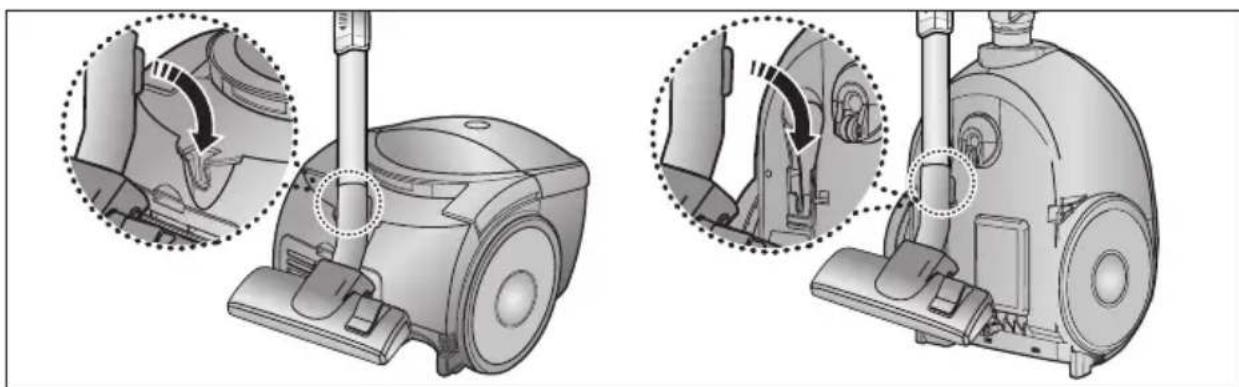
Parking System Parking floor nozzle for easy storage
Dust Full Indicator Red "Filter Check" indicator when bag needs replacement
Thermal Protection Self-resetting thermal cut-out on overheating
Safety Features Do not use on wet surfaces; keep away from heat sources; not for use by children
Maintenance Empty/change dust bag regularly; clean inlet and outlet filters; check for blockages
Certifications EMC Directive 89/336/EEC, Low Voltage Directive 73/23/EEC

Frequently Asked Questions - SC5120 SAMSUNG

Why won't the vacuum cleaner start?
Check if the power supply is connected and the plug is properly inserted. If the motor does not start, the thermal cut-out may have activated due to overheating. Leave the vacuum to cool for about 30 minutes. If the problem persists, inspect the cable and socket.
What should I do if the suction power gradually decreases?
Suction loss is often caused by a blocked nozzle, hose, or tube, or a full dust bag. Remove any obstructions and replace the dust bag if necessary. Also ensure the filters are not clogged.
The cord does not rewind fully. How can I fix it?
Check that the cord is not twisted or wound unevenly. Pull out the cord 2-3 meters and press the cord rewind button again. If it still doesn’t retract, the cord may be damaged and require replacement by a qualified technician.
Why is the vacuum cleaner not picking up dirt?
Inspect the hose for cracks or holes. A damaged hose will cause loss of suction. Replace the hose if needed. Also check the dust bag and filters for blockages.
What does the red 'Filter Check' indicator mean?
The red indicator means the dust bag is full and needs to be replaced. If the indicator stays red after changing the bag, turn off the vacuum and check for blockages in the hose, tube, floor nozzle, or inlet/outlet filters.
Can I use the vacuum cleaner on wet floors or to suck up water?
No, the vacuum cleaner is for dry use only. Using it on wet surfaces or to pick up water can cause electric shock or damage the motor. Always ensure the floor and rug are dry before vacuuming.
How often should I change the dust bag?
Change the dust bag when the 'Filter Check' indicator turns red or when suction decreases. For maximum efficiency, do not let the bag become too full. If using a textile filter bag, clean it and reuse it.
How do I clean the inlet and outlet filters?
Regularly check the inlet filter (located near the dust bag compartment) and remove dust particles. The outlet filter (HEPA or Micro filter) can be cleaned by tapping gently or rinsing with water (if washable) and drying completely before reinstallation. Refer to the manual for detailed steps.
What floor tools are included and how do I use them?
The vacuum comes with a combination floor nozzle for carpets and hard floors. You can adjust the setting by sliding a switch or using the body control. Optional crevice tool and dusting brush are also provided. For delicate surfaces, use the air control to reduce suction.
The vacuum cleaner overheats and shuts off. What should I do?
Overheating can be caused by blockages in the filter, nozzle, tube, or hose. Turn off the vacuum, unplug it, and check for any obstructions. Remove the blockage and let the motor cool down. The vacuum will automatically reset once cooled.

User questions about SC5120 SAMSUNG

0 question about this device. Answer the ones you know or ask your own.

Ask a new question about this device

Your email remains private: it is only used to notify you if someone answers your question.

No questions yet. Be the first to ask one.

Download the instructions for your Vacuum Cleaner in PDF format for free! Find your manual SC5120 - SAMSUNG and take your electronic device back in hand. On this page are published all the documents necessary for the use of your device. SC5120 by SAMSUNG.

USER MANUAL SC5120 SAMSUNG

* Before operating this unit, please read the instructions carefully. * For indoor use only.

IMPORTANT SAFEGUARDS

  1. Read all instructions carefully. Before switching on, make sure that the voltage of your electricity supply is the same as that indicated on the rating plate on the bottom of the cleaner.
  2. WARNING: Do not use the vacuum cleaner when rug or floor is wet. Do not use to suck up water.
  3. This appliance is not intended for use by young children or infirm persons unless they have been adequately supervised by a responsible person to ensure that they can use the appliance safely. Young children should be supervised to ensure that they do not play with the appliance.
  4. Do not use the vacuum cleaner without the dust bag. Empty the dust bag before it is full in order to maintain the best efficiency.
  5. Slide to the Stop (or Min) position before inserting a plug into the electrical outlet.
  6. Do not use the vacuum cleaner to pick up matches, live ashes or cigarette butts. Keep the vacuum cleaner away from stoves and other heat sources. Heat can deform and discolour the plastic parts of the unit.
  7. Avoid picking up hard, sharp objects with the vacuum cleaner as they may damage the cleaner parts. Do not stand on the hose assembly. Do not put a weight on the hose. Do not block the suction or the exhaustion part.
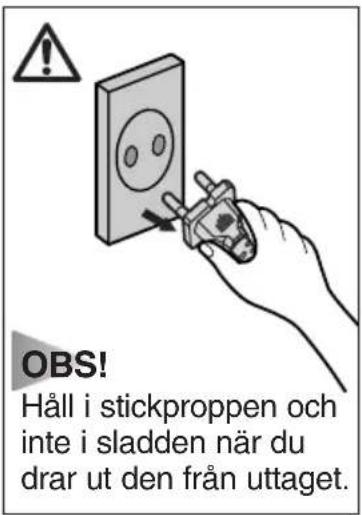
  8. Switch the vacuum cleaner off at the machine before unplugging from the electrical outlet. Grasp the plug to disconnect cord from the electrical outlet before caring the dust bag and filters.
  9. The plug must be removed from the socket outlet before cleaning or maintaining the appliance.
  10. The use of an extension cord is not recommended.
  11. If your vacuum cleaner is not operating correctly, switch off the power supply and consult an authorized service agent.
  12. If the supply cord is damaged, it must be replaced by the manufacturer or its service agent or a similarly qualified person in order to avoid a hazard.
  13. The vacuum cleaner is provided with a self-resetting thermal cut-out protection which automatically shut off current on over heating. Overheating can be caused by blockage in the filter, nozzle, tube or hose. After removing the cause and cooling the motor, vacuum cleaner automatically start again.

1 ASSEMBLING THE CLEANER

OPTION

▶ Features may vary according to model.
Technical illustration of a vacuum cleaner with close-up views showing internal components (no text or symbols).

Parking floor nozzle for easier storage.

NOTE: Grasp the plug to disconnect cord from the electrical outlet.

2-2 ON/OFF SWITCH (BODY CONTROL TYPE ONLY)Illustration of a hand operating a vacuum cleaner with a circular dial indicator (no text or symbols).

2-3 POWER CONTROL

1) HANDLE CONTROL TYPE

• SLIDE TO THE STOP POSITION Vacuum cleaner switches off (stand by mode) • SLIDE FORWARD TO MAX Suction capacity increases smoothly up to maximum.

Medical illustration of a medical device with a magnified inset showing internal anatomy (no text or symbols).

HANDLE CONTROL TYPE ONLY

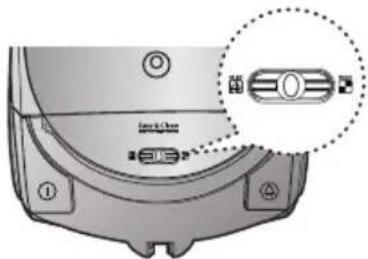
2) BODY CONTROL TYPE

MIN = For delicate surfaces e.g. net curtains. MAX = For hard floors and heavily soiled carpets.

Technical diagram of a device component with labeled parts and an inset showing a close-up view of a connector.

BODY CONTROL TYPE ONLY

2-4 AIR CONTROL

To reduce suction for cleaning draperies, small rugs, and other light fabrics, pull the tap air until the hole is open.

Diagram of a medical or surgical tool with a coiled tube and an arrow indicating direction (no text or symbols present).

BODY CONTROL TYPE ONLY

2-5 USING FLOOR TOOLSgraph TD A["Carpet"] --> B["Carbent"] B --> C["Bare floors"] C --> D["CREVICE"] D --> E["DUSTING"]

OPTION: Detach transparent drum cover for easy cleaning.

3 DUST FULL INDICATOR

Terry & Deere 1000mm

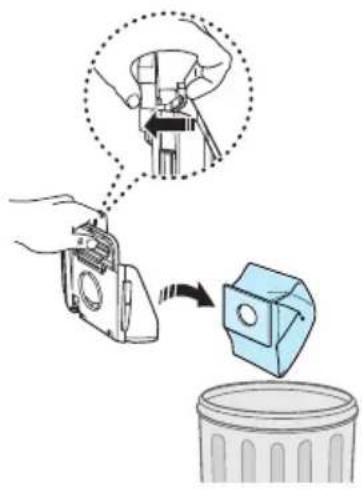
If the "Filter Check" indicator turns red while you are cleaning, the dust bag requires replacement.

NOTE: If the "Filter Check" indicator continues to display red even after changing the bag with a new one, turn the cleaner off and check for any clogging in the hose, tube, floor nozzle, or on the inlet/outlet filter.

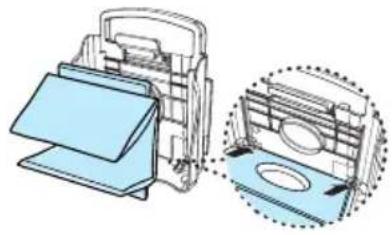
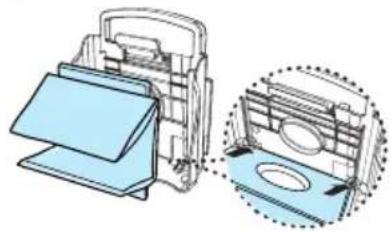
4 CHANGING THE DUST BAG

1Illustration of a hand inserting a camera into an open vacuum cleaner's airbag (no text or symbols visible).

2Diagram illustrating a mechanical device being inserted into a trash bin, with an inset showing the tool's insertion process.

3Technical illustration of a mechanical device with two views: top shows internal components, bottom shows exterior panels (no text or symbols).

4Illustration of hands using a printer to press a blue card into a holder, with an arrow symbol indicating the process (no text or symbols present).

5

Illustration of a vacuum cleaner with open lid and internal compartments (no text or symbols)

SAMSUNG SC5120 - CHANGING THE DUST BAG - 6

OPTIONAL

- FOR TEXTILE FILTER BAG If the textile filter bag gets full after use, clean it and use it again.

VP-95B TYPESAMSUNG SC5120 - OPTIONAL - 1

5 CLEANING THE INLET FILTER

Illustration of a vacuum cleaner with open lid and internal components (no text or symbols)

Diagram illustrating a hand removing a plastic bag into a trash bin, with a broken pipe symbol nearby.

Illustration of a vacuum cleaner with open lid and internal compartments, showing mechanical components (no text or symbols)

NOTE: Regularly check if the filter gets clogged and if so, remove the dust particles from the filter, as filter clogging may cause damage to the motor or decrease suction.

6 OUTLET FILTER

1Illustration of a hand using a vacuum cleaner to press down the air gap (no text or symbols visible)

2Diagram showing a heat exchanger or vent with a side panel and airflow direction (no text or symbols)

HEPA FILTER (option)

Diagram showing a monitor connected to a heat exchanger (no text or symbols present)

MICRO FILTER (option)

  • IF YOU HAVE A PROBLEM
PROBLEM CAUSE REMEDY
Motor does not start.No power supply. Thermal cut-out.Check cable, plug and socket. Leave to cool.
Suction force is gradually decreasing.Nozzle, suction hose or tube is blocked.Remove the object and change the dust-bag.
Cord does not rewind fully.Check that the cord is not twisted or wound unevenly.Pull the cord out 2-3m and push down the cord rewind button.
Vacuum cleaner does not pick up dirt.Crack or hole in hose.Check hose and replace if required.

This vacuum cleaner is approved to the following standards:

EMC Directive: 89/336/EEC, 92/31/EEC and 93/68/EEC

Low Voltage Directive: 73/23/EEC and 93/68/EEC

MEMO

SAMSUNG

SAMSUNG SC5120 - MEMO - 2

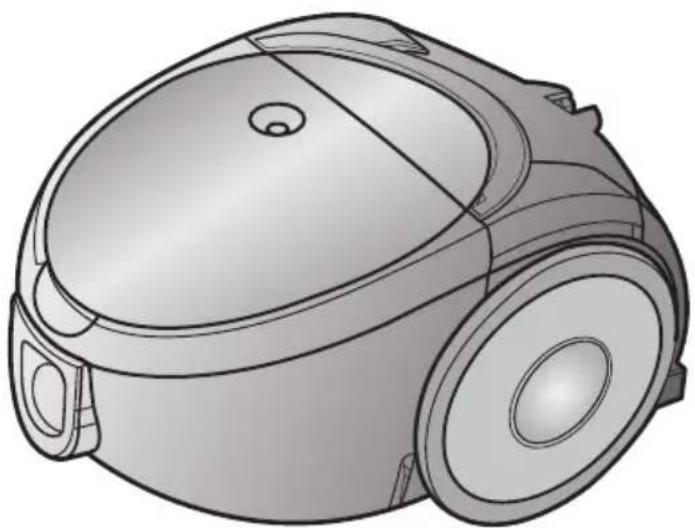
VACUUM CLEANER

Line drawing of a vacuum cleaner with a dome-shaped head and front-mounted wheels (no text or symbols)

Illustration of a hand pressing down on a vacuum cleaner's air vent (no text or symbols present)

2-3 ADJUSTING THE SUCTION POWER

1) HANDLE CONTROL

HANDLE CONTROL ONLY

2) CONTROL ON THE VACUUM CLEANER BODY

CONTROL ON THE VACUUM CLEANER BODY ONLY

2-4 AIR CONTROL

CHECK ONLY ON THE VACUUM CLEANER HOUSING

2-5 USING FLOOR NOZZLESgraph TD A["Start"] --> B["Mattor"] B --> C["Fria golv"] C --> D["SMALT MUNSTYCKE"] D --> E["DAMMNING"]

SAMSUNG SC5120 - 2-4 AIR CONTROL - 2

3 FULL BAG INDICATOR

Face & Churn SCE

2Diagram illustrating a mechanical device being inserted into a trash bin, with an inset showing the tool's insertion.

3Technical illustration of a mechanical device with two views: top view shows internal components, bottom view shows exterior panels (no text or symbols)

4Illustration of hands using a printer to press a blue sheet, with an arrow indicating the process (no text or symbols present)

5

Illustration of a vacuum cleaner with open lid and internal compartments (no text or symbols)

SAMSUNG SC5120 - FULL BAG INDICATOR - 6

OPTIONS

Diagram illustrating a hand removing a plastic sheet into a trash bin, with a hand holding the paper above.

Illustration of a vacuum cleaner with open lid and internal compartments, showing mechanical components (no text or symbols)

2

Diagram showing a car hood with a side panel and its side cover, no text or symbols present

HEPA FILTER (optional)

Diagram showing a device with a screen and a heat exchanger (no text or symbols)

MICRO FILTER (optional)

  • IF YOU HAVE PROBLEMS

Attach the floor nozzle for easier storage.

2 OPERATING THE VACUUM CLEANER

2-1 POWER CORD 2-2 ON/OFF BUTTONIllustration of a hand pressing down on a vacuum cleaner's airbag (no text or symbols visible)

2-3 OPERATION

1) MODEL WITH CONTROL ON THE HANDLE

• SLIDER IN STOP POSITION

ONLY FOR MODEL WITH CONTROL ON THE HANDLE

Technical diagram of a robotic vacuum cleaner with labeled ports and a highlighted internal component.

ONLY FOR MODEL WITH CONTROL ON THE VACUUM CLEANER ITSELF

2-4 AIR CONTROL

ONLY FOR MODEL WITH CONTROL ON THE VACUUM CLEANER ITSELF

2-5 USE OF NOZZLES AND ACCESSORIESgraph TD A["Tæpper"] --> B["Brush Tool"] B --> C["Adder"] C --> D["Adder"] D --> E["Final Assembly"] subgraph Component 1 F["Tæpper"] --> G["Brush Tool"] G --> H["Adder"] H --> I["Adder"] end subgraph Component 2 J["Gulve"] --> K["Brush Tool"] K --> L["Adder"] L --> M["Adder"] end subgraph Component…

Diagram of a device with labeled ports and an inset showing a rectangular component with light emission.

2Diagram showing a hand using a tool to lift a plastic container, with an inset image of the tool being inserted.

3Technical illustration of a mechanical device with two views: top shows internal components, bottom shows exterior panels (no text or symbols).

4Illustration of hands holding a blue electronic device with an arrow symbol indicating the process (no text or symbols present).

5

Illustration of a vacuum cleaner with open lid and internal compartments (no text or symbols).

SAMSUNG SC5120 - 2-4 AIR CONTROL - 7

EXTRA EQUIPMENT

Diagram illustrating a hand removing a plastic bag into a trash bin, with a broken pipe symbol nearby.

Illustration of a vacuum cleaner with open lid and internal components, showing mechanical parts (no text or symbols).

2Diagram showing two 3D rectangular heat exchanger units with a directional arrow indicating flow or movement (no text or symbols).

HEPA FILTER (optional)

Diagram showing a device emitting heat from a screen to a grid fan (no text or symbols).

MICRO FILTER (optional)

Position the floor nozzle for easier storage.

2 OPERATING THE VACUUM CLEANER

2-1 POWER CORD 2-2 ON/OFF SWITCHIllustration of a hand pressing down on a vacuum cleaner's airbag (no text or symbols visible).

2-3 OPERATION

1) MODEL WITH CONTROL ON THE HANDLE

• SLIDER IN STOP POSITION

ONLY FOR MODEL WITH CONTROL ON THE HANDLE
Technical diagram of a robotic vacuum cleaner with labeled ports and a highlighted internal component.

ONLY FOR MODEL WITH CONTROL ON THE VACUUM CLEANER ITSELF

2-4 AIR CONTROL

ONLY FOR MODEL WITH CONTROL ON THE VACUUM CLEANER ITSELF

2-5 USE OF NOZZLES AND ACCESSORIESgraph TD A["Tæpper"] --> B["Brush Tool"] B --> C["Adder"] C --> D["Adder"] D --> E["Final Assembly"] F["Gulve"] --> G["Brush Tool"] G --> H["Adder"] H --> I["Adder"] I --> J["Final Assembly"]

Diagram of a device with labeled ports and an inset showing a rectangular component with light emission.

2Diagram showing a hand using a tool to lift a plastic container, with an inset image of the tool being inserted.

3Technical illustration of a mechanical device with two views: top shows internal components, bottom shows exterior panels (no text or symbols).

4Illustration of hands holding a blue electronic device with an arrow symbol indicating the process (no text or symbols present).

5

Illustration of a vacuum cleaner with open lid and internal compartments (no text or symbols).

SAMSUNG SC5120 - 2-4 AIR CONTROL - 7

ACCESSORIES

Diagram illustrating a hand removing a plastic bag into a trash bin, with a broken pipe symbol nearby.

Illustration of a vacuum cleaner with open lid and internal components, showing mechanical parts (no text or symbols).

2Diagram showing two 3D rectangular heat exchanger units with a directional arrow indicating flow or movement (no text or symbols)

HEPA FILTER (accessory)

Diagram showing a device with a screen and a heat exchanger (no text or symbols)

MICRO FILTER (accessory)

Illustration of a robotic vacuum cleaner with a foot and sensor attached (no text or symbols)

2-3 POWER REGULATION

1) TYPE WITH REGULATION ON THE HANDLE

- SLIDE TO STOP POSITION

ONLY TYPE WITH REGULATION ON THE HANDLE

Technical diagram of a device component with labeled parts and an inset showing a close-up view of a connector or connector.

ONLY TYPE WITH REGULATION ON THE VACUUM CLEANER

Diagram of a flexible hose with a coiled tube, showing a hand holding a cable (no text or symbols present)

ONLY TYPE WITH REGULATION ON THE VACUUM CLEANER

2-5 USE OF FLOOR NOZZLEgraph TD A["Tepper"] --> B["Støvsuging"] B --> C["Fliserengjøring"] C --> D["SPREKKER"]

Technical diagram of a device with labeled ports and a highlighted component, including a magnified inset showing a vertical bar.

2Diagram illustrating a mechanical device being inserted into a trash bin, with an inset showing the tool's tip and component.

3Technical illustration of a mechanical device with two views: top view shows internal components, bottom view shows exterior panels (no text or symbols)

4Illustration of hands using a printer to press a stackable sheet, with an arrow indicating the process (no text or symbols present)

5

Illustration of a vacuum cleaner with open lid and internal compartments (no text or symbols)

SAMSUNG SC5120 - 2-3 POWER REGULATION - 9

OPTIONAL ACCESSORIES

Diagram illustrating a hand removing a trash can into a trash bin, with a broken tool symbolizing the removal.

Illustration of a vacuum cleaner with open lid and internal components, showing mechanical parts (no text or symbols)

2Diagram showing a car hood with a side panel and its side cover, no text or symbols present

HEPA FILTER (optional)

Diagram showing a device with a screen and a heat exchanger (no text or symbols)

MICRO FILTER (optional)

  • TROUBLESHOOTING

Illustration of a robotic vacuum cleaner with a hand pressing the center (no text or symbols)

2-3 Power adjustment

2Diagram showing a hand using a tool to remove a trash bin, with an inset image of the tool being inserted.

3Technical illustration of a mechanical device with a magnified inset showing internal components (no text or symbols)

4Illustration of hands holding a blue electronic device with an arrow symbol indicating the process (no text or symbols present)

5

Illustration of a compact vacuum cleaner with open lid and internal compartments (no text or symbols)

SAMSUNG SC5120 - 2-3 Power adjustment - 5

OPTIONAL

Diagram illustrating a hand removing a trash can into a trash bin, with a broken tool symbolizing the removal.

Illustration of a vacuum cleaner with open lid and internal components, showing mechanical parts (no text or symbols)

2Diagram showing a car air vent with a side panel and its side cover (no text or symbols)

HEPA FILTER (optional)

Diagram showing a device with a screen and a heat exchanger (no text or symbols)

MICRO STRAINER (optional)

  • IF YOU EXPERIENCE PROBLEMS
Manual assistant
Powered by Anthropic
Waiting for your message
Product information

Brand : SAMSUNG

Model : SC5120

Category : Vacuum Cleaner