
BassBlaster SQ1001 - Uncategorized Squeak - Free user manual and instructions
Find the device manual for free BassBlaster SQ1001 Squeak in PDF.


| Product Type | Portable Bass Speaker |
| Brand | Squeak |
| Model | BassBlaster SQ1001 |
| Dimensions (H x W x D) | 7.5 x 4.3 x 3.1 inches (190 x 110 x 80 mm) |
| Weight | 1.5 lbs (680 g) |
| Power Source | Rechargeable lithium-ion battery, USB-C charging |
| Battery Life | Up to 10 hours at moderate volume |
| Charging Time | Approximately 3 hours |
| Wireless Connectivity | Bluetooth 5.0 |
| Audio Output | 20W RMS, enhanced bass driver |
| Frequency Response | 50 Hz – 20 kHz |
| Controls | Volume, power, Bluetooth pairing, bass boost |
| Water Resistance | IPX5 (splash resistant) |
| Microphone | Built-in for hands-free calls |
| Speakerphone | Yes |
| Inputs | 3.5mm auxiliary jack, USB-C (charging) |
| Operating Range | Up to 33 feet (10 meters) |
| Care & Cleaning | Wipe with a soft, dry cloth; do not use abrasive cleaners |
| Safety Warnings | Avoid prolonged exposure to high volume levels to prevent hearing damage |
| Spare Parts & Repairability | Contact Squeak support for replacement parts; device is not user-serviceable |
| Included Accessories | USB-C charging cable, user manual |
Frequently Asked Questions - BassBlaster SQ1001 Squeak
User questions about BassBlaster SQ1001 Squeak
0 question about this device. Answer the ones you know or ask your own.
Ask a new question about this device
Download the instructions for your Uncategorized in PDF format for free! Find your manual BassBlaster SQ1001 - Squeak and take your electronic device back in hand. On this page are published all the documents necessary for the use of your device. BassBlaster SQ1001 by Squeak.
USER MANUAL BassBlaster SQ1001 Squeak
We would like to thank you for purchasing a portable Bluetooth speaker. This is a device that will certainly make your time spent with family and friends, providing many hours of great fun. Please read this manual before using the device.
SAFETY INFORMATION
- Store the speaker away from humid places, high temperature, oil and other liquids.
- Do not expose the product to direct sunlight and rain.
- Set the appropriate volume to avoid hearing damage.
- If you do not use the product for a long time, charge it at least once every three months to avoid damaging the lithium battery.
- It is prohibited to disassemble, repair or open the product.
- Keep away from children while charging to avoid electrocution or suffocation
FRONT PANEL

SIDE PANEL

DESCRIPTION
- Volume control
Knob control:
• Knob: main volume control.
- Press once: woofer volume control.
- Press twice: adjusting the tweeter volume.
- Press three times: microphone echo adjustment.
- Press four times: microphone volume adjustment.
Notes: the knob will automatically return to the main volume control if you do not perform any action within 4 seconds, regardless of the function it is in.
- previous song
- pause/play
- next song
- Equalizer effect selection
- MODE button
- REC button
- Microphone input (MIC)
- USB socket
- MicroSD card slot
- AUX-in
- Power switch
-
charging LED
-
USB-C charger socket (DC 3.7V/5V, IA)
To charge the device, use the included USB->USB-C cable (charger not included). If you wish to charge the device from the mains, we recommend using a DC 5V, 1A charger. It is forbidden to use chargers with a voltage higher than 5V. This will void the warranty and damage the speaker.
Before using the speaker for the first time, charge it fully. This is important!
Important! While the device is charging, you can use it normally, but we recommend that at the beginning of use, 3 full charging cycles should be carried out to form the built-in battery.
To start the device, slide the POWER button to the "ON" position. To turn off, slide the POWER button to the "OFF" position.
CHANGING THE OPERATING MODE OF THE DEVICE
To switch modes, use the MODE button and select from the options: Bluetooth/MicroSD/USB/FM radio/AUX-in. The current mode is displayed on the control panel.
MUSIC VOLUME CONTROL
To set the overall volume, use the main knob.
BLUETOOTH MODE
Make sure the device is in Bluetooth mode, then use your smartphone to search for available Bluetooth devices. When the name „SQ1001“ appears in the list, click that item to pair the device (the pairing process does not require a password). Once the pairing process is successful, you can start the music player on your smartphone and control the volume level with the volume control knob, use the PLAY/PAUSE button to play or pause playback, and the PREVIOUS/NEXT buttons to change the current song.
MICROSD/USB CARD MODE
In this mode, you can use the standard playback control using the PLAY/PAUSE buttons, the VOL-/VOL+ volume control knob and PREVIOUS/NEXT. In addition, using the EQ button, you can select one of the available graphic equalizer settings. In this mode, it is also possible to use the numeric keypad buttons to manually enter the song number.
Note: The device automatically remembers the last track played and resumes playback at the same point. To start playback from the beginning, manually enter the number of the first track, i.e. „0001“, and wait a moment, or press the STOP button and then PLAY.
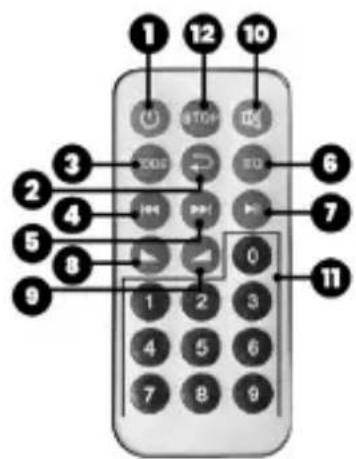
WIRELESS REMOTE CONTROL
- standby mode on/off
2 Repeat* mode. - mode selection: Bluetooth/AUX-in/FM/USB/SD
4 Previous song/radio station - next song/radio station
- graphic equalizer*: normal/bass/pop/rock/jazz.
- Play/Pause
- quieter
- louder
- mute
- numeric keypad
- stop
FM RADIO MODE
Unfold the antenna, then press and hold the PLAY button of the device for 2 sec to start the automatic FM station tuning function. When the process is complete, the first station in the list will be played. Use the PEVIOUS/NEXT TRACK buttons on the unit or remote control to change the radio station. Press PLAY button once to mute/cancel mute.
AUX-IN MODE
AUX-in mode only allows you to use the volume control.
RECORDING MODE (REC)
In recording mode, while the unit is in SD/USB mode, press the press the REC button to pause music playback and start recording the sound from the microphone. To stop recording, press the REC button again. The device will automatically play the recorded sequence. The recording function requires a microSD card or USB flash drive to be installed in advance.
It is worth remembering that the device has an active microphone input, which can lead to a slight hum even at the minimum volume setting.
In addition, the device is equipped with a built-in rechargeable battery, so be sure to charge it regularly at least once a week.
SMARTPHONE HOLDER
The speaker's addition of a top-mounted smartphone holder/stand is a practical solution that allows you to seamlessly play music from your phone without having to hold it in your hand.


EN - Environmental guidance
The device is marked with the symbol of a crossed-out waste container, in accordance with the European Directive 2012/19/EC on waste electronic and electrical equipment. Products marked with this symbol should not be discarded with other household waste after use. The user is obliged to dispose of used electrical and electronic equipment by delivering it to a designated point where it will be recycled.
The collection of such waste at designated locations and its proper processing contribute to the conservation of natural resources. Proper recycling of waste electrical and electronic equipment has beneficial effects on human health and the environment. To find out where and how to safely dispose of waste electrical and electronic equipment, the user should contact the relevant local government authority, waste collection point or the point of sale where the equipment was purchased.
*The battery-powered speaker work duration test was conducted under home conditions. The speaker was connected to a Xiaomi phone with Android system via Bluetooth. The distance between the phone and the speaker was 5 meters. The volume was set halfway through the range.
MBM Group s.c. declares that this device complies with the essential requirements and relevant provisions of Directive RED 2014/53/EU of the European Parliament and of the Council of 16 April 2014 on the harmonization of the laws of the Member States relating to the making available on the market of radio equipment and repealing Directive 1999/5/EC. The full text of the Declaration of Conformity is available at www.squeak.pi
Thank you for purchasing our device! We would like to inform you that we are constantly developing our products - both their specifications and design. For this reason, there may be slight changes in subsequent versions of the product.
If you need technical support or want more information about our products, please visit our website www.squeak.pl, where you will find answers to many of your questions.


- SAFETY INFORMATION
- DESCRIPTION
- Before using the speaker for the first time, charge it fully. This is important!
- CHANGING THE OPERATING MODE OF THE DEVICE
- MUSIC VOLUME CONTROL
- BLUETOOTH MODE
- MICROSD/USB CARD MODE
- WIRELESS REMOTE CONTROL
- FM RADIO MODE
- AUX-IN MODE
- RECORDING MODE (REC)
- SMARTPHONE HOLDER
- EN - Environmental guidance
Brand : Squeak
Model : BassBlaster SQ1001
Category : Uncategorized