
FX-501 - Uncategorized PANASONIC - Free user manual and instructions
Find the device manual for free FX-501 PANASONIC in PDF.


| Product Type | Digital Fiber Sensor Amplifier |
| Model | FX-501 (NPN output), FX-501P (PNP output) |
| Supply Voltage | 12 to 24 V DC (ripple P-P 10% or less) |
| Power Consumption | Normal: 960 mW or less (40 mA or less at 24 V); Eco: 680 mW or less (28 mA or less at 24 V) |
| Sensing Output | NPN or PNP open-collector transistor, max. 100 mA, residual voltage 2 V or less |
| Output Operation | Switchable Light-ON or Dark-ON |
| Short-Circuit Protection | Incorporated |
| Response Time (Selectable) | H-SP: 25 μs or less, FAST: 60 μs or less, STD: 250 μs or less, LONG: 2 ms or less, U-LG: 4 ms or less, HYPR: 24 ms or less |
| Protection | IP40 (IEC) |
| Ambient Temperature | -10 to +55 °C (cascade dependent: -10 to +50 °C for 4–7 units, -10 to +45 °C for 8–12 units) |
| Ambient Humidity | 35 to 85 % RH (storage: 35 to 85 % RH) |
| Material | Enclosure: Polycarbonate; Switch: TPEE; Protective cover: Polycarbonate |
| Weight (Main Body Only) | Approx. 15 g |
| Mounting | DIN rail (35 mm) |
| Connection Cable | Quick-connection cables (optional, 1 m, 2 m, 5 m lengths) |
| Digital Display | Threshold value (green) and incident light intensity (red) |
| Teaching Modes | 2-point, Limit, Full-auto, 1-point, 2-point, 3-point (Window/Hysteresis) |
| Key Lock Function | Prevents inadvertent key operations; set by pressing SET + MODE for 3 s |
| Interference Prevention | Up to 12 units (depending on response time); optical communication method |
| Accessories Included | FX-MB1 amplifier protection seal (1 set) |
| Applicable Standards | EMC Directive 2004/108/EC, UL, CSA |
Frequently Asked Questions - FX-501 PANASONIC
User questions about FX-501 PANASONIC
0 question about this device. Answer the ones you know or ask your own.
Ask a new question about this device
Download the instructions for your Uncategorized in PDF format for free! Find your manual FX-501 - PANASONIC and take your electronic device back in hand. On this page are published all the documents necessary for the use of your device. FX-501 by PANASONIC.
USER MANUAL FX-501 PANASONIC
Digital Fiber Sensor Amplifier FX-501□
MJE-FX501 No.0015-31V
Thank you very much for purchasing Panasonic products.
Please read this Instruction Manual carefully and thoroughly for the correct and optimum use of this product.
Kindly keep this manual in a convenient place for quick reference.
WARNING
- Never use this product as a sensing device for personnel protection.
- In case of using sensing devices for personnel protection, use products which meet laws and standards, such as OSHA, ANSI or IEC etc., for personnel protection applicable in each region or country.
1 INTENDED PRODUCTS FOR CE MARKING
- This product complies with the following standards / regulations.
EMC Directive 2004/108/EC
ANSI/UL 60947-5-2, CAN/CSA C22.2 No.14
S1-G-1-2009, S2-W-5-2009
- Caution about UL recognition
In case requiring conformity of UL listing mark or C-UL listing mark, USe class 2 power supply unit.
2 PART DESCRIPTION
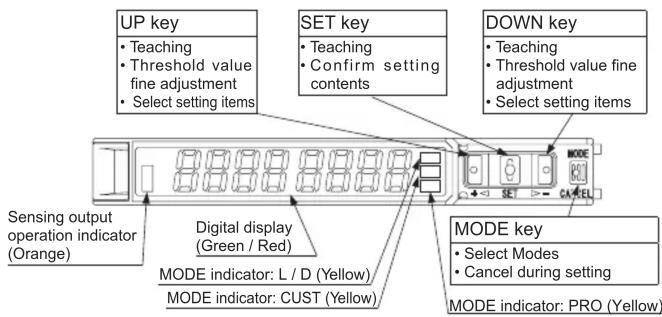
Pressing down SET key + MODE key for 3 sec : Set key lock or release key lock
3 MOUNTING
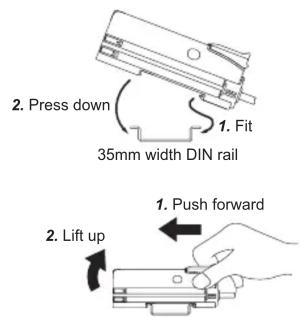
How to connect
- Fit the rear part of the mounting section of the amplifier on a DIN rail.
- Press down the rear part of the mounting section of the unit on the DIN rail and fit the front part of the mounting section to the DIN rail.
How to remove
- Push the controller forward.
- Lift up the front part of the amplifier to remove it.
How to connect the fiber cable
Be sure to fit the attachment to the fibers first before inserting the fibers to the amplifier. For details, refer to the instruction manual enclosed with the fibers.
- Snap the fiber lock lever down till it stops completely.
- Insert the fiber cables slowly into the inlets until they stops. (Note)
- Return the fiber lock lever to the original position till it stops.
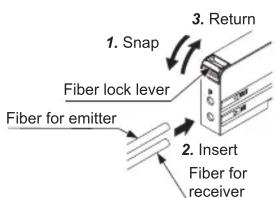
Note: With the coaxial reflective type fiber, such as , FD-G4 or FD-FM2, insert the single core fiber cable into the beam-emitting inlet "P" and the multi-core fiber cable into the beam-receiving inlet. If they are inserted in reverse, the sensing performance will deteriorate.
4 INSTALL MORE AMPLIFIER OF SERIES CONNECTION TYPE
- Make sure that the power supply is OFF while adding or removing the series connection type.
- In case 2 or more the series connection types are connected in cascade, make sure to mount them on a DIN rail.
- In case installing additional amplifier of series connection type, the maximum 11 the series connection types using sub cables can be added to an amplifier using a main connection cable.
- When connecting 2 or more the series connection types in cascade, use the sub cable (optional) for the second series connection type onwards.
For mounting and removing the amplifier, refer to "MOUNTING."
How to cascade
- Mount the amplifiers, one by one, on the DIN rail.
- Slide the amplifiers next to each other, and connect the quick-connection cables.
- Mount the end plates MS-DIN-E (optional) at both the ends to hold the amplifiers between their flat sides.
- Tighten the screws to fix the end plates.
How to Remove
- Loosen the screws of the end plates.
- Remove the end plates.
- Slide the amplifiers and remove them one by one.
5 I/O CIRCUIT DIAGRAMS


Note: The quick-connection sub cable does not incorporate +V (brown) and 0V (blue). The power is supplied from the connector of the main cable.
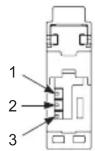
| TerminalNo. | Terminal name |
| 1 | +V |
| 2 | Sensing output |
| 3 | 0V |
The changed settings are not stored if turning the power OFF while setting. Therefore, confirm the settings by pressing the SET key before turning the power OFF.
- When turning ON the power, RUN mode is displayed and the digital display shows the threshold value (green) and the incident light intensity (red).




7 TEACHING MODE
- Be sure that detection may become unstable depending on the use environment in teaching if less margin is applied.
- When teaching in Window comparator mode or Hysteresis mode, a setting has to be made in PRO mode beforehand.
In case 1-point teaching, make sure to set the shift amount. (initial value is 10% or 100)
For the setting, refer to "PRO MODE OPERATION MANUAL."
- Teaching can be set in RUN mode.
Useful when sensing object can be set
- This is basic teaching method.
2-point teaching
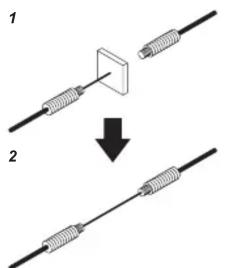
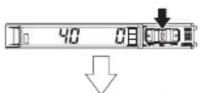
1. Press the SET key in the sensing object present condition.
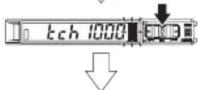
2. Press the SET key in the sensing object absent condition.

Stable sensing is possible

Stable sensing is not possible
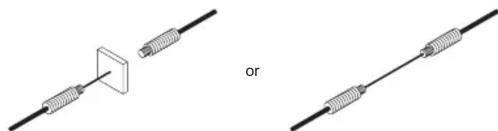
Useful when sensing object cannot be set
- This is teaching method in case small object or object in back ground are existing
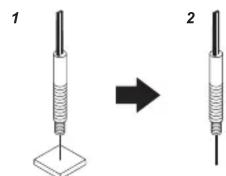
Limit-teaching
natural_image
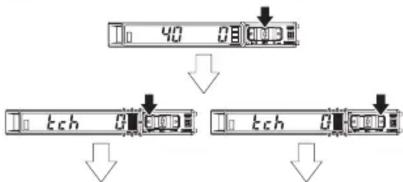
Two diagrams showing a wire connection with a square component and a diagonal line, labeled 'or' (no text or symbols present)- Press the SET key in the sensing object present condition or non sensing object present condition.
flowchart
graph TD
    A["40"] --> B["tch 0"]
    B --> C["0"]
    C --> D["tch 0"]
    D --> E["0"]
- The threshold level is shifted to high value (low sensitivity) by pressing down UP key. The threshold level is shifted to low value (high sensitivity) by pressing down UP key.


Stable sensing is possible


Stable sensing is not possible
Note: The shift value of approx. 15% is an initial value. Display of the shift value can be changed to percentage [approx. 0 to 200% (unit 1%)] within a light interval [0 to 200% (unit 1)].
[approx. 0 to 999% (unit -1 %)] or incident light intensity [0 to 9999 (unit -1)]. For setting the shift amount, refer to "PRO MODE OPERATION MANUAL."
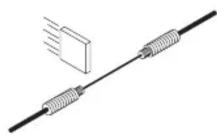
Useful when not want to stop production line and to keep the sensing object move
Full-auto teaching
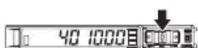
1. Pressing SET key down
Pressing down long
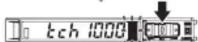
2. Run the sensing object on the line and hold down the SET key.


3. "Ruto" is displayed on the digital display (green) and when the sensing object passed through, release the SET key.


Stable sensing is possible

Stable sensing is not possible
1-point teaching (Window comparator mode / Hysteresis mode)
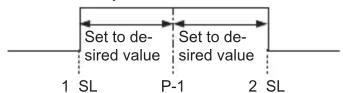
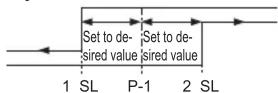
- This is method to set the shift amount to the desired value and to set the threshold range by using the 1-point teaching.
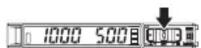





1. Pressing SET key down
2. Press the SET key down in the sensing object present condition.
3. The threshold value (1_SL) that is 10% lower from the incident light intensity and the threshold value (2_SL) that is 10% higher from the incident light intensity are set. (Note 1, 2)
Stable sensing is possible
Stable sensing is not possible
Notes 1) The shift amount of 10% is an initial value. The shift amount can be set in PRO mode. Furthermore, the shift value can be set in incident light amount. For setting method, refer to "PRO MODE OPERATION MANUAL." 2) If the value after setting exceeds the maximum (minimum), the maximum (minimum) sensitivity will be set.
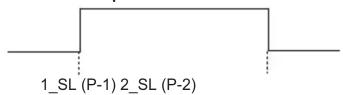
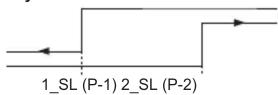
2-point teaching (Window comparator mode / Hysteresis mode)
- This is method to set the threshold range by conducting the 2-point teaching (P-1, P-2).
- When conducting teaching, use sensing objects (P-1 and P-2) whose incident light intensities are different from each other.
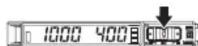

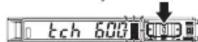



1. Pressing SET key down (1st time)
2. Press down the SET key in the sensing object present condition. (2nd time)
Stable sensing is possible
Stable sensing is not possible
Note: If the value after setting exceeds the maximum (minimum), the maximum (minimum) sensitivity will be set.
3-point teaching (Window comparator mode / Hysteresis mode)
- This is the method to conduct the 3-point teaching (P-1, P-2, P-3) and to set the threshold range by setting the threshold value (1_SL) of the mid-point between “A” and “B” and the threshold value (2_SL) of the mid-point between “B” and “C”.
- When conducting teaching, use sensing objects (A, B and C) whose incident light intensities are different.
- After teaching, P-1, P-2 and P-3 will be automatically relocated in ascending order: i.e. the lowest value is placed in "A", the second lowest in "B" and the highest in "C".
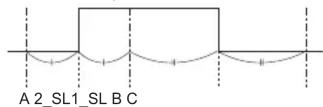
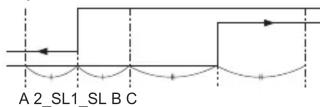
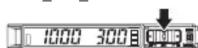

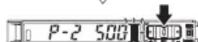

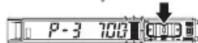



1. Press SET key down in the sensing object present condition (1st time)
2. Press SET key down in the sensing object present condition (2nd time)
3. Press SET key down in the sensing object present condition (3rd time)
Stable sensing is possible
Stable sensing is not possible
Note: If the value after setting exceeds the maximum (minimum), the maximum (minimum) sensitivity will be set.
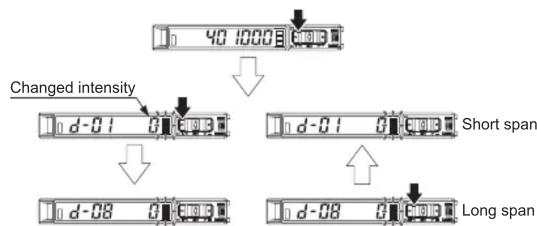
Span adjustment in rising differential mode or trailing differential mode
- Press the SET key to confirm the setting item.
- The threshold can be set by using the threshold value fine adjustment function. For the threshold value fine adjustment function, refer to “8 THRESHOLD VALUE FINE ADJUSTMENT FUNCTION”
flowchart
graph TD
    A["40 1000"] --> B["Changed intensity"]
    B --> C["d-01"]
    C --> D["Short span"]
    D --> E["d-08"]
    E --> F["Long span"]
8 THRESHOLD VALUE FINE ADJUSTMENT FUNCTION
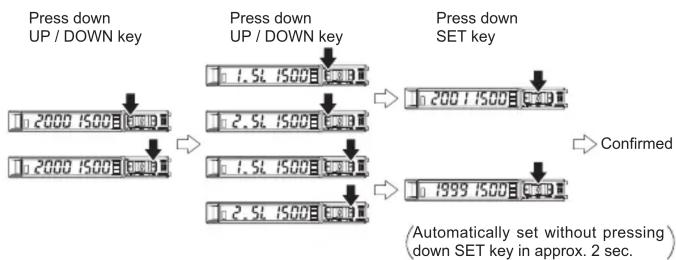
- Set the fine adjustment of threshold value in RUN mode.
- Also, the threshold value fine adjustment function can be used in forced ON output mode and forced OFF output mode.
- For setting of the sensing output, refer to "PRO MODE OPERATION MANUAL."

flowchart
graph LR
    A["Press down UP / DOWN key"] --> B["2000 1500"]
    B --> C["2000 1500"]
    C --> D["1999 1500"]
    D --> E["Confirmed (Automatically set without pressing) down SET key in approx. 2 sec."]
- When setting sensing output to the window comparator mode or hysteresis mode, "1.5L" and "2.5L" can be changed to another by pressing down SET key for 2 sec. In case conducting threshold value fine adjustment of "1.5L" or "2.5L", press down UP key or Down key, and "1.5L" or "2.5L" are displayed. Then, the threshold value fine adjustment can be conducted.
flowchart
graph TD
    A["Press down UP / DOWN key"] --> B["1.5L 1500"]
    B --> C["2.5L 1500"]
    C --> D["1.5L 1500"]
    D --> E["2.5L 1500"]
    E --> F["1999 1500"]
    F --> G["Confirmed"]
    style A fill:#f9f,stroke:#333
    style G fill:#f9f,stroke:#333
Note: It may not respond when values of “1.5L” and “2.5L” are close because of relation of hysteresis. Be sure to confirm with this device.
9 KEY LOCK FUNCTION
- The key lock function prevents key operations so that the conditions set in each setting mode are not inadvertently changed.
- If operating key switch after key lock is set, "loc on" is indicated on the digital display.


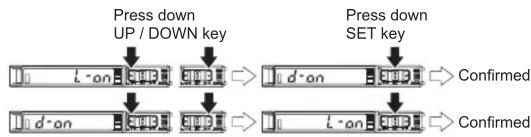
10 SENSING OUTPUT OPERATION MODE
- When MODE indicator: L / D (yellow) lights up, sensing output operation can be set.
flowchart
graph TD
    A["Press down UP / DOWN key"] --> B["10 d-an"]
    B --> C["→"]
    C --> D["10 d-an"]
    D --> E["Confirmed"]
    F["Press down SET key"] --> G["10 d-an"]
    G --> H["→"]
    H --> I["10 d-an"]
    I --> J["Confirmed"]
11 CUSTOM MODE
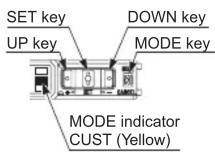
- When MODE indicator: CUST (yellow) lights up, Response time setting, Emission power setting or Hysteresis setting can be displayed. For the setting procedure, refer to “PRO MODE OPERATION MANUAL.”
- By pressing UP key or DOWN key, the setting in each item will be changed.
- Press SET key to confirm the setting.
- For setting of each item, refer to the following table.
| Item | Digital display | Reference item |
| Response time setting | SPEdStd | |
| Emission power setting | Pctl H-P | |
| Hysteresis setting | HYSH-O2 |
12 PRO MODE
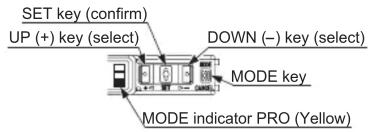
- When MODE indicator: PRO (yellow) lights up, PRO mode can be set.
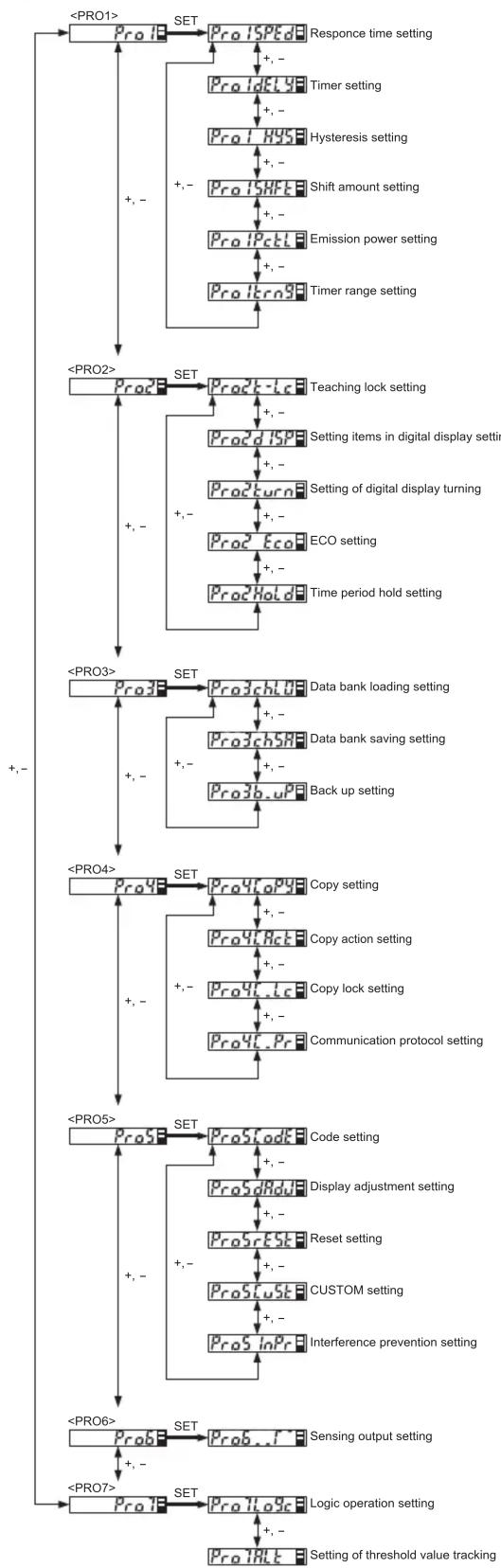
- For detail of PRO mode, refer to “PRO MODE OPERATION MANUAL.”
Procedure
flowchart
graph TD
    A["<PRO1>"] --> B["Pro1"]
    B --> C["SET"]
    C --> D["Pro1SPId"]
    D --> E["Response time setting"]
    C --> F["+,-"]
    F --> G["ProIdEY"]
    G --> H["Timer setting"]
    C --> I["Pro1HYS"]
    I --> J["Timer setting"]
    C --> K["+,-"]
    K --> L["Pro1HYSF"]
    L --> M["Shift amount setting"]
    C --> N["Pro1Pctl"]
    N --> O["Emission power setting"]
    C --> P["+,-"]
    P --> Q["ProItrn9"]
    Q --> R["Timer range setting"]

    S["<PRO2>"] --> T["Pro2"]
    T --> U["SET"]
    U --> V["Pro2t-Lc"]
    V --> W["Teaching lock setting"]
    T --> X["+,-"]
    X --> Y["Pro2d1SP"]
    Y --> Z["Setting items in digital display setting"]
    T --> AA["+,-"]
    AA --> AB["Pro2turn"]
    AB --> AC["Setting of digital display turning"]
    T --> AD["+,-"]
    AD --> AE["Pro2Eco"]
    AE --> AF["ECO setting"]
    T --> AG["+,-"]
    AG --> AH["Pro2Hold"]
    AH --> AI["Time period hold setting"]

    J["<PRO3>"] --> AJ["Pro3"]
    AJ --> AK["SET"]
    AK --> AL["Pro3chL0"]
    AL --> AM["Data bank loading setting"]
    AK --> AN["+,-"]
    AN --> AO["Pro3chSR"]
    AO --> AP["Data bank saving setting"]
    AK --> AQ["+,-"]
    AQ --> AR["Pro3b.upf"]
    AQ --> AS["Back up setting"]

    AT["<PRO4>"] --> AU["Pro4"]
    AU --> AV["SET"]
    AV --> AW["Pro4fLpy8"]
    AW --> AX["Copy setting"]
    AX --> AY["+,-"]
    AY --> AZ["Pro4tAct"]
    AZ --> BA["Copy action setting"]
    AX --> BB["+,-"]
    BB --> BC["Pro4t-Lc"]
    BC --> BD["Copy lock setting"]
    AX --> BE["+,-"]
    BE --> BF["Pro4t.Pr"]
    BF --> BG["Communication protocol setting"]

    BH["<PRO5>"] --> BI["Pro5"]
    BI --> BJ["SET"]
    BJ --> BK["Pro5fodt"]
    BK --> BL["Code setting"]
    BJ --> BM["+,-"]
    BM --> BN["Pro5dRdd"]
    BN --> BO["Display adjustment setting"]
    BJ --> BP["+,-"]
    BP --> BQ["Pro5rEstk"]
    BQ --> BR["Reset setting"]
    BJ --> BS["+,-"]
    BS --> BT["Pro5Custk"]
    BT --> BU["CUSTOM setting"]
    BJ --> BV["+,-"]
    BV --> BW["Pro5InPr"]
    BW --> BX["Interference prevention setting"]

    BY["<PRO6>"] --> BZ["Pro6"]
    BZ --> CA["SET"]
    CA --> CB["Sensing output setting"]

    DA["<PRO7>"] --> DB["Pro7"]
    DB --> DC["SET"]
    DC --> DD["Pro7Logic"]
    DD --> DE["Logic operation setting"]

    BE --> DF["Pro7ALT"]
    DF --> DG["Setting of threshold value tracking"]
13 OPTICAL COMMUNICATION
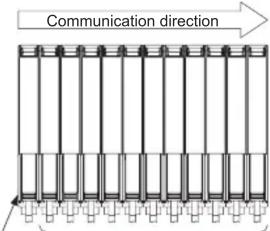
- When the setting of data bank loading / saving, copy setting, or copy action setting is conducted via optical communications, cascade the sub amplifiers right side to the main amplifier as follows.
However, in case using data bank loading / saving, use FX-502☐ or FX-505☐-C2 as main amplifier. - If an amplifier is under any of the following conditions, the setting of data bank loading / saving, or copy setting cannot be carried out.
- Copy lock setting is set to copy lock ON "C.Lc on."
• Digital display is blinking - External input setting of main amplifier is set to “InPT SELF.” (Only data-bank loading / saving)
- When communication protocol of a sub amplifier is set to communication emission halt “C.Pr oFF” the setting of data bank loading / saving, or copy setting cannot be carried out to sub amplifiers subsequent to the mentioned amplifier.
- Make sure to mount closely like follows since interference prevention function is conducted by optical communication. Main
Main amplifier
Sub amplifiers
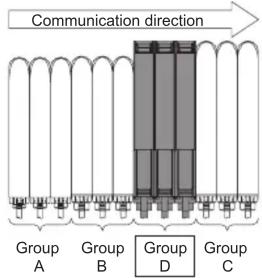
- When this product and other products (e.g. fiber sensor amplifiers, pressure sensor controllers, etc.) are connected together in cascade, install those products so that they are in order of Group A, B, D and C as shown in the right figure. This product is included in Group D.
flowchart
graph TD
    A["Group A"] --> D["Central Block"]
    B["Group B"] --> D
    C["Group C"] --> D
    D --> E["Communication direction"]
    style D fill:#999,stroke:#333
| Group | Model No. |
| A | FX-301 (Conventional version unit)FX-301B /G /H , LS-401 |
| B | FX-301 (Modified version unit)FX-305 , FX-301 -C1 |
| C | LS-403 , DPS series |
| D | FX-500 series |
- As for the products that are located between different groups, affix the amplifier protection seal FX-MB1 (optional) on the communication window of each corresponding product.
- Within each group, identical models should be connected in a lump.
- In case conducting copy setting of this device and other FX-500 series together, functions which are incorporated in this device will be copied but functions which are not incorporated in this device will not be copied.
14 INTERFERENCE PREVENTION FUNCTION
- This device incorporates an interference prevention function by setting different emitting frequencies from an interference prevention function by optical communication.
- For Interference prevention function setting procedure, refer to "PRO MODE OPERATION MANUAL."
- Possible number of amplifiers for interference prevention function is different as shown in table below.
| Response timeInterference prevention function setting | H-SP | FAST | STD | LONG | U-LG | HYPR |
| |P - 1| | 0 | 2 | 4 | 8 | 8 | 12 |
- In case putting in more amplifiers than limit of interference prevention function, put the amplifier protection seal to amplifier which is adjacent of end of an amplifier that the interference function is valid or set OFF in communication protocol setting of the end of amplifier that the interference prevention function is valid.
Example: Putting in 12 of this device and set STD of response time setting. - Possible number of interference prevention is 4.
Put the amplifier protection seals 4th and 5th amplifiers and between 8th and 9th amplifiers or change the communication protocol setting of 4th and 8th to OFF since interference prevention works from 1st to 4th, from 5th to 8th and 9th to 12th.
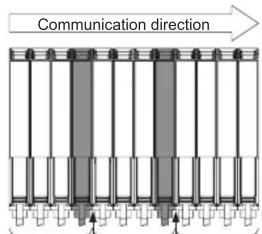
Interference prevention possible range
Put a protection seal between 4th and 5th amplifier. Or set communication protocol setting in 4th to OFF.
Interference prevention possible range
Interference prevention possible range
Put a protection seal between 8th and 9th amplifier. Or set communication protocol setting in 8th to OFF.
- In case mounting more amplifiers whose response time setting are different, put protection seal between amplifiers that have different response time setting or set communication protocol setting of the upper amplifier to OFF.
- For communication protocol setting procedure, refer to "PRO MODE OPERATION MANUAL."
15 ERROR INDICATION
- In case of errors, attempt the following measures.
| Error indication | Description | Remedy |
| Er01 | EEPROM is broken or reached the end of its working life. | Please contact our office. |
| Er02 | EEPROM writing error | |
| Er11 | Load of the sensing output is short-circuited causing an over-current to flow. | Turn OFF the power and check the load. |
| Er52 | Communication error when the amplifiers are mounted in cascade. | Verify that there is no loose or clearance between amplifiers. |
| Er53 | Communication error between the upper communication unit and amplifiers. | Verify that there is no loose or clearance between the upper communication unit and amplifiers. |
16 SPECIFICATIONS
| Type | Series connection type | |
| NPN output | PNP output | |
| Model No. | FX-501 | FX-501P |
| Supply voltage | 12 to 24V DC × 10% × 18%Ripple P-P10% or less | |
| Power consumption (Note 1) | Normal operation: 960mW or less (current consumption 40mA or less at 24V supply voltage)Eco mode: 680mW or less (current consumption 28mA or less at 24V supply voltage) | |
| Sensing output (Sensing output 1 / 2) | NPN open-collector transistorMaximum sink current: 100mA (Note 1)Applied voltage: 30V DC or less(Between sensing output and 0V)Residual voltage: 2V or less (Note 2)[At 100m A (Note 1) sink current] | PNP open-collector transistorMaximum source current: 100mA (Note 1)Applied voltage: 30V DC or less(Between sensing output and +V)Residual voltage: 2V or less (Note 2)[At 100mA (Note 1) source current] |
| Output operation | Switchable either Light-ON or Dark-ON | |
| Short-circuit protection | Incorporated | |
| Response time | H-SP: 25μs or less, FAST: 60μs or less, STD: 250μs or less, LONG: 2ms or less,U-LG: 4ms or less, HYPR: 24ms or less, Selectable | |
| Protection | IP40 (IEC) | |
| Ambient temperature | -10 to +55°C (If 4 to 7 units are mounted in cascade: -10 to +50°C or if 8 to 12 units are mounted in cascade: -10 to +45°C) (No dew condensation or icing allowed)Storage: -20 to +70°C | |
| Ambient humidity | 35 to 85% RH, Storage: 35 to 85% RH | |
| Material | Enclosure: Polycarbonate, Switch: TPEE, Protective cover: Polycarbonate | |
| Weight (Main body only) | Approx. 15g | |
| Accessory | FX-MB1 (Amplifier protection seal): 1 set. | |
Notes: 1) 50mA max. if 5 or more series connection types are connected together.
2) In case of using the quick-connection cable (cable length 5m) (optional).
3) Cables are not accessories. Be sure to use cables in table below.
| Cable | ||||||
| Cable length 1m | Cable length 2m | Cable length 5m | ||||
| Main cable | Sub cable | Main cable | Sub cable | Main cable | Sub cable | |
| FX-501□ | CN-73-C1 | CN-71-C1 | CN-73-C2 | CN-71-C2 | CN-73-C5 | CN-71-C5 |
17 CAUTIONS
- This product has been developed / produced for industrial use only.
- Make sure that the power supply is OFF while adding or removing the amplifiers.
- Take care that if a voltage exceeding the rated range is applied, or if an AC power supply is directly connected, the product may get burnt or be damaged.
- Take care that short-circuit of the load or wrong wiring may burn or damage the product.
- Do not run the wires together with high-voltage lines or power lines, or put them in the same raceway. This can cause malfunction due to induction.
- The specification may not be satisfied in a strong magnetic field.
- Verify that the supply voltage variation is within the rating.
- If power is supplied from a commercial switching regulator, ensure that the frame ground (F.G.) terminal of the power supply is connected to an actual ground.
- In case noise generating equipment (switching regulator, inverter motor, etc.) is used in the vicinity of this product, connect the frame ground (F.G.) terminal of the equipment to an actual ground.
- The ultra long distance (U-LG, HYPR) mode is more likely to be affected by extraneous noise since the sensitivity of that is higher than the other modes. Make sure to check the environment before use.
- Do not use during the initial transient time (H-SP, FAST, STD: 0.5 sec., LONG, U-LG, HYPR: 1 sec.) after the power supply is switched ON.
- Be sure to using the quick connection cable (optional) as cable. When you extend the cable, be sure to use cables which have 0.3mm^2 or more of conductor cross-section area. Extension up to total 100m is possible. However, in order to reduce noise, make the wiring as short as possible.
- Make sure that stress by forcible bend or pulling is not applied to the sensor cable joint and fiber cable.
- This product is suitable for indoor use only.
- Avoid dust, dirt, and steam.
- Take care that the product does not come in contact with oil, grease, organic solvents such as thinner, etc., strong acid or alkaline.
- This product cannot be used in an environment containing inflammable or explosive gasses.
- Never disassemble or modify the product.
- This product adopts EEPROM. Settings cannot be done 100 thousand times or more because of the EEPROM's lifetime.
Panasonic Electric Works SUNX Co., Ltd.
http://panasonic-electric-works.net/sunx
Overseas Sales Division (Head Office)
2431-1 Ushiyama-cho, Kasugai-shi, Aichi, 486-0901, Japan
Phone: +81-568-33-7861 FAX: +81-568-33-8591
Europe Headquarter: Panasonic Electric Works Europe AG
US Headquarter: Panasonic Electric Works Corporation of America
629 Central Avenue New Providence, New Jersey 07974 USA
Phone: +1-908-464-3550
PRINTED IN CHINA
© Panasonic Electric Works SUNX Co., Ltd. 2010

- Digital Fiber Sensor Amplifier FX-501□
- WARNING
- INTENDED PRODUCTS FOR CE MARKING
- PART DESCRIPTION
- MOUNTING
- How to connect
- How to remove
- How to connect the fiber cable
- INSTALL MORE AMPLIFIER OF SERIES CONNECTION TYPE
- How to cascade
- I/O CIRCUIT DIAGRAMS
- TEACHING MODE
- Useful when sensing object can be set
- 2-point teaching
- Useful when sensing object cannot be set
- Limit-teaching
- Useful when not want to stop production line and to keep the sensing object move
- Full-auto teaching
- 1-point teaching (Window comparator mode / Hysteresis mode)
- 2-point teaching (Window comparator mode / Hysteresis mode)
- 3-point teaching (Window comparator mode / Hysteresis mode)
- Span adjustment in rising differential mode or trailing differential mode
- THRESHOLD VALUE FINE ADJUSTMENT FUNCTION
- KEY LOCK FUNCTION
- SENSING OUTPUT OPERATION MODE
- CUSTOM MODE
- PRO MODE
- OPTICAL COMMUNICATION
- INTERFERENCE PREVENTION FUNCTION
- ERROR INDICATION
- SPECIFICATIONS
- CAUTIONS
- Panasonic Electric Works SUNX Co., Ltd.
Brand : PANASONIC
Model : FX-501
Category : Uncategorized