
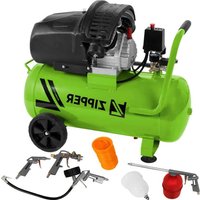
ZI-COM90-10 - Compressor Zipper - Free user manual and instructions
Find the device manual for free ZI-COM90-10 Zipper in PDF.


| Brand | Zipper |
| Model | ZI-COM90-10 |
| EAN | 9120039235189 |
| Product Type | Air Compressor (oil-lubricated, belt-driven) |
| Intended Use | Generation of compressed air for tire inflation and pneumatic tools |
| Tank Capacity | 90 L (approx.) |
| Max. Pressure | 8 bar (approx.) |
| Motor Power | 1.5 kW (approx.) |
| Power Supply | 230 V / 50 Hz (single phase) |
| Protection Class | IP20 (indoor use only) |
| Weight | 45 kg (approx.) |
| Dimensions (L x W x H) | 70 x 40 x 65 cm (approx.) |
| Operating Temperature | +5 °C to +40 °C |
| Storage Temperature | -25 °C to +55 °C |
| Humidity (max.) | 70 % |
| Sound Pressure Level | 85 dB(A) (approx.) |
| Safety Features | Safety valve, pressure switch, overload protection, grounding |
| Maintenance | Daily drain condensation; check oil level; clean air filter every 20-30 h; change oil every 250 h |
| Spare Parts Availability | Original ZIPPER spare parts via website or service |
| Warranty | 2 years (excluding wear parts) |
Frequently Asked Questions - ZI-COM90-10 Zipper
User questions about ZI-COM90-10 Zipper
0 question about this device. Answer the ones you know or ask your own.
Ask a new question about this device
Download the instructions for your Compressor in PDF format for free! Find your manual ZI-COM90-10 - Zipper and take your electronic device back in hand. On this page are published all the documents necessary for the use of your device. ZI-COM90-10 by Zipper.
USER MANUAL ZI-COM90-10 Zipper
natural_image
Green ZIPPER air compressor with fan inside cage (no visible text or symbols on body)
ZI-COM90-10
EAN: 9120039235189
CE
ATTENTION: Check oil!
YOUR
JOB.
OUR
TOOLS.
1 INHALT / INDEX
1 INHALT / INDEX 2
2 SICHERHEITSZEICHEN / SAFETY SIGNS / BEZPEČNOSTNÍ ZNAČKY / BEZPEČNOSTNÉ ZNAČKY....5
12.1 Intended use of the machine....21
12.1.1 Technical restrictions....21
12.1.2 Prohibited applications / Dangerous misuse....21
12.2 User requirements....21
12.3 Safety devices....21
12.4 General safety instructions....22
12.5 Electrical safety 22
12.6 Special safety instructions for this machine....23
12.7 Hazard warnings....23
13 TRANSPORT 24
14 ASSEMBLY 24
14.1 Preparation....24
14.1.1 Check delivery content....24
14.1.2 Requirements for the installation site....24
14.2 Assemble....24
14.3 Electrical connection....25
15 OPERATION....25
15.1 Operating instructions....25
15.2 Handling....26
15.2.1 Switch the machine on and off....26
15.2.2 Set output-pressure....26
15.2.3 Connecting the compressed air supply....26
16 CLEANING, MAINTENANCE, STORAGE, DISPOSAL 26
16.1 Cleaning....26
16.2 Maintenance....27
16.2.1 Maintenance plan 27
16.2.2 Drain condensation water....27
16.2.3 Clean air filter 27
16.2.4 Change oil....28
16.2.5 Check / replace belt 28
16.3 Storage....28
16.4 Disposal....29
17 TROUBLESHOOTING 29
18 ÚVODNÍ SLOVO (CZ)....30
19 BEZPEČNOST 31
EN Missing or non-readable security stickers have to be replaced immediately.
natural_image
Close-up of a mechanical lifting device with visible gears and shafts (no text or symbols)Einschalten
natural_image
Close-up of a mechanical device with hoses and connectors, no visible text or symbolsnatural_image
Exterior view of a cylindrical industrial water tank with wheels and a side-mounted rack (no visible text or symbols)natural_image
Close-up of an air compressor unit with a yellow arrow pointing to component 2 (no visible text or symbols)Kontrollieren
This manual contains information and important notes for safe commissioning and handling of the air compressor ZI-COM90-10, hereinafter referred to as “machine” in this document.

This manual is part of the machine and must not be removed. Save it for later reference and if you let other people use the machine, add this manual to the machine.
Please read and note the safety instructions!
Before first use read this manual carefully. It eases the correct use of the machine and prevents misunderstanding and damages of machine.
Due to constant advancements in product design, construction, illustrations and contents may deviate slightly. If you notice any errors, please inform us.
We reserve the right to make technical changes!
Check the goods immediately after receipt and note any complaints on the consignment note when taking over the goods from the deliverer!
Transport damage must be reported to us separately to us within 24 hours.
ZIPPER MASCHINEN GmbH cannot accept any liability for transport damage that has not been reported.
Copyright
© 2023
This documentation is protected by copyright. All rights reserved! In particular, the reprint, translation and extraction of photos and illustrations will be prosecuted.
The place of jurisdiction is the regional court Linz or the court responsible for 4170 Haslach is valid.
Customer service contact
This section contains information and important notes on the safe commissioning and handling of the machine.

For your safety, read this manual carefully before commissioning. This will enable you to handle the machine safely and thus prevent misunderstandings as well as personal injury and damage to property. Pay special attention to the symbols and pictograms used on the machine as well as the safety information and danger warnings!
12.1 Intended use of the machine
The machine is designed exclusively for the following activities:
For the generation of compressed air within the technical data. The machine can be used in various work fields such as refilling car tires or with pneumatic tools such as nailers, staplers, air vibrating grinders or similar.
NOTE

ZIPPER MASCHINEN GmbH assumes no responsibility or warranty for any other use or use beyond this and for any resulting damage to property or injury.
12.1.1 Technical restrictions
The machine is designed for the work under the following conditions:
Relative humidity
max. 70 %
Temperature (operation)
+5 °C to +40 °C
Temperature (storage)
-25 °C to +55 °C
12.1.2 Prohibited applications / Dangerous misuse
- Operating the machine without adequate physical and mental fitness.
- Operating the machine without knowledge of the manual.
- Modifying the machine design.
- Operating the machine in a potentially explosive environment.
- Operating the machine outside the technical limits specified in this manual.
- Removing of the safety markings attached to the machine.
- Modifying, circumventing or disabling the safety devices of the machine.
- The machine is not designed for continuous operation or unrestricted, commercial operation and may only be used in dry rooms.
- To aim the compressed air gun at persons is prohibited.
The non-intended use or the disregard of the explanations and instructions described in this manual will result in the expiration of all warranty claims and compensation claims for damages against ZIPPER MASCHINEN GmbH.
12.2 User requirements
The machine is designed to be operated by one person. The prerequisites for operating the machine are physical and mental fitness as well as knowledge and understanding of the operating instructions. Persons who, due to their physical, sensory or mental capabilities, inexperience or lack of knowledge, are unable to operate the machine safely must not use the machine without supervision or instruction by a responsible person.
Please note that locally applicable laws and regulations determine the minimum age of the operator and may restrict the use of this machine!
Work on electrical components or equipment may only be carried out by a qualified electrician or under the guidance and supervision of a qualified electrician.
Put on your personal protective equipment before working on the machine.
12.3 Safety devices
The machine is equipped with the following safety device:

natural_image
Industrial air compressor with attached pump and motor, shown in two views (no text or symbols visible)- Safety valve (1)
12.4 General safety instructions
To avoid malfunctions, damage and health impairments when working with the machine, the following points must be observed in addition to the general rules for safe working:
- Check the machine for completeness and function before starting. Only use the machine if the separating and other non-separating protective devices required for machining have are fitted.
• Make sure that the guards are in good working order and properly maintained.
- Select a level, vibration-free surface as the installation area.
- Ensure sufficient space around the machine.
• Ensure sufficient lighting conditions at the workplace to avoid stroboscopic effects.
- Ensure a clean working environment.
- Keep the area around the machine free of obstacles (e.g. dust, chips, cut-off workpiece parts, etc.).
- Only use tools that are in perfect condition and free of cracks and other defects (e.g. deformations).
- Remove tool keys and other setting tools before switching on the machine.
- Check the machine's connections for strength before each use.
- Never leave the running machine unattended. Switch off the machine before leaving the working area and secure it against unintentional or unauthorized restarting.
- The machine may only be operated, maintained or repaired by persons who are familiar and who have been informed about the dangers arising from this work.
- Ensure that unauthorized persons keep a safety distance from the machine and keep children away from the machine.
• Always work with care and the necessary caution and never use excessive force.
- Do not overload the machine.
- Hide long hair under hair protection.
- Wear close fitting protective work clothing and suitable protective equipment (eye protection, face protection, ear protection SI).
• Never wear loose jewellery, loose clothing or accessories (e.g. tie, scarf).
- Do not work on the machine if you are tired, not concentrated or under the influence of medication, alcohol or drugs!
- Do not use the machine in areas where vapours of paints, solvents or flammable liquids represent a potential danger (danger of fire or explosion!).
- Shut down the machine and disconnect it from the power supply, before adjustment, changeover, cleaning, maintenance or repair work, etc. Before starting work on the machine, wait until all tools or machine parts have come to a complete standstill and secure the machine against unintentional restart.
12.5 Electrical safety
• Make sure that the machine is grounded.
- Only use suitable extension cables.
- A damaged or tangled cable increases the risk of electric shock. Handle the cable with care. Never use the cable to carry, pull or disconnect the power tool. Keep the cable away from heat, oil, sharp edges or moving parts.
• Proper plugs and outlets reduce the risk of electric shock.
- Water entry into the machine increases the risk of electric shock. Do not expose the machine to rain or moisture.
- The machine may only be used if the power supply is protected by a residual current circuit breaker.
- Before connecting the machine always make sure that the main switch is switched off.
- Use the machine only when the ON-OFF switch is in good working order.
12.6 Special safety instructions for this machine
- The machine may only be operated in suitable rooms (well ventilated, ambient temperature +5°C to 40°C). There must be no dust, acids, vapour, explosive or flammable gases in the room.
- The machine may only be operated by one person.
- Do not place rags, containers or other materials on top of the machine.
Safety instructions when working with compressed air guns
- Compressors and pipes reach high temperatures during operation. Touching them lead to burns.
- When loosening the hose coupling, hold the coupling piece of the hose with your hand. This prevents injuries caused by a rebounding hose.
Safety instructions when paint spraying
- Do not use paints or solvents with a flash point of less than 55^ C .
- Do not heat paints and solvents.
- If liquids harmful to health are processed, filter units (face masks) are required for protection. Please also observe the information on protective measures provided by the manufacturers of such sub-stances.
- Observe the information and markings on the outer packaging of the processed materials in accordance with the German Ordinance on Hazardous Substances. If necessary, additional protective measures must be taken, in particular suitable clothing and masks must be worn.
- Smoking is not permitted during the spraying process or in the working area. Paint vapours are also highly flammable.
- Fireplaces, open light or sparking machines must not be present or operated.
- Do not store or consume food and beverages in the work area. Paint fumes are harmful.
- The working space must be larger than 30 m ^-3 and sufficient air exchange must be ensured during spraying and drying. Do not spray against the wind. Always observe the regulations of the local authorities when spraying flammable or dangerous spray materials.
- In connection with the PVC pressure hose, do not use media such as white spirit, butyl alcohol and methylene chloride (reduced service life).
Operation of pressure vessels
- Anyone who operates a pressure vessel has this to get in proper condition, operate it properly, monitor, make any necessary maintenance and repair work without delay and to meet the circumstances necessary security measures.
- A pressure vessel may not be operated if it has defects or will endanger employees or third persons.
- The pressure vessel must be checked regularly for damage, e.g. rust.
12.7 Hazard warnings
Despite intended use, certain residual risk factors remain. Due to the structure and construction of the machine, hazardous situations may occur which are identified in this manual as follows:
DANGER

A safety instruction designed in this way indicates an imminently hazardous situation which, if not avoided, will result in death or serious injury.
WARNING

A safety instruction designed in this way indicates a potentially hazardous situation which, if not avoided, could result in death or serious injury.
CAUTION

A safety instruction designed in this way indicates a possibly hazardous situation which, if not avoided, may result in minor or moderate injury.
NOTE

A safety notice designed in this way indicates a potentially hazardous situation which, if not avoided, may result in property damage.
Regardless of all safety regulations, your common sense and your appropriate technical aptitude/training are and remain the most important safety factor in the error-free operation of the machine. Safe working depends on you!
13 TRANSPORT
Transport the machine in its packaging to the place of installation. To manoeuvre the machine in the packaging, a pallet truck or forklift truck with the appropriate lifting force can be used, for example. The specifications can be found in the chapter Technical data. For proper transport, also observe the instructions and information on the transport packaging regarding centre of gravity, lifting points, weight, means of transport to be used as well as the prescribed transport position etc. Ensure that the selected lifting equipment (crane, forklift, pallet truck, load sling, etc.) is in perfect condition. Ensure the correct body posture when lifting, carrying and setting down the load.
Assembled and over short distances, the machine can also be transported by means of its wheels.
14 ASSEMBLY
14.1 Preparation
14.1.1 Check delivery content
Check the delivery immediately for transport damage and missing parts. Report any damage or missing parts to your dealer or the shipping company immediately. Visible transport damage must also be noted immediately on the delivery note in accordance with the provisions of the warranty, otherwise the goods are deemed to have been properly accepted.
14.1.2 Requirements for the installation site
The selected installation site must ensure a suitable connection to the power supply.
Place the machine on a level, solid surface.
The space requirement by the machine including a distance of approx. 50 centimetres to walls and other objects result from the technical data (dimensions, weight) of your machine. When dimensioning the required space, take into account that an unobstructed air supply to the machine must be ensured and that the operation, maintenance and repair of the machine must be possible without restrictions at all times.
The chosen installation site of the machine must comply with the local safety regulations as well as the ergonomic requirements for a workplace with sufficient lighting conditions.
14.2 Assemble
The machine comes pre-assembled, it is necessary to assemble the components dismantled for transport according to the following instructions and to make the electrical connection.

natural_image
Close-up of a jet landing gear with labeled parts (1, 2), no text or symbols present.1. Mount wheels
- Secure the wheel to the compressor wheel bracket with the screw (1) and washer and nut (2).
- Repeat this procedure with the 2^nd wheel.

natural_image
Mechanical assembly diagram showing a lever mechanism with a yellow arrow and number 3 (no text or symbols present)2. Mount swivel wheel
- Fix the swivelling castor to the bracket provided (3) with 4 screws, washers and nuts.

3. Mount transport handle
- Remove the screws from the bore holes (4).
- Push the transport handle into the holes and fix it with the screws (4).
4. Check the oil and top up if necessary
- Place the machine on a level surface.
- Use the oil sight glass (5) to check whether oil has been filled up to the center mark. If not, top up the oil.
Filling with oil
- Remove the transport plug from the oil filler opening (6).
- Fill the oil into the oil filler opening (6) up to the center mark in the oil sight glass (5).
5. Fitting the oil filler plug
- Close the opening (6) with the oil filler plug (7).
14.3 Electrical connection
WARNING
Dangerous electrical voltage!
Risk of injury due to dangerous electrical voltage!
→ The machine may only be connected to the power supply and the associated checks carried out by a qualified electrician or under the instruction and supervision of a qualified electrician!
- Check, whether the neutral connection (if existing) and the protective grounding function properly.
- Check, whether the supply voltage and the frequency correspond to the specifications of the machine.
NOTE

Deviation of the supply voltage and frequency!
A deviation from the value of the supply voltage of ± 5% is permissible. A short-circuit fuse must be provided in the power supply system of the machine!
- Use a supply cable that fulfils the electrical requirements (e.g. H07RN, H05RN) and take the required cross-section of the supply cable from a current carrying capacity table. Pay attention to the measures for protection against mechanical damage.
• Make sure that the power supply is protected by a residual current circuit breaker. - Connect the machine only to a properly grounded outlet.
- When using an extension cable, make sure that the dimension matches the connected load of the machine. The connection power can be found in the technical data, the correlation of cable cross-section and cable lengths can be found in the technical literature or obtain information from a specialist electrician.
- A damaged cable must be replaced immediately.
15 OPERATION
Only operate the machine when it is in a perfect condition. Before each operation, a visual inspection of the machine must be carried out. Safety devices and operating elements must be checked carefully. Check screw connections for damage and tight fit.
15.1 Operating instructions
- Check the oil level in the compressor pump before commissioning.
- The machine should be set up near the working consumer. Avoid long air lines and long supply lines (extensions).
• Make sure the intake air is dry and dust-free.
- Do not operate the machine in damp or wet areas.
- The machine must be operated on firm, level ground.
- Safety valve must be closed before the start.
- When loosening the hose coupling, hold the coupling piece of the hose firmly with your hand. This prevents injuries caused by a hose recoiling.
- Make sure that all hoses and fittings are suitable for the highest permissible working pressure of the compressor.
- Check the pressure vessel for rust and damage before each operation. The compressor must not be operated with a damaged or rusty pressure vessel.
15.2 Handling
15.2.1 Switch the machine on and off

natural_image
Industrial air compressor with internal components and a zoomed-in view of the cylinder (no visible text or symbols)Switch on
- Pull out the ON-OFF switch.
Switch off
- Press in the ON-OFF switch.
15.2.2 Set output-pressure

Output pressure
- Set the outlet pressure with the pressure regulator (2).
- The outlet pressure is displayed on the pressure gauge (3).
Pressure vessel pressure
- The pressure of the pressure vessel is indicated on the pressure vessel pressure gauge (4).
15.2.3 Connecting the compressed air supply
NOTE: Only connect the compressed air when the boiler is depressurised!

natural_image
Mechanical device with attached hoses and a numbered component (no visible text or symbols)- To connect a consumer, insert the nipple of the compressed air hose into a coupling (5). The sleeve will automatically springs forward.
• To disconnect, pull back the sleeve and remove the hose.
16 CLEANING, MAINTENANCE, STORAGE, DISPOSAL
WARNING

Handling the machine with connected power supply may result in serious injury or death.
→ Always disconnect the machine from the power supply before cleaning, maintenance or repair work and secure it against unintentional reconnection.
→ Allow the engine to cool down.
→ Release the boiler pressure.
16.1 Cleaning
Regular cleaning guarantees the long service life of your machine and is a prerequisite for its safe operation.
NOTE

Incorrect cleaning products can attack the finish of the machine. Do not use any solvents, nitro thinners or other cleaning products that could damage the machine's finish.
Observe the specifications and instructions of the cleaning agent manufacturer.
- After each use, remove dust and dirt particles from the machine, especially from the guards, air slots and motor housing and belt guard.
- Clean the machine with a damp cloth and, if necessary, some commercial detergent or blow it out with compressed air at low pressure.
- Lubricate bare machine parts with an acid-free lubricating oil (e.g. WD40 rust inhibitor).
16.2 Maintenance
The machine is low-maintenance and only a few parts need to be serviced. Malfunctions or defects that could affect your safety must be repaired immediately!
• Before each operation, check the perfect condition of the safety devices.
- Use only original spare parts recommended by the manufacturer.
- Regularly check the perfect and legible condition of the warning and safety labels of the machine.
16.2.1 Maintenance plan
The type and degree of machine wear depends to a large extent on the operating conditions. The following intervals apply when the machine is used within the technical limits:
| Interval | Components | Action |
| before usage | • screws | • tighten if necessary or replace if lost |
| • machine parts | • check for damage, especially rost | |
| • oil level | • Check, refill if necessary. | |
| after usage | • condensation water | • drain, see next chapter |
| • machine | • clean, especially the air vents | |
| every 20-30 operating hours | • air filter | • clean |
| • belt | • Check belt tension, replace if necessary. | |
| every 250 operating hours | • oil | • change |
16.2.2 Drain condensation water
To ensure a long service life of the pressure vessel, drain off the condensed water by opening the drain valve each time after using.
The condensation water from the pressure vessel contains oil residues. Dispose of the condensation water in an environmentally friendly manner!
NOTE


Waste oils are toxic and must not be released into the environment!
Follow the manufacturer's instructions and, if necessary, contact your local authorities for information on proper disposal.

natural_image
Exterior view of a large cylindrical industrial air compressor with wheels and control panel (no visible text or symbols)NOTE: Make sure that a max. pressure of 1 bar is not exceeded for this activity.
- Place a suitable collecting cup under the pressure vessel.
- To open, turn the drain valve clockwise (1). Let the condensation water run into the collecting cup.
- To close, turn the drain valve anticlockwise (1).
16.2.3 Clean air filter
A clogged, dirty air filter significantly reduces the performance of your machine!

natural_image
Industrial machine setup with a highlighted component (labeled '2') and wiring, no visible text or symbols.16.2.4 Change oil
NOTE


Waste oils are toxic and must not be released into the environment!
Follow the manufacturer's instructions and, if necessary, contact your local authorities for information on proper disposal.

- Loosen the oil drain plug (3) and let the oil run into a suitable collecting vessel. Close the oil drain plug again.
- Remove the oil filler plug (4).
- Fill oil into the opening up to the central marking in the oil sight glass (5).
- Close the opening with the oil filler plug (4).
16.2.5 Check / replace belt


Check
- Remove the front protective grille cover.
- Check the belt tension by means of a pressure test.
- The belt must not give way by more than 5 mm.
- If the tension is too low, tighten the belt.
Replace
- Loosen the front protective grille cover (1).
- Loosen the belt by loosening the fastening screws (2) of the motor and moving it.
- Replace the belt (3). Ensure that the new belt is positioned exactly in line with the two pulleys, otherwise adjust the position using the slotted holes on the motor mounting.
- Tension the belt and refasten the fastening screws on the motor (2).
- Refit the front protective grille (1).
16.3 Storage
If the machine is stored for longer than 30 days:
- Let the machine cool down.
- Release the vessel pressure.
- Drain condensation water.
- Clean the machine and dry.
• Cover the machine.
Store the machine in a dry, frost-proof and lockable place when not in use. Disconnect the machine from the power supply. Make sure that unauthorised persons and especially children do not have access to the machine.
NOTE

Improper storage can damage and destroy important components. Only store packed or already unpacked parts under the intended ambient conditions!
16.4 Disposal
Observe the national waste disposal regulations. Never dispose of the machine, machine components or operating equipment in the residual waste. If necessary, contact your local authorities for information regarding available disposal options. If you purchase a new machine or equivalent equipment from your specialist dealer, he is obliged in certain countries to dispose of your old machine properly.
17 TROUBLESHOOTING
WARNING

Danger due to electrical voltage!
Handling the machine with connected power supply may result in serious injury or death.
→ Disconnect the machine from the power supply before starting work to eliminate defects!
→ Allow the engine to cool down.
→ Release the boiler pressure.
Many possible sources of error can be eliminated in advance if the machine is properly connected to the power supply.
If you are unable to carry out the necessary repairs properly and/or do not have the required training, always consult a specialist to solve the problem.
| Trouble | Possible cause | Solution |
| pressure can no longer be saved | • valve seals defective | • Replace valve seals. |
| motor overheated | • low oil level | • Top up oil. |
| • dirty air filter | • Clean or replace air filter. | |
| machine runs but does not produce pressure | • clogged air filter | • Clean or replace air filter. |
| • defective gaskets | • Replace gaskets. | |
| • defective valves on the cylinder head | • Replace valves. | |
| motor will not start | • no power supply | • Check or set power supply. |
| • motor overload protection responds | • Let the motor cool down and restart. | |
| after reaching the switch-off pressure, compressed air escapes via the relief valve under the pressure switch until the switch-on pressure is reached | • check valve leaking or defective | • Clean or replace check valve insert. |
| • check valve damaged | • Replace check valve. | |
| machine switches on frequently | • a lot of condensate in the pressure vessel | • Drain condensate. |
| • machine overloaded | • Allow the machine to cool down. |
18 ÚVODNÍ SLOVO (CZ)
Vážený zákazníku!
natural_image
Industrial equipment setup showing a large air compressor and connected piping system (no visible text or symbols)natural_image
Close-up of a aircraft landing gear with labeled parts (1, 2), no text or symbols present.1. Montáž kol
natural_image
Close-up of a mechanical component with a numbered arrow pointing to a specific part (no text or symbols visible)
natural_image
Industrial machinery setup with a forklift and metal cage (no visible text or symbols)Zapnutí
natural_image
Mechanical device with attached yellow component labeled '5' (no visible text or symbols)natural_image
Exterior view of a cylindrical industrial tank with wheels and a side-mounted platform (no visible text or symbols)natural_image
Industrial equipment setup with a labeled component (no readable text or symbols)Kontrola
natural_image
Industrial air compressor with attached pump and hose assembly (no visible text or symbols)natural_image
Close-up of a forklift lifting a metal frame with yellow directional arrows (no text or symbols visible)Zapnutie
• Vytiahnite ZAPÍNAČ-VYPÍNAČ.
Vypnutie
• Zatlačte ZAPÍNAČ-VYPÍNAČ.
Výstupný tlak
natural_image
Exterior view of a large cylindrical industrial air compressor with wheels and control panel (no visible text or symbols)natural_image
Close-up of an air compressor unit with a yellow arrow pointing to the component (no visible text or symbols)33 ERSATZTEILE / SPARE PARTS / REZERVNI DIJELOVI / PIECES DE RECHANGE / NÁHRADNÍ DÍLY / NÁHRADNÉ DIELY
(EN) With original ZIPPER spare parts you use parts that are attuned to each other shorten the installation time and elongate your products lifespan.
NO TE

The installation of parts other than original spare parts leads to the loss of the guarantee! Therefore: When replacing components/parts, only use spare parts recommended by the manufacturer.
Order the spare parts directly on our homepage – category SPARE PARTS or contact our customer service
- via our Homepage – category SERVICE/NEWS - SPARE PARTS REQUEST,
• by e-mail to eg01@zipper-maschinen.at.
Always state the machine type, spare part number and designation. To prevent misunderstandings, we recommend that you add a copy of the spare parts drawing with the spare parts order, on which the required spare parts are clearly marked, especially when not using the online-spare-part catalogue.
ZIPPER machines are subject to the legal warranty, which is valid in the current version. (For electrical and mechanical components, this is equivalent to 2 years (excluding wearing parts and batteries), starting from the date of purchase by the end user/buyer. For rechargeable batteries and batteries, the legal warranty of 6 months applies, starting from the date of purchase by the end user/buyer). In case of defects during this period, which are not excluded by paragraph 3, ZIPPER will repair or replace the machine at its own discretion.
2.) Report:
In order to check the legitimacy of warranty claims, the final consumer must contact his dealer. The dealer has to report in written form the occurred defect to ZIPPER. If the warranty claim is legitimate, ZIPPER will pick up the defective machine from the dealer. Returned shippings by dealers which have not been coordinated with ZIPPER, will not be accepted and refused.
3.) Regulations:
a) Warranty claims will only be accepted, when a copy of the original invoice or cash voucher from the trading partner of ZIPPER is enclosed to the machine. The warranty claim expires if the accessories belonging to the machine are missing.
b) The warranty does not include free checking, maintenance, inspection or service works on the machine. Defects due to incorrect usage of the final consumer or his dealer will not be accepted as warranty claims either. Some examples: usage of wrong fuel, frost damages in water tanks, leaving fuel in the tank during the winter, etc.
c) Defects on wear parts are excluded, e.g. carbon brushes, collection bags, knives, cylinders, cutting blades, clutches, sealings, wheels, saw blades, splitting crosses, riving knives, riving knife extensions, hydraulic oils, oil/air/fuel filters, chains, spark plugs, sliding blocks, etc.
d) Also excluded are damages on the machine caused by incorrect or inappropriate usage, if it was used for a purpose which the machine is not supposed to, ignoring the user manual, force majeure, repairs or technical manipulations by not authorized workshops or by the customer himself, usage of non-original ZIPPER spare parts or accessories.
e) After inspection by our qualified personnel, resulted costs (like freight charges) and expenses for not legitimated warranty claims will be charged to the final customer or dealer.
f) In case of defective machines outside the warranty period, we will only repair after advance payment or dealer's invoice according to the cost estimate (incl. freight costs) of ZIPPER.
g) Warranty claims can only be granted for customers of an authorized ZIPPER dealer who directly purchased the machine from ZIPPER. These claims are not transferable in case of multiple sales of the machine.
4.) Claims for compensation and other liabilities:
The liability of company ZIPPER is limited to the value of goods in all cases. Claims for compensation because of poor performance, lacks, damages or loss of earnings due to defects during the warranty period will not be accepted. ZIPPER insists on its right to subsequent improvement of the machine.
SERVICE
After Guarantee and warranty expiration specialist repair shops can perform maintenance and repair jobs. But we are still at your service as well with spare parts and/or product service. Place your spare part/repair service cost inquiry by
- Mail to service@zipper-maschinen.at.
- Or use the online complaint order formula provided on our homepage – category service/news.
38 PROHLÁŠENÍ O ZÁRUCE (CZ)
(EN) We monitor the quality of our delivered products in the frame of a Quality Management policy.
Your opinion is essential for further product development and product choice. Please let us know about your:
- Impressions and suggestions for improvement.
- Experiences that may be useful for other users and for product design
- Experiences with malfunctions that occur in specific operation modes
We would like to ask you to note down your experiences and observations and send them to us via e-mail or by post:


- INHALT / INDEX
- Einschalten
- Kontrollieren
- Please read and note the safety instructions!
- Copyright
- Customer service contact
- Intended use of the machine
- NOTE
- Technical restrictions
- Prohibited applications / Dangerous misuse
- User requirements
- Please note that locally applicable laws and regulations determine the minimum age of the operator and may restrict the use of this machine!
- Safety devices
- General safety instructions
- Electrical safety
- Special safety instructions for this machine
- Safety instructions when working with compressed air guns
- Safety instructions when paint spraying
- Operation of pressure vessels
- Hazard warnings
- DANGER
- WARNING
- CAUTION
- TRANSPORT
- ASSEMBLY
- Preparation
- Check delivery content
- Requirements for the installation site
- Assemble
- Mount wheels
- Mount swivel wheel
- Mount transport handle
- Check the oil and top up if necessary
- Filling with oil
- Fitting the oil filler plug
- Electrical connection
- Dangerous electrical voltage!
- Deviation of the supply voltage and frequency!
- OPERATION
- Operating instructions
- Handling
- Switch the machine on and off
- Switch on
- Switch off
- Set output-pressure
- Output pressure
- Pressure vessel pressure
- Connecting the compressed air supply
- CLEANING, MAINTENANCE, STORAGE, DISPOSAL
- Cleaning
- Maintenance
- Maintenance plan
- Drain condensation water
- Waste oils are toxic and must not be released into the environment!
- Clean air filter
- Change oil
- Check / replace belt
- Check
- Replace
- Storage
- Disposal
- TROUBLESHOOTING
- Danger due to electrical voltage!
- ÚVODNÍ SLOVO (CZ)
- Vážený zákazníku!
- Montáž kol
- Zapnutí
- Kontrola
- Zapnutie
- Vypnutie
- Výstupný tlak
- ERSATZTEILE / SPARE PARTS / REZERVNI DIJELOVI / PIECES DE RECHANGE / NÁHRADNÍ DÍLY / NÁHRADNÉ DIELY
- NO TE
- 2.) Report:
- 3.) Regulations:
- 4.) Claims for compensation and other liabilities:
- SERVICE
- PROHLÁŠENÍ O ZÁRUCE (CZ)
Brand : Zipper
Model : ZI-COM90-10
Category : Compressor