
GT-AF-15 - Deep fryer Ambiano - Free user manual and instructions
Find the device manual for free GT-AF-15 Ambiano in PDF.


| Brand | Ambiano |
| Model | GT-AF-15 |
| Product Type | Digital Air Fryer |
| Capacity | Approx. 6.2 L |
| Power Consumption | 1700 W |
| Supply Voltage | 220-240 V~, 50 Hz |
| Temperature Range | 40 - 200 °C |
| Timer | 1 - 60 minutes |
| Cable Length | Approx. 100 cm |
| Weight (approx.) | 5.5 kg |
| Dimensions (L x W x H) (approx.) | 30 x 30 x 35 cm |
| Preheat Function | Yes, adjustable temperature and time |
| Manual Preselection | Adjustable time and temperature in 5 °C and 1 min increments |
| Memory Function | Save 2 custom programs (M1, M2) |
| Program Functions | 12 preset programs (French fries, fish, bacon, frozen food, chicken, shrimp, steak, bread, cake, tofu, keep warm, vegetables) |
| Start Delay Function | Up to 90 minutes |
| SHAKE Function | Reminder to shake food halfway (twice for chips) |
| Keep-Warm Function | 60 minutes at 40 °C |
| Safety Features | Overheat protection, automatic shut-off, cool-touch handle |
| Cleaning | Non-stick insert and grill grate dishwasher safe; wipe exterior with damp cloth |
| Warranty | 3 years (36 months) from date of purchase |
| Accessories Included | Insert (fry basket) with handle, grill grate, silicone grommets |
| Country of Origin | China |
Frequently Asked Questions - GT-AF-15 Ambiano
User questions about GT-AF-15 Ambiano
0 question about this device. Answer the ones you know or ask your own.
Ask a new question about this device
Download the instructions for your Deep fryer in PDF format for free! Find your manual GT-AF-15 - Ambiano and take your electronic device back in hand. On this page are published all the documents necessary for the use of your device. GT-AF-15 by Ambiano.
USER MANUAL GT-AF-15 Ambiano
- User manual/Warranty card
Contents
Scope of supply 2
General....4
Read and keep operating instructions .... 4
Explanation of symbols....5
Safety....6
Intended use....6
Safety instructions....6
Low acrylamide preparation 12
Initial start-up ....13
Checking the scope of supply....13
Before first use 14
Setting up the device....14
Operation....15
Preheat 16
Manual preselection of cooking time and temperature....17
Memory function for manual pre-selection of cooking time and temperature.....18
Cooking with the program function....19
Start delay function....21
SHAKE function 22
At the end of the cooking process 23
Keep-warm function....23
Cooking times, temperatures and quantities 24
Cleaning and storage 26
Cleaning....26
Storage....27
Technical data....27
Troubleshooting 28
Disposal....29
Disposing of the packaging 29
Disposing of old devices....29
General
Read and keep operating instructions
The operating instructions provide important information on starting and operating the device.

Before using the device, read through the operating instructions carefully, particularly the safety instructions. Failure to comply with these operating instructions may lead to serious injuries or material damage.
The operating instructions are based on the valid standards and rules in the European Union. Please also note the country-specific directives and laws abroad.
Keep the operating instructions for further use. If you pass this device on to third parties, please also ensure that you pass on these operating instructions.
You can also download these operating instructions from the website www.gt-support.de in PDF format.
Explanation of symbols
The following symbols and signal words are use in these operating instructions, on the device or on the packaging.

DANGER!
This signal symbol/word indicates a hazard with a high degree of risk, which could lead to death or serious injury if it is not avoided.

WARNING!
This signal symbol/word indicates a hazard with a medium degree of risk, which could lead to death or serious injury if it is not avoided.

CAUTION!
This symbol/word indicates a hazard with a low degree of risk, which could lead to minor or moderate injury if it is not avoided.

Hot surface! This symbol indicates hot surfaces during operation - do not touch with bare hand.
NOTE
This signal symbol/word warns of possible material damage.

This symbol provides useful information about assembly or operation.

RCM (Regulatory Compliance Mark)
The product complies with the requirements of the applicable Australian standards.
Safety
Intended use
This device is only suitable for the preparation of food in normal household quantities and may only be used indoors.
It can be used to prepare vegetables, French fries, fish, meat and poultry as well as cake.
This device is intended for private use only.
Only use the device as described in these operating instructions.
Any other use is regarded as inappropriate and may lead to material damage or even to personal injury.
Never use the Air Fryer to heat water or other liquids.
The manufacturer or retailer accepts no liability for damage caused by improper use, improper repairs, unauthorized modifications or the use of unauthorized accessories or spare parts.
This device is not suitable for commercial use, such as:
- in kitchens for employees or shops and other commercial areas,
• on agricultural farms, - by customers in hotels, motels or other living facilities,
- at bed & breakfast facilities.
Safety instructions

DANGER!
Electric shock hazard!
Faulty electrical installation or excessive mains voltage can lead to electric shocks.
- Only connect the device if the mains vol matches the specification on the rating plate.
- Only connect the device to an easily accessible socket, so that you can disconnect it from the power supply quickly in the event of a malfunction.
- Do not use the device if there is visible damage to the power cable or plug or if the accessories are very dirty.
- If the power cable is damaged, it must be replaced by the manufacturer or a similarly qualified person in order to avoid hazards.
- Do not open the housing, leave any repair to specialists. Please contact the service address indicated on the guarantee certifi cate.
- Do not insert metal or other objects into the openings of the device. Only use the accessories as intended.
- This device contains electrical and mechanical parts which are essential for protection against hazard sources.
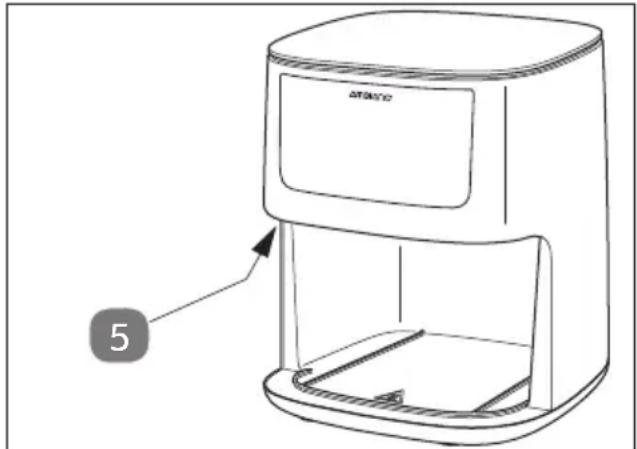
- The safety switch 5 must not be manipulated by hand in any manner.
- The device must not be operated with an external time switch or separate remote-control system.
- Keep the device, power cable and plug away from water and other liquids, open fire, heat sources and hot surfaces.
- Never touch the device and the power cable with wet or damp hands.
- Disconnect the plug by pulling the plug from the socket, never the cable.
- Never carry the device by the power cable.
- Install the cable such that it does not become a trip hazard.
- Do not kink the power cable and do not place it over sharp edges.
- Never store the device such that it can fall into a tub or sink.
- Never touch the device if it has fallen into water. In this case, disconnect the power cable immediately.
- Always switch off the device and unplug the power cable when:
- the device is not under supervision or it has finished cooking,
- you are not using the device, or it is being cleaned,
- during a thunderstorm or in the event of a malfunction.

DANGER!
Electric shock hazard!
Do not wind the power cable around the device or parts of the device. If a cable winder is present, use it accordingly.
Incorrect winding may cause damage to the cable insulation and a risk of electric shock.

WARNING!
Fire hazard!
Using adapter plugs or extension cords and exceeding the maximum permissible current may pose a fire hazard.
- Only use adapter plugs and extension cords which meet the valid safety regulations. Do not exceed the maximum permissible current of the adapter plug or extension cord.

WARNING!
Hazardous for children and persons with reduced physical, sensory or mental capabilities
or lack of experience and knowledge!
Children and persons with reduced physical or mental capabilities may be unable to recognize the danger that may arise when handling this device.
This may result in accidents causing severe injuries.
- This device may be used by children from the age of 8 and by persons with limited physical, sensory or mental capabilities or lacking experience and/or knowledge if they are under supervision or after being instructed in the device's safe use and any associated hazards.
- Do not allow children to play with the device.
- Children may not clean or maintain the device unless they are older than 8 years and are supervised.
- Children younger than 8 years should be kept away from the device and the connection cable.
- Do not allow children to play with the packaging film. They may get caught in it while playing or put it over their heads and suffocate.
WARNING!
Risk of injury!

Hot surface! Parts of this device become very hot during operation. Incorrect handling can cause severe injuries.
- Parts of the device become very hot during use. Do not touch these parts to prevent burns.
- Only touch the appliance during operation on the handle of the slide-in module and on the touch display!
- To prevent injury, keep hair, jewellery and clothing away from the device during operation.
- Never use the device if one of its parts is damaged.
- Also inform other users of the dangers.
- Hot steam escapes while the device is in operation, especially when the fry basket is pulled out. Always use oven mitts and never bend over the device.
- Always dry food thoroughly before cooking to avoid the formation of excessive steam.
- Remove frost and ice from frozen foods.
WARNING!
Risk of injury! Contact with hot steam can cause serious injury!
- During cooking, hot air escapes from the air outlet vents at the rear of the device. Keep your hands and face at a safe distance from the hot air and the air outlet vents. Also pay attention to the hot steam escaping from the joints at the front of the device. Be particularly careful when removing the fry basket from the device.

WARNING!
Fire hazard!
Hot surfaces can pose a fi re hazard.
If you use baking paper or aluminum foil without food in the cooking basket, the baking paper can ignite and it can lead to a fire.
If you use baking paper or aluminum foil, make sure that the food is evenly distributed. The baking paper or aluminum foil could end up in the heating element and ignite.
If you use baking paper or aluminum foil in the cooking basket, the airflow of the hot air will be reduced or interrupted. The cooking process may have to be extended and will be uneven.
- Never place the device on a hot gas or electric stove of any kind, electric hotplates or in the heated oven.
- Place the device on an easily accessible, level, dry, heat-resistant and sufficiently stable work surface.
- If necessary, place a non-slip mat under the rubber feet of the device, as surfaces are treated with a wide variety of cleaning agents and some of the ingredients can corrode and soften the rubber feet.
- Never place the device near or on the edge of the work surface.
- Never place the device under a kitchen cabinet or in a corner. Ensure that the device remains free at the top.
- Maintain a minimum distance of 30 cm from the rear wall of the device to other objects and at least 10 cm from the sides.
- Never place objects on the device.
- Never cover the device.
-
Do not reposition the device while it is in operation. Wait until the device has cooled down completely.
-
Keep the connection cable away from children. Children may pull on it and bring the device down on them.
- Do not fill the insert with grease or oil.
- Always place the hot fry basket/insert on a heat-resistant surface.

CAUTION!
Health hazard!
Excessively hot baking, cooking or grilling can produce health-hazardous substances.
- Do not allow the food to get too charred when baking or grilling.
- Remove any burnt foods.
Low acrylamide preparation

Acrylamide is suspected of being a carcinogenic substance that rises sharply when heating starchy foods above 175 °C.
Therefore, pay attention to the colour change of the food during preparation. Fried foods should not be served brown, but only “golden yellow”.
NOTE
Risk of damage!
Improper handling of the device can lead to overheating and damage.
- Never operate the device unattended and empty. The device could overheat, see Troubleshooting.
This can damage the heating coil and the non-stick coating and lead to the development of smoke. In this case, open the windows and air the room thoroughly.
Initial start-up Checking the scope of supply
NOTE Risk of damage!
Careless opening of the packaging with a sharp knife or other sharp object may damage the device.
- Open the packaging carefully.
- Remove all parts of the device and the operating instructions from the carton and remove the protective foils and inserted cardboard pieces.


Pull the insert 2 out of the appliance using the insert handle, see Fig. A. Remove the grill grate 3 from the insert.
- Check whether the delivery is complete (see Scope of supply).
- Check for any damaged individual parts. If this is the case, do not use them. Please contact the service address indicated on the guarantee certificate.
Before fi rst use

DANGER!
Electric shock hazard!
Never immerse the Air Fryer in water or any other liquid and never rinse it with water or cleaning agents!

CAUTION!
Production residues!
Consumption-unsuitable production-related residues may be present on or in all components of the item. Components that may come into contact with food must be checked and carefully cleaned before first use.
NOTE
Do not use scouring agents, solvents or sharp-edged objects!
- Wipe the inside and outside of the Air Fryer with a slightly damp cloth.
NOTE
Risk of damage!
The Air Fryer's fan and heating element are located at the top inside the insert compartment. Wipe this area very carefully.
- Clean the insert 2 and the grill grate 3 (see Fig. A) with hot water, a little washing-up liquid and a non-abrasive sponge.
- Then dry all parts well.

If necessary, press the removed silicone grommets 4 onto the mounts on the grill grate.
Setting up the device
Place the device on an easily accessible, level, dry, heat-resistant and sufficiently stable work surface. The rubber feet underneath the device ensure a secure hold.
Maintain a minimum distance of 30 cm from the rear wall of the device to other objects and at least 10 cm from the sides.
Completely unwind the power cord.
Operation
Only connect the device to the mains after its complete assembly.
Electric shock hazard! Ensure that the connecting cable cannot come into contact with the hot parts of the fryer.
Do not reposition the device when it is in use. Switch off the device, unplug it and allow the device to cool for 30 minutes before repositioning it.

Hot surface 7! The housing and device parts become very hot during operation.

Fire hazard!
If you use baking paper or aluminum foil without food in the cooking basket, the baking paper can ignite and it can lead to a fire.
If you use baking paper or aluminum foil, make sure that the food is evenly distributed. The baking paper or aluminum foil could end up in the heating element and ignite.
If you use baking paper or aluminum foil in the cooking basket, the airflow of the hot air will be reduced or interrupted. The cooking process may have to be extended and will be uneven.
- To set up the device, see Setting up the device.
- Prepare the food and place it in the fry basket.

Ensure that the food does not protrude beyond the edge of the fry basket. Please note the MAX mark in the cooking pot.
When preparing individual pieces of food, distribute them as far apart as possible so that the hot air can flow evenly around them. This ensures that food is cooked evenly
- Push the insert 2 all the way into the Air Fryer.
- Connect the plug to the mains supply. All symbols in the display light up briefly and 2 short beeps are emitted. The sensor field Start/Stop % 12 remains lit.
- Touch the sensor field ▶%. The display now alternately shows and flashes the pre-selection option for the cooking time and temperature.

If no further use takes place after switching on, the standby state is activated. From the standby state, the manual pre-selection of cooking time and temperature is initially opened. To reach the manual pre-selection from a program function,
touch the sensor fi eld% 12 for approx. 3 seconds and then press it again briefly.
Preheat
- In standby, touch the sensor fi eld % 12.
- The preheating function is activated with sensor field 15. The display shows 200 °C.
- You can use the sensor field — 11a or + 10a to set the temperature in the range between 40 and 200 °C (even if preheating has started).
- You can use the sensor field — 11b or + 11a to set the time between one and 60 minutes before starting preheating.

Preheating starts 3 seconds after the last entry. The current temperature is shown in the display and the sensor field 15 flashes. Once the selected preheating temperature has been reached, the sensor field lights up and
heating is ended. 3 short beeps will sound. The temperature is held for the set time, with the time counting down every minute and three short beeps sounding each time. After the time has elapsed, the device returns to standby.

After preheating, you can start cooking your preparation as described under Manual pre-selection of cooking time and temperature or Cooking with the program function.
To ensure that the food is cooked as homogeneously as possible by the stream of hot air, it should be redistributed, turned or shaken halfway through the cooking time.
When preparing French fries, they should be shaken twice during the cooking time.
Manual pre-selection of cooking time and temperature
WARNING!
Do not use the start delay function, if you intend to prepare perishable foods (e.g. meat or fish).
-
The symbol ⚠ 9a indicates the field and for changing the temperature and the symbol ⚠ 9b for changing the time with and . —
-
With the sensor fi elds + 10a / - 11a, you increase/decrease the temperature. With the sensor fi elds + 10b / - 11b, you increase/decrease the time.
- The temperature is changed in 5 °C increments ranging from 40 to 200 °C.
- The time is changed in minute increments ranging from one minute to 60 minutes.
If you continuously touch the sensor fi eld, the temperature/time will scroll forward/back quickly.
B
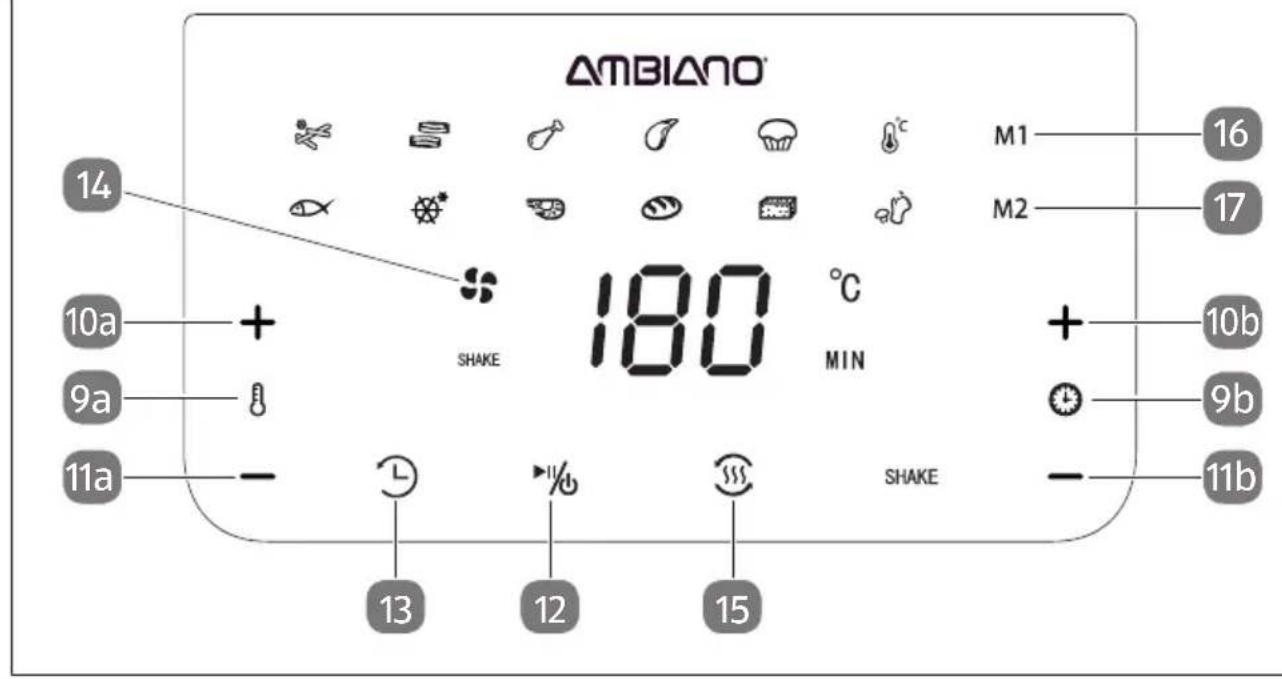
- Start cooking by touching the sensor fi eld ▶% 12, shown in Fig. B.

The indicator "Fan on" 14 indicates the operation. You can change the cooking time and temperature at any time during operation as described above.
If you want to interrupt the heating process, touch the sensor fi eld% during operation. The heating process is interrupted; the time is stopped and the sensor fi eld fl ashes. During this time, the fan continues to operate for a few seconds. Touching the sensor fi eld again will continue the cooking process.
If you want to control the cooking process or add or remove ingredients, you can pull out the insert 2 during operation. This deactivates the fan and heating element and stops the time. The sensor fi eld% 12 fl ashes. Reinserting the insert will continue the cooking process.
- To switch off the appliance within the next minute, touch the sensor fi eld% 12 for approx. 3 seconds. The fan will continue to operate for some time after the appli-ance is switched off.
Memory function for manual pre-selection of cooking time and temperature

Do not use the start delay function 13, if you intend to prepare perishable foods (e.g. meat or fish).

With the memory function you can store two individual programs for cooking time and temperature.
- Touch the sensor fi eld ▶% 12. The display now alternately shows and flashes the pre-selection option for the cooking time and temperature.
- Touch the sensor fi eld M1 16 for the fi rst memory or the sensor fi eld M2 17 for the second memory. If the memories are empty, 15 minutes at 180 °C is displayed.
- Set the required temperature and time with sensor fi elds + 10a / - 11a and + 10b / - 11b.
- Press and hold the corresponding sensor field for approx. 3 seconds to save the setting in the selected memory.
Open memory
- After switching on, touch the sensor field M1 16 or M2 17.
- Start cooking with sensor fi eld ▶% 12.
Cooking with the program function
WARNING!
Do not use the start delay function 13, if you intend to prepare perishable foods (e.g. meat or fish).

There are 12 programs available with default times and temperatures. The figure C shows the settings for "Cake" 4 .
- After switching on the device, touch the desired program icon ( 18 to 29 ).
18 Default setting for "French Fries" 20 minutes at 200 °C
19 Default setting for "Fish" 10 minutes at 180 °C
20 Default setting for "Bacon" 10 minutes at 180 °C
21 ※* Default setting for "Frozen food" 15 minutes at 180 °C
22 Default setting for "Chicken" 20 minutes at 180 °C
23 Default setting for "Shrimps" 12 minutes at 180 °C
24 Default setting for "Steak/Chops" 12 minutes at 180 °C
25 Default setting for "Bread" 15 minutes at 160 °C
26 Default setting for "Cake" 30 minutes at 160 °C
27 Default setting for "Tofu" 15 minutes at 160 °C
28 Default setting for "Keep-warm function" 60 minutes at 60 °C
29 Default setting for "Vegetables" 15 minutes at 160 °C
The selected program is indicated by the flashing symbol.


The temperature of the program is displayed alternately, first flashing and then the time. The cooking time and/or the temperature can be changed at any time before and during operation, as required, as described under
Manual pre-selection of the cooking time and the temperature.
If no further use takes place after the program selection, the standby state is activated. If you redistribute, turn or shake the food several times during the cooking time, you will achieve more even cooking (see under SHAKE function). To do this, pull out the drawer and slide it back into the appliance afterwards. Alternatively, place the insert on a heat-resistant surface and turn / distribute the food with the help of the appropriate utensils.
Start delay function

WARNING!
This function must not be used if no one is present in the living spaces.
Do not use the start delay function, if you intend to prepare perishable foods (e.g. meat or fish).
- Prepare the food to be cooked, slide the insert 2 completely into the Air Fryer and connect the power plug to the power supply.
- Set the temperature and time or select the required program function.
- Touch the sensor fi eld 13. The display now shows 90 MIN. By repeatedly touching the sensor fi elds+10b and -11b, you can adapt the start delay time:
1 0 - > 2 0 - > 3 0 - > 6 0 - > 9 0
D
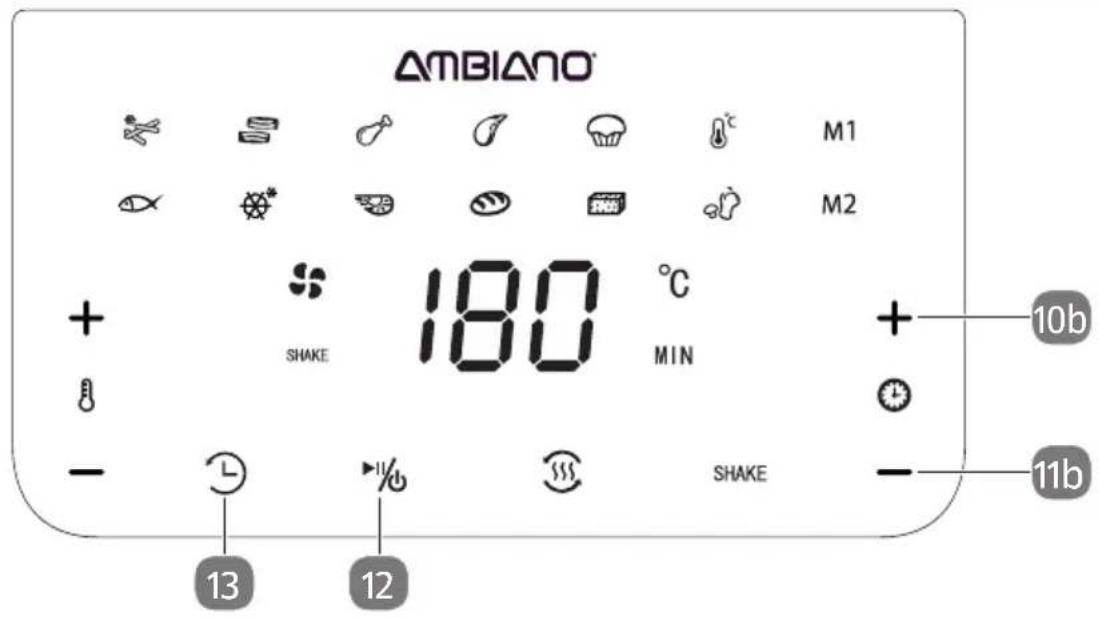
- Touch the sensor field 12 % in order to start the timer. The sensor field 13 flashes and the remaining time until program start is shown in the display. The cooking process starts after the set minutes have elapsed.

If you do not activate the sensor fi eld % , the appliance will remain switched on. In order to change the delay time during the function, touch the sensor fi eld 13 twice. 90 MIN will be displayed. Set the new required delay time and start the cooking process with %
SHAKE function

The SHAKE function reminds you after half of the cooking time with the flashing SHAKE 31 symbol and with short beeping tones, if the food being cooked needs to be redistributed, fl ipped or shaken during the cooking time.
The “Chips” program is a special feature. This provides the message after one-third and two-thirds of the cooking time.
E
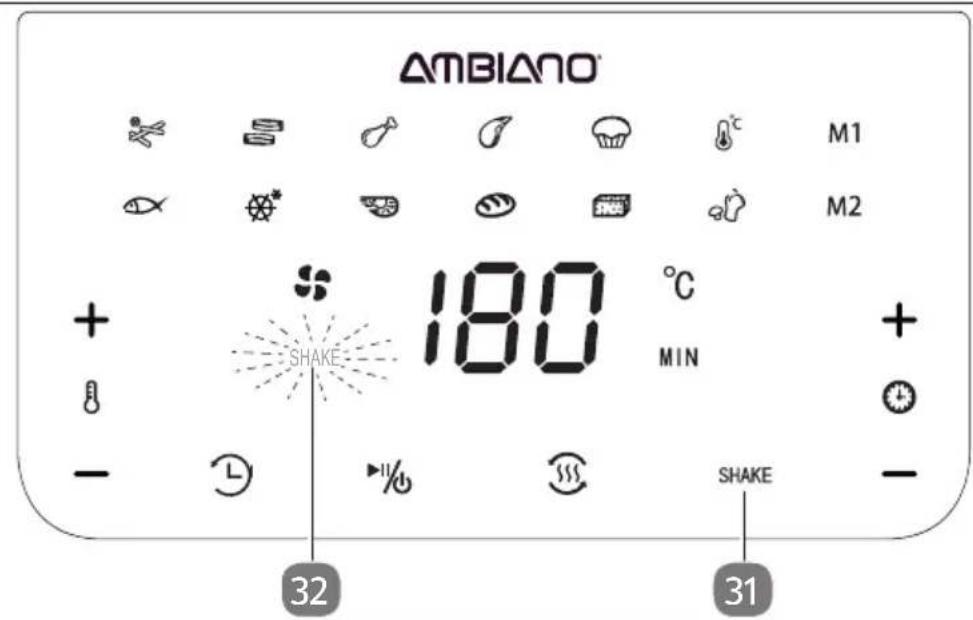
- Touch the SHAKE 31 sensor field before or after the program starts. The SHAKE 32 symbol lights up continuously.
The symbol flashes after reaching half (one-third/two-thirds for “Chips”) of the cooking time.
After you have removed the drawer, the SHAKE function is deactivated. With the “Chips” program, the SHAKE function is deactivated after the second message and pulling out the drawer.
At the end of the cooking process

Once the time has elapsed, the 3 short beeps sound and the standby state is activated.
If you want to end the cooking process before the time has elapsed, touch and hold the sensor fi eld% 12 for approx. 3 seconds. The fan will continue to operate for some time after the device is switched off.
During this time, no further settings can be made.
- Unplug the device from the power supply.

Hot surface 7! The housing and device parts become very hot during operation.
- Use the handle 6 to pull the insert 2 out of the device and place the insert on a heat-resistance surface.
- Remove the food from the fry basket.
Keep-warm function

After the selected program has elapsed, you can start the keep-warm function. In the keep-warm function, you can only reduce the time. The temperature is pre-set at 40\ °C and is not changeable.
- Touch the sensor fi eld 12 and select the keep-warm function 28.
- If necessary, reduce the keep-warm time with —11b.
After reducing it, the time can be increased to 60 minutes again.
- Start the keep-warm function with the sensor fi eld 12.
T h e k e e p - w a r m t i m e O n c e t h e t i m e h a s e
Cooking times, temperatures and quantities

The times, temperatures and quantities listed below are only approximate values. They can vary to a greater or lesser degree depending on the nature of the food being cooked.
| Potatoes / French fries | Quantity in grams | Time in minutes | Temperature in °C | Turn / shake | Additional information |
| Fried potato cakes 200 15 - 18 180 No | |||||
| Thin frozen chips 300 - 400 18 - 25 200 Yes | |||||
| Thick frozen chips 300 - 400 20 - 25 200 Yes | |||||
| Raw French fries (8 x 8 mm) | 300 - 400 20 - 25 200 Yes Add 1/2 ta- | blespoon of oil | |||
| Potato Gratin | 500 | 20 - 25 200 Yes | Use | Suitable container | |
| Bread | 350 - 1100 | 15 - 55 | 120 - 160 | No | Use suitable container |

Add a little oil to raw potatoes to prevent them from sticking together and to make them crispier. Add the oil after you have cut the potatoes and before placing them in the fry basket. Subsequent stirring will distribute the oil onto
the cut surfaces. Drain any excess oil before placing the potatoes in the fry basket.
| Meat, poultry and seafood | Quantity in grams | Time in minutes | Temperature in °C | Additional information |
| Fish 100 - 400 10 - 18 180 | ||||
| Prawns 100 - 400 8 - 15 180 | ||||
| Steak 100 - 350 12 - 20 200 | preheat | |||
| Pork chops 100 - 400 10 - 15 200 preheat | ||||
| Chicken legs 100 - 500 20 - 25 180 | ||||
| Chicken breast 100 - 500 20 - 25 180 | ||||
| Chicken nuggets, frozen | 100 - 500 | 15 - 20 | 200 | turn / shake |

Avoid cooking foods with a very high fat content. Note that large pieces take longer than two smaller ones, for example. Turn smaller pieces during cooking to achieve even cooking.
| Dessert / Vegetables | Quantity in grams | Time in minutes | Temperature in °C | Turn / shake | Additional information |
| Cake | 300 | 30 | 120 - 160 | No | Use suitable container |
| Muffins | 300 | 15 | 160 | No | |
| Spring rolls | 100 - 400 | 8 - 10 | 200 | Yes | |
| Boiled vegetables | 100 - 400 | 15 - 20 | 160 | Yes | Add 1/2 tablespoon of oil |
| Breaded cheese | 100 - 400 | 8 - 10 | 180 | No | |
| Tofu | 200 - 400 | 15-25 | 200 | No |
Cleaning and storage
Cleaning

DANGER!
Electric shock hazard!
Before cleaning, switch off the device and unplug it from the socket.
Never immerse the Air Fryer in water or any other liquid and never rinse it with water or cleaning agents!

WARNING!
Hot surfaces!

Hot surfaces can pose a risk of burns.
Before cleaning, leave the device to cool for at least 30 minutes. Remove the insert 2, so that the device can cool down faster.
NOTE
Risk of damage!
Do not use scouring agents, solvents or sharp-edged objects!

Leave all parts to cool before cleaning them. Clean accessories thoroughly after use to prevent residues from drying.
- Use a damp cloth to clean the surfaces of the device.
- Clean the insert 2 with hot water, a little detergent and a non-abrasive sponge.
You can use a degreasing detergent to remove any remaining dirt. Dry all parts thoroughly. - Clean the interior of the Air Fryer with a damp cloth and a little detergent.
Storage

DANGER!
Electric shock hazard!
Do not wind the power cable around the device or parts of the device. If a cable winder is present, use it accordingly.
Incorrect winding may cause damage to the cable insulation and a risk of electric shock.
Wind the power cable around the power cable bracket 7 so that you can stow the appliance away in a compact manner, see Fig. A. Clean the device and store it in a dry place away from dirt, out of the reach of children.
Technical data
Model: GT-AF-15-AUS
Supply voltage: 220-240 V\~
Mains frequency : 50 Hz
Power consumption: 1700 W
Cable length: approx. 100 cm
Capacity: Approx. 6.2 L
Timer: 1-60 minutes
Temperature range: 40-200 °C
Because our products are constantly being further developed and improved, design modifications and technical changes are possible.
Troubleshooting
| Problem Possible cause and remedy | |
| The device does not work. | Device is not plugged in.- Connect the plug to the mains supply. |
| Sensor fi eld 12 was not activated.- Touch the symbol | |
| Insert 2 was not fully inserted.- Push the insert in fl ush with the front of the device. | |
| Overheating protection triggered.- Unplug the device. Do not use the device. Contact the Service Center. | |
| Food is still raw. Too much | food in the basket.- Reduce the amount of food. |
| Temperature too low.- Increase the temperature. | |
| Cooking time too short.- Increase the cooking time. | |
| Food not cooked evenly. Food | Food must be turned.- Turn the food. |
| Insert cannot be pushed in. | The insert is overfi lled.- Fill less food in the insert. |
| Escaping steam. A normal frying process. | |
| Escaping white smoke. Very fatty foods. | - No negative effect. Avoid very fatty foods. |
| Oil residue in insert.- Clean all parts after use. | |
| The device continues to operate after insert is removed. | Faulty safety switch 5 or other component, see Safety instructions.- Unplug the device. Do not use the device. Contact the Service Center. |
Disposal
Disposing of the packaging

For more information on recycling visit arl.org.au
Dispose of the packaging separated into single type materials. Dispose of cardboard and carton as waste paper and foils via the recyclable material collection service.
Disposing of old devices
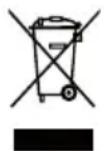
Old devices must not be disposed of with household waste!
Should the device no longer be capable of being used at some point in time, dispose of it in accordance with the regulations in force in your city or state.
Please ensure your recycling information applies to the local regulations.
6.2L DIGITAL AIR FRYER
Warranty Details
REGISTER YOUR PURCHASE AT www.aldi.com.au/en/about-aldi/product-registration/TO KEEP UP-TO-DATE WITH IMPORTANT PRODUCT INFORMATION
The product is guaranteed to be free from defects in workmanship and parts for a period of 36 months from the date of purchase. Defects that occur within this warranty period, under normal use and care, will be repaired, replaced or refunded at our discretion. The benefits conferred by this warranty are in addition to all rights and remedies in respect of the product that the consumer has under the Competition and Consumer Act 2010 and similar state and territory laws.
Our goods come with guarantees that cannot be excluded under the Australian Consumer Law. You are entitled to a replacement or refund for a major failure and for compensation for any other reasonably foreseeable loss or damage. You are also entitled to have the goods repaired or replaced if the goods fail to be of acceptable quality and the failure does not amount to a major failure.
6.2L DIGITAL AIR FRYER
Repair and Refurbished Goods or Parts Notice
REGISTER YOUR PURCHASE AT www.aldi.com.au/en/about-aldi/product-registration/TO KEEP UP-TO-DATE WITH IMPORTANT PRODUCT INFORMATION
Unfortunately, from time to time, faulty products are manufactured which need to be returned to the Supplier for repair.
Please be aware that if your product is capable of retaining user-generated data (such as files stored on a computer hard drive, telephone numbers stored on a mobile telephone, songs stored on a portable media player, games saved on a games console or files stored on a USB memory stick) during the process of repair, some or all of your stored data may be lost.
We recommend you save this data elsewhere prior to sending the product for repair.
You should also be aware that rather than repairing goods, we may replace them with refurbished goods of the same type or use refurbished parts in the repair process.
Please be assured though, refurbished parts or replacements are only used where they meet ALDI's stringent quality specifications.
If at any time you feel your repair is being handled unsatisfactorily, you may escalate your complaint. Please telephone us on 1800 269 981 or write to us at:
Wunsche (Australia) Pty Ltd
c/o Install and Fix Solutions Pty Ltd
Unit 1, 9 Kingsbury Street Brendale, Queensland 4500
AUSTRALIA
Hotline: 1800 269 981
Operating hours: 8.30-6.00 pm Monday – Friday
support@wunsche.com.au
ALDI guarantees that our exclusive brand products are developed to our stringent quality specifications. If you are not entirely satisfied with this product, please return it to the nearest ALDI store within 60 days from the date of purchase, for a full refund or replacement, or take advantage of our after sales support by calling the supplier's Customer Service Hotline.

Made in China
AMBIANO® is a registered trademark of ALDI Stores
DISTRIBUTED BY:
ALDI STORES
1 SARGENTS ROAD
MINCHINBURY NSW 2770
www.aldi.com.au





- CONTENTS
- SCOPE OF SUPPLY 2
- GENERAL....4
- EXPLANATION OF SYMBOLS....5
- SAFETY....6
- INITIAL START-UP ....13
- OPERATION....15
- COOKING TIMES, TEMPERATURES AND QUANTITIES 24
- CLEANING AND STORAGE 26
- TECHNICAL DATA....27
- TROUBLESHOOTING 28
- DISPOSAL....29
- GENERAL
- READ AND KEEP OPERATING INSTRUCTIONS
- EXPLANATION OF SYMBOLS
- SAFETY
- INTENDED USE
- NEVER USE THE AIR FRYER TO HEAT WATER OR OTHER LIQUIDS
- SAFETY INSTRUCTIONS
- DANGER
- ELECTRIC SHOCK HAZARD
- WARNING
- FIRE HAZARD
- HAZARDOUS FOR CHILDREN AND PERSONS WITH REDUCED PHYSICAL, SENSORY OR MENTAL CAPABILITIES
- OR LACK OF EXPERIENCE AND KNOWLEDGE
- RISK OF INJURY
- RISK OF INJURY! CONTACT WITH HOT STEAM CAN CAUSE SERIOUS INJURY
- CAUTION
- HEALTH HAZARD
- LOW ACRYLAMIDE PREPARATION
- NOTE
- RISK OF DAMAGE
- INITIAL START-UP CHECKING THE SCOPE OF SUPPLY
- NOTE RISK OF DAMAGE
- BEFORE FI RST USE
- NEVER IMMERSE THE AIR FRYER IN WATER OR ANY OTHER LIQUID AND NEVER RINSE IT WITH WATER OR CLEANING AGENTS
- PRODUCTION RESIDUES
- DO NOT USE SCOURING AGENTS, SOLVENTS OR SHARP-EDGED OBJECTS
- SETTING UP THE DEVICE
- OPERATION
- PREHEAT
- MANUAL PRE-SELECTION OF COOKING TIME AND TEMPERATURE
- DO NOT USE THE START DELAY FUNCTION, IF YOU INTEND TO PREPARE PERISHABLE FOODS (E.G. MEAT OR FISH)
- MEMORY FUNCTION FOR MANUAL PRE-SELECTION OF COOKING TIME AND TEMPERATURE
- DO NOT USE THE START DELAY FUNCTION 13, IF YOU INTEND TO PREPARE PERISHABLE FOODS (E.G. MEAT OR FISH)
- OPEN MEMORY
- COOKING WITH THE PROGRAM FUNCTION
- MANUAL PRE-SELECTION OF THE COOKING TIME AND THE TEMPERATURE
- START DELAY FUNCTION
- THIS FUNCTION MUST NOT BE USED IF NO ONE IS PRESENT IN THE LIVING SPACES
- SHAKE FUNCTION
- AT THE END OF THE COOKING PROCESS
- HOT SURFACE 7! THE HOUSING AND DEVICE PARTS BECOME VERY HOT DURING OPERATION
- KEEP-WARM FUNCTION
- COOKING TIMES, TEMPERATURES AND QUANTITIES
- CLEANING AND STORAGE
- CLEANING
- STORAGE
- TECHNICAL DATA
- DISPOSAL
- DISPOSING OF THE PACKAGING
- DISPOSING OF OLD DEVICES
- OLD DEVICES MUST NOT BE DISPOSED OF WITH HOUSEHOLD WASTE
- 6.2L DIGITAL AIR FRYER
- WARRANTY DETAILS
- REPAIR AND REFURBISHED GOODS OR PARTS NOTICE
- MADE IN CHINA
Brand : Ambiano
Model : GT-AF-15
Category : Deep fryer