
PartyKing1 Play - Loudspeaker Lamax - Free user manual and instructions
Find the device manual for free PartyKing1 Play Lamax in PDF.


| Product Type | Portable Bluetooth Speaker |
| Brand | Lamax |
| Model | PartyKing1 Play |
| Dimensions (W x H x D) | Approx. 20 x 10 x 10 cm |
| Weight | Approx. 500 g |
| Power Source | Built-in rechargeable battery, USB charging (5V/1A) |
| Battery Capacity | 2000 mAh |
| Playtime | Up to 6 hours at moderate volume |
| Charging Time | Approx. 3 hours |
| Bluetooth Version | 5.0 |
| Wireless Range | Up to 10 meters |
| Speaker Output | 10W (RMS) |
| Frequency Range | 80 Hz - 20 kHz |
| Water Resistance | IPX5 (splash-proof) |
| Connectivity | Bluetooth, AUX-in, USB (for media playback) |
| Microphone | Built-in for hands-free calls |
| Controls | Buttons on speaker: power, play/pause, volume, track skip, Bluetooth pairing |
| Accessories Included | USB charging cable, AUX cable, user manual |
| Cleaning Instructions | Wipe with dry cloth; do not use liquids or abrasives |
| Safety | Do not expose to extreme temperatures or moisture |
| Repairability | Not designed for user repair; contact Lamax support |
Frequently Asked Questions - PartyKing1 Play Lamax
User questions about PartyKing1 Play Lamax
0 question about this device. Answer the ones you know or ask your own.
Ask a new question about this device
Download the instructions for your Loudspeaker in PDF format for free! Find your manual PartyKing1 Play - Lamax and take your electronic device back in hand. On this page are published all the documents necessary for the use of your device. PartyKing1 Play by Lamax.
USER MANUAL PartyKing1 Play Lamax
LAMAX PartyKing1 Play

BOX CONTENT
1× LAMAX PartyKing1 Play
1× Wireless microphone
1× USB-C power cable
1×3.5 mm AUX cable
1× User manual
1× Safety instructions
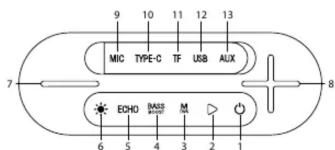
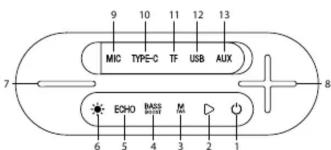
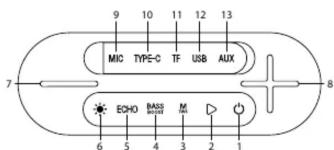
DESCRIPTION
| 1 | On/Off | 8 | Increase volume / Next track / Next radio station |
| 2 | Play/Pause | 9 | Microphone input |
| 3 | TWS function (True Wireless Stereo)Switch inputs | 10 | Input for USB-C power cable and LED indicator |
| 4 | Enable/Disable BeatBass function | 11 | Micro SD card slot |
| 5 | Set microphone echo level | 12 | USB input |
| 6 | LED lighting settings | 13 | 3.5 mm AUX cable input |
| 7 | Decrease volume / Previous track / Previous radio station |
SPEAKER CONTROLS
Charging
Fully charge the speaker battery before using it for the first time.
Charge the speaker with the supplied USB-C power cable.
LED indicator
LED is red – speaker battery is charging.
LED is green – speaker battery is fully charged.
On / Off
Press and hold the button ⏻ to turn the speaker on/off.
Bluetooth pairing
-
Turn on the speaker – this will automatically put it into pairing mode.
-
Activate the Bluetooth function on your device and search for
„LAMAX PartyKing1 Play“ on the list of available Bluetooth de-
vices. After successful pairing, there will be a sound notification.
-
If prompted to pair with a password, enter "0000" and confirm.
-
Playback can be controlled either with the paired device or di-
rectly on the speaker.
LED lighting
Press the button ⚙ to adjust the LED lighting option.
Press and hold the button ⚙ to turn off the LED lighting.
Switching inputs
Press the button M to set the input for playback
a) Bluetooth
b) Micro SD
c) AUX
d) USB
e) FM Radio
FUNCTION CONTROLS
TWS (True Wireless Stereo)
- To pair two speakers, turn on both speakers at the same time and
make sure they are not paired with another device
-
Press and hold the button M on either speaker.
-
After successful pairing, there will be a sound notification.
-
Playback can be controlled either with a paired device, directly on
the speaker or with the remote control.
FM Radio
-
Press the button M to turn on the FM radio
-
The station will tune in automatically.
-
Use the + button to select the next station
-
Use the - button to select the previous station.
Bass Boost
Press the button BASS to select the equaliser option.
a) Classic – normal bass level
b) BeatBass – higher bass level
Microphone
-
Turn on the microphone by pressing and holding the button 🔊
-
The microphone automatically pairs with the speaker.
-
Press and hold to turn off the microphone
Display is on – microphone is connected to the speaker.
Display flashes slowly – microphone is not connected to the spea
ker.
Display flashes fast – low microphone battery.
SPECIFICATIONS
| Wireless technology | Bluetooth 5.3 |
| Maximum pairing distance | Up to 15 m |
| Supported codecs | MP3, WAV |
| Battery capacity | 6000 mAh |
| Play time (80% volume) | Up to 13 hour |
| Charging time | 4 h |
| Sensitivity | ≥ 80 dB |
| Maximum performance | 80 W |
| Frequency range | 80 Hz - 12 kHz |
| Weight | 4.5 kg |
Printing errors reserved.
Download the latest version of the User Manual here:
https://lamax-electronics.com/partyking1play/manual


CE RoHS
LAMAX PartyKing1 Play
PACKUNGSINHALT
1× LAMAX PartyKing1 Play
1× Funkmikrofon
1× USB-C-Stromkabel
1×3,5-mm-AUX-Kabel
1× Benutzerhandbuch
https://lamax-electronics.com/partyking1play/manual


CE RoHS
LAMAX PartyKing1 Play

OBSAH BALENÍ
1× LAMAX PartyKing1 Play
https://lamax-electronics.com/partyking1play/manual


LAMAX PartyKing1 Play
OBSAH BALENIA
1× LAMAX PartyKing1 Play
https://lamax-electronics.com/partyking1play/manual


LAMAX PartyKing1 Play
ZAWARTOŚĆ PUDEŁKA
1× LAMAX PartyKing1 Play
https://lamax-electronics.com/partyking1play/manual


CE RoHS
LAMAX PartyKing1 Play

DOBOZ TARTALMA
1× LAMAX PartyKing1 Play
https://lamax-electronics.com/partyking1play/manual


CE RoHS
LAMAX PartyKing1 Play

VSEBINA ŠKATLE
1× LAMAX PartyKing1 Play


Brand : Lamax
Model : PartyKing1 Play
Category : Loudspeaker