
BHF07 MAX - FM Transmitter Navitel - Free user manual and instructions
Find the device manual for free BHF07 MAX Navitel in PDF.


| Product Type | FM Transmitter with Hands-Free |
| Bluetooth Version | 5.3 |
| Bluetooth Range | Up to 10 m (line of sight), 5 m with obstacles |
| FM Frequency Range | 87.5 – 108.0 MHz |
| Input Voltage | 12 – 24 V DC |
| USB-A Output (FC 3.0) | 5V/3A, 9V/2A, 12V/1.5A |
| USB-C Output (PD) | 5V/3A, 9V/3A, 12V/2.5A |
| Fast Charging Protocols | QC 3.0, FC 2.0, PD, Huawei FCP, Samsung AFC, BC1.2, Apple 2.4A |
| Hands-Free Calling | Yes, with built-in microphone |
| Audio Playback | Via Bluetooth, AUX, or FM transmission |
| AUX Input/Output | 3.5 mm jack for input (external source) or output (car audio) |
| Backlight Control | Multiple colors and breathing mode |
| Protection Features | Over-voltage, over-current, short-circuit, over-temperature |
| Automatic Connection | Yes, reconnects to last paired device |
| Display | Yes, shows frequency, voltage, etc. |
| Power Source | Car cigarette lighter socket |
Frequently Asked Questions - BHF07 MAX Navitel
User questions about BHF07 MAX Navitel
0 question about this device. Answer the ones you know or ask your own.
Ask a new question about this device
Download the instructions for your FM Transmitter in PDF format for free! Find your manual BHF07 MAX - Navitel and take your electronic device back in hand. On this page are published all the documents necessary for the use of your device. BHF07 MAX by Navitel.
USER MANUAL BHF07 MAX Navitel
natural_image
Close-up of a stainless steel digital water heater with a colorful sensor grille and control panel (no visible text or symbols)NAVITEL BHF07 MAX
BT Hands Free FM Transmitter
Úvod
Funkce
NAVITEL BHF07 MAX – FM-transmitter with Hands Free function, capable of playing audio files from external media via AUX, Bluetooth or FM.
Device layout
- Multifunctional button.
- Light.
- USB-C PD connector.
- AUX connector.
- Backlight control button.
- Display.
- USB-A FC connector.
- Microphone.
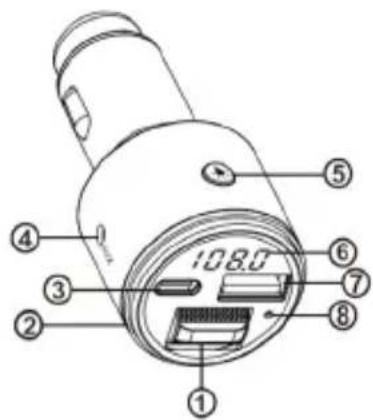
Features
- Play audio files from external media via AUX, Bluetooth or FM.
- Support C 3.0, FC2.0, PD, HUAWEI FCP, SAMSUNG AFC, BC1.2, Apple 2.4A fast charging protocols.
- Support hands-free function.
- Support output over voltage protection, over current protection, short circuit protection and over temperature protection.
- Automatic connection.
- Configurable backlight.
Specification
| Bluetooth version 5.3 | |
| Bluetooth transmission distance | obstacle up to 5 m straight line up to 10 m |
| Bluetooth frequency range 2.4 - 2.485 GHz | |
| USB-A connector FC 3.0, 5V/3A, 9V/2A, 12V/1.5A | |
| USB-C connector PD, 5V/3A, 9V/3A, 12V/2.5A | |
| FM transmitting frequency 87.5 | - 108.0 Mhz |
| Input voltage 12 - 24 V | |
| FM maximum EIRP -20.22 dBm | |
| Maximal power 68 dBu | |
| FM Antenna Gain | 0.75 dB (5-times extra magnification) |
Installation
- Insert the device into the cigarette lighter. The device will turn on automatically, then the voltage of the car's on-board network will be shown.
- Set the transmit frequency on the device, then tune your radio to the same frequency.
- Bluetooth connection - open the Bluetooth connection menu on device from which the audio file will be played. Find BHF07 MAX in the list of available devices and click "connect".
- Setting FM-frequency – to set the FM frequency, press and hold until the current frequency flashes. Scroll up/down to increase/decrease frequency. Confirm your selection by briefly pressing
- Volume control – simultaneously press and scroll up/down to increase/decrease volume.
- Switching of audiofiles - press 📄 to play/pause. To switch to the next/previous audio file scroll 📋 up/down.
- Making calls - to answer/hang up incoming call press 📄. To reject incoming call hold 📄. To redial the last number press 📄 twice.
- Backlight control - press ⚙ to select the backlight color. Hold ⚙ to turn "Breathing" mode on. Press ⚙ briefly several times until the backlight turns off.
- Playing via AUX - for "AUX input" insert one plug of the AUX cable into the corresponding connector on the FM transmitter, and insert the other plug into the audio source: smartphone, tablet, laptop, etc.
Note: for "AUX input" mode operation device's buttons don't work. Playing via FM-transmitter. The sound is played via Bluetooth on headphones and speakers.
- For "AUX output" mode operation insert plug of headphones or speakers into the corresponding connector on the FM transmitter. To play audio files through the car's speakers using the AUX cable included in the kit, insert one plug into the FM transmitter, and the other into the car's audio system.
Note: in this operating mode, audio files from an audio source are played via a Bluetooth connection.
Troubleshooting
| The device does not turn on | Make sure the FM transmitter is securely seated in the cigarette lighter socket.Make sure that there is corrosion in the cigarette lighter socket.Disconnect and connect the device again.Check if power is being supplied to the cigarette lighter socket. |
| Music is not playing, no sound | Check if a audio source is connected to the device or try another audio source.Make sure, that the device is not in pause.Make sure that FM-frequency of the device is tuned to the same frequency as the radio reciever.Make sure the volume is not set to 0. |
| Device interference | Make sure that current frequency doesn't coincide with the frequency of existing radiostation.Most electronic devices such as computers, telephones, televisions, etc. generate a magnetic field. Do not place any electronic devices near the FM radio to avoid interference. |
Precautionary measures
- Do not expose the device to physical impacts.
- Do not use this product in a dusty and humid environment with extremely high/low temperatures.
- Do not disassemble or repair device by yourself. In case of device failure, contact the service center.
- When starting the car engine, the device must be disconnected from the cigarette lighter.
- When using this product, obey applicable local laws and traffic regulations.
- When using the device, ensure that airbags and safety zones, controls and instruments are not obstructed, or that the driver's visibility is not obstructed.
- Avoid contacting the device with sources of electromagnetic radiation.
- Put the device away from fire sources to avoid explosion or fire.
- Strictly follow the laws and regulatory acts of the region where the device is used. This device can not be used for illegal purposes.
- Do not operate the device if it is visibly damaged.
- The manufacturer is not liable for damage resulting from incorrect installation/mounting, improper use of the product or non-observance of the operating instructions and/or safety instructions.
Wstep
Cechy
Особенности
Funkcie
UA
Особливості

Brand : Navitel
Model : BHF07 MAX
Category : FM Transmitter