NF-468V - Uncategorized Noyafa - Free user manual and instructions
Find the device manual for free NF-468V Noyafa in PDF.


| Type | Cable tester for network (RJ45) and telephone (RJ11/RJ12) cables |
| Model | NF-468V |
| Brand | Noyafa |
| Power Supply | 9V battery (not rechargeable) or external power via charging port (AC adaptor/power bank) |
| Cable Types Supported | RJ45 (8P8C) for network cables; RJ11 (6P4C) and RJ12 (6P6C) for telephone cables |
| Wiring Standards | T568A and T568B |
| Testing Functions | Open circuit, short circuit, crossed wires, and sequential continuity check |
| Indicators | LED indicators for pins 1-8 and G (shield); power LED |
| Speed Modes | ON (normal speed) and S (slow speed) for easier observation |
| Main Unit & Remote Unit | Includes both main tester and remote tester for end-to-end testing |
| Dimensions (approx.) | Main: 110 x 70 x 30 mm; Remote: 70 x 50 x 25 mm |
| Weight (approx.) | Main: 120 g; Remote: 60 g (without battery) |
| Safety | Do not use on live circuits; only for passive cable testing |
| Maintenance | Clean with a dry, soft cloth; avoid moisture and solvents |
| Reparability | No user-serviceable parts; replacement of battery is the only user action |
| Accessories Included | Main tester, remote tester, user manual (may vary by region) |
Frequently Asked Questions - NF-468V Noyafa
User questions about NF-468V Noyafa
0 question about this device. Answer the ones you know or ask your own.
Ask a new question about this device
Download the instructions for your Uncategorized in PDF format for free! Find your manual NF-468V - Noyafa and take your electronic device back in hand. On this page are published all the documents necessary for the use of your device. NF-468V by Noyafa.
USER MANUAL NF-468V Noyafa
natural_image
Cartoon illustration of a mouse wearing a graduation cap and holding a pencil, giving a thumbs-up (no text or symbols)Your excellent helper in cable test!
Your excellent helper in cable test!
NEW!
NF-468V/NF-468N
INSTRUCTION MANUAL


NF-468V
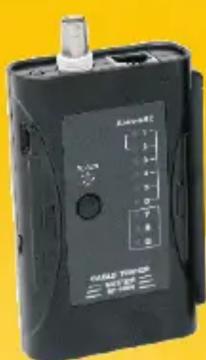

NF-468N

natural_image
Cartoon mouse wearing a graduation cap and holding a pencil, giving a thumbs-up (no text or symbols)VER: V1

T568B
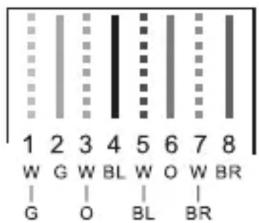
T568A
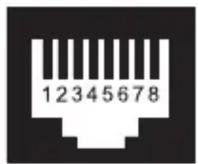
8P8C

6P6C

PLUG

Please read and learn safety instructions before use or maintain the equipment
Instructions:
● The basic NF-468N & NF-468V LAN tester is used for testing the pin out status only.
NF-468N is to check physical status of network cable & coax cable.
NF-468V is to check physical status of network cable & telephone cable.
- Two types of power supply: one is 9V battery, the other type is AC Charge adaptor / power bank connects to the charging port.
Warnings:
● The devices should not be used on a live circuit.
● The charging port is to supply power for the device, not for the battery.
Operation
Turn on the tester and choose "ON" for normal speed and "S" for slow speed light indication. Plug in your cord to be tested to the main unit and the remote and if all correct the indicators will light up in sequence from 1 to 8 (or G if shielded). If they do not light up in in sequence you will have a short circuit, wrong wiring or open circuit in your patch cord or wiring network that is being tested.
- If there is an open circuit on any of the wire connections then the corresponding light on both the main and remote testers will remain off.
- If less than two wires are connected correctly then all of the lights on the main and remote testers will remain off.
- If any connections are crossed, for example if one end of the wire is connected to connection No.2 and the other end is connected to connection No.4 then the lights on the remote will turn on out of sequence, the following sequence of lights will show on the testers.
Main Tester: 1-2-3-4-5-6-7-8-G
Remote Tester: 1-4-3-2-5-6-7-8-G
It can be seen that lights for connection No2 and connection No.4 are out of sequence which indicates they are crossed.
-
If two wires are short circuited then the corresponding lights on the remote will remain off.
-
Matching test leads are required on the main and remote testers, e.g. both RJ45 or both RJ11 or BNC.
Test BNC Cable (NF-468N)
- Switch on the power, choose "ON" or "S", the power light will turn on.
- Connect RJ45 port of BNC adapter with remote tester, then insert one end of BNC cable into BNC port of main tester, the other end into BNC connector. The lights of the main tester and remote tester will turn on sequentially from 1 to 2 and circulates.

NF-468N Main Tester
NF-468N Remote Tester
-
If the cable is breakage, disorder, short circuit, the result is as what was said in operation.
-
After operation, turn off the tester.
Test RJ45 Cable (NF-468V/NF-468N)
- Switch on the power, choose "ON" or "S", the power light will turn on.
- If UTP tested, the lights of the main tester and remote tester will turn on sequentially from 1 to 8 and circulates; If STP tested, the lights of the main tester and remote tester will turn on sequentially from 1 to G and circulates.
- If the cable is breakage, disorder, short circuit, the result is as what was said in operation.
- After operation, turn off the tester.
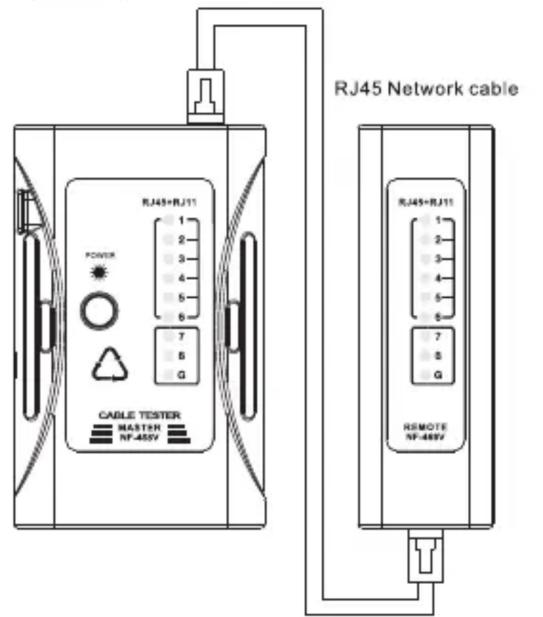
NF-468V Main Tester
NF-468V Remote Tester
Test RJ11 Cable(NF-468V)
- Switch on the power, choose "ON" or "S", the power light will turn on.
- If RJ11 cable tested, the lights of the main tester and remote tester will turn on sequentially from 2 to 5 and circulates. If RJ12 tested, the lights of the main tester and remote tester will turn on sequentially from 1 to 6 and circulates.
- If the cable is breakage, disorder, short circuit, the result is as what was said in operation.
- After operation, turn off the tester.

NF-468V Main Tester
NF-468V Remote Tester
Diagram of series products
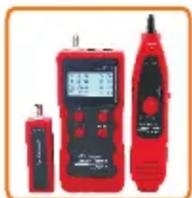
NF-868

NF-268

NF-8601

NF-806B

NF-800

NF-816

NF-622

NF-820
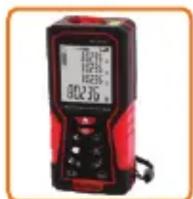
NF-2100

NF-708

NF-905

NF-911
Brand : Noyafa
Model : NF-468V
Category : Uncategorized