NF-811 - Uncategorized Noyafa - Free user manual and instructions
Find the device manual for free NF-811 Noyafa in PDF.


| Product Type | Wire Tracker (Cable Tester) |
| Brand | Noyafa |
| Model | NF-811 |
| Transmitter Dimensions (LxWxH) | 130 x 47 x 35 mm |
| Receiver Dimensions (LxWxH) | 180 x 45 x 30 mm |
| Total Weight | 113 g |
| Power Source | DC 9V battery (NEDA 1604/6F22) |
| Battery Quantity | 2 (one for transmitter, one for receiver) |
| Tone Frequency | 200 kHz |
| Maximum Tracing Distance | 2 km |
| Max Working Current (Transmitter) | 30 mA |
| Max Working Current (Receiver) | 80 mA |
| Compatible Connectors | RJ11, RJ45 |
| Functions | Cable tracing, wire mapping (continuity), telephone line condition & polarity test |
| Volume Regulation | Adjustable (0-8) on receiver |
| Signal LED | Yes |
| Earphone Jack | Yes |
| Voltage Protection | DC 60V (do not connect to live circuits >60V) |
| Package Contents | Transmitter, receiver, earphone, carry bag, RJ11 adapter cable, RJ45 adapter cable, crocodile clip, 2x 9V batteries, user manual |
| Safety Warning | Never connect to live circuits above 60V DC to avoid damage |
Frequently Asked Questions - NF-811 Noyafa
User questions about NF-811 Noyafa
0 question about this device. Answer the ones you know or ask your own.
Ask a new question about this device
Download the instructions for your Uncategorized in PDF format for free! Find your manual NF-811 - Noyafa and take your electronic device back in hand. On this page are published all the documents necessary for the use of your device. NF-811 by Noyafa.
USER MANUAL NF-811 Noyafa
natural_image
Cartoon illustration of a mouse wearing a graduation cap and holding a pencil, giving a thumbs-up (no text or symbols)Your excellent helper in cable test!
Your excellent helper in cable test!
Wire Tracker INSTRUCTION MANUAL


VER: V1
NF-811
Table of Contents
- Overview....1
- Product features.... 1
- Product introduction....1
- Interfaces....2
- Operation Instruction....3
- Wire mapping for Network Cable....5
- Telephone Line Condition & Polarity Test.....6
- Package content....7
- Technical parameters....7
Diagram of Series Products....9
1. Overview
NF-811 is a new wire tracker, which consist of a transmitter and receiver. It can be used to trace Network cable and Telephone cable, and identify cable's continuity quickly. It's an ideal network tool for the person who work with communication and intergrated wiring
2. Product features
- Tracing network & telephone line cable.
- Check network cable continuity.
- Identify telephone cable condition & polarity.
- Power system: DC9V battery.
3. Product introduction
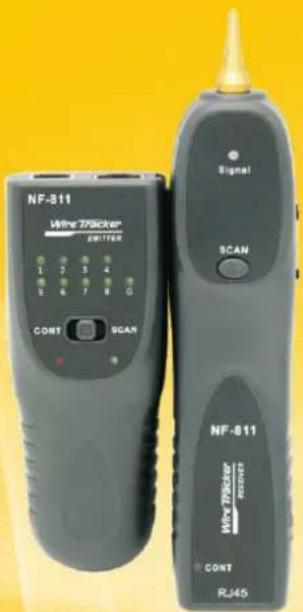
1) Transmitter: Tone generator
a. RJ45 and RJ11 standard modular jack
b. 3-position mode switch (OFF, CONT and SCAN).
c. 2-led displays (CONT, TONE)1\~8, G Led.
2) Receiver: Amplifier probe
a. Use the Amplifier and tone gernerator set to quickly and accurately trace and identify wires or cables, even when in a bundle.
b. Adjust volume level (0\~8) for various work environments.
c. Plug receptacle for earphone.
d. Signal LED.
- Interfaces:

5. Operation Instruction:
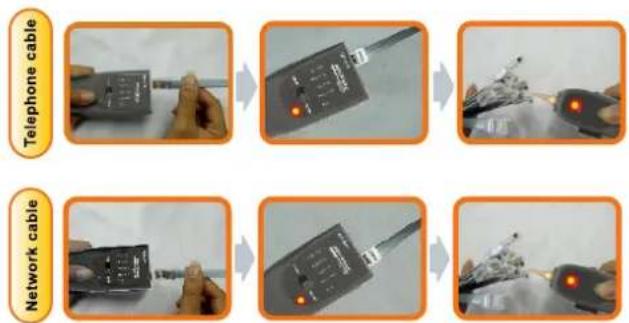
Cable Tracing function(eg : Network cable)
- The tested cable should insert into the RJ45 port with the transmitter;
- Put the button to "SCAN" position on the main tester, if the scan indicator lights up, that means the battery power is properly;
- Press the "SCAN" button on the receiver, and trace the connected cable on the main tester If the voice is not hear clearly, should adjust the volume from 1-8.
- During the testing, if you can't find the target cable easily, please insert the earphone and separate the surrounding lines because they are too close to each other and there will be signal interference that prevents you from finding the target cable;
- When you work in noisy or dark environments, you can turn on the switch on the right of the receiver.
Caution : Never connect live circuit (>60V DC) to the RJ11 or RJ45 port avoid burn out the device !

CASE 1 Trace cable in the computer room


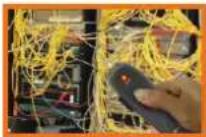
CASE 2 Trace electricity cable


CASE 3 Trace cable on the router


CASE 4 Trace cable in the Net-bar


6. Wire mapping for Network Cable:
Test result:
- Connect the tested network cable into "RJ45" port on the main tester and receiver;
- Adjust the button to "CONT" position, the indicator led is flashing all the time.
- If the cable (UTP) is normal, 1-8 led will lights up; if the cable is STP, 1-G led will lights up.

natural_image
Medical or laboratory equipment setup with two black devices and a white cable, one with a magnified inset showing a fiber or wire (no visible text or symbols)
natural_image
Two handheld devices with digital displays and a magnified inset showing a close-up of a small object (no visible text or symbols)
natural_image
Two black handheld devices with control knobs and a magnified inset showing a coiled cable or wire (no visible text or symbols)
natural_image
Close-up of hands holding two handheld devices with cables and wires (no visible text or symbols)Remark : According to the test result, this device can't check the cable status Cross and Short.
7. Telephone Line Condition & Polarity Test:
- Turn on the button to "SCAN" position, connect your telephone cable into RJ11 port on the emitter;
- The SCAN LED will indicate the line condition as GREEN/RED LIGHTING = CLEAR, FLICKERING GREEN / RED = BUSY, OR OFF (NO LIGHT) = RINGING;

Polarity Test:
- Turn on the button to "OFF" position (middle of the CONT and SCAN);
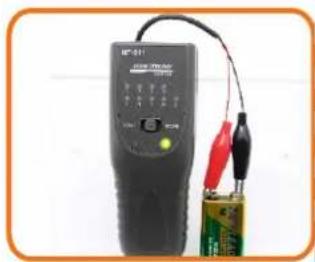
- Insert the Crocodile clips cable into RJ11 port of the main tester, then connect the tested cable with the red and black clips separately;
- The test result: RED LIGHTING = POSITIVE (Red clip connected cable is positive if SCAN light flashing)
GREEN LIGHTING = NEGATIVE (Red clip connected cable is negative if SCAN light flashing)

natural_image
Close-up of a black handheld electronic device connected to a battery with two red and black probes (no visible text or symbols)RED LIGHTING = POSITIVE
natural_image
Close-up of a black electronic device with wires and a battery, no visible text or symbols on the device itself.GREEN LIGHTING = NEGATIVE
- Package content
| Amplifier probe | 1PCS | Tone generator | 1PCS |
| Carry bag | 1PCS | User manual | 1PCS |
| Earphone | 1PCS | Color box | 1PCS |
| Cable adaptors | 3PCS | DC 9V battery | 2PCS |
Accessories
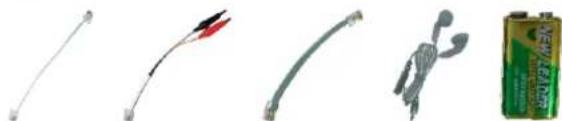
natural_image
Five different types of electronic components and a battery pack, including wires, connectors, and a human figure (no visible text or symbols)RJ11 adapter cable
Crocodile clip
RJ45 adapter cable
Earphone
9V battery
- Technical parameters:
| NF-811 Transmitter specifications | |
| Tone frequency | 200kHz |
| Max. distance of transmission | 2 kilometers |
| Max. working current | 30 mA |
| Volume Regulate Function | Audio volume level control |
| Compatible connectors | RJ11, RJ45 |
| Max. signal voltage | 8Vp-p |
| LED lights display | Wiremap, tone, tracing |
| Voltage protection | DC 60V |
| Battery Type | DC9.0V (NEDA 1604/6F22) x 1pc |
| Dimensions (LxWxD) | 130 * 47* 35 mm |
| NF-811 Receiver specifications | |
| Frequency | 200kHz |
| The Max. working current | 80 mA |
| Earphone jack | 1 |
| Battery Type | DC9.0V (NEDA 1604/6F22) x1pc |
| Dimensions (LxWxD) | 180 * 45* 30 mm |
| Total weight | 113g |
Diagram of Series Products
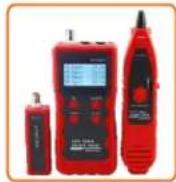
NF-868
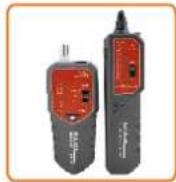
NF-268
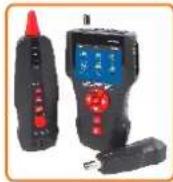
NF-8601

NF-806B

NF-800

NF-820

NF-468L

NF-300
NF-2100
NF-708

NF-905
NF-911
Brand : Noyafa
Model : NF-811
Category : Uncategorized