
SFH 8010 - Household Fan SENCOR - Free user manual and instructions
Find the device manual for free SFH 8010 SENCOR in PDF.


Pick your language and provide your email: we'll send you a specifically translated version.
| Product Type | Household Fan |
| Brand | Sencor |
| Model | SFH 8010 |
| Dimensions (H x W x D) | Approx. 50 x 40 x 40 cm |
| Weight | Approx. 3.5 kg |
| Power Supply | 220-240 V ~ 50/60 Hz |
| Power Consumption | 50 W |
| Number of Speed Settings | 3 |
| Oscillation | Yes, 90° |
| Timer Function | Yes, up to 2 hours |
| Remote Control | No |
| Blade Diameter | 40 cm |
| Material | Plastic, Metal |
| Safety Features | Thermal overload protection, tip-over switch |
| Cleaning | Wipe with a damp cloth; removable grille |
| Spare Parts | Blades, motor, fuse |
| Repairability | User-replaceable fuse; professional service for motor |
Frequently Asked Questions - SFH 8010 SENCOR
How do I clean the fan?
Unplug the fan. Remove the front grille by unscrewing the screws. Wipe the blades and grille with a damp cloth. Do not use abrasive cleaners. Allow everything to dry before reassembling.
The fan makes a rattling noise. What should I do?
Check if the blades are loose or damaged. Tighten the blade nut if necessary. Also ensure the fan is on a stable surface. If noise persists, contact customer service.
Does the fan have a remote control?
No, the Sencor SFH 8010 does not include a remote control. All functions are operated manually via buttons on the unit.
Can I use the fan in outdoor areas?
This fan is designed for indoor household use only. Do not expose it to rain or moisture.
How do I set the timer?
Press the timer button to select the desired duration (1 or 2 hours). The fan will automatically turn off after the set time.
What is the maximum tilt angle?
The fan head can be tilted up or down manually. The tilt range is approximately 30 degrees.
Is it safe to leave the fan on overnight?
Yes, the fan is equipped with thermal overload protection. However, it is recommended to use the timer and not leave it unattended for extended periods.
How do I replace the fuse?
Unplug the fan. Open the fuse compartment near the power cord. Replace the blown fuse with one of the same rating (5A, 250V). Close compartment and test.
What does the 'Mode' button do?
The 'Mode' button cycles between fan speed settings: Low, Medium, and High. The current speed is indicated by a light.
Why does the fan stop oscillating?
Ensure the oscillation button is pressed. If still not working, the oscillation mechanism may be jammed. Turn off and manually rotate the head slightly, then restart.
User questions about SFH 8010 SENCOR
0 question about this device. Answer the ones you know or ask your own.
Ask a new question about this device
No questions yet. Be the first to ask one.
Download the instructions for your Household Fan in PDF format for free! Find your manual SFH 8010 - SENCOR and take your electronic device back in hand. On this page are published all the documents necessary for the use of your device. SFH 8010 by SENCOR.
USER MANUAL SFH 8010 SENCOR
natural_image
White SENCOR 1000 heater with blue control knobs and a handle, no visible text or symbols on the device itself.SENCOR®
SFH 8010
① Rukojet
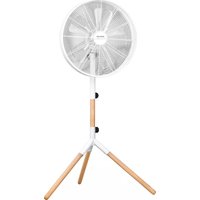


Table of contents
Click a title to access it
Manual assistant
Powered by Anthropic
Waiting for your message
Product information
Brand : SENCOR
Model : SFH 8010
Category : Household Fan