
DAB 600 KITCHEN - Radio GoGen - Free user manual and instructions
Find the device manual for free DAB 600 KITCHEN GoGen in PDF.


| Product Type | Kitchen Radio with DAB+, FM, and Bluetooth |
| Brand | GoGen |
| Model | DAB 600 KITCHEN |
| Frequency Range (FM) | 87.5 – 108 MHz |
| Frequency Range (DAB) | Band III 174 – 240 MHz |
| Bluetooth Frequency | 2402 – 2480 MHz |
| Bluetooth EIRP | 0.96 dBm |
| Power Supply | ~230 V / 50 Hz AC |
| Power Consumption | 3 W |
| Standby Power Consumption | < 1 W |
| Power Output | 1 x 1 W |
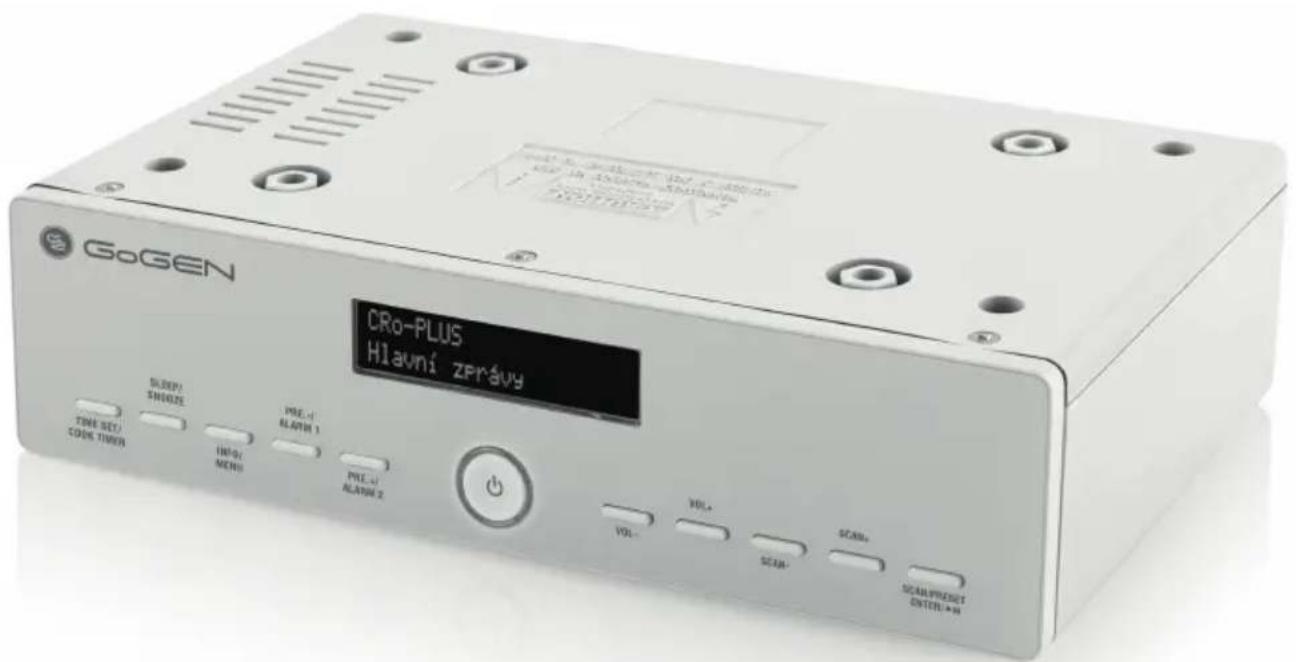
| Mounting Options | Under-cabinet or tabletop |
| Included Accessories | 4 screws, 4 spacers, drilling template, 4 rubber feet |
| Display | Adjustable backlight |
| Alarm | Dual alarms (Alarm 1 and Alarm 2) with snooze |
| Sleep Timer | Adjustable |
| Cook Timer | Yes (Egg timer) |
| DRC (Dynamic Range Control) | High, Low, Off |
| TA (Traffic Announcement) | On/Off |
| Prune (Remove unavailable stations) | Yes |
| Info Display | Yes (DAB and FM info) |
| Cleaning | Soft damp cloth; do not immerse |
| Safety | Do not expose to water; do not open housing |
| Compliance | EU Directive 2014/53/EU |
Frequently Asked Questions - DAB 600 KITCHEN GoGen
User questions about DAB 600 KITCHEN GoGen
0 question about this device. Answer the ones you know or ask your own.
Ask a new question about this device
Download the instructions for your Radio in PDF format for free! Find your manual DAB 600 KITCHEN - GoGen and take your electronic device back in hand. On this page are published all the documents necessary for the use of your device. DAB 600 KITCHEN by GoGen.
USER MANUAL DAB 600 KITCHEN GoGen
natural_image
Abstract logo design with white stylized 'S' inside a black circle (no text or symbols)DAB 600 KITCHEN
GoGEN
natural_image
Line drawing of a kitchen interior with oven, cabinet, and microwave oven (no text or symbols)natural_image
Line drawing of a kitchen interior with oven, cabinet, and microwave oven (no text or symbols)POUŽITIE AKO SAMOSTATNE STOJACEHO PRÍSTROJA / POUŽITIE NA STOLE
Manual scan for audio stations
natural_image
Line drawing of a kitchen interior with oven, cabinet, and microwave oven (no text or symbols)URUCHAMIANIE URZĄDZENIA / WPROWADZENIE
Thank you for choosing our product. We hope you enjoy using the device.
Symbols in these Instructions for Use
Important information for your safety is specially marked. It is essential to comply with these instructions in order to avoid accidents and prevent damage to the machine.
WARNING!
This warns you of dangers to your health and indicates possible injury risks.
CAUTION!
This refers to possible hazards to the machine or other objects.
NOTE: This highlights tips and information.
GENERAL SAFETY INSTRUCTIONS
Read the operating instructions carefully before putting the appliance into operation and keep the instructions including the warranty, the receipt and, if possible, the box with the internal packing. If you give this device to other people, please also pass on the operating instructions.
- To avoid the risk of fire or an electric shock, you should not expose the device to rain or moisture. Consequently do not use the device in the immediate vicinity of water - for example near a bath tub, a swimming pool or in a damp cellar.
- Do not use the device in extremely hot, cold, dusty or damp places.
- Only use the device for private use and the intended purpose. This device is not intended for commercial use.
- Ensure that the power cord is not kinked, trapped or brought into contact with heat sources.
- Ensure that the power cord does not present a tripping hazard.
- Never touch the power plug or the cable with wet hands.
- The power cord must always be easily accessible.
• Always insert the batteries correctly. - Do not cover up any ventilation openings with objects such as newspapers, tablecloths, curtains, etc.
- This appliance shall not be exposed to dripping or splashing water and that no object filled with liquids such as vases shall be placed on apparatus.
- Exposed ignition sources such as burning candles may not be placed onto the device.
- Never open the housing of the device. Incorrect repair scan constitute a considerable risk for the user. Should the device become damaged, in particular the mains supply cable, do not operate the device any longer, but rather have it repaired by an expert. Check the mains supply cable regularly for damage.
- For safety reasons a broken or damaged mains lead may only be replaced by an equivalent lead from the manufacturer, our customer service department or qualified person.
- If the device is not used for a longer period, remove the plug connector from the plug socket or take out the batteries.
These symbols may be found on the machine and are intended to indicate the following:
Make sure that the plug is not inserted when assembling the device!
- Remove all objects from the cupboard and anything which is fragile in the adjacent cupboards.
- For the installation the cupboard must fulfill the following conditions: Thickness of the cupboard floor between 16 mm and 20 mm.
- The wall mounting of the cupboard must be stable and anchored firmly in the wall with at least 2 screws.
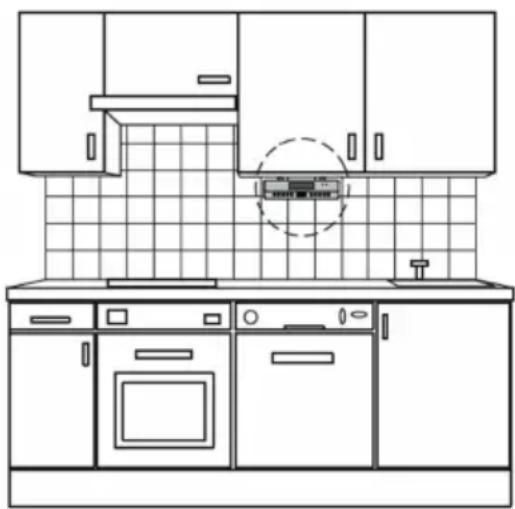
- Important! Do not install the device above a cooker!
- When installing the device it must be ensured that there is a power socket within reach.
- The mains socket must be within easy reach, so that the plug can be quickly removed in an emergency.
- Important! Do not connect the device to the mains power supply until after installation!
- The device cannot be installed under cupboards under which there is a lighting strip.
- For mounting, you may need the following supplies: A drill with 6 mm drill bit, pilot drill or nail, Allen key, tape measure, adhesive tape, scissors, safety goggles.
MOUNTING PROCEDURE
Supplied mounting accessories
4 x Screws
4 x Spacers
1 x Drilling template
CAUTION!
Please adhere to the dimensions stated in the installation instructions.
You should use only the installation accessories supplied.
Use a wrench and not an electric screwdriver.
Installation
Tape the template firmly down to the shelf with adhesive tape. With the help of a gimlet or nail pierce the crosses at the attachment points and use it to mark
the holes. Remove the template and drill the holes into the wall cupboard. Insert the spacer into the holes provided on the device. Countersink the screws into the holes in the cupboard.
Using the 4 screws and the spacers, attach the kitchen radio to the bottom of the cupboard.
Tighten the screws hand-tight with an Allen key.
NOTE: Sufficient ventilation is only guaranteed with a spacer.
STAND ALONE USE / TABLE TOP USE
Use the 4pcs rubber feet provided and stick 1pc each on the 4 corners of the bottom of the unit. In this case, the unit can be use as an independent sound system on the table without under-cabinet.
natural_image
Line drawing of a kitchen interior with oven, cabinet, and microwave oven (no text or symbols)START-UP OF THE DEVICE/INTRODUCTION
- Remove the protective film from the display if it is still present.
- Press the STANDBY / FUNCTION" button to turn on the device.
- Press the “STANDBY / FUNCTION” button for approx. 3 seconds to switch into the standby mode.
Power Supply
You can power your appliance by plugging the AC power cord at the back of the appliance into a wall AC power outlet. Check that the rated voltage of your appliance matches your local voltage.
SETTING THE CLOCK & DATE
- Press and hold the "TIME SET / COOK TIMER" button for approx.2 seconds.
- Use the "SCAN+" or "SCAN-" button to set the time format "12 / 24 hr".
- Press the "TIME SET / COOK TIMER" button to confirm time format.
- Use the “SCAN+” or “SCAN-” button to set the hours accordingly. The hour digits start flashing.
- Press the "TIME SET / COOK TIMER" button to confirm the hour.
- Repeat step 4 and 5 to set the minute / date.
SETTING ALARM
The system must be in standby mode in order to set the alarm.
- Activate alarm setting mode: Press and hold "PRESET- / ALARM 1" button for 3 seconds.
- The display will show the “Alarm 1 Setup”. Press ““PRESET- / ALARM 1” button to confirm. The hours of the currently set alarm time will start to flash.
- Press “SCAN+” or “SCAN-” button to set the hour. Press “PRESET- / ALARM 1” button to confirm. The minute indicator starts blinking.
- Press “SCAN+” or “SCAN-” button to set the minutes. Press “PRESET- / ALARM 1” button to confirm.
- Press "SCAN+" or "SCAN-" button to set the Duration. Press "PRESET-/ALARM 1" button to confirm.
- You can use the "SCAN+" or "SCAN-" button to choose one of the Alarm mode: BUZZER / DAB / FM. Press "PRESET- / ALARM 1" button to confirm.
- You can use "SCAN+" or "SCAN-" button to choose the channel and press "PRESET-/ALARM 1" button to confirm (Only available in DAB & FM Alarm mode.)
- You can use the “SCAN+” or “SCAN-” button to choose one of the Alarm setting: Daily / Once / Weekends / Weekdays
- Press "PRESET- / ALARM 1" button to confirm
- Use "SCAN+" or "SCAN-" button to set the Alarm volume. Press "PRESET-/ALARM 1" button to confirm.
NOTE: To set the second alarm time, repeat each of the above steps with the "PRESET+/ALARM 2" button.
Deactivate the alarm
Press "PRESET- / ALARM 1" or "PRESET+ / ALARM 2" button to turn off the alarm.
Snooze
The automatically set alarm function can be switched off for 9 minutes with the "SLEEP / SNOOZE" button.
OPERATION
Mode selection
Press the "STANDBY / FUNCTION" button shortly to switch between the modes: DAB / FM / BLUETOOTH.
Volume control
The volume can be easily controlled by "VOLUME+" or "VOLUME-" buttons.
Sleep function
Press and hold the "SLEEP / SNOOZE" button to enter the sleep function. Press "SLEEP / SNOOZE" button shortly to adjust the sleep timer.
LISTENING TO THE DAB
Select the DAB mode with the “STANDBY / FUNCTION” button, until “DAB” is shown in the display. The radio will automatically do a full scan of DAB+ stations. The list of stations is then stored, eliminating the need for another full scan when the radio is turned on next time. When the scan is complete, the stations are stored in alphabetical order. The first available station will be played back.
NOTE: If there is no DAB+ reception at any time, change the position of the unit or adjust the antenna. Press and hold the „SCAN / PRESET / ENTER / PLAY/PAUSE“ button for approx. 3 seconds to start a new search.
Info display
Press the "INFO / MENU" button to show the DAB information.
DAB MENU
- Press and hold "INFO / MENU" button to access DAB menu.
- Use "SCAN +" or "SCAN-" button to choose the menu options:
[Full scan] / [Manual tune] / [DRC] / [Prune] / [TA] / [System] - To select an option, press „SCAN / PRESET / ENTER / PLAY/PAUSE“ button to confirm.
- Repeat steps 2-3 if sub-option is available under one option.
[Full scan] The radio will automatically perform a full scan of DAB+ stations.
[Manual tune] Use "SCAN +" or "SCAN-" button to select a frequency. Press „SCAN / PRESET / ENTER / PLAY/PAUSE" button to confirm.
[DRC] Dynamic Range Control removes or adds the degree of adaptation, required for the differences in dynamic range between stations. Use "SCAN +" or "SCAN-" button to select an options. Press „SCAN / PRESET / ENTER / PLAY/PAUSE“ button to confirm.
Following options are available on the display:
DRC high: DRC turned on; default setting recommended for noisy environments.
DRC low: DRC is set to half the normal level.
DRC off: DRC is turned off.
[Prune] It may be that you can no longer receive some stations after a station scan or change of location. With this function you can delete these stations from the reception list.
Use "SCAN +" or "SCAN-" button to select [Yes] or [No],
then press „SCAN / PRESET / ENTER / PLAY/PAUSE“ button to confirm.
[TA] (Traffic announcement) Traffic information can be received manually or automatically with the TA function. Use "SCAN +" or "SCAN-" button to select [On] or [Off], then press „SCAN / PRESET / ENTER / PLAY/PAUSE“ button to confirm.
[System]
Egg timer - You can set the cook timer.
Backlight - You can set the brightness of the display.
Inactive Standby - You can set the time for inactive standby.
Language - You can choose your desired language.
Factory Reset - You can reset the unit to default setting.
SW version - You can see the current SW version of the unit.
LISTENING TO THE FM RADIO
Select the RADIO mode with the "STANDBY / FUNCTION" button, until "FM" is shown in the display. There are two options to search for and preset radio stations.
Automatic scan
Important! Any preset radio stations will be overridden.
Press and hold the „SCAN / PRESET / ENTER / PLAY/PAUSE“ button for approx.3 seconds.
The system scans the entire frequency band for radio stations. Any stations found will be preset from lowest to highest frequency. Once all the stations were automatic preset, press
"PRESET - / ALARM 1" or "PRESET + / ALARM 2" button to choose the preset stations.
Manual scan for audio stations
Briefly press the “SCAN+” & “SCAN-” button, until you have found the radio station which you are looking for. If you keep one of the buttons pressed down, the device will search to the previous, respectively next radio station.
Manual Preset
Use the Automatic scan or Manual scan, until you have found the radio station which you are looking for.
- Press „SCAN / PRESET / ENTER / PLAY/PAUSE“ button.
- Press "SCAN+" or "SCAN-" button to choose the preset station.
- Press „SCAN / PRESET / ENTER / PLAY/PAUSE“ button to confirm.
- Once the station was preset, press "PRESET - / ALARM 1" or "PRESET + / ALARM 2" button to choose the preset stations.
Info display
Press the "INFO / MENU" button to show the FM information.
FM MENU
- In FM mode, press and hold "INFO / MENU" button to access FM menu.
- Press "SCAN+" or "SCAN-" button to choose the following DAB menus:
[Scan setting] / [System]
- To select an option, press „SCAN / PRESET / ENTER / PLAY/PAUSE“ button to confirm.
- Repeat steps 2-3 if sub-option is available under one option.
[Scan setting] Select the desired option for automatic station search.
All stations: Search for all stations that can be received. In this case, station search also stops for weak stations.
Strong stations only: Only clear stations are searched.
[System]
Egg timer - You can set the cook timer.
Backlight - You can set the brightness of the display.
Inactive Standby - You can set the time for inactive standby.
Language - You can choose your desired language.
Factory Reset - You can reset the unit to default setting.
SW version - You can see the current SW version of the unit.
Logging on devices (Pairing)
Before you listen to music via the unit, you must pair the devices.
- Ensure, that the Bluetooth function is activated in your player (e.g. mobile phone). For this, refer to the operation manual of your player.
- Select the Bluetooth mode with the "STANDBY / FUNCTION" button, until "Bluetooth" s shown in the display.
- Chose the Bluetooth menu in your player and register the device in your player. For this, refer to the operation manual of your player. The device "DAB 600 KITCHEN" will show in your player as a selection. For the further procedure, please refer to the user manual of the playback unit. If possible, adjust the volume of the external unit to a comfortable level.
NOTE: Only one playback device may be connected with the music center at one time. If the music center is already connected with a different playback device, the music center will not appear in the BT selection menu.
CLEANING AND CARE
WARNING! Before cleaning, always switch off the product and disconnect the plug from power.
- Never immerse the product in water or other liquids.
- Clean the product with a soft, slightly damp cloth. Make sure that no moisture is entering the product during cleaning.
- Never use corrosive detergents, wire brushes, abrasive scourers, metal or sharp implements to clean your product.
- Dry the product thoroughly after cleaning.
- Store the product in a cool, dry location, away from children and pets.
SPECIFICATIONS
Frequencies: FM: 87,5-108 MHz; DAB: Band III 174-240 MHz
Bluetooth frequency: 2402 – 2480 MHz ; EIRP: 0,96 dBm
Power Supply: \~ 230 V / 50 Hz
Power output: 1 x 1 W
Power Consumption: 3 W
Standby Power Consumption: < 1 W
We reserve the right to change technical specifications.

WARNING: DO NOT USE THIS PRODUCT NEAR WATER, IN WET AREAS TO AVOID FIRE OR INJURY OF ELECTRIC CURRENT. ALWAYS TURN OFF THE PRODUCT WHEN YOU DON'T USE IT OR BEFORE A REVISION. THERE AREN'T ANY PARTS IN THIS APPLIANCE WHICH ARE REPARABLE BY CONSU-MER. ALWAYS APPEAL TO A QUALIFIED AUTHORIZED SERVICE. THE PRODUCT IS UNDER A DANGEROUS TENTION.


TO AVOID DANGER OF SUFFOCATION, KEEP THE PLASTIC BAG AWAY FROM BABIES AND CHILDREN. DO NOT USE THIS BAG IN CRIBS, BEDS, CARRIAGES OR PLAYPENS. THIS BAG IS NOT A TOY.
Disposal of old Electrical & Electronic Equipment (Applicable in the European Union and other European countries with separate collection systems)
This symbol on the product or on its packaging indicates that this product shall not be treated as household waste. Instead it shall be handed over to the applicable collection point for the recycling of electrical and electronic equipment. By ensuring this product is disposed of correctly, you will help prevent potential negative consequences for the environment and human health, which could otherwise be caused by inappropriate
waste handling of this product. The recycling of materials will help to conserve natural resources. For more detailed information about recycling of this product, please contact your local Civic Office, your household waste disposal service or the shop where you purchased the product.
Hereby, ETA a.s. declares that the radio equipment type DAB600KITCHEN is in compliance with Directive 2014/53/EU. The full text of the EU declaration of conformity is available at the following internet address: http://www.gogen.cz/declaration_of_conformity
natural_image
Line drawing of a kitchen interior with oven, cabinet, and microwave oven (no text or symbols)ASZTALON VALÓ HASZNÁLAT
natural_image
Abstract logo design with white stylized 'S' inside a black circle (no text or symbols)GoGEN
- DAB 600 KITCHEN
- GoGEN
- POUŽITIE AKO SAMOSTATNE STOJACEHO PRÍSTROJA / POUŽITIE NA STOLE
- Manual scan for audio stations
- URUCHAMIANIE URZĄDZENIA / WPROWADZENIE
- Symbols in these Instructions for Use
- WARNING!
- CAUTION!
- GENERAL SAFETY INSTRUCTIONS
- Make sure that the plug is not inserted when assembling the device!
- MOUNTING PROCEDURE
- Installation
- STAND ALONE USE / TABLE TOP USE
- START-UP OF THE DEVICE/INTRODUCTION
- Power Supply
- SETTING THE CLOCK & DATE
- SETTING ALARM
- Deactivate the alarm
- Snooze
- OPERATION
- Mode selection
- Volume control
- Sleep function
- LISTENING TO THE DAB
- Info display
- DAB MENU
- [System]
- LISTENING TO THE FM RADIO
- Automatic scan
- Manual Preset
- FM MENU
- [Scan setting] / [System]
- Logging on devices (Pairing)
- CLEANING AND CARE
- SPECIFICATIONS
- ASZTALON VALÓ HASZNÁLAT
Brand : GoGen
Model : DAB 600 KITCHEN
Category : Radio