
FS2SD - Smoke detector Ferguson - Free user manual and instructions
Find the device manual for free FS2SD Ferguson in PDF.


| Product Type | Photoelectric Smoke Detector |
| Model | FS2SD |
| Brand | Ferguson |
| Operating Voltage | DC3V (CR123A Lithium Battery) |
| Standby Current | ≤10 μA |
| Alarm Current | ≤60 mA |
| Sound Level | 85 dB at 3 m |
| Operating Temperature | -10°C to +50°C |
| Operating Humidity | ≤95% RH |
| Dimensions | 60 × 60 × 49.2 mm |
| Sensor Type | Photoelectric |
| Effective Lifespan | 10 years |
| Battery Type | CR123A (included) |
| Wireless Connectivity | ZigBee (requires Ferguson Smart Hub) |
| App Control | Ferguson Smart app (iOS/Android) |
| Mounting Location | Ceiling (center preferred) |
| Cleaning Frequency | Every 6 months |
| Mute Function | Yes (press Test/Mute button for 3 seconds) |
| Test Function | Yes (recommended weekly) |
| Low Battery Warning | Red LED flash every 40 sec, beep every 40 sec |
| Indicator LED | Red LED (normal, alarm, mute, fault) |
| Use Case | Home use only (not for public areas) |
| Safety Note | Warning device; cannot detect gas, heat, or flame |
Frequently Asked Questions - FS2SD Ferguson
User questions about FS2SD Ferguson
0 question about this device. Answer the ones you know or ask your own.
Ask a new question about this device
Download the instructions for your Smoke detector in PDF format for free! Find your manual FS2SD - Ferguson and take your electronic device back in hand. On this page are published all the documents necessary for the use of your device. FS2SD by Ferguson.
USER MANUAL FS2SD Ferguson
*Please read the user manual carefully before operation.
Product introduction
This product is a photoelectric smoke Detector. It is a warning device, cannot sense gas, heat, or flame, cannot prevent or put out fire. It is capable of real-time detecting the presence of smoke, detection of visible particles (smoldering fire) faster than ionization smoke alarms. Red LED flashes rapidly and detectors sound alarm once detecting smoke fire danger, can alert you and your family timely. Smoke alarms should be installed in all rooms, living room, storage areas, basements and attics unit where fire may happen.
2
- Operating voltage: DC3V(CR123A Lithium Battery)
- Static current: ≤ 10μ A
- Alarm current: ≤ 60mA
- Sound level: 85dB/3m
- Working Temperature: -10 \~ +50°C
- Working humidity: ≤ 95%RH
-
Dimension: 60*60*49.2mm
-
This device is designed specifically for home use, may not to be able to provide sufficient fire alert for public areas.
-
Please avoid installation in bathrooms and other very humid places, dusty or greasy areas, or very airy place with air conditioning, ceiling fans, etc.
- Please keep device clean, and do not let dust to accumulate. It is recommended to clean every 6 months with a household cleaner and a soft brush.
- The effective lifespan is 10 years. Replacement every 10 years, regardless of breakdown or not.
- Please pay attention if it alarms. Besides proper use of alarm, we should also strengthen the consciousness of fire safety.
Test/Hush Button and LED indicator

Sensor

Bracket
4
- Ceiling mounting
The preferred location to install smoke alarm is in the centre of the ceiling because Smoke, heat and combustion products rise to the ceiling and will lateral spread. Keep at least 30 cm distance from lights or decorations, and at least 15 cm away from walls and corner. If hall is more than 12 meters wide, please install at 2 sides of the hall.
Sloping ceiling mounting
If ceiling is sloping, please install the smoke alarm at horizontal distance 90cm away from the ceiling top.

Recommended and Avoided
Installation Position

Sloping Ceiling Mounting Position
5
1
Instalation Renderings

natural_image
Illustration of a hand inserting a yellow coin into a cylindrical device (no text or symbols)- Anticlockwise rotating the bracket out from the installation base, then remove the battery insulating strip to make device on power.
Adding device
Select the Smart Hub from the list of devices to which you want to
add a new device (sensor) or device with factory settings restored.
- Click add devices on APP, entering networking mode.

When the LED in the control panel blinks blue, we confirm and go to pairing devices.

7
- According to the tips on APP, keep pressing networking button, green LED flashes quickly, tips appear on APP, green LED keep on for 3 seconds, network success.

natural_image
Illustration of two camera lens components with a magnified inset showing the lens (no text or symbols)Delete device
In the application, click and hold the selected device, the "delete device" command will be displayed. After removed it, disconnect the network connection device by pressing and holding the pairing button. 6-fold LED blink in green means disconnection of the sensor network from the HUB.
8

natural_image
Line drawing showing a hand holding a blue circular object and another hand holding a cap (no text or symbols)- Remove the double-sided adhesive membrane on the mounting bracket, and rotating the smoke alarm into the bracket.
3
6
9
| Status | Light | Alarm Sound |
| Normal | Red LED flashes every 53 seconds | NO |
| Testing | Red LED flashes quickly | Rapid beeps |
| Alarm | Red LED flashes quickly | Rapid beeps |
| Mute mode | Red LED flashes every 10 seconds | NO |
| Low power | Red LED flashes every 40 seconds | Beep every 40 seconds |
| Fault | Red LED flashes every 40 seconds | Beep every 40 seconds |
Please refer to the following situation, if the Alarm can not work normally: 1. Battery reaches service life (status refer to Form 1). Please replace battery.
2. Fault affected by dirt with dust or oil, etc. (status refer to Form 1). Please clean the alarm correctly.
3. Whether the alarm is properly rotated into the mounting bracket
- The malfunction auto check function of this smoke alarm only provides infrared photoelectric sensor malfunction check and low battery power check. The sensor sensitivity should be tested periodically as required.
- To ensure the sensitivity to smoke, clean the smoke alarm surface with soft brush or cleaner every 6 months. Do not use solvent, liquid or detergent to clean the smoke alarm.
- For malfunction problems, please contact with vendor on time. Do not dismantle and try to repair alarms by yourself.
- If smoke alarms are not used for a long time, dismount them, remove batteries, put them in packing box and store in cool place.
- Photoelectric smoke alarms could reduce disaster happening. But they can not guarantee a hundred percent safety. For your safety concern, please use this smoke alarm correctly and know the fire safety tips. In daily life, pay attention to build up safety consciousness and take preventive measures.
FERGUSON SmartHome
Download app:Ferguson Smart



* this device requires Ferguson Smart Hub unit to work, not included.
10
Mute function
Please make sure that there is no real danger of fire when using mute function. Under known and non-fire alarm condition, please do not block or by any other form to prohibit alarming. Press the Test/Mute button to lower sensitivity and relieve alarm

Press and hold the test panel Test/Mute button for 3 seconds, as above picture shows, until alarm status (see status table). Testing is recommended to be done at least once a week. Do not use flame for testing. Once the alarm is sure to please pay attention.
1 + u1 - 1 = ( 1 + u) u1 < 1 = u
Follow fire safety rules and prevent hazardous situations:
1. Store combustible liquids such as gasoline in proper containers.
2. Never smoke in bed. After smoking a cigarette, put it out and place in a correct container.
3. Check if power sockets, plugs or switches are broke. If cables are frayed or cracked replace them.
4. Using power electric appliances such as heaters or heating equipments, do not make the circuit overload and check periodically if these appliances work properly.
5. Keep portable heaters and open flames, like candles, away from flammable materials.
6. Keep matches or lighters away from children.
7. Keep at least one working fire extinguisher on every floor and an additional one in the kitchen. Have fire escape ladders or other reliable means of escape from an upper floor in case stairs are blocked.
8. Make sure all the family members know what to do after hearing an alarm signal.
9. Install smoke alarms correctly according to manual. Keep alarms clean and do not let dust accumulate and test them monthly. Replace them immediately if they are not working properly.
6. Keep matches or lighters away from children.
7. Keep at least one working fire extinguisher on every floor and an additional one in the kitchen. Have fire escape ladders or other reliable means of escape from an upper floor in case stairs are blocked.
8. Make sure all the family members know what to do after hearing an alarm signal.
9. Install smoke alarms correctly according to manual. Keep alarms clean and do not let dust accumulate and test them monthly. Replace them immediately if they are not working properly.
Fire safety tips
16

SmartHome
intelligent home solutions don't have to be expensive

Battery Replacement Mute mode and Test
14

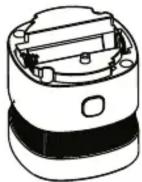
*Please replace battery correctly, following the battery positive and negative electrode. Attention to environmental protection and dispose used battery properly.
- Ferguson Sp. z o.o. is not responsible for damages caused by improper use of the Ferguson Smart Home system.
- Batteries attached to the device are not an integral part and not a subject to complaint. The manufacturer is not responsible for their proper operation.
- Declared wireless ZigBee network's range is based on laboratory tests and applies to open space, keep in mind that the materials used in the construction of houses and flats, wall thickness and conditions of electromagnetic fields can cause a significant reduction in network coverage.

Your product contains batteries covered by the European Directive 2006/66/EC, which cannot be disposed with normal household waste. Please inform yourself about the local rules on separate collection of batteries because correct disposal helps to prevent negative consequences for the environmental and human health.

12
15

18
More info at
ferguson-digital.eu
and
wiki.ferguson.pl/en
Thanks!
Brand : Ferguson
Model : FS2SD
Category : Smoke detector