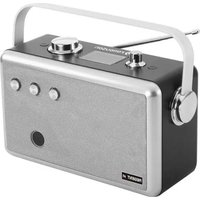
Regent P1 DAB+ - Receiver Ferguson - Free user manual and instructions
Find the device manual for free Regent P1 DAB+ Ferguson in PDF.


Pick your language and provide your email: we'll send you a specifically translated version.
| Product Type | DAB+/FM Radio Receiver |
| Model | Regent P1 DAB+ |
| Brand | Ferguson |
| Dimensions (W x H x D) | 200 x 130 x 80 mm |
| Weight | 500 g |
| Power Supply | AC 100-240V, 50/60Hz or 6 x LR6/AA batteries |
| Radio Bands | DAB+ (Band III) and FM (87.5-108 MHz) |
| Presets | 40 (DAB+ and FM combined) |
| Display | LCD with backlight |
| Speakers | 2 x 3W |
| Headphone Jack | 3.5 mm stereo |
| USB Port | USB-A for charging devices (5V, 1A) |
| Alarm | Dual alarm with snooze |
| Sleep Timer | Yes, adjustable (15-90 minutes) |
| Clock | Auto-sync via DAB+/FM RDS |
| Tuning | Auto and manual |
| Maintenance | Clean with a soft dry cloth; avoid liquids |
| Safety | Operate in dry environment, keep away from water |
| Spare Parts | Contact Ferguson customer service |
| Environmental | RoHS compliant, recyclable |
Frequently Asked Questions - Regent P1 DAB+ Ferguson
How do I switch between DAB+ and FM?
Press the Mode button repeatedly to toggle between DAB+ and FM bands.
How many radio stations can I store as presets?
You can store up to 40 presets, shared between DAB+ and FM bands.
Can I set the alarm to wake me up with a radio station?
Yes, you can set the alarm to wake you with the last tuned DAB+ or FM station, or a buzzer.
How do I perform a full scan for DAB+ stations?
In DAB+ mode, press and hold the Scan button for 2 seconds to perform a full band scan.
What type of batteries does the radio use?
It uses 6 x LR6/AA batteries (not included) for portable use.
How can I reset the radio to factory settings?
Turn off the radio, then press and hold the Menu button while turning it back on until 'Reset' appears.
Is the headphone output stereo?
Yes, the 3.5 mm headphone jack provides stereo sound.
Can I charge my phone using the USB port?
Yes, the USB port provides 5V, 1A output for charging compatible devices.
What should I do if the radio does not pick up DAB+ signals?
Ensure you are in an area with DAB+ coverage and perform a full scan. If problems persist, try repositioning the antenna.
How do I adjust the sleep timer?
Press the Sleep button repeatedly to cycle through timer durations (15, 30, 45, 60, 90 minutes) or off.
User questions about Regent P1 DAB+ Ferguson
0 question about this device. Answer the ones you know or ask your own.
Ask a new question about this device
No questions yet. Be the first to ask one.
Download the instructions for your Receiver in PDF format for free! Find your manual Regent P1 DAB+ - Ferguson and take your electronic device back in hand. On this page are published all the documents necessary for the use of your device. Regent P1 DAB+ by Ferguson.
USER MANUAL Regent P1 DAB+ Ferguson

Manual assistant
Powered by Anthropic
Waiting for your message
Product information
Brand : Ferguson
Model : Regent P1 DAB+
Category : Receiver