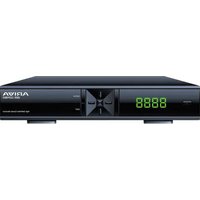
Ariva 255Combo - Receiver Ferguson - Free user manual and instructions
Find the device manual for free Ariva 255Combo Ferguson in PDF.


Pick your language and provide your email: we'll send you a specifically translated version.
| Product Type | Digital Satellite Receiver |
| Model | Ariva 255Combo |
| Brand | Ferguson |
| Dimensions (W x D x H) | 260 x 150 x 40 mm |
| Weight | 0.8 kg |
| Power Supply | 12V DC, 1.5A |
| Power Consumption | Max 18W (Standby <1W) |
| Tuner Type | DVB-S2 (Satellite) |
| Video Output | HDMI, Composite (RCA) |
| Audio Output | Digital Optical, RCA Stereo |
| USB Ports | 1 x USB 2.0 (for recording and playback) |
| Card Reader | 1 x Smart Card Slot (Conax CA) |
| Recording Function | Yes, via USB (PVR Ready) |
| Channel List Capacity | 4000 TV/Radio Channels |
| Supported Video Formats | MPEG-2, MPEG-4, H.264 |
| Maintenance | Clean with dry cloth; avoid liquids |
| Safety | Do not expose to moisture; use original power adapter |
| Spare Parts & Repairability | Contact authorized service center; no user-serviceable parts inside |
| General Information | User manual available in PDF; supports multiple languages |
Frequently Asked Questions - Ariva 255Combo Ferguson
How do I connect the Ferguson Ariva 255Combo to my TV?
Connect the HDMI cable from the receiver's HDMI port to your TV. Alternatively, use the composite RCA (yellow, white, red) cables if your TV lacks HDMI. Ensure the receiver is powered on and select the correct input on your TV.
How do I scan for satellite channels?
Go to Menu > Installation > Antenna Settings. Select your satellite (e.g., Astra 19.2E) and set the LNB frequency (typically 9750/10600). Then start a Blind Scan or Network Scan to find all available channels.
Can I record TV programs with this receiver?
Yes, the Ariva 255Combo supports recording to a USB drive via its PVR Ready function. Insert a formatted USB flash drive or external HDD, then press the Record button on the remote during a program. You can also schedule recordings via the EPG.
How do I update the firmware?
Download the latest firmware from the Ferguson support website onto a USB stick. Insert the stick into the receiver, go to Menu > System > Upgrade, select the file, and confirm. Do not power off during the update.
Why am I getting 'No Signal' on some channels?
This usually indicates a weak satellite signal. Check your dish alignment, LNB cable connections, and ensure no obstructions (trees, buildings). Also verify the correct satellite and transponder settings in the antenna menu.
How do I reset the receiver to factory settings?
Go to Menu > System > Factory Reset (or Default Settings). Enter the default password (usually 0000 or 1234) and confirm. This will erase all channels and personal settings.
Can I watch channels from multiple satellites?
Yes, the receiver supports DiSEqC 1.0/1.1 switches. Connect multiple LNBs to a DiSEqC switch, then configure each satellite's position in the Antenna Settings menu (e.g., DiSEqC 1.1 port 1 for Astra, port 2 for Hotbird).
What type of smart card does it support?
The Ariva 255Combo has a slot for Conax CA smart cards. You can insert a subscription card from providers like TNT Sat or other Conax-encrypted services to access pay channels.
How do I set up parental controls?
Go to Menu > System > Parental Lock. Set a 4-digit PIN (default 0000) and choose the rating level or specific channels to lock. Locked channels require the PIN to view.
The remote control is not working. What should I do?
First, replace the batteries (two AAA). Check for obstructions between remote and receiver. If still not working, try resetting the remote by removing batteries, pressing all buttons, and reinserting. If issues persist, contact support.
User questions about Ariva 255Combo Ferguson
0 question about this device. Answer the ones you know or ask your own.
Ask a new question about this device
No questions yet. Be the first to ask one.
Download the instructions for your Receiver in PDF format for free! Find your manual Ariva 255Combo - Ferguson and take your electronic device back in hand. On this page are published all the documents necessary for the use of your device. Ariva 255Combo by Ferguson.
USER MANUAL Ariva 255Combo Ferguson

Manual assistant
Powered by Anthropic
Waiting for your message
Product information
Brand : Ferguson
Model : Ariva 255Combo
Category : Receiver