
SupremeSound E9 - Headphones Evolveo - Free user manual and instructions
Find the device manual for free SupremeSound E9 Evolveo in PDF.


| Product Type | Wireless Bluetooth Headset and Speaker |
| Brand | Evolveo |
| Model | SupremeSound E9 |
| Bluetooth Version | 4.2 |
| Bluetooth Profiles | HFP/HSP, A2DP, AVRCP |
| NFC | Yes, for simple pairing |
| Speaker Driver | 40 mm |
| Frequency Response | 20 Hz - 20 kHz |
| Battery Type | Lithium-polymer, 450 mAh |
| Charging Time | Approximately 1.5 hours |
| Music Playback (Headphone Mode) | Up to 14 hours |
| Music Playback (Speaker Mode) | Up to 8 hours |
| Modes | Headphone, Speaker, FM Radio, Bluetooth, Memory Card (TF), AUX |
| Controls | On/Off, Mode Switch, Volume +/-, Play/Pause, Call control on right earcup |
| Connectivity | Bluetooth, 3.5 mm audio jack, Micro USB charging, TF card slot |
| Foldable Design | Yes, foldable and retractable |
| Hands-free Calls | Yes |
| Package Contents | Wireless Bluetooth Headset, 3.5 mm audio cable, Micro USB cable, Quick installation guide |
| Compliance | CE, Declaration of Conformity available at ftp://ftp.evolveo.com/ce |
| Disposal | Separate collection for electrical/electronic equipment per EU directive |
Frequently Asked Questions - SupremeSound E9 Evolveo
User questions about SupremeSound E9 Evolveo
0 question about this device. Answer the ones you know or ask your own.
Ask a new question about this device
Download the instructions for your Headphones in PDF format for free! Find your manual SupremeSound E9 - Evolveo and take your electronic device back in hand. On this page are published all the documents necessary for the use of your device. SupremeSound E9 by Evolveo.
USER MANUAL SupremeSound E9 Evolveo
Copyright © ABACUS Electric, s.r.o.
www.evolveo.com
www.facebook.com/EvolveoCZ
thank you for choosing the EVOLVEO SupremeSound E9 headphones.
We believe they will bring a lot of fun and happiness.
Package contents
• Wireless Bluetooth Headset
• 3.5mm audio jack cable
- Micro USB to USB cable
- Multi language quick installation guide
Specifications
- Wireless Bluetooth headphone and speaker
- Hands-free phone calls
- FM Radio
- Memory card
- Up to 14 hours of music playback in headphone mode
- Up to 8 hours of music playback in speaker mode
- Charging time around 1.5 hours
- Foldable and retractable design
• Control for playback, volume and accepting calls on the right ear cup - Bluetooth version: 4.2
- Bluetooth profiles: HFP/HSP.A2DP/AVPCP
• NFC - Speaker: 40mm
• Frequency Response: 20HZ-20KHZ
• Lithium-polymer battery 450mA
• 3.5 mm headphone output
Product overview

natural_image
Line drawing of a pair of headphones with curved arrows indicating sound waves (no text or symbols)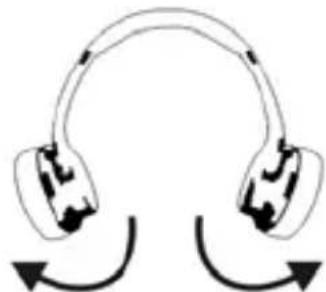
natural_image
Diagram of two earbuds with curved arrows indicating rotation or sound flow (no text or symbols)Headphone Mode:
When earcups are twisted inward direction, the headphone is activated.
Speaker Mode:
When earcups are twisted outward direction, speaker mode is activated.
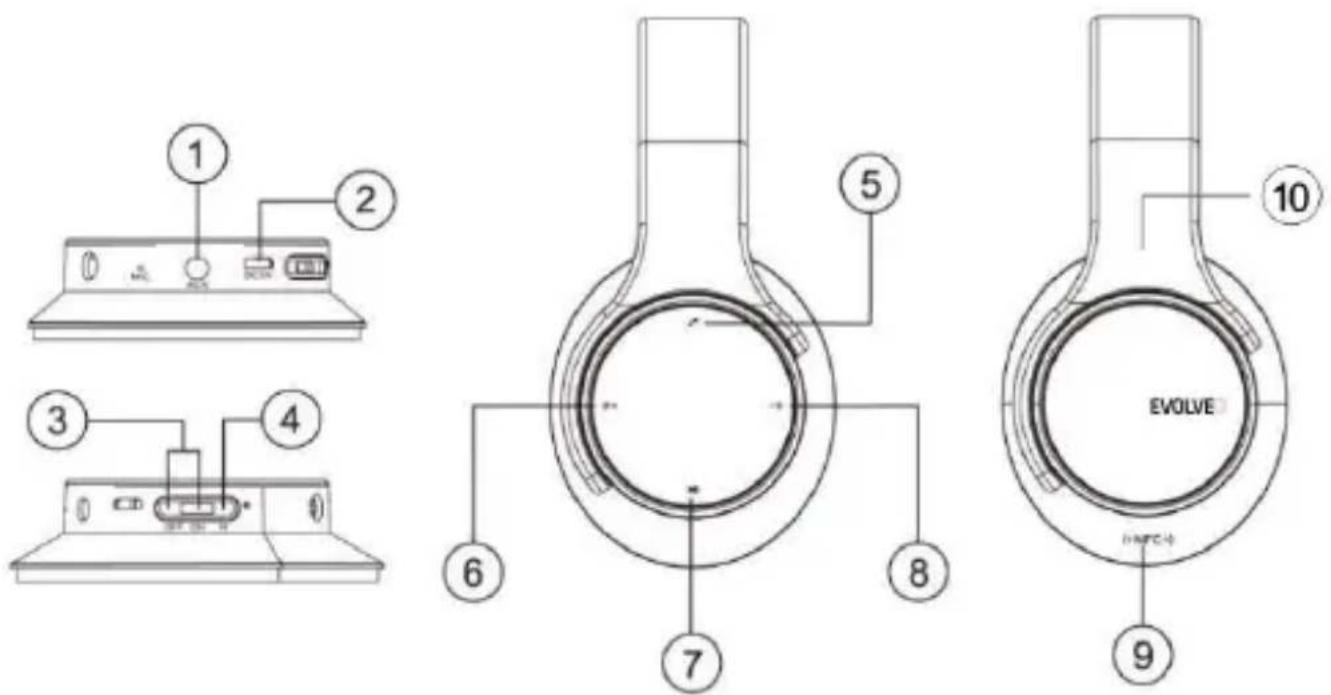
1: AUX in
2: DC 5V in
3: On/Off
4: Mode Switch Button: FM/Bluetooth/Memory card
5: Short press - answering calls; Long press when incoming call - hang off. Long press - dial back the last call.
6: Short press - Previous ; Long press - Vol +; In FM mode short press - Tune Up
7: Play / Pause
8: Short press - Next; Long press - Vol -; In FM mode short press - Tune Down
9: A built-in NFC feature enables simple pairing with NFC-enabled devices by a single touch.
10: TF card
Installation & usage
Bluetooth Mode:
- Turn on your cell phone,iPad, tablet or PC and go to the Bluetooth setting window to set up the Bluetooth.
- Turn on EVOLVEO SupremeSound E9 and shift to Bluetooth mode.
- Select the pairing name "E9" showed on your cell phone, tablet or PC to pair.
Music Mode (TF/AUX):
- Turn the Power button to "ON", and insert TF card or connect MP3/MP4 or PC to speaker, audio files play automatically.
The warranty DOESN'T APPLY to:
• using the device for other purposes than it was designed to
- installation of another firmware then the one that was installed as the original from the factory or firmware that can be downloaded manually or automatically from the device menu
- mechanical damage of caused by inappropriate using
- damage caused by the natural elements as fire, water, static electricity, overvoltage and so on
• damage caused by unauthorized repair
- damage of the guarantee seal or unreadable serial number of the device

Disposal: The symbol of crossed out container on the product, in the literature or on the wrapping means that in the European Union all the electric and electronic products, batteries and accumulators must be placed into the separate salvage after finishing their lifetime. Do not throw these products into the unsorted municipal waste

CE DEGL
DECLARATION OF CONFORMITY
Hereby, the company Abacus Electric, s.r.o. declares that the EVOLVEO SupremeSound E9 is in compliance with the requirements of the standards and regulations, relevant for the given type of device.
Find the complete text of Declaration of Conformity at ftp://ftp.evolveo.com/ce
Copyright © Abacus Electric, s.r.o.
www.evolveo.com
www.facebook.com/EvolveoCZ
All rights reserved.
Design and specification may be changed without prior notice.
Vážený zákazník,
Copyright © ABACUS Electric, s.r.o.
www.evolveo.com
www.facebook.com/EvolveoEU
Brand : Evolveo
Model : SupremeSound E9
Category : Headphones