
AVS1415 - Uncategorized DAEWOO - Free user manual and instructions
Find the device manual for free AVS1415 DAEWOO in PDF.


| Product Type | Stick Vacuum Cleaner |
| Dimensions (W x D x H) | 30 cm x 15 cm x 20 cm |
| Weight | 2.5 kg |
| Power Supply | 220-240 V, 50 Hz |
| Power Consumption | 600 W |
| Dust Capacity | 0.5 L |
| Filtration System | Cyclonic with washable filter |
| Noise Level | 75 dB |
| Cord Length | 5 m |
| Main Functions | Hard floor, carpet, crevice tool |
| Maintenance | Washable dust filter, empty dust cup |
| Safety Features | Overheat protection, automatic shut-off |
| Spare Parts | Filter, brush roll, crevice tool |
| Repairability | Modular design, user-replaceable parts |
| Warranty | 1 year |
Frequently Asked Questions - AVS1415 DAEWOO
User questions about AVS1415 DAEWOO
0 question about this device. Answer the ones you know or ask your own.
Ask a new question about this device
Download the instructions for your Uncategorized in PDF format for free! Find your manual AVS1415 - DAEWOO and take your electronic device back in hand. On this page are published all the documents necessary for the use of your device. AVS1415 by DAEWOO.
USER MANUAL AVS1415 DAEWOO
natural_image
Black outdoor earbuds with black bands and earphones, arranged in a symmetrical cross pattern (no text or symbols visible)Neckband Bluetooth Earphones
User Manual

DAEWOO
2 YEAR
WARRANTY
Terms and conditions apply.
IMPORTANT SAFEGUARDS
When using electrical appliances, basic safety precautions should always be followed.
These instructions should be saved for future reference:
- Read and familiarise yourself with all operating instructions before using your Bluetooth Earphones.
- Before using your Bluetooth Earphones, visually check that the unit is intact and has not suffered any transit damage.
- Only charge the earphones from a suitable USB outlet, any other power source may cause permanent damage to the earphones.
- The earphones must be fully charged via the USB port before use.
- Do not operate these Earphones after a malfunction or after being dropped or damaged in any way.
- Never allow children to play with the Earphones. Small parts may be a choking hazard.
- Do not allow the USB charging cable to hang over sharp edges or come in contact with hot surfaces.
- These Earphones are intended for household use only and should not be used for industrial purposes.
- Do not use these Earphones for anything other than its intended use.
- Do not immerse the Earphones in water or any other liquids.
- Do not expose the Earphones to moisture, rain or humidity, they are not waterproof.
- Before cleaning, ensure the Earphones are not connected to the USB supply.
- Never clean the earphones with solvents or harsh or abrasive cleaners.
- Do not attempt to dismantle the Earphones, it does not contain any user serviceable parts.
- Whilst not in use, store the Earphones in a cool dry place free from extreme temperatures, humidity or dust.
Description of Controls
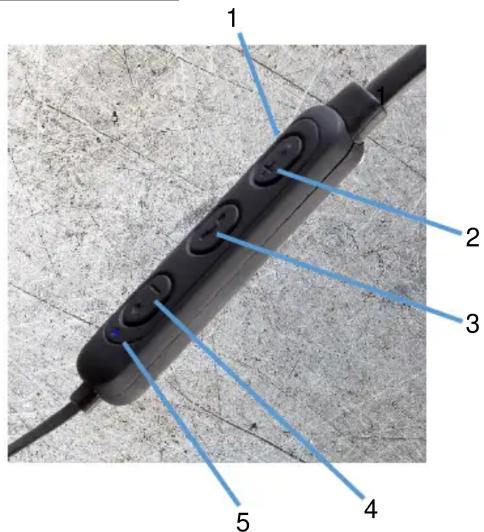
- Micro USB DC Charging Port (rear).
-
- Press briefly to Skip forwards to the next track or press and hold for volume increase.
- Power/Play/Pause/Phone button.
- — Press briefly to Skip back to the previous next track or press and hold for volume decrease.
- Bluetooth/Charge Indicator.
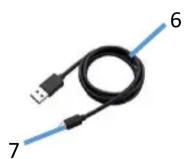
- USB Charging Cable.
- Micro USB Plug.
Charging the internal Battery
Before use, please ensure that the internal rechargeable battery is fully charged as follows:
-
Insert the Micro USB Plug (7) of the USB Charging Cable (6) into the Micro USB DC Port (1) on rear of the controls to charge the internal battery.
-
Insert the large USB plug on the other end of the USB Charging Cable (6) into a suitable USB charger rated at 5 volts 1 amp minimum.
-
The Bluetooth/Charge Indicator (5) will light red to show the internal battery is charging. Once the battery is fully charged, the Bluetooth/Charge Indicator (5) will light blue showing that the internal battery is fully charged and the USB Charging Cable (6) can be removed.
Using Your Bluetooth Earphones
-
Press the Power/Play/Pause/Phone button (3) for 3 seconds to power up the Earphones.
-
The Bluetooth/Charge Indicator (5) will flash.
-
Enable the Bluetooth mode on your Phone, Tablet or other Bluetooth compatible device and set it to search.
-
Select 'AVS1408' from the search results found by your device which will now pair with the Earphones and just the Bluetooth/Charge Indicator (5) will flash slowly to show Bluetooth connection.
-
Enable the music player on your Bluetooth connected device.
-
Briefly press the Power/Play/Pause/Phone button (3) to play music, press the button again to pause the music.
-
Briefly press the + button (2) to skip forwards to the next track or press and hold for volume increase.*
-
Briefly press the – button (4) to skip backwards to the next track or press and hold for volume decrease.
*Two high pitched beeps will be heard warning when the maximum volume setting has been reached.
Handling Telephone Calls
Answering a Call
-
A call coming in will mute (cut) the music you are listening to.
-
Briefly press the Power/Play/Pause/Phone button (3) to answer the call.
-
Press and hold down the + button (2) to increase the call volume level.*
-
Press and hold down the – button (4) to decrease the call volume level.
-
Briefly press the Power/Play/Pause/Phone button (3) again to end the call.
-
The callers voice will be heard through the Earpiece and your voice will be picked up by the built in Microphone inside the control unit.
Rejecting a Call
-
A call coming in will mute (cut) the music you are listening to.
-
Press and hold the Power/Play/Pause/Phone button (3) for two seconds to reject the call.
Redialling the Last Call Made
-
Briefly press the Power/Play/Pause/Phone button (3) twice to redial the last number you called.
-
Briefly press the Power/Play/Pause/Phone button (3) once to end the call.
*Two high pitched beeps will be heard warning when the maximum volume setting has been reached.
Care and Use of your Earphones
● Always disconnect the Earphones from the USB charging supply before cleaning.
- Clean outside of the Earphones with a clean damp cloth. Never clean with harsh or abrasive cleaners.
- Do not submerge the Earphones in water or any other liquids.
Technical Specification
| Model Numbers | AVS1408, AVS1414, AVS1415 & AVS1416 |
| Power Supply/Charger | DC 5V 1A |
| Weight | 23g |
| Built in Battery type | Lithium 90 mAh |
| Bluetooth Transmission power | ≤ -3.325dBm |
| This product conforms to Radio Equipment Directive 2014/53/EU | |
Waste batteries should not be disposed of with household waste. Please recycle where facilities exist. Check with your Local Authority or retailer for recycling advice.

natural_image
Abstract black-and-white geometric pattern resembling a stylized fan or leaf (no text or symbols)DAEWOO
GUARANTEE
This product is guaranteed for twenty-four months from the date of original purchase. If any defect should occur due to faulty materials or workmanship, please return it to the store it was purchased from.
You will need to have your receipt of purchase to hand. The guarantee is subject to the following provisions:
- It is only valid within the boundaries of the country of purchase.
- The product must be correctly installed and operated in accordance with the instructions contained in the User Manual.
- The product must be used solely for domestic purposes.
- The guarantee will be rendered invalid if the product is re-sold or has been damaged by inexpert repair.
- The manufacturer disclaims any liability for incidental or consequential damages.
- The guarantee is in addition to, and does not diminish, your statutory or legal rights.
Waste electrical products should not be disposed of with household waste. Please recycle where facilities exist. Check with your Local Authority or retailer for recycling

Daewoo Electricals is a registered trademark. Produced and imported under licence by ESG Ltd
Manchester M3 1JS www.esgld.com