
Ania 5R - Computer Cooling Component Evolveo - Free user manual and instructions
Find the device manual for free Ania 5R Evolveo in PDF.


| Product Type | CPU Cooler |
| Model | Ania 5R |
| Brand | Evolveo |
| Fan Size | 120 mm |
| Fan Dimensions | 120 x 120 x 25 mm |
| Heatsink Dimensions | 130 x 80 x 155 mm |
| Total Weight | 600 g |
| Fan Speed | 800 - 1800 RPM (PWM) |
| Airflow | 65 CFM |
| Noise Level | 18 - 30 dBA |
| Bearing Type | Hydraulic Bearing |
| Power Connector | 4-pin PWM |
| Voltage | 12 V DC |
| Socket Compatibility | Intel LGA 1200/115x/1700, AMD AM4/AM5 |
| Material | Aluminum fins, copper heat pipes |
| Number of Heat Pipes | 5 |
| Maximum TDP | 150 W |
| Cooling Method | Air cooling |
| LED Lighting | None |
| Maintenance | Clean fan and heatsink with compressed air every 6 months |
| Safety | Ensure proper mounting to avoid CPU damage. Use thermal paste. |
| Repair & Spare Parts | Fan replaceable; contact support for spare fan or mounting kit. |
| General | Includes mounting brackets, thermal paste, and installation guide. |
Frequently Asked Questions - Ania 5R Evolveo
User questions about Ania 5R Evolveo
0 question about this device. Answer the ones you know or ask your own.
Ask a new question about this device
Download the instructions for your Computer Cooling Component in PDF format for free! Find your manual Ania 5R - Evolveo and take your electronic device back in hand. On this page are published all the documents necessary for the use of your device. Ania 5R by Evolveo.
USER MANUAL Ania 5R Evolveo
natural_image
Black ergonomic fan device with blue LED display and four blades (no text or symbols visible)EN

Disposal: The symbol of crossed out container on the product, in the literature or on the wrapping means that in the European Union all the electric and electronic products,
batteries and accumulators must be placed into the separate salvage after finishing their lifetime. Do not throw these products into the unsorted municipal waste.

DECLARATION OF CONFORMITY
Hereby, the company Abacus Electric, s.r.o. declares that the EVOLVEO Ania 5, Ania 5R is in compliance with the requirements of the standards and regulations, relevant for the given type of device. Find the complete text of Declaration of Conformity at http://ftp.evolveo.com/ce/
Importer / Manufacturer
Abacus Electric, s.r.o.
Planá 2, 370 01, Czech Republic
Copyright © Abacus Electric, s.r.o.
www.evolveo.com
www.facebook.com/EvolveoCZ
All rights reserved.
Design and specification may be changed without prior notice
Feature
- With metal & plastic surface
- 2 USB ports
- With 5 ajustable angles
- With 4*70mm /1*125mm
- Compatible for 9-15.6" laptop
Technical information
• Fan Speed: 2500+-10% RPM
- Fan Noise: 20dB
• Dimensions: 365*297*30mm
- Weight: 800g
Package Contents
- 1 Laptop stand
- 1 USB cable


How to use ...
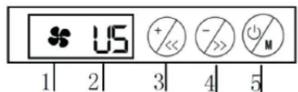
1 is fan indicator.
2 is gear indicator.
3 is for increasing the fans speed
4 is for decreasing the fans speed
5 is on/off button & mode selection
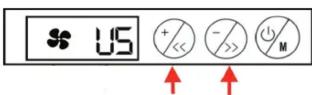
- Press +/- to increase or decrease the fans speed
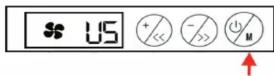
- Press the on/off button to start or shut the cooler.
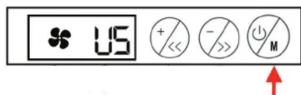
- Press the on/off button for 1.5 seconds change the mode of the cooler.
1) Press once, three fans working in a shape of triangle.
2) Long press once, four small fans working
3) long press twice, one big fan working, four small fans stok working.


Brand : Evolveo
Model : Ania 5R
Category : Computer Cooling Component