
MY iOn ION-01 - Air purifier Zepter - Free user manual and instructions
Find the device manual for free MY iOn ION-01 Zepter in PDF.


| Product Type | Portable Personal Air Purifier (Ionizer) |
| Brand | Zepter |
| Model | MY iOn ION-01 (Mylon) |
| Effective Area | 30 cm perimeter (personal breathing zone) |
| Technology | Negative Ionization |
| Negative Ion Output | 18,000,000 ions/cm³ |
| Dimensions (W x H x D) | 2.0 x 66.5 x 1.9 cm |
| Weight | 25 g |
| Battery Type | Rechargeable Li-ion |
| Battery Capacity | 200 mAh (0.74 Wh) |
| Nominal Voltage | 3.7 V |
| Rated Power Input | DC 5V, 1A |
| Usage Time (per charge) | Up to 10 hours |
| Charging Time | 2–3 hours |
| Charging Port | Micro USB |
| Package Contents | Mylon unit, USB cable, fabric necklace, PVC necklace, manual |
| Country of Origin | Korea |
| Distributor | Horse Air and Safe Service AG, Switzerland |
| Warranty | 24 months from purchase date |
| Cleaning Instructions | Wipe with dry soft cloth; do not use solvents or immerse in water |
| Safety Precautions | Do not use near water, in oxygen-rich environments, or with aerosol sprays; keep away from heat sources |
| Disposal | Do not dispose as household waste; recycle at designated collection points |
Frequently Asked Questions - MY iOn ION-01 Zepter
User questions about MY iOn ION-01 Zepter
0 question about this device. Answer the ones you know or ask your own.
Ask a new question about this device
Download the instructions for your Air purifier in PDF format for free! Find your manual MY iOn ION-01 - Zepter and take your electronic device back in hand. On this page are published all the documents necessary for the use of your device. MY iOn ION-01 by Zepter.
USER MANUAL MY iOn ION-01 Zepter
This device can only be used for the purposes it has been designed for. The manufacturer cannot be held responsible for any damage deriving from improper, incorrect or unreasonable use.
The warranty period will not be extended by the replacement of the appliance. The warranty will expire 24 months from the date of purchase. The date of purchase is the date shown on the invoice. Evidence of original purchase is required for warranty services, so it is important to keep your sales receipt.
The warranty is only valid if:
• the device shows material or manufacturing defects
- there are no signs of breaking by the customer or the presence of non-original pieces.
The warranty does not include:
• defects caused by improper handling or insufficient maintenance and care of the
appliance
• damages caused by transport, inadequate use, negligence and/or incorrect use
• damages caused by accidents such as fire, water or other external influences
- defects due to non-compliance with the applicable safety precautions and data stated on the type plate.
This guarantee does not affect the consumer's statutory rights under applicable national legislation in force, nor the customer's rights against the retailer arising from the sales/purchase agreement.
In the absence of applicable national legislation, this guarantee will be consumer's sole and exclusive legal remedy, and the manufacturer shall not be liable for any incidental or consequential damages for breach of any express of implied guarantee of this product. The liability of manufacturer is limited to and shall not exceed the purchase price of the product actually paid by the consumer.


www.zepter.com
Mylon
Portable Personal Air Sterilizer

USER'S GUIDE
(Mylon Portable Personal Air Sterilizer)
Mylon uses advanced ionisation technology to protect you from small particles, such as dust, pollen, bacteria, mould and viruses, which are often the most hazardous to your health. Emitting a constant stream of healthy negative ions, Mylon causes pollutants in the air to become negatively charged, forcing these pollutants from your personal space and creating cleaner, healthier air to breathe.
Warnings
All the safety and operating instructions should be carefully read before using Myion and followed.
- Do not immerse unit in liquids or allow liquids to enter the unit.
- Do not wear while bathing or in a shower.
- Do not place or store the unit where it can fall or be pulled into a tub or sink.
• The unit should be kept away from heat sources such as direct sunlight, radiators, heat
registers, stoves or other heat-producing appliances.
- Do not allow children to play with any plastic bags that accompany this unit. Plastic
bags may present a hazard to young children.
- This appliance may be used by children as long as they are at least 8 years old, they are properly supervised and have received instructions as to the safe use of the appliance. - This appliance may be used by persons with reduced physical, sensory or mental
• Do not attempt to disassemble or modify the product.
- Do not operate the product if it is not working properly, if it has been dropped into
water or damaged.
- Do not operate where aerosol units are being used or where oxygen is being
administered. Do not operate this unit in oxygen rich environments.
- Keep away from gas-powered stoves and ovens, and do not operate this unit in areas
where flammable or combustible units or vapours may be present.
Health precautions
- Pacemaker patients, children under 8 years of age and people with a history of respiratory problems or heart or lung disease should consult a physician prior to using this product.
Package content

a) Mylon b) USB charging cable c) Fabric necklace d) PVC necklace e) Instruction for Use
Product description

USB charging port
Instruction for use
a) Before first use, charge the product fully, as the battery may be empty.
b) Switch Mylon on by pressing On/Off button for 1 second. A stream of millions of negative ions is emitted from the negative ion emitter thereby creating a clean zone of healthier air within your breathing space. Blue LED indicator lights on and indicates that Mylon is powered on and is cleaning air.
c) To switch the device off, press the On/Offbutton for 1 second again. d) To attach the necklace on Mylon pull the metal pins as it is shown on the picture.
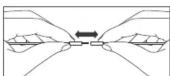

Thread the necklace through the opening and connect pins together.

Note! You can enjoy maximum effect of negative ions when negative ion emitter is pointed toward your face during use. You can wear Mylon hanging around your neck or place it on the desk in front of you.
Charging of Mylon
a) When battery indicator turns to orange, it is a signal that battery level is low and the device must be charged. b) Plug the USB cable to the USB charging port and charge it (USB charger, PC, etc.)
c) The battery indicator turns to green when the battery is fully charged. Charging will take about 2 -3 hours. d) The product can be used during charging.
e) Use charging adapter less than 2A. If use high-speed charger exceeding 2A, it may cause a fatal defect or a fire in the charging system of the device
Note! If the device is not used for a long time, please charge it at least once every three months.
Cleaning
- Switch Mylon off. - Use dry, softcloth to clean the surface. - Do not use harsh solvents or chemicals to clean Mylon - Never immerse in water or clean under running water.
Technical Specification
| Product name | MylanPortable Personal Air Purifier | Effective area | Perimeter of 30 cm |
| Product item code | ION-01 | Product dimension | W2TxH66.5xD19 cm |
| Distributed by | Home Art and Skills Services AG, SHI/egglecture 23, K802 Switzerland | Weight | 25 g |
| Country of origin | Korea | Battery | Li-ion battery |
| Rated power | DC 5V, 1A | Mopial | 70133 |
| Charging time | 2 - 3 hours | Nominal voltage | 3.7V |
| Usage time | 10 hours | Rated capacity | 200 mAh/0.74 W |
| Rated negative ion generation | 18 000 000 ml/km ^3 | Number of cells/Batteries | one |
Disposal

At the end of the Mylon lifetime, we recommend not to dispose of the appliance as ordinary waste, but to leave it with personnel qualified to collect such material. In this way, it will be properly disposed of and recycled. This is a valuable aid for safeguarding our environment!
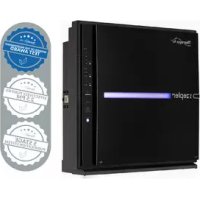

Brand : Zepter
Model : MY iOn ION-01
Category : Air purifier