
XSA1000TG - Meter Owon - Free user manual and instructions
Find the device manual for free XSA1000TG Owon in PDF.


| Product Type | Digital Multimeter |
| Brand | Owon |
| Model | XSA1000TG |
| Display | Backlit LCD, 6000 counts |
| Auto-Ranging | Yes |
| DC Voltage Range | 600 mV to 1000 V |
| AC Voltage Range | 600 mV to 750 V |
| DC Current Range | 600 μA to 10 A |
| AC Current Range | 600 μA to 10 A |
| Resistance Range | 600 Ω to 60 MΩ |
| Capacitance Range | 60 nF to 60 mF |
| Frequency Range | 60 Hz to 60 MHz |
| Diode Test | Yes |
| Continuity Test | Yes |
| Safety Rating | CAT II 1000V, CAT III 600V |
| Power Supply | 2x 1.5V AA batteries |
| Dimensions | 180 x 80 x 40 mm |
| Weight | 350 g (with batteries) |
| Operating Temperature | 0°C to 40°C |
| Storage Temperature | -20°C to 60°C |
| Maintenance | Clean with a dry cloth; avoid solvents |
| Spare Parts | Test leads, batteries, fuses |
| Repairability | Replaceable fuse and batteries; professional repair for other issues |
| General Information | Includes test leads, manual, and carrying case |
Frequently Asked Questions - XSA1000TG Owon
User questions about XSA1000TG Owon
0 question about this device. Answer the ones you know or ask your own.
Ask a new question about this device
Download the instructions for your Meter in PDF format for free! Find your manual XSA1000TG - Owon and take your electronic device back in hand. On this page are published all the documents necessary for the use of your device. XSA1000TG by Owon.
USER MANUAL XSA1000TG Owon
Sept 2020 edition V1.3.1
Copyright © LILLIPUT Company. All rights reserved.
The LILLIPUT's products are under the protection of the patent rights, including ones which have already obtained the patent rights and those which are applied for. The information in this manual will replace all materials published.
The information in this manual was correct at the time of printing. However, LILLIPUT will continue to improve products and reserves the rights to change specification at any time without notice.
owon® is the registered trademark of the LILLIPUT Company.
Fujian LILLIPUT Optoelectronics Technology Co., Ltd.
No. 19, Heming Road
Lantian Industrial Zone, Zhangzhou 363005 P.R. China
Tel: +86-596-2130430 Fax: +86-596-2109272
Web: www.owon.com E-mail: info@owon.com.cn
General Warranty
We warrants that the product will be free from defects in materials and workmanship for a period of 3 years from the date of purchase of the product by the original purchaser from the our Company. The warranty period for accessories is 12 months. This warranty only applies to the original purchaser and is not transferable to a third party.
If the product proves defective during the warranty period, we will either repair the defective product without charge for parts and labour, or will provide a replacement in exchange for the defective product. Parts, modules and replacement products used by our for warranty work may be new or reconditioned like new. All replaced parts, modules and products become the property of our company.
To obtain service under this warranty, the customer must notify our of the defect before the expiration of the warranty period. Customer shall be responsible for packaging and shipping the defective product to designated service centre, a copy of the customer's proof of purchase is also required.
This warranty shall not apply to any defect, failure or damage caused by improper use or improper or inadequate maintenance and care. We shall not be obligated to furnish service under this warranty a) to repair damage resulting from attempts by personnel other than our representatives to install, repair or service the product; b) to repair damage resulting from improper use or connection to incompatible equipment; c) to repair any damage or malfunction caused by the use of not our supplies; or d) to service a product that has been modified or integrated with other products when the effect of such modification or integration increases the time or difficulty of servicing the product.
Please contact the nearest Sales and Service Offices for services.
Excepting the after-sales services provided in this summary or the applicable warranty statements, we will not offer any guarantee for maintenance definitely declared or hinted, including but not limited to the implied guarantee for marketability and special-purpose acceptability. We should not take any responsibilities for any indirect, special or consequent damages.
Table of contents
List of figures ....iii
List of tables .... iii
- General Safety Requirements ....1
- Safety Terms and Symbols 4
- Document Overview ....5
- Quick Start 6
4.1 General Inspection 6
4.2 Safety Precaution before Operation ....6
4.3 First Time to Power on 8
4.4 Front Panel 9
4.5 Rear Panel 15
4.6 User Interface 17
4.7 Build-in Help 18
4.8 Basic Measurement 19
5. Menu Interpretation ....23
5.1 【FREQ】Frequency....23
5.2 【SPAN】 25
5.3 【AMPTD】Amplitude....27
5.4 【Auto】Auto Tune 30
5.5 【BW】Bandwidth....30
5.6 【Trace】....32
5.7 【Detector】....34
5.8 【Display】....36
5.9 【Sweep】....37
5.10 【Trig】 38
5.11 【Source】....38
5.12 【Demod】Demodulation....40
5.13 【Peak】....42
5.14 【Marker】 43
5.15 【Marker→】 46
5.16 【Marker Fctn】Marker Function....48
5.17 【Meas】Measurement....49
5.18 【Meas Setup】 53
5.19 【System】 53
5.20 【File】 59
Appendix A: Enclosure 72
Appendix B: General Care and Cleaning 72
Appendix C: USB Disk Requirements 73
Appendix D: PC Software Requirements 73
List of figures
Figure 4-1 Front panel 9
Figure 4-2 Function Keys 10
Figure 4-3 Numeric Keypad ....13
Figure 4-4 The knob....14
Figure 4-5 Direction keys 14
Figure 4-6 Rear Panel 15
Figure 4-7 User interface ....17
Figure 4-8 Full Span 20
Figure 4-9 Set frequency span ....21
Figure 4-10 Set reference level 22
List of tables
Table 4-1 Working Power Variation Range ....7
Table 4-2 Front Panel Description 9
Table 4-3 Function Key Description ....10
Table 4-4 Rear Panel Description ....15
Table 4-5 User interface Description ....17
Table 5-1 Detector type comparison 34
Table 5-2 [Factory] Settings .....55
1. General Safety Requirements
Before use, please read the following safety precautions to avoid any possible bodily injury and to prevent this product of any other connected products from damage. To avoid any contingent danger, ensure this product is only used within the ranges specified.
■ Use Proper Power Cord. Use only the power cord supplied with the product and certified to use in your country.
■ Product Grounded. This instrument is grounded through the power cord grounding conductor. To avoid electric shock, the grounding conductor must be grounded. The product must be grounded properly before any connection with its input or output terminals.
■ Check all Terminal Ratings. To avoid fire or shock hazard, check all ratings and markings on this product. Refer to the user manual for more information about ratings before connecting to the instrument.
■ Use Proper Overvoltage Protection. Make sure that no overvoltage (such as that caused by a thunderstorm) can reach the product, or else the operator might expose to danger of electrical shock.
■ Do not operate without covers. Do not operate the instrument with covers or panels removed.
■ Avoid exposed circuit. Be careful when working on exposed circuitry to avoid risk of electric shock or other injury.
■ Do not operate if any damage. If you suspect damage to the instrument, have it inspected by qualified service personnel before further use. Any maintenance, adjustment or replacement especially to circuits or accessories must be performed by qualified service personnel.
■ Use your Oscilloscope in a well-ventilated area. Make sure the instrument installed with proper ventilation.
■ Do not operate in damp conditions. In order to avoid short
circuiting to the interior of the device or electric shock, please do not operate in a humid environment.
■ Do not operate in an explosive atmosphere. In order to avoid damages to the device or personal injuries, it is important to operate the device away from an explosive atmosphere.
- Keep product surfaces clean and dry. To avoid the influence of dust or moisture in air, please keep the surface of device clean and dry.
■ Electrostatic Prevention. Operate the instrument in an electrostatic discharge protective environment to avoid damage induced by static discharges. Always ground both the internal and external conductors of cables to release static before making connections.
■ Protect the Input Terminals of Instrument. Do not bend or hit the input terminals and the connected devices, (such as filter, attenuator, etc.) as such stress may cause damages to devices and the instrument. Do not mix the use of 50Ω and 75Ω connectors and/or cables.
■ Do Not Overload the Input. To avoid damaging the instrument, the signals at input terminal must be less than 50V DC voltage components and 30 dBm (1 W) AC (RF) components.
■ Appropriate Use of Power Meter. If you are not sure of the characteristics of signal under measure, follow these recommendations to ensure safe operations: if a RF power meter is available, use it to measure the power level of this signal first; or add a rated external attenuator between signal cable and input terminal of the instrument. Maximum attenuation, reference level and maximum span frequency should be selected, so as to make the signals displayed within the screen.
■ Know About the Specification Conditions of the Instrument. For maximum performance of the instrument, use the analyzer under specified conditions.
■ Handling Safety. Please handle with care during transportation to avoid damages to buttons, knob, interfaces and other parts on the panels.
2. Safety Terms and Symbols
Safety Terms
Terms in this manual (The following terms may appear in this manual):

WARNING
Warning indicates conditions or practices that could res in injury or loss of life.

CAUTION
Caution indicates the conditions or practices that could result in damage to this product or other property.
Terms on the product (The following terms may appear on this product):
DANGER Indicates an immediate hazard or injury possibility. WARNING Indicates a possible hazard or injury.
CAUTION Indicates potential damage to the instrument or of property.
Safety Symbols
Symbols on the product (The following symbols may appear on the product):

Hazardous Voltage
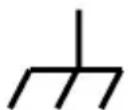
Chassis Ground

Refer to Manual
3. Document Overview
- Quick Start
This chapter states the matters need to attention before first power on, how to power on at first time, introduces spectrum analyzer's front/rear panel and user interface, explains how to use the instrument with a measurement example demonstration.
- Menu interpretation
This chapter offers spectrum analyzer's front panel menu and button interpretation.
● Specification Parameter
This chapter lists spectrum analyzer's specification parameter.
● Trouble Shooting
This chapter helps to implement the troubleshooting and deal with after sale repair.
- Appendix
This chapter introduces accessories of spectrum analyzer and how to maintain device.
Convention on button and menu key format:
Button: Button character + bold bracket, e.g. 【FREQ】stands for FREQ button.
Menu key words+bracket, e.g.[Center frequency] stands for
【FREQ】function's center frequency item, that is common called softkey menu item.
Related document:
Related documents including: Quick guide, User manual, programme guide and etc.
4. Quick Start
This chapter states the matters need to attention before first power on, and how to power on at first time, introduces spectrum analyzer's front/rear panel and user interface, explains how to use the instrument with a measurement example demonstration.
4.1 General Inspection
When you receive your new instrument, it is recommended that you check the instrument following these steps:
1. Check for transportation damage.
If it is found that the packaging carton or the foamed plastic protection cushion has suffered serious damage, do not throw it away until the complete device and its accessories have been electrically and mechanically checked.
2. Check the Accessories
The supplied accessories are described in the "Appendix A: Enclosure" of this Manual. Please ensure that all the listed accessories are present and undamaged, if any problems are found please contact your distributor or our local office.
3. Check the Complete Instrument
If there is any physical damage, operational fault, or performance issue please contact your distributor or our local office. If there is any damage to the instrument please ensure you keep the original packaging. Ideally you should always keep the original packaging if the instrument must be returned for repair.
4.2 Safety Precaution before Operation
4.2.1 Check Power Supply
The analyzer is equipped with a three-wire power cord in accordance with international safety standards. The product must be grounded properly before being powered on, as floating or improper ground may cause damage to the instrument or personal injury.
Make sure the grounding conductor of the spectrum analyzer is grounded before turning on the instrument. After which the AC
power cord can be connected. Do not use a non-ground power cord.
4.2.2 Allowed Variation Range of Supply Power Parameters
The spectrum analyzer is compatible with 100V-240V, 50Hz-60Hz AC power, Table 4-1 lists the power requirement to run the spectrum analyzer.
Table 4-1 Working Power Variation Range
| Power Supply Parameter | Compatible Range |
| Voltage | 100 - 240 VAC |
| Frequency | 50 - 60 Hz |
| Power | 28 W |
To prevent or lower the risk of damage to the spectrum analyzer from power interference between instruments, especially from peak pulses produced by large power consumption instruments, a 220V/110V AC regulated power supply is recommended.
4.2.3 Power Cord Selection
The analyzer is equipped with a three-wire power cord in accordance with international safety standards. This cable grounds the analyzer cabinet when connected to an appropriate power line outlet. The cable must be rated greater than 250Vac and 2A.

WARNING
Improper grounding may cause damage to the instrument or result in personal injury. Make sure the grounding conductor of the spectrum analyzer is grounded before turning on the instrument.
Always use a well-grounded power source. Do not use external power cable, power cord or an auto transform without grounded protection. If this product is to be powered via an external auto transformer for voltage reduction, ensure that its common terminal is connected to a neu (earthed pole) of the power supply.

WARNING
Make sure the supply power is stable before turning o analyzer to protect it from damage. Refer to “First Tim Power on” section 3.
4.2.4 Electro-static Discharge (ESD) Protection
ESD is an issue often ignored by users. Damage from ESD on the instrument is unlikely to occur immediately but will significantly reduce the reliability of it. Therefore, ESD precautions should be implemented in the work environment, and applied daily.
Generally, there are two steps to manage ESD protection:
1) Conductive table mats to connect hands via wrist bands
2) Conductive ground mat to connect feet via ankle straps
Implement both protection methods will provide a good level of anti-static protection. If used alone, the protection will not be as reliable. To ensure user's safety, anti-static components should offer at least 1MΩ isolation resistance.

WARNING
The above ESD protections measures cannot be used when working with over 500V!
Make good use of anti-static technology to protect components from damage:
1) Quickly ground the internal and external conductor of the coaxial cable before it is connected with the spectrum analyzer.
2) Staff must wear anti-static gloves before touching the connector cord or doing any assemble work.
3) Assure all the instruments are grounded properly to avoid static storage.
4.3 First Time to Power on
Connect the three-pin AC power cord into the instrument. Insert the plug into a power socket provided with a protective ground.

WARNING
Check the power source before turning on the spectrum analyzer, to protect the device from damage.
1) Press the power switch on the bottom left of the front panel.
2) Self-initialization takes about 30 seconds, after the boot screen the spectrum analyzer will default to the scanning curve.
3) After power on, let the spectrum analyzer warm up for 30 minutes for stabilization to obtain the most accurate results.
4.4 Front Panel
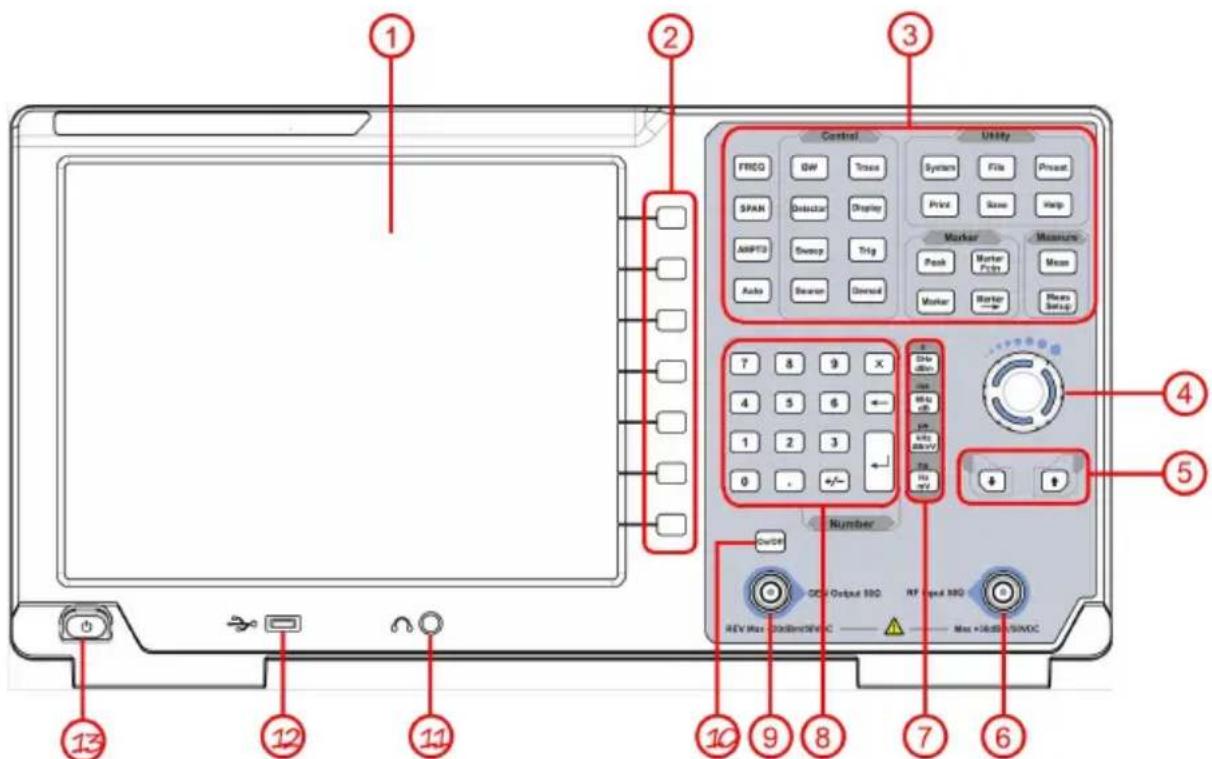
Figure 4-1 Front panel
Table 4-2 Front Panel Description
| NO. | Description | NO. | Description |
| 1 | LCD | 8 | Numeric keypad |
| 2 | Menu softkeys | 9 | TG or CW source output connector |
| 3 | Function keys | 10 | Source outputOn/Off button |
| 4 | Knob | 11 | Earphone interface |
| 5 | Arrow keys | 12 | USB Host port |
| 6 | RF Input connector | 13 | Power key(Push to turn on,long push to turn of |
| 7 | Unit keys |
4.4.1 Front Panel Function Key
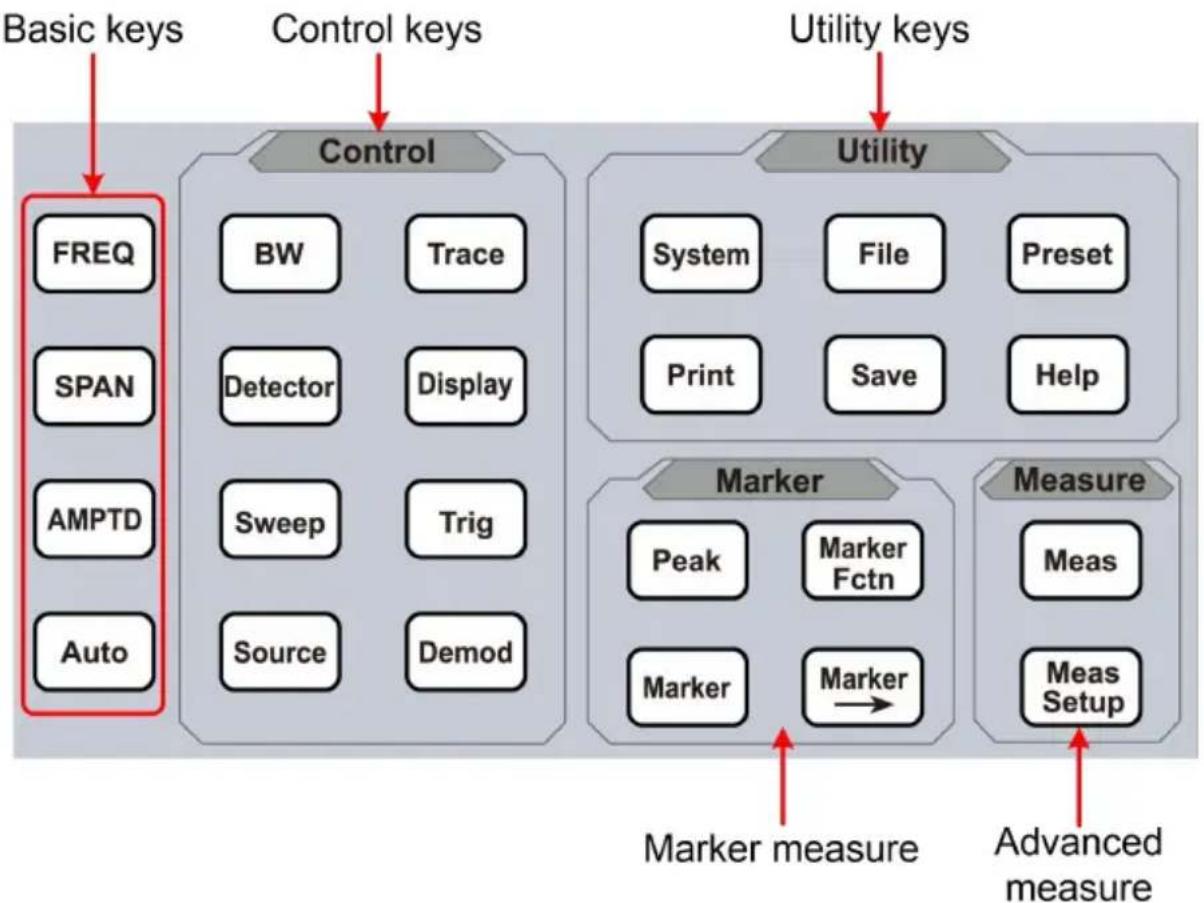
flowchart
graph TD
    A["Basic keys"] --> B["FREQ"]
    C["Control keys"] --> D["BW"]
    C --> E["Trace"]
    F["Utility keys"] --> G["System"]
    F --> H["File"]
    F --> I["Preset"]
    J["Marker"] --> K["Peak"]
    J --> L["Marker Fctn"]
    J --> M["Marker"]
    N["Measure"] --> O["Meas"]
    N --> P["Meas Setup"]
    Q["Marker measure"] --> R["Advanced measure"]
    S["Control"] --> T["Control"]
    U["Utility"] --> V["Utility"]
    W["Marker"] --> X["Marker"]
    Y["Measure"] --> Z["Measure"]
Figure 4-2 Function Keys
Table 4-3 Function Key Description
| Keys | Description |
| Basic keys | |
| FREQ | Activates the center-frequency function, an accesses the frequency function menu. |
| SPAN | Activates the frequency sweep span function, and set Full Span\Zero Span\Las Span. |
| AMPTD | Activates the reference level function, and accesses the amplitude softkeys, with which you set functions that affect data of the vertical axis. |
| AUTO | Searches the signal automatically within the full frequency range. |
| Control keys | |
| BW | Activates the RBW (resolution bandwidth) function, and accesses the softkeys that control the bandwidth functions and averaging. |
| Trace | Accesses the softkeys that allow you to store and manipulate trace information. |
| Detector | Accesses the softkeys that allow you to configure detector functions. |
| Display | Accesses the softkeys that allow you to control what is displayed on the analyzer, including the display line, graticule and label. |
| Sweep | Accesses the softkeys that allow you to select the sweep mode of the analyzer. |
| Trig | Accesses the softkeys that allow you to select the trigger mode of the analyzer. |
| Source | Accesses the softkeys that allow you to set the CW or TG source. |
| Demod | Accesses the softkeys that allow you to set the demodulation. |
| Marker measure keys | |
 | Places a marker on the highest peak, an accesses the Peak functions menu. |
 | Accesses the marker control keys that select the type and number of markers a turns them on and off. |
 | Accesses the marker function softkeys that allow you to set other system parameters based on the current marker value. |
 | Accesses the menu of special functions, such as marker noise, N dB bandwidth measure and frequency counting. |
| Advanced measure keys | |
 | Accesses the softkeys that let you make transmitter power measurements such as ACPR(adjacent channel power), channel power, and OBW(occupied bandwidth), etc |
 | Sets the parameters for the selected measurement function. |
| Utility keys | |
 | Sets the system parameters, and accesse the calibration menu. |
 | Accesses the softkeys that allow you to configure the file system of the analyzer. |
 | Resets the analyzer to the factory setting or user state. This state can be specified 【System】→ [PowerOn/Preset▶]→ [Preset▶]. |
 | Accesses the softkeys that allow you to $ the print parameters. |
 | Accesses the softkeys that allow you to save screen pixmap, trace data, or user state. |
 | Press the Help key to activate the help system. Press the Help key again to exit. |
advanced measure keys
4.4.2 Parameter Input
Specific parameter values are able to be entered using the numeric keypad, knob, and directional keys.
Numeric Keypad
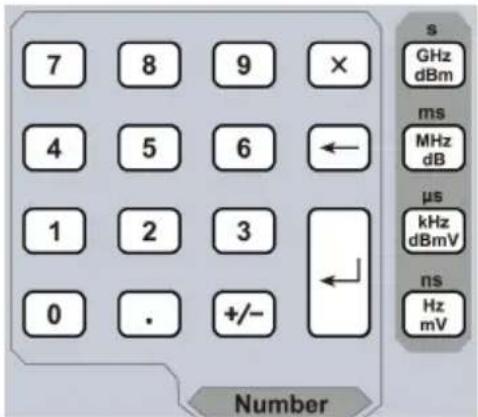
Figure 4-3 Numeric Keypad
- Numeric keys
Numbers 0-9 are available to be used.
- Decimal point
A decimal point "." will be inserted at the cursor position when this key is pressed.
- Sign key
Sign key "+/-" is to toggle the sign of a parameter. When pressed the first time, a "-" will be inserted and changed into "+" following the second press.
- Unit keys
Unit keys include GHz/dBm/s, MHz/dB/ms, kHz/dBmV/μs and Hz/mV/ns. After entering the desired numbers, choose an appropriate unit to complete the input. The specific meaning of unit is decided by the type of input parameter ("frequency", "amplitude" or "time").
- ☒ Cancel Key
(1) During the editing process this key will clear the inputs in the active area and exit editing mode at the same time.
(2) Turn off the display in the active area.
(3) Exit current test mode while in keyboard test.
- ← Back Key
(1) During the process of parameter editing, this key will delete the characters on the left side of the cursor.
(2) While in the process of file name editing, pressing this key will delete characters that have been entered.
7. Enter
When pressed, the system will complete the input process and insert a default measurement unit for the parameter automatically.
Knob
natural_image
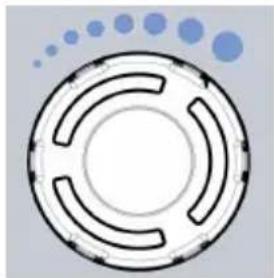
Circular diagram with concentric rings and radial segments, no text or symbols presentFigure 4- 4 The knob
The knob function:
During parameter editing, turn the knob clockwise to increase, or counterclockwise to decrease the parameter values at specified steps.
Direction key
natural_image
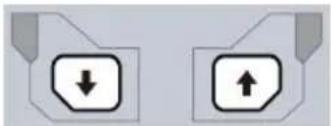
Two directional buttons with arrows, one downward and one upward, connected by gray lines (no text or symbols)Figure 4-5 Direction keys
The directional keys have following functions:
1) Increase or decrease the parameter value at specific steps while editing a parameter.
2) Move the cursor though the directory tree in the【File】function.
4.4.3 Front Panel Connector
1. USB Host

The analyzer may serve as a "host" device to connect to external USB devices. This interface is available for USB storage devices.
2. GEN Output 50Ω (tracking generator output 50Ω)
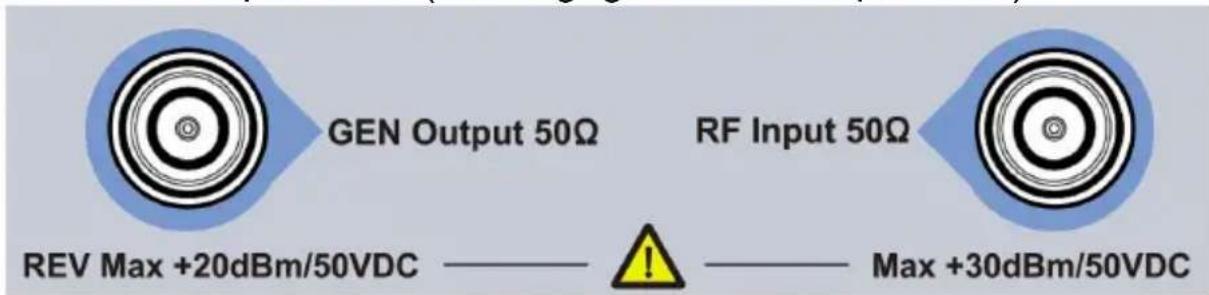
The output of the tracking generator can be connected to a receiver through an N type male connector, users can purchase this option if required.

CAUTION
Input voltage at RF input port must not be higher than DC to avoid damage to the attenuator and input mixer tracking generator.
3. RF Input 50Ω
The RF input may be connected to a device via a N type connector

CAUTION
When input attenuator is higher than 10 dB, the RF p input signal must be less than +30 dBm.
4.5 Rear Panel
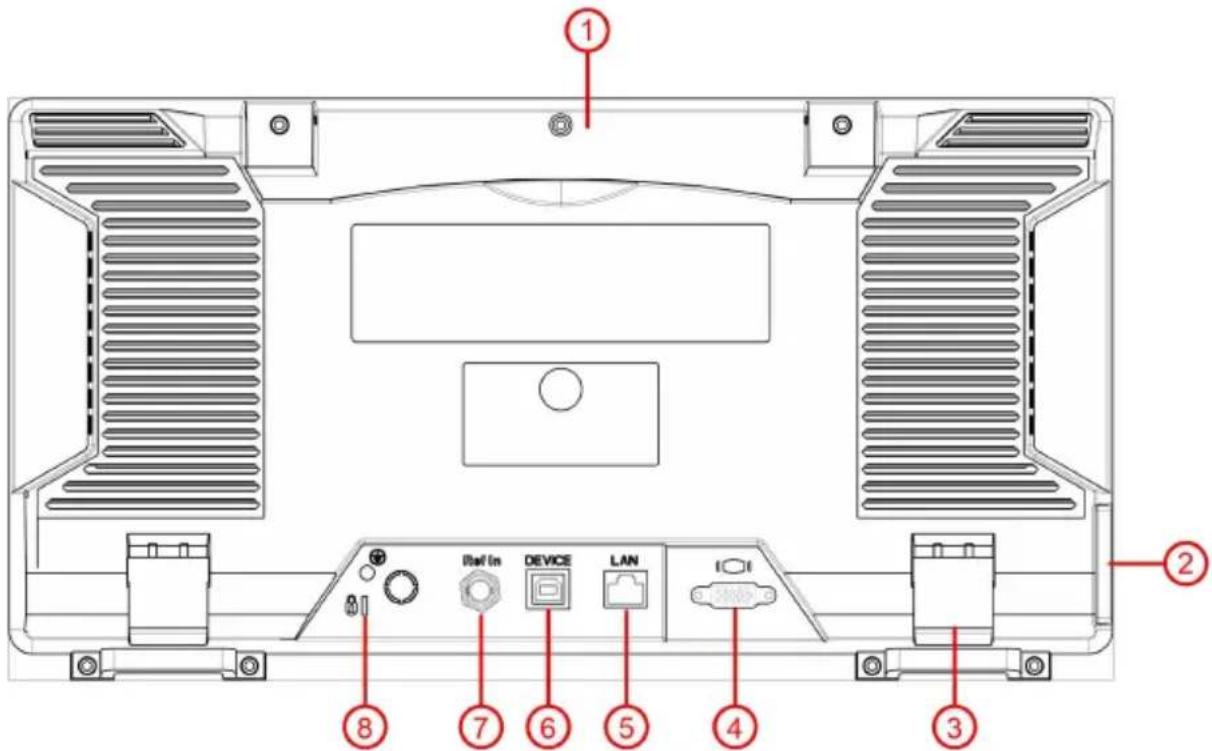
Figure 4-6 Rear Panel
Table 4-4 Rear Panel Description
| NO. | Name | Description |
| 1 | Handle | Stow the handle for mobile use. |
| 2 | AC power connector | AC: frequency 50 - 60 Hz, single-phas alternative 220V±15% or 110V±15% |
| 3 | Stool | To adjust the angle of the device |
| 4 | VGA port | provides a VGA signal output which is used through a VGA cable or with a projector |
| 5 | LAN interface | Through this interface, the analyzer can be connected to your local network for remote control. |
| 6 | USB Device interface | This configurable USB port permits external USB devices. It supports PictBridge printer and remote-control connection. |
| 7 | 10MHz IN/OUT | The BNC input or output of the 10 MH reference clock |
| 8 | Lock hole | You can lock the spectrum analyzer to fixed location using the security lock (please buy it yourself) to secure the spectrum analyzer. |
4.6 User Interface
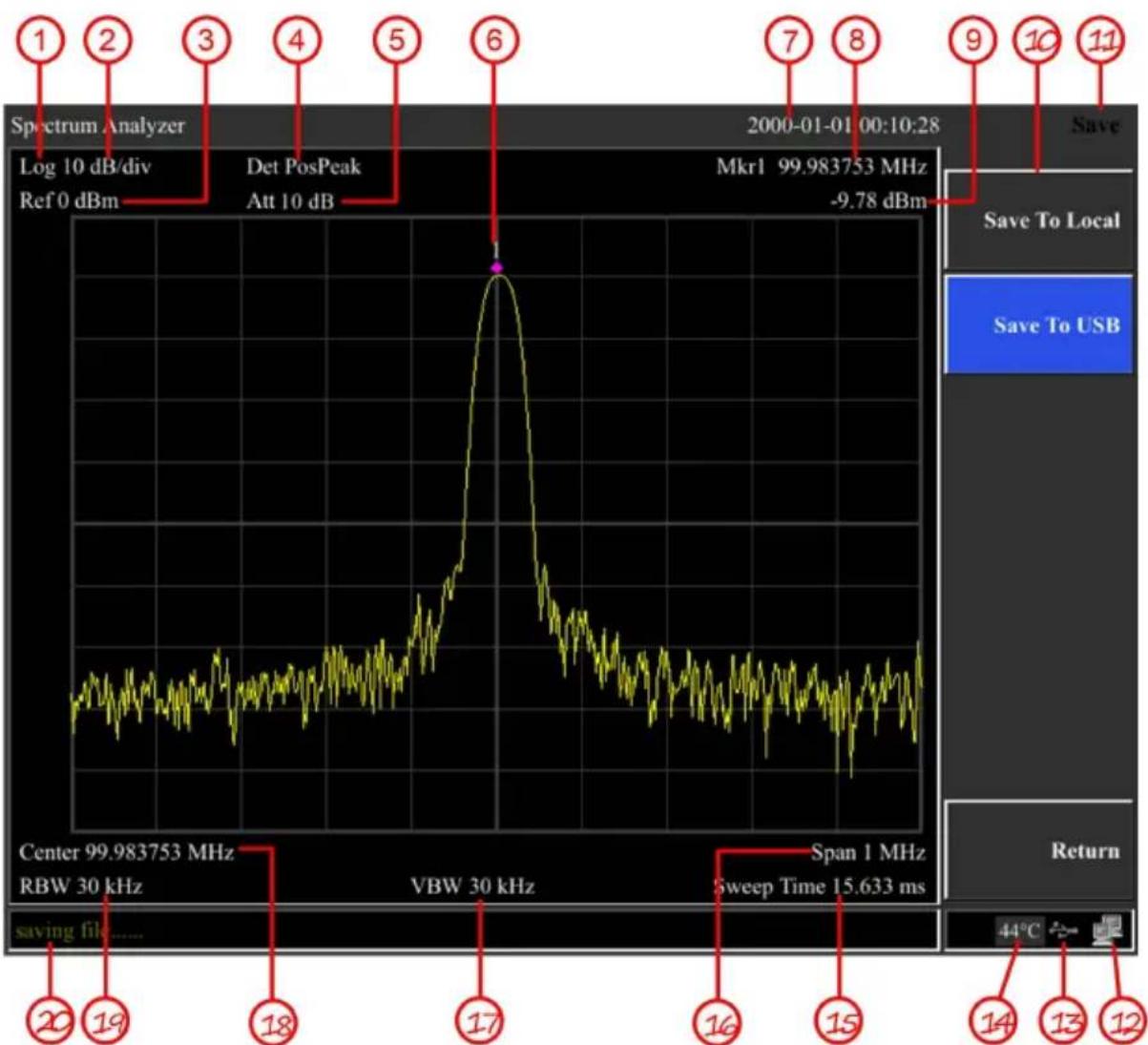
line
| Point | Frequency (MHz) | |-------|-----------------| | 1 | Log 10 dB/div | | 2 | Ref 0 dBm | | 3 | Det PosPeak | | 4 | Att 10 dB | | 5 | - | | 6 | Peak | | 7 | Mkr1 99.983753 MHz | | 8 | -9.78 dBm | | 9 | - | | 10 | - | | 11 | - | | Center | 99.983753 MHz | | RBW | 30 kHz | | VBW | 30 kHz | | Span | 1 MHz | | Sweep Time | 15.633 ms | | Return | - | | saving file | ... | | 20 | - | | 19 | - | | 18 | - | | 17 | - | | 16 | - | | 15 | - | | 14 | - | | 13 | - | | 12 | - |Figure 4-7 User interface
Table 4-5 User interface Description
| NO. | Name | Description | Related Key |
| 1 | Amplitude Division Type | Can choose logarithmic or linear | 【AMPTD】→[Scale Type] |
| 2 | Amplitude Division | Display division scale | 【AMPTD】→[Scale/Div] |
| 3 | Reference level | Reference level | 【AMPTD】→[Ref Level] |
| 4 | Detection type | Display detection type | 【Detector】 |
| 5 | Attenuation | Display input attenuation setting | 【AMPTD】→[Attenuation] |
| 6 | Marker | Display current activated marker | 【Marker】 |
| 7 | Date/time | Display system date and time | 【System】→[Date/Time] |
| 89 | Marker readout | Display frequency and amplitude of current marker | 【Marker】 |
| 10 | Menu item | Menu item of current function | |
| 11 | Menu title | Function of current menu belongs to. | |
| 12 | LAN access sign | LAN access sign | |
| 13 | USB storage device | Show if USB storage device is inserted; | |
| 14 | Temperature sign | Display device internal temperature | |
| 15 | Sweep Time | System sweep time | 【Sweep】→[Sweep Time] |
| 16 | Span | Display span width | 【SPAN】→[Span] |
| 17 | Video bandwidth | Display video bandwidth | 【BW】→[VBW] |
| 18 | Center frequency | Display center frequency | 【FREQ】→[Center Freq] |
| 19 | Resolution bandwidth | Display resolution bandwidth | 【BW】→[RBW] |
| 20 | System status | Display spectrum analyzer status |
4.7 Build-in Help
The built-in help provides information that refers to every function key and menu key on the front panel. Users can view this help information if required.
1. How to acquire built-in help
Press Help; a prompt about how to obtain help information will be shown
2.Page up and down
If there is more than one page of information, you can read the
complete information by using the directional keys.
3. Close the current help information
Press "Help" again to close help.
4. Acquire the menu help
A message about how to obtain help information will be shown, press the menu keys to get the corresponding help.
5. Acquire the help information of any function key
A message about how to obtain help information will be shown, press any function key to get the corresponding help.
4.8 Basic Measurement
Basic measurements include, input signal frequency and amplitude display, marked by a frequency marker. Follow these four simple steps below to implement input signal measurement.
Basic:
- Setting center frequency;
- Setting span and resolution bandwidth;
- Activate marker;
- Setting amplitude;
For example, to measure a 100MHz -20dB M signal, you must turn on the spectrum analyzer and ensure it is warmed up for 30 minutes to ensure measurement accuracy.
-
Equipment connection:
Connect the output terminal of signal generator to the RF Input
50Ω terminal of spectrum analyzer. Set the parameters as follows:
Frequency 100 MHz
Amplitude -20 dBm -
Setting parameters:
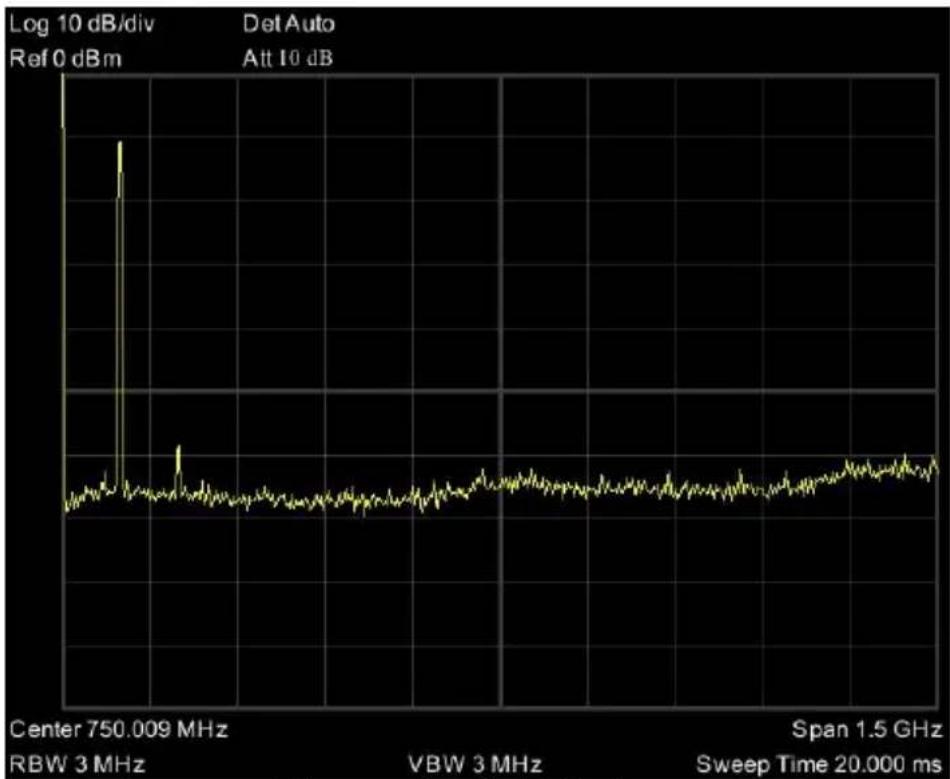
1) Press 【Preset】 to restore the analyzer to its factory-defined state. The Spectrum analyzer will display the spectrum from 9kHz to the maximum span width. The signal generated will display as a vertical line at 100MHz. Refer to Figure 4-8.
line
| Frequency (MHz) | Value (Log 10 dB/div) | | --------------- | --------------------- | | Center | 750.009 | | RBW | 3 | | VBW | 3 | | Span | 1.5 | | Sweep Time | 20.000 ms |Figure 4-8 Full Span
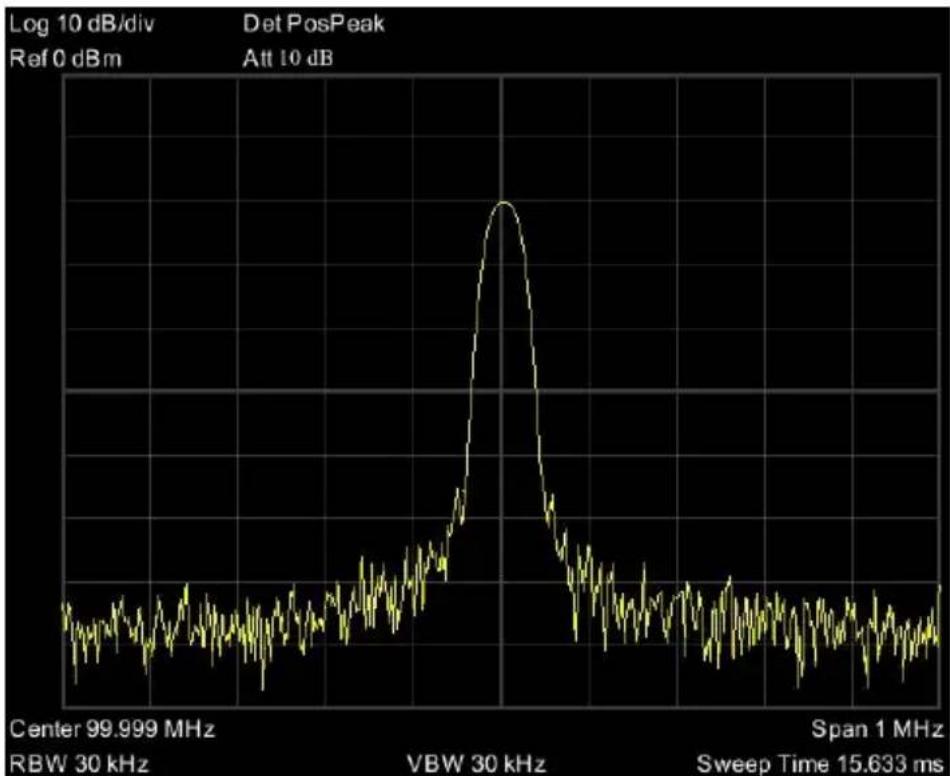
To clearly observe the signal, reduce the frequency span to 1 MHz and set the center frequency to 100MHz.
2) Setting Center Frequency
Press "FREQ", select [Center frequency] on corresponding pop up menu. Input "100" and select the unit as MHz on the numeric keypad. The keys can be used to set the exact value but the knob and directional keys can also be used to set the center frequency.
3) Setting Frequency Span
Press 【SPAN】, input "1" and select MHz as its unit using the numeric keypad; or press 【↓】 to decrease to 1MHz.
Press 【BW】, set [resolution bandwidth] to manual, and input "30" and select kHz as its unit using the numeric keypad; or press 【↓】to decrease to 30kHz.
Press 【Detector】, set the detection type to positive peak. Figure 4-9 shows the signal at a higher resolution.
Please note that resolution bandwidth, video bandwidth and frequency span are self-adapted. They adjust to certain values according to frequency span. Sweep time can be self-adapted too.
line
| Frequency (MHz) | Amplitude (dB/m) | | --------------- | ---------------- | | Center | 99.999 | | RBW | 30 | | VBW | 30 | | Span | 1 MHz | | Sweep Time | 15.633 ms |Figure 4-9 Set frequency span
4) Activate Marker
—Press【Marker】button in the function area. Press the softkey to select [Marker 1 2 3 4 5 ], select Marker 1, the marker is located at horizontal center by default, that is the signal peak point or its neighbor.
—Press Peak, and enter the next level menu, select [Max Search]. Frequency and amplitude values are read by the marker and shown on the top right of the display area.
5) Setting amplitude
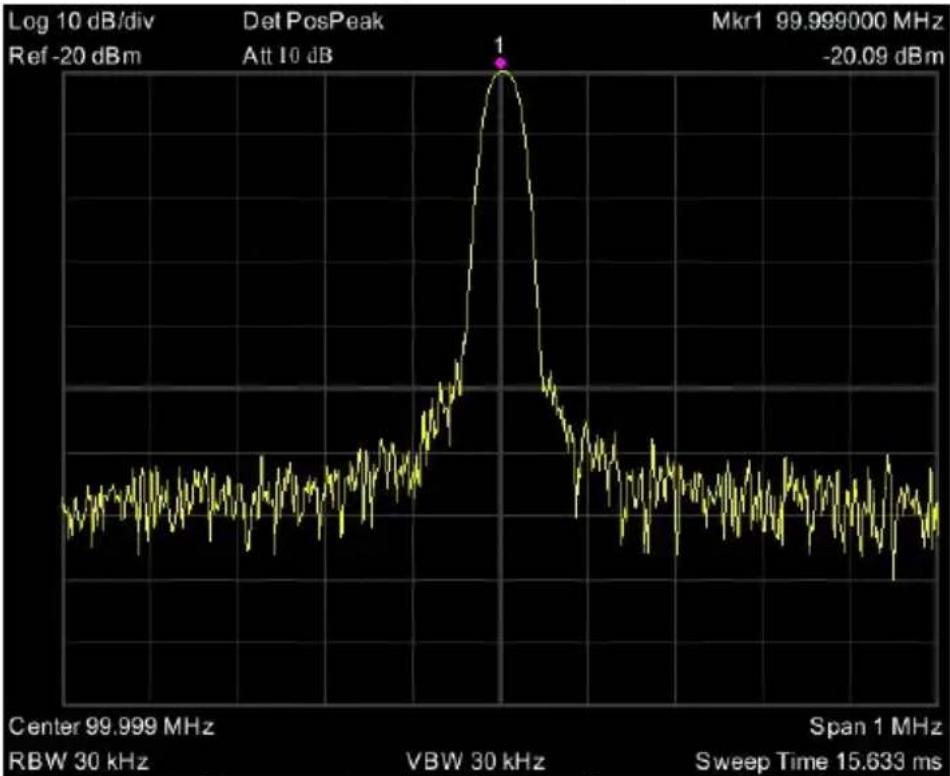
The reference level will be shown at the top of the display grid. To get a better dynamic range, the real signal peak point should be located at or near the top of display grid (reference level). The reference level is also the maximum value on Y axis. Here we reduce to 20dB reference level to increase the dynamic range.
Press 【AMPTD】, the amplitude setting menu will pop up, and the [reference level] soft key will be activated. The reference level can be input at the top left of the display grid. Input "-20" using the numeric keypad and set the unit to dBm. You can also use the 【↓】key or the knob for adjustment.
The reference level is set at -20dB, which is the signal peak value near the top of the grid. The balance between the signal
peak value and noise is dynamic range.
line
| Parameter | Value | | --------------- | --------- | | Mkr1 | 99.999000 MHz | | Ref | -20 dBm | | Att | 10 dB | | VBW 30 kHz | 30 kHz | | Span 1 MHz | 1 MHz | | Sweep Time | 15.633 ms |Figure 4-10 Set reference level
5. Menu Interpretation
This section provides you with the information on using the front panel of the spectrum analyzer.
5.1 【FREQ】Frequency
The frequency range of a channel can be expressed by either of two groups of parameters: Start Frequency and Stop Frequency; or Center Frequency and Span. If any such parameter is changed, the others would be adjusted automatically in order to ensure the coupling relationship among them
$$ f _ {\text { center }} = \left(f _ {\text { stop }} + f _ {\text { start }}\right) / 2 \tag {5-1} $$
$$ f _ {s p a n} = f _ {s t o p} - f _ {s t a r t} \tag {5-2} $$
f_center, f_stop, f_start and f_span denotes the center frequency, the stop frequency, the start frequency and the span respectively.
5.1.1 [Center Freq]
Sets the center frequency of the sweep. When pressed, the frequency mode is switched to Center Freq and Span in order to enter the desired parameter data.
Key Points:
- The start and stop frequencies vary with the center frequency when the span is constant.
- Changing the center frequency horizontally shifts the current sweep channel and the adjustment is limited by the specified frequency range.
- In Zero Span mode, the start frequency, stop frequency and center frequency are always equal. If one is changed the others are updated to match.
- You can modify this parameter using the numeric keys, knob, or direction keys.
5.1.2 [Start Freq]
Sets the start frequency of the sweep. When pressed, the
frequency mode is switched to Start Freq and Stop Freq in order to enter the desired parameter data.
Key Points:
- The span and center frequency are changed automatically according to the start frequency. The change of the span would have influence on other system parameters. For more details, please refer to "Span".
- In Zero Span mode, the start frequency, stop frequency and center frequency are always equal. If one is changed the others are updated to match.
- You can modify this parameter using the numeric keys, knob, or direction keys.
- If start freq is larger than stop freq when setting, then stop freq will increase automatically to the same value of start freq.
5.1.3 [Stop Freq]
Sets the stop frequency of the sweep. When pressed, the frequency mode is switched to Start Freq and Stop Freq in order to enter the desired parameter data.
Key Points:
- Modifying the stop frequency changes the span and center frequency, and the change of span influences other system parameters, see "Span".
- You can modify this parameter using the numeric keys, knob, or direction keys.
- If stop freq is larger than start freq when setting, then start freq will decrease automatically to the same value of stop freq.
5.1.4 [CF Step Auto Manual]
Sets the step of center frequency. Changing the center frequency in a fixed step continuously switches the channel to be measured.
Key Points:
- The frequency step type could be "Manual" or "Auto". In Auto mode, the CF step is 1/10 of span if it is in Non-zero span mode or equals 25% of RBW while in Zero span mode; in Manual mode, you can set the step using the numeric, step keys or knob. Then activate 【Center Frequency】, press step, center
frequency will change as setting step.
- After you set an appropriate frequency step and select center frequency, you can use using up and down direction keys to switch between measurement channels in a specified step in order to sweep the adjacent channels manually.
- You can modify this parameter using the numeric keys, knob, or direction keys.
Frequency step lends itself to detect the harmonic waves and bandwidths that are beyond the current span.
For example, for order of harmonic of a 300 MHz signal, you can use set both the center frequency and frequency step to 300 MHz, and press the up direction key continuously to increase the center frequency to 600MHz, that is secondary harmonic. Press frequency steps to increase center frequency by 300MHz, which reaches 900MHz. [Frequency Step Auto Manual] shows the auto or manual mode to setting the steps. When step is under manual mode, press [Frequency Step Auto Manual] to return to auto mode.
5.1.5 [Freq Offset]
You can set a frequency offset to displayed frequency value, including freq marker value. This movement won't influence sweep frequency range.
While this function activated (frequency offset isn't 0), you can modify this parameter using the numeric keys, knob or direction keys.
5.1.6 [Freq Ref Int Ext]
Set the reference frequency as internal or external input, this is regarded as whole device reference.
5.2 【SPAN】
Set the spectrum analyzer to span mode. When press 【SPAN】,
[Span],[Full Span],[Zero Span] and [Last Span] will be available to configure. You can modify span using the numeric keys, knob or direction keys. Use numeric key or [Zero Span] to clear span.
5.2.1 [Span]
Sets the frequency range of the sweep. When pressed, the frequency mode is switched to Center Freq/Span.
Key points:
- The start and stop frequencies are changed with the span automatically.
- In manual span mode, the span can be set down to 0 Hz, that is zero span mode. And up to the full span described in "Specification". When it is set to the maximum span, it enters full span mode.
- Modifying the span in non-zero span mode may cause an automatic change in both CF step and RBW if they were in Auto mode, and the change of RBW may influence VBW (in Auto VBW mode).
- In non-zero span mode, variation in the span, RBW or VBW would cause a change in sweep time.
- You can modify this parameter using the numeric keys, knob, or direction keys.
5.2.2 [Full Span]
Sets the spectrum analyzer to center frequency/sweep mode, and span of the analyzer to the maximum.
5.2.3 [Zero Span]
Sets the span of the analyzer to 0 Hz. Both the start and stop frequencies will equal the center frequency and the horizontal axis will denote time. The analyzer here is measuring the time domain characteristics of amplitude, located at the corresponding frequency point. This will help to observe the signal (especially for modulated signal) at time domain.
5.2.4 [Last Span]
Changes the span to the previous span setting.
5.3 【AMPTD】Amplitude
Sets the amplitude parameters of the analyzer. Through these parameters, signals under measurement can be displayed at an optimal view with minimum error. The pop out amplitude menu includes [Ref Level], [Attenuation Auto Manual], [Scale/Div], [Scale Type Lin Log], [Ref Offset], [Ref Unit], and [Preamplifier On Off].
5.3.1 [Ref Level]
Activate reference level function and sets the maximum power or voltage for display window.
Key points:
- This value is affected by a combination of maximum mixing level, input attenuation, and preamplifier. When you adjust it, the input attenuation is adjusted under a constant max mixing level, meeting:
$$ L _ {R e f} - q _ {R F} + q _ {P A} \leq L _ {m i x} \tag {5-3} $$
L_Ref , a_RF , a_PA and L_mix denotes the reference level, the input attenuation, the preamplifier, and the max mixing level, respectively.
- You can modify this parameter using the numeric keys, knob, or direction keys.
Reference level located at the top of axis grid. Measurement near the reference level would gain better accuracy, but input signal amplitude should not exceed the reference level; if it exceeds, the signal will be compressed and distorted, result in wrong measurement. Analyzer's input attenuation is related with reference level, it can self-adjust to avoid signal compression. Minimum reference level is -80dBm at Log scale under 0dB attenuation.
5.3.2 [Attenuation Auto Man]
Sets the front attenuator of the RF input in order to permit big signal (or small signals) to pass from the mixer with low distortion (or low noise). It only works under internal mixer mode to adjust input attenuator insider analyzer. In Auto mode, input attenuator is related with reference level.
Key points:
- When the preamplifier is On, the input attenuation could be set up to 40 dB. You can adjust the reference level to ensure that the specified parameters meet the requirement.
- Modifying the reference level may cause an automatic change in attenuation value; But the change of attenuation value won't influence reference level.
- You can modify this parameter using the numeric keys, knob, or direction keys.
Attenuator adjustment is to make the maximum signal amplitude pass from mixer less than or equal to -10dBm. E.g. if the reference level is +12dBm, the attenuator value is 22dB, then the input level in mixer is -18dBm (12-22-8=-18), its mainly purpose is to avoid signal compression. Switch [Input Atten Auto Manual] to manual mode, adjust the attenuator manually. The highlight under auto or manual stands for auto coupling and manual coupling. When attenuator is under manual mode, press [Input Atten Auto Manual] will match the attenuator and reference level again.
Note: Maximum input signal amplitude of input attenuator (10dB input attenuation at least) is +27dBm, higher power signal will damage input attenuator or mixer.
5.3.3 [Scale/Div]
Sets the logarithmic units per vertical grid division on the display. Select 1,2,4 or 10dB log amplitude scale. It's 10dB/div by default. Every activated marker is with dB as unit, difference between two markers is treated as marker difference under dB unit.
Key points:
- By changing the scale, the displayed amplitude range is
adjusted.
- The amplitude that can be displayed is from reference level minus 10 times the current scale value to the reference level.
- You can modify this parameter using the numeric keys, knob, or direction keys.
5.3.4 [Scale Type Lin Log]
Sets the Scale Type of Y-axis to Lin or Log, the default is Log. It only works under internal mixer mode. In general, select mV as Lin amplitude scale unit. Of course there would be other units for select.
Key points:
- In Log scale type: the Y-axis denotes the logarithmic coordinates, the value shown at top of the grid is the reference level and the grid size is equal to the scale value. The unit of Y-axis will be automatically switched into the default "dBm" when the scale type is changed from Lin to Log.
- In Lin scale type: the Y-axis denotes the linear coordinates, the value shown at the top of the grid is the reference level and the bottom of the grid shows 0 V. The grid size is 10% of the Reference level and the Scale/Div is invalid. The unit of Y-axis will be automatically switched into the default "mV" when the scale type is changed from Log to Lin.
- Other than as mentioned above, the unit of Y-axis is independent of the Scale Type.
5.3.5 [Ref Offset]
Assigns an offset to the reference level to attempt to compensate for gains or losses generated between the device under measurement and the analyzer.
Key points:
- The changing of this value changes both the readout of the reference level and the amplitude readout of the marker, but will not impact the position of the curve on the screen.
- You can modify this parameter using the numeric keys.
- This offset use dB as absolute unit, will not change with selected scale and unit.
5.3.6 [Ref Unit▶]
Sets the unit of the Y-axis to[dBm], [dBmV], [dBuV], [V] or [W] Key points:
1) [dBm]
Choose decibel equals to 1mW as amplitude unit.
2) [dBμW]
Choose decibel equals to 1μW as amplitude unit.
3) [dBpW]
Choose decibel equals to 1pW as amplitude unit.
4) [dBmV]
Choose decibel equals to 1mV as amplitude unit.
5) [dBμV]
Choose decibel equals to 1μW as amplitude unit.
6) [W]
Choose Watts as amplitude unit.
7) [V]
Choose Voltage as amplitude unit.
5.3.7 [Preamplifier On Off]
Sets the status of preamplifier located at the front of the RF signal path. Turning on the preamplifier reduces the displayed average noise level in order to distinguish small signals from the noise when working with small signals.
Searches for signals automatically throughout the full frequency range, adjusts the frequency and amplitude to their optimum and realizes one-key signal search and auto setting of parameters. Key points: some parameters such as reference level, scale, and input attenuation may be changed during the auto tune.
5.5 【BW】Bandwidth
Sets the RBW (Resolution Bandwidth) and VBW (Video Bandwidth) parameters of the analyzer. Pop out the setting menu includes
[RBW Auto Man], [RBW Mode Def Con], [VBW Auto Man], [Average On Off], [EMI Filter▶].
5.5.1 [RBW Auto Man]
Adjust the resolution bandwidth ranging from 10Hz-3MHz. Use numeric key, step key or knob to switch resolution bandwidth. The underline under Auto or Manual means Auto mode or Manual mode. Press [Resolution Bandwidth Auto Manual] and hold it until underline under Auto has been highlighted. Then the resolution bandwidth is under auto coupling mode.
Key points:
- Reducing the value of RBW will increase the frequency resolution, but may also cause sweeps to take longer (Sweep Time is effected by a combination of RBW and VBW when it is in Auto mode).
- RBW decreases with the span (non-zero span) in Auto RBW mode.
5.5.2 [RBW Mode Def Cont]
Adjust resolution step mode, resolution mode can be set to 1-3-5, Default or Continuous mode.
5.5.3 [VBW Auto Man]
Sets the desired video bandwidth in order to remove the band noise. Set the video resolution displays in function area, ranging from 10Hz to 30MHz by sequence step. You can modify this parameter by numeric key, step key or knob. The underline under Auto or Manual means Auto mode or Manual mode. Press [VBW Auto Manual] and hold it in manual until the underline highlighted under Auto to return auto mode.
Key points:
- Reducing the VBW to smooth the spectrum line and differentiate small signals from the noise. However, this may cause a longer sweep time. (Sweep Time is effected by a combination of RBW and VBW when it is in Auto mode).
- VBW varies with RBW when it is set to Auto.
5.5.4 [Average On Off]
Trace average function. It doesn't need narrow VBW to implement smooth trace. This function set the wave detector to acquisition mode, continuously get average of the trace to smooth it.
5.5.5 [EMI Filter▶]
Pop out the menu for EMI measurement bandwidth.
1) [EMI Filter On Off]
Turn on or off EMI measurement resolution bandwidth.
2) [1MHz]
Set EMI measurement resolution to 1MHz.
3) [120kHz]
Set EMI measurement resolution to 120kHz.
4) [9kHz]
Set EMI measurement resolution to 9kHz.
5) [200Hz]
Set EMI measurement resolution to 200Hz.
5.6 【Trace】
As the sweep signal is displayed as a trace on the screen, you can set parameters about the trace using this key. The analyzer allows for up to five traces to be displayed at one time, and press this key to check the menu for trace. It includes [Trace 1 2 3 4 5], [Clear Write], [Max Hold], [Min Hold], [Blank], [View], [Operations▶] ,[ 1 ↔ 2], [ 2 - DL → 2], [ 2 ↔ 3], [ 1 → 3] and [ → 3].
5.6.1 [Trace 1 2 3 4 5 ]
Select trace, the analyzer offers 1,2,3,4,5 trace. The selected trace and corresponding status menu will be underlined.
5.6.2 [Clear Write]
Refresh current curve and display the analyzer trace.
5.6.3 [Max Hold]
Maintains the maximum for each point of the trace. It continuously receive scan data and select positive peak value detect mode.
5.6.4 [Min Hold]
Maintains the minimum for each point of the trace. It continuously receive scan data and select negative peak value detect mode.
5.6.5 [Blank]
Clear the trace on screen. But the trace stock will keep still without refreshing.
5.6.6 [View]
Stops updating trace data and display current trace for observation..
5.6.7 [Operations▶]
Enter trace math related sub menu.
1) [1 2]
Exchange the trace stock 1 data with trace stock 2 and place them in display mode.
2) [2-DL → 2]
Deduct display line value in trace stock 2. This function executes once when activated. Press [2 - DL 2] again to execute it the second time. When this function activated, display line will also be activated.
3) [2 ↔ 3]
Exchange the trace stock 2 data with trace stock 3 and place them in display mode.
4) [1 3]
Exchange the trace stock 1 data with trace stock 3 and place them in display mode.
5) [2 3]
Exchange the trace stock 2 data with trace stock 3 and place them in display mode.
5.7 【Detector】
While displaying a wider span, each pixel contains spectrum information associated with a larger subrange. That is, several samples may fall on one pixel. Which of the samples will be represented by the pixel depends on the selected detector type. Press this key to pop out the relevant menu includes [Pos Peak], [Neg Peak], [Normal], [Sample], [RMS Avg], [Voltage Avg], [Quasi-Peak].
Key points:
- Selects an appropriate type according to the application in order to ensure the accuracy of the measurement for your application.
- When 【BW/AVG】→[EMI Filter▶]→[EMI Filter] is On, [Quasi-Peak] is available.
Table 5-1 Detector type comparison
| Detector Type | Measurement |
| Pos Peak | Positive peak detector ensures that no pe signal is missed, which is useful for measuring signals that are very close to the base noise. |
| Neg Peak | Negative peak detector is used in most cases with the self-test of the spectrum analyzer and is rarely used in the measurement. It is able to restore the modulation envelope of the AM signal well |
| Normal | Display pos peak and neg peak alternately when noise is detected, or it only display peak. |
| Sample | Sampling detector is conducive to measurement noise signal. Compared with the standard detection method, it can measure noise better. |
| RMS Avg | RMS Average detector averages rms level to calculate the true average power. It is for measuring the power of complex signa |
| Voltage Avg | Voltage Average detector averages the line voltage data of the envelope signal measured during the bucket interval. It is useful for observing rise and fall behavior AM or pulse-modulated signals. |
| Quasi-Peak | Quasi-peak detector is a weighted form of peak detection. The measured value drops as the repetition rate of the measured signal decreases. It is used in EMI testing. |
5.7.1 [Pos Peak]
Searches the maximum from the sampling data segment and displays it at the corresponding pixel. Positive peak detector will be selected when [Max Hold] pressed.
5.7.2 [Neg Peak]
Searches the minimum from the sampling data segment and displays it at the corresponding pixel.
5.7.3 [Normal]
When noise is detected, the positive and negative peaks are alternately displayed, otherwise only positive peaks are displayed.
5.7.4 [Sample]
Set the detector to the sampling detector mode. This mode is usually used for video averaging and noise frequency Maker.
5.7.5 [RMS Avg]
Set the detector to the RMS Average detector mode. This mode calculates the RMS average power of all the samples in the sample bucket.
5.7.6 [Voltage Avg]
Set the detector to the Voltage Average detector mode. This mode calculates the average voltage of all the samples in the sample bucket.
5.7.7 [Quasi-Peak]
Set the detector to the Quasi-Peak detector mode. This mode is available when EMI filter is turned on. The quasi-peak detector is a peak detector that is weighted by the duration and repetition rate of the signal, as specified by the CISPR 16-1-1 standard. Quasi-peak detection is characterized by a fast charge time and slow decay time.
5.8 【Display】
Controls the screen display of the analyzer, such as full screen, setting the on or off for window zoom, display line, amplitude scale, grid and label.
5.8.1 [Full Screen]
Set to full-screen display graphical interface, press any key to exit.
5.8.2 [Zoom On Off]
In multi-window display mode, press this button to zoom in on the selected window. Press the key for the first time to enlarge the selected window to the entire graphic display area. Press this button again to exit the entire graphic display area and restore the multi-window display mode.
5.8.3 [Display Line On Off]
When this menu is on, an adjustable horizontal reference line is activated on the screen.
5.8.4 [Ampt Graticule On Off]
Turn on or Off amplitude scale function.
5.8.5 [Grid On Off]
It's the grid lines displaying and hiding menu. When the grid display line is on, pressing [Grid On Off] again will turn it off.
5.8.6 [Label On Off]
Defines the content displayed or hidden in the comments that appear in the display grid area.
5.9 【Sweep】
Sets parameters about the Sweep time and mode including [Sweep Time Auto Manual]. [Sweep Single], [Sweep Cont]].
5.9.1 [Sweep Time Auto Man]
Sets the time interval for the analyzer to complete a sweep.
- In non-zero span, the analyzer uses the shortest sweep time on the basis of the current RBW and VBW settings if Auto is selected.
- You can modify this parameter using the numeric keys, knob, or direction keys.
5.9.2 [Sweep Single]
Press [Single Sweep] to set the sweep mode to Single. Press [Single Scan] to restart the scan when the next trigger signal arrives. Allows you to set continuous scan mode.
5.9.3 [Sweep Cont]
Press [Continuous Scan] to activate the sweep scan mode.
5.9.4 [Sweep Points]
Sets the desired points for every sweep. That is the number of points of the current trace.
Key Points:
- Changing the points may influence the sweep time which is limited by the sample rate of the ADC (Analog to Digital Converter). That is, the more points used, the longer the sweep will be.
- Changing the points would also influence other system parameters, thus the instrument restarts the sweep and measurement cycle.
- You can modify this parameter using the numeric keys, knob or direction keys.
5.10 【Trig】
Sets the trigger type and other associated parameters, menu includes [Auto Run] and [Video].
5.10.1 [Auto Run]
Set the trigger mode to the free trigger mode so that the scan trigger is as fast as possible with the spectrum analyzer. It meets the trigger conditions at any time, that is, continue to generate a trigger signal.
5.10.2 [Video]
This indicates a trigger signal will be generated when the system detects a video signal in which the voltage exceeds the specified video trigger level.
5.11 【Source】
When the Source is turned on, an independent signal or a signal
with the same frequency of the current sweep signal will be output from the GEN OUTPUT 50Ω terminal on the front panel. Press the key will pop out related menu includes [Source Gen_CW TG], [Output Level], [Output FREQ], [OF Step], [Network Meas▶]. The source is turned off in the power-on and reset states.
5.11.1 [Source Gen CW TG]
Select source as CW (Continuous Wave) or TG (Tracking Generator).
CW: Output independent continuous wave signal.
TG: RF output and spectrum reception are fully synchronized on the frequency sweep, and the tracking source frequency can not be set individually.
Note: XSA1032(TG) does not support CW source.
5.11.2 [Output Level]
Set the output power of CW or TG source.
5.11.3 [Output FREQ]
When the source is “CW”, set the output frequency of CW source.
5.11.4 [OF Step]
When the source is “CW”, set the output frequency step of CW source.
5.11.5 [Network Meas▶]
When the source is "TG", tracking source network measurement function is available, mainly for amplitude and frequency characteristics measurement; RF output and spectrum measurement is fully synchronized, can be used as a scalar network analyzer. When the network measurement function is "on", the measurement results show relative values after "normalized", expressed in "dB". When the network measurement function is "off", the measurement shows the spectrum measurement result, expressed in "dBm".
1) [Network Meas On\_Off]
Turn on or off the tracking source network measurement function. Tracking source network measurement function, mainly for amplitude and frequency characteristics measurement; RF output and spectrum measurement is fully synchronized, can be used as a scalar network analyzer. When the network measurement function is "on", the measurement results show relative values after "normalized", expressed in "dB". When the network measurement function is "off", the measurement shows the spectrum measurement result, expressed in "dBm".
2) [Output Level]
Used to set the output power of the trace source.
3) [Ref Level]
This soft menu is used to track the source network measurement of the user to adjust the measurement results display location.
4) [Sweep Points]
Used to set the number of scanning points for network measurements.
5) [Sweep Time]
Used to set the scan time for network measurements.
6) [Normalize]
This soft menu is used to track the user's field calibration of the source network measurements. After connecting the instrument's RF output to the RF input, press the "normalized" soft menu and the display shows a straight line on the 0dB scale.
5.12 【Demod】Demodulation
Enter the demodulation settings, the spectrum analyzer supports audio demodulation and AM, FM analog demodulation.
5.12.1 [DEMOD▶]
Enter Audio Demod soft menu.
5.12.2 [Demod On Off]
Turn audio demodulation on or off.
5.12.3 [Demod Mode▶]
Enter the demodulation mode soft menu. Including FMW, FM, AM, USB, LSB.
5.12.4 [Sound]
When the audio demodulation is on, adjust the speaker output volume.
5.12.5 [RadioSet▶]
Quick access to the common broadcast band.
5.12.6 [Analog Demod▶]
Enter the digital demodulation soft menu.
5.12.7 [AM▶]
Enter AM demodulation soft menu.
5.12.8 [AM On Off]
Turn AM demodulation On or Off.
5.12.9 [Carrier Freq]
Set the carrier frequency of the AM modulation signal.
5.12.10 [IF BW Auto Man]
Set the demodulation bandwidth to auto or manual mode.
5.12.11 [FM▶]
Enter FM demodulation soft menu.
5.12.12 [FM On Off]
Turn FM demodulation On or Off.
5.12.13 [Carrier Freq]
Set the carrier frequency of the FM modulation signal.
5.12.14 [IF BW Auto Man]
Set the demodulation bandwidth to auto or manual mode.
5.13 【Peak】
Executes peak searching immediately and opens the Peak setting menu.
Key Points:
- If Max is selected from the Peak Search option, it will search and mark the maximum on the trace.
- The peak search of Next Peak, Peak Right, Peak Left or peaks in the peak table must meet the specified parameter condition.
- The spurious signal at the zero frequency caused by LO feed through is ignored.
5.13.1 [Max Search]
Place a frequency scale at the highest point of the trace and display the frequency and amplitude of the frequency scale in the upper right corner of the screen. [Max search] does not change the activated function.
5.13.2 [Next Peak]
Searches the peak whose amplitude is the closest to that of the current peak. The peak is then identified with a marker. When this key is pressed repeatedly, you can quickly find a lower peak.
5.13.3 [Left Peak]
Searches the nearest peak located to the left side of the current peak and meets the current peak and peak thresholds condition. The peak is then identified with a marker.
5.13.4 [Right Peak]
Searches the nearest peak located to the right side of the current peak and meets the current peak and peak thresholds condition.
The peak is then identified with a marker.
5.13.5 [Min Search]
Searches the peak with the minimum amplitude on the trace and identifies it with a marker.
5.13.6 [Mkr→CF]
Used to move the peak point to the center frequency point.
5.13.7 [Cont Max On Off]
Set the peak search form, off by default. On mode will automatically search for the peak.
5.14 【Marker】
The marker appears as a rhombic sign (shown below) for identifying the point on the trace. We can easily readout the parameters of the marked point on the trace, such as the amplitude, frequency and sweep time.
Key points:
- The analyzer allows for up to three groups of markers to be displayed at one time, but only one pair or one single marker is active every time.
- You can use the numeric keys, knob or direction keys to enter the desired frequency or time when any marker type menu is active, so as to view the readouts of different points on the trace.
5.14.1 [Marker 1 2 3 4 5]
Selects one marker, the default is Marker1. And place the
frequency scale at the center of the trace. If the frequency difference is activated, this softkey changes to the menu under the [Difference] function.
If there is already a marker, this command will not produce any operation. If there are already two markers (e.g. in [Difference] mode), [Marker] changes the active frequency scale to a new single frequency scale. Amplitude and frequency information can be obtained from the frequency scale (time information when the sweep width is 0Hz), and these values are displayed in the upper right corner of the active function area and the screen. You can use the numeric keys, the step key, or the knob to move the active frequency scale.
The marker reads data from the current active track (this track may be track A or track B). If both tracks are active or both tracks are in static display mode, the frequency scale will read data from track A.
5.14.2 [Trace 1 2 3 4 5]
In the trace measurement, the frequency scale used to activate the traces.
5.14.3 [Normal]
One of the marker types, which is used to measure the values of X (Frequency or Time) or Y (Amplitude) at certain point of the trace. When selected, a marker will appear with its own digital ID such as "1" on the trace.
Key points:
- If no active marker exists currently, a one will be enabled automatically at the center frequency of current trace.
- You can use the knob, direction keys or numeric keys to move the marker. The readouts of the marker will be displayed on the upper right of the screen.
- The readout resolution of the X-axis corresponds to the span and sweep points. For higher resolution, add sweep points or
reduce the span.
5.14.4 [Delta]
One of the marker types, which is used to measure the delta values of X (Frequency or Time) and Y (Amplitude) between the Reference point and certain point on the trace. When selected, a pair of markers appears on the trace, which are the Reference Marker and the Delta Marker. Will be in the active area and the display area of the upper right corner, showing the amplitude delta value between the two markers and frequency difference. If a single marker already exists, [Delta] will place a static marker and an active marker to the original position and a single marker position. Use the knob, step key, or number keys to move the marker. If there are two markers, press [Delta] directly. However, if [Delta] has been activated, press [Delta] to place the still frequency scale to the active marker. The displayed amplitude difference is expressed in dB, or is the linear unit in terms of the corresponding scale.
Key points:
- The Reference Marker will be activated at the position of current marker, or else both the reference marker and Delta Marker will be simultaneously activated at the center frequency location if no marker is active at the present.
- The location of the Reference Marker is always fixed (both in the X-axis and the Y-axis), while the Delta Marker is active. You can use the numeric keys, knob or direction keys to change the location of Delta Marker.
- The delta of both the Frequency/Time and the amplitude between the two markers are displayed at the upper right of the screen.
- Two ways to enable a certain point as the reference:
a) Open a "Normal" marker and locate it onto a point and then switch the marker type into "Delta", creating a new reference, then you can modify the location of the delta point to achieve the delta measurement.
b) Open a Delta Marker and place it onto a point, then reselect the Delta menu to locate the marker you opened onto this points, then you can modify the location of the delta point to achieve the delta measurement.
5.14.5 [Off]
The marker information displayed on the screen and functions based on the marker will be turned off and won't show up again.
5.14.6 [All Off]
Turns off all the opened markers and the related functions. The marker won't show again.
5.14.7 [Marker Table On Off]
Turns on or off the display of all marker table.
5.15 【Marker→】
A soft menu associated with the marker function is popped out for setting the other system parameters (such as Center frequency, Reference level) by current marker readings. These menus relate to the frequency of the spectrum analyzer, whether the sweep width and marker are in normal or delta marker mode.
5.15.1 [Mkr->CF]
Sets the center frequency of the analyzer based on the frequency of the current marker. This feature quickly moves the signal to the center of the screen.
- If Normal is selected, the center frequency will be set to the frequency of the current marker.
- If Delta Marker is selected, the center frequency will be set to the frequency at which the Delta Marker is located.
● The function is invalid in Zero span mode.
5.15.2 [Mkr->CF Step]
Sets the center frequency step of the analyzer based on the
frequency of the current marker.
- If Normal is selected, the center frequency step will be set to the frequency of current marker.
- If Delta Marker is selected, the center frequency step will be set to the frequency at which the Delta Marker is located.
● The function is invalid in Zero span mode.
5.15.3 [Mkr->Start]
Sets the start frequency of the analyzer based on the frequency of the current marker.
- If Normal is selected, the start frequency will be set to the frequency of the current marker.
- If Delta Marker is selected, the start frequency will be set to the frequency at which the Delta Marker is located.
● The function is invalid in Zero span mode.
5.15.4 [Mkr->Stop]
Sets the stop frequency of the analyzer based on the frequency of the current marker.
- If Normal is selected, the stop frequency will be set to the frequency of the current marker.
- If Delta Marker is selected, the stop frequency will be set to the frequency at which the Delta Marker is located.
● The function is invalid in Zero span mode.
5.15.5 [Mkr->Ref Level]
Sets the reference level of the analyzer based on the amplitude of the current marker.
- If Normal is selected, the reference level will be set to the amplitude of the current marker.
- If Delta Marker is selected, the reference level will be set to the amplitude at which the Delta Marker is located.
5.15.6 [MkrΔ->Span]
Changes the span of the analyzer to the frequency difference
between the two markers.
5.15.7 [MkrΔ->CF]
Changes the center frequency of the analyzer to the frequency difference between the two markers.
5.16 【Marker Fctn】Marker Function
Executes specific marker soft menu.
5.16.1 [Function Off]
Turn off marker measurement function.
5.16.2 [NdB On Off]
Enables the N dB BW measurement or sets the value of N. The N dB BW denotes the frequency difference between points that are located on both sides of the current marker while the amplitude falls off (N<0) or rises (N>0) N dB separately,
Key points:
- When the measurement starts, the analyzer will search the two points which are located at both sides of the current point and are N dB amplitudes smaller or greater than the current point, and display the frequency difference between the two points.
- You can use the numeric keys, knob or direction keys to modify the value of N, 3 at default.
5.16.3 [Marker Noise On Off]
Turn on or off the frequency noise function. The function of marking noise is applied to the selected cursor, and then the noise Power Spectral Density at the cursor is read. When turned on, the average noise level read at the frequency scale is normalized to 1 Hz bandwidth for noise power.
5.16.4 [Freq Count▶]
Activate the frequency counter function and display the count results in the upper right corner of the screen. The counter counts only the signals that are displayed on the screen. The frequency count also pops up an additional counter function for the soft menu, including [Freq Count On_Off].
1) [Freq Count On Off]
Turn on or off the frequency counter mode. This function is invalid when the trace signal generator is activated. The count value is displayed in the upper right corner of the screen.
2) [Resolution]
Counter resolution is divided into 1 kHz, 100 Hz, 10 Hz, 1Hz.
Changing the counter resolution can change the counter accuracy.
The higher the resolution, the higher the counting accuracy.
5.17 【Meas】Measurement
Provide a variety of advanced measurement functions, pop-up spectrum analyzer built-in and user-defined measurement function soft menu, turn on or off the time spectrum, adjacent channel power measurement, channel power measurement, occupied bandwidth, Pass-Fail measurement menu.
5.17.1 [Measure off]
You can directly close the currently running measurement function, you can also choose to close the measurement menu.
5.17.2 [Time Spec On Off]
Turn on time spectrum measure mode.
5.17.3 [ACPR On Off]
Turn on or off the adjacent channel power measurement. Press 【Meas Setup】 to pop up the parameters of the adjacent channel power measurement soft menu. The adjacent channel power is used to measure the ratio of the adjacent channel power of the transmitter. The absolute value of the main channel power and the absolute value of the adjacent channel power are obtained by the linear power integration method, so that the adjacent channel power ratio is gained.
5.17.4 [Chanel Power On Off]
Turn on or off channel power measurements. Press【Meas Setup】to pop up the channel power measurement parameter settings soft menu. The channel power is used to measure the transmitter channel power, according to the user set the channel bandwidth, through the linear power integration method to obtain the absolute value of the main channel power.
5.17.5 [OBW On Off]
Turn on or off the occupied bandwidth measurement. Press
【Meas Setup】 to pop up the parameter setting soft menu for occupying the bandwidth measurement. Occupied Bandwidth is a measure of the bandwidth occupied by the transmitter signal can be measured from the total power ratio within the in-band power span, with a default value of 99% (the user can set this value).
5.17.6 [Pass-Fail▶]
Enter the pass / fail measurement function soft menu. Pass / fail measurement has two modes of window measurement and area measurement.
5.17.7 [Window Meas▶]
Enter Window measurement soft menu.
5.17.8 [Window Meas On Off]
Turn on or off window measurement mode.
5.17.9 [Limit Line On Off]
Turns the amplitude line on or off, and the amplitude line turns on when the window measurement is on.
5.17.10 [Freq Line On Off]
Turns the frequency line on or off, and the frequency line turns on when the window measurement is on.
5.17.11 [Limit Set Up Low]
Used to edit the upper and lower limit on the amplitude line.
5.17.12 [Freq Set Start Stop]
Start and stop frequencies for scanning line for editing.
5.17.13 [Window Sweep On Off]
Turns window sweep on or off. When the window sweep is on, only the window formed by the intersection of the amplitude line and the frequency line is scanned. The peripheral stops scanning; the full frequency is scanned when it is closed.
5.17.14 [Limit Meas▶]
Enter the soft menu of the area measurement mode.
5.17.15 [Limit Meas On Off]
Turn On or Off area measurement mode.
5.17.16 [Line Up On Off]
When the upper limit line is turned on or off, the upper limit line is opened by default when the area measurement is on.
5.17.17 [Line Low On Off]
When the lower limit line is turned on or off, the lower limit line is opened by default when the area measurement is on.
5.17.18 [Shift X/Y Freq Ampt]
Frequency: For the actual measurement, the edited area as a whole superimposed on a frequency, so that it can implement left or right shift, easy to measure. Does not affect the frequency and marker of the spectrum analyzer settings.
Amplitude: The region has been edited on the whole superimposed on a degree, so that it can move up or down, easy to measure. Does not affect the amplitude setting of the spectrum analyzer.
5.17.19 [UpLine Edit▶]
Upper line editing is used to edit the control line above the trace, depending on the trace.
5.17.20 [LowLine Edit▶]
Lower line editing is used to edit the control line above the trace, depending on the trace.
5.18 【Meas Setup】
Measurement setting menu for the corresponding measurement parameter settings when adjacent channel power, channel power, occupied bandwidth measurement mode is turned on.
5.18.1 [Channel BW]
Set the bandwidth of the channel power measurement, and set the total display power percentage of bandwidth.
5.18.2 [Channel Interval]
Set the center frequency difference of the primary channel to the adjacent channel.
5.18.3 [Channel Nums]
Set the number of upper and lower adjacent channels measured by adjacent channel power.
5.18.4 [Power Percent]
Set the power ratio of occupied bandwidth.
5.19 【System】
A soft menu for system parameter settings pops up. Including [System ▶], [Config I / O ▶], [PowerOn / Preset ▶], [Language ▶], [Date / Time ▶], [Calibration ▶]. For first time you use the spectrum analyzer, set the date and time, the system will store the settings, restart the machine after power off won't change the settings.
5.19.1 [System▶]
Pop up system information and system log soft menu.
1) [System Info]
2) [Firmware Update]
5.19.2 [Firmware Update]
- Create a folder named "spectrum" (lowercase) on the root directory of the USB memory device, and copy the firmware file onto this folder.
- Insert the USB memory device into the front-panel USB connector on your instrument. Press 【System】key on the front panel, press [System ▶], and press [Firmware Update] to execute firmware update.
- The analyzer will perform the update process. The upgrade procedure will take approximately 30 seconds. During the update process, do not remove the USB memory device, do not power off the instrument or press any key. If the update process fails, please report the problem to your distributor or our technical support.
- Once the upgrade is completed, the instrument will automatically restart
5.19.3 [Config I/O▶]
A soft menu for setting the interface address of the spectrum analyzer, including [Network ▶]. The spectrum analyzer supports VGA, LAN and USB interface communication.
1. [LAN▶]
Pop out the relative menu for network configuring.
1.1 [IP]
Used to set the IP address of the LAN port.
1.2 [Mask]
Set the subnet mask parameter.
1.3 [Gate]
Set default gateway address.
1.4 [DHCP On Off]
One of the setting methods of IP address. The DHCP server an IP address, subnet mask and gateway to the analyzer on basis of the current network status.
5.19.4 [PowerOn/Preset▶]
Used to set the analyzer power on parameters or reset parameters.
1. [Power Set▶]
Power-on parameter settings include [Factory] and [User].
2. [Preset▶]
Power-on parameter settings include [Factory] and [User].
Note: To save the current system configuration as a user-defined configuration, press the [Save] panel key and select the [User Status] menu item.
Table 5-2[Factory] Settings
| Parameter | Value | |
| Frequency | ||
| Center Frequency | XSA1015(TG) | 750.009000 MHz |
| XSA1032(TG) | 1.600009000 GHz | |
| XSA1036(TG) | 1.800009000 GHz | |
| XSA1075(TG) | 3.750009000 GHz | |
| Start Frequency | 9.000 kHz | |
| Stop Frequency | XSA1015(TG) | 1.500009000 GHz |
| XSA1032(TG) | 3.200009000 GHz | |
| XSA1036(TG) | 3.600009000 GHz | |
| XSA1075(TG) | 7.500009000 GHz | |
| Frequency Step | XSA1015(TG) | Auto150.000000 MHz |
| XSA1032(TG) | Auto320.000000 MHz | |
| XSA1036(TG) | Auto360.000000 MHz | |
| XSA1075(TG) | Auto750.000000 MHz | |
- Menu Interpretation
| Frequency Offset | 0 Hz | |
| Frequency Reference | Internal | |
| SPAN | ||
| Sweep | XSA1015(TG) | 1.500000000 GHz |
| XSA1032(TG) | 3.200000000 GHz | |
| XSA1036(TG) | 3.600000000 GHz | |
| XSA1015(TG) | 7.500000000 GHz | |
| AMPTD | ||
| Reference Level | 0.00 dBm | |
| Attenuator | Auto 10 dB | |
| Scale/div | 10.00 dB | |
| Scale Type | Log | |
| Reference Offset | 0.00 dB | |
| Unit | dBm | |
| Preamp | Off | |
| BW | ||
| Resolution Bandwidth | Auto 3 MHz | |
| Resolution Step | Default | |
| Video Bandwidth | Auto 3 MHz | |
| Trace Average | Off | |
| Detector | ||
| Detect Type | Pos Peak | |
| Sweep | ||
| Sweep Time | Auto 20.000 ms | |
| Sweep Term | Continuous Sweep | |
| Source | ||
| Tracking Source | Off | |
| Network Meas | Off | |
| Trace | ||
| Trace | 1 | |
| Trace Type | Clear Write | |
| Trace 1 Math | 1<->2 | |
| Display | ||
| Full Display | Off | |
| Window Zoom | Off | |
- Menu Interpretation
| Display Line | Off |
| Amplitude Scale | On |
| Grid | On |
| Label | On |
| Trig | |
| Trigger Type | Auto |
| Demod | |
| DEMOD | |
| Analog Demod | |
| Peak | |
| Peak Search | Off |
| Marker Fctn | |
| NdB | Off |
| Marker Noise | Off |
| Frequency Count | Off |
| Marker | |
| Marker | 1 |
| Trace | 1 |
| Marker List | Off |
| Meas | |
| Time Spectrum | Off |
| Adjacent Power | Off |
| Channel Power | Off |
| Occupied Bandwidth | Off |
| pass-fail | Off |
| Meas Setup | |
| Channel Bandwidth | 1.000000 MHz |
| Channel Gap | 2.000000 MHz |
| Adjacent Number | 3 |
| Occupied Bandwidth | 0.99 |
| System | |
| Interface | LAN |
| IP | 192.168.1.13 |
| Mask | 255.255.255.0 |
| Gate | 192.168.1.1 |
| DHCP | Off |
| Language | English |
| Date/Time | On |
| Paper Size | A4 |
| Print Language | PCL |
| Print Type | Black/White |
| Direction | Horizontal |
| Copy | 1 |
5.19.5 [Language▶]
To set the system language.
5.19.6 [Date/Time▶]
Used to set the device date, time, and their format.
- [Date/Time On Off]
Turn on or off Date/Time display. - [Format▶]
Time format can be displayed as [YMD HMS] or [HMS YMD]. - [Date Set]
Set the display date for spectrum analyzer. Format is YYYMMDD. E.g. June 22th, 2012 should display as 20120622.
• [Time Set]
Set the display time for spectrum analyzer. Format is HHMMSS. E.g. 16:55:30 should display as 165530.
5.19.7 [Calibration▶]
Pop up user calibration soft menu including [Calibration] and [Factory].
[Calibration]: Set the signal generator frequency as 440MHz, power as -20dBm, access to RF instrument RF input, press the [Calibration] softkey, start the implementation of user calibration.
[Factory]: If you do not need the user calibration compensation data, press the [Factory] key to clear the data and return to the factory status.
5.20 【File】
Pop up file management soft menu.
5.20.1 [Refresh]
In the directory state, view the latest stored files.
5.20.2 [Type ▶]
To check file type under directory, includes screen image, trace data and display all.
5.20.3 [First Page]
Display first page of current directory.
5.20.4 [Prev Page]
Display Previous page.
5.20.5 [Next Page]
Display next page.
5.20.6 [Last Page]
Display last page of current directory.
5.20.7 [Operations▶]
Pop out the soft menu for file operation, includes sorting order, delete, export and import.
5.21 【Print】
Pop out the relative soft menu for printing.
5.21.1 [Paper Size]
Used to select the size of the paper to be printed, including A4, A3, B5, C5, Letter.
5.21.2 [Language Pcl Esc]
Used to select the printer language, optional for Pcl and Esc.
5.21.3 [Printer Type Blak Color]
Use to switch from Black/White print to Color print.
5.21.4 [Orientation Hor Ver]
For the horizontal and vertical placement switch.
5.21.5 [Number]
To set the print copies.
5.21.6 [Print Trace]
Prints the current trace.
5.21.7 [Print Screen]
Print the full screen content.
5.22 【Save】
It's available to save screenshot, trace data, or user state.
5.22.1 [Screen Pixmap▶]
Enter screenshot save soft menu, you can choose to save screenshots to local or flash memory, the image file format is bmp, the lower left corner of the screen status display bar will display the saved screenshots information.
5.22.2 [Trace Data▶]
Enter the trace data save soft menu, you can choose to save the trace data to the local or flash memory, trace data file format is csv, the bottom left corner of the screen status display trace data saving information.
5.22.3 [User State]
Save the current system configuration as a user self-defined configuration. Save it in local. The information on saving the user status will display in the status bar of the bottom left corner of the screen.
6. Specification
This chapter lists the technical specifications and general technical specifications of the spectrum analyzer. Unless otherwise stated, the technical specifications apply to the following conditions:
●The instrument has been preheated for 30 minutes before use.
●The instrument is in the calibration cycle and has been self-calibrated.
"Typical" and "nominal" for this product are defined as follows
●Typical: Refers to the performance of the product under certain conditions.
- Nominal: Refers to the approximate value under product application process.
| Frequency | ||
| Frequency Range | XSA1015(TG) | 9 kHz to 1.500009 GH |
| XSA1032(TG) | 9 kHz to 3.200009 GH | |
| XSA1036(TG) | 9 kHz to 3.600009 GH | |
| XSA1075(TG) | 9 kHz to 7.500009 GH | |
| Frequency Resolution | 1 Hz | |
| Frequency Span | ||
| Span Range | 0 Hz, 100 Hz to max frequency of instrument | |
| Span Uncertainty | ± span / (sweep points-1) | |
| Internal Frequency Reference | ||
| Reference Frequency | 10.000000 MHz | |
| Reference Frequency Accuracy | ±[ (days since last calibrate × freq ag rate) + temperature stability + initial accuracy ] | |
| Temperature stability | XSA1015(TG)XSA1032(TG)XSA1036(TG) | <2.5 ppm (15°C to 35°C) |
| XSA1075(TG) | <1 ppm (15°C to 35°C) | |
| Aging rate | <1 ppm/year | |
| SSB Phase Noise (20°C to 30°C,fc=1 GHz, RBW=1 kHz, VBW=1 kHz) | ||
- Specification
| Carrier Offse | 10 kHz | XSA1015(TG)XSA1032(TG)XSA1036(TG) | < -82 dBc/Hz (Typical) |
| XSA1075(TG) | < -98 dBc/Hz (Typical) | ||
| 100 kHz | < -100 dBc/Hz (Typical) | ||
| 1 MHz | < -110 dBc/Hz (Typical) | ||
| Bandwidth | |||
| Resolution Bandwidth | 10 Hz to 500 kHz (1-10 steps by sequence), 1 MHz, 3 MHz | ||
| RBW Accuracy | < 5%, typical (RBW ≤ 1 MHz) | ||
| Resolution Filter Shape Factor (60 dB 3 dB) | <5: 1 typical (digital and close to Gaussian shape) | ||
| Video Bandwidth (VBW) | 10 Hz to 3 MHz | ||
| Amplitude and level | |||
| Amplitude measurement range | DANL to +20 dBm, 1 MHz to 7.5 GHz, Preamp Off | ||
| Reference Level | -80 dBm to +30 dBm, 0.1dBm by step | ||
| Preamp | 20 dB, nominal, 9 kHz to 7.5 GHz | ||
| Input Attenuator Range | XSA1015(TG) | 0 to 40 dB, in 1 dB s | |
| XSA1032(TG)XSA1036(TG)XSA1075(TG) | 0 to 50 dB, in 1 dB s | ||
| Max Input DC Voltage | ±50 VDC | ||
| Max continuous power | +30dBm, average continuous power | ||
| Display Average Noise Level(Input Attenuation= 0 dB, Sample Detector ,Trace Average ≥ 20°C to 30°C, Input Impedance=50 Ω ,RBW normalizes to 1Hz | |||
| Preamp Off | 1 MHz to 1 GHz | -140 dBm (Typical),<-130 dBm | |
- Specification
| XSA1015(TG) | 1 GHz to 1.5 G | -138 dBm (Typical),<-128 dBm | |
| XSA1032(TG) | 1 GHz to 3.2 G | ||
| XSA1036(TG) | 1 GHz to 3.6 G | ||
| XSA1075(TG) | 1 GHz to 7.5 G | ||
| XSA1075(TG) | 3.6 GHz to 5 GHz | -133 dBm (Typical),<-123 dBm | |
| 5 GHz to 6 GHz | -128 dBm (Typical),<-118 dBm | ||
| 6 GHz to 7 GHz | -123 dBm (Typical),<-118 dBm | ||
| 7 GHz to 8 GHz | -118 dBm (Typical),<-108 dBm | ||
| Preamp On | 1 MHz to 1 GHz | -160 dBm (Typical),<-150 dBm | |
| XSA1015(TG) | 1 GHz to 1.5 G | -158 dBm (Typical),<-148 dBm | |
| XSA1032(TG) | 1 GHz to 3.2 G | ||
| XSA1036(TG) | 1 GHz to 3.6 G | ||
| XSA1075(TG) | 1 GHz to 7.5 G | ||
| XSA1075(TG) | 3.6 GHz to 5 GHz | -153 dBm (Typical),<-143 dBm | |
| 5 GHz to 6 GHz | -148 dBm (Typical),<-138 dBm | ||
| 6 GHz to 7 GHz | -143 dBm (Typical),<-133 dBm | ||
| 7 GHz to 8 GHz | -138 dBm (Typical),<-128 dBm | ||
| Frequency response(20°C to 30°C, 30% to 70% relative humidity, input attenuatio dB, reference frequency=50 MHz) | |||
| Preamp Off(fc≥100K) | ±0.8 dB; ±0.4 dB (Typical) | ||
| Preamp On(fc≥1 MHz) | ±0.9 dB; ±0.5 dB (Typical) | ||
| Difference and Accuracy | |||
- Specification
| RBW Switch Difference | RBW=10 kHzLog resolution=±0.2 dB,Lin resolution=±0.01. Nominal | |
| Input Attenuation Difference | XSA1015(TG) | 20°C ~30°C, fc=50 MHzPreamplifier Off, 10 dBRF attenuation, input signal 1~40dB±0.5 dB |
| XSA1032(TG)XSA1036(TG)XSA1075(TG) | 20°C ~30°C, fc=50 MHzPreamplifier Off, 20 dBRF attenuation, input signal 1~50dB±0.5 dB | |
| Absolute Amplitude Accuracy | 20°C to 30°C, fc=50 MHz, Span=200 kHRBW=10 kHz, VBW=10 kHz, peak detector, 10 dB RF attenuation,95% confidence levelPreamp Off ±0.4 dB, input signal level -20 dBmPreamp On ±0.5 dB, input signal level -40 dBm | |
| Uncertainty | Input signal range 0 dBm to -50 dBm | |
| ±1.5 dB | ||
| VSWR | Input 10 dB RF attenuation, 1MHz to7.5 GHz | |
| <1.5, Nominal | ||
| Distortion and spurious response | ||
| Second harmonic distortion | fc ≥ 50 MHz, Preamp off, signal input dBm, 0 dB RF attenuation, °20to 30°C | |
| -65 dBc | ||
| Third-order intermodulation | fc ≥ 50 MHz, Input double tone level -dBm, frequency interval 100 kHz, input attenuation 0 dB, preamplifier off, 20°C 30°C | |
- Specification
| XSA1015(TG)XSA1032(TG)XSA1036(TG) | +10 dBm | ||
| XSA1075(TG) | +2 dBm | ||
| 1 dB GainCompression | fc ≥ 50 MHz, 0 dB RF attenuation,Preamp off, 20 to 30°C | ||
| >+2 dBm, nominal | |||
| Residual response | connect 50 Ω load at input port, 0 dBinput attenuation, 20C to 30°C | ||
| 1 kHz to 1.5 GHz | <-85 dBm, typical | ||
| 1.5 GHz to 7.5 GH | <-80 dBm, typical | ||
| Input relatedspurious | -30 dBm signal at input mixer,°20 to 30°C | ||
| <-60 dBc | |||
| Sweep | |||
| Sweep Time | None-zero Span | 10 ms to 3000 s | |
| Zero Span | 10 ms to 3000 s | ||
| Sweep Mode | Continuous, Single | ||
| Tracking Source Output, signal generator | |||
| Frequency Range | XSA1015(TG) | 100 kHz to 1.5 GHz(Tracking Source Output) | |
| XSA1032(TG) | 100 kHz to 3.2 GHz(Tracking Source Output) | ||
| XSA1036(TG) | 100 kHz to 3.6 GHz(Tracking Source Output)35 MHz to 3.6 GHz(Signal generator) | ||
| XSA1075(TG) | 100 kHz to 7.5 GHz(Tracking Source Output) | ||
| Output power levelrange | XSA1015(TG) | -30 dBm to 0 dBm | |
| XSA1032(TG)XSA1036(TG) | -40 dBm to 0 dBm | ||
- Specification
| Output power level resolution | 1 dB | ||
| Output flatness | ± 3 dB | ||
| Maximum safe reverse level | Average total power: ±30 dBm, DC : ± VDC | ||
| Demodulation | |||
| Audio Demodulat -ion | Frequency Range | XSA1015(TG) | 100 kHz to 1.5 GHz |
| XSA1032(TG) | 100 kHz to 3.2 GHz | ||
| XSA1036(TG) | 100 kHz to 3.6 GHz | ||
| XSA1075(TG) | 100 kHz to 7.5 GHz | ||
| Demodulat -ion Type | FM/AM/USB/LSB | ||
| AM Measurem -ent | Frequency Range | XSA1015(TG) | 10 MHz to 1.5 GHz |
| XSA1032(TG) | 10 MHz to 3.2 GHz | ||
| XSA1036(TG) | 10 MHz to 3.6 GHz | ||
| XSA1075(TG) | 10 MHz to 7.5 GHz | ||
| Modulation rate | 20 Hz to 100 kHz | ||
| Modulation Rate Accuracy | 1Hz, nominal (Modulation rate < 1 kHz) <0.1% modulation rate, nominal (Modulation rate ≥ 1 kHz) | ||
| Depth | 5% to 95% | ||
| Depth Accuracy | ±4%, nominal | ||
| FM Measurem -ent | Frequency Range | XSA1015(TG) | 10 MHz to 1.5 GHz |
| XSA1032(TG) | 10 MHz to 3.2 GHz | ||
| XSA1036(TG) | 10 MHz to 3.6 GHz | ||
- Specification
| XSA1075(TG) | 10 MHz to 7.5 GHz | ||
| Modulation rate | 20 Hz to 100 kHz | ||
| Modulation Rate Accuracy | 1 Hz, nominal (Modulation rate < 1 kHz) <0.1% modulation rate, nominal (Modulation rate ≥ 1 kHz) | ||
| Deviation | 20 Hz to 200 kHz | ||
| Deviation Accuracy | ±4%, nominal | ||
| Frequency Counter | |||
| Resolution | 1Hz, 10Hz, 100Hz, 1kHz | ||
| Accuracy | ±(frequency indication × frequency reference accuracy + counter resolution) | ||
| RF Input | |||
| Impedance | 50 Ω, typical | ||
| Connector | N Type Female | ||
| Tracking Generator Output | |||
| Impedance | 50 Ω, typical | ||
| Connector | N Type Female | ||
| 10MHz Reference Input / Output | |||
| Connector | BNC female | ||
| 10MHz Reference Amplitude | 0 dBm to +10 dBm | ||
| USB | |||
| USB Host | |||
| Connector | B Plug | ||
| Protocol | USB 2.0 (Host End) | ||
| USB Device | |||
| Connector | A Plug | ||
- Specification
| Protocol | 2.0 Version |
| VGA | |
| Connector | 15-pins D-SUB(female) |
| Resolution | 800*600, 60 Hz |
| Display | |
| Type | TFT LCD |
| Resolution | 800*600 |
| Size | 10.4 inches |
| Color | 65536 |
| Remote Control | |
| USB | USB TMC |
| LAN | 10/100 Base, RJ-45 |
| Mass Memory | |
| Mass Memory | Internal Storage 256M Bytes |
| Temperature | |
| Operating Temperature Range | 0 °C to 40 °C |
| Storage Temperature Range | -20 °C to 60 °C |
| Appearance | |
| Dimensions | 421 mm (Width)×221 mm (Height)×115 mm (Depth) |
| Weight | Approx. 5.0 kg (without package) |
7. Warranty
7.1 Troubleshooting
Typical issues that may occur when using your spectrum analyzer:
■ Power on malfunction
■ No signal display
■ Wrong measurement results or poor frequency or amplitude precision.
1. Power on malfunction
Power on malfunction can include a situation where the screen is still dark (no display) after switch on.
If the screen is still dark after power on, please check:
1) If the power supply has been connected correctly and it the power supply voltage range is within the specification.
2) If the power switch has been turned on.
3) If the fan is running, please contact us for service.
2. No signal display
If there is no signal display at any wave band. Please try the following: set a signal generator at 30 MHz frequency and -20 dBm power and connect it to the spectrum analyzer RF input connector. If there is still no signal display, there may be a problem with the spectrum analyzer hardware circuit. Please contact us for service.
3. Wrong measurement results or poor signal frequency precision
If the display contents shakes a lot or the frequency readout exceeds the error range during measurements, check if the signal source is stable. If so, check if spectrum analyzer reference is precise. Select internal or external frequency reference according to measurement conditions: press 【FREQ】→[frequency reference Internal External]. If the frequency is still not precise, then the spectrum analyzer LO has lost its phase lock, please contact us for service.
4. Wrong measurement results or poor readout amplitude
precision
If signal amplitude readout is not precise, perform a calibration. If amplitude readout is still not precise, then it may be a problem with internal circuit, please contact us for service.
7.2 Spectrum Analyzer Repair
When it is difficult to solve your spectrum analyzer's problem, you can contact us by phone or fax. When it's confirmed that the instrument is damaged and need return to repair, you need to wrap the spectrum with the original packaging material and the packing box, follow the steps below to package:
1) Write a detailed description of the malfunction of the spectrum analyzer, put it in the box together with the spectrum analyzer.
2) Put the instrument in a dustproof / antistatic plastic bag to reduce possible damage.
3) Place pads in four corners of mother packaging carton, then put the instrument into the mother carton.
4) Seal the carton with tape and tighten it with nylon tape.
5) Mark the carton with words of "Fragile! Do not touch! Carefully".
6) Ship by type of precise instruments.
7) Keep all the copies of shipping sheets.

CAUTION
The use of other materials to package the spectrum analyzer may damage the instrument. Do not use polystyrene pellets as packaging materials, they can not adequately fit the instrument, and can be sucked into the generated electrostatic, causing the spectrum analysis damage.
8. Appendix
Appendix A: Enclosure
(The accessories subject to final delivery.)
Standard Accessories
Power Cord

CD Rom

Quick Guide
USB Cable
Options
N-N Cable
N-SMA Cable
SMA-SMA Cable
SMA Adaptor
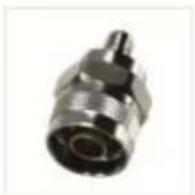
N-SMA
Adaptor
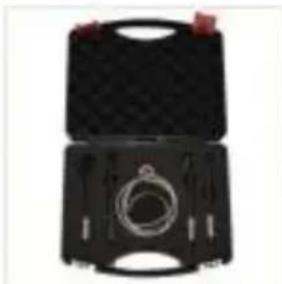
natural_image
Open black plastic case containing a circular mechanical component with a handle (no text or symbols visible)Near Field Probe includes: Four near-probes, N-SMA adapter, SMA-SMA cab ( Frequency range: 30 MHz - 3 GHz)
Appendix B: General Care and Cleaning
General Care
Do not store or leave the instrument where the liquid crystal display could be exposed to direct sunlight for long periods of time.
Caution: To avoid any damage to the instrument or probes, do not exposed it to any sprays, liquids, or solvents.
Cleaning
Inspect the instrument and probes as often as operating conditions require.
To clean the instrument exterior, perform the following steps:
Wipe the dust from the instrument surface with a soft cloth. Take care not to scratch the transparent LCD protection screen when cleaning.

WARNING
Before re applying power, ensure that the instrument is completely dry, avoiding any electric shock or electrical short circuit resulting from moisture.
Appendix C: USB Disk Requirements
USB disk requirements:
Max capacity 4G, NTFS file system is not supported.
If the USB disk doesn't work properly, format your USB disk and then try again.
Appendix D: PC Software Requirements
The PC software does not support Windows XP.


- Sept 2020 edition V1.3.1
- General Warranty
- Table of contents
- List of figures ....iii
- List of tables .... iii
- Menu Interpretation ....23
- List of figures
- List of tables
- General Safety Requirements
- Safety Terms and Symbols
- Safety Terms
- WARNING
- CAUTION
- Safety Symbols
- Document Overview
- - Quick Start
- - Menu interpretation
- ● Specification Parameter
- ● Trouble Shooting
- - Appendix
- Convention on button and menu key format:
- Related document:
- Quick Start
- General Inspection
- Check for transportation damage.
- Check the Accessories
- Check the Complete Instrument
- Safety Precaution before Operation
- Check Power Supply
- Allowed Variation Range of Supply Power Parameters
- Power Cord Selection
- Electro-static Discharge (ESD) Protection
- First Time to Power on
- Front Panel
- Front Panel Function Key
- Parameter Input
- Numeric Keypad
- Enter
- Knob
- Direction key
- Front Panel Connector
- USB Host
- GEN Output 50Ω (tracking generator output 50Ω)
- RF Input 50Ω
- Rear Panel
- User Interface
- Build-in Help
- How to acquire built-in help
- 2.Page up and down
- Close the current help information
- Acquire the menu help
- Acquire the help information of any function key
- Basic Measurement
- Basic:
- 2) Setting Center Frequency
- 3) Setting Frequency Span
- Menu Interpretation
- 【FREQ】Frequency
- [Center Freq]
- Key Points:
- [Start Freq]
- [Stop Freq]
- [CF Step Auto Manual]
- [Freq Offset]
- [Freq Ref Int Ext]
- 【SPAN】
- [Span]
- [Full Span]
- [Zero Span]
- [Last Span]
- 【AMPTD】Amplitude
- [Ref Level]
- [Attenuation Auto Man]
- [Scale/Div]
- [Scale Type Lin Log]
- [Ref Offset]
- [Ref Unit▶]
- [Preamplifier On Off]
- 【BW】Bandwidth
- [RBW Auto Man]
- [RBW Mode Def Cont]
- [VBW Auto Man]
- [Average On Off]
- [EMI Filter▶]
- 【Trace】
- [Trace 1 2 3 4 5 ]
- [Clear Write]
- [Max Hold]
- [Min Hold]
- [Blank]
- [View]
- [Operations▶]
- 【Detector】
- [Pos Peak]
- [Neg Peak]
- [Normal]
- [Sample]
- [RMS Avg]
- [Voltage Avg]
- [Quasi-Peak]
- 【Display】
- [Full Screen]
- [Zoom On Off]
- [Display Line On Off]
- [Ampt Graticule On Off]
- [Grid On Off]
- [Label On Off]
- 【Sweep】
- [Sweep Time Auto Man]
- [Sweep Single]
- [Sweep Cont]
- [Sweep Points]
- 【Trig】
- [Auto Run]
- [Video]
- 【Source】
- [Source Gen CW TG]
- [Output Level]
- [Output FREQ]
- [OF Step]
- [Network Meas▶]
- 1) [Network Meas On\_Off]
- 2) [Output Level]
- 3) [Ref Level]
- 4) [Sweep Points]
- 5) [Sweep Time]
- 6) [Normalize]
- 【Demod】Demodulation
- [DEMOD▶]
- [Demod On Off]
- [Demod Mode▶]
- [Sound]
- [RadioSet▶]
- [Analog Demod▶]
- [AM▶]
- [AM On Off]
- [Carrier Freq]
- [IF BW Auto Man]
- [FM▶]
- [FM On Off]
- [Carrier Freq]
- [IF BW Auto Man]
- 【Peak】
- [Max Search]
- [Next Peak]
- [Left Peak]
- [Right Peak]
- [Min Search]
- [Mkr→CF]
- [Cont Max On Off]
- 【Marker】
- [Marker 1 2 3 4 5]
- [Trace 1 2 3 4 5]
- [Normal]
- [Delta]
- [Off]
- [All Off]
- [Marker Table On Off]
- 【Marker→】
- [Mkr->CF]
- [Mkr->CF Step]
- [Mkr->Start]
- [Mkr->Stop]
- [Mkr->Ref Level]
- [MkrΔ->Span]
- [MkrΔ->CF]
- 【Marker Fctn】Marker Function
- [Function Off]
- [NdB On Off]
- [Marker Noise On Off]
- [Freq Count▶]
- 【Meas】Measurement
- [Measure off]
- [Time Spec On Off]
- [ACPR On Off]
- [Chanel Power On Off]
- [OBW On Off]
- [Pass-Fail▶]
- [Window Meas▶]
- [Window Meas On Off]
- [Limit Line On Off]
- [Freq Line On Off]
- [Limit Set Up Low]
- [Freq Set Start Stop]
- [Window Sweep On Off]
- [Limit Meas▶]
- [Limit Meas On Off]
- [Line Up On Off]
- [Line Low On Off]
- [Shift X/Y Freq Ampt]
- [UpLine Edit▶]
- [LowLine Edit▶]
- 【Meas Setup】
- [Channel BW]
- [Channel Interval]
- [Channel Nums]
- [Power Percent]
- 【System】
- [System▶]
- [Firmware Update]
- [Config I/O▶]
- [LAN▶]
- [IP]
- [Mask]
- [Gate]
- [DHCP On Off]
- [PowerOn/Preset▶]
- [Power Set▶]
- [Preset▶]
- [Language▶]
- [Date/Time▶]
- [Calibration▶]
- 【File】
- [Refresh]
- [Type ▶]
- [First Page]
- [Prev Page]
- [Next Page]
- [Last Page]
- [Operations▶]
- 【Print】
- [Paper Size]
- [Language Pcl Esc]
- [Printer Type Blak Color]
- [Orientation Hor Ver]
- [Number]
- [Print Trace]
- [Print Screen]
- 【Save】
- [Screen Pixmap▶]
- [Trace Data▶]
- [User State]
- Specification
- Warranty
- Troubleshooting
- Power on malfunction
- No signal display
- Wrong measurement results or poor signal frequency precision
- Wrong measurement results or poor readout amplitude
- precision
- Spectrum Analyzer Repair
- Appendix
- Appendix A: Enclosure
- Appendix B: General Care and Cleaning
- General Care
- Cleaning
- Appendix C: USB Disk Requirements
- Appendix D: PC Software Requirements
Brand : Owon
Model : XSA1000TG
Category : Meter