
WK32BG - Keyboard Evolveo - Free user manual and instructions
Find the device manual for free WK32BG Evolveo in PDF.


| Product Type | Wireless Keyboard with Touchpad |
| Brand | Evolveo |
| Model | WK32BG |
| Connectivity | 2.4 GHz Wireless |
| Interface | USB Nano Receiver |
| Touchpad | Yes, with multi-gesture support |
| Layout | QWERTY |
| Dimensions (Approx.) | 380 x 130 x 20 mm |
| Weight (Approx.) | 400 g |
| Power Source | 2x AAA Batteries (1.5V each) |
| Operating Range | Up to 10 meters |
| Compatibility | Windows, macOS, Android, Linux |
| Power Saving | Auto sleep mode |
| Material | Plastic |
| Color | Black / Dark Gray |
| Multimedia Keys | Yes, dedicated shortcuts |
| Maintenance | Clean with a soft, dry cloth. Avoid liquids. |
| Safety | Keep away from water and extreme temperatures. |
| Spare Parts | USB receiver and batteries (standard AAA) |
| Country of Origin | China |
Frequently Asked Questions - WK32BG Evolveo
User questions about WK32BG Evolveo
0 question about this device. Answer the ones you know or ask your own.
Ask a new question about this device
Download the instructions for your Keyboard in PDF format for free! Find your manual WK32BG - Evolveo and take your electronic device back in hand. On this page are published all the documents necessary for the use of your device. WK32BG by Evolveo.
USER MANUAL WK32BG Evolveo
- A certain theoretical equation of maintenance theory
2.4G wireless keyboard with Touchpad
www.evolveo.com
Package Contents
-
2.4G wireless keyboard
-
USB receiver
- User manual
2.4G wireless Keyboard Characteristics:
1) 2.4G wireless keyboard touchpad
2) Suitable for All-IN-ONE computers, Laptops, Desktops, etc. 3) R-shape angle of keycans comfort to type
4) Supported power by 2pcs AAA batteries.
Light analysis
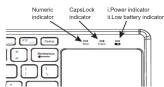
Indicator Analysis
Number indicator: Press Fn+F11,LED will be blue. Press them again,
LED will be off. m CapsLock indicator: Press CapsLock key, LED will be blue. Press
It again, LED will be off.
■.1.Power Indicator: Once Keyboard power on LED will flash red light. ii.Battery Low indicator : If battery is lower than 2.1V,LED will flash







Connecting Steps: Step1. USB receive signal in device's USB port
Step1. Data receiver contacts to switch a data port. Step2. Assembly 2 AAA batteries, switch power button to [ON] side.
Step3. [Power] indicator flashes red, then off. Connected successfully.
Note: In step 2, if fail to connect, press ESC+K, forcing to enter pairing status.
Touchpad Analysis
- When using Windows systems
Touched action Finger action Finger action
Toburnski fikkai picture Hinger boson
Move cursor One finger Slide
图4
Click once or Click twice One/Two finger(s) click once or click twice
Scroll on parallel
or vertical
Pop Charm Menu of Windows 8 One finger slide to left
- 1.0000
Close content: window One finger slide down
Change to next
window Low high dark to light
Zoom in Slide to two sides from center
| | |
| Show Desktop Three fingers slide down | ||
| Backward | Three fingers slide to left | |
| Forward | Three fingers slide to right | |
2,When using Android system
| Touchped function | Mouse function | Finger action | Finger action |
| picture | ||
| Move Move the cursor | Finger slide |
| click touchpad | click touchpad | √ | One finger |
| once | once | click |
| Click right key | Click right key | Two fingers |
Function Keys Analysis
| Ft+ Ft- | Fn+ | ||||
| Ee | Player | F8 | Mute | F2 | Screenshot |
| F1 | PlayPause | F7 | Home | Page up | |
| F2 | Last track | F8 | Search | Page down | |
| F3 | Next track | F9 | Favorite | Line front | |
| F4 | Volumedown | F10 | Insert | Line end | |
| F5 | Volume up | F11 | Number lock |
5.2.1.1.1
Energy Saving mode 1. Keyboard domant energy-saving mode: If keyboard is not used for 10
minutes, it will be dormant. Press any key, it will be active. 2 If press and hold any key for 2 minutes keyboard will be dormant.
2.3 press and hold any key for £ Press any key, it will be active.
Keyboard specification
- Operating distance is up to 10 meters
-
Modulation system: OFSK
-
Working voltage: 1.5-3.0V
-
Keyboard working current: 2.0mA Touchpad working current: 4.0mA
-
Standby current: 0.3–1.5mA
-
Sleeping current: =0.2mA
-
Battery: 2'AAA
-
You know: @3+10a
-
Key life: 3 million s
-
Operating temperature: -10±55℃
-
Keyboard size: 366.54*121.33*18.36mm
-
Touchpad size: 74.6*89.6mm
Safety Coutions
Safety Caution
1) Keep the item away from sharp objects. 2) Do not place heavy object on the keyboard.
3) Do not Microwave the item 4) Do not force or distorted it
5) Keep away from oil, chemical or any oil

Brand : Evolveo
Model : WK32BG
Category : Keyboard