
LK652 - Keyboard Evolveo - Free user manual and instructions
Find the device manual for free LK652 Evolveo in PDF.


| Product Type | Illuminated Keyboard |
| Model | LK652 |
| Brand | Evolveo |
| Backlight Color | Blue |
| Backlight Control | Scroll Lock key |
| Multimedia Hotkeys | 12 via Fn combination (Play, Volume, Mute, Track navigation, My Computer, My Favorite) |
| LED Indicators | Num Lock, Caps Lock, Scroll Lock |
| Palm Rest | Yes, comfortable |
| Connection | Wired USB |
| Power Supply | USB 5V |
| Operating System | Windows, macOS (backlight off not supported on macOS) |
| Package Contents | Illuminated Keyboard, User Manual |
| Safety | Place on stable surface; avoid sunlight, heat, moisture; do not open; backup data before use. |
| Maintenance | Keep dry; clean with soft cloth; avoid liquids. |
| Spare Parts & Repairability | Not user-serviceable; contact support for issues. |
Frequently Asked Questions - LK652 Evolveo
User questions about LK652 Evolveo
0 question about this device. Answer the ones you know or ask your own.
Ask a new question about this device
Download the instructions for your Keyboard in PDF format for free! Find your manual LK652 - Evolveo and take your electronic device back in hand. On this page are published all the documents necessary for the use of your device. LK652 by Evolveo.
USER MANUAL LK652 Evolveo
Illuminated Keyboard
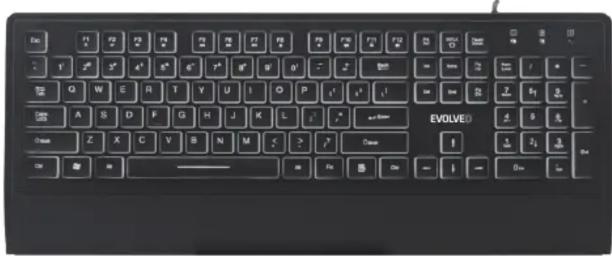
Please read the manual and safety Instructions before using the product for the first time.
▶Package Contents
Illuminated Keyboard x1
User Manual x1
www.evolveo.com
▶ Letter Illumination On/off control:
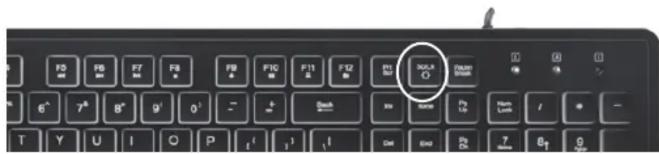

! LED OFF function does not work on Mac OS.
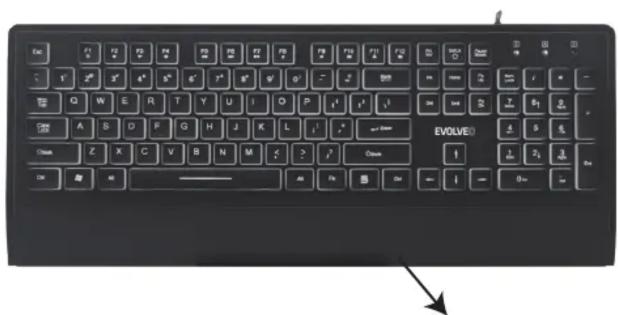
comfortable palm-rest
▶ Main features:
- Blue color letter illumination;
- Illumination control by : Scroll
- 12 multimedia hotkeys via Fn:

Fn+F1 = Media Play Fn+F2=Volume Down
Fn+F3 = Volume Up Fn+F4= Mute
Fn+F5 = Previous Track Fn+F6=Next Track
Fn+F7 =Play/Pause Fn+F8= Stop
Fn+F11 = My computer Fn + F12 = My Favorite
- Three LED indicators: Num-lock/Capslock/Scroll-Lock

- output : USB 5V
- Operation System requirement: an available USB port on computers with
▶ Safety Instructions
Put the device always on a stable and straight surface. It will damage the device if it falls.
Don't place the device into direct sunlight or in places with high temperature. This will damage the device or shorten its average lifespan.
Don't place it near heat sources like radiators or other heat producing devices.
Don't expose the device to water, moisture or high humidity.
Don't place it in the bathroom or the kitchen near a sink. Avoid direct contact with water.
Don't try to open the device.
Prior to the first use of our product make a backup of your data.
In the case of improper use, we are not liable for any loss of data.
In any case, liability for loss of data is limited to the effort that is necessary to restore from existing backup copies.
EVOLVE®
LK652

Brand : Evolveo
Model : LK652
Category : Keyboard