
AK-ENU3M2-BK - External hard drive AKASA - Free user manual and instructions
Find the device manual for free AK-ENU3M2-BK AKASA in PDF.


| Product Type | External M.2 SATA SSD Enclosure |
| Brand | Akasa |
| Model | AK-ENU3M2-BK |
| Interface | USB 3.1 Gen2 Type-C (10 Gbps) |
| SSD Compatibility | M.2 SATA (B key) SSDs |
| Supported SSD Sizes | 2230, 2242, 2260, 2280 |
| Connector Type | USB Type-C |
| Enclosure Material | Aluminium |
| Dimensions (approx.) | 100 x 30 x 10 mm |
| Weight (approx.) | 45 g |
| Power Supply | Bus-powered via USB |
| Included Accessories | USB cable, screw set, screwdriver |
| LED Indicator | Activity LED (blue) |
| OS Support | Windows, macOS, Linux |
| Maximum Capacity | Up to 2 TB (depending on SSD) |
Frequently Asked Questions - AK-ENU3M2-BK AKASA
User questions about AK-ENU3M2-BK AKASA
0 question about this device. Answer the ones you know or ask your own.
Ask a new question about this device
Download the instructions for your External hard drive in PDF format for free! Find your manual AK-ENU3M2-BK - AKASA and take your electronic device back in hand. On this page are published all the documents necessary for the use of your device. AK-ENU3M2-BK by AKASA.
USER MANUAL AK-ENU3M2-BK AKASA
Product Code: AK-ENU3M2-02
Contents

Layout

① USB 3.1 Gen2 Type-C connector
② B key M.2 connector
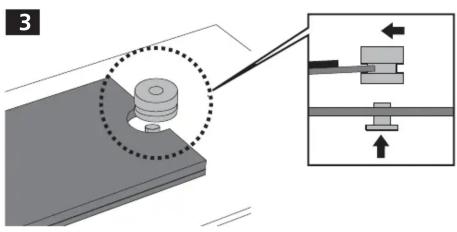
③④⑤⑥ standoffs for M.2 SSD (2230, 2242, 2260, 2280 size)
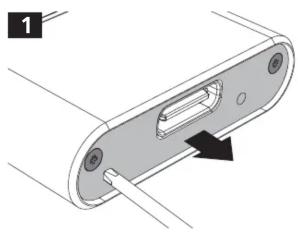
Installation



Brand : AKASA
Model : AK-ENU3M2-BK
Category : External hard drive