
Crypto Vesa 80W - Computer Case AKASA - Free user manual and instructions
Find the device manual for free Crypto Vesa 80W AKASA in PDF.


| Product Type | Mini-ITX Computer Case with VESA Mount |
| Model | Crypto Vesa 80W |
| Brand | Akasa |
| Motherboard Compatibility | Mini-ITX |
| Mounting | VESA 75/100 compatible, rear VESA bracket |
| Dimensions (Approx.) | 210 x 170 x 60 mm (8.3 x 6.7 x 2.4 in) |
| Weight (Approx.) | 1.2 kg (2.6 lbs) |
| Power Supply | Integrated 80W DC-ATX power supply (AC adapter not included) |
| Drive Bays | 1 x 2.5" SSD/HDD (internal) |
| Expansion Slots | 1 x Low-profile PCIe (optional riser) |
| Cooling | Passive (ventilation slots), optional 40mm fan mount |
| Front Panel Ports | 1 x USB 3.0, 1 x USB 2.0, Audio I/O |
| Material | Steel chassis, plastic front panel |
| Main Functions | Mount Mini-ITX system behind VESA-compatible monitor; space-saving design |
| Maintenance & Cleaning | Wipe exterior with dry soft cloth; avoid liquids; ensure ventilation vents are clear |
| Safety | Ensure proper ventilation; keep away from moisture; do not block airflow |
| Spare Parts & Repairability | Replacement screws and VESA bracket available; contact Akasa support |
| General Information | Designed for space-saving, low-power industrial or home media PC; includes installation guide |
Frequently Asked Questions - Crypto Vesa 80W AKASA
User questions about Crypto Vesa 80W AKASA
0 question about this device. Answer the ones you know or ask your own.
Ask a new question about this device
Download the instructions for your Computer Case in PDF format for free! Find your manual Crypto Vesa 80W - AKASA and take your electronic device back in hand. On this page are published all the documents necessary for the use of your device. Crypto Vesa 80W by AKASA.
USER MANUAL Crypto Vesa 80W AKASA
A4 (21x 29.7cm) 70g模照紙,單色印刷
GB Installation Instructions
natural_image
Technical illustration of a screw with two views: one showing a threaded component, the other showing a cross-sectional view (no text or symbols)
natural_image
Technical illustration of a screw with two views: one showing a flat screw and the other showing a cross-sectional view (no text or symbols)
natural_image
Simple line drawing of a metal bracket or support structure (no text or symbols)Installation

natural_image
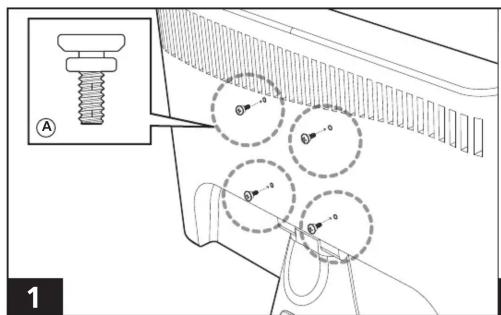
Diagram of a device with two switches and a panel, showing internal components and wiring (no text or symbols)


natural_image
Line drawing of a computer monitor rear panel with ventilation slots and a central-mounted unit (no text or symbols)akasa
Crypto Vesa
vesa mounting mini-ITX case

Brand : AKASA
Model : Crypto Vesa 80W
Category : Computer Case