
T527000 - Vacuum Cleaner Tower - Free user manual and instructions
Find the device manual for free T527000 Tower in PDF.


| Product Type | Handheld Vacuum Cleaner |
| Brand | Tower |
| Model | T527000 |
| Power Consumption | 50W |
| Battery Voltage | DC 11.1V |
| Charging Input | 100-240V ~50/60Hz, 0.5A |
| Charging Output | 13V DC, 460mAh |
| Charging Time | 4 hours |
| Battery Type | Lithium-ion (rechargeable) |
| Speed Settings | 2 (Low and High) |
| Filter Type | Washable (rinse under water) |
| Accessories Included | Brush accessory, Charging and Storage Base, DC Adaptor, Car Charging Adaptor |
| Cordless | Yes |
| LED Display | Battery level indicator |
| Safety Features | Thermal cut-off, battery overheat protection |
| Usage | Indoor, household |
| Warranty | 1 year (extendable to 3 years with online registration) |
| Suitable For | Dry pick-up only |
| Not Suitable For | Long carpet fibres, flammable liquids |
Frequently Asked Questions - T527000 Tower
User questions about T527000 Tower
0 question about this device. Answer the ones you know or ask your own.
Ask a new question about this device
Download the instructions for your Vacuum Cleaner in PDF format for free! Find your manual T527000 - Tower and take your electronic device back in hand. On this page are published all the documents necessary for the use of your device. T527000 by Tower.
USER MANUAL T527000 Tower
over 100 YEARS of quality
natural_image
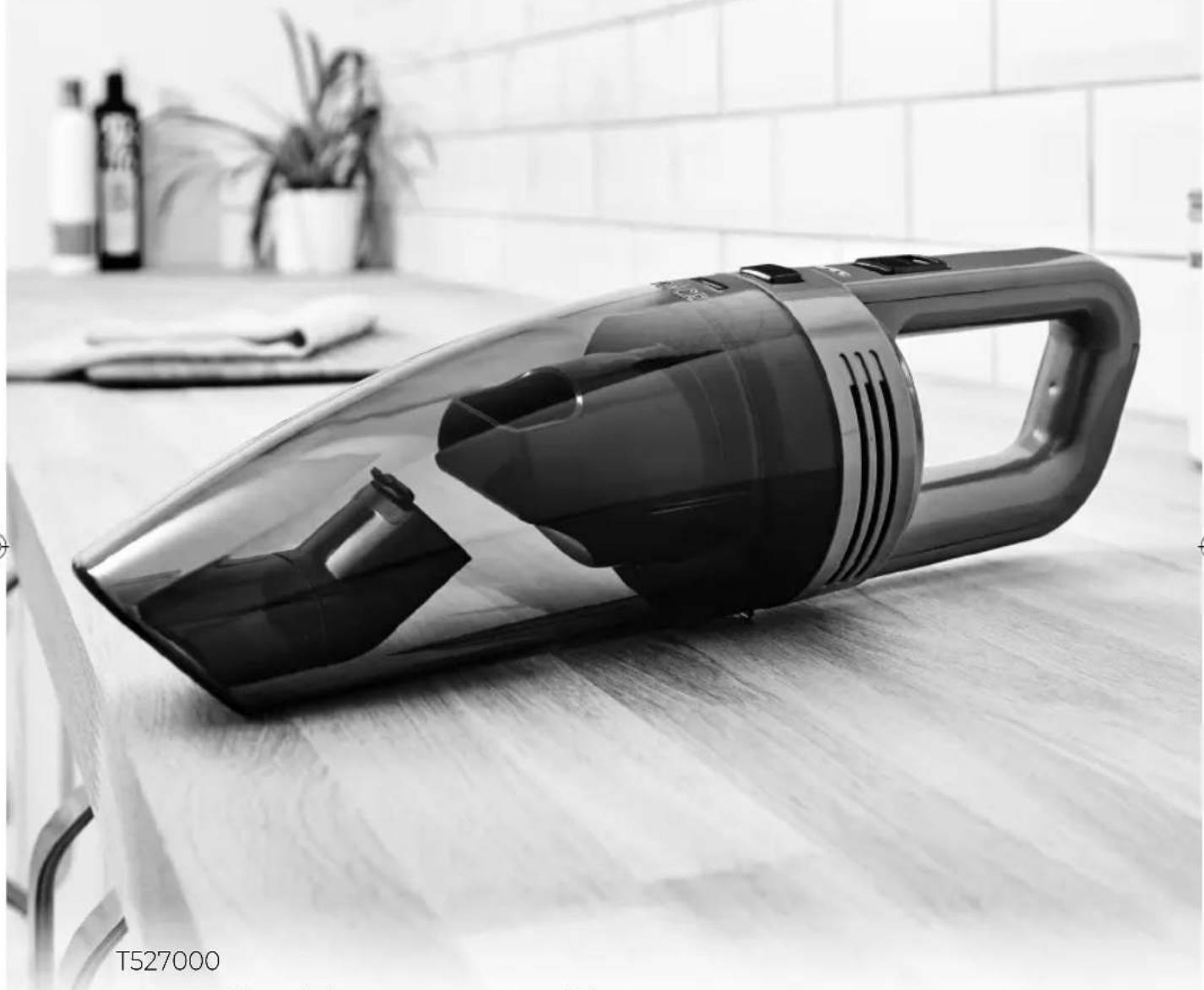
Black and white photo of a clean vacuum cleaner on a tiled floor, with a kitchen background featuring bottles and a plant (no visible text or symbols)T527000
Handheld Vacuum Cleaner

SAFETY AND INSTRUCTION MANUAL
PLEASE READ CAREFULLY
*Subject to registering your Extended Guarantee online at www.towerhousewares.co.uk.
This box contains:
Instruction Manual
Handheld Vacuum Cleaner
Brush Accessory
Charging and Storage Base
DC Adaptor
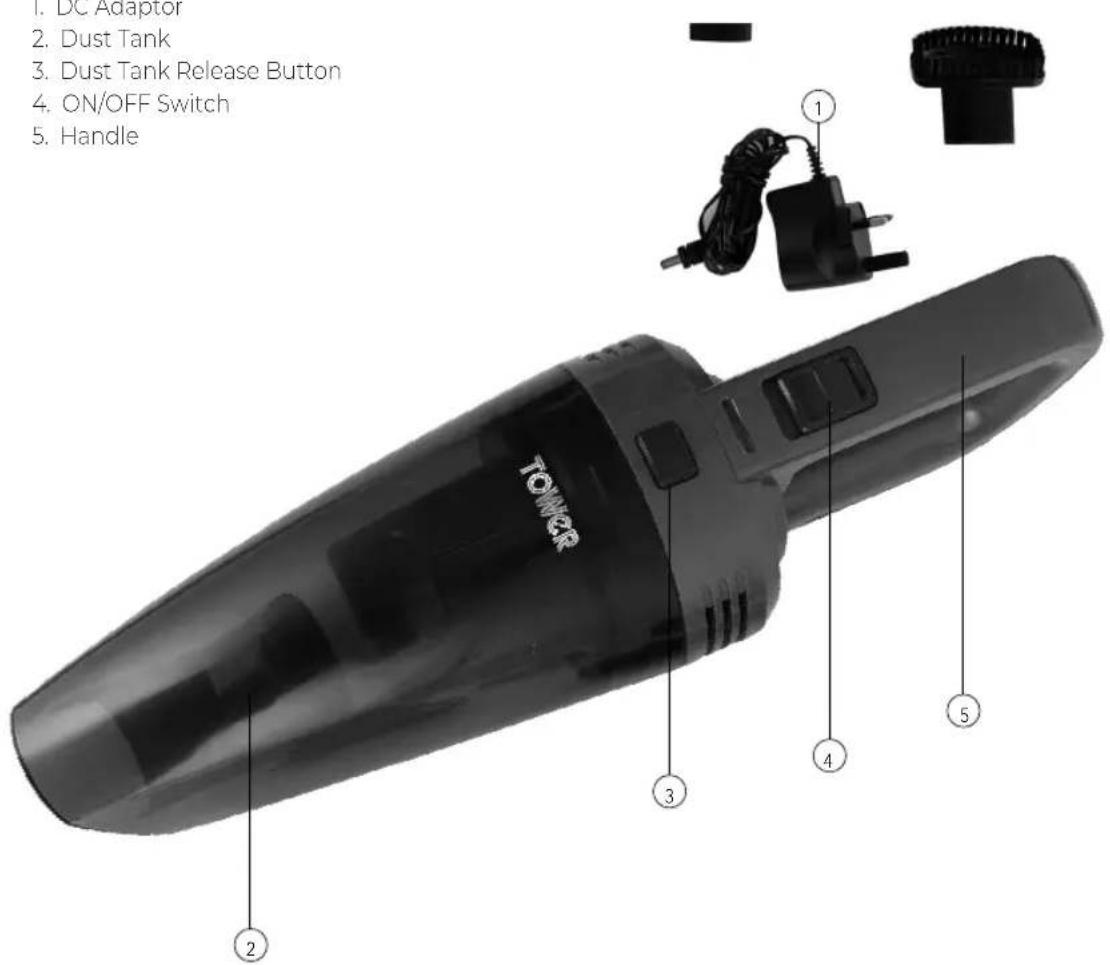
- DC Adaptor
- Dust Tank
- Dust Tank Release Button
- ON/OFF Switch
- Handle
Technical Data:
Model: T527000
Voltage: DC 11.1V
Product Power: 50W
Adaptor Rating
Input: 100-240V \~50/60Hz 0.5A
Output: 13V DC 460mAh
Charging Time: 4 hours
Important Safety Information:
Please read these notes carefully BEFORE using your Tower appliance
- Check that the voltage of the main circuit corresponds with the rating of the appliance before operating.
- If the supply cord or appliance is damaged, stop using the appliance immediately and seek advice from the manufacturer, its service agent or a similarly qualified person.
• DO NOT let the cord hang over the edge of a table or counter or let it come into contact with any hot surfaces.
• DO NOT carry the appliance by the power cord.
• DO NOT use any extension cord with this appliance.
• DO NOT pull the plug out by the cord as this may damage the plug and/or the cable.
- Switch off at the wall socket then remove the plug from the socket when not in use or before cleaning.
- Switch off and unplug before fitting or removing tools/ attachments, after use and before cleaning.
- Close supervision is necessary when any appliance is used by or near children.
• Children should not play with the appliance.
- This appliance can be used by children aged from 8 years and above and persons with reduced physical, sensory or mental capabilities or lack of experience and knowledge if they have been given supervision or instruction concerning use of the appliance in a safe way and understand the hazards involved.
• Cleaning and user maintenance should not be undertaken by children without supervision.
• Take care when any appliance is used near pets.
• Not suitable for carpets with long fibres as the bristles will damage the fibres.
- Keep the vacuum cleaner moving over the carpet surface at all times to avoid damaging the carpet fibres.
• DO NOT use this product for anything other than its intended use.
• DO NOT immerse cords, plugs or any part of the appliance in water or any other liquid.
• This appliance is for household use only.
• DO NOT use the appliance outdoors.
- Keep hair, loose clothing, fingers and all body parts away from moving parts.
• DO NOT use to pick up flammable liquids such as gasoline or use in an area where they might be present.
• DO NOT use the appliance without the dust container filter in place.
- This product is fitted with a thermal cut-out, which will activate if the motor overheats due to blocked air inlets. If the appliance cuts out, allow it to cool for 1 hour, then empty the dust container and clean all of the filters.
• DO NOT pick up anything that is burning or smoking such as cigarettes, matches or hot ashes.
• Use extra care when cleaning on stairs.
• The use of accessory attachments is not recommended by the appliance manufacturer apart from those supplied with this product. DO NOT use extension cords with the appliance.
• DO NOT pull the cord, use the cord as a handle, close a door on the cord, or pull the cord around sharp edges or corners.
• DO NOT run the vacuum cleaner over the cord. Keep the cord away from heated surfaces.
ADDITIONAL BATTERY SAFETY PRECAUTIONS
- DO NOT use a battery pack or appliance that is damaged or modified. Damaged or modified batteries may exhibit unpredictable behaviour resulting in fire, explosion or risk of injury. DO NOT expose the battery pack or appliance to fire or excessive temperatures. Exposure to fire or temperatures above 60°C (140°F) may cause an explosion.
• The battery is a sealed unit and under normal
circumstances poses no safety concerns. In the unlikely event that liquid leaks from the battery, DO NOT touch the liquid as it may cause irritation or burns to the skin, eyes or nose. Should battery liquid come in contact with skin, immediately wash the affected area with soap and water. In case of eye contact, immediately flush your eyes thoroughly with water for at least 15 minutes and seek medical attention.
• In case of inhalation, immediately expose to fresh air and seek out medical advice.
- Disposal: Wear gloves to handle the battery. Dispose of it immediately, following local ordinances or regulations.
- Follow all charging instructions and DO NOT charge the battery pack or the appliance outside of the temperature range specified in the instructions. Charging improperly or at a temperature outside of the specified range may damage the battery and increase the risk of fire. To ensure maximum
battery life, observe the following guidelines:
- When not in use the appliance should be stored at room temperature. Recommended range: 18°C (64°F) to 28°C (82°F).
• The ambient temperature range for operation and charging should be 10^ C ( 50^ F) to 30^ C ( 86^ F).
- FIRE WARNING - DO
NOT place this product on or near a cooker or any other hot surface and DO NOT incinerate this appliance even if it is severely damaged. The battery might catch fire or explode.
- FIRE WARNING -
DO NOT apply any fragrance or scented product to the filter(s) of this appliance. The chemicals in such products are known to be flammable and can cause the appliance to catch fire.
• In the unlikely event
the appliance develops a fault, stop using it immediately and seek advice from the Customer Support Team: +44 (0) 333 220 6066
Before First Use:
- Remove the product from the box.
- Remove any packaging from the product.
- Please retain all packaging until you have checked and counted all the parts and the contents against the parts list.
- Dispose of the packaging in a responsible manner.
USING YOUR APPLIANCE
Charging the Appliance:
- This unit can be charged using the included charging base, or the included car adaptor.
Note: When using the charging base to charge the vacuum cleaner, ensure it is firmly secured in place; otherwise, the unit may not secure correctly.
- To charge the unit through the included charging base, start by placing the vacuum on the corresponding slot on the base. To do this, align the spike on the base with the corresponding notch on the main body of the unit, then push the unit down until it clicks into place.
- Once the unit is firmly secured in place, plug the charging base adaptor into a compatible mains socket, ensuring the socket switch is in the ON position.
- Once plugged into an active socket, the unit will automatically begin to charge. The unit's LED screen will turn on and display the current battery level to show the adaptor is connected to the unit, and the vacuum is charging.
- The unit is fully charged when the number on the unit's LED display reads '100'
- When the numbers on the unit's LED display drop below 10, the unit needs recharging. Repeat the steps outlined above to fully recharge the unit.
Note: To ensure optimal performance each time, the unit should be left on charge whenever it is not in use.
Note: The adaptor may become warm during the charging process. This is normal, and does not indicate overheating or malfunction.
Note: The average charging time for this unit is 3-4 hours.
- To charge the unit through a car lighter, plug one end of the included car charging adaptor into the corresponding notch on the handle of the vacuum cleaner, and the other into a compatible car lighter. The unit will automatically begin to charge. The blue LED indicator on the body of the vacuum will light up and display the current battery level to show the adaptor is connected to the unit and the vacuum is charging.
Turning the Appliance On and Off:
- Push the ON/OFF button on the main body of the vacuum cleaner to turn the unit on. The unit will automatically begin to operate at low speed. The LED display and a green light indicator will light up to show the unit is on and operating at low speed.
- Press the On/Off button again while the unit is operating on Low speed mode to switch to High speed mode. The green LED indicator on the unit's control panel will go out and a red indicator light will come on to show the unit is operating at High speed,
- Press the On/Off button a third time while the unit is operating at High speed to turn it off. Air will stop emitting from the unit and the LED display and all indicators will go out to show the unit has been turned off.
Using the Brush Accessory:
- This unit comes complete with a brush accessory, ideal for cleaning car seats and other similar surfaces.
- To use this accessory, attach it to the air vent at the front of the unit and push firmly down to secure it in place.
- To remove the accessory, pull it firmly up and away from the main body of the unit until it detaches.
Troubleshooting:
| Problem Solution | |
| The vacuum will not work | · Ensure the vacuum cleaner is fully charged. To charge the unit, plug the AC adaptor into it, connect it to a mains socket and wait until the LED indicator on the charger goes out.· Check that there are no blockages to the dust tank or filter and remove as necessary. |
| The vacuum will not pick-up or the suction power is weak | · The dust container may be full, or the filters may require cleaning. Empty the dust container and clean the filters.· There may be blockages in the filters or dust tank. Check for blockages and clean the filters and dust tank as detailed in the 'Cleaning and Care' section. |
| Dust is escaping from the vacuum | · The filter may not be installed correctly, or the dust tank may be full. Empty the dust tank and reassemble the filter system. |
| The vacuum is making an unusual sound or hissing. | · The airflow may be restricted or blocked. Check for blockages and clean the filters and hose as detailed in the 'Cleaning and Care' section. |
Cleaning & Care
Emptying the Dust Tank:
Note: Ensure the vacuum cleaner is turned off and unplugged from the mains before emptying the dust tank.
- To remove the dust tank from the vacuum cleaner, press the release button on the main body of the unit, then pull the tank firmly towards you and away from the main body of the vacuum.
- Once the dust tank has been removed, grip the inner filter and rotate it clockwise until you hear a click to detach it from the unit.
- When the filter is unscrewed, pull it out and tap it over a rubbish bin or similar surface to remove any dust residue.
- Once the filter is clean, rinse it under running water and leave it to dry for at least 24 hours. If necessary, tap the dust tank over a rubbish bin again to remove any dust residue left inside it.
Note: Ensure the unit is thoroughly clean and the filter is completely dry before attempting to use or store it.
- Once the filter is clean, screw it back into the unit until you hear a click. Ensure the filter is firmly secured into place before attempting to use it again.
Clearing Blockages:
If the dust tank is overfilled, the filter is clogged up, or the vacuum picks up a larger piece of debris, the vacuum may become clogged.
Should this occur, carry out the following steps to unclog the vacuum:
-
Check the dust tank and empty it if necessary.
-
Check the filter for any debris and rinse it under running water if necessary, as detailed in the sections above.
-
Detach any attachments from the unit and check for blockages.
Storing the Appliance:
Note: Before storing the vacuum, unplug it from the mains and remove any attachments from the front of the unit.
Note: To prolong battery life and ensure safe storage, take care to observe the battery safety precautions outlined in the corresponding section of this manual before storing the unit.
- Store the appliance in a cool, dry place, preferably in the charging and storage base or inside its original packaging, and out of the reach of children.
WARNING:
Do not immerse any electrical part of the appliance in water such as motor units or plugs.
Please see cleaning section for further instructions.
Wiring Safety for UK Use Only (Power adapters only):
- Never open the power adapter, you risk getting an electric shock. Only use the power adapter that is supplied with your product.
- You must always connect the power adapter to the product before connecting to the mains power supply.
- The power adapter must be used indoors only, and must not be subjected to damp conditions. The power adapter does not have any user serviceable parts.
- If in doubt, consult a qualified electrician who will be pleased to do this for you.
- If you need to remove the plug – disconnect it from the mains – and then cut it off of the mains lead and immediately dispose of it in a safe manner. Never attempt to reuse the plug or insert it into a socket outlet as there is a danger of an electric shock.
WARNING:
Do not attempt to open any part of the power adaptor or plug.
TOWER®
over 100 YEARS of quality
thank you!
We hope you enjoy your appliance for many years
This product is guaranteed for 12 months from the date of original purchase. If any defect arises due to faulty materials of workmanship, the faulty products must be returned to the place of purchase. Refund or replacement is at the discretion of the retailer.
The Following Conditions Apply:
The product must be returned to the retailer with proof of purchase or a receipt. The product must be installed and used in accordance with the instructions contained in this instruction guide.
It must be used only for domestic purposes. It does not cover wear and tear, damage, misuse or consumable parts. Tower has limited liability for incidental or consequential loss or damage. This guarantee is valid in the UK and Eire only.
The standard one year guarantee is only extended to the maximum available for each particular product upon registration of the product within 28 days of purchase. If you do not register the product with us within the 28 day period, your product is guaranteed for 1 year only.
To validate your extended warranty, please visit www.towerhousewares.co.uk and register with us online.
Please note that length of extended warranty offered is dependent on product type and that each qualifying product needs to be registered individually in order to extend its warranty past the standard 1 year.
Extended warranty is only valid with proof of purchase or receipt. Your warranty becomes void should you decide to use non Tower spare parts. Spare parts can be purchased from www.towerhousewares.co.uk
Should you have a problem with your appliance, or need any spare parts, please call our Customer Support Team on:
+44 (0) 333 220 6066

3
YEAR GUARANTEE
1022 V2

- Handheld Vacuum Cleaner
- This box contains:
- Technical Data:
- Important Safety Information:
- ADDITIONAL BATTERY SAFETY PRECAUTIONS
- - FIRE WARNING - DO
- - FIRE WARNING -
- • In the unlikely event
- Before First Use:
- USING YOUR APPLIANCE
- Charging the Appliance:
- Turning the Appliance On and Off:
- Using the Brush Accessory:
- Cleaning & Care
- Emptying the Dust Tank:
- Clearing Blockages:
- Storing the Appliance:
- WARNING:
- Wiring Safety for UK Use Only (Power adapters only):
- TOWER®
- The Following Conditions Apply:
Brand : Tower
Model : T527000
Category : Vacuum Cleaner