
D400 Pro - Headphones S.M.S.L - Free user manual and instructions
Find the device manual for free D400 Pro S.M.S.L in PDF.


| Product Type | Headphone Amplifier / DAC |
| Dimensions (WxHxD) | 254 x 189 x 46 mm |
| Weight | 1.9 kg (4.18 lbs) |
| Power Consumption | < 10 W (standby < 0.5 W) |
| Power Supply | AC 100-240V, 50/60Hz |
| Inputs | USB, Optical, Coaxial, I²S, Bluetooth, AES/EBU |
| Outputs | RCA (unbalanced), XLR (balanced) |
| DAC Chip | AK4191 + AK4499EX (dual mono) |
| USB Controller | XMOS XU-316 (3rd generation) |
| Supported Formats (USB) | PCM up to 32-bit/768kHz, DSD up to DSD512 |
| MQA Support | MQA decoding (USB, Optical, Coaxial), MQA-CD (Optical, Coaxial) |
| Bluetooth Codecs | LDAC (24-bit/96kHz), aptX HD, aptX, SBC, AAC |
| THD+N (XLR) | 0.00006% (-124 dB) |
| Dynamic Range (XLR) | 132 dB |
| Signal-to-Noise Ratio (XLR) | 132 dB |
| Output Level | XLR: 5 Vrms, RCA: 2.5 Vrms |
| Display | Tempered glass full lamination color IPS |
| Remote Control | Yes (RC-8C, 2 x AAA batteries) |
| Housing Material | All-aluminum alloy |
| Certifications | Hi-Res Audio (Japan Audio Association), MQA |
| Warranty | 1 year (free repair for normal use) |
| Maintenance | Use in ventilated, dry place; unplug when not in use for long periods |
| Safety | Use specified voltage only; do not open cabinet; contact service for repairs |
Frequently Asked Questions - D400 Pro S.M.S.L
User questions about D400 Pro S.M.S.L
0 question about this device. Answer the ones you know or ask your own.
Ask a new question about this device
Download the instructions for your Headphones in PDF format for free! Find your manual D400 Pro - S.M.S.L and take your electronic device back in hand. On this page are published all the documents necessary for the use of your device. D400 Pro by S.M.S.L.
USER MANUAL D400 Pro S.M.S.L
REVERSED
有关更多信息, 请访问 https://www.mqa.co.uk/how-it-works
如何播放MQA
- Install this unit in a well ventilated, cool, dry, clean place-away from direct sunlight, heat sources, vibration, dust, moisture, or cold..
- Use the voltage specified on this unit Only. Using this unit with a higher voltage than specified is dangerous and may cause fire, damage to this unit, or personal injury. Our company will not be held responsible for any damage resulting from the use of this unit with a voltage other than that specified.
- Do not attempt to modify or fix this unit by yourself. Contact alesperson or customer service when any service is needed. The cabinet should never be opened for any reason.
- When not planning to use this unit for long periods of time (i.e. when going on vacation), disconnect the power cable from the AC wall outlet.
Important note:
The product specifications and information mentioned in this manual are for reference only. The content of this manual is subject to change without notice.
Warranty Terms
1. The Term of Service
Foshan Shuangmusanlin Technology Co., Ltd promises to offer good-quality products. If the product is broken in 7 days after purchasing when you use it normally, you can choose to send it back for return, replacement or repairing (only the product does not affect the second sales can be returned). Repairing for free in one year if you use it normally.
-
Date of purchase is in accordance with the date on invoice or receipt uesd by seller, and if you buy it on line, you can show the screenshot of trade.
-
If an inappropriate usage causes the unit damaged, the warranty will be void. As below.
-
All damages by inappropriate use, including using it under non-normal working environment or without following the instructions.
- Dismantling, refitting, repairing by user in private.
- Causing damage by using some fittings instead of the designative or accredited ones.
-
Cannot provide credible proof of purchase.
-
Sending it back to our company for repairing.
-
Contact your S.M.S.L Audio reseller for a return or replacement.
Features
• Support MQA decoding, support MQA-CD;
- New 3rd generation XMOS XU-316, PCM support up to 32bit/768kHz, DSD support to DSD512;
- Flagship DAC chip 1 AK4191+ 1 AK4499EX, tap all the potential of the chip;
- Dual mono design, one AK4499EX per channel, distortion as low as a staggering 0.00006% (-124dB);
• Use 5 high-end dual op amps and a large number of audiophile components;
- Adopt 2nd PLL to eliminate JITTER during SPDIF transmission;
- The new self-developed CK-03 clock processing circuit greatly reduces clock jitter;
- Support DOP independent display function, accurately determine the current decoding format;
- USB, optical fiber, coaxial, AES, I2S support DSD transmission, coaxial and optical fiber support DOP64;
• Using tempered glass full lamination color IPS display.
- Built-in low-noise power processing, while improving power efficiency, lower power consumption;
- Combined with multiple low-noise regulated power supplies, it provides a stable, reliable, efficient, and low-noise power supply system.
• Qualcomm high-end Bluetooth chip, support LDAC (24bit/96kHz), APTX/HD, SBC, AAC;
- High quality all-aluminum alloy shell, support high quality gold plated input and output connection terminals;
• Japan Audio Association (JAS) Hi-Res certification;
• Equipped with remote control and full-featured remote control.
Specifications
Input....USB/Optical/Coaxial/I²S/Bluetooth/AES
Output....RCA/XLR
Output Level.....XLR 5Vrms
RCA 2.5Vrms
Output impedance.....XLR 200Ω
RCA 100Ω
THD+N.....XLR 0.00006%(-124dB)(UN-WTD)
RCA 0.00008% (-121dB)(UN-WTD)
Dynamic range.....XLR 132dB
RCA 126dB
SNR.....XLR 132dB
RCA 126dB
USB transmission....Asynchronization
USB compatibility....Windows 7 / 8 / 8.1 / 10 / 11(needs drive)
Mac OSX 10.6 or later, Linux(driveless)
MQA decoder....USB/Optical/Coaxial
MQA-CD decoder....Optical/Coaxial
Sampling rate ....USB / I ^2 S PCM 44.1 \~ 768kHz
DSD 2.8224 \~ 22.5792MHz
Optical / Coaxial PCM 44.1 \~ 192kHz
Bluetooth specification :
LDAC 24bit/96kHz (990kbps/660kbps/330kbps)
aptX-HD 24bit/48 kHz_576kbps
aptX 16bit/44.1 kHz_352kbps
SBC 16bit/44.1 kHz_328kbps
AAC 16bit/44.1 kHz_320kbps
Power Consumption....<10W
Standby power....<0.5W
Size....254x189x46mm(WxHxD)
Weight....1.9kg/4.18lbs
Remote control
- If the remote control is still ineffective when it is close to the machine, replace it with a new battery.
- If the user does not use the remote control for a long time, remove the battery of the remote control.
- Dispose of used batteries in accordance with local regulations on battery disposal.
Operating the remote control
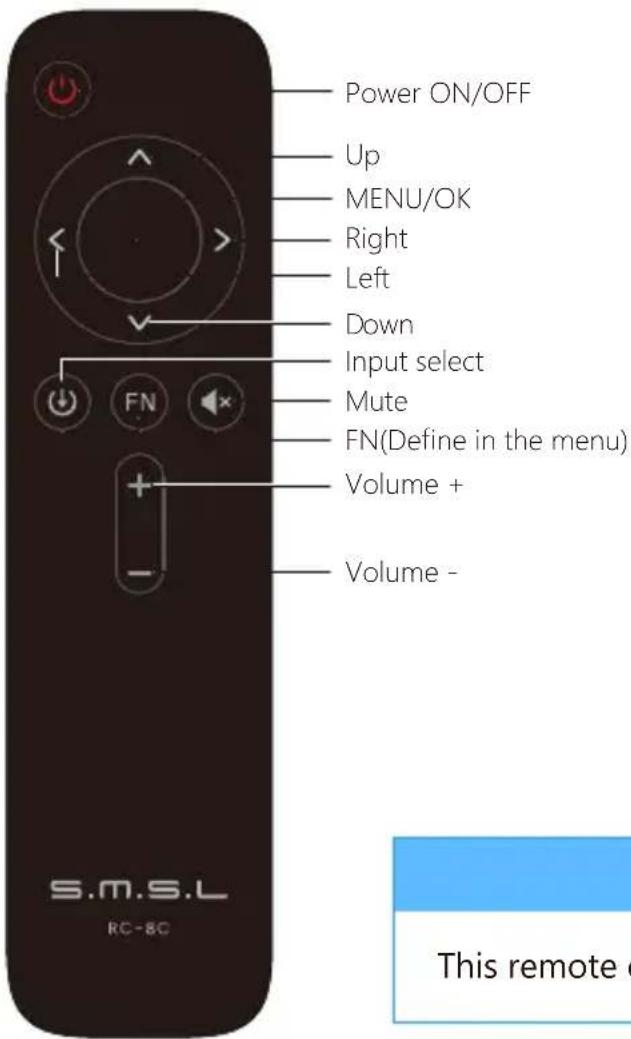
Note
This remote controller use 2 x R03/AAA batteries.
Display Interface and Instructions
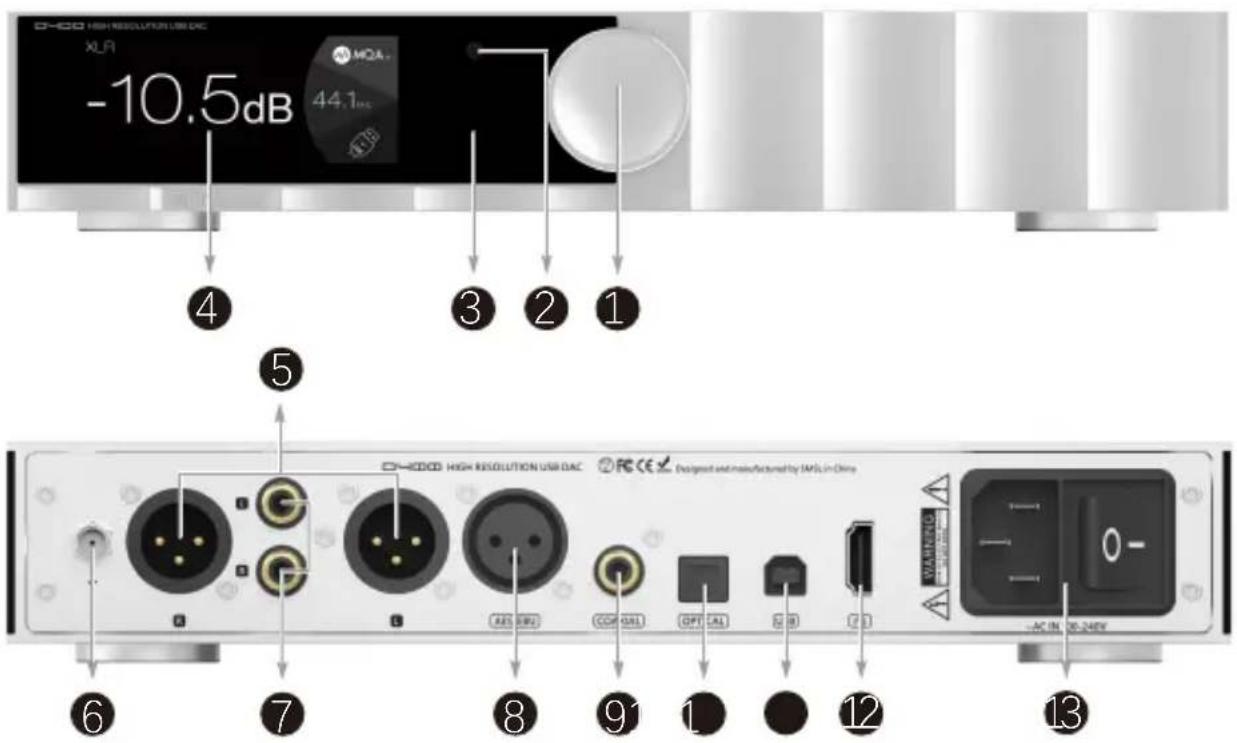
1 Knob
2 Remote window
3 Indicator light
4 Display
5 XLR output
6 Bluetooth antenna
7 RCA Output
8 AES/EBU Input
9 Coaxial Input
10 Optical input I²S input
11 USB input
12
13 AC IN
Knob\*
- Konb: Volume +/-, menu switching, function selection.
- Button: Short press to enter the menu and confirm; long press to exit the menu and switch the machine on and off.
Bluetooth operating instructions\*\*
Connection:
Switch the input source to Bluetooth, turn on the Bluetooth function of the phone, search for "SMSL D400", click Pair Connection after searching, and when the phone shows "Connected", the connection is successful.
Re-connection:
During the use of Bluetooth, if the connection is lost, eg: going out, and then coming back, some phones will not automatically reconnect, at this time, a short press of the Bluetooth button on the remote control can reconnect.
Clear pairing:
Press and hold the Bluetooth Control button on the remote control. After clearing the pairing, some phones may no longer be able to search for "SMSL D400", in which case you need to delete the Bluetooth device "SMSL D400" saved by the phone and then search for pairing.
Instructions
INPUTS
- USB TYPE B
- BLUETOOTH
• OPTICAL - COAXIAL
- AES/EBU
- I2S(HDMI)
OUTPUTS
- ALL LINE OUT
BALANCED - UNBALANCED
PCM FILTER
PRE MODE is the volume adjustment function switch for the output.
• VARIABLE : The output volume is controlled.
• FIXED : The output connector volume is fixed.
Open the DSD direct access function. At this time, the volume of PCM or DSD is not adjusted. The output amplitude is fixed to about 3.7VRMS. When this function is opened, the DSD is not processed at all, and the output is directly output.
FN KEY FOR
• OUTPUTS
- BLUETOOTH
PHASE
Instructions
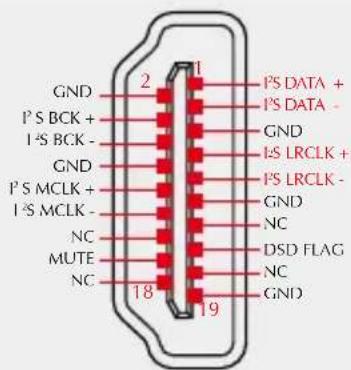
I²S MODE
NORMAL
- REVERSED
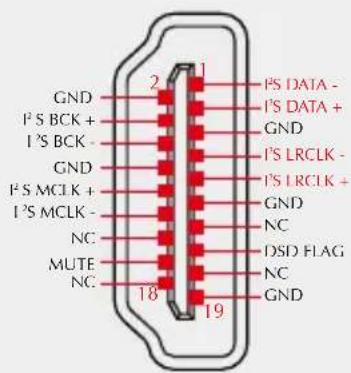
NORMAL
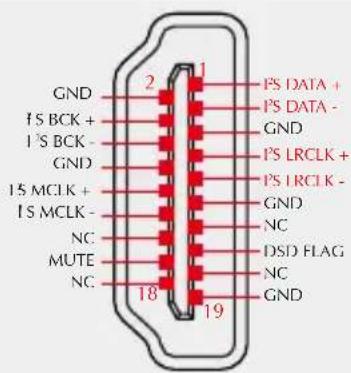
REVERSED
Note: This option is used to match different I²S interface standards, please check the interface definition of the signal source before use
AUDIO PHASE
• NORMAL (2+,3-)
• INVERTED (2-,3+)
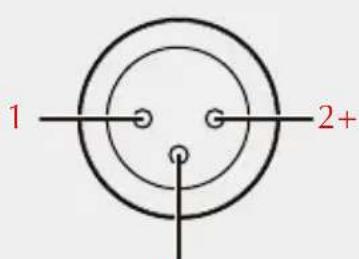
3- NORMALINVERTED
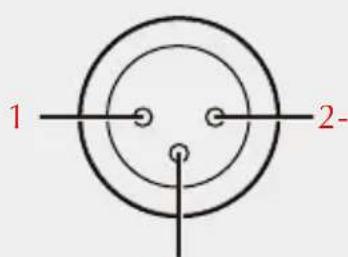

Instructions
I²S DSD CHANNEL
- DSDL=PCM DATA (The DSD left channel using the PCM DATA pin)
- DSDL=PCM LRCK (The DSD left channel using the PCM LRCK pin)
Note: When using the I²S input to streaming DSD audio, if you find that the left and right channels are incorrect, you can use this option to correct it.
DIMMER
- 5 second \~ 60 second
(The range is 5 seconds-60 seconds. After setting, the screen will automatically go off within this time, and the screen will re-light up if you operate the remote control or the knob at any time.)
BRIGHTNESS
• 1% \~ 99%
RESET
- During Bluetooth input, long press the middle button of the knob, the system will only reset the Bluetooth pairing status;
- During other input, long press the middle button of the knob, the system will clear all settings, including Bluetooth.
About MQA
MQA (Master Quality Authenticated) is an award-winning British technology that delivers the sound of the original master recording. The master MQA file is fully authenticated and is small enough to stream or download. The D400 includes MQA technology, which enables you to playback MQA audio files and streams, delivering the sound of the original master recording.
Visit How it works https://www.mqa.co.uk/how-it-works for more information.
How to play MQA
■ D400 supports MQA decoding with USB, optical fiber and coaxial!
- D400's MQA playback does not require the use of special playback software, such as foobar2000, Audirvanaplus only needs to support ASIO or WASAPI audio output, and when playing MQA audio, it is best to adjust the volume of the computer to the maximum, so that the audio output of the computer is in the best condition.
- When playing an MQA file, the sampling rate of the original master recording is displayed.

MQA and the Sound Wave Device are registered trade marks of MQA Limited.© 2016
Notes on playing MQA-CD
- Please make sure that what is being played is a genuine MQA-CD.
- Verify that the optical or coaxial signal output of the CD player is an unprocessed source code.
- 如何播放MQA
- Important note:
- Warranty Terms
- The Term of Service
- Features
- Specifications
- Remote control
- Operating the remote control
- Note
- Display Interface and Instructions
- Knob\*
- Bluetooth operating instructions\*\*
- Connection:
- Re-connection:
- Clear pairing:
- Instructions
- INPUTS
- OUTPUTS
- PCM FILTER
- FN KEY FOR
- I²S MODE
- AUDIO PHASE
- I²S DSD CHANNEL
- DIMMER
- BRIGHTNESS
- RESET
- About MQA
- How to play MQA
- Notes on playing MQA-CD
Brand : S.M.S.L
Model : D400 Pro
Category : Headphones