
DETF122 - Ventilateur domestique DELONGHI - Free user manual and instructions
Find the device manual for free DETF122 DELONGHI in PDF.


| Brand | De'Longhi |
| Model | DETF122 (BK/WH) |
| Product Type | Tower Fan |
| Oscillation | Dual direction (horizontal and vertical) |
| Fan Speeds | 3 (Low, Medium, High) |
| Wind Modes | 4 (Normal, Sleep, Natural, ECO) |
| Timer Settings | 4 (1, 2, 4, 8 hours) |
| Remote Control | Yes (CR2032 battery) |
| Display | LED with auto dimming |
| Power Supply | 220-240 V ~ 50 Hz (refer to rating label) |
| Power Consumption | Refer to product rating label |
| Product Dimensions (L x W x H) | Refer to product rating label |
| Net Weight | Approx. 5 kg |
| Control Panel | Touch buttons on unit |
| Safety Features | Automatic shut-off when tipped over (not confirmed in manual), overheat protection not specified |
| Cleaning | Unplug, wipe with damp cloth monthly |
| Assembly | Base assembly required |
| Usage | Indoor only |
| Child Safety | Not for children under 8 without supervision |
| Warranty | Standard De'Longhi warranty |
| Battery Type (Remote) | CR2032 |
Frequently Asked Questions - DETF122 DELONGHI
User questions about DETF122 DELONGHI
0 question about this device. Answer the ones you know or ask your own.
Ask a new question about this device
Download the instructions for your Ventilateur domestique in PDF format for free! Find your manual DETF122 - DELONGHI and take your electronic device back in hand. On this page are published all the documents necessary for the use of your device. DETF122 by DELONGHI.
USER MANUAL DETF122 DELONGHI
Dual Oscillation Tower Fan
Consumer Helpline
Australia
Phone: 1800 126 659
Fax: 1800 007 289
www.delonghl.com.au
New Zealand
Phone: 0508 200 300
Fax: 0508 200 301
www.delonghl.co.nz
Distributed by De'Longhi Australia Pty Ltd.
ABN 49 104 012 857
P.O. Box 4540 Casula Mall, NSW 2170
Distributed by De'Longhi New Zealand Ltd.
NZBN 9429035952824
P.O. Box 58-056 Botany, MANUKAU 2163

is a registered Trademark
of De'Longhi Australia Pty Ltd.
ABN 49 104 012 857
© 2017 De'longhi Australia Pty Ltd.
Model
DETF122.BK
DETF122.WH
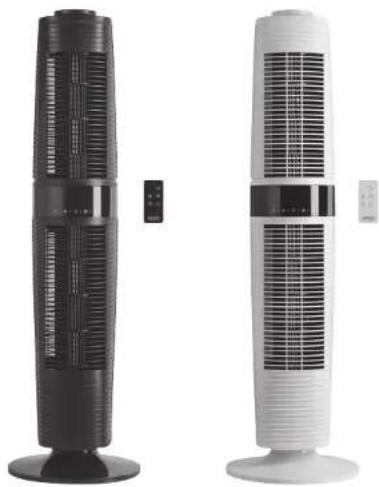
natural_image
Two tall industrial air filters with ventilation grilles, shown from different angles (no text or symbols visible)USER GUIDE
Please read this user guide carefully and retain for future reference
SafetyGuidelines
- Safety Guidelines....3-5
- Features....5
3.PartsDrawing....6-7 - Installation & Operation Instructions....8-11
- Usage of Remote Control....12
- Cleaning & Maintenance....13
Safety
- Read these instructions carefully and retain for future reference.
- Remove all packaging and any labels.
FUNDAMENTAL SAFETY WARNING
- The appliance is not intended for use by persons (including children) with reduced physical, sensory or mental capabilities, or lack of experience and knowledge, unless they have been given supervised or instruction concerning use of the appliance in a safe way and understand the hazards involve by a responsible person for their safety.
- Young children should be supervised to ensure that they do not play with the appliance.
-
If the supply cord is damaged, it must be replaced by the manufacturer or its service agent or a similarly qualified person in order to avoid a hazard.
-
Ensure that the fan is switched off from the supply mains before removing guard for cleaning.
- Misuse of your appliance can result in injury.
FOR EUROPEAN MARKET ONLY
- This appliance can be used by children aged from 8 years and above and persons with reduced physical, sensory or mental capabilities or lack of experience and knowledge if they have been given supervision or instruction concerning use of the appliance in a safe way and understand the hazards involved. Children shall not play with the appliance. Cleaning and user maintenance shall not be made by children without supervision.
- For indoor use only. Rain and water are dangerous in the presence of electricity.
- Use on stable horizontal surfaces only to avoid fan tipping over.
SafetyGuidelines
Features
Before Plugging In
- Make sure your electricity supply is the same as the one shown on the rating label.
- Please ensure the socket's power is over 10Amps / 240V and the voltage should meet the requirements on the rating label.
- Do not operate or plug in the fan with wet hands.
- Ensure the plug is plugged in the socket completely.
- If the fan does not rotate or with abnormal smell, immediately unplug the fan and contact service center for repair.
- Do not place heavy objects on the power cord, it will damage the cord.
-
If the plug or the power cord is damaged, it will result in short circuit and may lead to electric shock or fire. Please unplug the fan and call service center for repair. These parts must be replaced by the manufacturer or its service agent or a similarly qualified person in order to avoid a hazard.
-
Do not use pesticides and flammable sprays around the product, it may cause product damage.
- Do not put any foreign object in the fan.
- Do not spill liquid on the fan, it will lead to short circuit and damage the fan.
- Do not use the fan around a tub, sprinkler or pool, it will lead to short circuit and damage the fan.
- Do not leave the fan unattended. Please turn the fan off when you go out.
- Do not pull the power cord to unplug the fan, it will damage the cord.
Service and Customer Care
- If the cord is damaged it must, for safety reasons, be replaced by DeLonghi or an authorized DeLonghi repairer.
- If you experience any problems with the operation of your appliance, before requesting assistance, please visit www.delonghi.com
- Please note that your product is covered by a warranty, which complies with all legal provisions concerning any existing warranty and consumer rights in the country where the product was purchased.
-
If your DeLonghi product malfunctions or you find any defects, please send it or bring it to an authorized DeLonghi service centre. To find up to date details of your nearest authorized DeLonghi service center visit www.delonghi.com
-
Wide oscillation angle for your comfort
- Dual oscillation directions
- 3 exta wind modes: apart from normal wind mode, three additional wind modes for selection: sleep, natural and ECO
- 3 fan speeds: low, mid, high
- 4 timer settings: 1, 2, 4 and 8 hours
- LED display with infrared remote control
- Auto dimming function
Parts Drawing
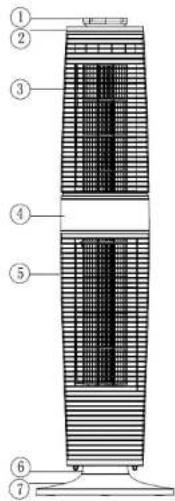
- Handle
- Top Cover
- Upper housing
- Control panel
- Bottom housing
- Oscillation base
- Base
Display panel
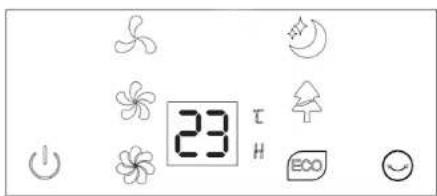
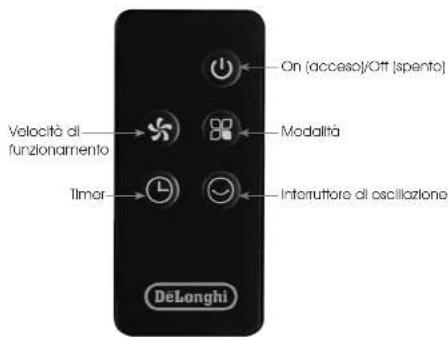
Control panel
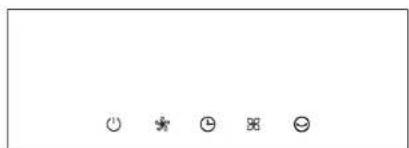
natural_image
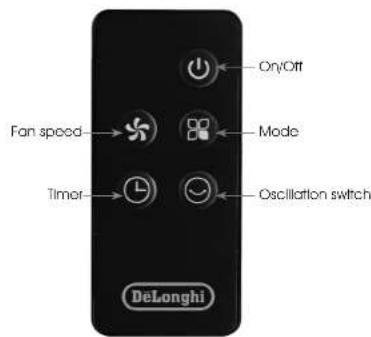
Five simple icons: three smiley faces, one neutral face, two surprised faces, and one frowning face (no text or symbols)Remote control panel
Installation & Operation Instruction
Installation
- Take out the fan for assembly and make sure all accessories are included.
- Please assemble the fan as below instructions:
☐ Lock rear base and front base together according to Figure 1.
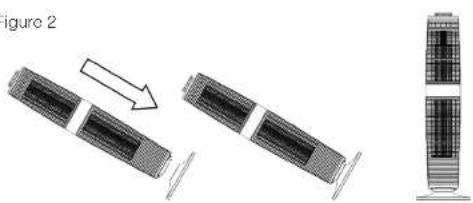
☐ Put the main body into the assembled base along the locating pole, according to Figure 2.
Figure 1
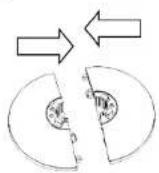
Figure 2
natural_image
Diagram showing three stages of a device with internal components and structural elements, no text or symbols present.Page 8 Page 9
□ After assembled, put the machine in a suitable place, plug in and operate according to the instruction manual.
Operation Instruction
Note: When plugging in the first time you will hear 2 beeping sounds. This means the fan is correctly connected. When the unit is on standby status, only the ON/OFF will be available. ( Two beeps when unit is plugged in, one beep when buttons are pressed and one beep for power off)
1) ON/OFF ⏻
Start the fan operation by pressing the "ON/OFF" button on the control panel. The fan works initially in "LOW" speed, normal mode, no timer and no oscillation setting. To turn off the fan, press the "ON/OFF" button and the unit will shift to stand by mode with one beep sound.
2) SPEED

Press SPEED button to set wind speed, and circulate as the rule of LOW - MED - HI - LOW. LED lights show accordingly.
3) TIMER

No timer status when turning on the fan, timer LED no display.
Press TIMER button to set and circulate as the rule of 1H - 2H - 4H - 8H - no timer-1H. LED lights show accordingly.
There is no timer and related display show under the initial conditions. The fan will be under count down status until it turns off.
4) MODES
The initial wind mode is "Normal", press MODE button to set wind mode and shift as the rule of "Normal" - "Sleep" - "Natural" - "ECO" - "Normal". The LED lights show accordingly. (No display for NORMAL mode.)
The setting (except timer and mode) is memorized even the unit is turned off (not power off).
Working rule of wind modes:
-
Normal HI speed MED speed LOW speed
-
Sleeping

HI: 30 minutes "HI" natural wind—30 minutes "MED" natural wind—Remain "LOW" natural wind speed
MED: 30 minutes "MED" natural wind—Remain "LOW" natural wind speed
LOW: Remain "LOW" natural wind speed
- Natural

Oscillogram for 3 natural wind (HI, MED, LOW)
- ECO

Under this mode, the machine works in Low speed when ambience temperature < 25°C; in HI speed when > 29°C; in MED speed when 25°C\~29°C.
- Auto dimming fuction
The LED lights will dim 100% automatically without operation more than 1 minute.
Usage for remote control
Cleaning & Maintenance
WARNING - KEEP BATTERIES OUT OF REACH OF CHILDREN
Swallowing may lead to serious injury in as little as 2 hours or death, due to chemical burns and potential perforation of the oesophagus.
Examine devices and make sure the battery compartment is correctly secured. Do not use if compartment is not secure.
Dispose of used button batteries immediately and safely. Flat batteries can still be dangerous.
This product requires button cell battery to operate and this is hazardous to young children.
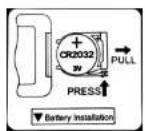
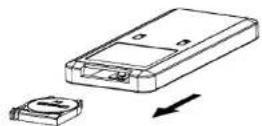
Remote control has a battery compartment that requires two or more independent and simultaneous actions to remove its cover; press and pull out the battery compartment on the back of remote control, install the button cell (CR2032 3V) according to the positive and negative sign and close the compartment. Align the remote control with the receiver on the fan to operate.
If there is too much dust or dirt on the front grid cover and wind wheel of the fan, the performance of air-out would be affected, so we suggest clean the fan once per month at least.
-
Always remember unplug the fan before cleaning, or may cause electric shock or product damage.
-
Clean with ordinary cleaner and banister brush. Do not use any chemical agents.
Unit surface cleaning
- Do not allow water and steam to drip on.
- Do not use corrosive detergent or solvent cleaning.
- Always unplug the fan before cleaning.
Maintain guidance
- Unplugged and packed to prevent dust from entering the body if not use for a long time.
- Placed in a dry well ventilated place after packed.
Specification
| Model TBD | |
| Rated voltage refer to product rating label | |
| Rated frequency refer to product rating label | |
| Rated power refer to product rating label | |
| Product size(L*W*H) 968*F2 | 88mm |
| Environment 0-+40°C, relative humidity≤90% (25°C) | |
natural_image
Five simple icons: three smiley faces, one neutral face, two surprised faces, and one frowning face (no text or symbols)Pannello del telecomando
natural_image
Diagram showing three stages of a device or system transformation, with no visible text or symbols.Page 8 Page 9

- Dual Oscillation Tower Fan
- Consumer Helpline
- Australia
- New Zealand
- SafetyGuidelines
- Safety
- FUNDAMENTAL SAFETY WARNING
- FOR EUROPEAN MARKET ONLY
- Features
- Before Plugging In
- Service and Customer Care
- Parts Drawing
- Installation & Operation Instruction
- Installation
- Operation Instruction
- 1) ON/OFF ⏻
- 2) SPEED
- 3) TIMER
- 4) MODES
- Usage for remote control
- Cleaning & Maintenance
- WARNING - KEEP BATTERIES OUT OF REACH OF CHILDREN
Brand : DELONGHI
Model : DETF122
Category : Ventilateur domestique