
BRC4C62-9 - Remote control DAIKIN - Free user manual and instructions
Find the device manual for free BRC4C62-9 DAIKIN in PDF.


| Product Type | Wireless Remote Controller |
| Model Numbers | BRC4C61, BRC4C62, BRC4C63, BRC4C64 |
| Compatible Systems | Daikin air conditioners (VRV, heat pump, heat recovery, straight cooling) |
| Power Supply | 2 x AAA alkaline batteries (LR03) |
| Battery Life | Approximately 1 year under normal use |
| Transmission Range | Up to 7 meters |
| Dimensions (approx.) | 160 mm x 55 mm x 20 mm |
| Weight (with batteries) | Approx. 120 g |
| Display Features | LCD showing operation mode, set temperature, timer, fan speed, air flow direction |
| Operating Modes | Cool, Heat, Auto (heat recovery only), Dry, Fan only |
| Temperature Setting Range | 19°C to 25°C (adjustable for automatic operation) |
| Fan Speeds | High, Low |
| Timer | Programmable start/stop timer up to 72 hours |
| Air Flow Direction Adjustment | Available on models BRC4C61 and BRC4C63 |
| Centralized Control Support | Yes, compatible with optional centralized controllers |
| Emergency Operation | Switch on indoor unit for operation without remote |
| Maintenance | Replace batteries when display dims; clean with dry cloth; do not wash |
| Safety Features | Auto restart after power failure; safety device prevents restart within 3 minutes |
| Reparability | Serviceable only by qualified technician; contact dealer for repairs |
Frequently Asked Questions - BRC4C62-9 DAIKIN
User questions about BRC4C62-9 DAIKIN
0 question about this device. Answer the ones you know or ask your own.
Ask a new question about this device
Download the instructions for your Remote control in PDF format for free! Find your manual BRC4C62-9 - DAIKIN and take your electronic device back in hand. On this page are published all the documents necessary for the use of your device. BRC4C62-9 by DAIKIN.
USER MANUAL BRC4C62-9 DAIKIN
Wireless Remote Controller Kit
MODELS:
BRC4C61
BRC4C62
BRC4C63
BRC4C64
Thank you for purchasing this Daikin air conditioner.
Carefully read this operation manual before using the air conditioner. It will tell you how to use the unit properly and help you if any trouble occurs. After reading the manual, file it away for future reference.
PRIOR TO USE
This operation manual is exclusively for instructions on how to use the wireless remote controller. Read also the operation manual attached to the indoor unit and to the outdoor unit for safe usage of the system and maintenance.
1
1-3
COOL/HEAT CHANGEOVER
REMOTE CONTROL SWITCH
1
2
[2]
3
4
5
6
7
8
9
CONTENTS
PRIOR TO USE ...... [1]
ILLUSTRATION...... [2]
1 SAFETY PRECAUTIONS...... 1
2 NAMES AND FUNCTIONS OF THE OPERATING SECTION.... 4
3 HANDLING FOR WIRELESS
REMOTE CONTROLLER.... 5
4 OPERATION PROCEDURE...... 6
5 NOT MALFUNCTION OF THE AIR CONDITIONER.... 12
6 HOW TO DIAGNOSE TROUBLE SPOTS.... 12
1. SAFETY PRECAUTIONS
To gain full advantage of the air conditioner's functions and to avoid malfunction due to mishandling, we recommend that you read this instruction manual carefully before use. This air conditioner is classified under “appliances not accessible to the general public”.
The precautions described herein are classified as WARNING and CAUTION. They both contain important information regarding safety. Be sure to observe all precautions without fail.

WARNING...... Failure to follow these instructions properly may result in personal injury or loss of life.

CAUTION ...... Failure to observe these instructions properly may result in property damage or personal injury, which may be serious depending on the circumstances.
After reading, keep this manual in a convenient place so that you can refer to it whenever necessary. If the equipment is transferred to a new user, be sure also to hand over the manual.

WARNING
Be aware that prolonged, direct exposure to cool or warm air from the air conditioner, or to air that is too cool or too warm can be harmful to your physical condition and health.
When the air conditioner is malfunctioning (giving off a burning odor, etc.) turn off power to the unit and contact your local dealer.
Continued operation under such circumstances may result in a failure, electric shocks or fire hazards.
Consult your local dealer to install your equipment.
Doing the work yourself may result in water leakage, electric shocks or fire hazards.
Consult your local dealer regarding modification, repair and maintenance of the air conditioner or the remote controller.
Improper workmanship may result in water leakage, electric shocks or fire hazards.
Do not place objects, including rods, your fingers, etc., in the air inlet or outlet.
Injury may result due to contact with the air conditioner's high-speed fan blades.
Beware of fire in case of refrigerant leakage.
If the air conditioner is not operating correctly, i.e. not generating cool or warm air, refrigerant leakage could be the cause. Consult your dealer for assistance.
The refrigerant within the air conditioner is safe and normally does not leak. However, in the event of a leakage, contact with a naked burner, heater or cooker may result in generation of noxious gas.
Do not longer use the air conditioner until a qualified service person confirms that the leakage has been repaired.
Consult your local dealer regarding what to do in case of refrigerant leakage.
When the air conditioner is to be installed in a small room, it is necessary to take proper measures so that the amount of any leaked refrigerant does not exceed the concentration limit in the event of a leakage. Otherwise, this may lead to an accident due to oxygen depletion.
Contact professional personnel about attachment of accessories and be sure to use only accessories specified by the manufacturer.
If a defect results from your own workmanship, it may result in water leaks, electric shock or fire.
Consult your local dealer regarding relocation and reinstallation of the air conditioner.
Improper installation work may result in leakage, electric shocks or fire hazards.
Be sure to use fuses with the correct ampere reading.
Do not use improper fuses, copper or other wires as a substitute, as this may result in electric shock, fire, injury or damage to the unit.
Be sure to install an earth leakage breaker.
Failure to install an earth leakage breaker may result in electric shocks or fire.
Be sure to earth the unit.
Do not earth the unit to a utility pipe, lightning conductor or telephone earth lead. Imperfect earthing may result in electric shocks or fire.
A high surge current from lightning or other sources may cause damage to the air conditioner.
Consult the dealer if the air conditioner submerges owing to a natural disaster, such as a flood or typhoon.
Do not operate the air conditioner in that case, or otherwise a malfunction, electric shock, or fire may result.
Do not start or stop operating the air conditioner with the power supply breaker turned ON or OFF.
Otherwise, fire or water leakage may result. Furthermore, the fan will rotate abruptly if power failure compensation is enabled, which may result in injury.
Do not use the product in the atmosphere contaminated with oil vapor, such as cooking oil or machine oil vapor.
Oil vapor may cause crack damage, electric shocks, or fire.
Do not use the product in places with excessive oily smoke, such as cooking rooms, or in places with flammable gas, corrosive gas, or metal dust.
Using the product in such places may cause fire or product failures.
Do not use flammable materials (e.g., hairspray or insecticide) near the product.
Do not clean the product with organic solvents such as paint thinner.
The use of organic solvents may cause crack damage to the product, electric shocks, or fire.
Be sure to use a dedicated power supply for the air conditioner.
The use of any other power supply may cause heat generation, fire, or product failures.

CAUTION
Do not use the air conditioner for purposes other than those for which it is intended.
Do not use the air conditioner for cooling precision instruments, food, plants, animals or works of art as this may adversely affect the performance, quality and/or longevity of the object concerned.
Do not remove the outdoor unit's fan guard.
The guard protects against the unit's high speed fan, which may cause injury.
Do not place objects that are susceptible to moisture directly beneath the indoor or outdoor units.
Under certain conditions, condensation on the main unit or refrigerant pipes, air filter dirt or drain blockage may cause dripping, resulting in fouling or failure of the object concerned.
To avoid oxygen depletion, ensure that the room is adequately ventilated if equipment such as a burner is used together with the air conditioner.
After prolonged use, check the unit stand and its mounts for damage.
If left in a damaged condition, the unit may fall and cause injury.
Do not place flammable sprays or operate spray containers near the unit as this may result in fire.
Before cleaning, be sure to stop unit operation, turn the breaker off or remove the power cord.
Otherwise, an electric shock and injury may result.
To avoid electric shocks, do not operate with wet hands.
Do not place appliances that produce naked flames in places exposed to the air flow from the unit as this may impair combustion of the burner.
Do not place heaters directly below the unit, as resulting heat can cause deformation.
Do not allow a child to mount on the outdoor unit or avoid placing any object on it.
Falling or tumbling may result in injury.
Do not block air inlets nor outlets.
Impaired air flow may result in insufficient performance or trouble.
Be sure that children, plants or animals are not exposed directly to airflow from the unit, as adverse effects may ensue.
Do not wash the air conditioner or the remote controller with water, as this may result in electric shocks or fire.
Do not place water containers (flower vases, etc.) on the unit, as this may result in electric shocks or fire.
Do not install the air conditioner at any place where there is a danger of flammable gas leakage.
In the event of a gas leakage, build-up of gas near the air conditioner may result in fire hazards.
Do not put flammable containers, such as spray cans, within 1 m from the blow-off mouth.
The containers may explode because the warm air output of the indoor or outdoor unit will affect them.
The batteries must be removed from the appliance before it is scrapped and they are disposed of safely.
Arrange the drain to ensure complete drainage.
If proper drainage from the outdoor drain pipe does not occur during air conditioner operation, there could be a blockage due to dirt and debris build-up in the pipe.
This may result in a water leakage from the indoor unit. Under these circumstances, stop air conditioner operation and consult your dealer for assistance.
The appliance is not intended for use by unattended young children or infirm persons.
Impairment of bodily functions and harm to health may result.
Children should be supervised to ensure that they do not play with the unit or its remote controller.
Accidental operation by a child may result in impairment of bodily functions and harm health.
Do not let children play on or around the outdoor unit.
If they touch the unit carelessly, injury may be caused.
Consult your dealer regarding cleaning the inside of the air conditioner.
Improper cleaning may cause breakage of plastic parts, water leakage and other damage as well as electric shocks.
To avoid injury, do not touch the air inlet or aluminum fins of the unit.
Do not place objects in direct proximity of the outdoor unit and do not let leaves and other debris accumulate around the unit.
Leaves are a hotbed for small animals which can enter the unit. Once in the unit, such animals can cause malfunctions, smoke or fire when making contact with electrical parts.
Never touch the internal parts of the controller.
Do not remove the front panel. Touching certain internal parts will cause electric shocks and damage to the unit. Please consult your dealer about checking and adjustment of internal parts.
Do not leave the remote controller wherever there is a risk of wetting.
If water gets into the remote controller there is a risk of electrical leakage and damage to electronic components.
When using the wireless remote controller, do not put a strong light beam or install an inverter fluorescent lamp near the receiving section on the main unit. A malfunction may occur.
Watch your steps at the time of air filter cleaning or inspection.
High-place work is required, to which utmost attention must be paid. If the scaffold is unstable, you may fall or topple down, thus causing injury.
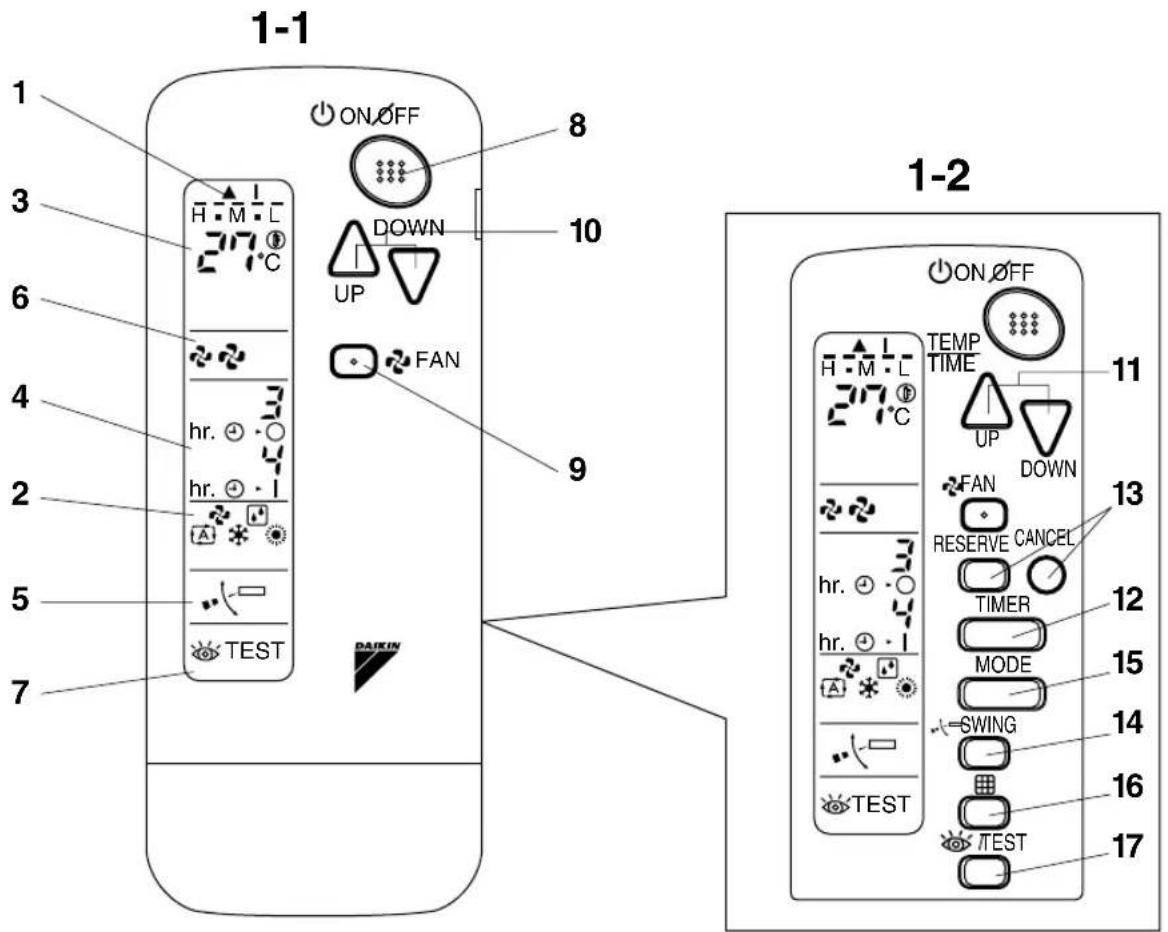
- NAMES AND FUNCTIONS OF THE OPERATING SECTION (Fig. 1, 2)
| 1 | DISPLAY “▲”(SIGNAL TRANSMISSION) |
| This lights up when a signal is being transmitted. | |
| 2 | DISPLAY “○”“○”“○”“○”(OPERATION MODE) |
| This display shows the current OPERATION MODE. For straight cooling type, “○” (Auto) and “○” (Heating) are not installed. | |
| 3 | DISPLAY “○”(SET TEMPERATURE) |
| This display shows the set temperature. | |
| 4 | DISPLAY “hr. ⊕-○ hr. ⊕-1(PROGRAMMED TIME) |
| This display shows PROGRAMMED TIME of the system start or stop. | |
| 5 | DISPLAY “○”(AIR FLOW FLAP)(BRC4C61, 63 only) |
| Refer to page 9. |
| 6 | DISPLAY “ ”” ”(FAN SPEED) |
| The display shows the set fan speed. | |
| 7 | DISPLAY “ ”(INSPECTION/TEST OPERATION) |
| When the INSPECTION/TEST OPERATION BUTTON is pressed, the display shows the system mode is in. | |
| 8 | ON/OFF BUTTON |
| Press the button and the system will start. Press the button again and the system will stop. | |
| 9 | FAN SPEED CONTROL BUTTON |
| Press this button to select the fan speed, HIGH or LOW, of your choice. | |
| 10 | TEMPERATURE SETTING BUTTON |
| Use this button for SETTING TEMPERATURE (Operates with the front cover of the remote controller closed.) | |
| 11 | PROGRAMMING TIMER BUTTON |
| Use this button for programming “START and/or STOP” time. (Operates with the front cover of the remote controller opened.) | |
| 12 | TIMER MODE START/STOP BUTTON |
| Refer to page 9. | |
| 13 | TIMER RESERVE/CANCEL BUTTON |
| Refer to page 9. | |
| 14 | AIR FLOW DIRECTION ADJUST BUTTON (BRC4C61, 63 only) |
| Refer to page 9. | |
| 15 | OPERATION MODE SELECTOR BUTTON |
| Press this button to select OPERATION MODE. | |
| 16 | FILTER SIGN RESET BUTTON |
| Refer to the section of MAINTENANCE in the operation manual attached to the indoor unit. | |
| 17 | INSPECTION/TEST OPERATION BUTTON |
| This button is used only by qualified service persons for maintenance purposes. | |
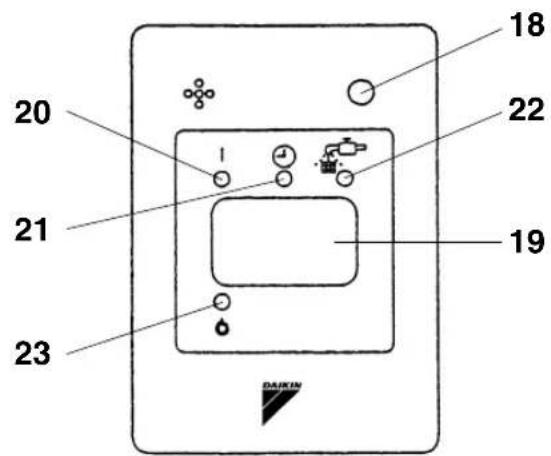
| 18 | EMERGENCY OPERATION SWITCH |
| This switch is readily used if the remote controller does not work. | |
| 19 | RECEIVER |
| This receives the signals from the remote controller. | |
| 20 | OPERATING INDICATOR LAMP (Red) |
| This lamp stays lit while the air conditioner runs. It flashes when the unit is in trouble. | |
| 21 | TIMER INDICATOR LAMP (Green) |
| This lamp stays lit while the timer is set. | |
| 22 | AIR FILTER CLEANING TIME INDICATOR LAMP (Red) |
| Lights up when it is time to clean the air filter. | |
| 23 | DEFROST LAMP (Orange) |
| Lights up when the defrosting operation has started. (For straight cooling type this lamp does not turn on.) | |
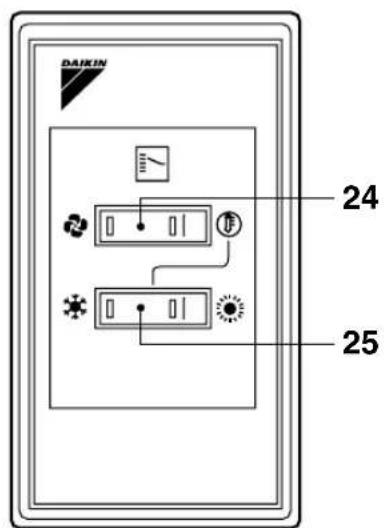
| 24 | FAN/AIR CONDITIONING SELECTOR SWITCH |
| Set the switch to “ ☀ (FAN) for FAN and “ ⓞ (A/C) for HEAT or COOL. | |
| 25 | COOL/HEAT CHANGEOVER SWITCH |
| Set the switch to “ ☀ (COOL) for COOL and “ ⓞ (HEAT) for HEAT. | |
| NOTES ☎ For the sake of explanation, all indications are shown on the display in Figure 1 contrary to actual running situations.Fig. 1-2 shows the remote controller with the front cover opened.Fig. 1-3 shows this remote controller can be used in conjunction with the one provided with the VRV system.If the air filter cleaning time indicator lamp lights up, clean the air filter as explained in the operation manual provided with the indoor unit.After cleaning and reinstalling the air filter, press the filter sign reset button on the remote controller. The air filter cleaning time indicator lamp on the receiver will go out. | |
3. HANDLING FOR WIRELESS REMOTE CONTROLLER
Precautions in handling remote controller
Direct the transmitting part of the remote controller to the receiving part of the air conditioner.
If something blocks the transmitting and receiving path of the indoor unit and the remote controller as curtains, it will not operate.
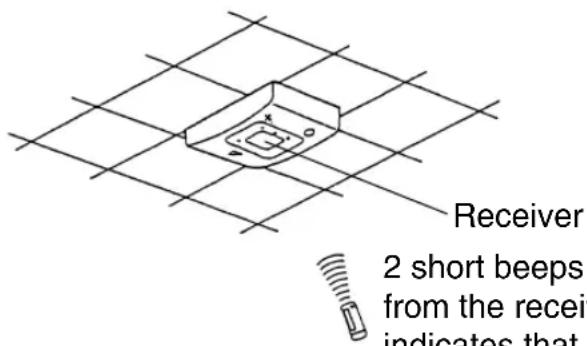
Transmitting distance is approximately 7 m.
Do not drop or get it wet.
It may be damaged.
Never press the button of the remote controller with a hard, pointed object.
The remote controller may be damaged.
Installation site
- It is possible that signals will not be received in rooms that have electronic fluorescent lighting. Please consult with the salesman before buying new fluorescent lights.
- If the remote controller operated some other electrical apparatus, move that machine away or consult your dealer.
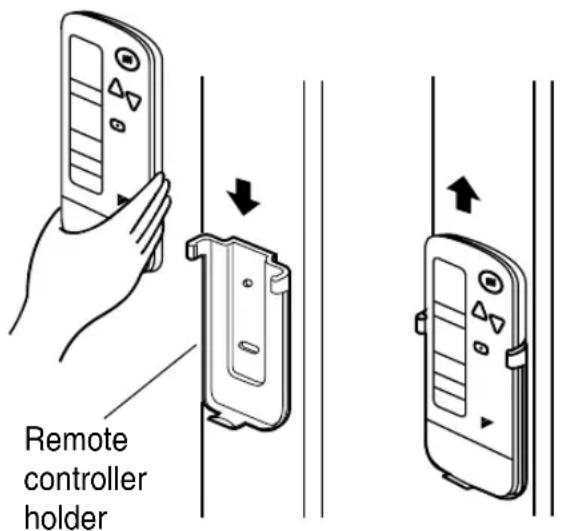
Placing the remote controller in the remote controller holder
Install the remote controller holder to a wall or a pillar with the attached screw. (Make sure it transmits)
Placing the remote controller
Slide from above
Removing the remote controller
Pull it upward
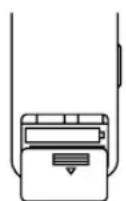
How to put the dry batteries
(1) Remove the back cover of the remote controller to the direction pointed by the arrow mark.
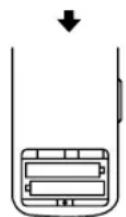
(2) Put the batteries Use two dry cell batteries (AAA.LR03 (alkaline)). Put dry batteries correctly to fit their (+) and (−).
(3) Close the cover
— When to change batteries
Under normal use, batteries last about a year. However, change them whenever the indoor unit doesn't respond or responds slowly to commands, or if the display becomes dark.
[CAUTIONS]
- Replace all batteries at the same time, do not use new and old batteries intermixed.
- In case the remote controller is not used for a long time remove all batteries in order to prevent liquid leak of the battery.
IN THE CASE OF CENTRALIZED CONTROL SYSTEM
- If the indoor unit is under centralized control, it is necessary to switch the remote controller's setting. In this case, contact your DAIKIN dealer.
- Operating procedure varies with heat pump type and straight cooling type. Contact your Daikin dealer to confirm your system type.
- To protect the unit, turn on the main power switch 6 hours before operation.
- If the main power supply is turned off during operation, operation will restart automatically after the power turns back on again.
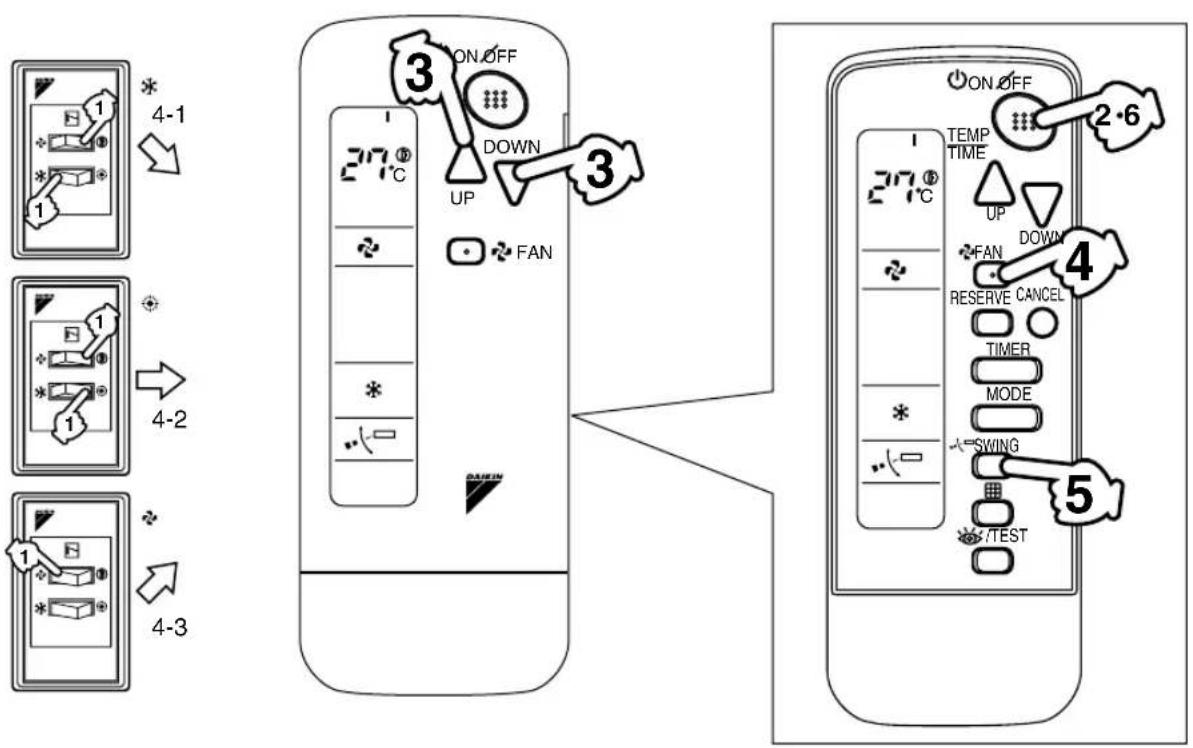
COOLING, HEATING, AUTOMATIC AND FAN OPERATION (Fig. 3, 4)
- AUTOMATIC OPERATION can be selected only by Heat recovery system.
- Cooling only system gives selection of FAN or COOLING OPERATION only.
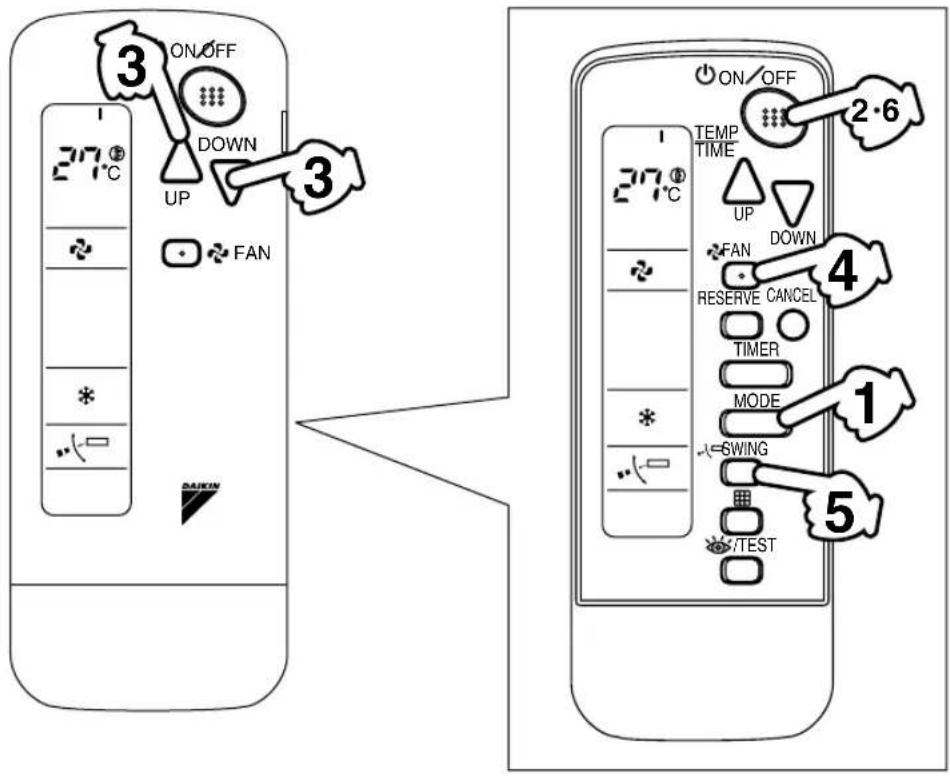
《FOR SYSTEMS WITHOUT COOL/HEAT CHANGEOVER REMOTE CONTROL SWITCH (Fig. 3)》
1 Press OPERATION MODE SELECTOR button several times and select the OPERATION MODE of your choice as follows.
In this operation mode, COOL/HEAT changeover is automatically conducted at a present indoor temperature.
Press ON/OFF button.
OPERATION lamp lights up and the system starts OPERATION.
《FOR SYSTEMS WITH COOL/HEAT CHANGEOVER REMOTE CONTROL SWITCH (Fig. 4)》
Select OPERATION MODE with the COOL/HEAT
CHANGEOVER REMOTE CONTROL SWITCH as follows.
■ COOLING OPERATION ....
Refer to fig. 4-1 (①)

Refer to fig. 4-2 ( Ⓤ )

■ FAN OPERATION ....
Refer to fig. 4-3 ( )
Press ON/OFF button.
OPERATION lamp lights up and the system starts OPERATION.
ADJUSTMENT
For programming TEMPERATURE and FAN SPEED and AIR FLOW DIRECTION, follow the procedure shown below.
Press TEMPERATURE SETTING button and program the temperature.
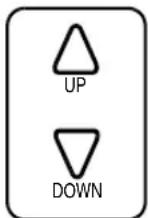
Each time this button is pressed, setting temperature rises 1^ C.
Each time this button is pressed, setting temperature lowers 1^ C.
In case of automatic operation
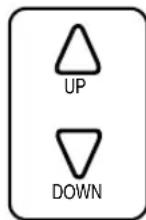
Each time this button is pressed, setting temperature shifts to "H" side.
Each time this button is pressed, setting temperature shifts to "L" side.
[°C]
| H | ■ | M | ■ | L | |
| Setting temperature | 25 2 | 3 22 2 | 1 19 |
NOTE

- The setting is impossible for fan operation.
Press FAN SPEED CONTROL button.
High or Low fan speed can be selected.
Press AIR FLOW DIRECTION button. (BRC4C61, 63 only)
Refer to "ADJUSTING THE AIR FLOW DIRECTION" (p. 9) for details.
STOPPING THE SYSTEM
Press ON/OFF button once again.
OPERATION lamp goes off, and the system stops OPERATION.
NOTE

- Do not turn OFF power immediately after the unit stops. Then, wait no less than 5 minutes. Water is leaking or there is something else wrong with the unit.
[EXPLANATION OF HEATING OPERATION]
DEFROST OPERATION
- As the frost on the coil of an outdoor unit increase, heating effect decreases and the system goes into DEFROST OPERATION.
- The fan operation stops and the DEFROST lamp of the indoor unit goes on. After 6 to 8 minutes (maximum 10 minutes) of DEFROST OPERATION, the system returns to HEATING OPERATION.
Heating capacity & Outdoor air temperature
- Heating capacity drops as outdoor air temperature lowers. If feeling cold, use another heater at the same time as this air conditioner.
- Hot air is circulated to warm the room. It will take some time from when the air conditioner is first started until the entire room becomes warm. The internal fan automatically turns at low speed until the air conditioner reaches a certain temperature on the inside. In this situation, all you can do is wait.
- If hot air accumulates on the ceiling and feet are left feeling cold, it is recommended to use a circulator. For details, contact the place of purchase.
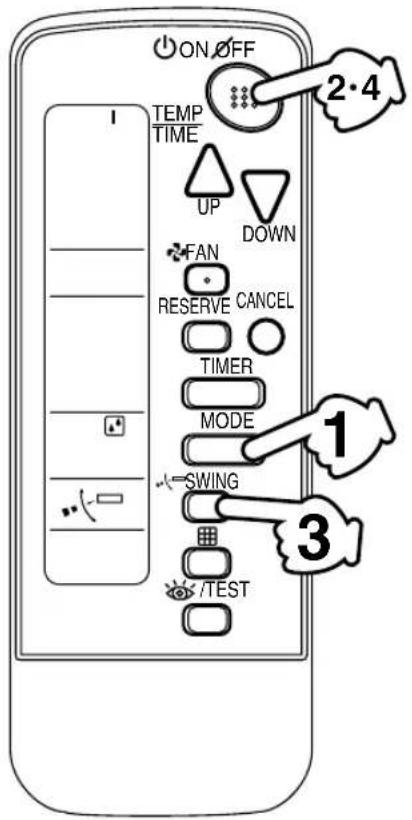
PROGRAM DRY OPERATION (Fig. 5, 6)
- The function of this program is to decrease the humidity in your room with the minimum temperature decrease.
- Micro computer automatically determines TEMPERATURE and FAN SPEED.
- This system does not go into operation if the room temperature is below 16^ .
《FOR SYSTEMS WITHOUT COOL/HEAT CHANGEOVER REMOTE CONTROL SWITCH (Fig. 5)》
Press OPERATION MODE SELECTOR button several
times and select “☐(PROGRAM DRY OPERATION).
Press ON/OFF button.
OPERATION lamp lights up and system starts OPERATION.
ADJUSTMENT
Press AIR FLOW DIRECTION ADJUST button. (BRC4C61, 63)
only)
Refer to "ADJUSTING THE AIR FLOW DIRECTION" (p. 9) for details.
STOPPING THE SYSTEM
Press ON/OFF button again.
OPERATION lamp goes off and the system stops OPERATION.
NOTE
- Do not turn OFF power immediately after the unit stops. Then, wait no less than 5 minutes. Water is leaking or there is something else wrong with the unit.
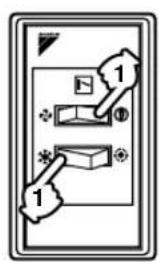
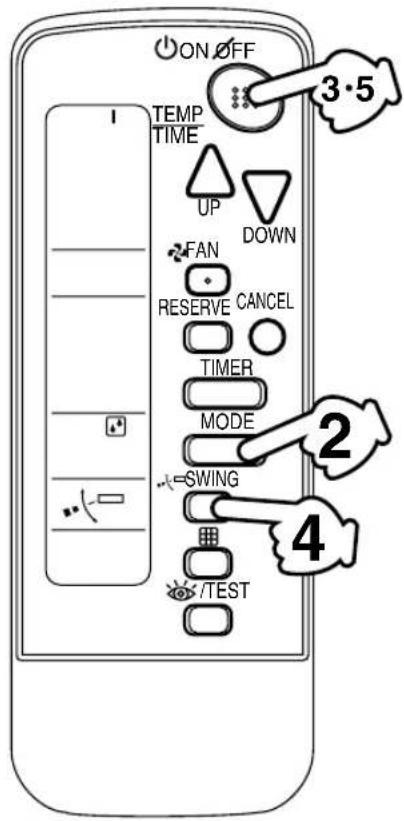
《FOR SYSTEMS WITH COOL/HEAT CHANGEOVER REMOTE CONTROL SWITCH (Fig. 6)》
Select COOLING OPERATION MODE with the COOL/HEAT GEOVER REMOTE CONTROL H.
Press OPERATION MODE SELECTOR button several and select PROGRAM DRY “☐”
Press ON/OFF button.
OPERATION lamp lights up and the system starts.
Press AIR FLOW DIRECTION ADJUST button. (BRC4C61, 63
Refer to "ADJUSTING THE AIR FLOW DIRECTION" (p. 9) for details.
STOPPING THE SYSTEM
Press ON/OFF button once again.
OPERATION lamp goes off, and the system stops OPERATION.
NOTE
- Do not turn OFF power immediately after the unit stops. Then, wait no less than 5 minutes. Water is leaking or there is something else wrong with the unit.
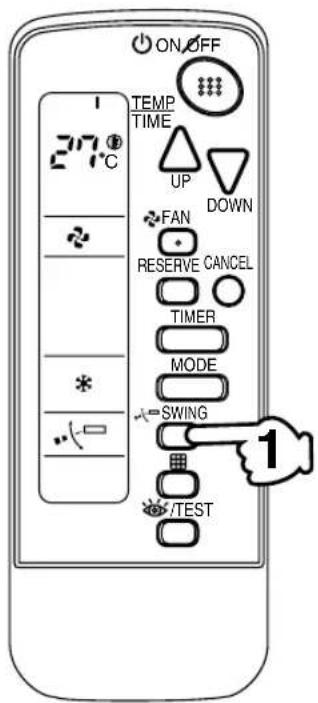
ADJUSTING THE AIR FLOW DIRECTION (Fig. 7)
Press the AIR FLOW DIRECTION ADJUST button to adjust up/down air flow angle.
Press the AIR FLOW DIRECTION ADJUST button to select direction as shown below.
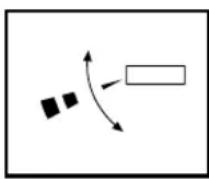
DISPLAY appears and the air flow direction continuously varies. (Automatic swing setting)
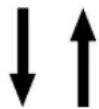
Press AIR FLOW DIRECTION ADJUST button to select the air direction of your choice.
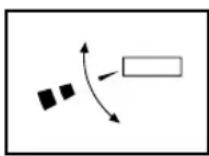
DISPLAY vanishes and the desired air flow direction is fixed. (Fixed air flow setting)
- The movable limit of the blade is changeable. Contact your Daikin dealer for details.
MOVEMENT OF THE AIR FLOW FLAP
For the following conditions, micro computer controls the air flow direction so it may be different from the display.
| Operation mode | Cooling Heating | |
| Operation conditions | When room temperature is lower than the set temperature | When room temperature is higher than the set temperatureAt defrost operation |
| When operating continuously at horizontal air flow direction | ||
Operation mode includes automatic operation.
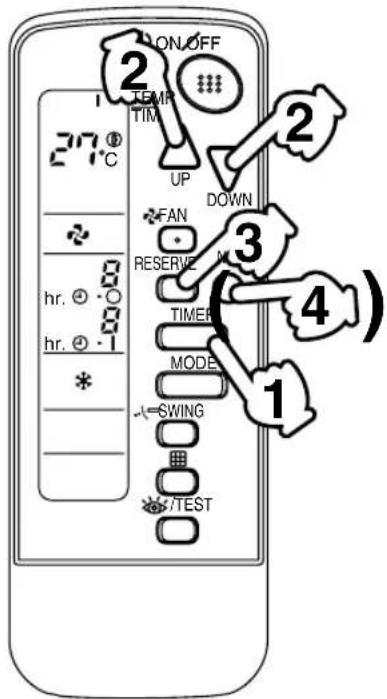
PROGRAM TIMER OPERATION (Fig. 8)
- The timer is operated in the following two ways.
Programming the stop time (✗) ▷ ....The system stops operating after the set time has elapsed.
Programming the start time ( Ⓧ ▶ | .... The system starts operating after the set time has elapsed.
- The timer can be programmed a maximum of 72 hours.
- The start and the stop time can be simultaneously programmed.
Press the TIMER MODE START/STOP button several
times and select the mode on the display.
The display flashes.
For setting the timer stop......“④→○
For setting the timer start .....“ ” |
Press the PROGRAMMING
TIMER button and set the time
for stopping or starting the system.
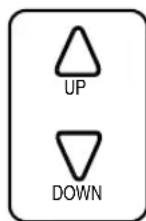
When this button is pressed, the time advances by 1 hour.
When this button is pressed, the time goes backward by 1 hour.
Press RESERVE button.
The timer setting procedure ends.
The display changes from flashing light to a constant light.
NOTE

- When setting the timer Off and On at the same time, repeat the above procedure from to once again.
For example.
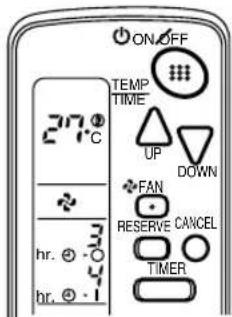
When the timer is programmed to stop the system after 3 hours and start the system after 4 hours, the system will stop after 3 hours and then 1 hour later the system will start.
• After the timer is programmed, the display shows the remaining time.
- Press the TIMER OFF button to cancel programming. The display vanishes. ( )
HOW TO SET MASTER REMOTE CONTROLLER (For VRV series)
- When the system is installed as shown below, it is necessary to designate the master remote controller.
《For Heat pump system》
When one outdoor unit is connected with several indoor units.
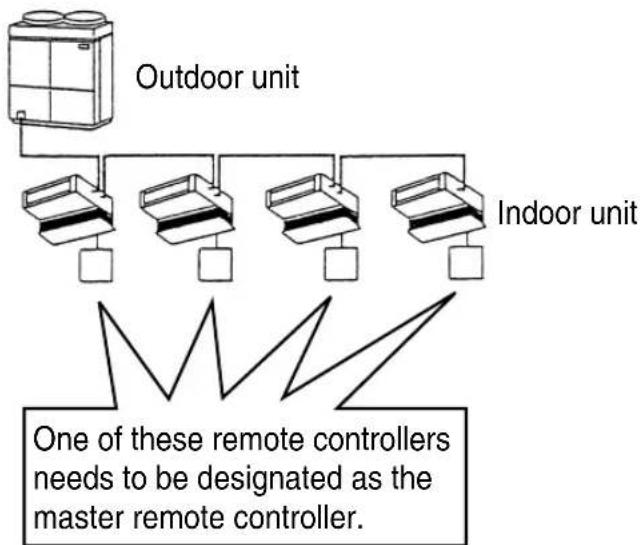
flowchart
graph TD
    A["Outdoor unit"] --> B["Controller 1"]
    A --> C["Controller 2"]
    A --> D["Controller 3"]
    A --> E["Controller 4"]
    F["Indoor unit"] --> G["Controller 1"]
    F --> H["Controller 2"]
    F --> I["Controller 3"]
    F --> J["Controller 4"]
    K["One of these remote controllers needs to be designated as the master remote controller."] --> L["Feedbacking lines"]
《For Heat recovery system》
When one BS unit is connected with several indoor units.
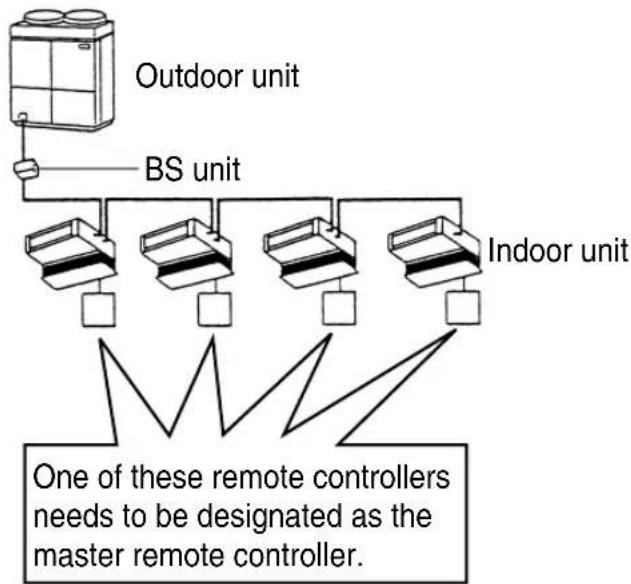
flowchart
graph TD
    A["Outdoor unit"] --> B["BS unit"]
    B --> C["Indoor unit"]
    C --> D["One of these remote controllers needs to be designated as the master remote controller."]
    style A fill:#f9f,stroke:#333
    style B fill:#ccf,stroke:#333
    style C fill:#cfc,stroke:#333
    style D fill:#fcc,stroke:#333
- Only the master remote controller can select HEATING, COOLING or AUTOMATIC (only Heat recovery system) OPERATION.
When the indoor unit with master remote controller is set to "COOL", you can switch over operation mode between "FAN", "DRY" and "COOL".
When the indoor unit with master remote controller is set to "HEAT", you can switch over operation mode between "FAN" and "HEAT".
When the indoor unit with master remote controller is set to "FAN", you cannot switch operation mode.
When attempting settings than that consented above, a “peep” is emitted as a warning.
Only with Heat recovery system, you can set the indoor unit to AUTOMATIC. Attempting to do so, a "peep" will be emitted as a warning.
How to designate the master remote controller
Continuously press the OPERATION MODE SELECTOR but-4 seconds.
The displays showing “ ^21 of all slave indoor unit connected to the same outdoor unit or BS unit flash.
Press the OPERATION MODE SELECTOR button to the indoor unit that you wish to designate as the master remote controller. Then designation is completed. This indoor unit is designated as the master remote controller and the display showing “vanishes.
- To change settings, repeat steps ① and ②.
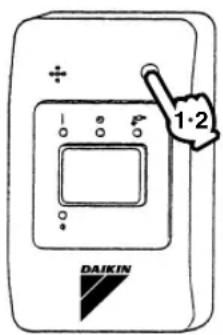
EMERGENCY OPERATION
When the remote controller does not work due to battery failure or the absence thereof, use this switch which is located beside the discharge grille on the main unit. When the remote controller does not work, but the battery low indicator on it is not lit, contact your dealer.
[START]
![DAIKIN BRC4C62-9 - [START] - 1](/content/2026/05/852453/images/698ef16595dee9164b552858694210fb996711073ab44e9ce91e8775bf0aa15f.jpg)
Press the EMERGENCY OPERATION switch.
The machine runs in the previous mode. The system operates with the previously set air flow direction, and air flow rate.
[STOP]
![DAIKIN BRC4C62-9 - [STOP] - 1](/content/2026/05/852453/images/dd53777fc24e60e04fa0d2c1af8ae4add89875da7b5f6b12f2919ad79556abbc.jpg)
Press the EMERGENCY OPERATION switch again.
PRECAUTIONS FOR GROUP CONTROL SYSTEM OR TWO REMOTE CONTROLLER CONTROL SYSTEM
This system provides two other control systems beside individual control (one remote controller controls one indoor unit) system. Confirm the following if your unit is of the following control system type.
■ Group control system
One remote controller controls up to 16 indoor units.
All indoor units are equally set.
■ Two remote controller control system
Two remote controllers control one indoor unit. (In case of group control system, one group of indoor units)
The unit follows individual operation.
NOTES

- Cannot have two remote controller control system with only wireless remote controllers. (It will be a two remote controller control system having one wired and one wireless remote controllers.)
- Under two remote controller control system, wireless remote controller cannot control timer operation.
- Only the operating indicator lamp out of 3 other lamps on the indoor unit display functions.
- Contact your Daikin dealer in case of changing the combination or setting of group control and two remote controller control systems.
5. NOT MALFUNCTION OF THE AIR CONDITIONER
The following symptoms do not indicate air conditioner malfunction
- The system does not restart immediately after the ON/OFF button is pressed.
If the OPERATION lamp lights, the system is in normal condition. It does not restart immediately because a safety device operates to prevent overload of the system. After 3 minutes, the system will turn on again automatically.
- The system does not restart immediately when TEMPERATURE SETTING button is returned to the former position after pushing the button.
It does not restart immediately because a safety device operates to prevent overload of the system. After 3 minutes, the system will turn on again automatically.
- If the reception beep is rapidly repeated 3 times (It sounds only twice when operating normally.)
Control is set to the optional controller for centralized control.
- If the defrost lamp on the indoor unit's display is lit when heating is started.
This indication is to warn against cold air being blown from the unit. There is nothing wrong with the equipment.
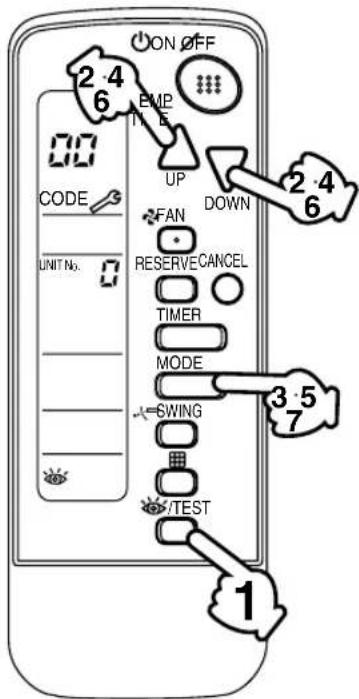
6. HOW TO DIAGNOSE TROUBLE SPOTS (Fig. 9)
I. EMERGENCY STOP
When the air conditioner stops in emergency, the run lamp on the indoor unit starts blinking. Take the following steps yourself to read the malfunction code that appears on the display. Contact your dealer with this code. It will help pinpoint the cause of the trouble, speeding up the repair.
Press the INSPECTION/TEST button to select the inspection
mode “”
"appears on display and blinks. "UNIT" lights up.
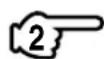
Press PROGRAMMING TIMER BUTTON and change the unit
number.
Press to change the unit number until the indoor unit beeps and perform the following operation according to the number of beeps.
Number of beeps
3 short beeps .....Perform all steps from ③ to ⑥
1 short beep .....Perform and steps

1 long beep ......Normal state
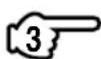
Press OPERATION MODE SELECTOR BUTTON.
“on the left-hand of the malfunction code blinks.
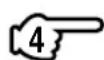
Press PROGRAMMING TIMER BUTTON and change the mal-on code.
Press until the indoor unit beeps twice.
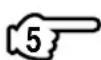
Press OPERATION MODE SELECTOR BUTTON.
"On the right-hand of the malfunction code blinks.
Press PROGRAMMING TIMER BUTTON and change the mal-on code.
Press until the indoor unit makes a long beep.
The malfunction code is fixed when the indoor unit makes a long beep.
Reset of the display.
Press OPERATION MODE SELECTOR BUTTON to get the display back to the normal state.
II.IN CASE BESIDES EMERGENCY STOP
1. The unit does not operate at all.
- Check if the receiver is exposed of sunlight or strong light. Keep receiver away from light.
- Check if there are batteries in the remote controller. Place the batteries.
- Check if the indoor unit number and wireless remote controller number are equal.
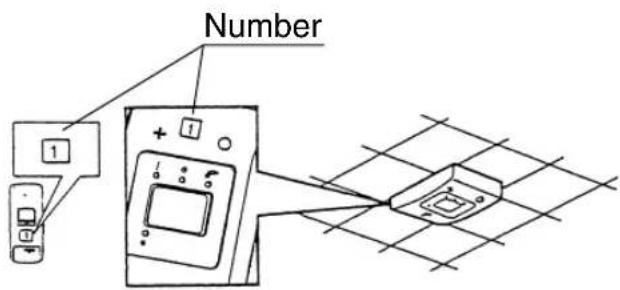
Operate the indoor unit with the remote controller of the same number.
Signal transmitted from a remote controller of a different number cannot be accepted. (If the number is not mentioned, it is considered as "1")
2. The system operates but it does not sufficiently cool or heat.
- If the set temperature is not proper.
- If the FAN SPEED is set to LOW SPEED.
- If the air flow angle is not proper.
Contact the place of purchase in the following case.

WARNING
When you detect a burning odor, shut OFF power immediately and contact the place of purchase. Using the equipment in anything but proper working condition can result in equipment damage, electric shock and/or fire.
[Trouble]
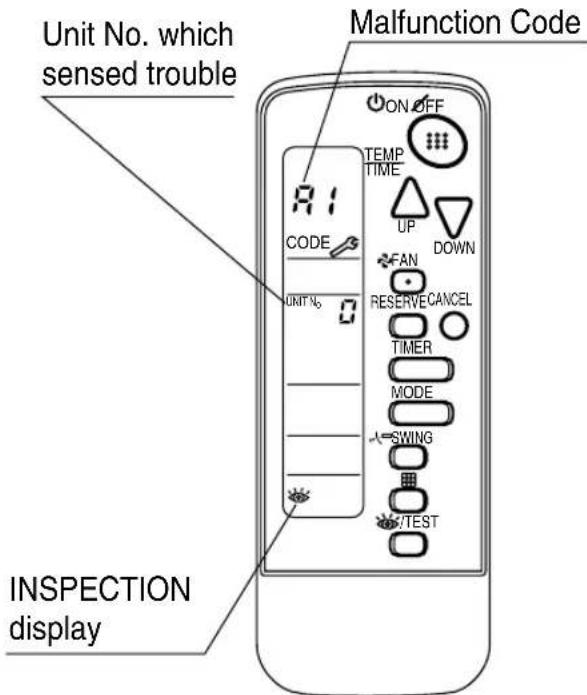
The RUN lamp of the indoor unit is flashing and the unit does not work at all.
[Remedial action]
Check the malfunction code (A1 \~ UF) on the remote control and contact the place of purchase. (See page 12.)
![DAIKIN BRC4C62-9 - [Remedial action] - 1](/content/2026/05/852453/images/2d2916d10c4efd7cceafccd3b9d8ca01efb13fcaaabf47b438b69cb3463b4c04.jpg)
Disposal requirements
Batteries supplied with the remote controller are marked with this symbol.
This means that the batteries shall not be mixed with unsorted household waste.
If a chemical symbol is printed beneath the symbol, this chemical symbol means that the battery contains a heavy metal above a certain concentration. Possible chemical symbols are:
■ Pb: lead (>0.004%)
Waste batteries must be treated at a specialized treatment facility for re-use.
By ensuring waste batteries are disposed of correctly, you will help to prevent potential negative consequences for the environment and human health.
DAIKIN INDUSTRIES, LTD.
Head office:
Umeda Center Bldg., 2-4-12, Nakazaki-Nishi,
Kita-ku, Osaka, 530-8323 Japan
Tokyo office:
JR Shinagawa East Bldg., 2-18-1, Konan,
Minato-ku, Tokyo, 108-0075 Japan