
Decko Svetlo - Alarm Clock GoGen - Free user manual and instructions
Find the device manual for free Decko Svetlo GoGen in PDF.


| Product Type | Alarm Clock Radio |
| Brand | GoGen |
| Model | Decko Svetlo |
| Dimensions | 150 x 85 x 44 mm |
| Weight | 182 g |
| Input Voltage | DC 5 V |
| Input Current | 700 mA |
| Max Power | 3.5 W |
| LED Color Temperature | 4000 K |
| Battery Type | Built-in Li-ion 1200 mAh |
| Operating Time (Battery Mode) | Up to 25 hours |
| Charging Time | About 3.5 hours |
| Night Light | Dimmable, stepless dimming |
| Alarm Clocks | 3 groups (R1, R2, R3) |
| Snooze | 10 minutes, up to 3 times |
| Sleep Mode | 30 minutes, light slowly dims |
| Display | Time, date, year, month, day |
| Time Format | 12h / 24h switchable |
| Package Contents | USB cable, instruction manual |
| Warranty | 2 years |
Frequently Asked Questions - Decko Svetlo GoGen
User questions about Decko Svetlo GoGen
0 question about this device. Answer the ones you know or ask your own.
Ask a new question about this device
Download the instructions for your Alarm Clock in PDF format for free! Find your manual Decko Svetlo - GoGen and take your electronic device back in hand. On this page are published all the documents necessary for the use of your device. Decko Svetlo by GoGen.
USER MANUAL Decko Svetlo GoGen
NEBEZPEČÍ UDUŠENÍ. PE SÁČEK ODKLÁDEJTE MIMO DOSAH DĚTÍ. SÁČEK NENÍ NA HRANÍ. NEPOUŽÍVEJTE TENTO SÁČEK V KOLÉBKÁCH, POSTÝLKÁCH, KOČÁRCÍCH NEBO DĚTSKÝCH OHRÁD-KÁCH.
LIKVIDACE NEPOTŘEBNÉHO ELEKTRICKÉHO ELEKTRONICKÉHO ZAŘÍZENÍ (PLATNÉ EVROPSKÉ UNII A V DALŠÍCH EVROPSKÝCH STÁTECH UPLATŇUJÍCÍCH ODDĚLENÝ SYSTÉM SBĚRU)
natural_image
Symbol of a trash bin crossed with no text or labels
OHRÁDKACH.
NEBEZPEČENSTVO UDUSENIA. PE VRECKO ODKLADAJTE MIMO DOSAHU DETÍ. VRECKO NIE JE NA HRANIE. NEPOUŽÍVAJTE TOTO VRECÚŠKO V KOLÍSKACH, POSTIEL'KACH, KOČÍKOCH ALEBO DETSKÝCH
LIKVIDÁCIA STARÝCH ELEKTRICKÝCH A PRÍSTROJOV (VŤAHUJE SA NA EURÓPSKU ÚNIU A EURÓPSKE KRAJINY SO SYSTÉMAMI ODDELENÉHO ZBERU)
natural_image
Symbol of a trash bin crossed with two diagonal lines, representing no waste or discharge (no text or labels)
natural_image
Prohibition sign with a crossed-out face inside a circle (no text or symbols)
natural_image
Prohibition sign with a crossed-out dog silhouette (no text or symbols)NIEBEZPIECZEŃSTWO
natural_image
Simple line drawing of a trash bin with two crossed lines indicating no waste or prohibition (no text or symbols)
Thank you for purchasing the product. Before using, please read over this manual on how to properly use it and for other product specifications.
PACKAGE CONTENTS
USB cable, instruction manual
TECHNICAL SPECIFICATIONS
✗ Input voltage: DC 5 V
✗ Input current: 700 mA
× Max power: 3,5 W
✗ LED light color temperature: 4000 K
✗ Battery: built-in Li-ion battery 1200 mAh
✗ Operating time (battery mode): up to 25 hours
✗ Charging time: about 3,5 hours
× Dimensions: 150 x 85 x 44 mm
× Weight: 182 g
We reserve the right to change technical specifications.
WARNING
✗ This product is for indoor use only.
✗ Please switch the main power switch to the OFF position if it is not used for a long time.
✗ Please make sure the product is without strong electromagnetic interference, otherwise may be lights on or turned off.
✗ This product has a built-in rechargeable lithium battery, please do not pollute the environment when disused and try to classify and recycle as far as possible.
✗ The light source of this lamp is not replaceable, when the light source reaches its end, the whole lamp should be replaced.
✗ Do not charge the product unattended
DEVICE LAYOUT
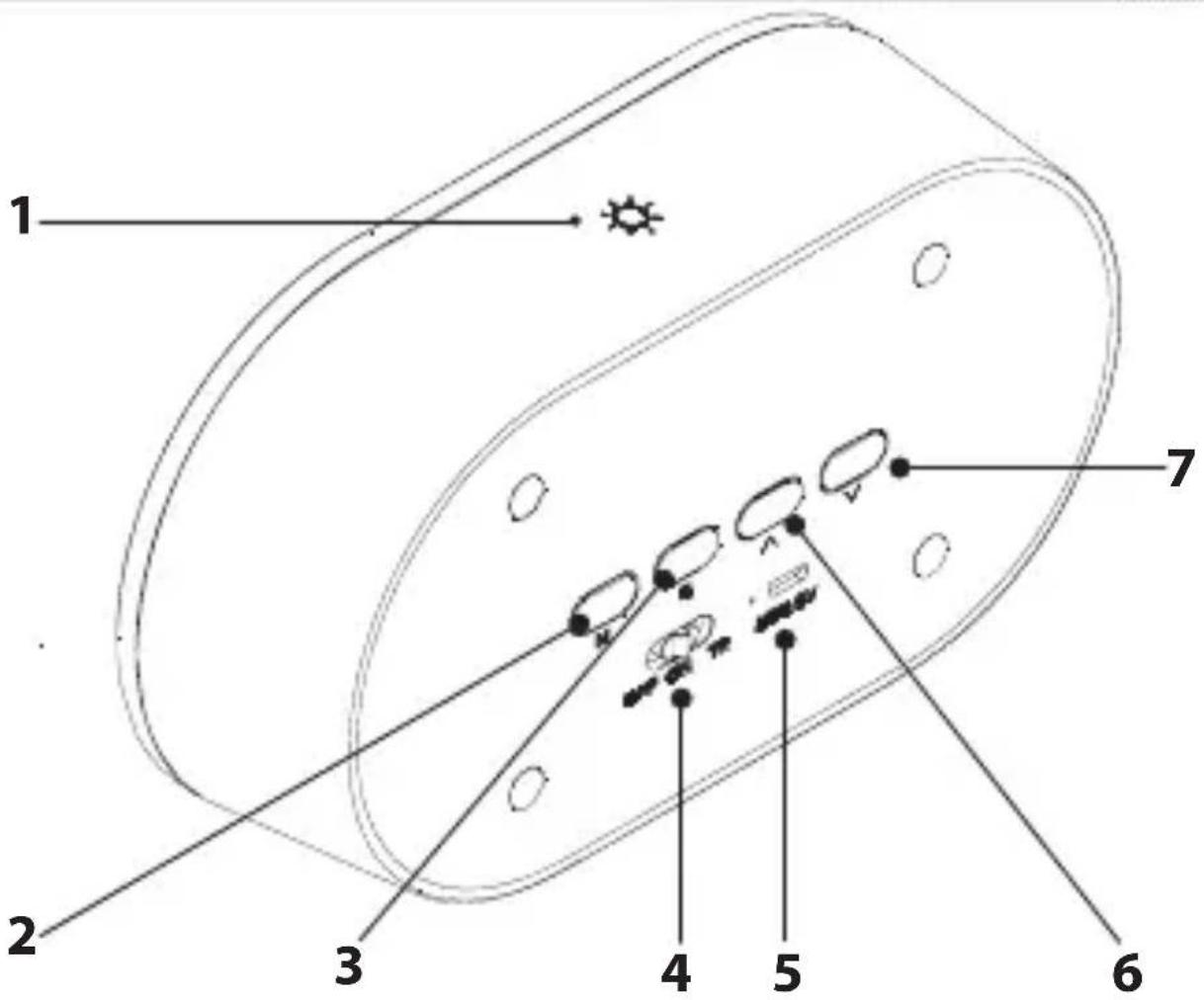
- Night light button
- M button
- S button
- Main switch
- Charging input and LED indicator
- UP button
- DOWN button
POWER SUPPLY MODE
Insert the USB power cable into the device with the USB power output port, and insert the other end into the power input interface to charge the product battery. The red charging indicator light is on, and the indicator light is off when it is fully charged. When the „Lo“ letter on the display flashes, it indicates that the product is low in power and needs to be charged immediately, to prevent the clock from being reset due to the battery power consumption.
Main switch
× when the main switch is turned to „OFF“, the night light is off, the clock enters the standby mode, all buttons are invalid
× when the main switch is turned to „ON“, the display screen is on, and all buttons are operable
× when the switch is turned to „TR“, the display screen is off and enters the energy-saving mode
Night light button
Short touch to turn on / off night light, long touch stepless dimming. In „TR“ mode: a short touch button wakes up the display screen, 30 seconds later, the digital screen automatically goes out, continuous touch twice to turn on the night light.
M button
Short press to switch the „year-month day-time“ display.
S button
Short press to enter alarm setting; long press (2 sec) to enter date clock setting.
UP button
Long press 2 seconds to switch 12 / 24h hours system.
NOTE: When setting clock, date, and alarm, short press this button to add value step by step, but long press this button to add value quickly.
DOWN button
NOTE: When setting clock, date and alarm, short press this button to minus value step by step, but long press this button to minus value quickly.
Time setting
Long press the S button for 2 seconds, and enter the date setting function after hearing the „tick“ sound. After entering the setting interface, the number indicating „year“ flashes. Adjust the number through the UP and DOWN button. After adjustment, short press the S button to successively enter the „month-day-hour/minute“ adjustment and the adjustment method is consistent with „year“ setting. After setting, press the S button briefly to exit the setting mode.
NOTE: If there is no operation for 10 seconds during the setting, the system will exit the setting.
Alarm setting
Press the S button once to display „oFR1“ (continue pressing to select „oFR2“, „oFR3“, R1-R2-R3 represent three groups of the alarm clock, „oF“ indicates that the alarm clock is off, press the UP button to switch to the „onR1“ display, meanwhile, the alarm clock starts). At the status, long press the S button for 2 sec to hear the „tick“ sound to enter the alarm clock setting. First, enter the „time“ setting, adjust the number through the UP and DOWN buttons, press the S button again to switch to the „minute“ setting, and press the S button to exit after the setting is completed. When the alarm rings, touch any button to turn it off. If there is no operation the sound lasts for 1 minute, it will automatically enter into snooze mode for 10 minutes. Press any button in the process of snooze timing to turn off snooze. After snooze timing finishes, the alarm will ring again, then press any button to turn off the alarm. After snooze mode 3 times, it will turn off automatically.
Night light setting
Short press the night light button to turn on/off night light. After the light is on, long press the button to adjust the lightness.
Every time turn on the light will keep the brightness of the last time you turned it off.
Hours system setting
The default is 24h hours system. In the time display state, long press the UP button to enter the hour's system setting, and short press the UP button to switch 12h / 24h hours system.
Sleep mode
Long press the M button to enter sleep mode. the light flashes 2 times to prompt you to enter the sleep mode. In sleep mode, the night light will slowly dim until it is turned off, and the sleep mode time is about 30 minutes.
NOTE: If you long press the M button again, you will enter the sleep mode again until the time is over, and the night light will be turned off.
Warranty
Our product is warranted for 2 full year from the date of purchase. The warranty is provided on all material defects and workmanship. Guarantee of 24 months does not apply to decrease in the accumulator's effective capacity caused by its use or age. Effective capacity gradually decreases depending on the method of use of the accumulator.

TO AVOID DANGER OF SUFFOCATION, KEEP THE PLASTIC BAG AWAY FROM BABIES AND CHILDREN. DO NOT USE THIS BAG IN CRIBS, BEDS, CARRIAGES OR PLAYPENS. THIS BAG IS NOT A TOY.
Disposal of old Electrical & Electronic Equipment (Applicable in the European Union and other European countries with separate collection systems)
natural_image
Symbol of a trash bin crossed with two diagonal lines, representing no waste or discharge (no text or labels)
This symbol on the product or on its packaging indicates that this product shall not be treated as household waste. Instead it shall be handed over to the applicable collection point for the recycling of electrical and electronic equipment. By ensuring this product is disposed of correctly, you will help prevent potential negative consequences for the environment and human health, which could otherwise be caused by
inappropriate waste handling of this product. The recycling of materials will help to conserve natural resources. For more detailed information about recycling of this product, please contact your local Civic Office, your household waste disposal service or the shop where you purchased the product.
FULLADÁSVESZÉLY. TARTSA A PE ZACSKÓT GYERMEKEKTÓL ELZÁRT HELYEN. A ZACSKÓ NEM JÁTÉKSZER. NE HASZNÁL- JA EZT A ZACSKÓT BÖLCSŐKBEN, KISÁGYAK- BAN, BABAKOCSIKBAN,
VAGY GYEREK JÁRÓKÁKBAN.
natural_image
Symbol of a trash bin crossed with no text or numbers, representing waste sorting or disposal (no text present)- LIKVIDACE NEPOTŘEBNÉHO ELEKTRICKÉHO ELEKTRONICKÉHO ZAŘÍZENÍ (PLATNÉ EVROPSKÉ UNII A V DALŠÍCH EVROPSKÝCH STÁTECH UPLATŇUJÍCÍCH ODDĚLENÝ SYSTÉM SBĚRU)
- LIKVIDÁCIA STARÝCH ELEKTRICKÝCH A PRÍSTROJOV (VŤAHUJE SA NA EURÓPSKU ÚNIU A EURÓPSKE KRAJINY SO SYSTÉMAMI ODDELENÉHO ZBERU)
- PACKAGE CONTENTS
- TECHNICAL SPECIFICATIONS
- We reserve the right to change technical specifications.
- WARNING
- DEVICE LAYOUT
- POWER SUPPLY MODE
- Main switch
- Night light button
- M button
- S button
- UP button
- DOWN button
- Time setting
- Alarm setting
- Night light setting
- Hours system setting
- Sleep mode
- Warranty
- Disposal of old Electrical & Electronic Equipment (Applicable in the European Union and other European countries with separate collection systems)
Brand : GoGen
Model : Decko Svetlo
Category : Alarm Clock