
Detective POE8 SMART - Dictaphone Evolveo - Free user manual and instructions
Find the device manual for free Detective POE8 SMART Evolveo in PDF.


| Product Type | IP Surveillance Camera |
| Brand | Evolveo |
| Model | Detective POE8 SMART |
| Resolution | 2MP (1920x1080) Full HD |
| Lens Angle | 104.45° wide-angle |
| Video Compression | H.265 |
| Power Input | 100-240V AC, 50/60Hz |
| Power Output | 12V DC, 1A (12W) via included adapter |
| PoE Support | Yes, IEEE 802.3af |
| ONVIF Compliance | Yes, supports connection to third-party NVRs |
| Motion Detection | Yes, sends alarm to mobile phone |
| Human Body Detection | Yes, triggers recording and alarm |
| Night Vision | IR LEDs for low-light operation |
| Protection Rating | IP66 (weatherproof) |
| Operating Temperature | -10°C to +50°C |
| Installation Method | Wall or ceiling mount (drilling required) |
| Warranty | Standard manufacturer warranty (check documentation) |
| Included Accessories | Power adapter, mounting screws, plastic dowels |
Frequently Asked Questions - Detective POE8 SMART Evolveo
User questions about Detective POE8 SMART Evolveo
0 question about this device. Answer the ones you know or ask your own.
Ask a new question about this device
Download the instructions for your Dictaphone in PDF format for free! Find your manual Detective POE8 SMART - Evolveo and take your electronic device back in hand. On this page are published all the documents necessary for the use of your device. Detective POE8 SMART by Evolveo.
USER MANUAL Detective POE8 SMART Evolveo
natural_image
White EVOLVE surveillance camera with antenna and antenna (no text or symbols visible)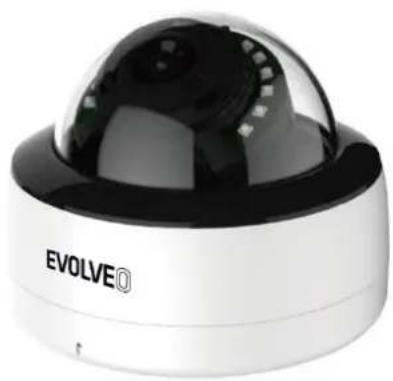
natural_image
Exterior view of a white and black surveillance camera with a dome lens (no visible text or symbols)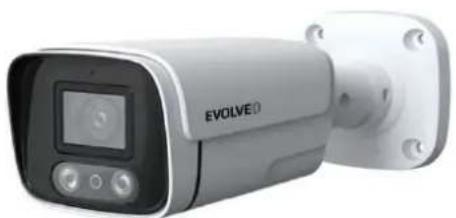
natural_image
Exterior view of a modern surveillance camera (no visible text or symbols on body)Obsah / Content / Tartalom / Cuprins
Česky....3
Slovensky 8
English....13
Magyar....18
Română 23
Obsah
4. Popis funkcí
No.5, 17/F, Strand 50, 50 Bonham Strand, Sheung Wan, Hong Kong
Vyrobeno v Číně
Copyright © Abacus Electric, s.r.o.
www.evolveo.com
www.facebook.com/EvolveoCZ
4. Popis funkcií
No.5, 17/F, Strand 50, 50 Bonham Strand, Sheung Wan, Hong Kong
Vyrobené v Číne
Copyright © Abacus Electric, s.r.o.
www.evolveo.com
www.facebook.com/EvolveoCZ
- Connecting the camera to a local network .... 14
- Pairing 15
- Camera installation method ....15
- Description of functions....15
- Frequently Asked Questions ....16
1. Connecting the camera to a local network
Remark: Make sure that the camera and the network video recorder and hard disk drive are on the same LAN.
Then make the connection according to the type of your NVR system:
EVOLVEO Detective IP8
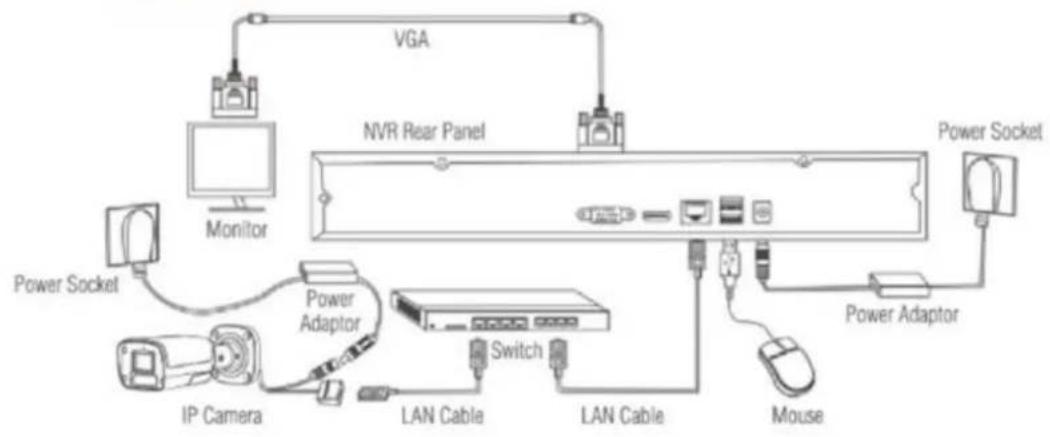
flowchart
graph TD
    A["Monitor"] --> B["NVR Rear Panel"]
    B --> C["VGA"]
    C --> D["Power Socket"]
    D --> E["Power Adaptor"]
    E --> F["Switch"]
    F --> G["IP Camera"]
    G --> H["LAN Cable"]
    H --> I["LAN Cable"]
    I --> J["Mouse"]
    J --> K["Power Adaptor"]
    K --> L["Power Socket"]
EVOLVEO Detective POE8
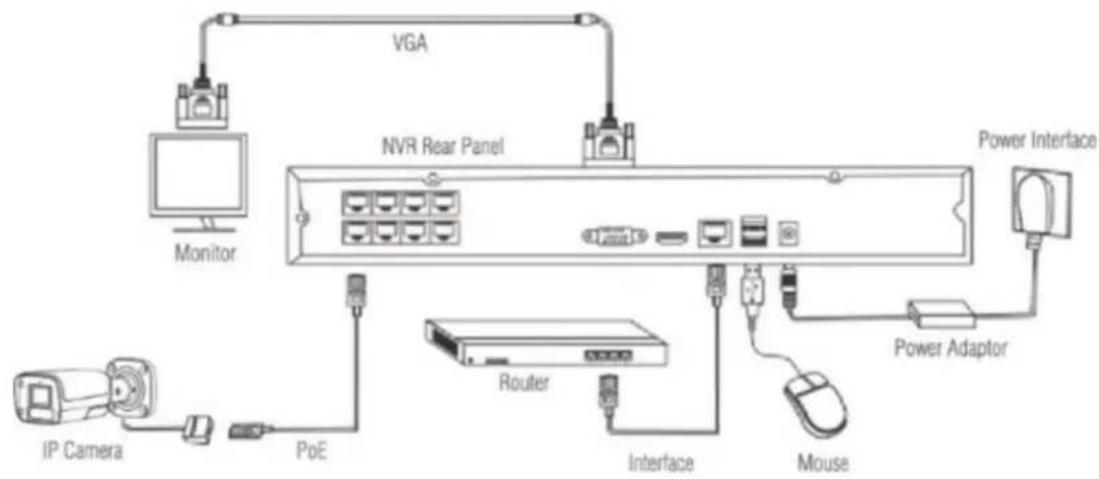
flowchart
graph TD
    A["Monitor"] --> B["NVR Rear Panel"]
    B --> C["Router"]
    C --> D["Interface"]
    D --> E["Mouse"]
    E --> F["Power Adaptor"]
    F --> G["Power Interface"]
    H["IP Camera"] --> I["PoE"]
    I --> J["Monitor"]
EVOLVEO Detective WN8
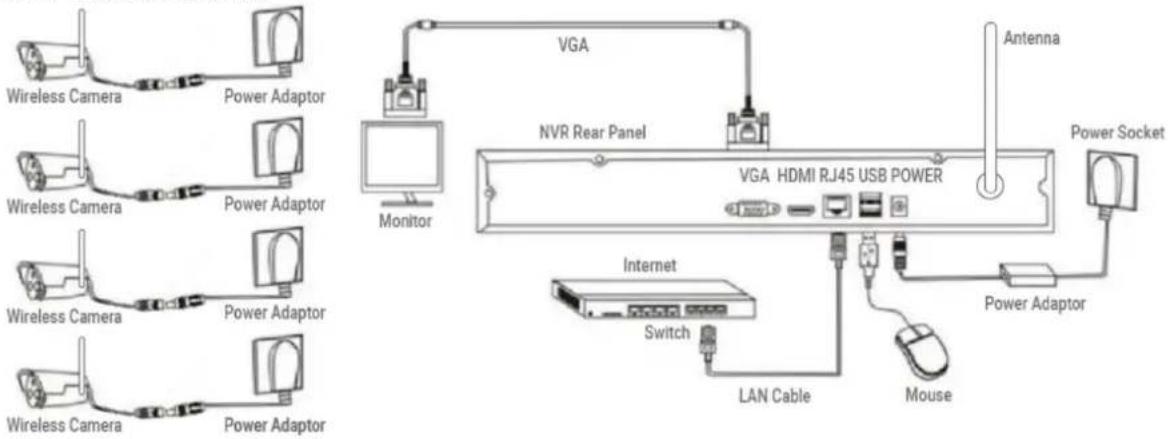
flowchart
graph TD
    A["Wireless Camera"] --> B["Power Adaptor"]
    C["Wireless Camera"] --> D["Power Adaptor"]
    E["Wireless Camera"] --> F["Power Adaptor"]
    G["Wireless Camera"] --> H["Power Adaptor"]
    I["VGA"] --> J["NVR Rear Panel"]
    K["Monitor"] --> L["VGA HDMI RJ45 USB POWER"]
    M["Antenna"] --> N["Power Socket"]
    O["Internet"] --> P["Switch"]
    Q["LAN Cable"] --> R["Switch"]
    S["Mouse"] --> T["Power Adaptor"]
    U["Monitor"] --> V["Monitor"]
2. Pairing
Pair the camera with your EVOLVEO Detective POE8/IP8 or WN8 SMART NVR system. The pairing process is described in the manual of each individual NVR system NVR Detective. Please follow the instructions given here. Manuals can also be found at www.evolveo.com on the product page in the "Downloads" section.
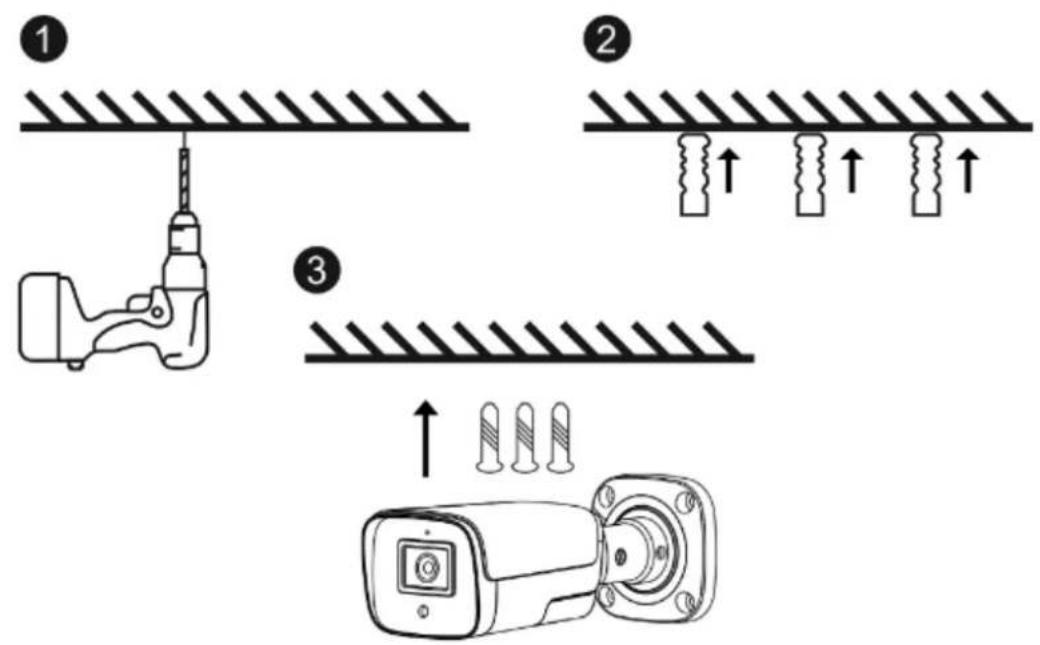
3. Camera installation method
- According to the position of the holes in the camera base, drill three holes in the wall plate.
- Insert plastic dowels into the holes.
- Align the holes of the camera base with the plastic dowels and then secure the camera with the screws.
4. Description of functions
- Definition: 2M (1920*1080) resolution, high quality and realistic image.
- Angle of view: The camera is equipped with 104.45° wide-angle optics
- Motion detection: supports alarm function when motion is detected. If an object moves in the detection area, an alarm message is sent to the mobile phone in time.
- Human body detection: If a human body is detected in the detection area, an alarm message is sent to the mobile phone in time and image recording is started.
- ONVIF support: The camera supports ONVIF and can be accessed from NVRs from different manufacturers.
- H.265 encoding: This technology allows you to store more footage in higher quality
- Support POE function: It can be powered directly from a wired network and connected to a PoE-enabled NVR.
5. Frequently Asked Questions
Q: After scanning the code with the QR camera, a prompt will appear: Please check the network connection.
A: Make sure the network video recorder is connected to the Internet. Then scan the QR code again.
Q: How to check if the camera is properly connected?
A:
- Check that the adapter is plugged in correctly and that the power cord is inserted, if necessary.
- Restart the device by reconnecting the power supply
- Reconfigure the camera.
- Check that the camera is properly connected to the local network (status LED on the connector is flashing), and that it is on the same network and IP range as the NVR unit.
Q: Is a higher camera temperature normal?
A: When the camera is operating normally, a certain degree of heating of the camera surface will occur, which is a normal phenomenon. Feel free to use it. Applicable temperature range: -10 ^ to +50 ^ .
Q: What do I need to look out for when using the camera?
A: To get a better image in night IR, do not use the camera with reflective objects such as glass and white walls directly in the camera's view, otherwise the image will be overexposed from these objects.
Q: Is the camera waterproof?
A: Equipped with IP 66 protection, the camera will function when exposed to weather conditions such as rain and snow. However, for proper operation it is necessary that the power connector and the mains connector are covered, otherwise the camera loses its degree of protection and the claim cannot be accepted.
The warranty does NOT cover:
- using the equipment for purposes other than those for which it is designed,
- installing firmware other than that installed on the device
- electrical or mechanical damage caused by improper use
- damage caused by natural elements such as water, fire, static electricity, power surges, etc.
- damage caused by repairs carried out by an unqualified person
- illegible serial number
- battery capacity drops after 6 months of use (6 month battery life guarantee)
Disposal
The crossed-out container symbol on the product, in the accompanying documentation or on the packaging reminds you that in EU countries, all electrical and electronic equipment, batteries and accumulators must be disposed of separately at the end of their useful life as part of sorted waste. Do not dispose of these products in unsorted municipal waste.

DECLARATION OF CONFORMITY
Abacus Electric, s.r.o. hereby declares that the product EVOLVEO SEA DET-WNSCAM,
The SEA DET-POE8DOM, SEA DET-POE8CAM meets the requirements of the standards and regulations that are relevant to the type of equipment.
The full text of the Declaration of Conformity can be found at ftp://ftp.evolveo.com/ce
Importer / Importer / Importer / Importer
Abacus Electric, s.r.o.
Planá 2, 370 01, Czech Republic
Producer / Producer / Manufacturer / Gyártó
Naxya Limited
No.5, 17/F, Strand 50, 50 Bonham Strand, Sheung Wan, Hong Kong
Made in China
Copyright © Abacus Electric, s.r.o.
www.evolveo.com
www.facebook.com/EvolveoCZ
All rights reserved.
The appearance and technical specifications of the product are subject to change without notice.
Tartalomjegyzék
No.5, 17/F, Strand 50, 50 Bonham Strand, Sheung Wan, Hong Kong
Made in China
Copyright © Abacus Electric, s.r.o.
www.evolveo.com
www.facebook.com/EvolveoCZ
Minden jog fenntartva.
No.5, 17/F, Strand 50, 50 Bonham Strand, Sheung Wan, Hong Kong
Fabricat în China
Copyright © Abacus Electric, s.r.o.
www.evolveo.com
www.facebook.com/EvolveoCZ
| Information published | Value and precision | Unit |
| Manufacturer's name or trade mark, commercial registration number and address | Zhuhai Bright Source Electronic Science&Technology Co.,LTD - | |
| Model identifier | CYH012S012V1000E | - |
| Input voltage | 100~240Vac | V |
| Input AC frequency | 50/60Hz+/-3Hz | Hz |
| Output voltage | 11.4~12.6Vdc | V |
| Output current | 1A | A |
| Output power | 12W | W |
| Average active efficiency | 82,96% | % |
| Efficiency at low load (10 %) | 82,71% | % |
| No-load power consumption | 0.1W | W |
Brand : Evolveo
Model : Detective POE8 SMART
Category : Dictaphone