
BPS-250 - Loudspeaker DENVER - Free user manual and instructions
Find the device manual for free BPS-250 DENVER in PDF.


| Brand | Denver |
| Model | BPS-250 |
| Product Type | Portable Bluetooth Speaker |
| Dimensions (W x D x H) | 265 x 280 x 350 mm |
| Battery | 7.4V, 3600mAh Lithium Polymer |
| Output Power | 40 W |
| Charging | 5V 2A via USB-C (cable included) |
| Bluetooth Version | Not specified (operates up to 10m) |
| Frequency Range | 20Hz - 20KHz |
| Max Output Power (Radio) | 40 dB |
| Operating Temperature | 0°C to 40°C |
| Supported Modes | Bluetooth, USB, TF Card, AUX, Microphone |
| Additional Features | TWS pairing, LED light modes, EQ, remote control |
| Accessories Included | Charging cable, remote control, user manual, color box |
| Safety Certifications | CE (EU Declaration of Conformity per RED 2014/53/EU) |
| Disposal | Do not dispose with household waste; recycle at designated facility |
Frequently Asked Questions - BPS-250 DENVER
User questions about BPS-250 DENVER
0 question about this device. Answer the ones you know or ask your own.
Ask a new question about this device
Download the instructions for your Loudspeaker in PDF format for free! Find your manual BPS-250 - DENVER and take your electronic device back in hand. On this page are published all the documents necessary for the use of your device. BPS-250 by DENVER.
USER MANUAL BPS-250 DENVER
natural_image
Black and white Denver air conditioner with colorful ambient lighting and digital display (no text or symbols on device body)https://facebook.com/Denver.eu

FR
Please read the safety instructions carefully before using the product for the first time at the instructions for future reference.
- This product is not a toy. Keep it out of reach of children.
- Warning: This product includes lithium polymer batteries.
- Keep product out of the reach of children and pets to avoid chewing and swallowing.
- Product operating and storage temperature is from 0 degree Celsius to 40 degree Ce Under and over this temperature might affect the function.
- Never open the product. Touching the inside electrics can cause electric shock. Repair service should only be performed by qualified personnel.
- Do not expose to heat, water, moisture, direct sunlight!
- Please protect your ears against loud volume. Loud volume can damage your ears in hearing loss.
- Bluetooth wireless technology operates within a range of about 10 m (30 feet). The maximum communication distance may vary depending on the presence of obstacles (people, metal objects, walls, etc.) or the electromagnetic environment.
- Microwaves emitting from a Bluetooth device may affect the operation of electronic devices.
- The unit is not waterproof. If water or foreign objects enter the unit, it may result in electric shock. If water or a foreign object enters the unit, stop use immediately.
- Only charge with supplied USB cable.
- Do not use non original accessories together with the product as this can make the functionality abnormal.
Denver A/S reserve the rights for print errors
Denver A/S cannot be held responsible for any technical or typographical errors and reset the right to make changes to the product and manuals without prior notice. If you detect inaccuracies or omissions, please inform us at the address on the back cover.
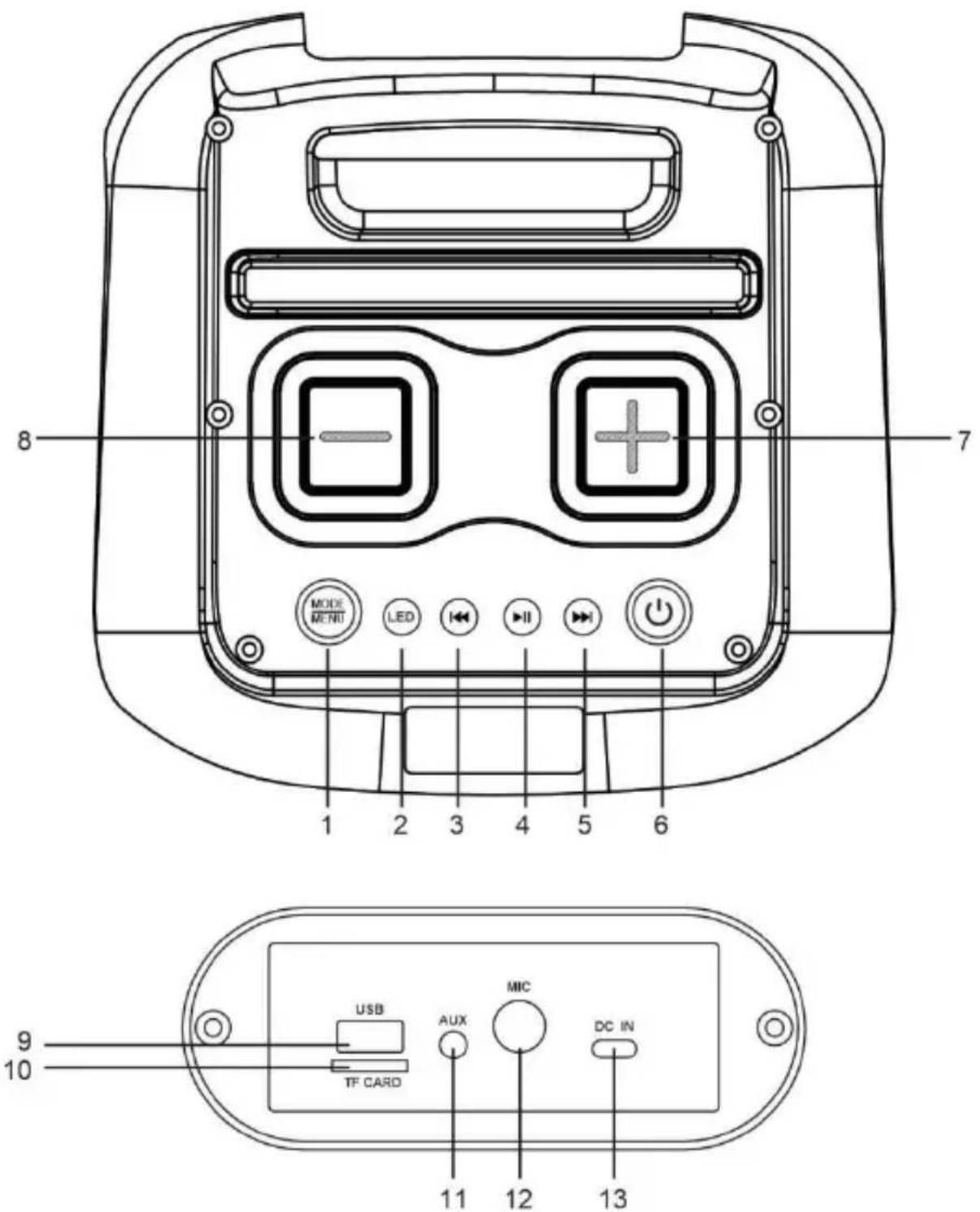
Control Panel:
- : Long press to switch between operating modes: BT mode, TF card mode, U disk mode AUX mode. Short press to switch between volume control of microphone, Treble, Bass, E
- : Short press the button to select the LED light mode; long press to turn OFF the light
press to turn on the light again.
- : Previous song.
- : Short press to play/pause music; long press to connect TWS.
- : Next song.
- Long press the button to POWER ON/OFF.
- : To increase volume;
- To reduce volume;
- : USB jack.
- :TF card jack.
- : Aux Input.
- : Microphone input.
- : Charging port.
Remote control:
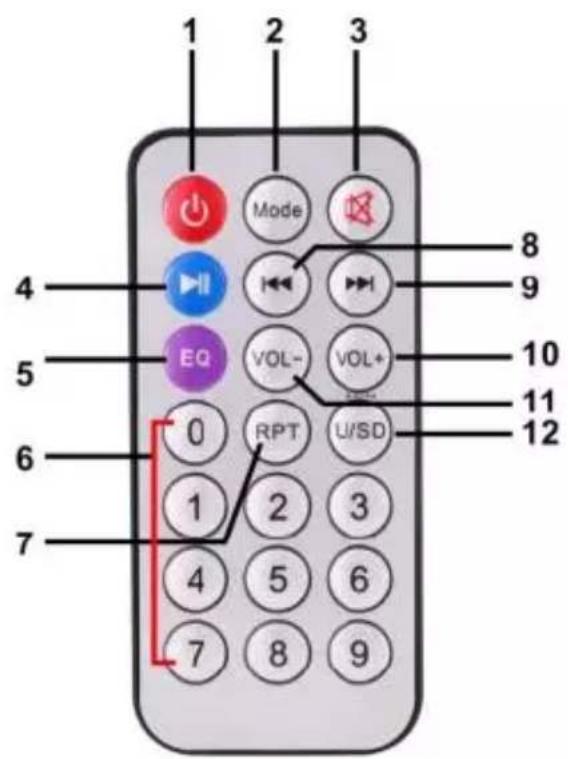
-
On/Off Switch;
-
MODE: to switch between the modes;
- MUTE: to mute;
- Press to play/pause music.
- EQ: to set equalizer variants;
- 0-9: to select a song directly;
- RPT: to repeat the song;
- to select the previous song from USB / TF/ BT;
- to select the next song from USB/TF / BT;
- VOL+: to increase volume;
- VOL-: to reduce volume;
- Switch between USB and SD card.;
Please notice: When using the remote control to control the speaker, please point vertically the top. The remote sensor is located there. It cannot be accessed directly from the front speaker.
FUNCTION DESCRIPTION
1. Charge the speaker
To charge the speaker's built-in battery, connect power adaptor (not supplied) to the charging. The battery icon on LED will flash when charging, and will stop flashing when fully charged
2. Bluetooth function
- Power on the product then long press MODE button to enter BT mode.
- Put your mobile device (cell phones, computers, etc.) into BT pairing mode, search for B devices, and select the item name (Denver BPS-250) when it appears.
- After the device has been paired successfully for the first time, it will connect automatic around 10 seconds to the device last connected when next time use. (Note: The product connect to only one Bluetooth device at a time.).
3. TWS Function
Power on two speakers and enter Bluetooth mode.
Turn off the Bluetooth function on your phone or other Bluetooth device. Long press the PI Pause button of either speaker, the display will show "t-ON" and then the "BLUE". A difference will then be heard to signify that the two speakers have connected via Bluetooth.
Turn on Bluetooth on the mobile phone and search for “Denver BPS-250” and connect.
A beep will then be heard signifying that the mobile has connected to the speakers. You can enjoy music from the two speakers.
4. USB mode
- Insert a USB device into the speaker's USB port.
- Long press MODE to switch to USB mode ("USB" on display).
- Short press the PLAY / PAUSE button to play or pause the music.
5. Auxiliary input mode
- Connect a 3.5 mm audio cable to the unit's auxiliary input.
- Long press MODE to switch to auxiliary input mode ("LINE" on display).
- Short press the PLAY / PAUSE button to play or pause the music.
6. TF card mode
- Insert an SD card, SD card mode will start automatically.
- Long press MODE to switch to TF card input mode ("SD" on display).
- Short press the PLAY / PAUSE button to play or pause the music.
PRODUCT SPECIFICATIONS
Battery: 7.4V, 3600mAh
Output power: 40 W
Dimensions (W x D x H): 265x 280 x 350mm
Charging: 5V 2A
Accessories: Charging cable, remote control, user manual, color box.
Please notice - All products are subject to change without any notice. We take reservations errors and omissions in the manual.
ALL RIGHTS RESERVED, COPYRIGHT DENVER A/S

Electric and electronic equipment and included batteries contains materials, components and substances that can be hazardous to your health and the environment, if the waste material (discarded electric and electronic equipment and batteries) is not handled correctly.
Electric and electronic equipment and batteries is marked with the crossed out trash can say seen above. This symbol signifies that electric and electronic equipment and batteries should be disposed of with other household waste, but should be disposed of separately.
As the end user it is important that you submit your used batteries to the appropriate and designated facility. In this manner you make sure that the batteries are recycled in accord with legislature and will not harm the environment.
All cities have established collection points, where electric and electronic equipment and batte
can either be submitted free of charge at recycling stations and other collection sites, or be collected from the households. Additional information is available at the technical department your city.
Hereby, Denver A/S declares that the radio equipment type BPS-250 is in compliance with Directive 2014/53/EU. The full text of the EU declaration of conformity is available at the fo internet address: denver.eu and then click the search ICON on topline of website. Write mo number: BPS-250. Now enter product page, and RED directive is found under downloads/other downloads.
Operating Frequency Range:20Hz-20KHz
Max Output Power:40dB
DENVER A/S
Omega 5A, Soeften
DK-8382 Hinnerup
Denmark
www.facebook.com/denver.eu
Contact
Nordics
Headquarter
Denver A/S
Omega 5A, Soeften
DK-8382 Hinnerup
Denmark
Phone: +45 86 22 61 00
(Push "1" for support)
For technical questions, please write to:
support.hq@denver.eu
For all other questions please write to:
contact.hq@denver.eu
Benelux
DENVER BENELUX B.V.
Barwoutswaarder 13C+D
3449 HE Woerden
The Netherlands
Phone: 0900-3437623
E-Mail: support.nl@denver.eu
Spain/Portugal
DENVER SPAIN S.A
Ronda Augustes y Louis Lumiere, n° 23 - nave 16
Parque Tecnológico
46980 PATERNA
Valencia (Spain)
Spain
Phone: +34 960 046 883
Mail support.es@denver.eu
Portugal:
Phone: +35 1255 240 294
E-Mail: denver.service@satfiel.com
Germany
Denver Germany GmbH Service
Max-Emanuel-Str.4
94036 Passau
Phone: +49 851 379 369 40
support.de@denver.eu
Fairfixx GmbH
Repair and service
(for TV, E-Mobility/Hoverboards/Balanceboards,
Smartphones & Tablets)
Tel.: +49 851 379 369 69
If your country is not listed above,
please write an email to
support@denver.eu

denver
DENVER A/S
Omega 5A, Soeften
DK-8382 Hinnerup
Denmark
denver.eu
facebook.com/denver.eu
Version 1.1



Brand : DENVER
Model : BPS-250
Category : Loudspeaker