
HPM-61CH180AERIs R32-3 - Heat pump Vivax - Free user manual and instructions
Find the device manual for free HPM-61CH180AERIs R32-3 Vivax in PDF.


| Product Type | Air Source Heat Pump |
| Model | HPM-61CH180AERIs R32-3 |
| Brand | Vivax |
| Refrigerant | R32 |
| Heating Capacity | 18.0 kW |
| Cooling Capacity | 16.0 kW |
| Power Supply | 380-415V / 3Ph / 50Hz |
| Dimensions (W x D x H) | 1100 x 450 x 800 mm |
| Weight | 90 kg |
| Energy Efficiency Ratio (EER) | 3.5 |
| COP (Coefficient of Performance) | 4.0 |
| Operating Temperature Range | -15°C to +45°C |
| Main Functions | Heating, Cooling, Dehumidification |
| Control Type | Wired Controller with LCD |
| Airflow Rate | 3000 m³/h |
| Sound Level (Indoor) | 45 dB(A) |
| Sound Level (Outdoor) | 55 dB(A) |
| Maintenance | Clean air filters every 3 months; check refrigerant annually |
| Safety Features | Overload protection, high-pressure switch, anti-freeze valve |
| Spare Parts Availability | Compressor, fan motor, control board, sensors available for 10 years |
| Warranty | 3 years |
Frequently Asked Questions - HPM-61CH180AERIs R32-3 Vivax
User questions about HPM-61CH180AERIs R32-3 Vivax
0 question about this device. Answer the ones you know or ask your own.
Ask a new question about this device
Download the instructions for your Heat pump in PDF format for free! Find your manual HPM-61CH180AERIs R32-3 - Vivax and take your electronic device back in hand. On this page are published all the documents necessary for the use of your device. HPM-61CH180AERIs R32-3 by Vivax.
USER MANUAL HPM-61CH180AERIs R32-3 Vivax
[Non-Text]
[Non-Text]
[Non-Text]
[Non-Text]
[Non-Text]
[Non-Text]
[Non-Text]
[Non-Text]
[Non-Text]
[Non-Text]
[Non-Text]
[Non-Text]
[Non-Text]
[Non-Text]
[Non-Text]
[Non-Text]
[Non-Text]
[Non-Text]
[Non-Text]
[Non-Text]
[Non-Text]
[Non-Text]
[Non-Text]
[Non-Text]
[Non-Text]
[Non-Text]
[Non-Text]
[Non-Text]
[Non-Text]
[Non-Text]
[Non-Text]
[Non-Text]
[Non-Text]
[Non-Text]
[Non-Text]
[Non-Text]
[Non-Text]
[Non-Text]
[Non-Text]
[Non-Text]
[Non-Text]
[Non-Text]
[Non-Text]
[Non-Text]
[Non-Text]
[Non-Text]
CONTENTS
1 SAFETY CONSIDERATIONS 02
2 GENERAL INFORMATION 04
3 ACCESSORIES 06
4 BEFORE INSTALLATION 06
5 IMPORTANT INFORMATION FOR THE REFRIGERANT 07
6 INSTALLATION SITE
• 6.1 Selecting a location in cold climates 08
• 6.2 Selecting a location in hot climates 09
7 INSTALLATION PRECAUTIONS
- 7.1 Dimensions 09
• 7.2 Installation requirements 09
• 7.3 Drain hole position 10
• 7.4 Servicing space requirements ...... 10
8 TYPICAL APPLICATIONS
• 8.1 Application 1 11
• 8.2 Application 2 12
• 8.3 Application 3 13
• 8.4 Application 4 14
• 8.5 Application 5 17
• 8.6 Application 6 18
• 8.7 Application 7 20
9 OVERVIEW OF THE UNIT
• 9.1 Disassembling the unit 21
• 9.2 Main components ...... 21
• 9.3 Electronic control box 22
• 9.4 Water piping 27
• 9.5 Adding water 31
• 9.6 Water piping insulation 32
• 9.7 Field wiring 32
10 START-UP AND CONFIGURATION
• 10.1 Climate related curves 41
• 10.2 DIP switch settings overview 42
• 10.3 Initial start-up at low outdoor ambient temperature 43
• 10.4 Pre-operation checks 43
• 10.5 Powering up the unit 44
• 10.6 Setting the pump speed 44
• 10.7 Field settings 46
11 TEST RUN AND FINAL CHECKS
• 11.1 Final checks 57
• 11.2 Test run operation (manually) 57
12 MAINTENANCE AND SERVICE 57
13 TROUBLE SHOOTING
• 13.1 General guidelines 58
• 13.2 General symptoms 58
• 13.3 Operation parameter 60
• 13.4 Error codes.... 61
14 TECHNICAL SPECIFICATIONS 69
15 INFORMATION SERVICING 70
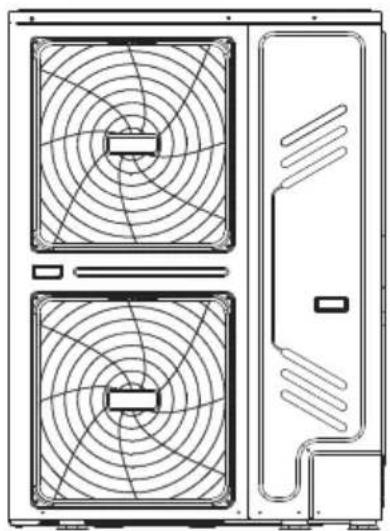
natural_image
Technical line drawing of a dual-panel HVAC unit with circular fan patterns (no text or symbols)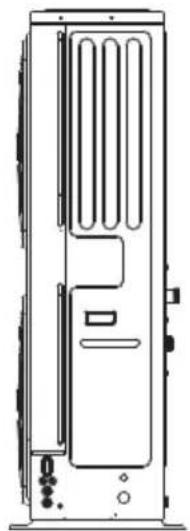
natural_image
Technical line drawing of a server cabinet or rack unit (no text or symbols)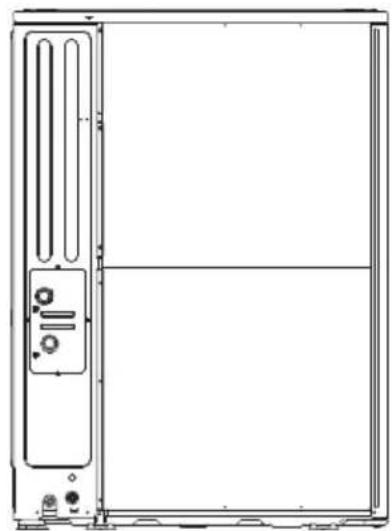
natural_image
Front view line drawing of a rectangular electronic device with internal components and mounting holes (no text or symbols)Wiring diagram:
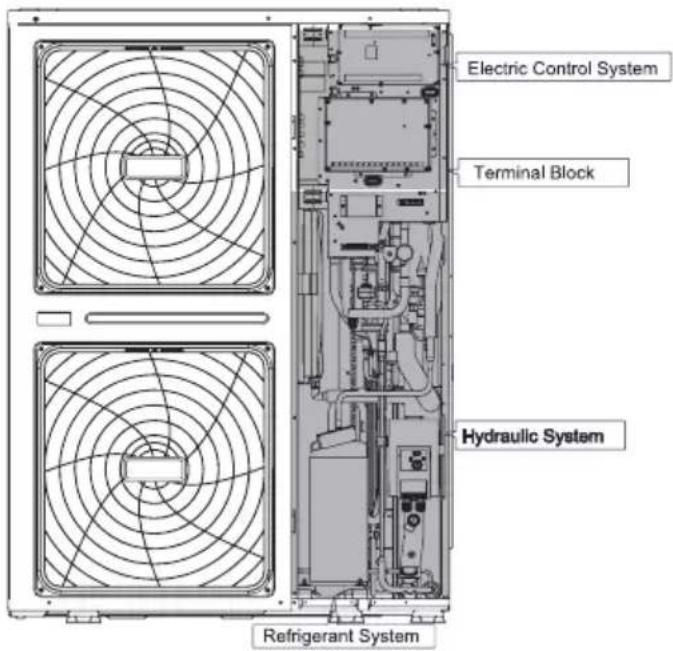
NOTE
The picture and function described in this manual contain the backup heater components.
NOTE
- Maximum length of communication wirings between the indoor unit and the controller is 50m.
- Power cords and communication wiring must be laid out separately, they can not be placed in the same conduit. Otherwise, it may lead to electromagnetic interference. Power cords and communication wirings should not come in contact with the refrigerant pipe so as to prevent the high temperature pipe from damaging wirings.
- Communication wirings must use shielded lines. Including indoor unit to outdoor unit PQE line, indoor unit to controller ABXYE line.
1 SAFETY PRECAUTIONS
The precautions listed here are divided into the following types. They are quite important, so be sure to follow them carefully. Meanings of DANGER, WARNING, CAUTION and NOTE symbols.
i INFORMATION
- Read these instructions carefully before installation. Keep this manual in a handy for future preference.
- Improper installation of equipment or accessories may result in electric shock, short-circuit, leakage, fire or other damage to the equipment. Be sure to only use accessories made by the supplier, which are specifically designed for the equipment and make sure to get installation done by a professional.
- All the activitie described in this manual must be carried out by a licensed technician. Be sure to wear adequate personal protection equipment such as gloves and safety glasses while installation the unit or carrying out maintenance activities.
- Contact your dealer for any further assistance.
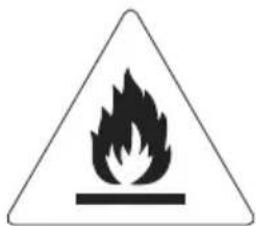
natural_image
Warning symbol of a flame inside a triangle (no text or numbers)Caution: Risk of fire/ flammable materials
WARNING
Servicing shall only be performed as recommended by the equipment manufacturer. Maintenance and repair requiring the assistance of other skilled personnel shall be carried out under the supervision of the person competent in the use of flammable refrigerants.
DANGER
Indicates an imminently hazardous situation which if not avoided, will result in death or serious injury.
WARNING
Indicates a potentially hazardous situation which if not avoided, could result in death or serious injury.
CAUTION
Indicates a potentially hazardous situation which if not avoided, may result in minor or moderate injury. It is also used to alert against unsafe practices.
NOTE
Indicates situations that could only result in accidental equipment or property damage.
Explanation of symbols displayed on the indoor unit or outdoor unit
 | WARNING | This symbol shows that this appliance used a flammable refrigerant. If the refrigerant is leaked and exposed to an external ignition source, there is a risk of fire. |
 | CAUTION | This symbol shows that the operation manual should be read carefully. |
 | CAUTION | This symbol shows that a service personnel should be handling this equipment with reference to the installation manual. |
 | CAUTION | This symbol shows that a service personnel should be handling this equipment with reference to the installation manual. |
 | CAUTION | This symbol shows that information is available such as the operating manual or installation manual. |
DANGER
• Before touching electric terminal parts, turn off power switch.
- When service panels are removed, live parts can be easily touched by accident.
- Never leave the unit unattended during installation or servicing when the service panel is removed.
- Do not touch water pipes during and immediately after operation as the pipes may be hot and could burn your hands. To avoid injury, give the piping time to return to normal temperature or be sure to wear protective gloves.
- Do not touch any switch with wet fingers. Touching a switch with wet fingers can cause electrical shock.
• Before touching electrical parts, turn off all applicable power to the unit.
WARNING
- Tear apart and throw away plastic packaging bags so that children will not play with them. Children playing with plastic bags face danger of death by suffocation.
- Safely dispose of packing materials such as nails and other metal or wood parts that could cause injuries.
- Ask your dealer or qualified personnel to perform installation work in accordance with this manual. Do not install the unit yourself. Improper installation could result in water leakage, electric shocks or fire
- Be sure to use only specified accessories and parts for installation work. Failure to use specified parts may result in water leakage, electric shocks, fire, or the unit falling from its mount.
• Install the unit on a foundation that can withstand its weight. Insufficient physical strength may cause the equipment to fall and possible injury. - Perform specified installation work with full consideration of strong wind, hurricanes, or earthquakes. Improper installation work may result in accidents due to equipment falling.
- Make certain that all electrical work is carried out by qualified personnel according to the local laws and regulations and this manual using a separate circuit. Insufficient capacity of the power supply circuit or improper electrical construction may lead to electric shocks or fire.
- Be sure to install a ground fault circuit interrupter according to local laws and regulations. Failure to install a ground fault circuit interrupter may cause electric shocks and fire.
- Make sure all wiring is secure. Use the specified wires and ensure that terminal connections or wires are protected from water and other adverse external forces. Incomplete connection or affixing may cause a fire.
- When wiring the power supply, form the wires so that the front panel can be securely fastened. If the front panel is not in place there could be overheating of the terminals, electric shocks or fire.
• After completing the installation work, check to make sure that there is no refrigerant leakage. - Never directly touch any leaking refrigerant as it could cause severe frostbite. Do not touch the refrigerant pipes during and immediately after operation as the refrigerant pipes may be hot or cold, depending on the condition of the refrigerant flowing through the refrigerant piping, compressor and other refrigerant cycle parts. Burns or frostbite are possible if you touch the refrigerant pipes. To avoid injury, give the pipes time to return to normal temperature or, if you must touch thembe sure to wear protective gloves.
- Do not touch the internal parts (pump, backup heater, etc.) during and immediately after operation. Touching the internal parts can cause burns. To avoid injury, give the internal parts time to return to normal temperature or, if you must touch them, be sure to wear protective gloves.
CAUTION
• Ground the unit.
• Grounding resistance should be according to local laws and regulations.
- Do not connect the ground wire to gas or water pipes, lightning conductors or telephone ground wires.
• Incomplete grounding may cause electric shocks.
- Gas pipes: Fire or an explosion might occur if the gas leaks.
- Water pipes: Hard vinyl tubes are not effective grounds.
- Lightning conductors or telephone ground wires: Electrical threshold may rise abnormally if struck by a lightning bolt.
• Install the power wire at least 3 feet (1 meter) away from televisions or radios to prevent interference or noise. (Depending on the radio waves, a distance of 3 feet (1 meter) may not be sufficient to eliminate the noise.)
- Do not wash the unit. This may cause electric shocks or fire. The appliance must be installed in accordance with national wiring regulations. If the supply cord is damaged, it must be replaced by the manufacturer, its service agent or similarly qualified persons in order to avoid a hazard.
• Do not install the unit in the following places:
- Where there is mist of mineral oil, oil spray or vapors. Plastic parts may deteriorate, and cause them to come loose or water to leak.
- Where corrosive gases (such as sulphurous acid gas) are produced. Where corrosion of copper pipes or soldered parts may cause refrigerant to leak.
- Where there is machinery which emits electromagnetic waves. Electromagnetic waves can disturb the control system and cause equipment malfunction.
- Where flammable gases may leak, where carbon fiber or ignitable dust is suspended in the air or where volatile flammables such as paint thinner or gasoline are handled. These types of gases might cause a fire.
- Where the air contains high levels of salt such as near the ocean.
- Where voltage fluctuates a lot, such as in factories.
- In vehicles or vessels.
- Where acidic or alkaline vapors are present.
- This appliance can be used by children 8 years old and above and persons with reduced physical, sensory or mental capabilities or lack of experience and knowledge if they are supervised or given instruction on using the unit in a safe manner and understand the hazards involved. Children should not play with the unit. Cleaning and user maintenance should not be done by children without supervision.
• Children should be supervised to ensure that they do not play with the appliance.
If the supply cord is damaged, it must be replaced by the manufacturer or its service agent or a similarly qualified person.
- DISPOSAL: Do not dispose this product as unsorted municipal waste. Collection of such waste separately for special treatment is necessary. Do not dispose of electrical appliances as municipal waste, use separate collection facilities. Contact your local government for information regarding the collection systems available. If electrical appliances are disposed of in landfills or dumps, hazardous substance can leak into the groundwater and get into the food chain, damaging your health and well-being.
- The wiring must be performed by professional technicians in accordance with national wiring regulation and this circuit diagram. An all-pole disconnection device which has at least 3mm separation distance in all pole and a residual current device(RCD) with the rating not exceeding 30mA shall be incorporated in the fixed wiring according to the national rule.
- Confirm the safety of the installation area (walls, floors, etc.) without hidden dangers such as water, electricity, and gas. Before wiring/pipes.
- Before installation, check whether the user's power supply meets the electrical installation requirements of unit (including reliable grounding, leakage, and wire diameter electrical load, etc.). If the electrical installation requirements of the product are not met, the installation of the product is prohibited until the product is rectified.
- When installing multiple air conditioners in a centralized manner, please confirm the load balance of the three-phase power supply, and multiple units are prevented from being assembled into the same phase of the three-phase power supply.
• Product installation should be fixed firmly, Take reinforcement measures, when necessary.
- In order to ensure the safety of the product, please restart the unit at least once every 3 months, so that the unit can carry out self-inspection operation.
NOTE
• About Fluorinated Gasses
- This air-conditioning unit contains fluorinated gasses. For specific information on the type of gas and the amount, please refer to the relevant label on the unit itself. Compliance with national gas regulations shall be observed.
- Installation, service, maintenance and repair of this unit must be performed by a certified technician.
- Product uninstallation and recycling must be performed by a certified technician.
- If the system has a leak-detection system installed, it must be checked for leaks at least every 12 months. When the unit is checked for leaks, proper record-keeping of all checks is strongly recommended.
2 GENERAL INTRODUCTION
- These units are used for both heating and cooling applications. They can be combined with fan coil units, floor heating applications, low temperature high efficiency radiators, domestic hot water tanks (field supply) and solar kits (field supply).
• A wired controller is supplied with the unit. -
Room thermostat (field supply) can be connected to the unit(room thermostat should be kept away from heating source when selecting the installation place).
-
Solar kit for domestic hot water tank(field supply) An optional solar kit can be connected to the unit.
- Remote alarm kit (field supply) can be connected to the unit.
• Operation range
COOLING MODE
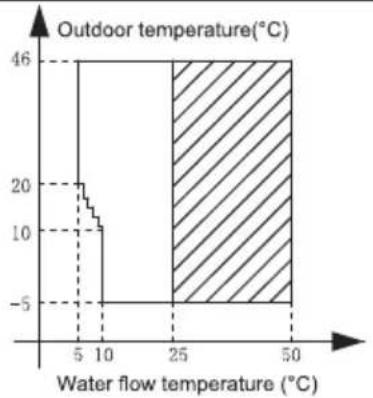
area
| Water flow temperature (°C) | Outdoor temperature (°C) | | :--- | :--- | | 5 | 20 | | 10 | 10 | | 25 | 46 | | 50 | 46 |HEATING MODE
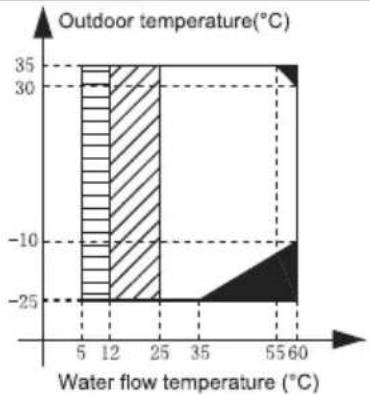
heatmap
| Water flow temperature (°C) | Outdoor temperature (°C) | | :--- | :--- | | 5 | -25 | | 12 | -10 | | 25 | 35 | | 35 | -25 | | 55 | -10 | | 60 | 35 |DOMESTIC WATER HEATING MODE
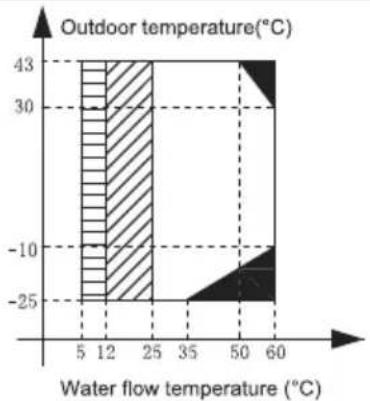
bar
| Water flow temperature (°C) | Outdoor temperature (°C) | | :--- | :--- | | 5 | -25 | | 12 | -25 | | 25 | -25 | | 35 | -25 | | 50 | -10 | | 60 | 43 |If IBH/AHS setting is valid, only IBH/AHS turns on; If IBH/AHS setting is invalid, only heat pump turns on;
No heat pump operation, IBH or AHS only
Water flow temperature drop or rise interval
- If you add the backup heater in the system, the backup heater can increase the heating capacity during cold outdoor temperatures. The backup heater also serves as a backup in case of malfunctioning and for freeze protection of the outside water piping during winter time. The capacity of backup heater for different units is listed below.
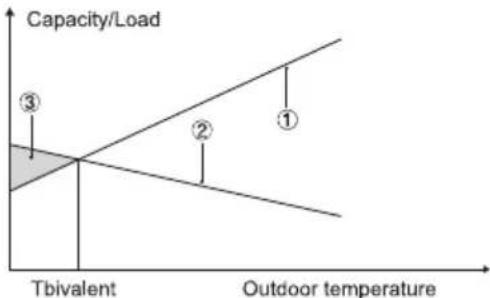
line
| Scenario | Capacity/Load (Tbivalent) | Capacity/Load (Outdoor temperature) | | :--- | :--- | :--- | | ① | 0 | 0 | | ② | 0 | 0 | | ③ | 0 | 0 |① Heat pump capacity.
② Required heating capacity (site dependent).
③ Additional heating capacity provided by backup heater.
- The unit have a freeze prevention function that uses the heat pump to keep the water system safe from freezing in all conditions. Since a power failure may happen when the unit is unattended, it's suggested to use anti-freezing flow switch in the water system. (Refer to 9.4 Water piping).
- In cooling mode, the minimum leaving water flow temperature(T1stoph) that the unit can reach in different outdoor temperature(T4) is listed below:
| Outdoor temp. (°C) | ≤10 | 11 | 12 | 13 |
| Water flow temp. (°C) | 10 | 9 | 9 | 8 |
| Outdoor temp. (°C) | 14 | 15 | 16 | 17 |
| Water flow temp. (°C) | 8 | 7 | 7 | 6 |
| Outdoor temp. (°C) | 18 | 19 | 20 | ≥21 |
| Water flow temp. (°C) | 6 | 6 | 5 | 5 |
- In heating mode, the maximum leaving water flow temperature (T1stoph) that heat pump can reach in different outdoor temperature (T4) is listed below:
| Outdoor temp. (°C) | -25 | -24 | -23 | -22 | |
| Water flow temp. (°C) | 35 | 35 | 35 | 37 | 39 |
| Outdoor temp. (°C) | -20 | -19 | -18 | -17 | |
| Water flow temp. (°C) | 40 | 42 | 44 | 46 | 48 |
| Outdoor temp. (°C) | -15 | -14 | -13 | -12 | |
| Water flow temp. (°C) | 50 | 52 | 54 | 56 | 58 |
| Outdoor temp. (°C) | -10~30 | 31 | 32 | ||
| Water flow temp. (°C) | 60 | 59 | 58 | 57 | |
| Outdoor temp. (°C) | 34 | 35 | |||
| Water flow temp. (°C) | 56 | 55 | |||
- In DHW mode, the maximum domestic hot water temperature(T5stop) that heat pump can reach in different outdoor temperature(T4) is listed below:
| Outdoor temp. (°C) | -25~-21 | -20~-14 | -15~-11 | -10~-4 | -5~-1 |
| DHW Water flow temp. (°C) | 35 | 40 | 45 | 48 | 50 |
| Outdoor temp. (°C) | 0~4 | 5~9 | 10~14 | 15~19 | 20~24 |
| DHW Water flow temp. (°C) | 53 | 55 | 55 | 53 | 50 |
| Outdoor temp. (°C) | 25~29 | 30~34 | 35~39 | 40~43 | |
| DHW Water flow temp. (°C) | 50 | 48 | 48 | 45 |
3 ACCESSORIES
| Accessories supplied with the unit | |||||
| Name | Shape | Quantity | Name | Shape | Quantity |
| Installation and owner's manual(this book) | [3K02] | 1 | Y-shape filter | 1 | |
| Operation manual | [4T50] | 1 | Water outlet connection pipe assembly | 2 | |
| Technical data manual |  | 1 | Wired controller | 1 | |
| Thermistor for domestic hot water tank (T5)* |  | 1 | Adapter for inlet water pipe | 1 | |
| Extension wire for T5 | — | 1 | Network matching wire*** | 1 | |
| Tighten belt for customer wiring use |  | 2 | |||
| Accessories available from supplier | |||||
| Thermistor for balance tank (Tbt1)* | 1 | Extension wire for Tbt1 | — | 1 | |
| Thermistor for Zone 2 flow temp. (Tw2) | 1 | Extension wire for Tw2 | — | 1 | |
| Thermistor for solar temp. (Tsolar) | 1 | Extension wire for Tsolar | — | 1 | |
*If the system is installed in parallel, Tbt1 must be connected and installed in the balance tank.
**When the units are connected in parallel, such as when the communication between the unit is unstable (such as an Hd fault code), add a network matching wire between the ports H1 and H2 at the terminal of the communication system;
Sensors Tbt1, T5 and extension wire can be shared, sensors Tw2, Tsolar and extension wire can be shared, if these functions are needed at the same time, please customize these sesors and extension additionally.
4 BEFORE INSTALLATION
- Before installation: Be sure to confirm the model name and the serial number of the unit.
- Handling: Due to relatively large dimensions and heavy weight, the unit should only be handled using lifting tools with slings. The slings can be fitted into foreseen sleeves at the base frame that are made specifically for this purpose.
CAUTION
• To avoid injury, do not touch the air inlet or aluminum fins of the unit.
• Do not use the grips in the fan grills to avoid damage.
• The unit is top heavy! Prevent the unit from falling due to improper inclination during handling.
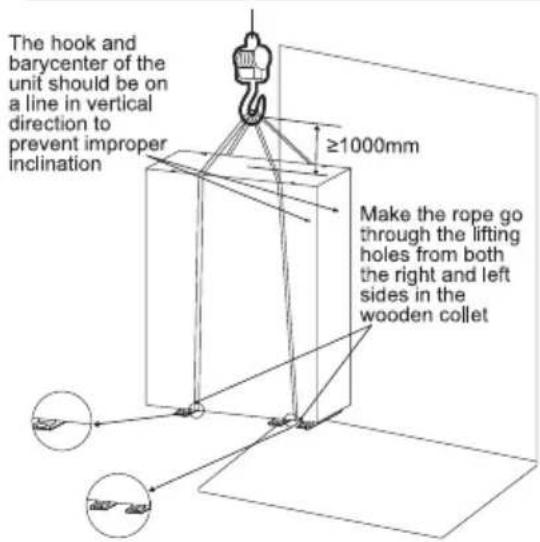
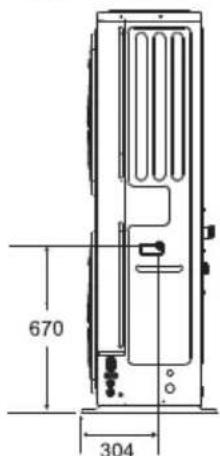
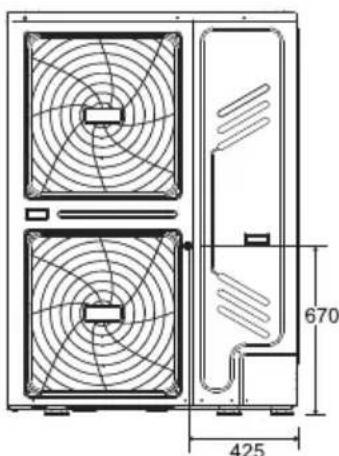
The position of barycenter for different unit can be seen in the picture below. (unit:mm)
5 IMPORTANT INFORMATION FOR THE REFRIGERANT
This product has the fluorinated gas, it is forbidden to release to air.
Refrigerant type: R32; Volume of GWP: 675.
GWP=Global Warming Potential
| Model | Factory charged refrigerant volume in the unit | |
| Refrigerant/kg | Tonnes CO2 equivalent | |
| 18kW | 5.00 | 3.38 |
| 22kW | 5.00 | 3.38 |
| 26kW | 5.00 | 3.38 |
| 30kW | 5.00 | 3.38 |
CAUTION
• Frequency of Refrigerant Leakage Checks
- For unit that contains fluorinated greenhouse gases in quantities of 5 tonnes of CO2 equivalent or more, but of less than 50 tonnes of CO2 equivalent, at least every 12 months, or where a leakage detection system is installed, at least every 24 months.
- For unit that contains fluorinated greenhouse gases in quantities of 50 tonnes of CO2 equivalent or more, but of less than 500 tonnes of CO2 equivalent at least every six months, or where a leakage detection system is installed, at least every 12 months.
- For unit that contains fluorinated greenhouse gases in quantities of 500 tonnes of CO2 equivalent or more, at least every three months, or where a leakage detection system is installed, at least every six months.
- This air-conditioning unit is a hermetically sealed equipment that contains fluorinated greenhouse gases.
- Only certificated person is allowed to do installation, operation and maintenance.
6 INSTALLATION SITE
WARNING
- There is flammable refrigerant in the unit and it should be installed in a well-ventilated site. If the unit is installed inside, an additional refrigerant detection device and ventilation equipment must be added in accordance with the standard EN378. Be sure to adopt adequate measures to prevent the unit from being used as a shelter by small animals.
- Small animals making contact with electrical parts can cause malfunction, smoke or fire. Please instruct the customer to keep the area around the unit clean.
- Select an installation site where the following condition sare satisfied and one that meets with your customer's approval.
- Places that are well-ventilated.
- Places where the unit does not disturb next-door neighbors.
- Safe places which can bear the unit's weight and vibration and where the unit can be installed at an even level.
- Places where there is no possibility of flammable gas or product leak.
- The equipment is not intended for use in a potentially explosive atmosphere.
- Places where servicing space can be well ensured.
- Places where the units' piping and wiring lengths come within the allowable ranges.
- Places where water leaking from the unit cannot cause damage to the location (e.g. in case of a blocked drain pipe).
- Places where rain can be avoided as much as possible.
- Do not install the unit in places often used as a work space. In case of construction work (e.g. grinding etc.) where a lot of dust is created, the unit must be covered.
- Do not place any object or equipment on top of the unit (top plate)
- Do not climb, sit or stand on top of the unit.
- Be sure that sufficient precautions are taken in case of refrigerant leakage according to relevant local laws and regulations.
- Don't install the unit near the sea or where there is corrosion gas.
- When installing the unit in a place exposed to strong wind, pay special attention to the following.
- Strong winds of 5 m/sec or more blowing against the unit's air outlet causes a short circuit (suction of discharge air), and this may have the following consequences:
- Deterioration of the operational capacity.
- Frequent frost acceleration in heating operation.
- Disruption of operation due to rise of high pressure.
- When a strong wind blows continuously on the front of the unit, the fan can start rotating very fast until it breaks.
In normal condition, refer to the figures below for installation of the unit:
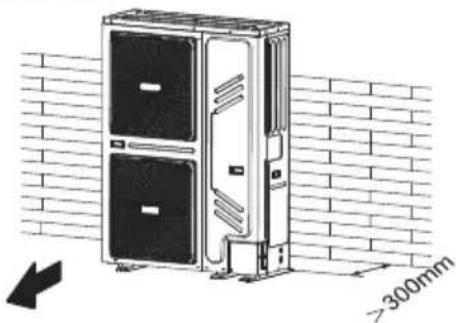
natural_image
Technical line drawing of a dual-chamber air conditioner unit mounted on a brick wall, with dimension annotation (>300mm) and an arrow indicating direction (no text or symbols on the diagram itself)In case of strong wind and the wind direction can be foreseen, refer to the figures below for installation of the unit(any one is OK):
Turn the air outlet side toward the building's wall, fence or screen.
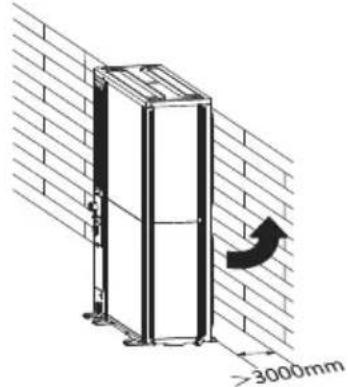
Make sure there is enough room to do the installation.
Set the outlet side at a right angle to the direction of the wind.
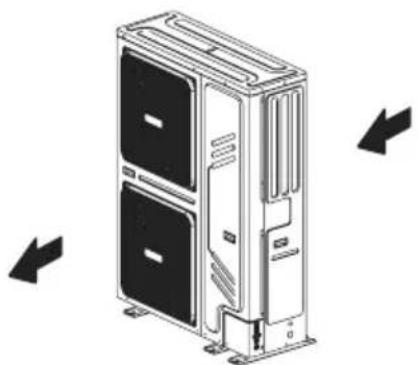
natural_image
Illustration of a server rack unit with directional arrows indicating movement or flow (no text or symbols present)• Prepare a water drainage channel around the foundation, to drain waste water from around the unit.
- If water does not easily drain from the unit, mount the unit on a foundation of concrete blocks, etc. (the height of the foundation should be about 100 mm (3.93 in).
- If you install the unit on a frame, please install a waterproof plate (about 100 mm) on the underside of the unit to prevent water from coming in from the low side.
- When installing the unit in a place frequently exposed to snow, pay special attention to elevate the foundation as high as possible.
- If you install the unit on a building frame, please install a waterproof plate (field supply) (within 150mm of the underside of the unit) in order to avoid drain water dripping. (See the picture in the right).
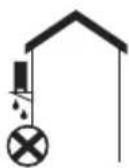
6.1 Selecting a location in cold climates
Refer to "Handling" in section "4 Before installation"
NOTE
When operating the unit in cold climates, be sure to follow the instructions described below.
- To prevent exposure to wind, install the unit with its suction side facing the wall.
- Never install the unit at a site where the suction side may be exposed directly to wind.
- To prevent exposure to wind, install a baffle plate on the air discharge side of the unit.
- In heavy snowfall areas, it is very important to select an installation site where the snow will not affect the unit. If lateral snowfall is possible, make sure that the heat exchanger coil is not affected by the snow (if necessary construct a lateral canopy).
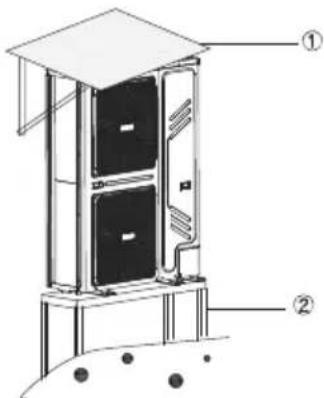
① Construct a large canopy.
② Construct a pedestal.
Install the unit high enough off the ground to prevent it from being buried in snow.
6.2 Selecting a location in hot climates
As the outdoor temperature is measured via the outdoor unit air thermistor, make sure to install the outdoor unit in the shade or a canopy should be constructed to avoid direct sunlight, so that it is not influenced by the sun's heat, otherwise protection may be possible to the unit.
7 INSTALLATION PRECAUTIONS
7.1 Dimensions
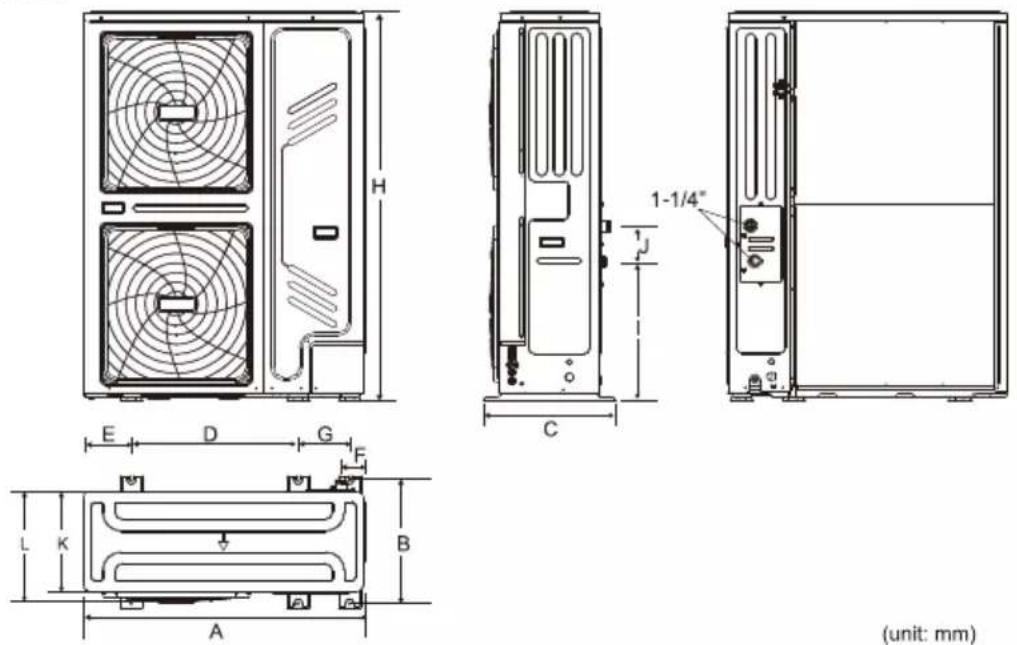
(unit: mm)
| Model | A | B | C | D | E | F | G | H | I | J | K | L |
| 18/22/26/30 kW | 1129 | 494 | 528 | 668 | 192 | 98 | 206 | 1558 | 558 | 143 | 400 | 440 |
7.2 Installation requirements
- Check the strength and level of the installation ground so that the unit may not cause any vibrations or noise during its operation.
- In accordance with the foundation drawing in the figure, fix the unit securely by means of foundation bolts. (Prepare six sets each of 10 Expansion bolts, nuts and washers which are readily available in the market.)
- Screw in the foundation bolts until their length is 20 mm from the foundation surface.
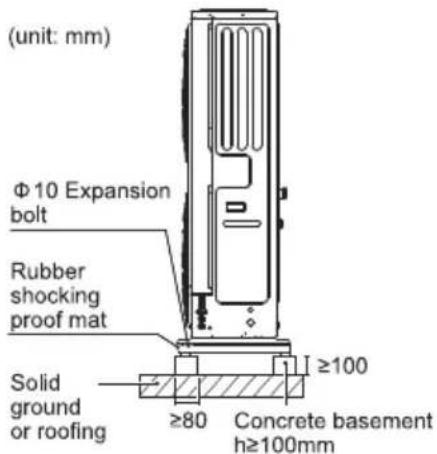
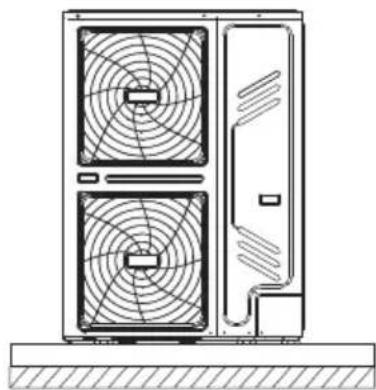
natural_image
Technical line drawing of a dual-panel air conditioning unit with fan blades and ventilation grilles (no text or symbols)7.3 Drain hole position
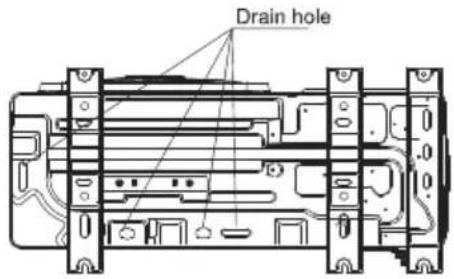
NOTE
It's necessary to install an electrical heating belt if water can't drain out in cold weather.
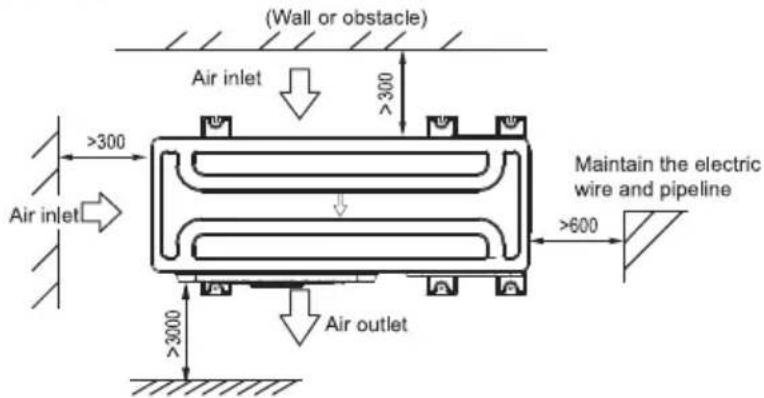
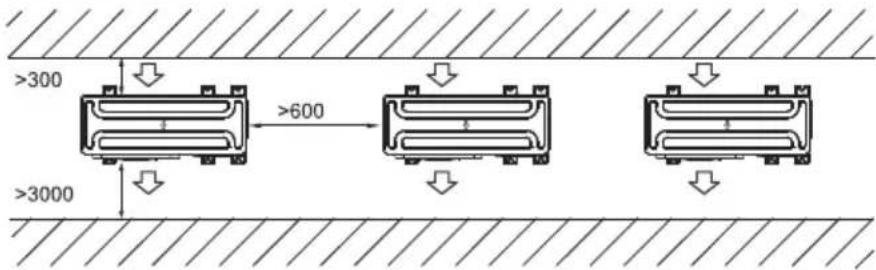
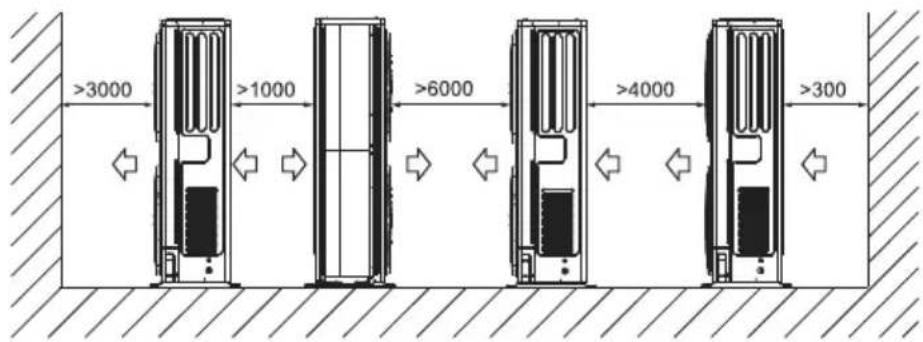
7.4 Servicing space requirements
1) Single unit installation
2) Parallel connect the two units or above
3) Parallel connect the front with rear sides
8 TYPICAL APPLICATIONS
The application examples given below are for illustration only.
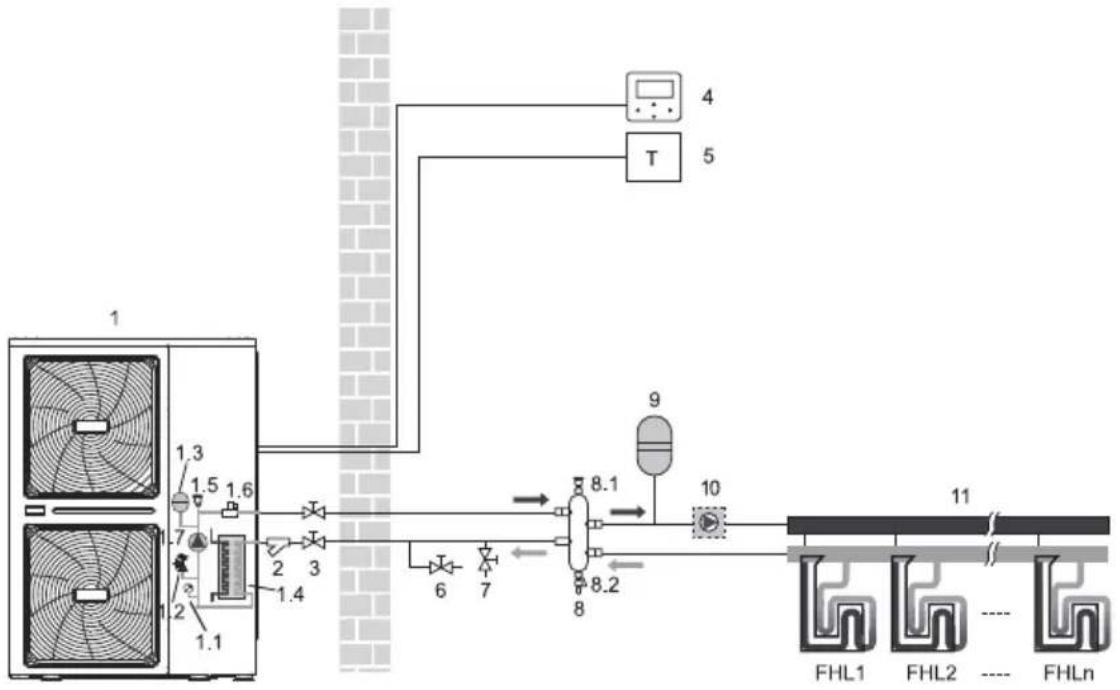
8.1 Application 1
Space heating with a room thermostat connected to the unit.
flowchart
graph TD
    A["1"] --> B["1.3"]
    A --> C["1.5"]
    A --> D["1.6"]
    A --> E["2"]
    A --> F["1.4"]
    B --> G["2"]
    C --> H["3"]
    D --> I["7"]
    E --> J["8.1"]
    F --> K["8.2"]
    G --> L["9"]
    H --> L
    I --> L
    J --> L
    K --> L
    L --> M["10"]
    M --> N["FHL1"]
    M --> O["FHL2"]
    M --> P["FHLn"]
    N --> Q["11"]
    O --> Q
    P --> Q
| Coding | Assembly unit | Coding | Assembly unit |
| 1 | Outdoor unit | 5 | Room thermostat (field supply) |
| 1.1 | Manometer | 6 | Drain valve (field supply) |
| 1.2 | Pressure relief valve | 7 | Fill valve (field supply) |
| 1.3 | Expansion vessel | 8 | Balance tank (field supply) |
| 1.4 | Plate heat exchanger | 8.1 | Air purge valve |
| 1.5 | Air purge valve | 8.2 | Drain valve |
| 1.6 | Flow switch | 9 | Expansion vessel (field supply) |
| 1.7 | P_i: Circulation pump inside the unit | 10 | P_o: Outside circulation pump (field supply) |
| 2 | Y-shape filter | 11 | Collector / distributor (field supply) |
| 3 | Stop valve (field supply) | FHL 1...n | Floor heating loop (field supply) |
| 4 | Wired controller |
NOTE
The volume of balance tank(8) should be greater than 40L. The drain valve (6) should be installed at the lowest position of the system. Pump_o (10) should be controlled by outdoor unit and connect to corresponding port in the outdoor unit(refer to 9.7.6 Connection for other components/For outside circulation pump P_o).
Unit operation and space heating:
When a room thermostat is connected to the unit and when there is a heating request from the room thermostat, the unit will start operating to achieve the target water flow temperature as set on the user interface. When the room temperature is above the thermostat set point in the heating mode, the unit will stop operating. The circulation pump (1.7) and (10) will also stop running. The room thermostat is used as a switch here.
NOTE
Make sure to connect the thermostat wires to the correct terminals, method B should be selected (see "For room thermostat" in 9.7.6 connection for other components). To correctly configure the ROOM THERMOSTAT in the FOR SERVICEMAN mode see 10.7 Field settings/ROOM THERMOSTAT.
8.2 Application 2
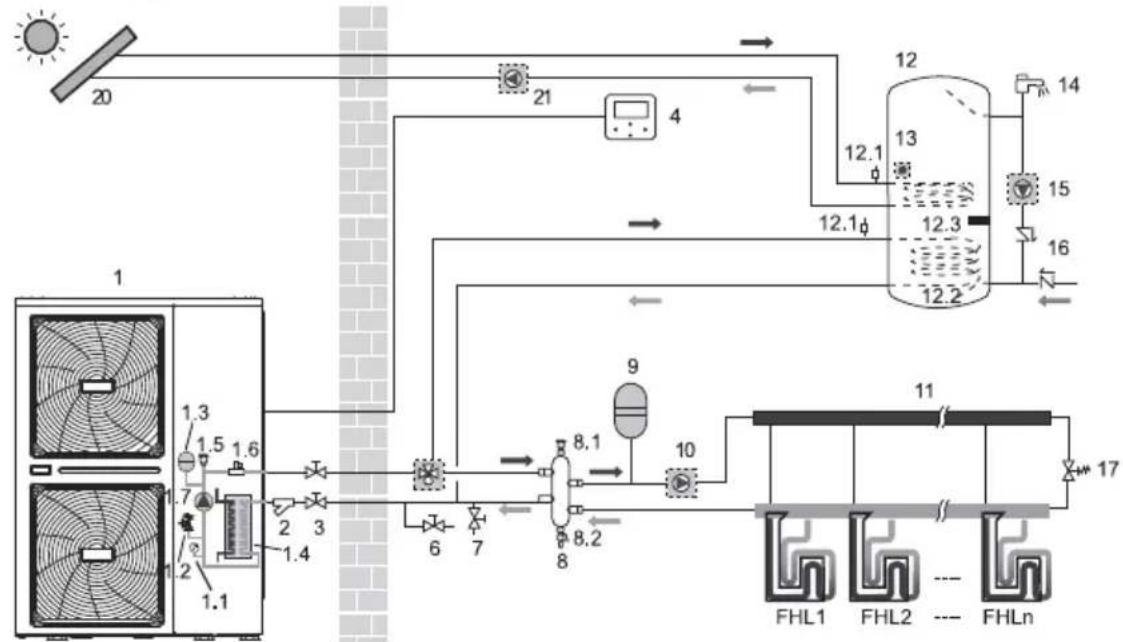
Space heating without room thermostat connected to the unit. Domestic hot water tank is connected to the unit, and the tank is with solar heating system.
flowchart
graph TD
    A["1"] --> B["20"]
    B --> C["21"]
    C --> D["4"]
    D --> E["12"]
    E --> F["13"]
    F --> G["12.1φ"]
    G --> H["12.2"]
    H --> I["12.3"]
    I --> J["14"]
    I --> K["15"]
    I --> L["16"]
    M["1"] --> N["2"]
    N --> O["1.1"]
    O --> P["1.4"]
    P --> Q["2"]
    Q --> R["3"]
    R --> S["6"]
    S --> T["7"]
    T --> U["8.1"]
    U --> V["8.2"]
    V --> W["9"]
    W --> X["10"]
    X --> Y["11"]
    Y --> Z["17"]
    AA["FHL1"] --> AB["FHL2"] --> AC["FHLn"]
| Coding | Assembly unit | Coding | Assembly unit |
| 1 | Outdoor unit | 9 | Expansion vessel (field supply) |
| 1.1 | Manometer | 10 | P_o: Outside circulation pump (field supply) |
| 1.2 | Pressure relief valve | 11 | Collector / distributor (field supply) |
| 1.3 | Expansion vessel | 12 | Domestic hot water tank (field supply) |
| 1.4 | Plate heat exchanger | 12.1 | Air purge valve |
| 1.5 | Air purge valve | 12.2 | Heat exchanger coil |
| 1.6 | Flow switch | 12.3 | Booster heater |
| 1.7 | P_i: Circulate pump in the unit | 13 | T5: DHW tank temp. sensor |
| 2 | Y-shape filter | 14 | Hot water tap (field supply) |
| 3 | Stop valve (field supply) | 15 | P_d: DHW pump (field supply) |
| 4 | Wired controller | 16 | One way valve (field supply) |
| 6 | Drain valve (field supply) | 17 | Bypass valve(field supply) |
| 7 | Fill valve (field supply) | 18 | SV1: 3-way valve (field supply) |
| 8 | Balance tank (field supply) | 20 | Solar energy kit(field supply) |
| 8.1 | Air purge valve | 21 | P_s: Solar pump(field supply) |
| 8.2 | Drain valve | FHL 1...n | Floor heating loop (field supply) |
NOTE
The volume of balance tank(8) should be greater than 40L. The drain valve (6) should be installed at the lowest position in the system. Pump(10) should be controlled by outdoor unit and connect to corresponding port in the outdoor unit(refer to 9.7.6 Connection for other components/For outside circulation pump P_o).
• Circulation pump operation
The circulation pump (1.7) and (10) will operate as long as the unit is on for space heating.
The circulation pump (1.7) will operate as long as the unit is on for heating domestic hot water (DHW).
- Space heating
1) The unit (1) will operate to achieve the target water flow temperature set on the wired controller.
2) The bypass valve should be selected so that at all times the minimum water flow as mentioned in 9.4 Water piping is guaranteed.
• Domestic water heating
1) When the domestic water heating mode is enabled (either manually by the user, or automatically through scheduling) the target domestic hot water temperature will be achieved by a combination of the heat exchanger coil and the electrical booster heater (when the booster heater in the tank is set to YES).
2) When the domestic hot water temperature is below the user configured set point, the 3-way valve will be activated to heat the domestic water by means of the heat pump. If there is a huge demand for hot water or a high hot water temperature setting, the booster heater (12.3) can provide auxiliary heating.
CAUTION
Make sure to fit the 3-way valve correctly. For more details, refer to 9.7.6 Connection for other components/For 3-way valve SV1.
NOTE
The unit can be configured so that at low outdoor temperatures, water is exclusively heated by the booster heater. This assures that the full capacity of the heat pump is available for space heating.
Details on domestic hot water tank configuration for low outdoor temperatures (T4DHWMIN) can be found in 10.7 Field settings/How to set the DHW MODE.
8.3 Application 3
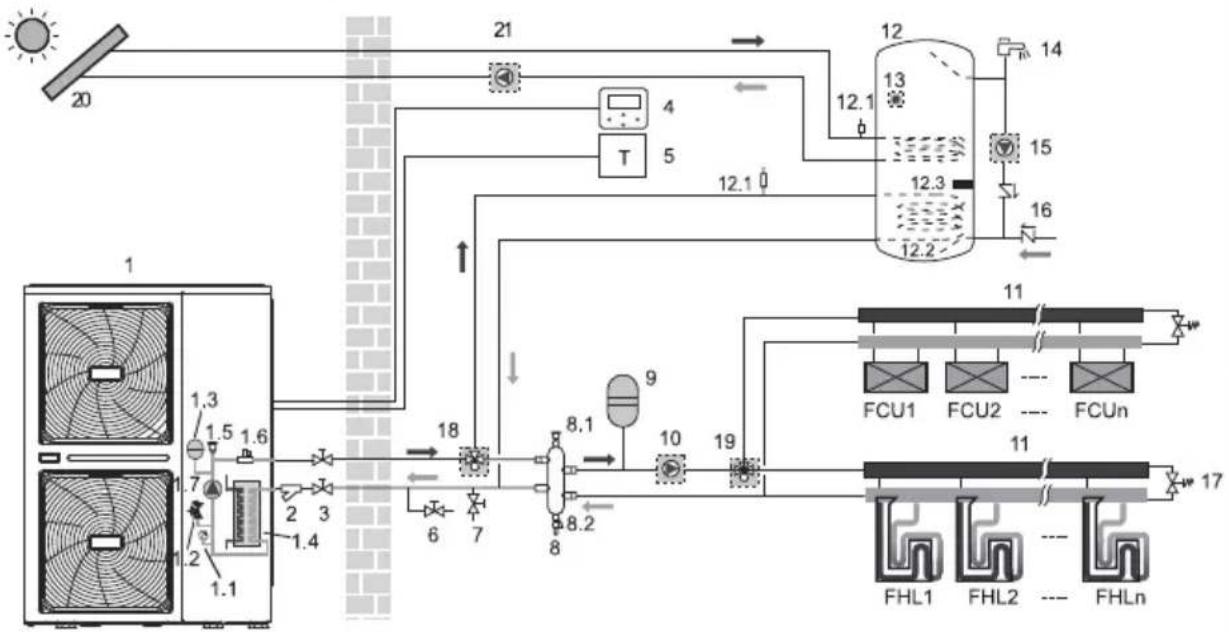
Space cooling and heating application with a room thermostat suitable for heating/cooling changeover when connected to the unit. Heating is provided through floor heating loops and fan coil units. Cooling is provided through the fan coil units only. Domestic hot water is provided through the domestic hot water tank which is connected to the unit.
flowchart
graph TD
    A["1"] --> B["20"]
    B --> C["21"]
    C --> D["T"]
    D --> E["4"]
    D --> F["5"]
    E --> G["12.1"]
    F --> H["12.3"]
    G --> I["12.2"]
    H --> J["13"]
    I --> K["14"]
    J --> L["15"]
    K --> M["16"]
    L --> N["FCU1"]
    L --> O["FCU2"]
    L --> P["FCUn"]
    N --> Q["11"]
    O --> R["11"]
    P --> S["17"]
    Q --> T["FHL1"]
    Q --> U["FHL2"]
    Q --> V["FHLn"]
    W["1.3"] --> X["1.5"]
    X --> Y["1.6"]
    Y --> Z["2"]
    Z --> AA["3"]
    AA --> AB["4"]
    AB --> AC["5"]
    AC --> AD["6"]
    AD --> AE["7"]
    AE --> AF["8"]
    AF --> AG["8.1"]
    AG --> AH["9"]
    AH --> AI["10"]
    AI --> AJ["19"]
    AJ --> AK["17"]
| Coding | Assembly unit | Coding | Assembly unit |
| 1 | Outdoor unit | 10 | P_o: Outside circulation pump (field supply) |
| 1.1 | Manometer | 11 | Collector / distributor (field supply) |
| 1.2 | Pressure relief valve | 12 | Domestic hot water tank (field supply) |
| 1.3 | Expansion vessel | 12.1 | Air purge valve |
| 1.4 | Plate heat exchanger | 12.2 | Heat exchanger coil |
| 1.5 | Air purge valve | 12.3 | Booster heater |
| 1.6 | Flow switch | 13 | T5: DHW tank temp. sensor |
| 1.7 | P_i: Circulation pump inside the unit | 14 | Hot water tap (field supply) |
| 2 | Y-shape filter | 15 | P_d: DHW pump (field supply) |
| 3 | Stop valve (field supply) | 16 | One way valve (field supply) |
| 4 | Wired controller | 17 | Bypass valve(field supply) |
| 5 | Room thermostat (field supply) | 18 | SV1: 3-way valve (field supply) |
| 6 | Drain valve (field supply) | 19 | SV2: 3-way valve (field supply) |
| 7 | Fill valve (field supply) | 20 | Solar energy kit(field supply) |
| 8 | Balance tank (field supply) | 21 | P_s: Solar pump(field supply) |
| 8.1 | Air purge valve | FHL 1...n | Floor heating loop (field supply) |
| 8.2 | Drain valve | FCU 1...n | Fan coil units (field supply) |
| 9 | Expansion vessel (field supply) |
NOTE
The volume of balance tank(8) should be greater than 40L. The drain valve (6) should be installed at the lowest position of the system. Pump(10) should be controlled by outdoor unit and connect to corresponding port in the outdoor unit (refer to 9.7.6 Connection for other components/For outside circulation pump P_o).
- Pump operation and space heating and cooling
The unit will switch to either heating or cooling mode according to the setting of room thermostat. When space heating/cooling is requested by the room thermostat (5), the pump will start operating and the unit (1) will switch to heating mode/cooling mode. The unit (1) will operate to achieve the target cold/hot water leaving temperature. In the cooling mode, the motorized 3-way valve (19) will close to prevent cold water running through the floor heating loops (FHL).
CAUTION
Make sure to connect the thermostat wires to the correct terminals and to configure the ROOM THERMOSTAT in the wired controller correctly (see 10.7 Field settings/ROOM THERMOSTAT). Wiring of the room thermostat should follow method A as described in 9.7.6 connection for other components/For room thermostat.
Wiring of the 3-way valve (19) is different for a NC (normal closed) valve and a NO (normal open) valve! Make sure to connect to the correct terminal numbers as detailed on the wiring diagram.
The ON/OFF setting of the heating/cooling operation cannot be done on the user interface, the target outlet water temperature should be set in the user interface.
• Domestic water heating
Domestic water heating is as described in 8.2 Application 2.
8.4 Application 4
Space heating with an auxiliary boiler (alternating operation).
Space heating application by either the unit or by an auxiliary boiler connected in the system.
- The unit controlled contact (also called "permission signal for the auxiliary boiler") is determined by the outdoor temperature (thermistor located at the outdoor unit). See 10.7 Field settings/OTHER HEATING SOURCE.
- Bivalent operation is possible for both space heating operation and domestic water heating operation.
- If the auxiliary boiler only provides heat for space heating, the boiler must be integrated in the piping work and in the field wiring according to the illustration for application a.
- If the auxiliary boiler is also providing heat for domestic hot water, the boiler can be integrated in the piping work and in the field wiring according to the illustration for application b. In this condition, the unit can sent ON/OFF signal to boiler in heating mode, but the boiler control itself in DHW mode.
CAUTION
Be sure that the boiler and the integration of the boiler in the system is in accordance with relevant local laws and regulations.
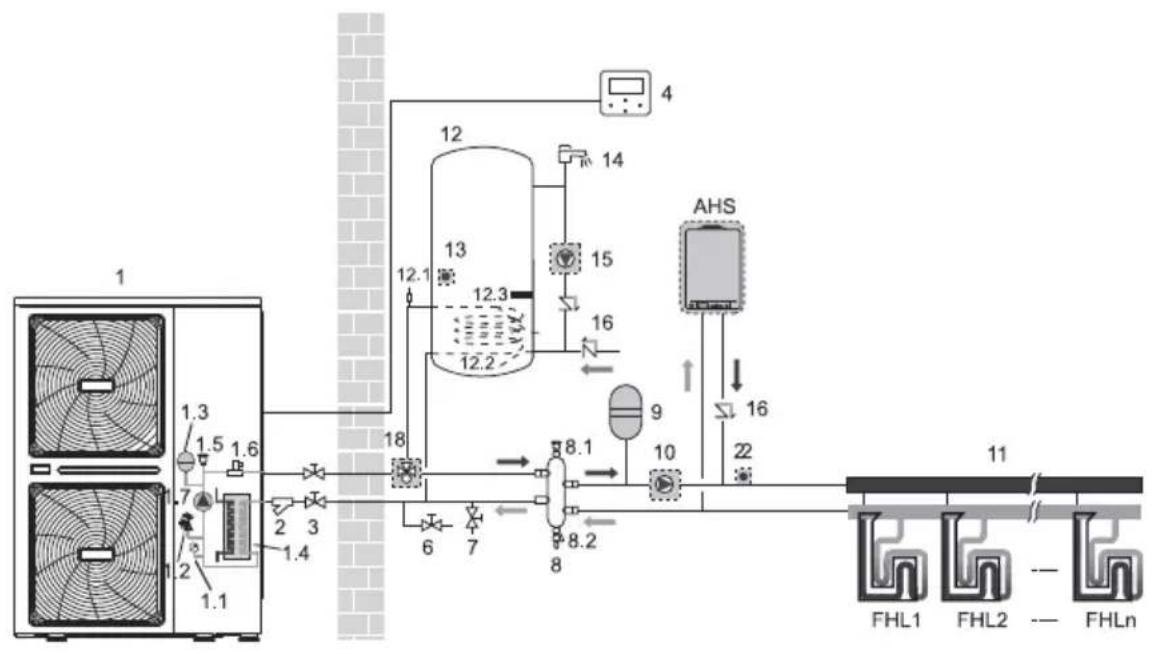
8.4.1 Application a
Boiler provide heat for space heating only
flowchart
graph TD
    A["1.3 Fan 1.5 Fan 1.6"] --> B["2.1 Fan 1.4 Fan 1.1"]
    B --> C["6.7 Fan 7.0 Fan 8.1"]
    C --> D["8.2 Fan 8.1"]
    D --> E["10.0 Fan 10.2"]
    E --> F["16.0 AHS Unit"]
    F --> G["14.0 AHS Unit"]
    G --> H["4.0 AHS Unit"]
    H --> I["11.0 FHL1 FHL2 FHLn"]
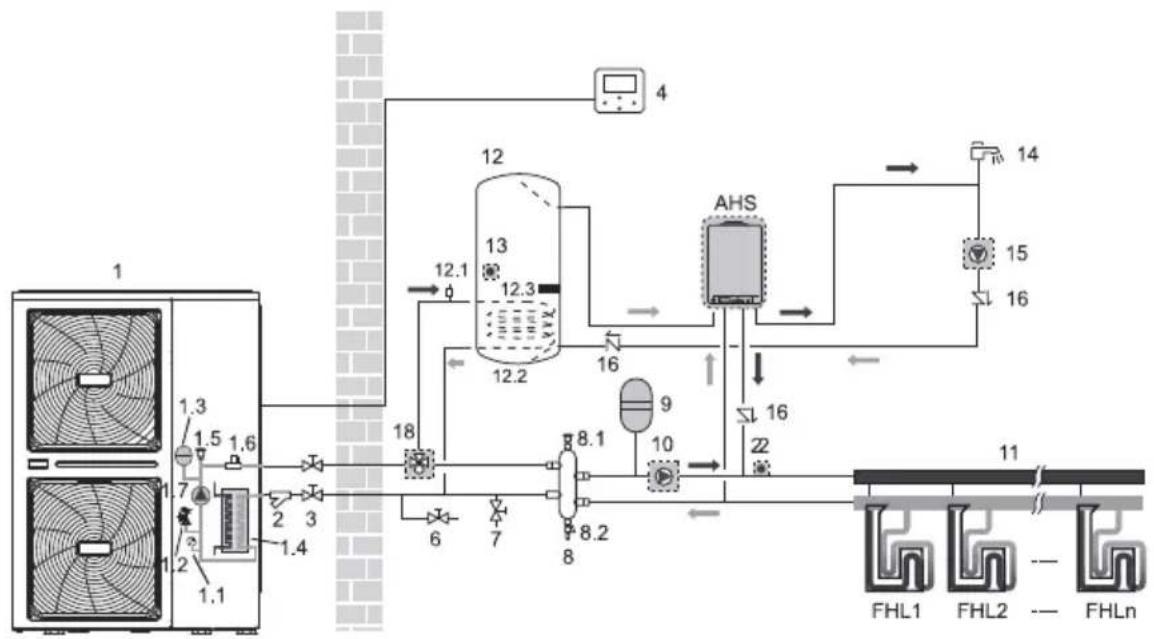
8.4.2 Application b
Boiler provide heat for space heating and domestic water heating, the ON/OFF of boiler is controlled by itself for domestic water heating.
flowchart
graph TD
    A["1"] --> B["2"]
    B --> C["3"]
    C --> D["4"]
    D --> E["5"]
    E --> F["6"]
    F --> G["7"]
    G --> H["8"]
    H --> I["9"]
    I --> J["10"]
    J --> K["11"]
    K --> L["12"]
    L --> M["13"]
    M --> N["14"]
    N --> O["15"]
    O --> P["16"]
    P --> Q["17"]
    Q --> R["18"]
    R --> S["19"]
    S --> T["20"]
    T --> U["21"]
    U --> V["22"]
    V --> W["23"]
    W --> X["24"]
    X --> Y["25"]
    Y --> Z["26"]
    Z --> AA["27"]
    AA --> AB["28"]
    AB --> AC["29"]
    AC --> AD["30"]
    AD --> AE["31"]
    AE --> AF["32"]
    AF --> AG["33"]
    AG --> AH["34"]
    AH --> AI["35"]
    AI --> AJ["36"]
    AJ --> AK["37"]
    AK --> AL["38"]
    AL --> AM["39"]
    AM --> AN["40"]
8.4.3 Application c
Boiler provide heat for domestic water heating. The ON/OFF of boiler controlled by unit.
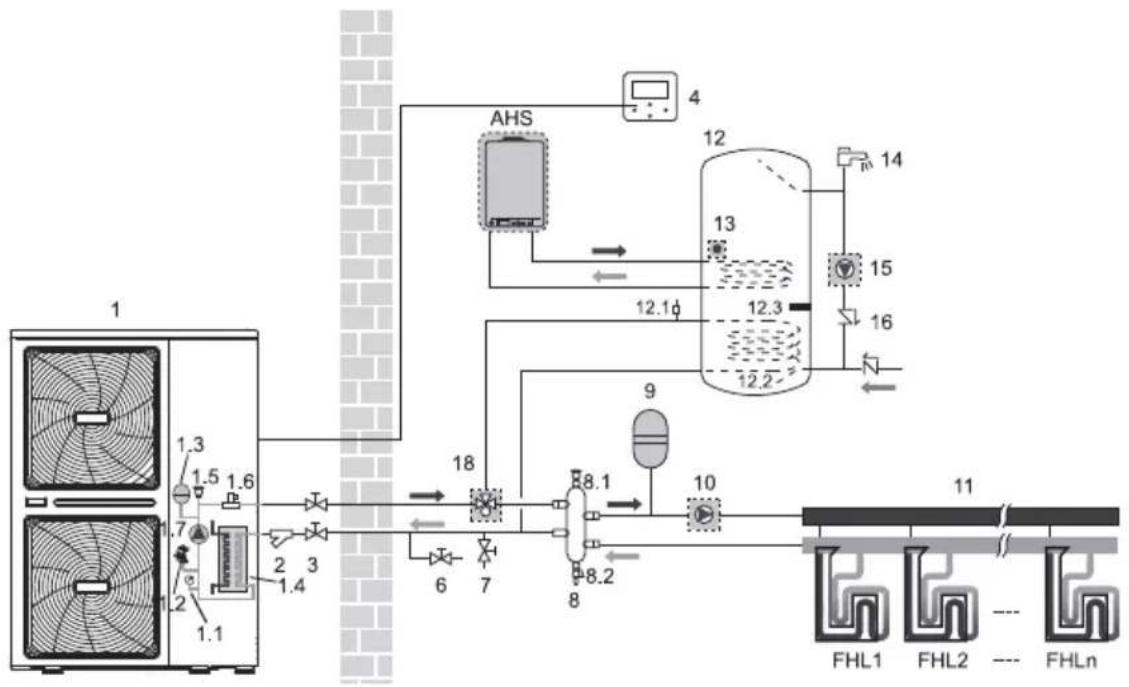
flowchart
graph TD
    A["1.3"] --> B["1.5"]
    B --> C["1.6"]
    C --> D["2"]
    D --> E["3"]
    E --> F["4"]
    F --> G["AHS"]
    G --> H["12"]
    H --> I["13"]
    I --> J["12.1d"]
    J --> K["12.3"]
    K --> L["12.2"]
    L --> M["9"]
    M --> N["8.1"]
    N --> O["10"]
    O --> P["11"]
    P --> Q["FHL1"]
    P --> R["FHL2"]
    P --> S["FHLn"]
    style A fill:#f9f,stroke:#333
    style B fill:#f9f,stroke:#333
    style C fill:#f9f,stroke:#333
    style D fill:#f9f,stroke:#333
    style E fill:#f9f,stroke:#333
    style F fill:#f9f,stroke:#333
    style G fill:#ccf,stroke:#333
    style H fill:#ccf,stroke:#333
    style I fill:#ccf,stroke:#333
    style J fill:#ccf,stroke:#333
    style K fill:#ccf,stroke:#333
    style L fill:#ccf,stroke:#333
    style M fill:#ccf,stroke:#333
    style N fill:#ccf,stroke:#333
    style O fill:#ccf,stroke:#333
    style P fill:#ccf,stroke:#333
    style Q fill:#ccf,stroke:#333
    style R fill:#ccf,stroke:#333
    style S fill:#ccf,stroke:#333
| Coding | Assembly unit | Coding | Assembly unit |
| 1 | Outdoor unit | 9 | Expansion vessel (field supply) |
| 1.1 | Manometer | 10 | P_o: Outside circulation pump (field supply) |
| 1.2 | Pressure relief valve | 11 | Collector / distributor (field supply) |
| 1.3 | Expansion vessel | 12 | Domestic hot water tank (field supply) |
| 1.4 | Plate heat exchanger | 12.1 | Air purge valve |
| 1.5 | Air purge valve | 12.2 | Heat exchanger coil |
| 1.6 | Flow switch | 12.3 | Booster heater |
| 1.7 | P_i: Circulation pump inside the unit | 13 | T5: DHW tank temp. sensor |
| 2 | Y-shape filter | 14 | Hot water tap (field supply) |
| 3 | Stop valve (field supply) | 15 | P_d: DHW pump (field supply) |
| 4 | Wired controller | 16 | One way valve (field supply) |
| 6 | Drain valve (field supply) | 18 | SV1: 3-way valve (field supply) |
| 7 | Fill valve (field supply) | 22 | T1: Outlet water temperature sensor(field supply) |
| 8 | Balance tank (field supply) | FHL 1...n | Floor heating loop(field supply) |
| 8.1 | Air purge valve | AHS | Additional heating source(boiler)(field supply) |
| 8.2 | Drain valve | / | / |
NOTE
The volume of balance tank(8) should be greater than 40L. The drain valve (6) should be installed at the lowest position of the system. Temperature sensor T1 must be installed at the outlet of AHS, and connect to the corresponding port in the main control board of hydraulic module(refer to 9.3.1 Main control board of hydraulic module), pump(10) should be controlled by outdoor unit and connect to corresponding port in the outdoor unit(refer to 9.7.6 Connection for other components/For outside circulation pump P_o).
Operation
When heating is required, either the unit or the boiler starts operating, depending on the outdoor temperature (refer to 10.7 field setting/OTHER HEATING SOURCE).
- As the outdoor temperature is measured via the outdoor unit air thermistor, make sure to install the outdoor unit in the shade, so that it is not influenced by the sun's heat.
-
Frequent switching can cause corrosion of the boiler at an early stage. Contact the boiler manufacturer,
-
During heating operation of the unit, the unit will operate to achieve the target water flow temperature set on the user interface. When weather dependent operation is active, the water temperature is determined automatically depending on the outdoor temperature.
- During heating operation of the boiler, the boiler will operate to achieve the target water flow temperature set on the user interface.
- Never set the target water flow temperature set point on the user interface above (60°C).
NOTE
Make sure to correctly configure FOR SERVICEMAN in the user interface. Refer to 10.7 Field settings/Other heating source.
CAUTION
Ensure that return water to the heat exchanger does not exceed 60^ C. Never put the target water flow temperature set point on the user interface above 60^ C.
Make sure that the non-return valves (field supply) are correctly installed in the system.
The supplier will not be held liable for any damage resulting from failure to observe this rule.
8.5 Application 5
Dual setpoint function application with two room thermostat connect to the outdoor unit.
- Space heating with two room thermostat application through floor heating loops and fan coil units. The floor heating loops and fan coil units require different operating water temperatures.
- The floor heating loops require a lower water temperature in heating mode compared to fan coil units. To achieve these two set points, a mixing station is used to adapt the water temperature according to requirements of the floor heating loops. The fan coil units are directly connected to the unit water circuit and the floor heating loops are after the mixing station. The mixing station is controlled by the unit (or field supply, controls itself).
• The operation and configuration of the field water circuit is the responsibility of the installer. - We only offer a dual set point control function. This function allows two set points to be generated. Depending on the required water temperature (floor heating loops and/or fan coil units are required). More details refer to 10.7 field setting /ROOM THERMOSTAT.
NOTE
The wiring of room thermostat 5A(for fan coil units) and 5B(for floor eating loops) should follow 'method C' as described in 9.7.6 Connection for other components/For room thermostat, and the thermostat which connect to port 'C' (in the outdoor unit) should be placed on the zone where floor heating loops is installed(zone B), the other one connect to port 'H' should be placed on the zone where fan coil units are installed(zone A).
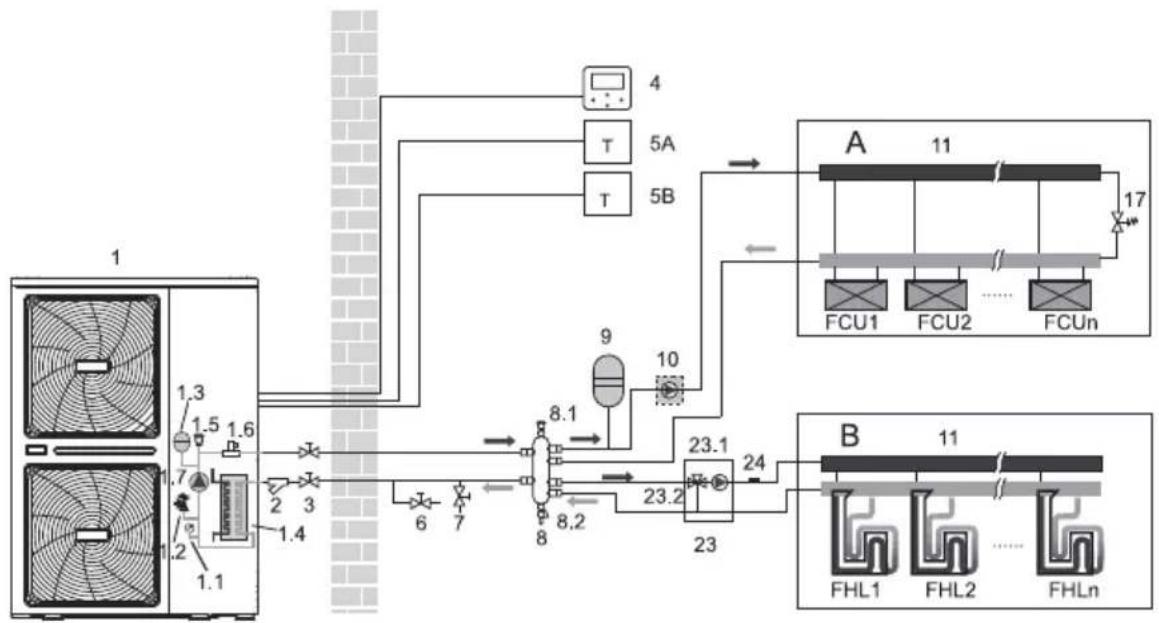
flowchart
graph TD
    subgraph_Panel_A["1"]
        A1[" fan 1 "] --> A2[" fan 2 "]
        A2 --> A3[" fan 3 "]
        A3 --> A4[" fan 4 "]
        A4 --> A5[" T "]
        A5 --> A6[" 5A "]
        A6 --> A7[" T "]
        A7 --> A8[" 5B "]
        A8 --> A9[" 4 "]
        A9 --> A10[" 9 "]
        A10 --> A11[" FCU1 "]
        A11 --> A12[" FCUn "]
        A12 --> A13[" 17 "]
    end

    subgraph_Panel_B["2"]
        B1[" fan B "] --> B2[" fan C "]
        B2 --> B3[" fan D "]
        B3 --> B4[" fan E "]
        B4 --> B5[" fan F "]
        B5 --> B6[" fan G "]
        B6 --> B7[" fan H "]
        B7 --> B8[" fan I "]
        B8 --> B9[" fan J "]
        B9 --> B10[" fan K "]
        B10 --> B11[" fan L "]
        B11 --> B12[" fan M "]
        B12 --> B13[" fan N "]
        B13 --> B14[" fan O "]
        B14 --> B15[" fan P "]
        B15 --> B16[" fan Q "]
        B16 --> B17[" fan R "]
        B17 --> B18[" fan S "]
        B18 --> B19[" fan T "]
        B19 --> B20[" fan U "]
        B20 --> B21[" fan V "]
        B21 --> B22[" fan W "]
        B22 --> B23[" fan X "]
        B23 --> B24[" fan Y "]
        B24 --> B25[" fan Z "]
        B25 --> B26[" fan AA "]
        B26 --> B27[" fan AB "]
        B27 --> B28[" fan AC "]
        B28 --> B29[" fan DV "]
        B29 --> B30[" fan DVY "]
        B30 --> B31[" fan DVZY "]
        B31 --> B32[" fan DVZYXY "]
        B32 --> B33[ fan DVZVXYXYXYXYXYXYXYXYXYXYXYXYXYXYXYXYXYXYXYXYXYXYXYXYXYXYXYXYXYXYXYXYXYXYXYXYXYXYXYXYXYXYXYXYXYXYXYXYXYXYXZ
    end

    %% Annotations
    %% Components: 1.3, 1.5, 1.6, 1.7, 1.4, 8.1, 8.2, 23.1, 23.2, 24, 17
    %% Labels on diagram; 'A' and 'B' indicate specific labels for Panel_A and Panel_B respectively.
| Coding | Assembly unit | Coding | Assembly unit |
| 1 | Outdoor unit | 7 | Fill valve (field supply) |
| 1.1 | Manometer | 8 | Balance tank (field supply) |
| 1.2 | Pressure relief valve | 8.1 | Air purge valve |
| 1.3 | Expansion vessel | 8.2 | Drain valve |
| 1.4 | Plate heat exchanger | 9 | Expansion vessel (field supply) |
| 1.5 | Air purge valve | 10 | P_o: Outside circulation pump (field supply) |
| 1.6 | Flow switch | 11 | Collector / distributor (field supply) |
| 1.7 | P_i: Circulation pump in the unit | 17 | Bypass valve (field supply) |
| 2 | Y-shape filter | 23 | Mixing station (field supply) |
| 3 | Stop valve (field supply) | 23.1 | P_c: zone 2 pump (field supply) |
| 4 | Wired controller | 23.2 | SV3: 3-way valve (field supply) |
| 5A | Room thermostat for zone 1 (field supply) | 24 | Tw2: Zone 2 water flow temp. (individual purchase) |
| 5B | Room thermostat for zone 2 (field supply) | FHL 1...n | Floor heating loop (field supply) |
| 6 | Drain valve (field supply) | FCU 1...n | Fan coil units (field supply) |
NOTE
- The volume of balance tank(8) should be greater than 40L. The drain valve (6) should be installed at the lowest position of the system. Pump(10) and pump(23.1) should be controlled by outdoor unit and connect to corresponding port in the outdoor unit(refer to 9.7.6 Connection for other components/For outside circulation pump P_o and For tank loop pump P_d and mix pump P_c).
- The advantage of the dual set point control is that the heat pump will/can operate at the lowest required water flow temperature when only floor heating is required. Higher water flow temperatures are only required in case fan coil units are operating. This results in better heat pump performance.
• Pump operation and space heating
The pump (1.7) and (10) will operate when there is request for heating from A and / or B. Pump (23.1) will operate only when there is request for heating from B. The outdoor unit will start operating to achieve the target water flow temperature. The target water leaving temperature depends on which room thermostat is requesting heating.
When the room temperature of both zones is above the thermostat set point, the outdoor unit and pump will stop operating.
NOTE
- Make sure to correctly configure the room thermostat installation on the user interface. Refer to "10.7 Field settings/ROOM THERMOSTAT".
- It is the installers' responsibility to ensure that no unwanted situations can occur (e.g. extremely high temperature water going towards floor heating loops, etc.)
- The supplier does not offer any type of mixing station. Dual set point control only provides the possibility to use two set points.
- When only zone A requests heating, zone B will be fed with water at a temperature equal to the first set point. This can lead to unwanted heating in zone B.
- When only zone B requests heating, the mixing station will be fed with water at a temperature equal to the second set point. Depending on the control of the mixing station, the floor heating loop can still receive water at a temperature equal to the set point of the mixing station.
- Be aware that the actual water temperature through the floor heating loops depends on the control and setting of the mixing station.
8.6 Application 6
Dual setpoint function application without room thermostat connect to the outdoor unit.
- Heating is provided through floor heating loops and fan coil units. The floor heating loops and fan coil units require different operating water temperatures.
- The floor heating loops require a lower water temperature in heating mode compared to fan coil units. To achieve these two set points, a mixing station is used to adapt the water temperature according to requirements of the floor heating loops. The fan coil units are directly connected to the unit water circuit and the floor heating loops are after the mixing station. The mixing station is controlled by the unit (or buy from the market, controlled by itself).
• The operation and configuration of the field water circuit is the responsibility of the installer.
• We only offer a dual set point control function. This function allows two set points to be generated. Depending on the required water temperature (floor heating loops and/or fan coil units are required) the first set point or second set point can be activated. See 10.7 field setting /TEMP. TYPE SETTING.
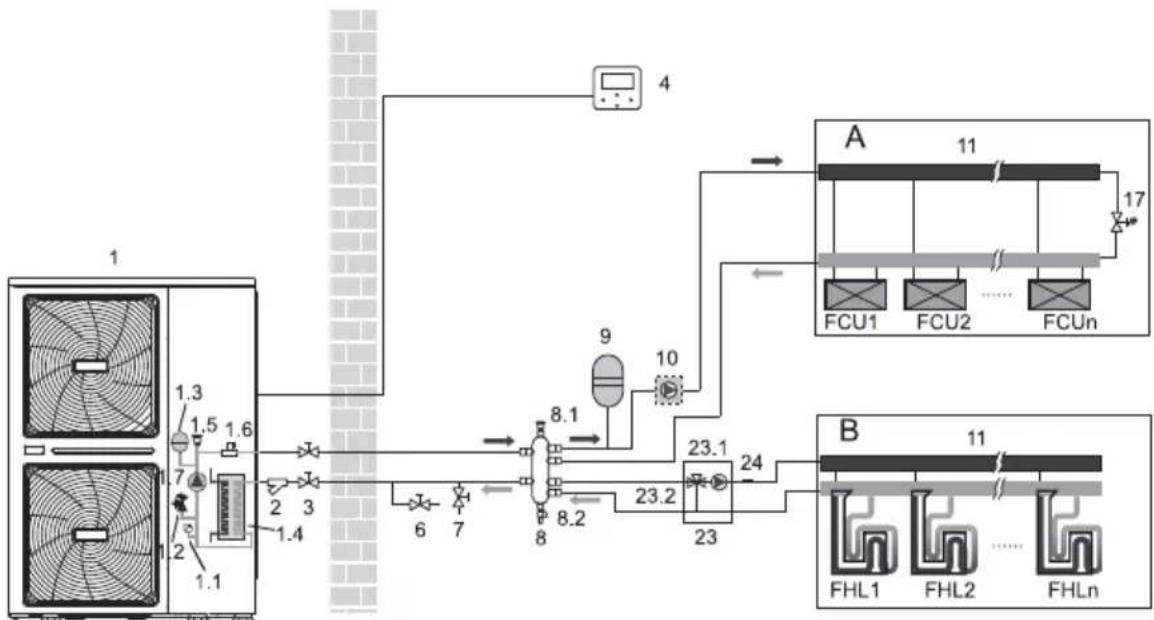
flowchart
graph TD
    subgraph_Air_Trafficule_1["1"]
        A["Refrigerator 1"] -->|1.3, 1.5, 1.6| Valve_1["Valve 1"]
        B["Refrigerator 2"] -->|1.1, 1.4| Valve_2["Valve 2"]
        Valve_1 -->|7| Valve_3["Valve 3"]
        Valve_2 -->|2| Valve_4["Valve 4"]
    end
    subgraph_Air_Trafficule_2["2"]
        Valve_3 -->|6, 7| Valve_5["Valve 5"]
        Valve_4 -->|8, 8, 8, 8, 8, 8, 8, 8, 8, 8, 8, 8, 8, 8, 8, 8, 8, 8, 8, 8, 8, 8, 8, 8, 8, 8]
    end
    subgraph_Air_Trafficule_3["3"]
        Valve_5 -->|23,2| Valve_6["Valve 6"]
        Valve_6 -->|23,2| Valve_7["Valve 7"]
        Valve_7 -->|23,2| Valve_8["Valve 8"]
        Valve_8 -->|8,1| Valve_9["Valve 9"]
        Valve_9 -->|10| Valve_10["Valve 10"]
        Valve_10 -->|10| Valve_11["Valve 11"]
        Valve_11 -->|17| Control_A["A"]
    end
    subgraph_Air_Trafficule_4["4"]
        Control_A -->|A 11| Control_B["B"]
    end
| Coding | Assembly unit | Coding | Assembly unit |
| 1 | Outdoor unit | 7 | Fill valve (field supply) |
| 1.1 | Manometer | 8 | Balance tank (field supply) |
| 1.2 | Pressure relief valve | 8.1 | Air purge valve |
| 1.3 | Expansion vessel | 8.2 | Drain valve |
| 1.4 | Plate heat exchanger | 9 | Expansion vessel (field supply) |
| 1.5 | Air purge valve | 10 | P_o: Outside circulation pump (field supply) |
| 1.6 | Flow switch | 11 | Collector / distributor (field supply) |
| 1.7 | P_i: Circulation pump in the unit | 17 | Bypass valve (field supply) |
| 2 | Y-shape filter | 23 | Mixing station (field supply) |
| 3 | Stop valve (field supply) | 23.1 | P_c: zone 2 pump (field supply) |
| 4 | Wired controller | 23.2 | SV3: 3-way valve (field supply) |
| 5A | Room thermostat for zone 1 (field supply) | 24 | Tw2: Zone 2 water flow temp. (individual purchase) |
| 5B | Room thermostat for zone 2 (field supply) | FHL 1...n | Floor heating loop (field supply) |
| 6 | Drain valve (field supply) | FCU 1...n | Fan coil units (field supply) |
NOTE
- The volume of balance tank(8) should be greater than 40L. The drain valve (6) should be installed at the lowest position of the system.
- As the temperature sensor attached in the user interface is used to detect the room temperature, the user interface (4) should be placed in the room where floor heating loops and fan coil units is installed and away from the heating source. Correct configuration should be applied in the user interface (refer to 10.7 field settings/TEMP. TYPE SETTING). The first setpoint is water temperature which can be set on the main page of user interface, the second setpoint is calculated from climate related curves, the target outlet water temperature is the higher one of these two setpoints. The unit will turn off when the room temperature reaches the target temperature.
• Pump operation and space heating
The pump (1.7) and (10) will operate when there is request for heating from A and / or B. Pump (23.1) will operate when the room temperature of zone B is lower than the set point which set in the user interface. The outdoor unit will start operating to achieve the target water flow temperature.
8.7 Application 7
The units are installed in parallel and can be used for cooling, heating and hot water.
- 6 units can be connected in parallel. Please refer to 9.7.5 for the parallel system electrical control system connection diagram.
- The parallel system can control and view the operation of the entire system only by connecting the master to the wire controller;
- If the DHW function is required, the water tank can only be connected to the master unit water circuit through a three-way valve, and controlled by the master unit;
- If you need to link with AHS, the AHS can only be connected to the master waterway and controlled by the master unit;
- The connection and function of the terminal are the same as the single unit, please refer to the application 8.1\~8.6;
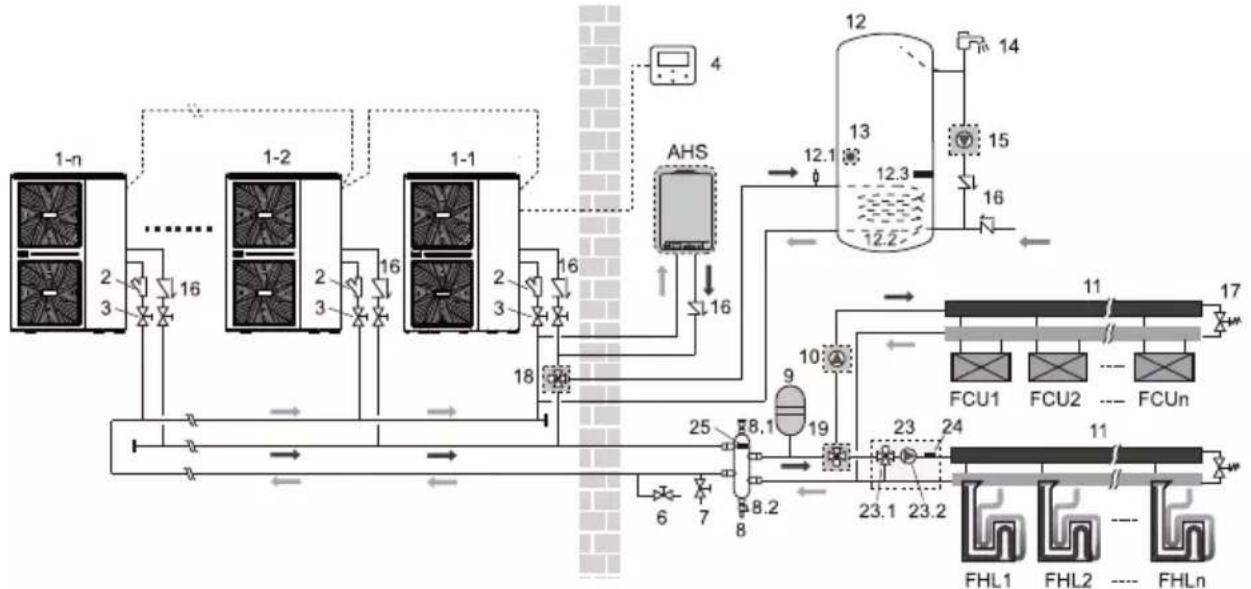
flowchart
graph TD
    A["1-n"] --> B["1-2"]
    B --> C["1-1"]
    C --> D["AHS"]
    D --> E["12"]
    E --> F["13"]
    F --> G["14"]
    D --> H["16"]
    H --> I["18"]
    I --> J["25"]
    J --> K["8.1"]
    K --> L["9"]
    L --> M["10"]
    M --> N["12.1"]
    N --> O["12.2"]
    O --> P["13"]
    P --> Q["14"]
    P --> R["15"]
    R --> S["16"]
    S --> T["FCU1"]
    S --> U["FCU2"]
    S --> V["FCUn"]
    W["6"] --> X["7"]
    X --> Y["8.2"]
    Y --> Z["23.1"]
    Z --> AA["23.2"]
    AA --> AB["11"]
    AB --> AC["FHL1"]
    AB --> AD["FHL2"]
    AB --> AE["FHLn"]
| Coding | Assembly unit | Coding | Assembly unit |
| 1-1 | Outdoor unit: master | 13 | T5: DHW tank temp. sensor |
| 1-2...1-n | Outtdoor unit: slave | 14 | Hot water tap (field supply) |
| 2 | Y-shape filter | 15 | P_d: DHW pump (field supply) |
| 3 | Stop valve (field supply) | 16 | One way valve (field supply) |
| 4 | Wired controller | 17 | Bypass valve(field supply) |
| 6 | Drain valve (field supply) | 18 | SV1: 3-way valve (field supply) |
| 7 | Fill valve (field supply) | 19 | SV2: 3-way valve (field supply) |
| 8 | Balance tank (field supply) | 23 | Mixing station (field supply) |
| 8.1 | Air purge valve | 23.1 | SV3: 3-way valve (field supply) |
| 8.2 | Drain valve | 23.2 | P_c: zone 2 pump (field supply) |
| 9 | Expansion vessel (field supply) | 24 | Tw2: Zone 2 water flow temp. (individual purchase) |
| 10 | P_o: Outside circulation pump (field supply) | 25 | Tbt1: Balance tank temp. sensor (individual purchase) |
| 11 | Collector / distributor (field supply) | FHL 1...n | Floor heating loop (field supply) |
| 12 | Domestic hot water tank (field supply) | FCU 1...n | Fan coil units (field supply) |
| 12.1 | Air purge valve | AHS | Additional heating source(boiler) (field supply) |
| 12.2 | Heat exchanger coil | / | / |
| 12.3 | Booster heater | / | / |

NOTE
- The volume of balance tank(8) should be greater than (40*n)L. The drain valve (6) should be installed at the lowest position of the system.
- The water inlet and outlet pipe joints of each unit of the parallel system should be connected with soft connections, and one-way valves must be installed at the water outlet pipe;
- The Tbt1 temperature sensor must be installed in the parallel system (otherwise unit cannot be started), the temperature point is set in the balance tank (8).
9 OVERVIEW OF THE UNIT
9.1 Disassembling the unit
Door 1 To access to the compressor and electrical parts and hydraulic compartment
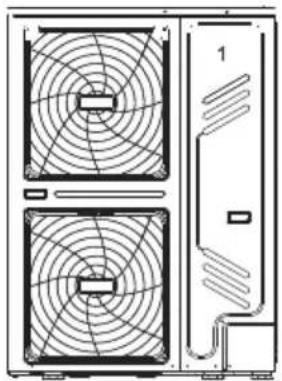
natural_image
Technical line drawing of a dual-panel air conditioner unit with fan patterns and ventilation slots (no text or symbols)WARNING
- Switch off all power — i.e. unit power supply — before removing doors 1 .
- Parts inside the unit may be hot.
Push the grill to the left until it stops, then pull its right edge, so you can remove the grill. You can also reverse the procedure. Be careful to avoid hand injury.
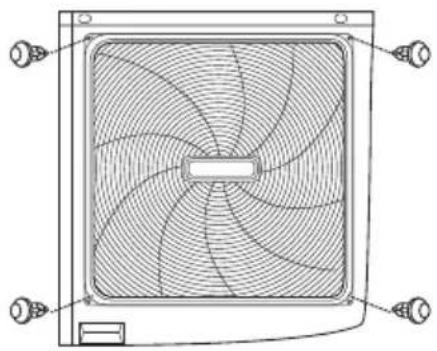
natural_image
Technical line drawing of a square fan with radial blades and mounting connectors (no text or symbols)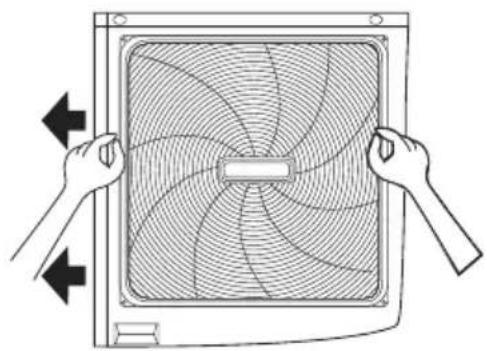
natural_image
Illustration of two hands holding a fan blade inside a computer case, with arrows indicating clockwise motion (no text or symbols)9.2 Main components
9.2.1 Hydraulic module
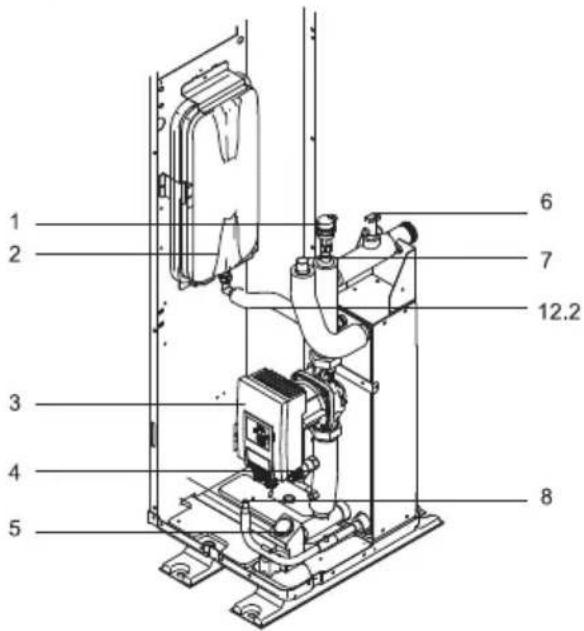
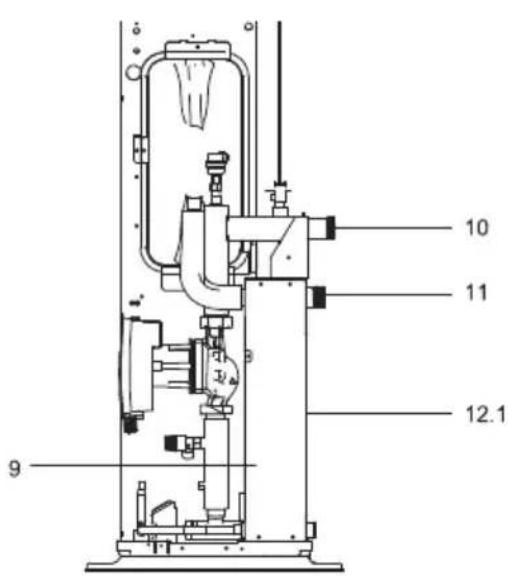
9.2.2 Hydraulic system diagram
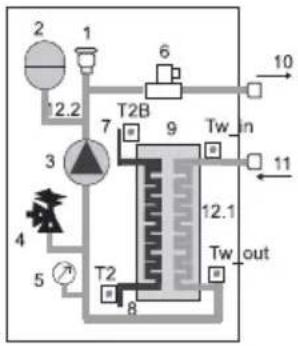
flowchart
graph TD
    A["1"] --> B["2"]
    B --> C["3"]
    C --> D["T2B"]
    D --> E["7"]
    E --> F["6"]
    F --> G["9"]
    G --> H["Tw_in"]
    H --> I["10"]
    I --> J["11"]
    J --> K["12.1"]
    K --> L["Tw_out"]
    L --> M["8"]
    M --> N["T2"]
    N --> O["5"]
    O --> P["4"]
    P --> Q["3"]
    Q --> R["2.2"]
| Coding | Assembly unit | Explanation |
| 1 | Air purge valve | Remaining air in the water circuit will be automatically removes air from the water circuit. |
| 2 | Expansion vessel | Balances water system pressure. (Expansion vessel volume: 8L) |
| 3 | Circulation pump | Circulates water in the water circuit. |
| 4 | Pressure relief valve | Prevents excessive water pressure by opening at 3 bar and discharging water from the water circuit. |
| 5 | Manometer | Provides water circuit pressure readout. |
| 6 | Flow switch | Detects water flow rate to protect compressor and water pump in the event of insufficient water flow. |
| 7 | Refrigerant gas connection | / |
| 8 | Refrigerant liquid connection | / |
| 9 | Plate heat exchanger | Transfer heat from the refrigerant to the water. |
| 10 | Water outlet connection | / |
| 11 | Water inlet connection | / |
| 12.1 | Electrical heating tape | For heating plate heat exchanger |
| 12.2 | Electrical heating tape | For heating connection pipe of expansion vessel |
| / | Temperature sensors | Four temperature sensors determine the water and refrigerant temperature at various points in the water circuit.(T2B; T2; Tw out; Tw in) |
9.3 Electronic control box
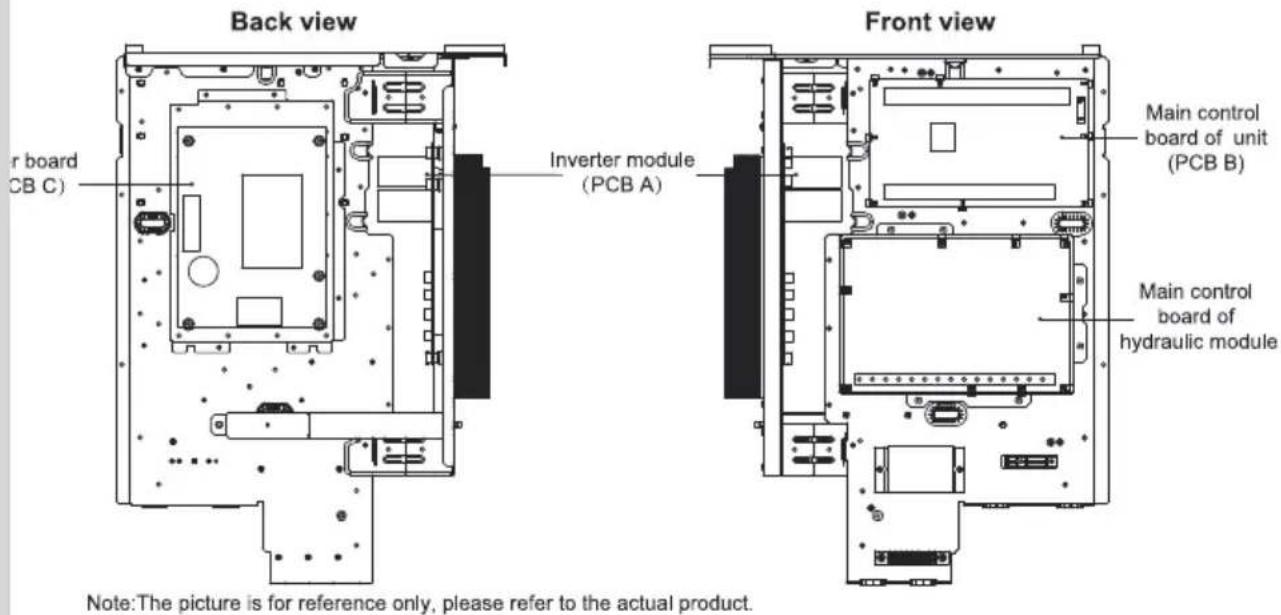
9.3.1 Main control board of indoor unit
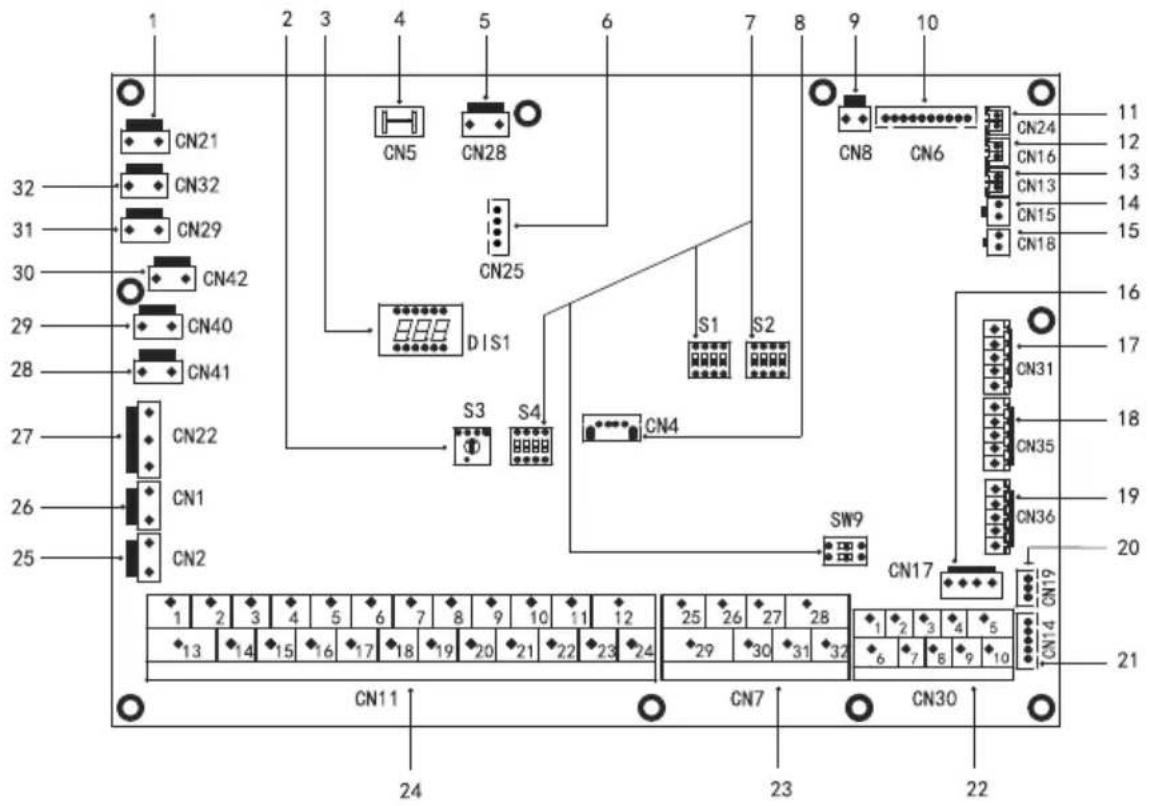
| Order | Port | Code | Assembly unit | Order | Port | Code | Assembly unit |
| 1 | CN21 | POWER | Port for power supply | 19 | CN36 | M1 M2 | Port for remote switch |
| 2 | S3 | / | Rotary dip switch | T1 T2 | Port for temperature board | ||
| 3 | DIS1 | / | Digital display | 20 | CN19 | P Q | Communicate port between indoor unit and outdoor unit |
| 4 | CN5 | GND | Port for ground | 21 | CN14 | A B X Y E | Port for communication with the wired controller |
| 5 | CN28 | PUMP | Port for variable speed pump power input | 22 | CN30 | 1 2 3 4 5 | Port for communication with the wired controller |
| 6 | CN25 | DEBUG | Port for IC programming | 6 7 | Communicate port between indoor unit and outdoor unit | ||
| 7 | S1.S2.S4.SW9 | / | Dip switch | 9 10 | Port for Internal machine Parallel | ||
| 8 | CN4 | USB | Port for USB programming | 23 | CN7 | 26 30/31 32 | Compressor run/Defrost run |
| 9 | CN8 | FS | Port for flow switch | 25 29 | Port for antifreeze E-heating tape(external) | ||
| 10 | CN6 | T2 | Port for temperature sensors of refrigerant liquid side temperature of indoor unit (heating mode) | 24 | CN11 | 27 28 | Port for additional heat source |
| T2B | Port for temperature sensors of refrigerant gas side temperature of indoor unit (cooling mode) | 1 2 | Input port for solar energy | ||||
| TW_in | Port for temperature sensors of inlet water temperature of plate heat exchanger | 3 4 15 | Port for room thermostat | ||||
| TW_out | Port for temperature sensors of outlet water temperature of plate heat exchanger | 5 6 16 | Port for SV1(3-way valve) | ||||
| 7 8 17 | Port for SV2(3-way valve) | ||||||
| T1 | Port for temperature sensors of final outlet water temperature of indoor unit | 9 21 | Port for zone 2 pump | ||||
| 10 22 | Port for outside circulation pump | ||||||
| 11 23 | Port for solar energy pump | ||||||
| 11 | CN24 | Tbt1 | Port for balanced water tank of up temp. sensor | 12 24 | Port for DHW pipe pump | ||
| 13 16 | Control port for tank booster heater | ||||||
| 12 | CN16 | Tbt2 | Port for balanced water tank of down temp. sensor | 14 17 | Control port for internal backup heater 1 | ||
| 13 | CN13 | T5 | Port for domestic hot water tank temp. sensor | 25 | CN2 | TBH_FB | Port for SV3(3-way valve) |
| 14 | CN15 | Tw2 | Port for outlet water for zone 2 temp. sensor | 18 19 20 | Feedback port for external temperature switch(shorted in default) | ||
| 15 | CN18 | Tsolar | Port for solar panel temp. sensor | 26 | CN1 | IBH1/2_FB | Feedback port for temperature switch (shorted in default) |
| 16 | CN17 | PUMP_BP | Port for variable speed pump communication | IBH1 | Control port for internal backup heater 1 | ||
| 17 | CN31 | HT | Control port for room thermostat (heating mode) | 27 | CN22 | IBH2 | Reserved |
| COM | Power port for room thermostat | TBH | Control port for tank booster heater | ||||
| CL | Control port for room thermostat (cooling mode) | 28 | CN41 | HEAT8 | Port for anti-freeze electric heating tape(internal) | ||
| 18 | CN35 | SG | Port for smart grid (grid signal) | 29 | CN40 | HEAT7 | Port for anti-freeze electric heating tape(internal) |
| EVU | Port for smart grid (photovoltaic signal) | 30 | CN42 | HEAT6 | Port for anti-freeze electric heating tape(internal) | ||
| 31 | CN29 | HEAT5 | Port for anti-freeze electric heating tape(internal) | ||||
| 32 | CN32 | IBH0 | Port for backup heater |
9.3.2 Inverter module
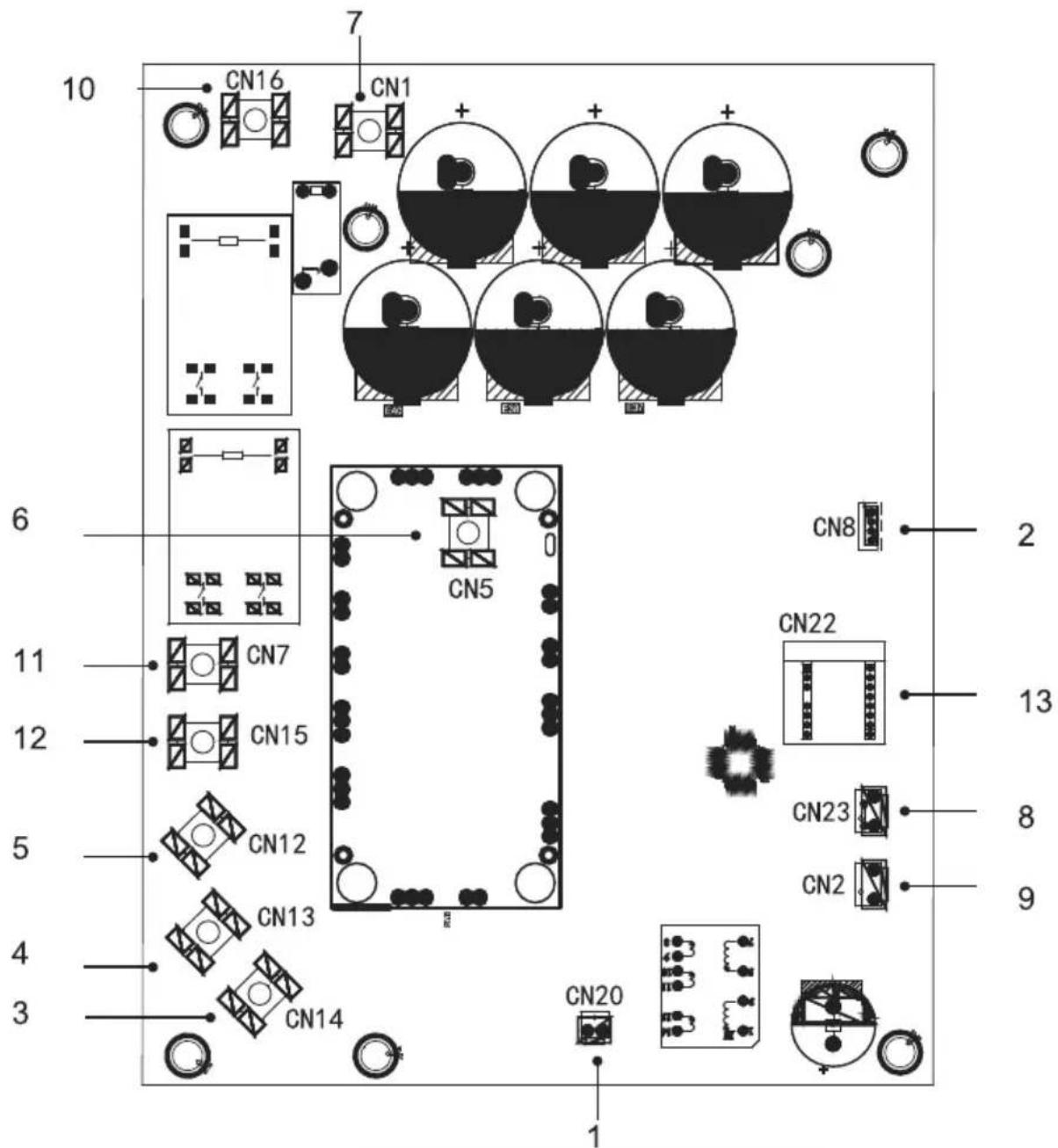
| Coding | Assembly unit |
| 1 | Output port for +15V(CN20) |
| 2 | Port for communication with PCB B (CN8) |
| 3 | Compressor connection port W |
| 4 | Compressor connection port V |
| 5 | Compressor connection port U |
| 6 | Input port P_out for IPM module |
| 7 | Input port P_in for IPM module |
| 8 | Input port for high pressure switch (CN23) |
| 9 | Power for switching power supply(CN2) |
| 10 | Power filtering L1(L1') |
| 11 | Power filtering L2(L2') |
| 12 | Power filtering L3(L3') |
| 13 | PED board |
9.3.3 Main control board of unit
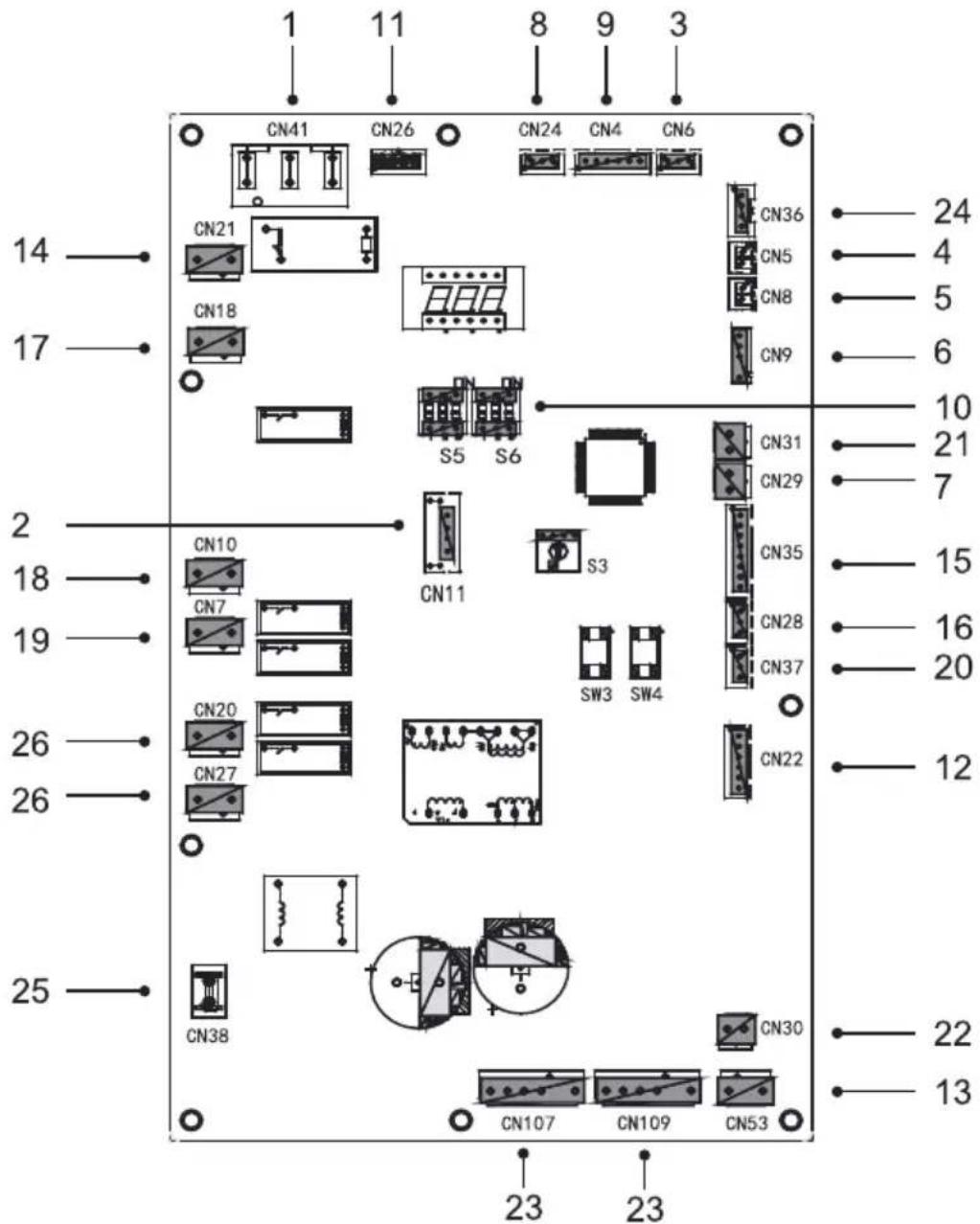
| Coding | Assembly unit | Coding | Assembly unit |
| 1 | Power supply port for PCB B(CN41) | 14 | Power supply port for hydro-box control board(CN21) |
| 2 | Port for IC programming(CN11) | 15 | Port for other temp.sensor(CN35) |
| 3 | Port for pressure sensor(CN6) | 16 | Port for communication XYE(CN28) |
| 4 | Port for sunction temp.sensor(CN5) | 17 | Port for 4-way value(CN18) |
| 5 | Port for discharge temp.sensor(CN8) | 18 | Port for eletric heating tape1(CN10) |
| 6 | Port for outdoor ambient temp. sensor and condenser temp.sensor(CN9) | 19 | Port for eletric heating tape2(CN7) |
| 7 | Port for low pressure switch and quick check(CN29) | 20 | Port for communication D1D2E(CN37) |
| 8 | Port for communication with hydro-box control board (CN24) | 21 | Port for high pressure switch and quick check(CN31) |
| 9 | Port for communication with PCB C(CN4) | 22 | Port for fan 15VDC power supply(CN30) |
| 10 | DIP switch(S5,S6) | 23 | Port for fan(CN107/109) |
| 11 | Port for communication with Power Meter(CN26) | 24 | Port for communication with PCB A(CN36) |
| 12 | Port for electrical expansion value(CN22) | 25 | Port for GND(CN38) |
| 13 | Port for fan 310VDC power supply(CN53) | 26 | Port for SV(CN20/27) |
9.3.3 Filter board
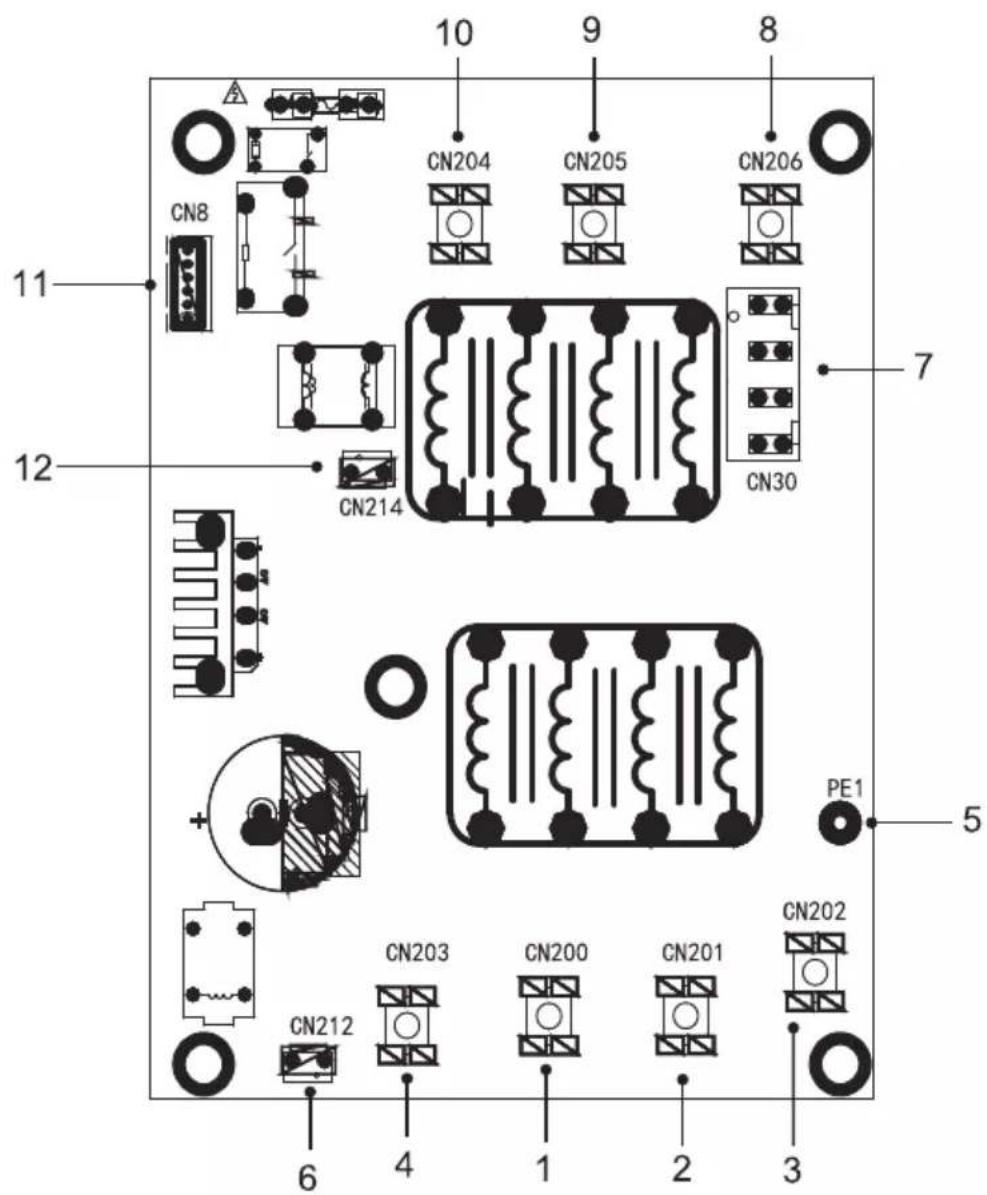
PCB C
| Coding | Assembly unit | Coding | Assembly unit |
| 1 | Power supply L3(L3) | 7 | Power supply port for main control board(CN30) |
| 2 | Power supply L2(L2) | 8 | Power filtering L1(L1') |
| 3 | Power supply L1(L1) | 9 | Power filtering L2(L2') |
| 4 | Power supply N(N) | 10 | Power filtering L3(L3') |
| 5 | Ground wire(PE1) | 11 | Port for communication with PCB B (CN8) |
| 6 | Power supply port for DC fan(CN212) | 12 | Power supply for PCB A switching power supply(CN214) |
9.4 Water piping
All piping lengths and distances have been taken into consideration.
| Requirements | Valve |
| The maximum allowed thermistor cable length is 20m. This is the maximum allowable distance between the domestic hot water tank and the unit (only for installations with a domestic hot water tank). The thermistor cable supplied with the domestic hot water tank is 10m in length. In order to optimize efficiency we recommend installing the 3-way valve and the domestic hot water tank as close as possible to the unit. | Thermistor cable length minus 2m |
NOTE
If the installation is equipped with a domestic hot water tank (field supply), please refer to the domestic hot water tank Installation And Owner's Manual. If there is no glycol (anti-freeze) in the system there is a power supply or pump failure, drain the system (as shown in the figure below).
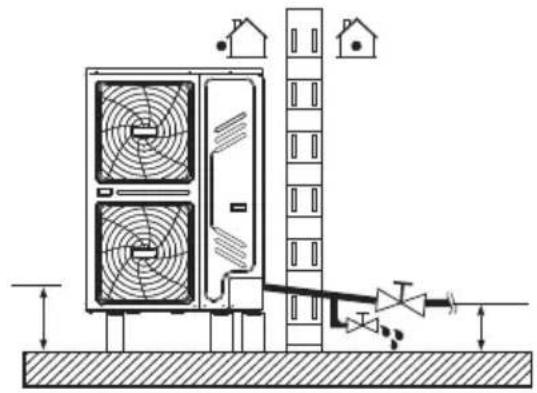
natural_image
Technical diagram of an air conditioning unit with fan and cooling system (no text or labels)NOTE
If water is not removed from the system in freezing weather when unit is not used. The frozen water may damage the water circle parts.
9.4.1 Check the water circuit
The units are equipped with a water inlet and outlet for connection to a water circuit.
The units should only be connected to closed water circuits. Connection to an open water circuit would lead to excessive corrosion of the water piping. Only materials complying with all applicable legislation should be used.
Example:
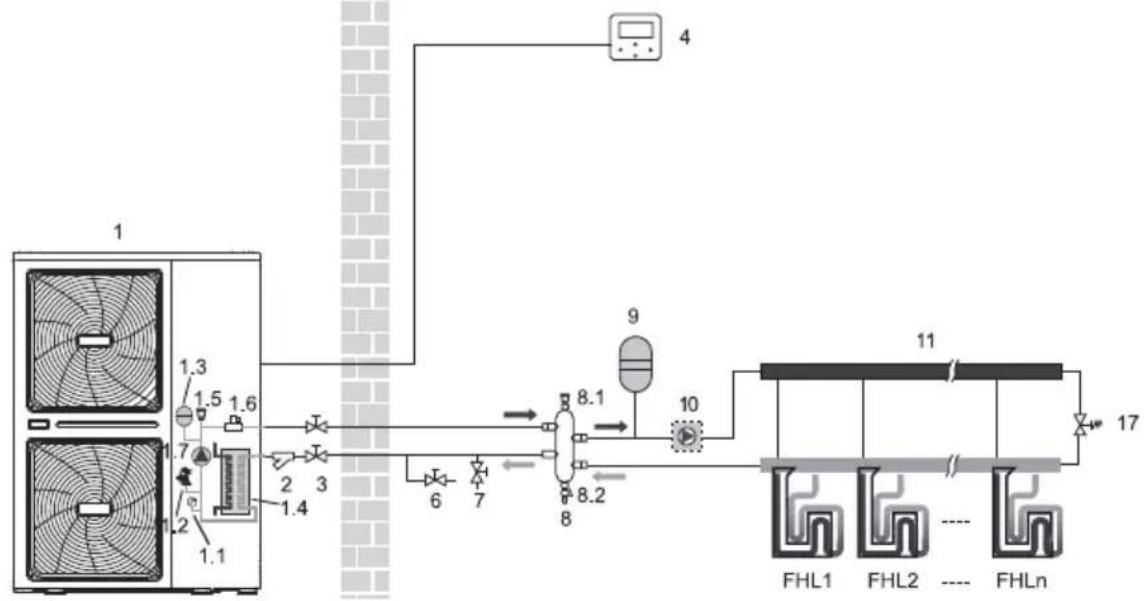
flowchart
graph TD
    A["1 Fan Unit"] -->|1.3 1.5 1.6| B["Valve"]
    B --> C["2 Valve"]
    B --> D["3 Valve"]
    B --> E["4 Valve"]
    C --> F["6 Valve"]
    D --> G["7 Valve"]
    E --> H["8 Valve"]
    F --> I["8.1 Valve"]
    G --> J["8.2 Valve"]
    H --> K["9 Valve"]
    I --> L["FHL1"]
    J --> M["FHL2"]
    K --> N["FHLn"]
    L --> O["11 Valve"]
    M --> P["17 Valve"]
Before continuing installation of the unit, check the following:
• The maximum water pressure ≤ 3 bar.
• The maximum water temperature ≤ 70°C according to safety device setting.
• Always use materials that are compatible with the water used in the system and with the materials used in the unit.
- Ensure that components installed in the field piping can withstand the water pressure and temperature.
- Drain taps must be provided at all low points of the system to permit complete drainage of the circuit during maintenance.
- Air vents must be provided at all high points of the system. The vents should be located at points that are easily accessible for service. An automatic air purge is provided inside the unit. Check that this air purge valve is not tightened so that automatic release of air in the water circuit is possible.
9.4.2 Water volume and expansion vessel pre-pressure checks
The units are equipped with an expansion vessel (models: 8L) that has a default pre-pressure of 1.0 bar. To assure proper operation of the unit, the pre-pressure of the expansion vessel might need to be adjusted.
1) Check that the total water volume in the installation, excluding the internal water volume of the unit, is at least 40L. Refer to 14 Technical specifications to find the total internal water volume of the unit.
NOTE
• In most applications this minimum water volume will be satisfactory.
• In critical processes or in rooms with a high heat load though, extra water might be required.
- When circulation in each space heating loop is controlled by remotely controlled valves, it is important that this minimum water volume is kept even if all the valves are closed.
2) Using the table below, determine if the expansion vessel pre-pressure requires adjustment.
3) Using the table and instructions below, determine if the total water volume in the installation is below the maximum allowed water volume.
| Installation height difference(*) | Water volume ≤230 L | Water volume >230 L |
| ≤7 m | No pre-pressuread justment required. | Actions required:• Pre-pressure must be increased, calculate according to"Calculating the pre-pressure of the expansion vessel" below.• Check if the water volume is lower than maximum allowed water volume (use graph below) |
| >7 m | Actions required:• Pre-pressure must be increased, calculate according to"Calculating the pre-pressure of the expansion vessel" below.• Check if the water volume is lower than maximum allowed water volume (use graph below) | Expansion vessel of the unit too small for the installation. |
^a Height difference is between the highest point of the water circuit and the outdoor unit's expansion tank. Unless the unit is located at the highest point of the system, in which case the installation height difference is considered to be zero.
Calculating the pre-pressure of the expansion vessel
The pre-pressure (Pg) to be set depends on the maximum installation height difference (H) and is calculated as follows: Pg(bar)=(H(m)/10+0.3) bar
Checking the maximum allowed water volume
To determine the maximum allowed water volume in the entire circuit, proceed as follows:
- Determine the calculated pre-pressure (Pg) for the corresponding maximum water volume using the graph below.
- Check that the total water volume in the entire water circuit is lower than this value. If this is not the case, the expansion vessel inside the unit is too small for the installation.
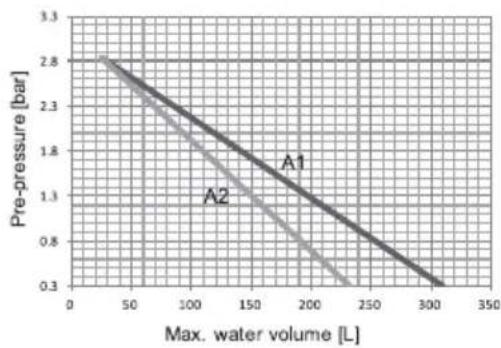
line
| Max. water volume [L] | Pre-pressure [bar] | | --------------------- | ------------------ | | 0 | 2.8 | | 50 | 2.6 | | 100 | 2.3 | | 150 | 2.0 | | 200 | 1.7 | | 250 | 1.4 | | 300 | 1.1 | | 350 | 0.8 |Pre-pressure = pre-pressure of the expansion vessel Maximum water volume = maximum water volume in the system
A1 System without glycol
A2 System without 25% propylene glycol
Example 1:
The unit is installed 5m below the highest point in the water circuit. The total water volume in the water circuit is 100 L. In this example, no action or adjustment is required.
Example 2:
The unit is installed at the highest point in the water circuit. The total water volume in the water circuit is 250 L.
Result:
- Since 250 L is more than 230 L, the pre-pressure must be decreased (see table above).
• The required pre-pressure is: Pg(bar) = (H(m)/10+0.3) bar = (0/10+0.3) bar = 0.3 bar - The corresponding maximum water volume can be read from the graph: approximately 310L.
- Since the total water volume (250L) is below the maximum water volume (310L), the expansion vessel suffices for the installation.
Setting the pre-pressure of the expansion vessel
When it is required to change the default pre-pressure of the expansion vessel (1.0 bar), following guidelines:
- Use only dry nitrogen to set the expansion vessel pre-pressure.
- Inappropriate setting of the expansion vessel pre-pressure will lead to malfunctioning of the system. Pre-pressure should only be adjusted by a licensed installer.
Selecting the additional expansion vessel
If the expansion vessel of the unit is too small for the installation, an additional expansion vessel is needed.
- calculate the pre-pressure of the expansion vessel: Pg(bar) = (H(m) / 10 + 0.3) bar the expansion vessel equipped in the unit should adjust the pre-pressure also.
- calculate the volume needed of the additional expansion vessel: V1=0.0693*Vwater/(2.5-Pg)-V0 Vwater is volume of water in the system, V0 is volume of expansion vessel which the unit is equipped(8L).
9.4.3 Water circuit connection
Water connections must be made correctly in accordance with labels on the outdoor unit, with respect to the water inlet and water outlet.
CAUTION
Be careful not to deform the unit's piping by using excessive force when connecting the piping. Deforming the piping can cause the unit to malfunction.
If air, moisture or dust gets in the water circuit, problems may occur. Therefore, always take into account the following when connecting the water circuit:
• Use clean pipes only.
- Hold the pipe end downwards when removing burrs.
- Cover the pipe end when inserting it through a wall to prevent dust and dirt entering.
- Use a good thread sealant for sealing the connections. The sealing must be able to withstand the pressures and temperatures of the system.
- When using non-copper metallic piping, be sure to insulate two kind of materials from each other to prevent galvanic corrosion.
- For copper is a soft material, use appropriate tools for connecting the water circuit. Inappropriate tools will cause damage to the pipes.
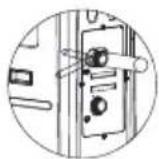
NOTE
The unit is only to be used in a closed water system. Application in an open water circuit can lead to excessive corrosion of the water piping:
- Never use Zn-coated parts in the water circuit. Excessive corrosion of these parts may occur as copper piping is used in the unit's internal water circuit.
- When using a 3-way valve in the water circuit. Preferably choose a ball type 3-way valve to guarantee full separation between the domestic hot water and floor heating water circuit.
- When using a 3-way valve or a 2-way valve in the water circuit. The recommended maximum changeover time of the valve should be less than 60 seconds.
9.4.4 Water circuit anti-freeze protection
Ice formation can cause damage to the hydraulic system. As the outdoor unit may be exposed to sub-zero temperatures, care must be taken to prevent freezing of the system.
All internal hydronic parts are insulated to reduce heat loss. Insulation must also be added to the field piping.
The software contains special functions using the heat pump to protect the entire system against freezing. When the temperature of the water flow in the system drops to a certain value, the unit will heat the water, either using the heat pump, the electric heating tap, or the backup heater. The freeze protection function will turn off only when the temperature increases to a certain value.
In event of a power failure, the above features would not protect the unit from freezing.
Do one of the following to protect the water circuit against freezing:
- Add glycol to the water. Glycol lowers the freezing point of the water.
- Install freeze protection valves. Freeze protection valves drain the water from the system before it can freeze.
NOTE
If you add glycol to the water, do NOT install freeze protection valves. Possible consequence: Glycol leaking out of the freeze protection valves.
1. Freeze protection by glycol
About freeze protection by glycol
Adding glycol to the water lowers the freezing point of water.
WARNING
Ethylene glycol is toxic.
WARNING
Due to the presence of glycol, corrosion of the system is possible. Uninhibited glycol will turn acidic under the influence of oxygen. This process is accelerated by the presence of copper and high temperatures. The acidic uninhibited glycol attacks metal surfaces and forms galvanic corrosion cells that cause severe damage to the system. Therefore it is important that:
- the water treatment is correctly executed by a qualified water specialist,
- a glycol with corrosion inhibitors is selected to counteract acids formed by the oxidation of glycols,
- no automotive glycol is used because their corrosion inhibitors have a limited lifetime and contain silicates which can foul or plug the system,
- galvanized pipes are NOT used in glycol systems since the presence may lead to the precipitation of certain components in the glycol's corrosion inhibitor.
NOTE
Glycol absorbs water from its environment. Therefore do NOT add glycol that has been exposed to air. Leaving the cap off the glycol container causes the concentration of water to increase. The glycol concentration is then lower than assumed. As a result, the hydraulic components might freeze up after all. Take preventive actions to ensure a minimal exposure of the glycol to air.
Types of glycol
The types of glycol that can be used depend on whether the system contains a domestic hot water tank:
If the system contains a domestic hot water tank, then only use propylene glycol ^* ;
If the system does NOT contain a domestic hot water tank, then you can use either propylene glycol* or ethylene glycol;
*Propylene glycol, including the necessary inhibitors, classified as Category III according to EN1717.
Required concentration of glycol
The required concentration of glycol depends on the lowest expected outdoor temperature, and on whether you want to protect the system from bursting or from freezing. To prevent the system from freezing, more glycol is required.
Add glycol according to the table below:
Ethylene Glycol
| Quality of glycol | Modification coefficient | Minimum outdoor temperature | |||
| Cooling capacity modification | Power modification | Water resistance | Water flow modification | ||
| 0% | 1.000 | 1.000 | 1.000 | 1.000 | 0°C |
| 10% | 0.984 | 0.998 | 1.118 | 1.019 | -5°C |
| 20% | 0.973 | 0.995 | 1.268 | 1.051 | -15°C |
| 30% | 0.965 | 0.992 | 1.482 | 1.092 | -25°C |
Propylene Glycol
| Quality of glycol | Modification coefficient | Minimum outdoor temperature | |||
| Cooling capacity modification | Power modification | Water resistance | Water flow modification | ||
| 0% | 1.000 | 1.000 | 1.000 | 1.000 | 0°C |
| 10% | 0.976 | 0.996 | 1.071 | 1.000 | -4°C |
| 20% | 0.961 | 0.992 | 1.189 | 1.016 | -12°C |
| 30% | 0.948 | 0.988 | 1.380 | 1.034 | -20°C |

INFORMATION
- Protection against bursting: the glycol will prevent the piping from bursting, but NOT the liquid inside the piping from freezing.
- Protection against freezing: the glycol will prevent the liquid inside the piping from freezing.

NOTE
- The required concentration might differ depending on the type of glycol. ALWAYS compare the requirements from the table above with the specifications provided by the glycol manufacturer. If necessary, meet the requirements set by the glycol manufacturer.
- If the liquid in the system is frozen, the pump will NOT be able to start. Mind that if you only prevent the system from bursting, the liquid inside might still freeze.
- When water is at standstill inside the system, the system is very likely to freeze and get damaged.
2. Freeze protection by freeze protection valves
About freeze protection valves
When no glycol is added to the water, you can use freeze protection valves to drain the water from the system before it can freeze.
• Install freeze protection valves (field supply) at all lowest points of the field piping.
- Normally closed valves (located indoors near the piping entry/exit points) can prevent that all water from indoor piping is drained when the freeze protection valves open.

NOTE
Water may enter into the flow switch and cannot be drained out and may freeze when the temperature is low enough. The flow switch should be removed and dried, then can be reinstalled in the unit.
Counterclock Wise rotation, remove the flow switch.
Drying the flow switch completely.
Also refer to "10.3 Pre-operation checks/Checks before initial start-up".
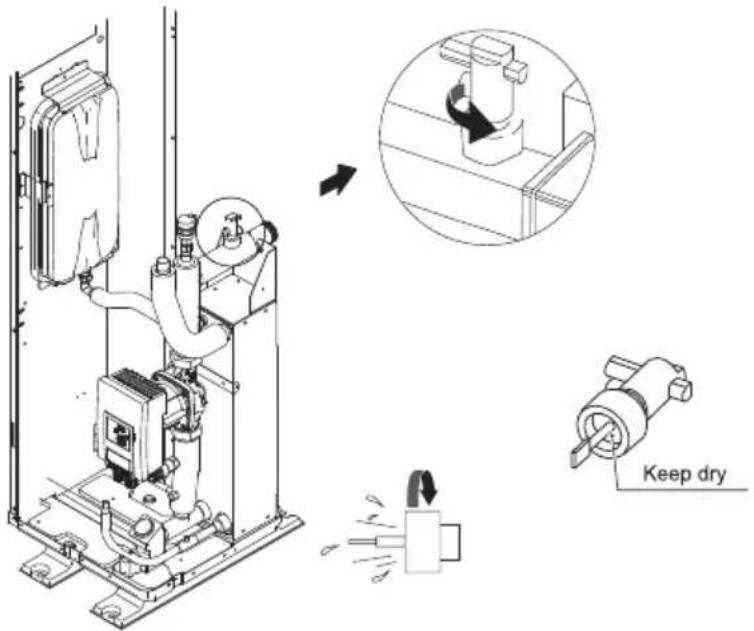
9.5 Adding water
Connect the water supply to the fill valve and open the valve.
Make sure the automatic air purge valve is open (at least 2 turns).
Fill with water until the manometer indicates a pressure of approximately 2.0 bar. Remove air in the circuit as much as possible using the air purge valves. Air in the water circuit could lead to malfunction of the backup electric heater.
Do not fasten the black plastic cover on the vent valve at the topside of the unit when the system is running. Open air purge valve, tum anticlockWise at least 2 full turns to release air from the system.
natural_image
Pure mechanical assembly diagram without any text, numbers, or symbolsNOTE
During filling, it might not be possible to remove all air in the system. Remaining air will be removed through the automatic air purge valves during the first operating hours of the system. Topping up the water afterwards might be required.
- The water pressure indicated on the manometer will vary depending on the water temperature (higher pressure at higher water temperature). However, at all times water pressure should remain above 0.3 bar to avoid air entering the circuit.
• The unit might drain-off too much water through the pressure relief valve.
• Water quality should be complied with EN 98/83 EC Directives.
Detailed water quality condition can be found in EN 98/83 EC Directives.
9.6 Water piping insulation
The complete water circuit including all piping, water piping must be insulated to prevent condensation during cooling operation and reduction of the heating and cooling capacity as well as prevention of freezing of the outside water piping during winter. The insulation material should at least of B1 fire resistance rating and complies with all applicable legislation. The thickness of the sealing materials must be at least 13 mm with thermal conductivity 0.039 W/mK in order to prevent freezing on the outside water piping.
If the outdoor ambient temperature is higher than 30^ C and the humidity is higher than RH 80%, then the thickness of the sealing materials should be at least 20 mm in order to avoid condensation on the surface of the seal.
9.7 Field wiring
WARNING
A main switch or other means of disconnection, having a contact separation in all poles, must be incorporated in the fixed wiring in accordance with relevant local laws and regulations. Switch off the power supply before making any connections. Use only copper wires. Never squeeze bundled cables and make sure they do not come in contact with the piping and sharp edges. Make sure no external pressure is applied to the terminal connections. All field wiring and components must be installed by a licensed electrician and must comply with relevant local laws and regulations.
The field wiring must be carried out in accordance with the wiring diagram supplied with the unit and the instructions given below.
Be sure to use a dedicated power supply. Never use a power supply shared by another appliance.
Be sure to establish a ground. Do not ground the unit to a utility pipe, surge protector, or telephone ground. Incomplete grounding may cause electrical shock.
Be sure to install a ground fault circuit interrupter (30 mA). Failure to do so may cause electrical shock.
Be sure to install the required fuses or circuit breakers.
9.7.1 Precautions on electrical wiring work
• Fix cables so that cables do not make contact with the pipes (especially on the high pressure side).
- Secure the electrical wiring with cable ties as shown in figure so that it does not come in contact with the piping, particularly on the high-pressure side.
• Make sure no external pressure is applied to the terminal connectors.
- When installing the ground fault circuit interrupter make sure that it is compatible with the inverter (resistant to high frequency electrical noise) to avoid unnecessary opening of the ground fault circuit interrupter.
NOTE
The ground fault circuit interrupter must be a high-speed type breaker of 30 mA (<0.1 s).
- This unit is equipped with an inverter. Installing a phase advancing capacitor not only will reduce the power factor improvement effect, but also may cause abnormal heating of the capacitor due to high-frequency waves. Never install a phase advancing capacitor as it could lead to an accident.
9.7.2 Wiring overview
The illustration below gives an overview of the required field wiring between several parts of the installation. Refer also to "8 Typical application examples".
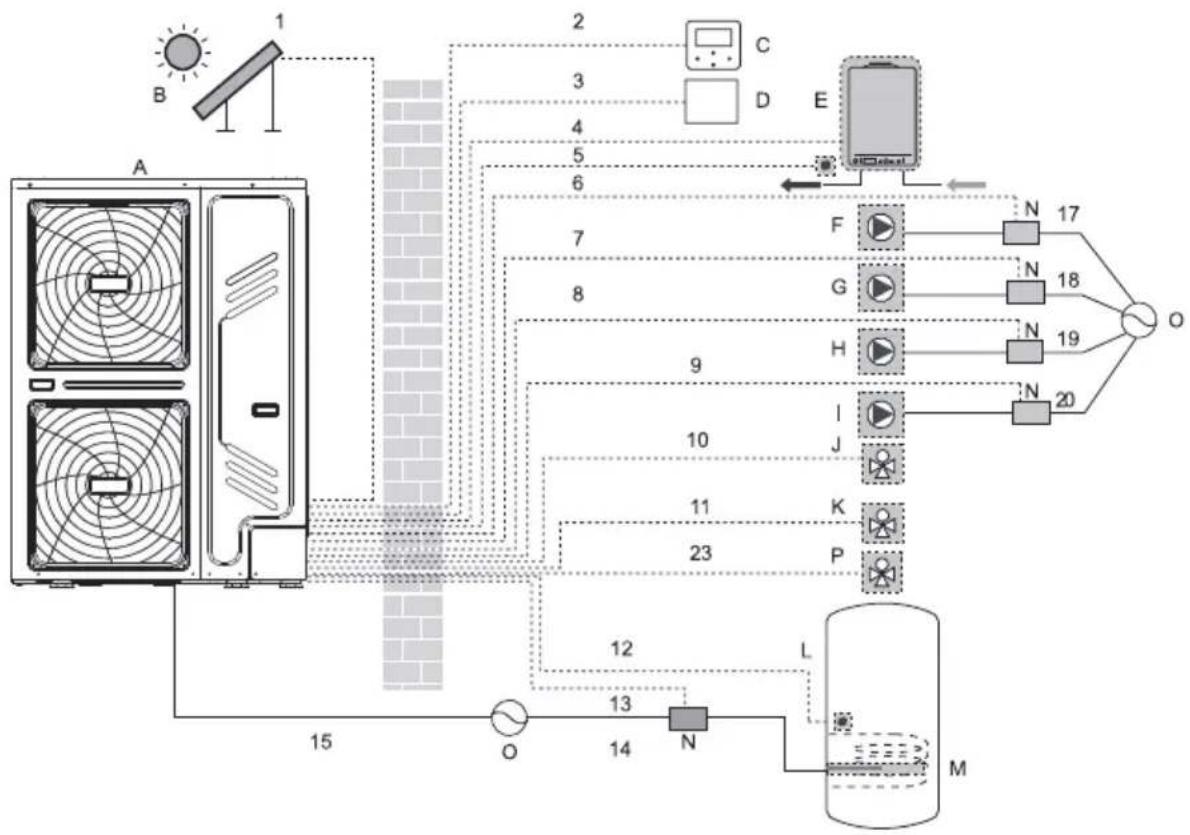
flowchart
graph TD
    A["A"] -->|1| B["B"]
    B --> C["C"]
    C --> D["D"]
    D --> E["E"]
    E --> F["F"]
    F --> G["G"]
    G --> H["H"]
    H --> I["I"]
    I --> J["J"]
    J --> K["K"]
    K --> L["P"]
    L --> M["M"]
    M --> N["N"]
    N --> O["O"]
    O --> P["N 17"]
    P --> Q["N 18"]
    Q --> R["N 19"]
    R --> S["N 20"]
    S --> T["N 17"]
    T --> U["N 18"]
    U --> V["N 19"]
    V --> W["N 20"]
    W --> X["N 17"]
    X --> Y["N 18"]
    Y --> Z["N 19"]
    Z --> AA["N 20"]
| Coding | Assembly unit | Coding | Assembly unit |
| A | Outdoor unit | I | P_d: DHW pump (field supply) |
| B | Solar energy kit (field supply) | J | SV2: 3-way valve (field supply) |
| C | User interface | K | SV1: 3-way valve for domestic hot water tank (field supply) |
| D | Room thermostat (field supply) | L | Domestic hot water tank |
| E | Boiler (field supply) | M | Booster heater |
| F | P_s: Solar pump (field supply) | N | Contactor |
| G | P_c: Circulation pump / zone 2 pump (field supply) | O | Power supply |
| H | P_o: Outside circulation pump / zone 1 pump (field supply) | P | Zone2 SV3(3-way valve) |
| Item | Description | AC/DC | Required number of conductors | Maximum running current |
| 1 | Solar energy kit signal cable | AC | 2 | 200mA |
| 2 | User interface cable | AC | 5 | 200mA |
| 3 | Room thermostat cable | AC | 2 or 3 | 200mA(a) |
| 4 | Boiler control cable | / | 2 | 200mA |
| 5 | Thermistor cable for Tw2 | DC | 2 | (b) |
| 9 | DHW pump control cable | AC | 2 | 200mA(a) |
| 10/11/23 | 3-way valve control cable | AC | 2 or 3 | 200mA(a) |
| 12 | Thermistor cable for T5 | DC | 2 | (b) |
| 13 | Booster heater control cable | AC | 2 | 200mA(a) |
| 15 | Power supply cable for unit | AC | 3+GND | (c) |
(a) Minimum cable section AWG18 (0.75mm²).
(b) The thermistor and connection wire (10m) are delivered with the domestic hot water tank (T5) or zone 2 outlet temp. (Tw2)
(c) See 9.7.4 Specifications of standard wiring components
NOTE
Please use H07RN-F for the power wire, all the cable are connected to high voltage except for thermistor cable and cable for user interface.
• Equipment must be grounded.
- All high-voltage external load, if it is metal or a grounded port, must be grounded.
- All external load current is needed less than 0.2A, if the single load current is greater than 0.2A, the load must be controlled through AC contactor.
- AHS1" "AHS2", "A1" "A2", "R1" "R1" and "DTF1" "DTF2" wiring terminal ports provide only the switch signal. Please refer to image of 9.7.6 to get the ports position in the unit.
- Expansion valve E-Heating tape, Plate heat exchanger E-Heating tape and Flow switch E-Heating tape share a control port.
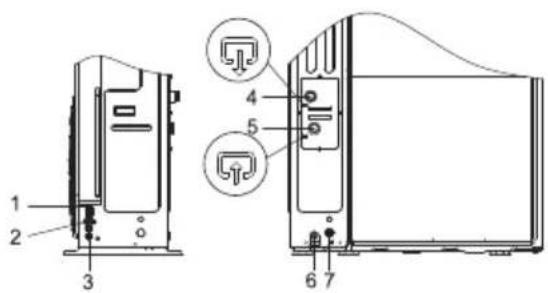
| Coding | Assembly unit |
| 1 | High voltage wire hole |
| 2 | Low voltage wire hole |
| 3 | High voltage or low voltage wire hole |
| 4 | Water outlet |
| 5 | Water inlet |
| 6 | Drain outlet |
| 7 | Drainage pipe hole (for safety valve) |
Field wiring guidelines
- Most field wiring on the unit is to be made on the terminal block inside the switch box. To gain access to the terminal block, remove the switch box service panel.
WARNING
Switch off all power including the unit power supply and backup heater and domestic hot water tank power supply (if applicable) before removing the switch box service panel.
• Fix all cables using cable ties.
• A dedicated power circuit is required for the backup heater.
- Installations equipped with a domestic hot water tank (field supply) require a dedicated power circuit for the booster heater. Please refer to the domestic hot water tank Installation & Owner's Manual. Secure the wiring in the order shown below.
- Lay out the electrical wiring so that the front cover does not rise up when doing wiring work and attach the front cover securely.
• Follow the electric wiring diagram for electrical wiring works (the electric wiring diagrams are located on the rear side of door 2.
• Install the wires and fix the cover firmly so that the cover may be fit in properly.
9.7.3 Precautions on wiring of power supply
- Use a round crimp-style terminal for connection to the power supply terminal board. In case it cannot be used due to unavoidable reasons, be sure to observe the following instructions.
- Do not connect different gauge wires to the same power supply terminal. (Loose connections may cause overheating.)
- When connecting wires of the same gauge, connect them according to the figure below.

natural_image
Three identical 3D diagrammatic icons showing a device with circular ports and checkmark indicators (no text or symbols)- Use the correct screwdriver to tighten the terminal screws. Small screwdrivers can damage the screw head and prevent appropriate tightening.
• Over-tightening the terminal screws can damage the screws. - Attach a ground fault circuit interrupter and fuse to the power supply line.
- In wiring, make certain that prescribed wires are used, carry out complete connections, and fix the wires so that outside force cannot affect the terminals.
| System | Outdoor unit | Power Current Compressor | OFM | ||||||||
| Voltage | Hz | Min.(V) | Max.(V) | MCA(A) | TOCA(A) | MFA(A) | MSC(A) | RLA(A) | kW | FLA(A) | |
| 18kW | 380-415 | 50 | 342 | 456 | 21.0 | 28 | 25 | - | 12 | 0.34 | 3.0 |
| 22kW | 380-415 | 50 | 342 | 456 | 24.5 | 28 | 25 | - | 14 | 0.34 | 3.0 |
| 26kW | 380-415 | 50 | 342 | 456 | 27.0 | 28 | 32 | - | 18 | 0.34 | 3.0 |
| 30kW | 380-415 | 50 | 342 | 456 | 28.5 | 28 | 32 | - | 21 | 0.34 | 3.0 |
9.7.4 Specifications of standard wiring components
Door 1: compressor compartment and electrical parts: XT1
OUTOOOR UNIT POWER SUPPLY
| Unit | 18kW | 22kW | 26kW | 30kW |
| Maximum overcurrent protector(MOP) | 18 | 21 | 24 | 28 |
| Wiring size( mm^2 ) | 6 | 6 | 6 | 6 |
- Stated values are maximum values (see electrical data for exact values).

NOTE
The ground fault circuit interrupter must be a high-speed type breaker of 30 mA (<0.1 s).
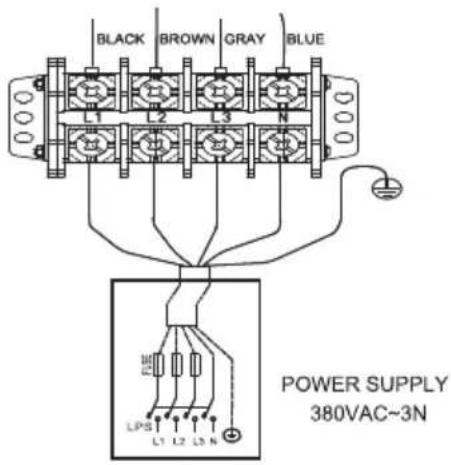
9.7.5 Connection for system parallel
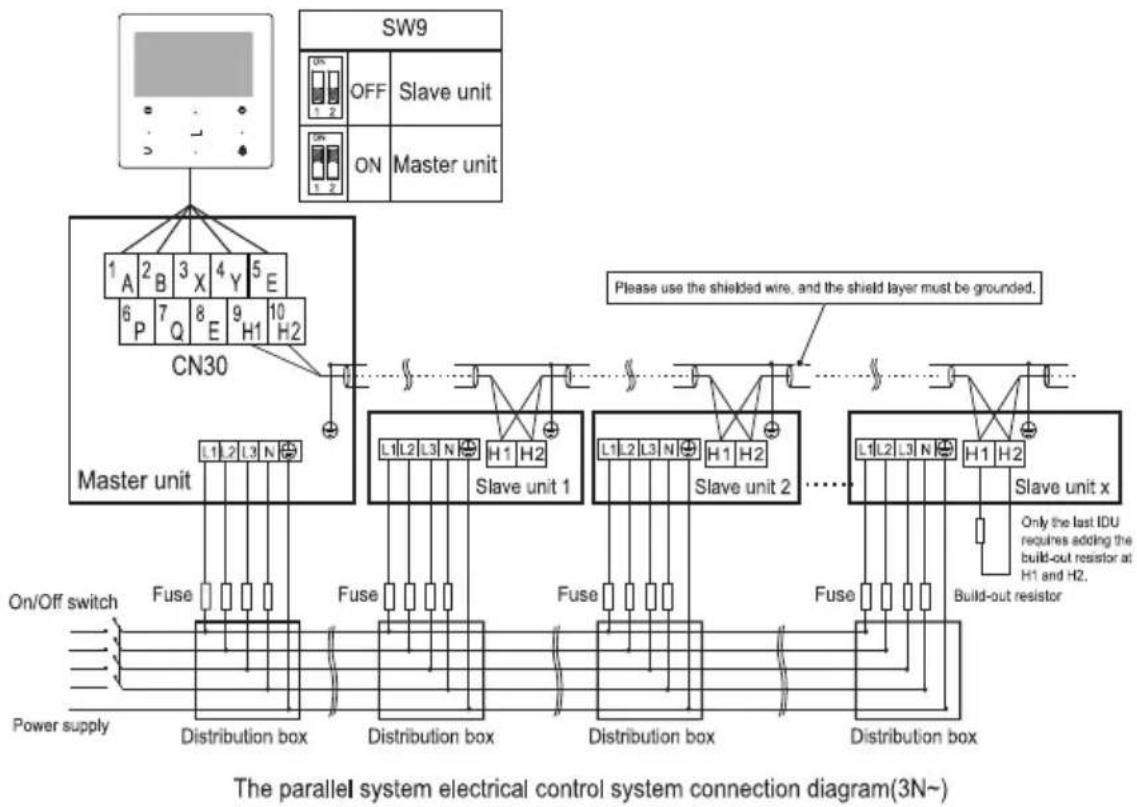
flowchart
graph TD
    A["Power supply"] --> B["On/Off switch"]
    B --> C["Distribution box"]
    C --> D["CN30"]
    D --> E["Master unit"]
    E --> F["ON/OFF/SW9/Slave unit"]
    F --> G["ON/Master unit"]
    H["Power supply"] --> I["Distribution box"]
    I --> J["CN30"]
    J --> K["Master unit"]
    K --> L["On/OFF/Sw9/Sw9/Slave unit"]
    L --> M["ON/Master unit"]
    N["Power supply"] --> O["Distribution box"]
    O --> P["CN30"]
    P --> Q["Master unit"]
    Q --> R["On/OFF/Sw9/Sw9/Slave unit"]
    R --> S["ON/Master unit"]
    T["Power supply"] --> U["Distribution box"]
    U --> V["CN30"]
    V --> W["Master unit"]
    W --> X["On/OFF/Sw9/Sw9/Slave unit"]
    X --> Y["ON/Master unit"]
    Z["Power supply"] --> AA["Distribution box"]
    AA --> AB["CN30"]
    AB --> AC["Master unit"]
    AC --> AD["On/OFF/Sw9/Sw9/Slave unit"]
    AD --> AE["ON/Master unit"]

CAUTION
- The parallel function of the system only supports 6 machines at most.
2、In order to ensure the success of automatic addressing, all machines must be connected to the same power supply and powered on uniformly. - Only the Master unit can connect the controller, and you must put the SW9 to "on" of the master unit, the slave unit cannot connect the controller.
- Please use the shielded wire, and the shield layer must be grounded.
9.7.6 Connection for other components
| 1SL1 | 2SL2 | 3H | 4C | 51ON | 61OFF | 72ON | 82OFF | 9P_c | 10P_o | 11P_s | 12P_d | 25HT | 26R2 | 27ASH1 | 28ASH2 | 1A | 2B | 3X | 4Y | 5E | |||
| 13TBH | 14IBH1 | 15L1 | 16N | 17N | 18N | 193ON | 203OFF | 21N | 22N | 23N | 24N | 29N | 30R1 | 31DFT2 | 32DFT1 | 6P | 7Q | 8E | 9H1 | 10H2 |
CN11
CN7
CN30
| CN11 | Code | Connect to | ||
| 1 | 1 | SL1 | Solar energy input signal | |
| 2 | SL2 | |||
| 2 | 3 | H | Room thermostat input (high voltage) | |
| 4 | C | |||
| 15 | L1 | |||
| 3 | 5 | 1ON | SV1(3-way valve) | |
| 6 | 1OFF | |||
| 16 | N | |||
| 4 | 7 | 2ON | SV2(3-way valve) | |
| 8 | 2OFF | |||
| 17 | N | |||
| 5 | 9 | P_c | Pumpc(zone 2 pump) | |
| 21 | N | |||
| 6 | 10 | P_o | Outside circulation pump (zone 1 pump) | |
| 22 | N | |||
| 7 | 11 | P_s | Solar energy pump | |
| 23 | N | |||
| 8 | 12 | P_d | DHW pipe pump | |
| 24 | N | |||
| 9 | 13 | TBH | Tank booster heater | |
| 16 | N | |||
| 10 | 14 | IBH1 | Internal backup heater 1 | |
| 17 | N | |||
| 1 | 18 | N | SV3(3-way valve) | |
| 19 | 3ON | |||
| 20 | 3OFF | |||
| CN11 | Code | Connect to | ||
| 1 | 1 | A | Wired controller | |
| 2 | B | |||
| 3 | X | |||
| 4 | Y | |||
| 5 | E | |||
| 2 | 6 | P | Outdoor unit | |
| 7 | Q | |||
| 3 | 9 | H1 | system parallel | |
| 10 | H2 | |||
| CN7 | Code | Connect to | ||
| 1 | 26 R2 | Compressor run | ||
| 30 R1 | ||||
| 31 DFT2 | Defrost or alarm signal | |||
| 32 DFT1 | ||||
| 2 | 25 HT | Antifreeze E-heating tape(external) | ||
| 29 | N | |||
| 3 | 27 | AHS1 | Additional heat source | |
| 28 | AHS2 | |||
Port provide the control signal to the load. Two kind of control signal port:
Type 1: Dry connector without voltage.
Type 2: Port provide the signal with 220V voltage. If the current of load is <0.2A, load can connect to the port directly. If the current of load is ≥0.2A, the AC contactor is required to connected for the load.
Type 1:
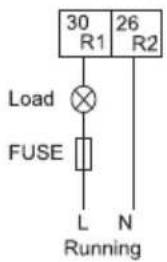
Type 2:
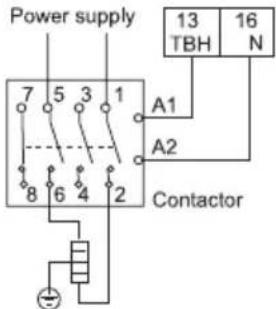
Control signal port of hydraulic model contains terminals for solar energy, remote alarm, 3-way valve, pump, and external heating source, etc.
The parts wiring is illustrated below:
1) For solar energy kit input signal
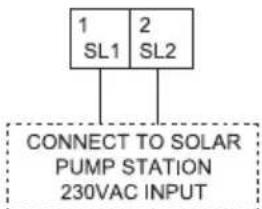
| Voltage | 220-240VAC |
| Maximum running current(A) | 0.2 |
| Wiring size(mm ^2 ) | 0.75 |
2) For room thermostat
a. type 1(RT1) (High voltage)
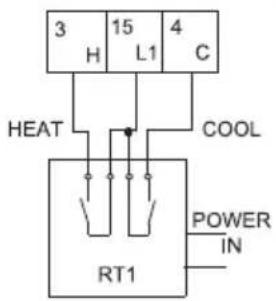
Method A
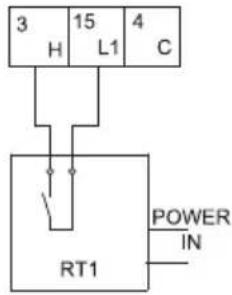
Method B
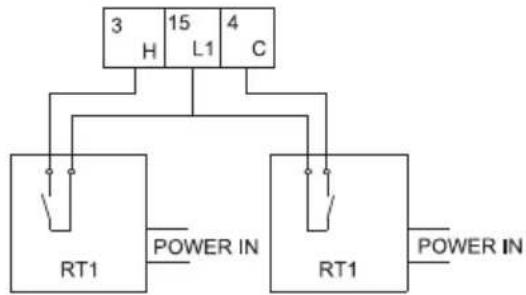
flowchart
graph TD
    A["3 H"] --> B["RT1"]
    C["15 L1"] --> B
    D["4 C"] --> B
    B --> E["POWER IN"]
    F["RT1"] --> G["POWER IN"]
Method C
b. type 2(RT1) (Low voltage): in main control board of hydraulic module CN31
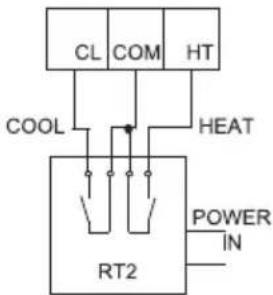
Method A
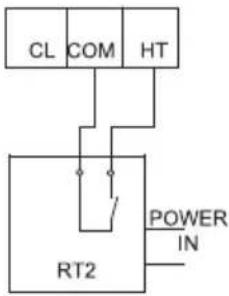
flowchart
graph TD
    A["CL"] --> B["RT2"]
    C["COM"] --> B
    D["HT"] --> B
    B --> E["POWER IN"]
Method B
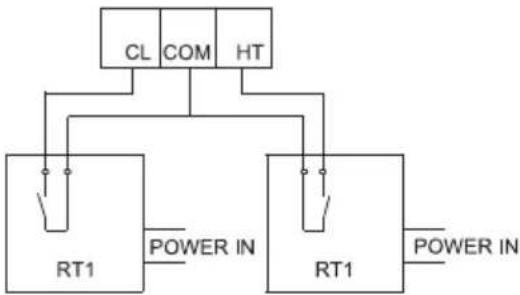
flowchart
graph TD
    A["CL"] --> B["RT1"]
    C["COM"] --> B
    D["HT"] --> B
    B --> E["POWER IN"]
    B --> F["POWER IN"]
    style A fill:#f9f,stroke:#333
    style C fill:#f9f,stroke:#333
    style D fill:#f9f,stroke:#333
Method C
NOTE
There are two optional connect method depend on the room thermostat type.
| Voltage | 220-240VAC |
| Maximum running current(A) | 0.2 |
| Wiring size(mm ^2 ) | 0.75 |
Room thermostat type1(RT1)(High voltage): "POWER IN" provide the working voltage to the RT, doesn't provide the voltage to the RT connector directly. Port "15 L1" provide the 220V voltage to the RT connector. Port "15 L1" connect from the unit main power supply port L of 1-phase power supply, L2 port of 3-phase power supply.
Room thermostat type2(RT2)(Low voltage): "POWER IN" provide the working voltage to the RT.
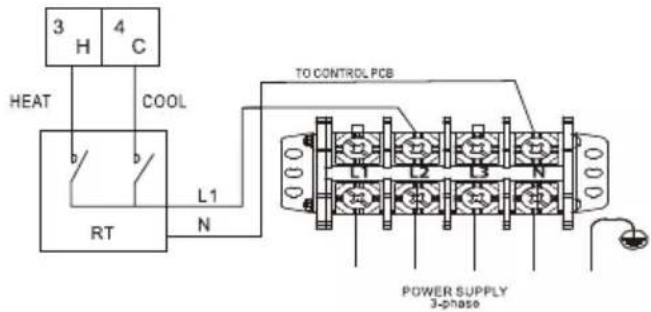
There are three methods for connecting the thermostat cable (as described in the picture above) and it depends on the application.
- Method A
RT can control heating and cooling individually, like the controller for 4-pipe FCU. When the hydraulic module is connected with the external temperature controller, user interface FOR SERVICEMAN set THERMOSTAT and ROOM MODE SETTING to YES:
A.1 When unit detect voltage is 230VAC between C and N, the unit operates in the cooling mode.
A.2 When unit detect voltage is 230VAC between H and N, the unit operates in the heating mode.
A.3 When unit detect voltage is 0VAC for both side(C-N, H-N) the unit stop working for space heating or cooling.
A.4 When unit detect voltage is 230VAC for both side(C-N, H-N) the unit working in cooling mode.
- Method B
RT provide the switch signal to unit. user interface FOR SERVICEMAN set ROOM THERMOSTAT and MODE SETTING to YES:
B.1 When unit detect voltage is 230VAC between H and N, unit turn on.
B.2 When unit detect voltage is 0VAC between H and N, unit turn off.
NOTE
When ROOM THERMOSTAT is set to YES, the indoor temperature sensor Ta can't be set to valid, unit running only according to T1.
- Method C
Hydraulic module is connected with two external temperature controllers, while user interface FOR SERVICEMAN set DUAL ROOM THERMOSTAT to YES:
C.1 When unit detect voltage is 230VAC between H and N, the MAIN side turn on. When unit detect voltage is 0VAC between H and N, the MAIN side turn off.
C.2 When unit detect voltage is 230VAC between C and N, the ROOM side turn on according to climate temp curve. When unit detect voltage is 0V between C and N, the ROOM side turn off.
C.3 When H-N and C-N are detected as 0VAC, unit turn off.
C.4 when H-N and C-N are detected as 230VAC, both MAIN and ROOM side turn on.
NOTE
- The wiring of the thermostat should correspond to the settings of the user interface. Refer to 10.7 Field setting/Room Thermostat.
- Power supply of machine and room thermostat must be connected to the same Neutral Line and (L2) Phase Line(for 3-phase unit only).
Procedure
- Connect the cable to the appropriate terminals as shown in the picture.
• Fix the cable with cable ties to the cable tie mountings to ensure stress relief.
3) For 3-way value SV3
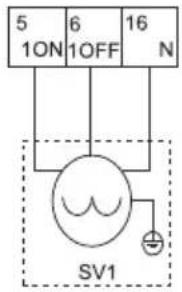
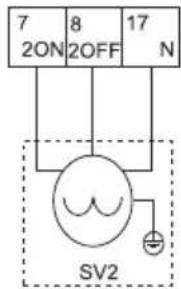
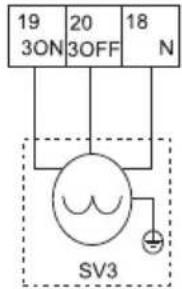
| Voltage | 220-240VAC |
| Maximum running current(A) | 0.2 |
| Wiring size( mm^2 ) | 0.75 |
| Control port signal type | Type 1 |
NOTE
Wiring of the 3-way valve is different for NC(normal close) and NO (normal open). Before wiring, read the Installation & Owner's manual for the 3-way valve carefully and install the valve as showed in the picture. Make sure to connect it to the correct terminal numbers.
Procedure
- Connect the cable to the appropriate terminals as shown in the picture.
• Fix the cable reliably.
4) For different functions pumps:
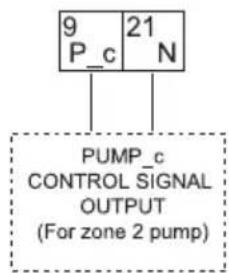
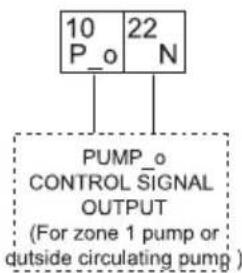
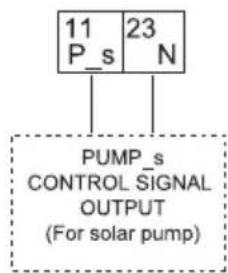
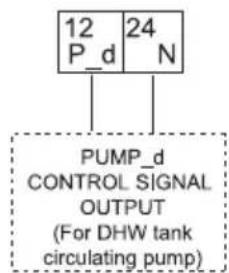
| Voltage | 220-240VAC |
| Maximum running current(A) | 0.2 |
| Wiring size( mm^2 ) | 0.75 |
| Control port signal type | Type 2 |
5) For tank booster heater:
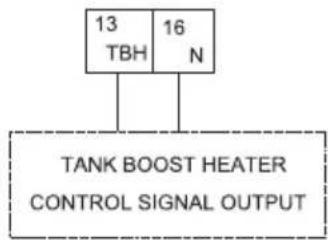
flowchart
graph TD
    A["13 TBH"] --> C["TANK BOOST HEATER CONTROL SIGNAL OUTPUT"]
    B["16 N"] --> C
Procedure
- Connect the cable to the appropriate terminals as shown in the picture.
• Fix the cable reliably.
| Voltage | 220-240VAC |
| Maximum running current(A) | 0.2 |
| Wiring size(mm ^2 ) | 0.75 |
| Control port signal type | Type 2 |
Connection of the booster heater cable depends on the application. Only when the domestic hot water tank is installed will this wiring be needed. The unit only sends a turn on/off signal to the booster heater. An additional circuit breaker is needed and a dedicated terminal is needed to supply power to the booster heater.
See also "8 Typical application examples" and "10.7 Field settings/DHW control" for more information.
Procedure
- Connect the cable to the appropriate terminals as shown in the picture.
• Fix the cable with cable ties to the cable tie mountings to ensure stress relief.
6) For external backup heater kit (optional)
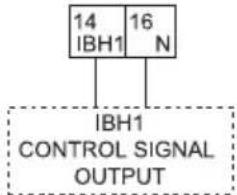
| Voltage | 220-240VAC |
| Maximum running current(A) | 0.2 |
| Wiring size( mm^2 ) | 0.75 |
| Control port signal type | Type 2 |
7) For antifreeze e-heating tape (external)
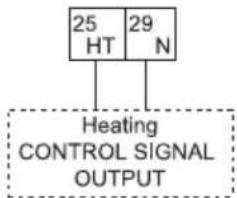
flowchart
graph TD
    A["25 HT"] --> C["Heating CONTROL SIGNAL OUTPUT"]
    B["29 N"] --> C["Heating CONTROL SIGNAL OUTPUT"]
| Voltage | 220-240VAC |
| Maximum running current(A) | 0.2 |
| Wiring size(mm ^2 ) | 0.75 |
| Control port signal type | Type 2 |
8) For unit running state output
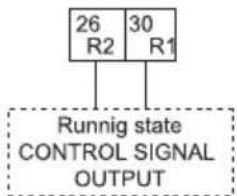
| Voltage | 220-240VAC |
| Maximum running current(A) | 0.2 |
| Wiring size(mm ^2 ) | 0.75 |
| Control port signal type | Type 2 |
9) For additional heat source control:
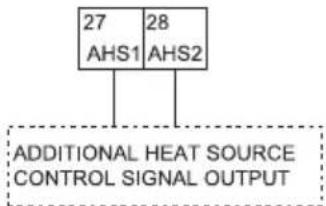
| Voltage | 220-240VAC |
| Maximum running current(A) | 0.2 |
| Wiring size( mm^2 ) | 0.75 |
| Control port signal type | Type 2 |
10) For defrosting signal output:
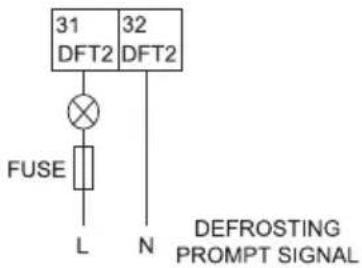
| Voltage | 220-240VAC |
| Maximum running current(A) | 0.2 |
| Wiring size(mm ^2 ) | 0.75 |
| Control port signal type | Type 1 |
11) For wired controller:
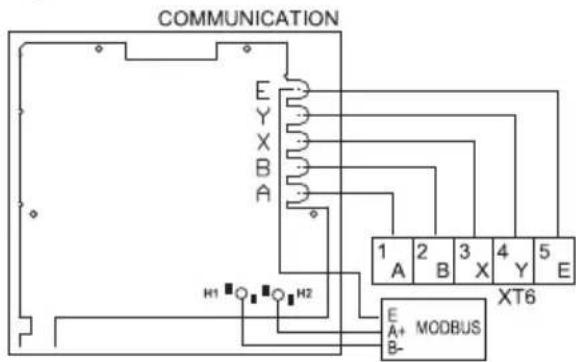
flowchart
graph TD
    A["Communication"] --> B["A"]
    A --> C["B"]
    A --> D["X"]
    A --> E["Y"]
    A --> F["E"]
    B --> G["XT6 Bus"]
    C --> G
    D --> G
    E --> G
    F --> G
    H1 --> I["+"]
    H2 --> J["-"]
    E --> K["MODBUS"]
    style H1 fill:#f9f,stroke:#333
    style H2 fill:#f9f,stroke:#333
    style E fill:#ccf,stroke:#333
    style K fill:#cfc,stroke:#333
NOTE
This equipment supports MODBUS RTU communication protocol.
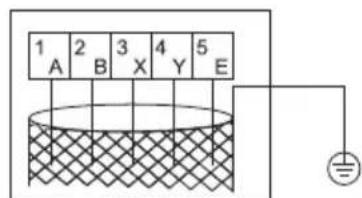
"PLEASE USE SHIELDED WIRE AND EARTH THE WIRE."
| Wire type | 5 wire shielded cable |
| Wire section(mm2) | 0.75~1.25 |
| Maximum wire length(m) | 50 |
As described above, during wiring, port A in the unit terminal XT6 corresponds to port A in the user interface. Port B corresponds to port B. Port X corresponds to port X. Port Y corresponds to port Y, and port E corresponds to port E.
Procedure
- Remove the rear part of the user interface.
- Connect the cable to the appropriate terminals as shown in the picture.
Reattach the rear part of the user interface.
12) For other functional ports
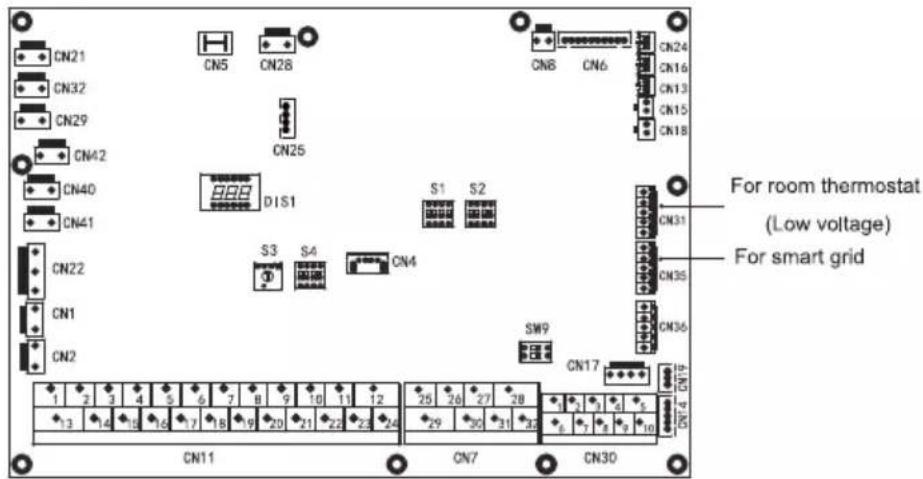
a. For room thermostat (Low voltage): see 9.7.6 2) for room thermostat
b. For smart grid:
The unit has smart grid function, there are two ports on PCB to connect SG signal and EVU signal as following:
- When EVU signal is on, and SG signal is on, as long as the DHW mode is set to be valid, heat pump will operate DHW mode priority and the DHW mode setting temperature will be change to 70°C. T5<69°C, the TBH is on, T5≥70°C, the TBH is off.
- When EVU signal is on, and SG signal is off, as long as the DHW mode is set to be valid and the mode is on, heat pump will operate DHW mode priority. T5<T5S-2, the TBH is on, T5≥T5S+3, the TBH is off.
- When EVU signal is off, and SG signal is on, the unit operates normally.
- When EVU signal is off, and SG signal is off, the unit operates as below: The unit will not operate DHW mode, and the TBH is invalid, disinfect function is invalid. The max running time for cooling/heating is "SG RUNNING TIME", then unit will be off.
10 START-UP AND CONFIGURATION
The unit should be configured by the installer to match the installation environment (outdoor climate, installed options, etc.) and user expertise.
CAUTION
It is important that all information in this chapter is read sequentially by the installer and that the system is configured as applicable.
10.1 Climate related curves
The Climate related curves can be selected in the user interface. Once the curve is selected, the target outlet temperature. In each mode, user can select one curve from curves in the user interface(curve can't be selected if dual room thermostat function is enabled.
It's possible to select curves even dual room thermostat function is enabled.
The relationship between outdoor temperature (T4/°C) and the target water temperature(T1S/°C) is described in the table and picture in the next page.)
- The environment temperature curves of the low temperature setting for heating mode and ECO heating mode
| T4 | ≤slant - 20 | -19 | -18 | -17 | -16 | -15 | -14 | -13 | -12 | -11 | -10 | -9 | -8 | -7 | -6 | -5 | -4 | -3 | -2 | -1 | 0 |
| 1-T1S | 38 | 38 | 38 | 38 | 38 | 37 | 37 | 37 | 37 | 37 | 37 | 36 | 36 | 36 | 36 | 36 | 36 | 35 | 35 | 35 | 35 |
| 2-T1S | 37 | 37 | 37 | 37 | 37 | 36 | 36 | 36 | 36 | 36 | 36 | 35 | 35 | 35 | 35 | 35 | 35 | 34 | 34 | 34 | 34 |
| 3-T1S | 36 | 36 | 36 | 35 | 35 | 35 | 35 | 35 | 35 | 34 | 34 | 34 | 34 | 34 | 34 | 33 | 33 | 33 | 33 | 33 | 33 |
| 4-T1S | 35 | 35 | 35 | 34 | 34 | 34 | 34 | 34 | 34 | 33 | 33 | 33 | 33 | 33 | 33 | 32 | 32 | 32 | 32 | 32 | 32 |
| 5-T1S | 34 | 34 | 34 | 33 | 33 | 33 | 33 | 33 | 33 | 32 | 32 | 32 | 32 | 32 | 32 | 31 | 31 | 31 | 31 | 31 | 31 |
| 6-T1S | 32 | 32 | 32 | 32 | 31 | 31 | 31 | 31 | 31 | 31 | 31 | 31 | 30 | 30 | 30 | 30 | 30 | 30 | 30 | 30 | 29 |
| 7-T1S | 31 | 31 | 31 | 31 | 30 | 30 | 30 | 30 | 30 | 30 | 30 | 30 | 29 | 29 | 29 | 29 | 29 | 29 | 29 | 29 | 28 |
| 8-T1S | 29 | 29 | 29 | 29 | 28 | 28 | 28 | 28 | 28 | 28 | 28 | 28 | 27 | 27 | 27 | 27 | 27 | 27 | 27 | 27 | 26 |
| T4 | 1 | 2 | 3 | 4 | 5 | 6 | 7 | 8 | 9 | 10 | 11 | 12 | 13 | 14 | 15 | 16 | 17 | 18 | 19 | ≥slant 20 | |
| 1-T1S | 35 | 35 | 34 | 34 | 34 | 34 | 34 | 34 | 33 | 33 | 33 | 33 | 33 | 33 | 32 | 32 | 32 | 32 | 32 | 32 | 32 |
| 2-T1S | 34 | 34 | 33 | 33 | 33 | 33 | 33 | 33 | 32 | 32 | 32 | 32 | 32 | 32 | 31 | 31 | 31 | 31 | 31 | 31 | 31 |
| 3-T1S | 32 | 32 | 32 | 32 | 32 | 32 | 31 | 31 | 31 | 31 | 31 | 31 | 30 | 30 | 30 | 30 | 30 | 30 | 29 | 29 | 29 |
| 4-T1S | 31 | 31 | 31 | 31 | 31 | 31 | 30 | 30 | 30 | 30 | 30 | 30 | 29 | 29 | 29 | 29 | 29 | 29 | 28 | 28 | 28 |
| 5-T1S | 30 | 30 | 30 | 30 | 30 | 30 | 29 | 29 | 29 | 29 | 29 | 29 | 28 | 28 | 28 | 28 | 28 | 28 | 27 | 27 | 27 |
| 6-T1S | 29 | 29 | 29 | 29 | 29 | 29 | 28 | 28 | 28 | 28 | 28 | 28 | 27 | 27 | 27 | 27 | 27 | 27 | 26 | 26 | 26 |
| 7-T1S | 28 | 28 | 28 | 28 | 28 | 28 | 27 | 27 | 27 | 27 | 27 | 27 | 26 | 26 | 26 | 26 | 26 | 26 | 25 | 25 | 25 |
| 8-T1S | 26 | 26 | 26 | 26 | 26 | 26 | 26 | 25 | 25 | 25 | 25 | 25 | 25 | 25 | 25 | 24 | 24 | 24 | 24 | 24 | 24 |
- The environment temperature curves of the high temperature setting for heating mode and ECO heating mode
| T4 | ≤-20 | -19 | -18 | -17 | -16 | -15 | -14 | -13 | -12 | -11 | -10 | -9 | -8 | -7 | -6 | -5 | -4 | -3 | -2 | -1 | 0 |
| 1-T1S | 55 | 55 | 55 | 55 | 54 | 54 | 54 | 54 | 54 | 54 | 54 | 54 | 53 | 53 | 53 | 53 | 53 | 53 | 53 | 53 | 52 |
| 2-T1S | 53 | 53 | 53 | 53 | 52 | 52 | 52 | 52 | 52 | 52 | 52 | 52 | 51 | 51 | 51 | 51 | 51 | 51 | 51 | 51 | 50 |
| 3-T1S | 52 | 52 | 52 | 52 | 51 | 51 | 51 | 51 | 51 | 51 | 51 | 51 | 50 | 50 | 50 | 50 | 50 | 50 | 50 | 50 | 49 |
| 4-T1S | 50 | 50 | 50 | 50 | 49 | 49 | 49 | 49 | 49 | 49 | 49 | 49 | 48 | 48 | 48 | 48 | 48 | 48 | 48 | 48 | 47 |
| 5-T1S | 48 | 48 | 48 | 48 | 47 | 47 | 47 | 47 | 47 | 47 | 47 | 47 | 46 | 46 | 46 | 46 | 46 | 46 | 46 | 46 | 45 |
| 6-T1S | 45 | 45 | 45 | 45 | 44 | 44 | 44 | 44 | 44 | 44 | 44 | 44 | 43 | 43 | 43 | 43 | 43 | 43 | 43 | 43 | 42 |
| 7-T1S | 43 | 43 | 43 | 43 | 42 | 42 | 42 | 42 | 42 | 42 | 42 | 42 | 41 | 41 | 41 | 41 | 41 | 41 | 41 | 41 | 40 |
| 8-T1S | 40 | 40 | 40 | 40 | 39 | 39 | 39 | 39 | 39 | 39 | 39 | 39 | 38 | 38 | 38 | 38 | 38 | 38 | 38 | 38 | 37 |
| T4 | 1 | 2 | 3 | 4 | 5 | 6 | 7 | 8 | 9 | 10 | 11 | 12 | 13 | 14 | 15 | 16 | 17 | 18 | 19 | ≥20 | |
| 1-T1S | 52 | 52 | 52 | 52 | 52 | 52 | 52 | 51 | 51 | 51 | 51 | 51 | 51 | 51 | 51 | 50 | 50 | 50 | 50 | 50 | 50 |
| 2-T1S | 50 | 50 | 50 | 50 | 50 | 50 | 50 | 49 | 49 | 49 | 49 | 49 | 49 | 49 | 49 | 48 | 48 | 48 | 48 | 48 | 48 |
| 3-T1S | 49 | 49 | 49 | 49 | 49 | 49 | 49 | 48 | 48 | 48 | 48 | 48 | 48 | 48 | 48 | 47 | 47 | 47 | 47 | 47 | 47 |
| 4-T1S | 47 | 47 | 47 | 47 | 47 | 47 | 47 | 46 | 46 | 46 | 46 | 46 | 46 | 46 | 46 | 45 | 45 | 45 | 45 | 45 | 45 |
| 5-T1S | 45 | 45 | 45 | 45 | 45 | 45 | 45 | 44 | 44 | 44 | 44 | 44 | 44 | 44 | 44 | 43 | 43 | 43 | 43 | 43 | 43 |
| 6-T1S | 42 | 42 | 42 | 42 | 42 | 42 | 42 | 41 | 41 | 41 | 41 | 41 | 41 | 41 | 41 | 40 | 40 | 40 | 40 | 40 | 40 |
| 7-T1S | 40 | 40 | 40 | 40 | 40 | 40 | 40 | 39 | 39 | 39 | 39 | 39 | 39 | 39 | 39 | 38 | 38 | 38 | 38 | 38 | 38 |
| 8-T1S | 37 | 37 | 37 | 37 | 37 | 37 | 37 | 36 | 36 | 36 | 36 | 36 | 36 | 36 | 36 | 35 | 35 | 35 | 35 | 35 | 35 |
- The automatic setting curve for heating mode
The automatic setting curve is the ninth curve, the ninth curve can be set as following:
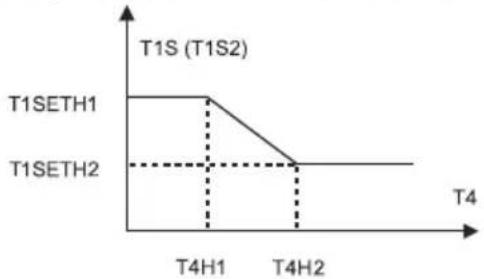
line
| Time Point | State | Value | | :--- | :--- | :--- | | T4H1 | T1SETH1 | 1 | | T4H2 | T1SETH2 | 0.5 |State: In the setting the wired controller, if T4H2<T4H1, then exchange their value; if T1SETH1<T1SETH2, then exchange their value.
- The environment temperature curves of the low temperature setting for cooling mode
| T4 | -10≤T4<15 | 15≤T4<22 | 22≤T4<30 | 30≤T4 |
| 1-T1S | 16 | 11 | 8 | 5 |
| 2-T1S | 17 | 12 | 9 | 6 |
| 3-T1S | 18 | 13 | 10 | 7 |
| 4-T1S | 19 | 14 | 11 | 8 |
| 5-T1S | 20 | 15 | 12 | 9 |
| 6-T1S | 21 | 16 | 13 | 10 |
| 7-T1S | 22 | 17 | 14 | 11 |
| 8-T1S | 23 | 18 | 15 | 12 |
- The environment temperature curves of the high temperature setting for cooling mode
| T4 | -10≤T4<15 | 15≤T4<22 | 22≤T4<30 | 30≤T4 |
| 1-T1S | 20 | 18 | 17 | 16 |
| 2-T1S | 21 | 19 | 18 | 17 |
| 3-T1S | 22 | 20 | 19 | 17 |
| 4-T1S | 23 | 21 | 19 | 18 |
| 5-T1S | 24 | 21 | 20 | 18 |
| 6-T1S | 24 | 22 | 20 | 19 |
| 7-T1S | 25 | 22 | 21 | 19 |
| 8-T1S | 25 | 23 | 21 | 20 |
- The automatic setting curve for cooling mode
The automatic setting curve is the ninth curve, the ninth curve can be set as following:

line
| Time Point | T1SETC1 | T1SETC2 | | :--- | :--- | :--- | | T4C1 | 1 | 0 | | T4C2 | 0 | 0 |State: In the setting the wired controller, if T4C2<T4C1, then exchange their value; if T1SETC1<T1SETC2, then exchange their value.
10.2 DIP switch settings overview
10.2.1 Function setting
DIP switch is located on the hydraulic module main control board (see "9.3.1 main control board of hydraulic module") and allows configuration of additional heating source thermistor installation, the second inner backup heater installation, etc.
WARNING
- Switch off the power supply before opening the switch box service panel and making any changes to the DIP switch settings.
- Operate the switches with an insulated stick (such as a closed ball-point pen) to avoid electrostatic damage to the components.
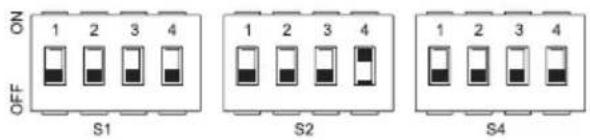
| DIP switch | ON=1 | OFF=0 | Factory defaults | DIP switch | ON=1 | OFF=0 | Factory defaults | DIP switch | ON=1 | OFF=0 | Factory defaults | |||
| S1 | 1 | Reserved | Reserved | Refer to electrically controlled wiring diagram | S2 | 1 | Start pumpo after 24 hours will be invalid | Start pumpo after 24 hours will be invalid | Refer to electrically controlled wiring diagram | S4 | 1 | Master unit:clear address of all slave units Slave unit:clear its own address | Keep the current address | Refer to electrically controlled wiring diagram |
| 2 | Reserved | Reserved | 2 | Without TBH | With TBH | 2 | Reserved | Reserved | ||||||
| 3/4 | 0/0=Without IBH and AHS 1/0=With IBH 0/1=With AHS for heat mode 1/1=With AHS for heat mode and DHW mode | 3/4 | 0/0=variable speed pump, Max head: 8.5m 0/1=constant speed pump 1/0=variable speed pump, Max head: 10.5m 1/1=variable speed pump, Max head: 9.0m | 3/4 | Reserved | |||||||||
10.3 Initial start-up at low outdoor ambient temperature
During initial start-up and when water temperature is low, it is important that the water is heated gradually. Failure to do so may result in concrete floors cracking due to rapid temperature change. Please contact the responsible cast concrete building contractor for further details.
To do so, the lowest water flow set temperature can be decreased to a value between 25°C and 35°C by adjusting the FOR SERVICEMAN. Refer to "FOR SERVICEMAN/special function/preheating for floor".
10.4 Pre-operation checks
Checks before initial start-up.
DANGER
Switch off the power supply before making any connections.
After the installation of the unit, check the following before switching on the circuit breaker:
- Field wiring: Make sure that the field wiring between the local supply panel and unit and valves (when applicable), unit and room thermostat (when applicable), unit and domestic hot water tank, and unit and backup heater kit have been connected according to the instructions described in the chapter 9.6 Field wiring, according to the wiring diagrams and to local laws and regulations.
- Fuses, circuit breakers, or protection devices Check that the fuses or the locally installed protection devices are of the size and type specified in the chapter 14 Technical specifications. Make sure that no fuses or protection devices have been bypassed.
- Backup heater circuit breaker: Do not forget to turn on the backup heater circuit breaker in the switchbox (it depends on the backup heater type). Refer to the wiring diagram.
- Booster heater circuit breaker: Do not forget to turn on the booster heater circuit breaker (applies only to units with optional domestic hot water tank installed).
- Ground wiring: Make sure that the ground wires have been connected properly and that the ground terminals are tightened.
- Internal wiring: Visually check the switch box for loose connections or damaged electrical components.
- Mounting: Check that the unit is properly mounted, to avoid abnormal noises and vibrations when starting up the unit.
• Damaged equipment: Check the inside of the unit for damaged components or squeezed pipes. - Refrigerant leak: Check the inside of the unit for refrigerant leakage. If there is a refrigerant leak, call your local dealer.
- Power supply voltage: Check the power supply voltage on the local supply panel. The voltage must correspond to the voltage on the identification label of the unit.
• Air purge valve: Make sure the air purge valve is open (at least 2 turns). - Shut-off valves: Make sure that the shut-off valves are fully open.
10.5 Powering up the unit
When power to the unit is turned on, "1%\~99%" is displayed on the user interface during initialization. During this process the user interface cannot be operated.
10.6 Setting the pump speed
The pump speed can be selected by adjusting the red knob on the pump. The notch point indicates pump speed.
The default setting is the highest speed (III). If the water flow in the system is too high the speed can be set to low (I).
The available external static pressure function for water flow is shown in the graph below.
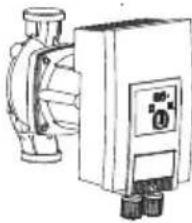
natural_image
Illustration of a pump and control unit (no text or symbols visible)Available external static presurre VS Flow rate
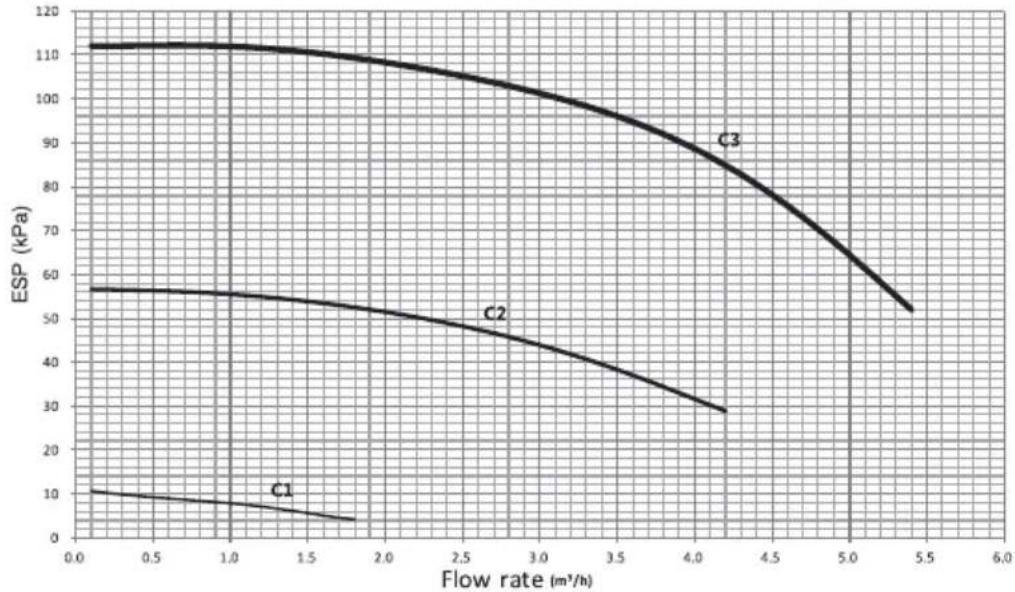
line
| Flow rate (m³/h) | ESP (kPa) - C1 | ESP (kPa) - C2 | ESP (kPa) - C3 | | ---------------- | -------------- | -------------- | -------------- | | 0.0 | 10 | 57 | 112 | | 1.0 | 8 | 55 | 110 | | 2.0 | 6 | 50 | 105 | | 3.0 | 4 | 45 | 95 | | 4.0 | 2 | 35 | 80 | | 5.0 | 1 | 25 | 60 | | 5.5 | 0 | 20 | 50 |DANGER
- Operating the system with closed valves will damage the circulation pump!
- If it's necessary to check the running status of the pump when unit power on. please do not touch the internal electronic control box components to avoid electric shock.
1) Faults with external interference sources
Only have faults remedied by qualified personnel.
| Faults | Causes | Remedy |
| Pump is not running although the power supply is switched on. Black display | Electrical fuse defective | Check fuses. |
| Pump has no voltage. | Restore power after interruption. | |
| Pump is making noises. | Cavitation due to insufficient suction pressure. | Increase the system suction pressure within the permissible range. |
| Check the delivery head setting and set to lower head if necessary. |
2) Fault signals
• The fault signal is indicated by the LED display.
• The fault signal LED is continuously illuminated in red
- The pump switches off (depending on the error code), and attempts a cyclical restart.
i INFORMATION
- EXCEPTION: Error code E10 (blocking) After approx. 10 minutes, the pump switches off permanently and displays the error code.
| Code no. | Fault | Cause | Remedy |
| E04 | Mains undervoltage | Power supply too low on mains side | Check mains voltage. |
| E05 | Mains overvoltage | Power supply too high on mains side | Check mains voltage. |
| E09 | Turbine operation | The pump is driven in reverse (the fluid flows through the pump from the pressure to the suction side) | Check flow, install non-return valves if necessary |
| E10 | Blocking | The rotor is blocked | Request customer service |
| E21 * | Overload | Sluggish motor | Request customer service |
| E23 | Short-circuit | Motor current too high | Request customer service |
| E25 | Contacting/winding | Motor winding defective | Request customer service |
| E30 | Module overheated | Module interior too warm | Improve room ventilation, check operating conditions, request customer service, if necessary |
| E31 | Overheated power section | Ambient temperature too high | Improve room ventilation, check operating conditions, request customer service, if necessary |
| E36 | Electronic faults | Electronics defective | Request customer service |
* In addition to the LED display, the fault signal LED is continuously illuminated in red.
2) Warning signals
• The warning signal is indicated by the LED display.
• The fault signal LED and the SSM relay do not respond.
• The pump continues to run with limited output.
• The indicated faulty operating status must not occur for a prolonged period. The cause must be eliminated.
| Code no. | Fault | Cause | Remedy |
| E07 | Generator operation | Pump hydraulics have fluid running through them. | Check the system |
| E11 | Dry running | Air in the pump | Check the water volume/ pressure |
| E21 * | Overload | Sluggish motor, pump is operated outside of its specifications (e.g. high module temperature). The speed is lower than during normal operation. | Check the ambient conditions |
* See also fault signal E21.
NOTE
- If the operating fault cannot be remedied, please consult a specialist technician or the nearest customer service location or representative.
- In order to ensure the service life of the pump, it is recommended that the unit run at least once every 2 weeks (ensure that the pump is running) or keep it powered on for a long time (in the power-on standby state, the unit will run the pump for 1 minutes every 24 hours)
10.7 Field settings
The unit shall be configured by the installer to match the installation environment (outdoor climate, installed options, etc.) and user demand. A number of field settings are available. These settings are accessible and programmable through "FOR SERVICEMAN" in user interface.
Powering on the unit
When power on the unit, "1%\~99%" is displayed on the user interface during initialization. During this process the user interface cannot be operated.
Procedure
To change one or more field settings, proceed as follows.
NOTE
Temperature values displayed on the wired controller (user interface) are in °C.
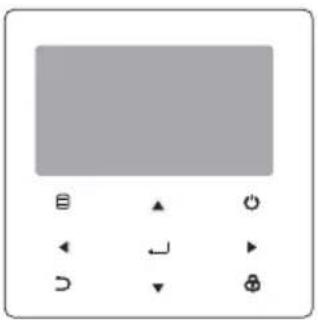
| Keys Function | |
| ∅ | Go to the menu structure(on the home page) |
| ◀▶▼▲ | Navigate the cursor on the displayNavigate in the menu structureAdjust settings |
| ∅ | Turn on/off the space heating/cooling operation or DHW modeTurn on/or off functions in the menu structure |
| ⊃ | Come back to the up level |
| ∅ | Long press for unlock /lock the controllerUnlock /lock some functions such as "DHW temperature adjusting" |
| ⊥ | Go to the next step when programming a schedule in the menu structure; and confirm a selection to enter in the submenu of the menu structure. |
About FOR SERVICEMAN
"FOR SERVICEMAN" is designed for the installer to set the parameters.
- Setting the composition of equipment.
- Setting the parameters.
How to go to FOR SERVICEMAN
Go to ☐ > FOR SERVICEMAN. Press ↙:
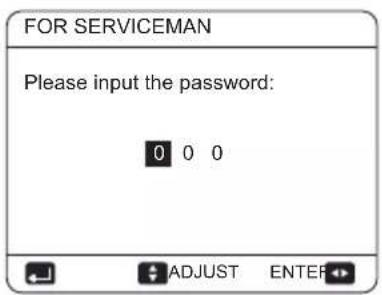
Press ◀▶ to navigate and press ▼▲ to adjust the numerical value. Press____. The password is 234, the following pages will be displayed after putting the password:
| FOR SERVICEMAN 1/3 |
| 1. DHW MODE SETTING |
| 2. COOL MODE SETTING |
| 3. HEAT MODE SETTING |
| 4. AUTO MODE SETTING |
| 5. TEMP.TYPE SETTING |
| 6. ROOM THERMOSTAT |
| ENTER |
| FOR SERVICEMAN 2/3 |
| 7. OTHER HEATING SOURCE |
| 8. HOLIDAY AWAY MODE SET |
| 9. SERVICE CALL SETTING |
| 10. RESTORE FACTORY SETTINGS |
| 11. TEST RUN |
| 12. SPECIAL FUNCTION |
| ENTER |
| FOR SERVICEMAN 3/3 |
| 13. AUTO RESTART |
| 14. POWER INPUT LIMITATION |
| 15. INPUT DEFINE |
| 16. CASCADE SET |
| 17. HMI ADDRESS SET |
| ENTER |
Press ▼ ▲ to scroll and use " ←" to enter submenu.
DHW = domestic hot water
Go to > FOR SERVICE MAN> 1.DHW MODE SETTING. Press ▼ . The following pages will be displayed:
The following pages will be displayed:
| 2 COOL MODE SETTING | 1/3 |
| 2.1 COOL MODE | YES |
| 2.2 t_T4_FRESH_C | 2.0HRS |
| 2.3 T4CMAX | 43°C |
| 2.4 T4CMIN | 20°C |
| 2.5 dT1SC | 5°C |
| ADJUST | |
| 2 COOL MODE SETTING | 2/3 |
| 2.6 dTSC | 2°C |
| 2.7 t_INTERVAL_C | 5MIN |
| 2.8 T1SetC1 | 10°C |
| 2.9 T1SetC2 | 16°C |
| 2.10 T4C1 | 35°C |
| ADJUST | |
| 2 COOL MODE SETTING | 3/3 |
| 2.11 T4C2 | 25°C |
| 2.12 ZONE1 C-EMISSION | FCU |
| 2.13 ZONE2 C-EMISSION | FLH |
| ADJUST | |
10.7.3 HEAT MODE SETTING
Go t > FOR SERVICE MAN> 3. HEAT MODE SETTING. Press. The following pages will be displayed:
| 3 HEAT MODE SETTING | 1/3 |
| 3.1 HEAT MODE | YES |
| 3.2 t_T4_FRESH_H | 2.0HRS |
| 3.3 T4HMAX | 16°C |
| 3.4 T4HMIN | -15°C |
| 3.5 dT1SH | 5°C |
| ADJUST | |
| 3 HEAT MODE SETTING | 2/3 |
| 3.6 dTSH | 2°C |
| 3.7 t_INTERVAL_H | 5MIN |
| 3.8 T1SetH1 | 35°C |
| 3.9 T1SetH2 | 28°C |
| 3.10 T4H1 | -5°C |
| ADJUST | |
| 3 HEAT MODE SETTING | 3/3 |
| 3.11 T4H2 | 7°C |
| 3.12 ZONE1 H-EMISSION | RAD. |
| 3.13 ZONE2 H-EMISSION | FLH |
| 3.14 t_DELAY_PUMP | 2MIN |
| ADJUST | |
10.7.4 AUTO MODE SETTING
Go to ☐ > FOR SERVICE MAN> 4.AUTO MODE SETTING. Press ↓, the following page will be displayed.
| 4 AUTO. MODE SETTING | |
| 4.1 T4AUTOCMIN | 25°C |
| 4.2 T4AUTOHMAX | 17°C |
| ADJUST | |
10.7.5 TEMP. TYPE SETTING
About TEMP. TYPE SETTING
EThe TEMP. TYPE SETTING is used for selecting whether the water flow temperature or room temperature is used to control the ON/OFF of the heat pump.
When ROOM TEMP. is enabled, the target water flow temperature will be calculated from climate-related curves.
How to enter the TEMP. TYPE SETTING
Go to ☐ > FOR SERVICEMAN> 5.TEMP. TYPE SETTING. Press ↓. The following page will be displayed:
| 5 TEMP. TYPE SETTING | |
| 5.1 WATER FLOW TEMP. | YES |
| 5.2 ROOM TEMP. | NON |
| 5.3 DOUBLE ZONE | NON |
| ADJUST | |
If you only set WATER FLOW TEMP. to YES, or only set ROOM TEMP. to YES, The following pages will be displayed.
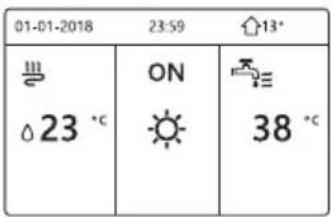
only WATER FLOW TEMP. YES
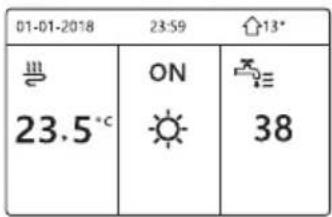
only ROOM TEMP. YES
If you set WATER FLOW TEMP. and ROOM TEMP. to YES, meanwhile set DOUBLE ZONE to NON or YES, the following pages will be displayed.
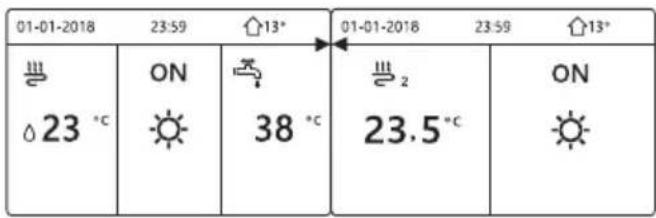
Homepage (zone 1)
Addition page (zone 2)(Double zone is effective)
In this case, the setting value of zone 1 is T1S, the setting value of zone 2 is TS (The corresponding TIS2 is calculated according to the climate related curves.)
If you set DOUBLE ZONE to YES and set ROOM TEMP. to NON, meanwhile set WATER FLOW TEMP. to YES or NON, the following pages will be displayed.
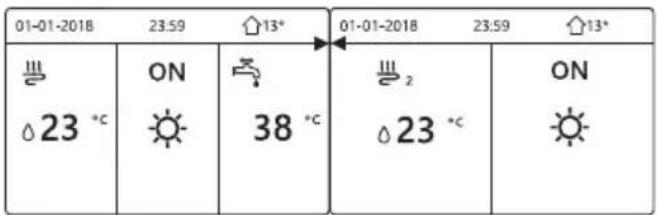
Homepage (zone 1)
Addition page (zone 2)
In this case, the setting value of zone 1 is T1S, the setting value of zone 2 is T1S2.
If you set DOUBLE ZONE and ROOM TEMP. to YES, meanwhile set WATER FLOW TEMP. to YES or NON, the following page will be displayed.
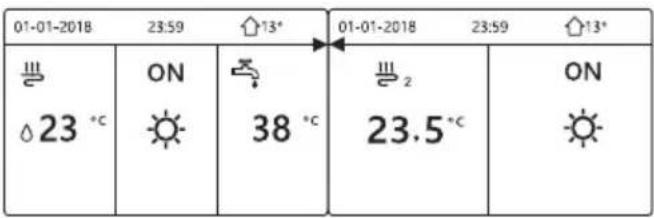
Homepage (zone 1)
Addition page (zone 2)(Double zone is effective)
In this case, the setting value of zone 1 is T1S, the setting value of zone 1 is TS (The corresponding TIS2 is calculated according to the climate related curves.)
10.7.6 ROOM THERMOSTAT
About ROOM THERMOSTAT
The ROOM THERMOSTAT is used to set whether the room thermostat is available.
How to set the ROOM THERMOSTAT
Go to ☐ >FOR SERVICEMAN> 6.ROOM
THERMOSTAT. Press ←. The following page will be displayed:
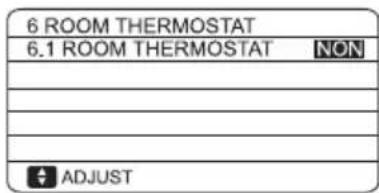

NOTE
ROOM THERMOSTAT = NON, no room thermostat.
ROOM THERMOSTAT = MODE SET, the wiring of room thermostat should follow method A.
ROOM THERMOSTAT=ONE ZONE, the wiring of room thermostat should follow method B.
ROOM THERMOSTAT=DOUBLE ZONE, the wiring of room thermostat should follow method C (refer to 9.7.6 "Connection for other components/For room thermostat")
10.7.7 Other HEATING SOURCE
The OTHER HEATING SOURCE is used to set the parameters of the backup heater, additional heating sources and solar energy kit.
Go to ☐ > FOR SERVICEMAN> 7. OTHER HEATING SOURCE, Press ←. The following page will be displayed:
| 7 OTHER HEATING SOURCE 1/2 | |
| 7.1 dT1_IBH_ON | 5°C |
| 7.2 t_IBH_DELAY | 30MIN |
| 7.3 T4_IBH_ON | -5°C |
| 7.4 dT1_AHS_ON | 5°C |
| 7.5 t_AHS_DELAY | 30MIN |
| ADJUST | |
| 7 OTHER HEATING SOURCE | 2/2 |
| 7.6 T4_AHS_ON | -5°C |
| 7.7 IBH Locate | PIPE LOOP |
| 7.8 P_IBH1 | 0.0kW |
| 7.9 P_IBH2 | 0.0kW |
| 7.10 P_TBH | 2.0kW |
| ADJUST |
10.7.8 HOLIDAY AWAY SETTING
The HOLIDAY AWAY SETTING is used to set the outlet water temperature to prevent freezing when away for holiday.
Go to ☑ > FOR SERVICEMAN> 8.HOLIDAY AWAY SETTING. Press ←. The following page will be displayed:
| 8 HOLIDAY AWAY SETTING | |
| 8.1 T1S_H.A._H | 20°C |
| 8.2 T5S_H.A._DHW | 20°C |
| ADJUST | |
10.7.9 SERVICE CALL SETTING
The installers can set the phone number of the local dealer in SERVICE CALL SETTING. If the unit doesn't work properly, call this number for help.
Go to ☐ > FOR SERVICEMAN>SERVICE CALL. Press ↙. The following page will be displayed:
Press ▼ ▲ to scroll and set the phone number. The maximum length of the phone number is 13 digits, if the length of phone number is short than 12, please input ■, as shown below:
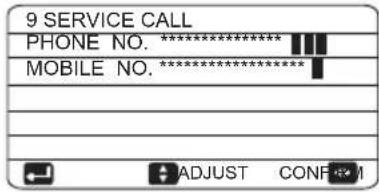
The number displayed on the user interface is the phone number of your local dealer.
10.7.10 RESTORE FACTORY SETTINGS
The RESTORE FACTORY SETTING is used to restore all the parameters set in the user interface to the factory setting.
Go to > FOR SERVICE MAN > 10.RESTORE FACTORY SETTINGS. Press ←. The following page will be displayed:
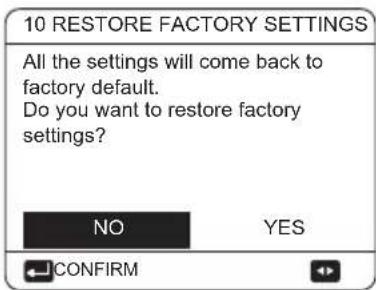
Press ◀▶ to scroll the cursor to YES and press ⬇. The following page will be displayed:
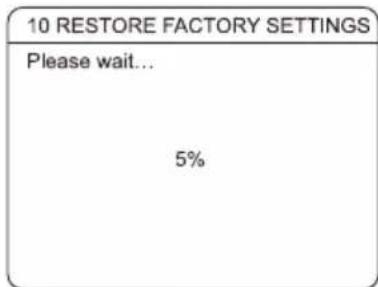
After a few seconds, all the parameters set in the user interface will be restored to factory settings.
10.7.11 TEST RUN
TEST RUN is used to check correct operation of the valves, air purge, circulation pump operation, cooling, heating and domestic water heating.
Go to > FOR SERVICE MAN> 11.TEST RUN.
Press ←. The following page will be displayed:
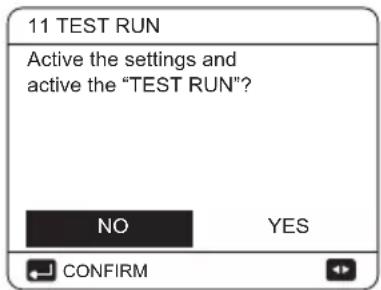
If YES is selected, the following pages will be displayed:
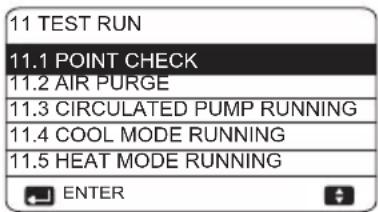
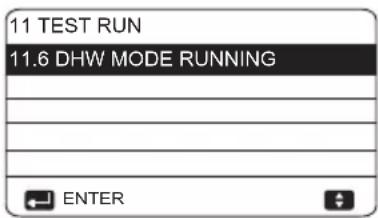
If POINT CHECK is selected, the following pages will be displayed:
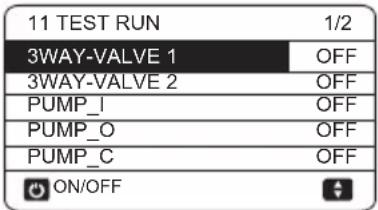
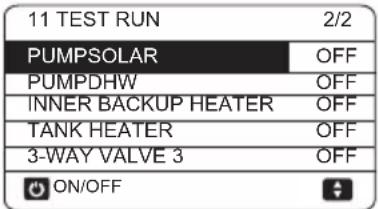
Press ▼ ▲ to scroll to the components you want to check and press ⏻. For example, when 3-way valve is selected and ⏻ is pressed, if the 3-way valve is open/close, then the operation of 3-way valve is normal, and so are other components.

CAUTION
Before the point check, make sure the tank and the water system is filled with water, and air is expelled, or it may cause the pump or backup heater burn out.
If you select AIR PURGE and ← is pressed, the following page will be displayed :
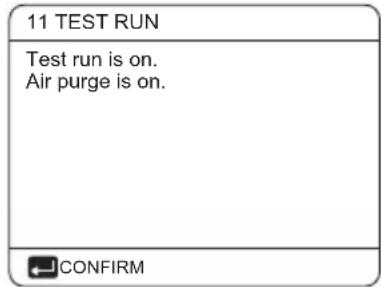
When in air purge mode, SV1 will open, SV2 will close. 60s later the pump in the unit (PUMPI) will operate for 10min during which the flow switch will not work. After the pump stops, the SV1 will close and the SV2 will open. 60s later both the PUMPI and PUMPO will operate until the next command is received.
When CIRCULATION PUMP RUNNING is selected, the following page will be displayed:
11 TEST RUN
Test run is on.
Circulated pump is on.

CONFIRM
When circulation pump running is turned on, all running components will stop. 60 seconds later, the SV1 will open, the SV2 will close, 60 seconds later PUMPI will operate. 30s later, if the flow switch checked normal flow, PUMPI will operate for 3min, after the pump stops 60 seconds, the SV1 will close and the SV2 will open. 60s later the both PUMPI and PUMPO will operate, 2 mins later, the flow switch will check the water flow. If the flow switch closes for 15s, PUMPI and PUMPO will operate until the next command is received.
When the COOL MODE RUNNING is selected, the following page will be displayed:
11 TEST RUN
Test run is on.
Cool mode is on.
Leaving water temperature is 15^ C.

CONFIRM
During COOL MODE test running, the default target outlet water temperature is 7^ C. The unit will operate until the water temperature drops to a certain value or the next command is received.
When the HEAT MODE RUNNING is selected, the following page will be displayed:
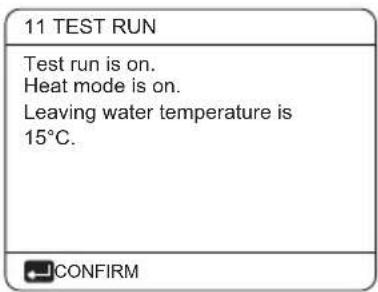
During HEAT MODE test running, the default target outlet water temperature is 35^ C. The IBH (internal backup heater) will turn on after the compressor runs for 10 min. After the IBH runs for 3 minutes, the IBH will turn off, the heat pump will operate until the water temperature increase to a certain value or the next command is received.
When the DHW MODE RUNNING is selected, the following page will be displayed:
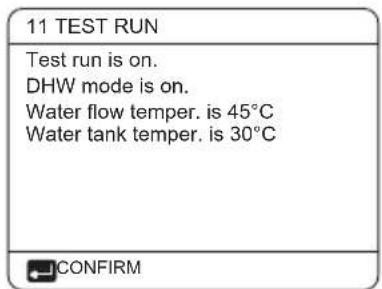
During DHW MODE test running, the default target temperature of the domestic water is 55°C. The TBH(tank boost heater) will turn on after the compressor runs for 10min. The TBH will turn off 3 minutes later, the heat pump will operate until the water temperature increase to a certain value or the next command is received.
During test run, all buttons except are invalid. If you want to turn off the test run, please press . For example, when the unit is in air purge mode, after you press , the following page will be displayed:
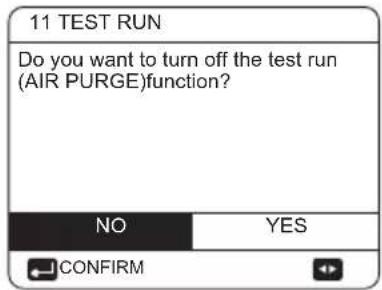
Press ◀▶ to scroll the cursor to YES and press ↓. The test run will turn off.
10.5.12 SPECIAL FUNCTION
When it is in special function modes, the wired controller can not operate, the page do not return to the homepage, and the screen showed the page that special function runs, the wired controller do not locked.
NOTE
During special function operating other functions (WEEKLY SCHEDULE/TIMER, HOLIDAY AWAY, HOLIDAY HOME) can't be used.
Go to > FOR SERVICE MAN> 12.SPECIAL FUNCTION.
Before floor heating, if a large amount of water remains on the floor, the floor may be warped or even rupture during floor heating operation, in order to protect the floor, floor drying is necessary, during which the temperature of the floor should be increased gradually.
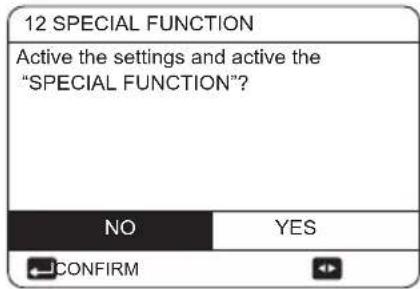
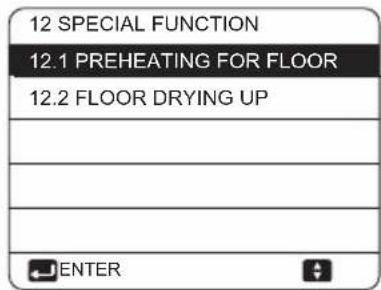
Press ▼ ▲ to scroll and press ← to enter.
During first operation of the unit, air may remain in the water system which can cause malfunctions during operation. It is necessary to run the air purge function to release the air (make sure the air purge valve is open).
If PREHEATING FOR FLOOR is selected, after press ←, the following page will be displayed:
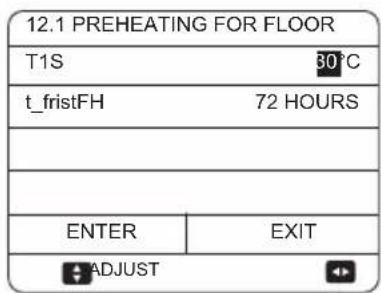
When the cursor is on OPERATE PREHEATING FOR FLOOR, Use ◀▶ to scroll to YES and press ∪. The following page will be displayed:
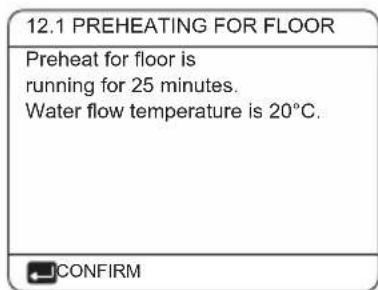
During preheating for floor, all the buttons except └are invalid. If you want to turn off the preheating for floor, please press └.
The following page will be displayed:
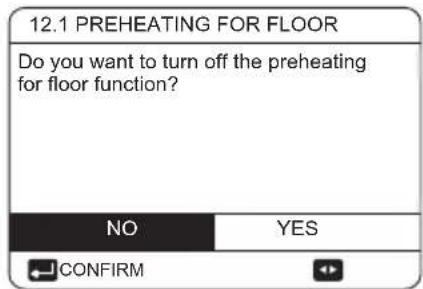
Use ◀▶ to scroll the cursor to YES and press, the preheating for floor will turn off.
The operation of the unit during preheating for floor described in the picture below:
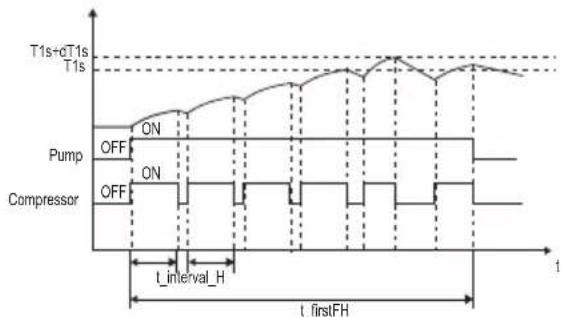
other
| Signal | Value | |------------|-------| | On | ON | | Off | ON | | Off | OFF |If FLOOR DRYING UP is selected, after pressing _, the following pages will be displayed:
| 12.2 FLOOR DRYING UP | |
| t_DRYUP | 8 days |
| t_HIGHPEAK | 5 days |
| t_DRYDOWN | 5 days |
| T_DRYPEAK | 45°C |
| START TIME | 15:00 |
| ADJUST | |
| 12.2 FLOOR DRYING UP | |
| START DAY | 01-01-2019 |
| ENTER | EXIT |
| ADJUST | |
When the cursor is on OPERATE FLOOR DRYING, use ◀▶ to scroll to YES and press ↓. The following page will be displayed:
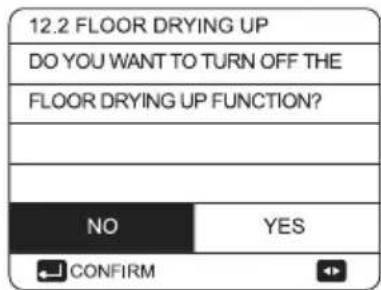
During floor drying, all the buttons except □are invalid. When the heat pump malfunctions, the floor drying mode will turn off when the backup heater and additional heating source is unavailable. If you want to turn off floor drying up, please press ←. The following page will be displayed:
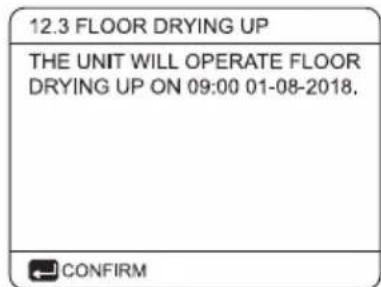
Use ◀▶ to scroll the cursor to YES and press ∪. Floor drying will turn off.
The target outlet water temperature during floor drying up described in the picture below:
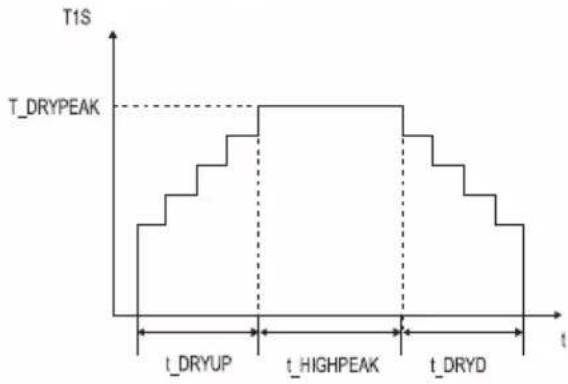
line
| Time Segment | Value | | ---------------- | ----- | | t_DRYUP | Low | | t_HIGHPEAK | High | | t_DRYD | Low |10.7.13 AUTO RESTART
The AUTO RESTART function is used to select whether the unit reapplies the user interface settings at the time when power returns after a power supply failure.
Go to ☐ > FOR SERVICEMAN>13.AUTO RESTART
| 13 AUTO RESTART | |
| 13.1 COOL/HEAT MODE | YES |
| 13.2 DHW MODE | NON |
| ADJUST | |
The AUTO RESTART function reapplies the user interface settings at the time of the power supply failure. If this function is disabled, when power returns after a power supply failure, the unit won't auto restart.
10.7.14 POWER INPUT LIMITATION
How to set the POWER INPUT LIMITATION
Go to ☐ > FOR SERVICEMAN>
- POWER INPUT LIMITATION
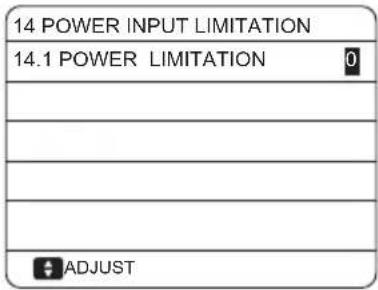
10.7.15 INPUT DEFINE
How to set the INPUT DEFINE
Go to ☑ > FOR SERVICEMAN> 15. INPUT DEFINE
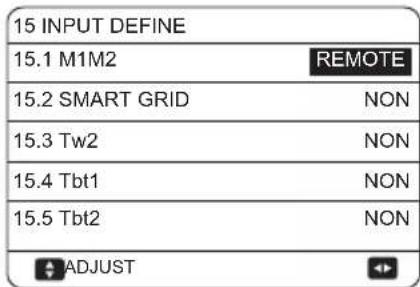
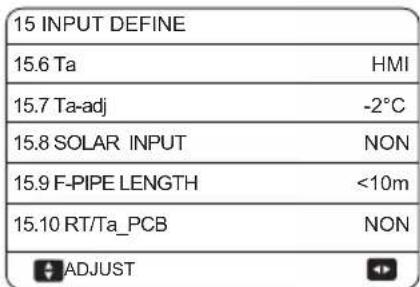
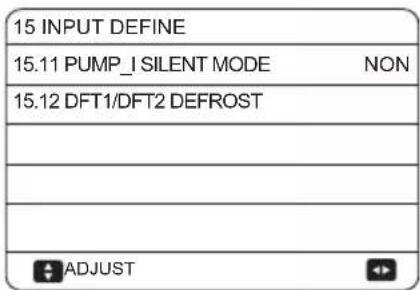
10.7.16 CASCADE SET
How to set the CASCADE SET
Go to ☐ >FOR SERVICEMAN>16.CASCADE SET.
| 16 CASCADE SET | |
| 16.1 PER START | 10% |
| 16.2 TIME_ADJUST | 5 MIN |
| 16.3 ADDRESS RESET | 0 |
After setting the address, you need to press the " 🔒 " key to confirm.
The address "FF" is an invalid address code.
10.5.17 HMI ADDRESS SET
How to set the HMI ADDRESS SET
Go to ☐ >FOR SERVICEMAN>16.HMI ADDRESS SET.
| 17 HMI ADDRESS SET | |
| 17.1 HMI SET | MASTER |
| 17.2 HMI ADDRESS FOR BMS | 1 |
| 17.3 STOP BIT 1 | |
When HMI SET is set to SLAVE, the controller can only switch the operation mode, turn on or off, set the temperate, and cannot set other parameters and functions.
The address "FF" is an invalid address code.
10.7.16 Setting parameters
The parameters related to this chapter are shown in the table below.
| Order number | Code State Default Minimum Maximum | Setting interval | Unit | ||||
| 1.1 DHW | MODE Enable or disable the DHW mode:0=NON,1=YES 1 0 1 1 / | ||||||
| 1.2 DISINFECT Enable or disable the disinfect mode:0=NON,1=YES 1 0 1 1 / | |||||||
| 1.3 | DHW PRIORITY | Enable or disable the DHW priority mode:0=NON,1=YES | 1 | 0 | 1 | 1 | / |
| 1.4 | PUMP_D | Enable or disable the DHW pump mode:0=NON,1=YES | 0 | 0 | 1 | 1 | / |
| 1.5 | DHW PRIORITY TIME SET | Enable or disable the DHW priority time set:0=NON,1=YES | 0 | 0 | 1 | 1 | / |
| 1.6 dT5_ON | The tempe rature difference for starting the heat pump | 10 | 1 | 30 | 1 | °C | |
| 1.7 | dT1S5 | The difference value between Twout and T5 in DHW mode | 10 | 5 | 40 | 1 | °C |
| 1.8 T4DHMAX | The maximum ambient temperature that the heat pump can operate at f or domestic water heating | 43 | 35 | 43 | 1 | °C | |
| 1.9 T4DHWMIN | The minimum ambient temperature that the heat pump can operate f or domestic water heating | -10 | -25 | 30 | 1 | °C | |
| 1.10 | t_INTERVAL_DHW | the start time interval of the compressor in DHW mode. | 5 | 5 | 5 | 1 | MIN |
| 1.11 | dT5_TBH_OFF | the temperature difference between T5 and T5S that turns the booster heater off. | 5 | 0 | 10 | 1 | °C |
| 1.12 | T4_TBH_ON | the highest outdoor temperature the TBH can operate. | 5 | -5 | 50 | 1 | °C |
| 1.13 | t_TBH_DELAY | the time that the compressor has run before starting the booster heater | 30 | 0 | 240 | 5 | MIN |
| 1.14 | T5S_DISINFECT | the target temperature of water in the domestic hot water tank in the DISINFECT function. | 65 | 60 | 70 | 1 | °C |
| 1.15 | t_DI_HIGHTEMP. | the time that the highest temperature of water in the domestic hot water tank in the DISINFECT function will last | 15 | 5 60 | 5 | MIN | |
| 1.16 | t_DI_MAX | the maximum time that disinfection will last | 210 | 90 | 300 | 5 | MIN |
| 1.17 | t_DHWHP_RESTRICT | he operation time for the space heating/cooling operation. | 30 | 10 | 600 | 5 | MIN |
| 1.18 | t_DHWHP_MAX | the maximum continuous working period of the heat pump in DHW PRIORITY mode. | 90 | 10 | 600 | 5 | MIN |
| 1.19 | PUMP_D TIMER | Enable or disable the DHW pump run as timed and keeps running for PUMP RUNNING TIME:0=NON,1=YES | 1 | 0 | 1 | 1 | / |
| 1.20 | PUMP_D RUNNING TIME | the certain time that the DHW pump will keep running for | 5 | 5 | 120 | 1 | MIN |
| 1.21 | PUMP_D DISINFECT RUN | Enable or disable the DHW pump operate when the unit is in disinfect mode and T3: T5S_DI-2:0=NON,1=YES | 1 | 0 | 1 | 1 | / |
| 2.1 | COOL MODE | Enable or disable the cooling mode:0=NON,1=YES | 1 | 0 | 1 | 1 | / |
| 2.2 t_T4_FRESH_C | The refresh time of climate related curves for cooling mode | 0.5 | 0.5 | 6 | 0.5 hours | ||
| 2.3 T4CMAX | The highest ambient operation temperature for cooling mode | 52 | 35 | 52 | 1 | °C | |
| 2.4 T4CMIN | the lowest ambient operating temperature for cooling mode | 10 | -5 | 25 | 1 | °C | |
| 2.5 | dT1SC | the temperature difference for starting the heat pump(T1) | 5 | 2 | 10 | 1 | °C |
| 2.6 | dTSC | the temperature difference for starting the heat pump(Ta) | 2 | 1 | 10 | 1 | °C |
| 2.7 | t_INTERVAL_COOL | the start time interval of the compressor in COOL mode | 5 | 5 | 5 | 1 | °C |
| 2.8 T1SeC1 | The setting temperature 1 of climate related curves f or cooling mode. | 10 | 5 25 | 1 | MIN | ||
| 2.9 T1SeC2 | The setting temperature 2 of climate related curves f or cooling mode. | 16 | 5 | 25 | 1 | °C | |
| 2.10 | T4C1 | The ambient temperature 1 of climate related curves f or cooling mode. | 35 | -5 | 46 | 1 | °C |
| 2.11 | T4C2 | The ambient temperature 2 of climate related curves f or cooling mode. | 25 | -5 | 46 | 1 | °C |
| 2.12 | ZONE1 C-EMISSION | The type of zone1 end for cooling mode 0=FCU(fan coil unit), 1=RAD (radiator), 2=FLH(floor heating) | 0 | 0 | 2 | 1 | / |
| 2.13 | ZONE2 C-EMISSION | The type of zone2 end for cooling mode 0=FCU(fan coil unit), 1=RAD (radiator), 2=FLH(floor heating) | 0 | 0 | 2 | 1 | / |
| 3.1 HEAT MODE Enable or disable the heating mode 1011/ | |||||
| 3.2 t_T4_FRESH_H | The refresh time of climate related curves for heating mode | 0.5 0.5 6 0.5 hours | |||
| 3.3 T4HMAX | The maximum ambient operating temperature for heating mode | 25 20 35 1 | °C | ||
| 3.4 T4HMIN | The minimum ambient operating temperature for heating mode | -15 | -25 | 30 | 1 |
| 3.5 | dT1SH | The temperature difference for starting the unit (T1) | 5 | 2 | 20 |
| 3.6 | dTSH | The temperature difference for starting the unit (Ta) | 2110 | ||
| 3.7 | t_INTERVAL_HEAT | the start time interval of the compressor in HEAT mode | 5 | 5 | 5 |
| 3.8 T1SetH1 | The setting temperature 1 of climaterelated curves for heating mode | 35 25 65 1 | °C | ||
| 3.9 T1SetH2 | The setting temperature 2 of climate related curves for heating mode | 28 25 65 1 | °C | ||
| 3.10 | T4H1 | The ambient temperature 1 of climate related curves for heating mode | -5 -25 | 35 1 | °C |
| 3.11 | T4H2 | The ambient temperature 2 of climate related curves for heating mode | 7 | -25 | 35 |
| 3.12 | ZONE1 H-EMISSION | The type of zone1 end for heating mode: 0=FCU(fan coil unit), 1=RAD.(radiator), 2=FLH(floor heating) | 1 | 0 | 2 |
| 3.13 | ZONE2 H-EMISSION | The type of zone2 end for heating mode: 0=FCU(fan coil unit), 1=RAD.(radiator), 2=FLH(floor heating) | 2 | 0 | 2 |
| 3.14 | L_DELAY_PUMP | The delay time for water pump to stop after the compressor stops | 2 | 0.5 | 20 |
| 4.1 T4AUTOCMIN | The minimum operating ambient temperature for cooling in auto mode | 25 20 29 1 | °C | ||
| 4.2 T4AUTOHMAX | The maximum operating ambient temperature for heating in auto mode | 17 10 17 1 | °C | ||
| 5.1 | WATER FLOW TEMP. | Enable or disable the WATER FLOW TEMP.:0=NON,1=YES | 1 | 0 | 1 |
| 5.2 | ROOM TEMP. | Enable or disable the ROOM TEMP.:0=NON,1=YES | 0 | 0 | 1 |
| 5.3 DOUBLE ZONE | Enable or disable the ROOM THERMOSTAT DOUBLE ZONE:0=NON,1=YES | 0 | 0 | 1 | 1 |
| 6.1 | ROOM THERMOSTAT | The style of room thermostat 0=NON,1=MODE SET,2=ONE ZONE,3=DOUBLE ZONE | 0 | 0 | 3 |
| 7.1 dT1_IBH_ON | The temperature difference between T1S and T1 for starting the backup heater. | 5 | 2 | 10 | 1 |
| 7.2 t_IBH_DELAY | The time that the compressor has run before the first backup heater turns on | 30 15 | 120 5 | MIN | |
| 7.3 T4_IBH_ON | The ambient temperature for starting the backup heate r | -5 | -15 | 30 | 1 |
| 7.4 dT1_AHS_ON | The temperature difference between T1S and T1 for turning the additional heating source on | 5 | 2 | 20 | 1 |
| 7.5 t_AHS_DELAY | The time that the compressor has run before starting the additional heating source | 30 5 120 5 | MIN | ||
| 7.6 T4_AHS_ON | The ambient temperature for starting the additional heating source | -5 -15 | 30 1 | °C | |
| 7.7 IBH_LOCATE | IBH/AHS installation location PIPE LOOP=0; BUFFER TANK=1 | 0 | 0 | 0 | 0 |
| 7.8 | P_IBH1 | Power input of IBH1 | 0 | 0 | 20 |
| 7.9 | P_IBH2 | Power input of IBH2 | 0 | 0 | 20 |
| 7.10 | P_TBH | Power input of TBH | 2 | 0 | 20 |
| 8.1 T1S_H.A_H | The target outlet water temperature for space heating when in holiday away mode | 25 20 25 1 | °C | ||
| 8.2 T5S_H.A_DHW | The target outlet water temperature for domestic hot water heating when in holiday away mode | 25 20 25 1 | °C | ||
| 12.1 | PREHEATING FOR FLOOR T1S | The setting temperature of outlet water during first preheating for floor | 25 25 35 1 | °C | |
| 12.3 | t_FIRSTFH | The time last for preheating floor | 72 | 48 | 96 |
| 12.4 L_DRYUP The day for w arming | up during floor drying up 8 4 15 1 DAY | |||||
| 12.5 L_HI GHPEAK | The continue days in high temperature during floor drying up | 5 | 3 | 7 | 1 | D |
| 12.6 L_DRYD | The day of dropping temperature during floor drying up | 5 | 4 | 1 | 5 | 1 |
| 12.7 T_DRYPEAK | The target peak temperature of water flow during floor drying up | 45 | 30 | 55 1 °C | ||
| 12.8 START TIME The start time of floor drying up | Hour: the present time(not on the hour +1, on the hour +2)Minute:00 | 0:00 | 23:30 | 1/30 | h/min | |
| 12.9 START DATE | The start date of floor drying up | The present date | 1/1/2000 | 31/12/2099 | 1/1/2001 | d/m/y |
| 13.1 AUTO RESTART COOL/HEAT MODE | Enable or disable the auto restart cooling/heating mode. 0=NON,1=YES | 1 | 0 | 1 | 1 | / |
| 13.2 AUTO RESTART DHW MODE | Enable or disable the auto restart DHW mode. 0=NON,1=YES | 1 | 0 | 1 | 1 | / |
| 14.1 POWER INPUT LIMITATION | The type of power input limitation, 0=NON, 1~8=TYPE 1~8 | 0 | 0 | 8 | 1 | / |
| 15.1 M1 M2 | Define the function of the M1M2 switch; 0=REMOTE ON/OFF,1= TBH ON/OFF,2=AHS ON/OFF | 0 | 0 | 2 | 1 | |
| 15.2 SMART GRID | Enable or disable the SMART GRID; 0=NON,1=YES | 0 | 0 | 1 | 1 | / |
| 15.3 Tw2 | Enable or disable the T1b(Tw2); 0=NON,1=YES | 0 | 0 | 1 | 1 | / |
| 15.4 Tbt1 | Enable or disable the Tbt1; 0=NON,1=YES | 0 | 0 | 1 | 1 | / |
| 15.5 Tbt2 | Enable or disable the Tbt2; 0=NON,1=YES | 0 | 0 | 1 | 1 | / |
| 15.6 Ta | Enable or disable the Ta; 0=NON,1=YES | 0 | 0 | 1 | 1 | / |
| 15.7 Ta-adj | The corrected value of Ta on wired controller | -2 | -10 10 | 1 | °C | |
| 15.8 SOLAR INPUT | Choose the SOLAR INPUT; 0=NON,1=CN18Tsolar,2=CN11SL1SL2 | 0 | 0 | 2 | 1 | / |
| 15.9 F-PIPE LENGTH | Choose the total length of the liquid pipe(F-PIPE LENGTH); 0=F-PIPE LENGTH < 10m,1=F-PIPE LENGTH≥ 10m | 0 | 0 | 1 | 1 | / |
| 15.10 RT/Ta PCB | Enable or disable the RT/Ta PCB≡NON,1=YES | 0 | 0 | 1 | 1 | / |
| 15.11 PUMP_I SILENT MODE | Enable or disable PUMPI SILENT MODE 0=NON, 1=YES | 0 | 0 | 1 | 1 | / |
| 15.12 DFT1/DFT2 | DFT1/DFT2 port function:0=DEFROST 1=ALARM | 0 | 0 | 1 | 1 | / |
| 16.1 PER_START | Start-up percentage of multiple units | 10 | 10 | 100 | 10 | % |
| 16.2 TIME_ADJUST | Adjustment time of adding and subtracting units | 5 | 1 | 60 | 1 | MIN |
| 16.3 ADDRESS RESET | Reset the address code of the unit | FF | 0 | 15 | 1 | / |
| 17.1 HMI SET | Choose the HMI; 0=MASTER, 1=SLAVE | 0 | 0 | 1 | 1 | / |
| 17.2 HMI ADDRESS FOR BMS | Set the HMI address code for BMS | 1 | 1 | 16 | 1 | / |
| 17.3 STOP BIT | HMI stop bit | 1 | 1 | 2 | 1 | / |

NOTE
15.12 DFT1/DFT2 ALARM function can be valid only with IDU software version higher than V99.
11 TEST RUN AND FINAL CHECKS
The installer is obliged to verify correct operation of unit after installation.
11.1 Final checks
Before switching on the unit, read following recommendations:
- When the complete installation and all necessary settings have been carried out, close all front panels of the unit and refit the unit cover.
• The service panel of the switch box may only be opened by a licensed electrician for
NOTE
That during the first running period of the unit, required power input may be higher than stated on the nameplate of the unit. This phenomenon originates from the compressor that needs elapse of a 50 hours run in period before reaching smooth operation and stable power consumption.
11.2 Test run operation (manually)
If required, the installer can perform a manual test run operation at any time to check correct operation of air purge, heating, cooling and domestic water heating, refer to 10.7 Field settings/test run.
12 MAINTENANCE AND SERVICE
In order to ensure optimal availability of the unit, a number of checks and inspections on the unit and the field wiring have to be carried out at regular intervals.
This maintenance needs to be carried out by your local technician.
In order to ensure optimal availability of the unit, a number of checks and inspections on the unit and the field wiring have to be carried out at regular intervals.
This maintenance has to be carried out by your local technician.
DANGER
ELECTRIC SHOCK
- Before carrying out any maintenance or repairing activity, must switch off the power supply on the supply panel.
- Do not touch any live part for 10 minutes after the power supply is turned off.
- The crank heater of compressor may operate even in standby.
- Please note that some sections of the electric component box are hot.
• Forbid touch any conductive parts. - Forbid rinse the unit. It may cause electric shock or fire.
- Forbid leave the unit unattended when service panel is removed.
The following checks must be performed at least once a year by qualified person.
- Water pressure
Check the water pressure, if it is below 1 bar, fill water to the system. - Water filter
Clean the water filter.
• Water pressure relief valve
Check for correct operation of the pressure relief valve by turning the black knob on the valve counter-clockWise:
-If you do not hear a clacking sound, contact your local dealer.
-In case the water keeps running out of the unit, close both the water inlet and outlet shut-off valves first and then contact your local dealer.
• Pressure relief valve hose
Check that the pressure relief valve hose is positioned appropriately to drain the water.
• Backup heater vessel insulation cover
Check that the backup heater insulation cover is fastened tightly around the backup heater vessel.
- Domestic hot water tank pressure relief valve (field supply) Applies only to installations with a domestic hot water tank. Check for correct operation of the pressure relief valve on the domestic hot water tank.
• Domestic hot water tank booster heater
Applies only to installations with a domestic hot water tank. It is advisable to remove lime buildup on the booster heater to extend its life span, especially in regions with hard water. To do so, drain the domestic hot water tank, remove the booster heater from the domestic hot water tank and immerse in a bucket (or similar) with lime-removing product for 24 hours.
- Unit switch box
-Carry out a thorough visual inspection of the switch box and look for obvious defects such as loose connections or defective wiring.
-Check for correct operation of contactors with an ohm meter. All contacts of these contactors must be in open position.
Use of glycol (Refer to 9.3 Water pipework Caution: "Use of glycol") Document the glycol concentration and the pH-value in the system at least once a year.
-A PH-value below 8.0 indicates that a significant portion of the inhibitor has been depleted and that more inhibitor needs to be added.
-When the PH-value is below 7.0 then oxidation of the glycol occurred, the system should be drained and flushed thoroughly before severe damage occurs.
Make sure that the disposal of the glycol solution is done in accordance with relevant local laws and regulations.
13 TROUBLE SHOOTING
This section provides useful information for diagnosing and correcting certain troubles which may occur in the unit.
This troubleshooting and related corrective actions may only be carried out by your local technician.
13.1 General guidelines
Before starting the troubleshooting procedure, carry out a thorough visual inspection of the unit and look for obvious defects such as loose connections or defective wiring.
WARNING
When carrying out an inspection on the switch box of the unit, always make sure that the main switch of the unit is switched off.
When a safety device was activated, stop the unit and find out why the safety device was activated before resetting it. Under no circumstances can safety devices be bridged or changed to a value other than the factory setting. If the cause of the problem cannot be found, call your local dealer.
If the pressure relief valve is not working correctly and is to be replaced, always reconnect the flexible hose attached to the pressure relief valve to avoid water dripping out of the unit!
NOTE
For problems related to the optional solar kit for domestic water heating, refer to the troubleshooting in the Installation & Owner's manual for that kit.
13.2 General symptoms
Symptom 1: The unit is turned on but the unit is not heating or cooling as expected
| POSSIBLE CAUSES | CORRECTIVE ACTION |
| The temperature setting is not correct. | Check the controller set point.T4HMAX,T4HMIN in heat mode.T4CMAX,T4CMIN in cool mode.T4DHWMAX,T4DHWMIN in DHW mode. |
| The water flow is too low. | Check that all shut off valves of the water circuit are completely open.Check if the water filter needs cleaning.Make sure there is no air in the system (purge air).Check on the manometer that there is sufficient water pressure.The water pressure must be>1 bar (water is cold).Make sure that the expansion vessel is not broken.Check that the resistance in the water circuit is not too high for the pump. |
| The water volume in the installation is too low. | Make sure that the water volume in the installation is above the minimum required value (refer to "9,3 water piping/ Checking the water volume and expansion vessel pre-pressure"). |
Symptom 2: The unit is turned on but the compressor is not starting (space heating or domestic water heating)
| POSSIBLE CAUSES | CORRECTIVE ACTION |
| The unit must start up out of its operation range (the water temperature is too low). | In case of low water temperature, the system utilizes the backup heater to reach the minimum water temperature first ( 12^ ).Check that the backup heater power supply is correct.Check that the backup heater thermal fuse is closed.Check that the backup heater thermal protector is not activated.Check that the backup heater contactors are not broken. |
Symptom 3: Pump is making noise (cavitation)
| POSSIBLE CAUSES | CORRECTIVE ACTION |
| There is air in the system. | Purge air. |
| Water pressure at pump inlet is too low. | Check on the manometer that there is sufficient water pressure.The water pressure must be > 1 bar (water is cold).Check that the manometer is not broken.Check that the expansion vessel is not broken.Check that the setting of the pre- pressure of the expansion vessel is correct (refer to "9.3 water piping/Checking the water volume and expansion vessel pre-pressure"). |
Symptom 4: The water pressure relief valve opens
| POSSIBLE CAUSES | CORRECTIVE ACTION |
| The expansion vessel isbroken. | Replace the expansion vessel. |
| The filling water pressure in the installation is higher than 0.3MPa. | Make sure that the filling water pressure in the installation is about 0.15~0.20MPa (refer to "9.3 water piping/Checking the water volume and expansion vessel pre-pressure"). |
Symptom 5: The water pressure relief valve leaks
| POSSIBLE CAUSES | CORRECTIVE ACTION |
| Dirt is blocking the water pressure relief valve outlet. | Check for correct operation of the pressure relief valve by turning the red knob on the valve counter clockwise:If you do not hear a clacking sound, contact your local dealer.In case the water keeps running out of the unit, close both the water inlet and outlet shut-off valves first and then contact your local dealer. |
Symptom 6: Space heating capacity shortage at low outdoor temperatures
| POSSIBLE CAUSES | CORRECTIVE ACTION |
| Backup heater operation is not activated. | Check that the "OTHER HEATING SOURCE/ BACKUP HEATER"is enabled, see "10.7 Field settings" Check whether or not the thermal protector of the backup heater has been activated (refer to "Controls parts for backup heater(IBH)"). Check if booster heater is running, the backup heater and booster heater can't operate simultaneously. |
| Too much heat pump capacity is used for heating domestic hot water (applies only to installations with a domestic hot water tank). | Check that the "t_DHWHP_MAX" and "t_DHWHP_RESTRICT" are configured appropriately:Make sure that the "DHW PRIORITY" in the user interface is disabled.Enable the "T4_TBH_ON" in the user interface/FOR SERVICEMAN to activate the booster heater for domestic water heating. |
Symptom 7: Heat mode can't change to DHW mode immediately
| POSSIBLE CAUSES | CORRECTIVE ACTION |
| Volume of tank is too small and the location of water temperature probe not high enough | Set "dT1S5" to 20°C, and set "t_DHWHP_RESTRICT" to minimum value.Set dT1SH to 2°C.Enable TBH, and TBH should be controlled by the outdoor unit.If AHS(boiler) is available, turn boiler on first, if requirement for turn heat pump on is fulfilled, the heat pump will turn on.If both TBH and AHS are not available, try to change the position of T5 probe(refer to 2 General information/Domestic hot water tank). |
Symptom 8: DHW mode can't change to Heat mode immediately
| POSSIBLE CAUSES CORRECT | VE ACTION |
| Heat exchanger for space heating not big enough | Set "t_DHWHP_MAX" to minimum value, the suggested value is 60min.If circulating pump out of unit is not controlled by unit, try to connect it to the unit.Add 3-way valve at the inlet of fan coil to ensure enough water flow. |
| Space heating load is small | Normal, no need for heating |
| Disinfect function is enabled but without TBH | Disable disinfect functionadd TBH or AHS for DHW mode |
| Manual turn on the FAST WATER function, after the hot water meets the requirements, the heat pump fails to switch to the air-conditioning mode in time when the air conditioner is in demand | Manual turn off the FAST WATER function |
| When the ambient temperature is low, the hot water is not enough and the AHS is not operated or operated late | Set "T4DHWMIN", the suggested value is ≥ -5°CSet "T4_TBH_ON", the suggested value is ≥ 5°C |
| DHW mode priority | If there is AHS or IBH connect to the unit, when the outdoor unit failed, the hydraulic module board must run DHW mode till the water temperature reach the setting temperature before change to heating mode. |
Symptom 9: DHW mode heat pump stop work but setpoint not reached, space heating require heat but unit stay in DHW mode
| POSSIBLE CAUSES | CORRECTIVE ACTION |
| Surface of coil in the tank not large enough | The same solution for Symptom 7 |
| TBH or AHS not available | Heat pump will stay in DHW mode until "t_DHWHP_MAX" reached or setpoint is reached. Add TBH or AHS for DHW mode, TBH and AHS should be controlled by the unit. |
13.3 Operation parameter
This menu is for installer or service engineer reviewing the operation parameters.
- At home page, go to "←">"OPERATION PARAMETER".
- Press " ☐". There are nine pages for the operating parameter as following. Press "▼"、"▲" to scroll.
- Press"▶" and "◀" to check slave units' operation parameter in cascade system. The address code in the upper right corner will change from "#00" to "#01"、"#02" etc. accordingly
| OPERATION PARAMETER | #00 |
| ONLINE UNITS NUMBER | 1 |
| OPERATE MODE | COOL |
| SV1 STATE | ON |
| SV2 STATE | OFF |
| SV3 STATE | OFF |
| PUMP_I | ON |
| ADDRESS | 1/9 |
| OPERATION PARAMETER | #00 | |
| PUMP-O | OFF | |
| PUMP-C | OFF | |
| PUMP-S | OFF | |
| PUMP-D | OFF | |
| PIPE BACKUP HEATER | OFF | |
| TANK BACKUP HEATER | ON | |
| ADDRESS | 2/9 | |
| OPERATION PARAMETER | #00 |
| GAS BOILER | OFF |
| T1 LEAVING WATER TEMP. | 35°C |
| WATER FLOW | 1.72m 3/h |
| HEAT PUMP CAPACTIY | 11.52kW |
| POWER CONSUM. | 1000kWh |
| Ta ROOM TEMP | 25°C |
| ADDRESS | 3/9 |
| OPERATION PARAMETER | #00 |
| T5 WATER TANK TEMP. | 53°C |
| Tw2 CIRCUIT2 WATER TEMP. | 35°C |
| TIS' C1 CLI. CURVE TEMP. | 35°C |
| TIS2' C2 CLI. CURVE TEMP. | 35°C |
| TW_O PLATE W-OUTLET TEMP. | 35°C |
| TW_I PLATE W-OUTLET TEMP. | 30°C |
| ADDRESS | 4/9 |
| OPERATION PARAMETER | #00 |
| Tbt1 BUFFERTANK_UP TEMP. | 35°C |
| Tbt2 BUFFERTANK_LOW TEMP. | 35°C |
| Tsolar | 25°C |
| IDU SOFTWARE | 01-09-2019V01 |
| ADDRESS | 5/9 |
| OPERATION PARAMETER | #00 |
| ODU MODEL | 6kW |
| COMP.CURRENT | 12A |
| COMP.FREQUENCY | 24Hz |
| COMP.RUN TIME | 54 MIN |
| COMP.TOTAL RUN TIME | 1000Hrs |
| EXPANSION VALVE | 200P |
| ADDRESS | 6/9 |
| OPERATION PARAMETER | #01 |
| FAN SPEED | 600R/MIN |
| IDU TARGET FREQUENCY | 46Hz |
| FREQUENCY LIMITED TYPE | 5 |
| SUPPLY VOLTAGE | 230V |
| DC GENERATRIX VOLTAGE | 420V |
| DC GENERATRIX CURRENT | 18A |
| ADDRESS | 7/9 |
| OPERATION PARAMETER | #01 |
| TW_O PLATE W-OUTLET TEMP. | 35°C |
| TW_I PLATE W-INLET TEMP. | 30°C |
| T2 PLATE F-OUT TEMP. | 35°C |
| T2B PLATE F-IN TEMP. | 35°C |
| Th COMP. SUCTION TEMP. | 5°C |
| Th COMP. DISCHARGE TEMP. | 75°C |
| ADDRESS | 8/9 |
| OPERATION PARAMETER | #01 |
| T3 OUTDOOR EXCHARGE TEMP. | 5°C |
| T4 OUTDOOR AIR TEMP. | 5°C |
| TF MODULE TEMP. | 55°C |
| P1 COMP. PRESSURE | 2300kPa |
| ODU SOFTWARE | 01-09-2018V01 |
| HMI SOFTWARE | 01-09-2018V01 |
| ADDRESS | 9/9 |
NOTE
The power consumption parameter is preparatory. some parameter is not be activated in the system, the parameter will show "--"
The heat pump capacity is for reference only, not used to judge the ability of the unit. The accuracy of sensor is ± 1^ . The flow rates parameters are calculated according to the pump running parameters, the deviation is different at different flow rates, the maximum of deviation is 25% .
13.4 Error codes
When a safety device is activated, an error code will be displayed on the user interface.
A list of all errors and corrective actions can be found in the table below.
Reset the safety by turning the unit OFF and back ON.
In case this procedure for resetting the safety is not successful, contact your local dealer.
| ERROR CODE | MALFUNCTION OR PROTECTION | FAILURE CAUSE AND CORRECTIVE ACTION |
| EO | Water flow fault (E8 displayed 3 times) | 1.The wire circuit is short connected or open. Reconnect the wire correctly.2.Water flow rate is too low.3. Water flow switch is failed, switch is open or close continuously, change the water flow switch. |
| EI | Phase loss or neutral wire and live wire are connected reversely | 1.Check the power supply cables should be connected stable, to avoid phase loss.2.Check the power supply cables sequence, change any two cables sequence of the three power supply cables. |
| E2 | Communication fault between controller and main control board of hydraulic module | 1.The wire doesn't connect between wired controller and unit, connect the wire.2.Communication wire sequence is not right. Reconnect the wire in the right sequence.3. Whether there is a high magnetic field or high power interfere, such as lifts, large power transformers, etc..4. To add a barrier to protect the unit or to move the unit to the other place. |
| E3 | Final outlet water temp, sensor (T1) fault. | 1. Check the resistance of the sensor2. The T1 sensor connector is loosen. Reconnect it.3.The T1 sensor connector is wet or there is water in. remove the water, make the connector dry. Add waterproof adhesive.4.The T1 sensor failure, change a new sensor. |
| E4 | Water tank temp, sensor (T5) fault. | 1. Check the resistance of the sensor2.The T5 sensor connector is loosen. Reconnect it.3.The T5 sensor connector is wet or there is water in. remove the water, make the connector dry. Add waterproof adhesive4.The T5 sensor failure, change a new sensor |
| E5 | The condenser outlet refrigerant temperature sensor (T3) fault. | 1. Check the resistance of the sensor2. The T3 sensor connector is loosen. Reconnect it.3.The T3 sensor connector is wet or there is water in. remove the water, make the connector dry. Add waterproof adhesive4. The T3 sensor failure, change a new sensor. |
| E6 | The ambient temperature sensor (T4) fault. | 1. Check the resistance of the sensor2. The T4 sensor connector is loosen. Reconnect it.3.The T4 sensor connector is wet or there is water in. remove the water, make the connector dry. Add waterproof adhesive4. The T4 sensor failure, change a new sensor. |
| E7 | The balance tank up temp. sensor (Tbt1) fault. | 1.Check the resistance of the sensor.2.The Tbt1 sensor connector is loosen,reconnect it.3.The Tbt1 sensor connector is wet or there is water in,remove the water,make the connector dry.Add waterproof adhesive.4.The Tbt1 sensor failure,change a new sensor. |
| E8 | Water flow fault. | Check that all shut off valves of the water circuit are completely open.1. Check if the water filter needs cleaning.2. Refer to "9.4 Charging water"3. Make sure there is no air in the system(purge air).4. Check on the manometer that there is sufficient water pressure. The water pressure must be >1 bar.5. Check that the pump speed setting is on the highest speed.6. Make sure that the expansion vessel is not broken.7. Check that the resistance in the water circuit is not too high for the pump (refer to "Setting the pump speed").8. If this error occurs at defrost operation (during space heating or domestic water heating), make sure that the backup heater power supply is wired correctly and that fuses are not blown.9. Check that the pump fuse and PCB fuse are not blown. |
| E9 | Compressor suction temp. sensor (Th) fault. | 1.Check the resistance of the sensor.2. The Th sensor connector is loosen. Reconnect it.3.The Th sensor connector is wet or there is water in. remove the water, make the connector dry. Add waterproof adhesive4. The Th sensor failure, change a new sensor. |
| EA | Compressor discharge temp. sensor (Tp) fault. | 1.Check the resistance of the sensor.2. The Tp sensor connector is loosen. Reconnect it.3.The Tp sensor connector is wet or there is water in. remove the water, make the connector dry. Add waterproof adhesive4. The Tp sensor failure, change a new sensor. |
| Eb | Solar panel temp.sensor (Tsolar) fault. | 1.Check the resistance of the sensor.2.The Tsolar sensor connector is loosen,reconnect it.3.The Tsolar sensor connector is wet or there is water in,remove the water,make the connector dry.Add waterproof adhesive.4.The Tsolar sensor failure,change a new sensor. |
| EC | The balance tank low temp.sensor(Tbt2) fault | 1. Check the resistance of the sensor. 2. The Tbt2 sensor connector is loosen,reconnect it. 3. The Tbt2 sensor connector is wet or there is water in,remove the water,make the connector dry.Add waterproof adhesive. 4. The Tbt2 sensor failure,change a new sensor. |
| Ed | The plate exchanger water inlet temp. sensor (Tw_in) fault. | 1. Check the resistance of the sensor. 2. The Tw_in sensor connector is loosen. Reconnect it. 3. The Tw_in sensor connector is wet or there is water in. remove the water, make the connector dry. Add waterproof adhesive 4. The Tw_in sensor failure, change a new sensor. |
| EE | The main control board of hydraulic module EEPROM fault. | 1. The EEprom parameter is error, rewrite the EEprom data. 2. EEprom chip part is broken, change a new EEprom chip part. 3. main control board of hydraulic module is broken, change a new PCB. |
| bH | PED PCB fault | 1. After 5 minutes of power-off interval, power on again and observe whether it can be recovered; 2. If it can't be restored, replace PED safety plate, power on again, and observe whether it can be restored; 3. If it can not be recovered, the IPM module board should be replaced. |
| C7 | High temp. protection of inverter module | 1. Power supply voltage of the unit is low, increase the power voltage to the required range. 2. The space between the units is too narrow for heat exchange. Increase the space between the units. 3. Heat exchanger is dirty or something is block on the surface. Clean the heat exchanger or remove the obstruction. 4. Fan is not running. Fan motor or fan is broken, Change a new fan or fan motor. 5. Water flow rate is low, there is air in system, or pump head is not enough. Release the air and reselect the pump. 6. Water outlet temp.sensor is loosen or broken, reconnect it or change a new one. |
| F1 | DC bus low voltage protection | 1. Check the power supply. 2. If the power supply is OK,and check if LED light is OK, check the voltage PN, if it is 380V, the problem usually comes from the main board. And if the light is OFF, disconnect the power, check the IGBT, check those dioxides, if the voltage is not correct, the inverter board is damaged, change it. 3. And if those IGBT are OK, which means the inverter board is OK, power form rectifier bridge is not correct, check the bridge. (Same method as IGBT, disconnect the power, check those dioxides are damaged or not). 4. Usually if F1 exist when compressor start, the possible reason is main board. If F1 exist when fan start, it may be because of inverter board. |
| H0 | Communication fault between main control board of hydraulic module and main control board PCB B. | 1. wire doesn't connect between main control board PCB B and main control board of indoor unit. connect the wire.2. Whether there is a high magnetic field or high power interfere, such as lifts, large power transformers, etc.. To add a barrier to protect the unit or to move the unit to the other place. |
| H1 | Communication fault between inverter module PCB A and main control board PCB B. | 1. Whether there is power connected to the PCB and driven board. Check the inverter module PCB indicator light is on or off. If Light is off, reconnect the power supply wire.2. if light is on, check the wire connection between inverter module PCB and main control board PCB, if the wire loosen or broken, reconnect the wire or change a new wire.3. Replace a new main PCB and driven board in turn. |
| H2 | The plate exchanger refrigerant outlet (liquid pipe) temp. sensor (T2) fault. | 1. Check the resistance of the sensor2. The T2 sensor connector is loosen. Re connect it.3. The T2 sensor connector is wet or there is water in. remove the water, make the connector dry. Add waterproof adhesive4. The T2 sensor failure, change a new sensor. |
| H3 | The plate exchanger refrigerant outlet (gas pipe) temp. sensor (T2B) fault. | 1. Check the resistance of the sensor2. The T2B sensor connector is loosen. Reconnect it.3. The T2B sensor connector is wet or there is water in. remove the water, make the connector dry. Add waterproof adhesive4. The T2B sensor failure, change a new sensor. |
| H4 | Three times P6 protection | Same to P6 |
| H5 | Room temp. sensor (Ta) fault | 1. Check the resistance of the sensor2. The Ta senor is in the interface;3. The Ta sensor failure, change a new sensor or change a new interface, or reset the Ta, connect a new Ta from the indoor unit PCB |
| H6 | DC fan motor fault. | 1. Strong wind or typhoon below toward to the fan, to make the fan running in the opposite direction. Change the unit direction or make shelter to avoid typhoon below to the fan.2. fan motor is broken, change a new fan motor. |
| H7 | Main circuit voltage protection fault. | 1. Whether the power supply input is in the available range.2. Power off and power on for several times rapidly in short time.Remain the unit power off for more than3 minutes than power on.4. the circuit defect part of Main control board is defective. Replace a new Main PCB. |
| H8 | Pressure sensor fault. | 1. Pressure sensor connector is loosen, reconnect it.2. Pressure sensor failure, change a new sensor. |
| H9 | Zone 2 water flow temp. sensor (Tw2) fault. | 1. Check the resistance of the sensor.2. The Tw2 sensor connector is loosen. Reconnect it.3. The Tw2 sensor connector is wet or there is water in.remove the water, make the connector dry. Add waterproof adhesive4. The Tw2 sensor failure, change a new sensor. |
| HA | The plate heat exchanger water outlet temperature sensor (Tw_out) fault. | 1. Check the resistance of the sensor.2. The TW_out sensor connector is loosen. Reconnect it.3. The TW_out sensor connector is wet or there is water in.remove the water, make the connector dry. Add waterproof adhesive4. The TW_out sensor failure, change a new sensor. |
| Hb | Three times "PP" protection and Tw_out<7°C | The same to "PP". |
| Hd | Communication fault between master unit and slave unit (in parallel) | 1. Address code missing or address code setting duplicate, reset address code;2. The connected wire is wrong, reconnect the wire;3. Chick whether the main board fuse is damaged;4. Add a network matching wire betewwn the ports H1 and H2 at the terminal of the communication system;5. Put the SW9 to "on" of the master unit |
| HE | Communication fault between main control board of hydraulic module and Ta / room thermostart transfer PCB. | 1. temperature collecting plate is set effectively, but it is notconnected with temperature collecting plate.2. temperature collecting plate connection wire is not connected, check the connection line and joint3. Temperature plate damaged, replace it |
| HF | Inverter module board EE PROM fault | 1. The EEprom parameter is error, rewrite the EEprom data.2. EEprom chip part is broken, change a new EEprom chip part.3. Main PCB is broken, change a new PCB. |
| HH | H6 displayed 10 times in 120 minutes. | Refer to H6 |
| HP | Low pressure protection (Pe<0.6) occurred 3 times in 1 hour in cooling mode | Refer to P0 |
| P0 | Low pressure protection | 1. System is lack of refrigerant volume. Charge the refrigerant in right volume.2. When at heating mode or heat water mode, Heat exchanger is dirty or something is block on the surface. Clean the heat exchanger or remove the obstruction.3. The water flow is low in cooling mode.4. Electrical expansion valve locked or winding connector is loosen. Tap-tap the valve body and plug in/ plug off the connector for several times to make sure the valve is working correctly. And install the winding in the right location. |
| P1 | High pressure protection | Heating mode, DHW mode:1. The water flow is low; water temp is high, whether there is air in the water system. Release the air.2. Water pressure is lower than 0.1Mpa, charge the water to let the pressure in the range of 0.15~0.2Mpa.3. Over charge the refrigerant volume. Recharge the refrigerant in right volume.4. Electrical expansion valve locked or winding connector is loosen. Tap-tap the valve body and plug in/ plug off the connector for several times to make sure the valve is working correctly. And install the winding in the right location DHW mode: Water tank heat exchanger is smaller than the required 1.7m2.(10-16kW unit)or 1.4m2(5-9kW unit).Cooling mode:1.Heat exchanger cover is not removed, Remove it.2. Heat exchanger is dirty or something is block on the surface. Clean the heat exchanger or remove the obstruction. |
| P3 | Compressor overcurrent protection. | 1.The same reason to P1.2. Power supply voltage of the unit is low, increase the power voltage to the required range. |
| P4 | Compressor discharge temp. too high protection | 1.The same reason to P1.2. System is lack of refrigerant volume. Charge the refrigerant in right volume.3.TW_out temp sensor is loosen Reconnect it..4. T1 temp sensor is loosen. Reconnect it.5. T5 temp sensor is loosen. Reconnect it. |
| P5 | High Temperature difference protection between water inlet and water outlet of the plate heat exchanger. | 1. Check that all shut off valves of the water circuit are completely open.2. Check if the water filter needs cleaning.3. Refer to "9.4 Charging water"4. Make sure there is no air in the system (purge air).5. Check on the manometer that there is sufficient water pressure. The water pressure must be >1 bar(water is cold).6. Check that the pump speed setting is on the highest speed.7. Make sure that the expansion vessel is not broken.8. Check that the resistance in the water circuit is not too high for the pump. (refer to "10.6 Setting the pump speed"). |
| P6 | Inverter module protection | 1. Power supply voltage of the unit is low, increase the power voltage to the required range.2. The space between the units is too narrow for heat exchange.Increase the space between the units.3. Heat exchanger is dirty or something is block on the surface. Clean the heat exchanger or remove the obstruction.4. Fan is not running. Fan motor or fan is broken, Change a new fan or fan motor.5. Over charge the refrigerant volume. Recharge the refrigerant in right volume.6. Water flow rate is low, there is air in system, or pump head is not enough. Release the air and reselect the pump.7. Water outlet temp sensor is loosen or broken, reconnect it or change a new one.8. Water tank heat exchanger is smaller than the required 1.7m2.(1016kW unit)or 1.4m2(5-9kW unit).9. Module wires or screws are loosen. Reconnect wires and screws.The Thermal Conductive Adhesive is dry or drop.Add some thermal conductive adhesive.10. The wire connection is loosen or drop. Reconnect the wire.11. Drive board is defective, replace a new one.12. If already confirm the control system has no problem, then compressor is defective, replace a new compressor. |
| Pb | Anti-freeze mode protection | Unit will return to the normal operation automatically. |
| Pd | High temperature protection of refrigerant outlet temp. of condenser. | 1. Heat exchanger cover is not removed. Remove it.2. Heat exchanger is dirty or something is block on the surface. Clean the heat exchanger or remove the obstruction.3. There is no enough space around the unit for heat exchanging.4. fan motor is broken, replace a new one. |
| PP | Water inlet temperature is higher than water outlet in heating mode | 1. Check the resistance of the sensor.2. The water inlet/outlet sensor wire connector is loosen. Reconnect it.3. The water inlet/outlet (TW_in /TW_out) sensor is broken, Change a new sensor.4. Four-way valve is blocked. Restart the unit again to let the valve change the direction.5. Four-way valve is broken, change a new valve. |
| L0 | DC compressor inverter module fault | 1. Check the Heat pump system pressure;2. Check the phase resistance of compressor;3. Check the U、V、W power line connection sequence between the inverter board and the compressor;4. Check the L1、L2、L3 power line connection between the inverter board and the Filter board;5. Check the inverter board. |
| L1 | DC bus low voltage protection (from inverter module mostly when compressor running) | |
| L2 | DC bus high voltage protection from DC driver | |
| L4 | MCE fault | |
| L5 | Zero speed protection | |
| L7 | Phase sequence fault | |
| L8 | Compressor frequency variation greater than 15Hz within 1 second protection | |
| L9 | Actual compressor frequency differs from target frequency by more than 15Hz protection |
14 TECHNICAL SPECIFICATIONS
| Unit | 18kW | 22kW | 26kW | 30kW |
| Power supply | 380-415V 3N~ 50Hz | |||
| Rated input | 10.6kW | 12.5kW | 13.8kW | 14.5kW |
| Rated Current | 16.8A | 19.6A | 21.6A | 22.8A |
| Nominal capacity | Refer to the technical data | |||
| Dimensions (W×H×D)[mm] | 1129x1558x528 | |||
| Packing (W×H×D)[mm] | 1220x1735x565 | |||
| Heat exchanger | Plate heat exchanger | |||
| Electric heater | / | |||
| Internal water volume | 3.5L | |||
| Safety valve | 0.3MPa | |||
| Filter mesh | 60 | |||
| Min. water flow (flow switch) | 27L/min | |||
| Pump | ||||
| Type | Fixd speed pump | |||
| Max. head | 12m | |||
| Power input | 262W | |||
| Expansion vessel | ||||
| Volume | 8L | |||
| Max. operating pressure | 1.0MPa | |||
| Pre-charge pressure | 0.1MPa | |||
| Weight | ||||
| Net weight | 177kg | |||
| Gross weight | 206kg | |||
| Connections | ||||
| Water inlet/outlet | 5/4 BSP | |||
| Operation range - water side | ||||
| heating model | +5 ~ +60°C | |||
| cooling model | +5 ~ +25°C | |||
| Operation range - air side | ||||
| heating model | -25 ~ +35°C | |||
| cooling mode | -5 ~ +46°C | |||
| Domestic hot water | -25 ~ +43°C | |||
15 INFORMATION SERVICING
1) Checks to the area
Prior to beginning work on systems containing flammable refrigerants, safety checks are necessary to ensure that the risk of ignition is minimised. For repair to the refrigerating system, the following precautions shall be complied with prior to conducting work on the system.
2) Work procedure
Works shall be undertaken under a controlled procedure so as to minimise the risk of a flammable gas or vapour being present while the work is being performed.
3) General work area
All maintenance staff and others working in the local area shall be instructed on the nature of work being carried out. work in confined sapces shall be avoided. The area around the work space shall be sectioned off. Ensure that the conditions within the area have been made safe by control of flammable material.
4) Checking for presence of refrigerant
The area shall be checked with an appropriate refrigerant detector prior to and during work, to ensure the technician is aware of potentially flammable atmospheres. Ensure that the leak detection equipment being used is suitable for use with flammable refrigerants, i.e. no sparking, adequately sealed or intrinsically safe.
5) Presence of fire extinguisher
If any hot work is to be conducted on the refrigeration equipment or any associated parts, appropriate fire extinguishing equipment shall be available to hand. Have a dry power or CO^2 fire extinguisher adjacent to the charging area.
6) No ignition sources
No person carrying out work in relation to a refrigeration system which involves exposing any pipe work that contains or has contained flammable refrigerant shall use any sources of ignition in such a manner that it may lead to the risk of fire or explosion. All possible ignition sources, including cigarette smoking, should be kept sufficiently far away from the site of installation, repairing, removing and disposal, during which flammable refrigerant can possibly be released to the surrounding space. Prior to work taking place, the area around the equipment is to be surveyed to make sure that there are no flammable hazards or ignition risks. NO SMOKING signs shall be displayed.
7) Ventilated area
Ensure that the area is in the open or that it it adequately ventilated before breaking into the system or conducting any hot work. A degree of ventilation shall continue during the period that the work is carried out. The ventilation should safely disperse any released refrigerant and preferably expel it externally into the atmosphere.
8) Checks to the refrigeration equipment
Where electrical components are being changed, they shall be fit for the purpose and to the correct specification. At all times the manufacturer's maintenance and service guidelines shall be followed. If in doubt consult the manufacturer's technical department for assistance. The following checks shall be applied to installations using flammable refrigerants:
• The charge size is in accordance with the room size within which the refrigerant containing parts are installed;
• The ventilation machinery and outlets are operating adequately and are not obstructed;
- If an indirect refrigerating circuit is being used, the secondary circuits shall be checked for the presence of refrigerant; marking to the equipment continues to be visible and legible.
• Marking and signs that are illegible shall be corrected;
- Refrigeration pipe or components are installed in a position where they are unlikely to be exposed to any substance which may corrode refrigerant containing components, unless the components are constructed of materials which are inherently resistant to being corroded or are suitably protected against being so corroded.
9) Checks to electrical devices
Repair and maintenance to electrical components shall include initial safety checks and component inspection procedures. If a fault exists that could compromise safety, then no electrical supply shall be connected to the circuit until it is satisfactorily dealt with. If the fault cannot be corrected immediately but it is necessary to continue operation, and adequate temporary solution shall be used. This shall be reported to the owner of the equipment so all parties are advised.
Initial safety checks shall include:
• That capacitors are discharged: this shall be done in a safe manner to avoid possibility of sparking;
• That there no live electrical components and wiring are exposed while charging, recovering or purging the system;
• That there is continuity of earth bonding.
10) Repairs to sealed components
a) During repairs to sealed components, all electrical supplies shall be disconnected from the equipment being worked upon prior to any removal of sealed covers, etc. If it is absolutely necessary to have an electrical supply to equipment during servicing, then a permanently operating form of leak detection shall be located at the most critical point to warn of a potentially hazardous situation.
b) Particular attention shall be paid to the following to ensure that by working on electrical components, the casing is not altered in such a way that the level of protection is affected. This shall include damage to cables, excessive number of connections, terminals not made to original specification, damage to seals, incorrect fitting of glands, etc.
- Ensure that apparatus is mounted securely.
- Ensure that seals or sealing materials have not degraded such that they no longer serve the purpose of preventing the ingress of flammable atmospheres. Replacement parts shall be in accordance with the manufacturer's specifications.
NOTE
The use of silicon sealant may inhibit the effectiveness of some types of leak detection equipment. Instrinsically safe components do not have to be isolated prior to working on them.
11) Repair to intrinsically safe components
Do not apply any permanent inductive or capacitance loads to the circuit without ensuring that this will not exceed the permissible voltage and current permitted for the equipment in use. Intrinsically safe components are the only types that can be worked on while live in the presence of a flammable atmosphere. The test apparatus shall be at the correct rating. Replace components only with parts specified by the manufacturer. Other parts may result in the ignition of refrigerant in the atmosphere from a leak.
12) Cabling
Check that cabling will not be subject to wear, corrosion, excessive pressure, vibration, sharp edges or any other adverse environmental effects. The check shall also take into account the effects of aging or continual vibration from sources such as compressors or fans.
13) Detection of flammable refrigerants
Under no circumstances shall potential sources of ignition be used in the searching for or detection of refrigerant leaks. A halide torch (or any other detector using a naked flame) shall not be used.
14) Leak detection methods
The following leak detection methods are deemed acceptable for systems containing flammable refrigerants. Electronic leak detectors shall be used to detect flammable refrigerants, but the sensitivity may not be adequate, or may need re-calibration. (-Detection equipment shall be calibrated in a refrigerant-free area.) Ensure that the detector is not a potential source of ignition and is suitable for the refrigerant. Leak detection equipment shall be set at a percentage of the LFL of the refrigerant and shall be calibrated to the refrigerant employed and the appropriate percentage of gas (25% maximum) is confirmed. Leak detection fluids are suitable for use with most refrigerants but the use of detergents containing chlorine shall be avoided as the chlorine may react with the refrigerant and corrode the copper pipe-work. If a leak is suspected ,all naked flames shall be removed or extinguished. If a leakage of refrigerat is found which requires brazing, all of the refrigerant shall be recovered from the system, or isolated(by means of shut off valves) in a part of the system remote from the leak . Oxygen free nitrogen(OFN) shall then be purged through the system both before and during the brazing process.
15) Removal and evacuation
When breaking into the refrigerant circuit to make repairs of for any other purpose conventional procedures shall be used, However, it is important that best practice is followed since flammability is a consideration. The following procedure shall be adhered to:
- Remove refrigerant;
• Purge the circuit with inert gas; - Evacuate;
• Purge again with inert gas; - Open the circuit by cutting or brazing.
The refrigerant charge shall be recovered into the correct recovery cylinders. The system shall be flushed with OFN to render the unit safe. This process may need to be repeated several times.
Compressed air or oxygen shall not be used for this task.
Flushing shall be achieved by breaking the vacuum in the system with OFN and continuing to fill until the working pressure is achieved, then venting to atmosphere, and finally pulling down to a vacuum. This process shall be repeated until no refrigerant is within the system.
When the final OFN charge is used, the system shall be vented down to atmospheric pressure to enable work to take place. This operation is absolutely vital if brazing operations on the pipe-work are to take place.
Ensure that the outlet for the vacuum pump is not closed to any ignition sources and there is ventilation available.
16) Charging procedures
In addition to conventional charging procedures, the following requirements shall be followed:
- Ensure that contamination of different refrigerants does not occur when using charging equipment. Hoses or lines shall be as short as possible to minimize the amount of refrigerant contained in them.
• Cylinders shall be kept upright. - Ensure that the refrigeration system is earthed prior to charging the system with refrigerant.
- Label the system when charging is complete(if not already).
• Extreme care shall be taken not to overfill the refrigeration system.
- Prior to recharging the system it shall be pressure tested with OFN. The system shall be leak tested on completion of charging but prior to commissioning. A follow up leak test shall be carried out prior to leaving the site.
17) Decommissioning
Before carrying out this procedure, it is essential that the technician is completely familiar with the equipment and all its detail. It is recommended good practice that all refrigerants are recovered safely. Prior to the task being carried out, an oil and refrigerant sample shall be taken.
In case analysis is required prior to re-use of reclaimed refrigerant. It is essential that electrical power is available before the task is commenced.
a) Become familiar with the equipment and its operation.
b) Isolate system electrically
c) Before attempting the procedure ensure that:
• Mechanical handling equipment is available, if required, for handling refrigerant cylinders;
• All personal protective equipment is available and being used correctly;
• The recovery process is supervised at all times by a competent person;
• Recovery equipment and cylinders conform to the appropriate standards.
d) Pump down refrigerant system, if possible.
e) If a vacuum is not possible, make a manifold so that refrigerant can be removed from various parts of the system.
f) Make sure that cylinder is situated on the scales before recovery takes place.
g) Start the recovery machine and operate in accordance with manufacturer's instructions.
h) Do not overfill cylinders. (No more than 80% volume liquid charge).
i) Do not exceed the maximum working pressure of the cylinder, even temporarily.
j) When the cylinders have been filled correctly and the process completed, make sure that the cylinders and the equipment are removed from site promptly and all isolation valves on the equipment are closed off.
k) Recovered refrigerant shall not be charged into another refrigeration system unless it has been cleaned and checked.
18) Labelling
Equipment shall be labelled stating that it has been de-commissioned and emptied of refrigerant. The label shall be dated and signed. Ensure that there are labels on the equipment stating the equipment contains flammable refrigerant.
19) Recovery
When removing refrigerant from a system, either for service or decommissioning, it is recommended good practice that all refrigerants are removed safely.
When tranferring refrigerant into cylinders, ensure that only appropriate refrigerant recovery cylinders are employed. Ensure that the correct numbers of cylinders for holding the total system charge are available. All cylinders to be used are designated for the recovered refrigerant and labelled for that refrigerant(i.e special cylinders for the recovery of refrigerant). Cylinders shall be complete with pressure relief valve and associated shut-off valves in good working order.
Empty recovery cylinders are evacuated and, if possible, cooled before recovery occurs.
The recovery equipment shall be in good working order with a set of instructions concerning the equipment that is at hand and shall be suitable for the recovery of flammable refrigerants. In addition, a set of calibrated weighing scales shall be available and in good working order.
Hoses shall be complete with leak-free disconnect couplings and in good condition. Before using the recovery machine, check that it is in satisfactory working order, has been properly maintained and that any associated electrical components are sealed to prevent ignition in the event of a refrigerant release. Consult manufacturer if in doubt.
The recovered refrigerant shall be returned to the refrigerant supplier in the correct recovery cylinder, and the relevant Waste Transfer Note arranged. Do not mix refrigerants in recovery units and especially not in cylinders.
If compressors or compressor oils are to be removed, ensure that they have been evacuated to an acceptable level to make certain that flammable refrigerant does not remain within the lubricant. The evacuation process shall be carried out prior to retruning the compressor to the suppliers. Only electric heating to the compressor body shall be employed to accelerate this process. When oil is drained from a system, it shall be carried out safely.
20) Transportation, marking and storage for units
Transport of equipment containing flammable refrigerants Compliance with the transport regulations
Marking of equipment using signs Compliance with local regulations
Disposal of equipment using flammable refrigerants Compliance with national regulations
Storage of equipment/appliances
The storage of equipment should be in accordance with the manufacturer's instructions.
Storage of packed (unsold) equipment
Storage package protection should be constructed such that mechanical damage to the equipment inside the package will not cause a leak of the refrigerant charge.
The maximum number of pieces of equipment permitted to be stored together will be determined by local regulations.
ANNEX A: Refrigerant cycle
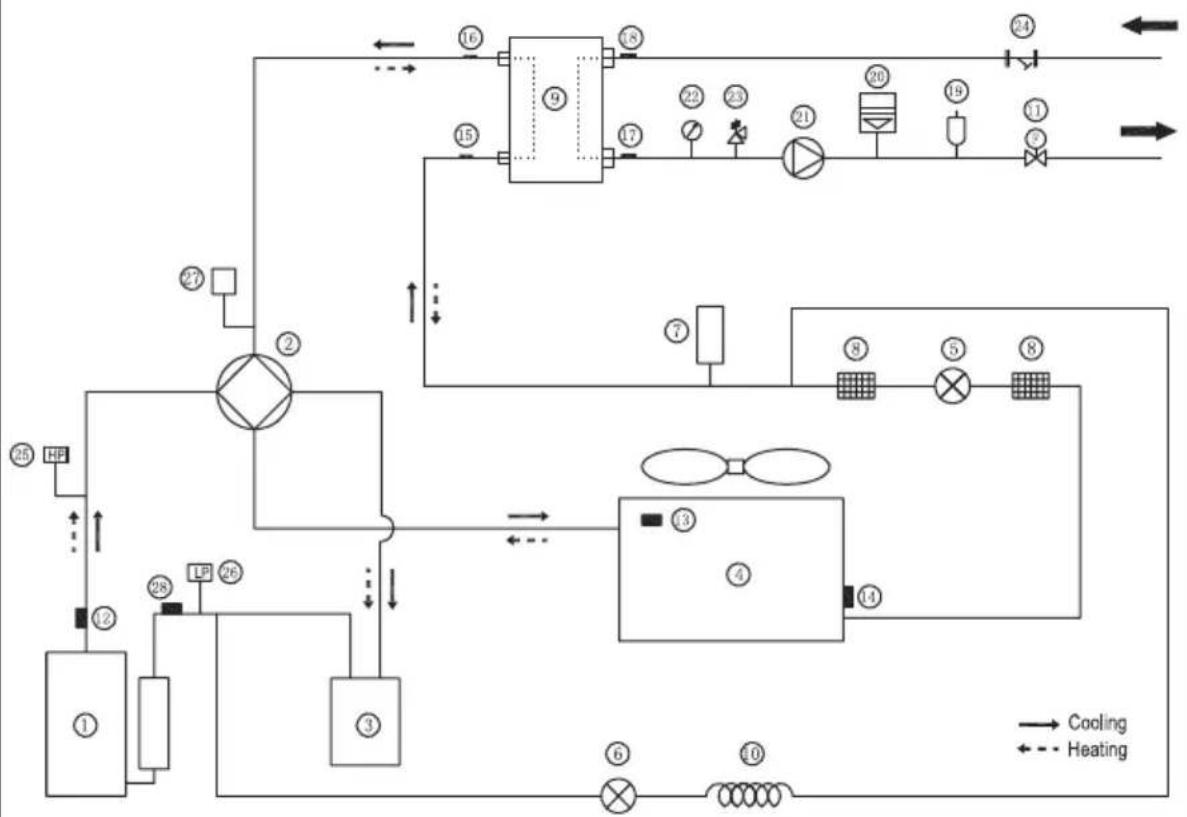
flowchart
graph TD
    A["①"] --> B["②"]
    B --> C["③"]
    C --> D["④"]
    D --> E["⑤"]
    E --> F["⑥"]
    F --> G["⑦"]
    G --> H["⑧"]
    H --> I["⑨"]
    I --> J["⑩"]
    J --> K["⑪"]
    K --> L["⑫"]
    L --> M["⑬"]
    M --> N["⑭"]
    N --> O["⑮"]
    O --> P["⑯"]
    P --> Q["⑰"]
    Q --> R["⑱"]
    R --> S["⑲"]
    S --> T["⑳"]
    T --> U["㉑"]
    U --> V["㉒"]
    V --> W["㉓"]
    W --> X["㉔"]
    X --> Y["㉕"]
    Y --> Z["㉖"]
    Z --> A
    style A fill:#f9f,stroke:#333
    style B fill:#ccf,stroke:#333
    style C fill:#cfc,stroke:#333
    style D fill:#fcc,stroke:#333
    style E fill:#cff,stroke:#333
    style F fill:#ffc,stroke:#333
    style G fill:#fcf,stroke:#333
    style H fill:#cff,stroke:#333
    style I fill:#ffc,stroke:#333
    style J fill:#cff,stroke:#333
    style K fill:#ffc,stroke:#333
    style L fill:#cff,stroke:#333
    style M fill:#ffc,stroke:#333
    style N fill:#cff,stroke:#333
    style O fill:#ffc,stroke:#333
    style P fill:#cff,stroke:#333
    style Q fill:#ffc,stroke:#333
    style R fill:#cff,stroke:#333
    style S fill:#ffc,stroke:#333
    style T fill:#cff,stroke:#333
    style U fill:#ffc,stroke:#333
    style V fill:#cff,stroke:#333
    style W fill:#ffc,stroke:#333
    style X fill:#cff,stroke:#333
    style Y fill:#ffc,stroke:#333
    style Z fill:#cff,stroke:#333
| Item | Description | Item | Description |
| 1 | Compressor | 15 | Refrigerant inlet (liquid pipe) temp. sensor |
| 2 | 4-Way Valve | 16 | Refrigerant outlet (gas pipe) temp. sensor |
| 3 | Gas-liquid separator | 17 | Water outlet temp. sensor |
| 4 | Air side heat exchanger | 18 | Water Inlet temp. sensor |
| 5 | Electronic expansion Valve | 19 | Air purge valve |
| 6 | Single-way electromagnetic valve | 20 | Expansion vessel |
| 7 | Liquid Tank | 21 | Circulating pump |
| 8 | Strainer | 22 | Manometer |
| 9 | Water Side Heat Exchanger(Plate Heat Exchange) | 23 | Safety valve |
| 10 | Capillary | 24 | Y-shape filter |
| 11 | Flow switch | 25 | High Pressure Switch |
| 12 | Discharge temperature sensor | 26 | Low Pressure Switch |
| 13 | Outdoor temperature sensor | 27 | Pressure valve |
| 14 | Evaporation sensor in heating(Condenser sensor in cooling) | 28 | Suction temperature sensor |
ANNEX B:
To install the E-heating tape at the drainage outlet (by client)
Connect the wireCeating tape at the drainage outlet to the wire joint XT3.
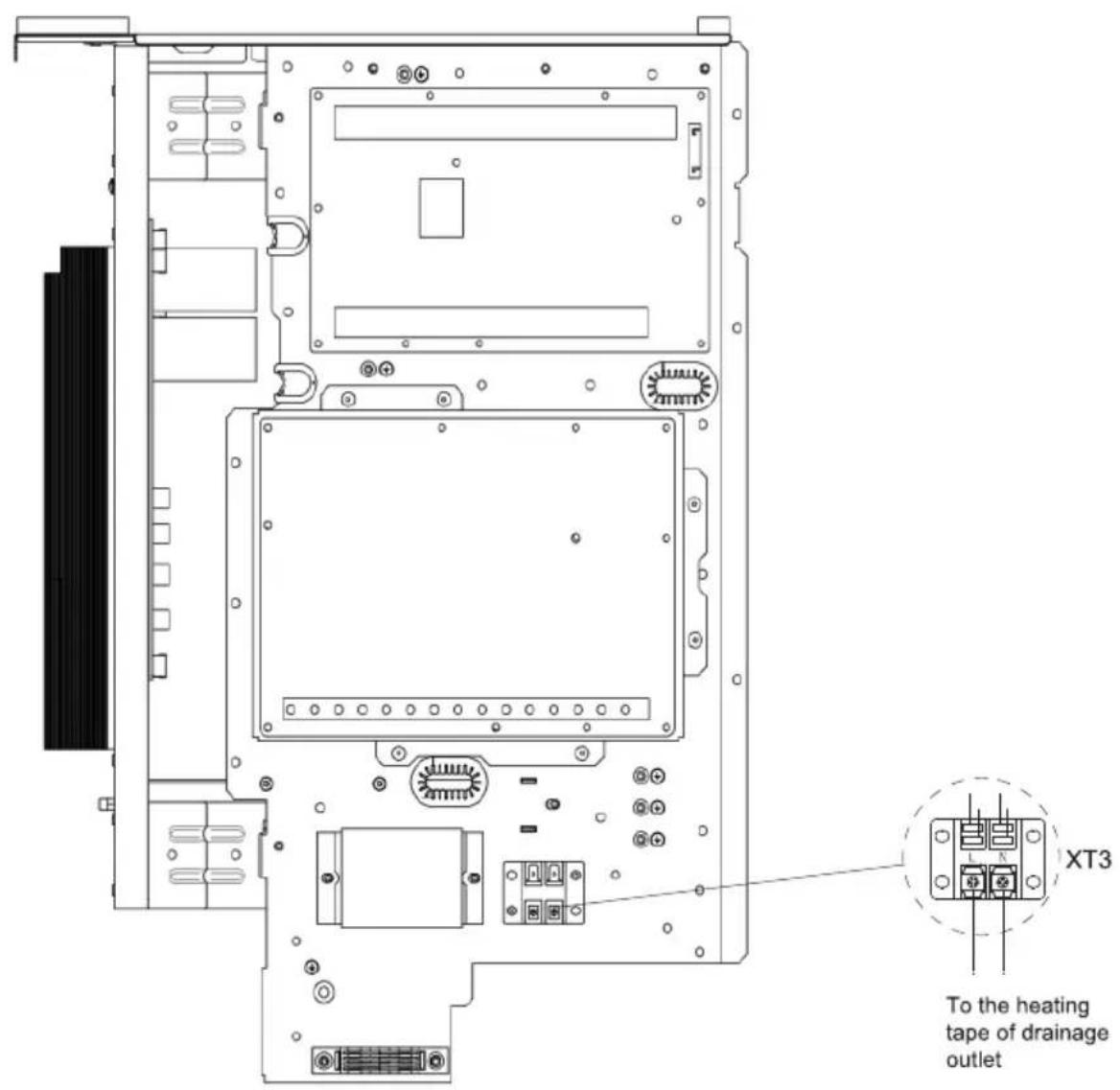
NOTE:
The picture is for reference only, please refer to the actual product.
The power of the E-heating tape shall not exceed 40W/200mA, supply volatge 230VAC.