
SDF 1091 - Digital photo frame SENCOR - Free user manual and instructions
Find the device manual for free SDF 1091 SENCOR in PDF.


| Product Type | Digital Photo Frame |
| Brand | Sencor |
| Model | SDF 1091 |
| Display Size | 8 inches (approximately) |
| Display Resolution | 1024 x 768 pixels |
| Aspect Ratio | 4:3 |
| Supported Image Formats | JPEG, BMP, PNG |
| Internal Memory | 4 GB (estimated) |
| Memory Card Slot | microSD, up to 32 GB |
| USB Port | USB 2.0 (service use only) |
| Power Supply | DC 5V, 1A via included adapter |
| Power Button | Press and hold 5s to turn on, 3s for power menu |
| Reset Button | Recessed, use needle or paper clip |
| Software | Frameo |
| Slideshow Features | Slideshow, calendar, clock |
| Dimensions (W x H x D) | Approx. 200 x 150 x 20 mm |
| Weight | Approx. 0.5 kg |
| Mounting | Tabletop stand (built-in) |
| Operating Temperature | 0°C to 35°C |
| Storage Temperature | -10°C to 45°C |
| Cleaning | Wipe with a soft, dry cloth. Do not use liquids. |
| Safety | Use only supplied adapter. Keep away from moisture. |
| Warranty | 24 months |
| Included Accessories | DC adapter, user manual |
Frequently Asked Questions - SDF 1091 SENCOR
User questions about SDF 1091 SENCOR
0 question about this device. Answer the ones you know or ask your own.
Ask a new question about this device
Download the instructions for your Digital photo frame in PDF format for free! Find your manual SDF 1091 - SENCOR and take your electronic device back in hand. On this page are published all the documents necessary for the use of your device. SDF 1091 by SENCOR.
USER MANUAL SDF 1091 SENCOR
1. ΠΑΡΟΧΗ ΙΣΧΥΩΣ 1.
Thank you for purchasing this Digital Photo Frame.
Before using connecting, operating or adjusting this product, please read this manual thoroughly, and retain it for future reference. This manual will help you use many of the useful features that will make using your Digital Photo Frame viewing more enjoyable.
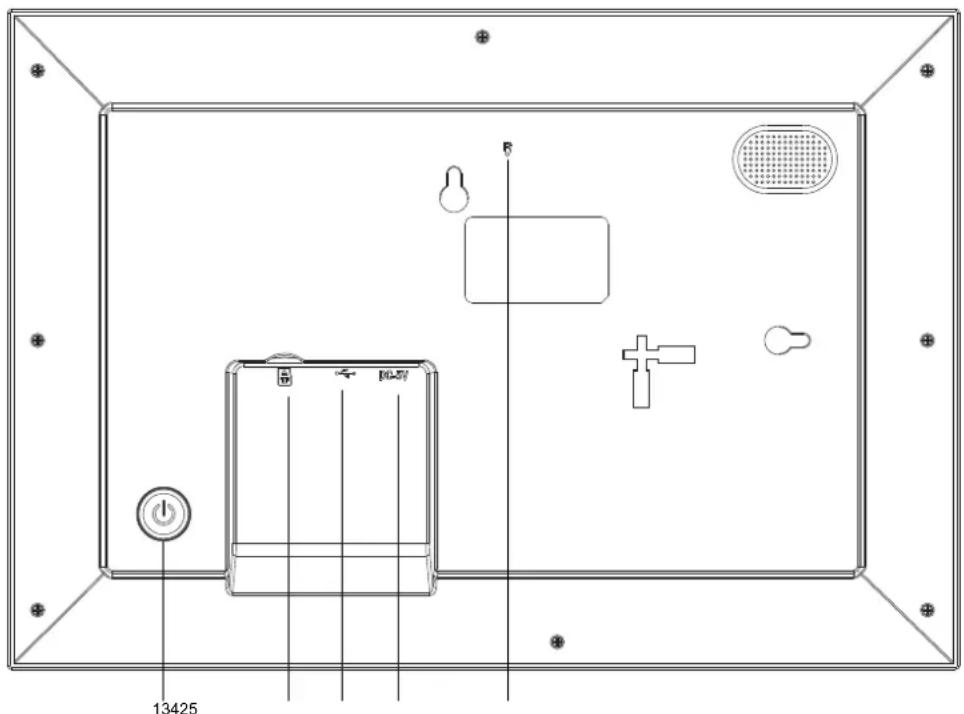
1. POWER
After connecting power adapter, please press and hold power button for approximately 5 seconds (until screen turns on).
When it is on, press and hold power button for approximately 3 seconds to access reboot or power off menu. Short press on power button will turn off/onscreen (but leave the photo frame in on position).
2. USB
Connect a USB flash drive. USB is for service use only.
3. RESET
Use a needle or paper clip to reset unit.
4. MicroSD card
Load external max 32GB microSD memory card here.
5. DC
Connect DC adapter to power on the device.
For information on setting up and operating the digital photo frame, see enclosed Frameo manual.
INSTRUCTIONS AND INFORMATION REGARDING THE DISPOSAL OF USED PACKAGING MATERIALS
Dispose of packaging material at a public waste disposal site.
DISPOSAL OF USED ELECTRICAL AND ELECTRONIC APPLIANCES

The meaning of the symbol on the product, its accessory or packaging indicates that this product shall not be treated as household waste. Please, dispose of this product at your applicable collection point for the recycling of electrical & electronic equipment waste. Alternatively in some states of the European Union or other European states you may return your products to your local retailer when buying an equivalent new product. The correct disposal of this product will help save valuable natural resources and help in preventing the potential negative impact on the environment and human health, which could be caused as a result of improper liquidation of waste. Please ask your local authorities or the nearest waste collection centre for further details. The improper disposal of this type of waste may fall subject to national regulations for fines.
For business entities in the European Union
If you wish to dispose of an electrical or electronic device, request the necessary information from your seller or supplier.
Disposal in other countries outside the European Union
If you wish to dispose of this product, request the necessary information about the correct disposal method from local government departments or from your seller.

The product meets EU requirements.
Changes to the text, design and technical specifications may occur without prior notice and we reserve the right to make these changes.
Address of the manufacturer: FAST ČR, a.s., U Sanitasu 1621, CZ 251 01 Říčany
SENCOR®
EN Warranty conditions
Warranty card is not a part of the device packaging.
This product is warranted for the period of 24 months from the date of purchase to the end-user. Warranty is limited to the following conditions. Warranty is referred only to the customer goods using for common domestic use. The claim for service can be applied either at dealer's shop where the product was bought, or at below mentioned authorized service shops. The end-user is obligated to set up a claim immediately when the defects appeared but only till the end of warranty period. The end user is obligated to cooperate to certify the claiming defects. Only completed and clean (according to hygienic standards) product will be accepted. In case of eligible warranty claim the warranty period will be prolonged by the period from the date of claim application till the date of taking over the product by end-user, or the date the end-user is obligated to take it over. To obtain the service under this warranty, end-user is obligated to certify his claim with duly completed following documents: receipt, certificate of warranty, certificate of installation.
This warranty is void especially if apply as follows:
☒ Defects which were put on sale.
☒ Wear-out or damage caused by common use.
The product was damaged by unprofessional or wrong installation, used in contrary to the applicable instruction manual, used in contrary to legal enactment and common process of use or used for another purpose which has been designed for.
The product was damaged by uncared-for or insufficient maintenance.
The product was damaged by dirt, accident of force majeure (natural, disaster, fire, and flood).
☒ Defects on functionality caused by low duality of signal, electromagnetic field interference etc.
The product was mechanically damaged (e.g. broken button, fall).
Damage caused by use of unsuitable media, fillings, expendable supplies (batteries) or by unsuitable working conditions (e.g. high temperatures, high humidity, quakes).
Repair, modification or other failure action to the product by unauthorized person.
End-user did not prove enough his right to claim (time and place of purchase).
☒ Data on presented documents differs from data on products.
Cases when the claiming product cannot be identified according to the presented documents (e.g. the serial number or the warranty seal has been damaged).
Authorized service centers
Visit www.sencore.eu for detailed information about authorized service centers.



- ΠΑΡΟΧΗ ΙΣΧΥΩΣ 1.
- Thank you for purchasing this Digital Photo Frame.
- POWER
- USB
- RESET
- MicroSD card
- DC
- INSTRUCTIONS AND INFORMATION REGARDING THE DISPOSAL OF USED PACKAGING MATERIALS
- DISPOSAL OF USED ELECTRICAL AND ELECTRONIC APPLIANCES
- For business entities in the European Union
- Disposal in other countries outside the European Union
- SENCOR®
- EN Warranty conditions
- This warranty is void especially if apply as follows:
- Authorized service centers
Brand : SENCOR
Model : SDF 1091
Category : Digital photo frame